alarm CHRYSLER 200 2015 2.G User Guide
[x] Cancel search | Manufacturer: CHRYSLER, Model Year: 2015, Model line: 200, Model: CHRYSLER 200 2015 2.GPages: 698, PDF Size: 5.12 MB
Page 76 of 698
•Do not add a secondary seat cover or mat.
• At no time should any Supplemental Restraint System
(SRS) component or SRS related component or fastener
be modified or replaced with any part except those
which are approved by Chrysler Group LLC .
WARNING!
Unapproved modifications or service procedures to
the passenger seat assembly, its related components,
seat cover or cushion may inadvertently change the
air bag deployment in case of a frontal collision. This
could result in death or serious injury to the front
passenger if the vehicle is involved in a collision. A
modified vehicle may not comply with required
Federal Motor Vehicle Safety Standards (FMVSS)
and/or Canadian Motor Vehicle Safety Standards
(CMVSS).
Knee Impact Bolsters
The Knee Impact Bolsters help protect the knees of the
driver and front passenger, and position the front occu-
pants for improved interaction with the Advanced Front
Air Bags.
WARNING!
• Do not drill, cut, or tamper with the knee impact
bolsters in any way.
• Do not mount any accessories to the knee impact
bolsters such as alarm lights, stereos, citizen band
radios, etc.
74 THINGS TO KNOW BEFORE STARTING YOUR VEHICLE
Page 142 of 698
NOTE:In a parking lot situation, oncoming vehicles can
be obscured by vehicles parked on either side. If the
sensors are blocked by other structures or vehicles, the
system will not be able to alert the driver.
When RCP is on and the vehicle is in REVERSE, the
driver is alerted using both the visual and audible
alarms, including reducing the radio volume.
WARNING!
RCP is not a Back Up Aid system. It is intended to be
used to help a driver detect an oncoming vehicle in a
parking lot situation. Drivers must be careful when
backing up, even when using RCP. Always check
carefully behind your vehicle, look behind you, and
be sure to check for pedestrians, animals, other
vehicles, obstructions, and blind spots before back-
ing up. Failure to do so can result in serious injury or
death.
Modes Of Operation
Three selectable modes of operation are available in the
Uconnect® System. Refer to “Uconnect® Settings/
Customer Programmable Features” in “Understanding
Your Instrument Panel” for further information.
Blind Spot Alert Lights Only
When operating in Blind Spot Alert mode, the BSM
system will provide a visual alert in the appropriate side
view mirror based on a detected object. However, when
the system is operating in Rear Cross Path (RCP) mode,
the system will respond with both visual and audible
alerts when a detected object is present. Whenever an
audible alert is requested, the radio is muted.
Blind Spot Alert Lights/Chime
When operating in Blind Spot Alert Lights/Chime mode,
the BSM system will provide a visual alert in the appro-
priate side view mirror based on a detected object. If the
140 UNDERSTANDING THE FEATURES OF YOUR VEHICLE
Page 209 of 698
WARNING!
In the normal Cruise Control mode, the system will
not react to vehicles ahead. In addition, the proximity
warning does not activate and no alarm will sound
even if you are too close to the vehicle ahead since
neither the presence of the vehicle ahead nor the
vehicle-to vehicle distance is detected. Be sure to
maintain a safe distance between your vehicle and
the vehicle ahead. Always be aware which mode is
selected.
To Set A Desired Speed
Turn the Normal (Fixed Speed) Electronic
Speed Control ON. When the vehicle has
reached the desired speed, press the SET (+) or
SET (-) button and release. Release the accel-
erator and the vehicle will operate at the selected speed. Once a speed has been set a message (CRUISE CON-
TROL SET TO MPH/KM) will appear indicating what
speed was set. This light will turn on when the electronic
speed control is SET.
To Vary The Speed Setting
To Increase Speed
When the Normal (Fixed Speed) Electronic Speed Con-
trol is set, you can increase speed by pressing the SET
+
button.
The speed increment shown is dependant on the speed of
U.S. (mph) or Metric (km/h) units:
U.S. Speed (mph)
• Pressing the SET +button once will result ina1mph
increase in set speed. Each subsequent tap of the
button results in an increase of 1 mph.3
UNDERSTANDING THE FEATURES OF YOUR VEHICLE 207
Page 283 of 698
GARAGE DOOR OPENER — IF EQUIPPED
HomeLink® replaces up to three remote controls (hand-
held transmitters) that operate devices such as garage
door openers, motorized gates, lighting or home security
systems. The HomeLink® unit operates off your vehicle’s
battery.
The HomeLink® buttons that are located in the sun visor
designate the three different HomeLink® channels.NOTE:HomeLink® is disabled when the Vehicle Secu-
rity Alarm is active.
HomeLink® Buttons
3
UNDERSTANDING THE FEATURES OF YOUR VEHICLE 281
Page 290 of 698
2. Push and hold the desired HomeLink® button untilthe indicator light begins to flash after 20 seconds. Do
not release the button.
3. Without releasing the button proceed with
“Canadian/Gate Operator Programming” step 2 and
follow all remaining steps.
Using HomeLink®
To operate, push and release the programmed
HomeLink® button. Activation will now occur for the
programmed device (i.e., garage door opener, gate opera-
tor, security system, entry door lock, home/office light-
ing, etc.,). The hand-held transmitter of the device may
also be used at any time.
Security
It is advised to erase all channels before you sell or turn
in your vehicle. To do this, push and hold the two outside buttons for 20
seconds until the red indicator flashes. Note that all
channels will be erased. Individual channels cannot be
erased.
The HomeLink® Universal Transceiver is disabled when
the Vehicle Security Alarm is active.
Troubleshooting Tips
If you are having trouble programming HomeLink®,
here are some of the most common solutions:
•
Replace the battery in the original hand-held transmit-
ter.
• Push the LEARN button on the Garage Door Opener
to complete the training for a Rolling Code.
• Did you unplug the device for programming and
remember to plug it back in?
288 UNDERSTANDING THE FEATURES OF YOUR VEHICLE
Page 333 of 698
22. Vehicle Security AlarmThis light will flash rapidly for approximately
15 seconds when the vehicle theft alarm is
arming. The light will flash at a slower speed
continuously after the alarm is set. The security
light will also come on for about three seconds when the
ignition is first turned on.
23. Tachometer
Indicates the engine speed in revolutions per minute
(RPM x 1000).
24. Park/Headlight ON Indicator — If Equipped
This indicator will illuminate when the park
lights or headlights are turned on.
25. EVIC White Telltales — If Equipped 26. Temperature Gauge
The temperature gauge shows engine coolant tempera-
ture. Any reading within the normal range indicates that
the engine cooling system is operating satisfactorily.
The gauge pointer will likely indicate a higher tempera-
ture when driving in hot weather, up mountain grades,
or when towing a trailer. It should not be allowed to
exceed the upper limits of the normal operating range.
CAUTION!
Driving with a hot engine cooling system could
damage your vehicle. If the temperature gauge reads
“H” pull over and stop the vehicle. Idle the vehicle
with the air conditioner turned off until the pointer
drops back into the normal range. If the pointer
remains on the “H” and you hear continuous chimes,
turn the engine off immediately and call an autho-
rized dealer for service.
4
UNDERSTANDING YOUR INSTRUMENT PANEL 331
Page 437 of 698
Uconnect® Access* (8.4A/8.4AN)
An included trial and/or subscription is required to take
advantage of the Uconnect® Access services in the next
section of this guide. To register with Uconnect® Access,
press the Apps button on the 8.4-inch touchscreen to get
started. Detailed registration instructions can be found
on the next page.
*Uconnect® Access is available only on equipped ve-
hicles purchased within the continental United States and
Alaska. Services can only be used where coverage is
available; see coverage map for details.
9-1-1 Call
Theft Alarm Notification
Remote Door Lock/Unlock
Stolen Vehicle Assistance
Remote Vehicle Start**
Remote Horn and Lights
Yelp® Search
Voice Texting
Roadside Assistance Call
Wi-Fi Hotspot***
**If vehicle is equipped.
***Extra charges apply.
4
UNDERSTANDING YOUR INSTRUMENT PANEL 435
Page 677 of 698
AlarmArm The System ........................19
Disarm The System .......................19
Rearming The System .....................18
Tamper Alert ...........................20
Vehicle Security Alarm ....................18
Alarm, Panic .............................24
Alarm (Security Alarm) .....................331
All Wheel Drive (AWD) .....................470
Alterations/Modifications, Vehicle ...............7
Antifreeze (Engine Coolant) ..................610
Disposal ............................. .613
Anti-Lock Brake System (ABS) ................482
Anti-Lock Warning Light ....................328
Appearance Care ........................ .619
Assist, Hill Start ......................... .490
Auto Down Power Windows ..................42
Automatic Door Locks ......................33
Automatic Headlights ..................... .160Automatic High Beams
.....................162
Automatic Temperature Control (ATC) ..........419
Automatic Transaxle ...................... .457
Automatic Transmission ....................460
Adding Fluid ......................... .619
Fluid and Filter Changes ..................619
Fluid Change ......................... .619
Fluid Level Check ...................... .617
Fluid Type ........................... .617
Special Additives ...................... .618
Autostick .............................. .468
Auto Unlock, Doors ........................34
Auto Up Power Windows ....................43
Axle Lubrication ......................... .655
Battery ................................ .599
Keyless Transmitter Replacement (RKE) ........25
Remote Battery Replacement ................25
Transmitter Battery Replacement .............25
10
INDEX 675
Page 685 of 698
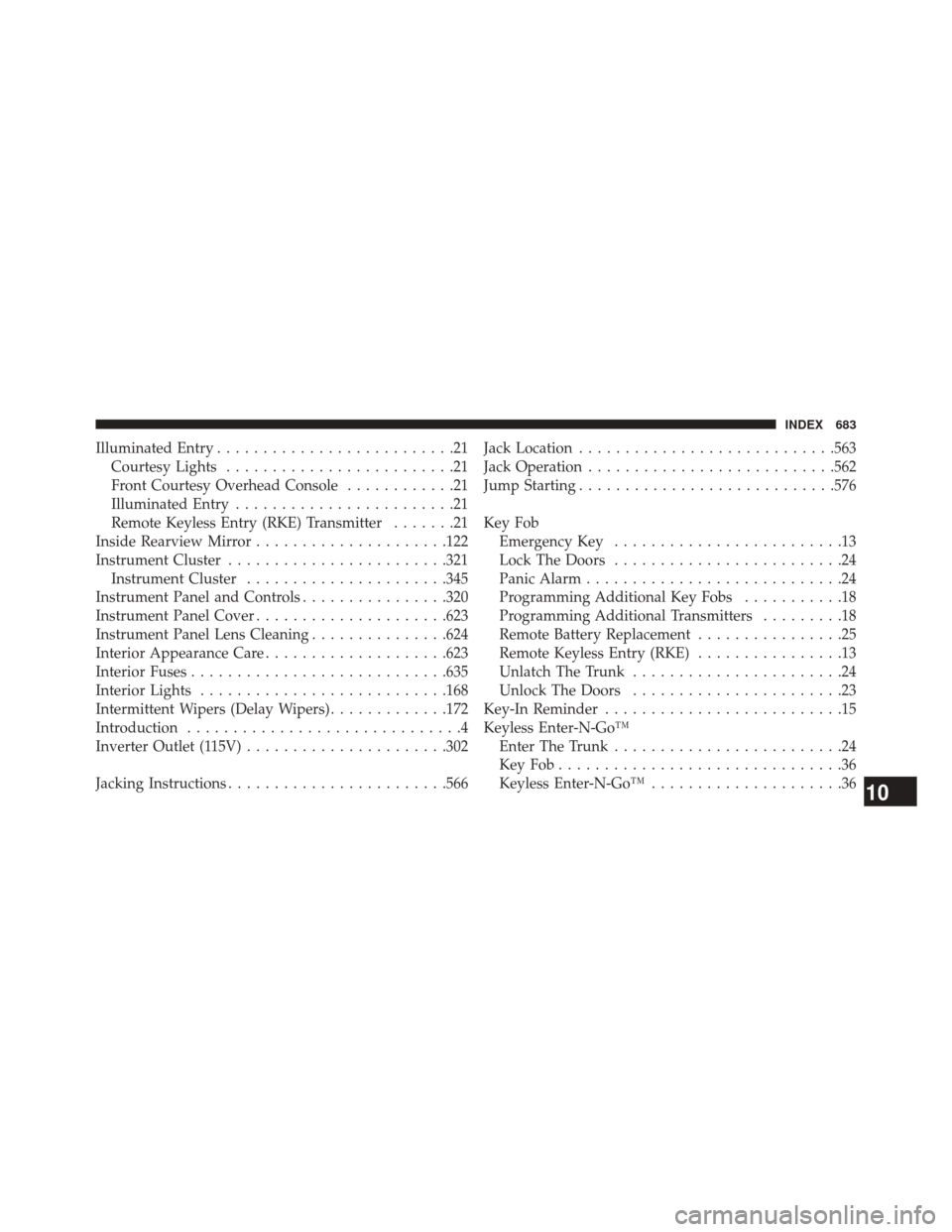
Illuminated Entry..........................21
Courtesy Lights .........................21
Front Courtesy Overhead Console ............21
Illuminated Entry ........................21
Remote Keyless Entry (RKE) Transmitter .......21
Inside Rearview Mirror .....................122
Instrument Cluster ....................... .321
Instrument Cluster ..................... .345
Instrument Panel and Controls ................320
Instrument Panel Cover .....................623
Instrument Panel Lens Cleaning ...............624
Interior Appearance Care ....................623
Interior Fuses ........................... .635
Interior Lights .......................... .168
Intermittent Wipers (Delay Wipers) .............172
Introduction ..............................4
Inverter Outlet (115V) ..................... .302
Jacking Instructions ....................... .566Jack Location
........................... .563
Jack Operation .......................... .562
Jump Starting ........................... .576
Key Fob Emergency Key .........................13
Lock The Doors .........................24
Panic Alarm ............................24
Programming Additional Key Fobs ...........18
Programming Additional Transmitters .........18
Remote Battery Replacement ................25
Remote Keyless Entry (RKE) ................13
Unlatch The Trunk .......................24
Unlock The Doors .......................23
Key-In Reminder ..........................15
Keyless Enter-N-Go™ Enter The Trunk .........................24
KeyFob...............................36
Keyless Enter-N-Go™ .....................36
10
INDEX 683
Page 687 of 698
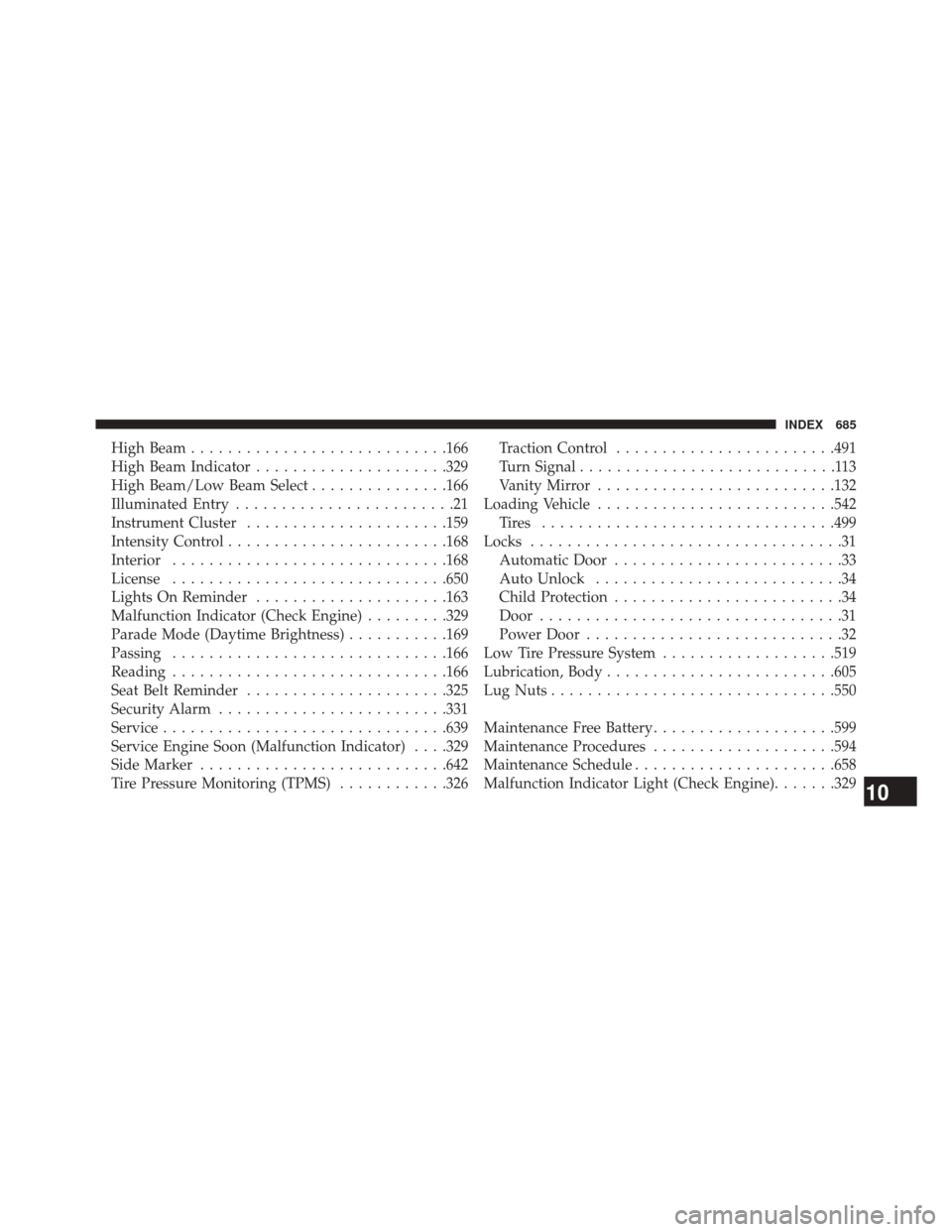
High Beam........................... .166
High Beam Indicator .....................329
High Beam/Low Beam Select ...............166
Illuminated Entry ........................21
Instrument Cluster ..................... .159
Intensity Control ....................... .168
Interior ............................. .168
License ............................. .650
Lights On Reminder .....................163
Malfunction Indicator (Check Engine) .........329
Parade Mode (Daytime Brightness) ...........169
Passing ............................. .166
Reading ............................. .166
Seat Belt Reminder ..................... .325
Security Alarm ........................ .331
Service .............................. .639
Service Engine Soon (Malfunction Indicator) . . . .329
Side Marker .......................... .642
Tire Pressure Monitoring (TPMS) ............326Traction Control
....................... .491
Turn Signal ............................113
Vanity Mirror ......................... .132
Loading Vehicle ......................... .542
Tires ............................... .499
Locks ..................................31
Automatic Door .........................33
Auto Unlock ...........................34
Child Protection .........................34
Door .................................31
Power Door ............................32
Low Tire Pressure System ...................519
Lubrication, Body ........................ .605
Lug Nuts .............................. .550
Maintenance Free Battery ....................599
Maintenance Procedures ....................594
Maintenance Schedule ..................... .658
Malfunction Indicator Light (Check Engine) .......329
10
INDEX 685