brake CHRYSLER 200 2016 2.G Owner's Manual
[x] Cancel search | Manufacturer: CHRYSLER, Model Year: 2016, Model line: 200, Model: CHRYSLER 200 2016 2.GPages: 702, PDF Size: 5.13 MB
Page 211 of 702
FORWARD COLLISION WARNING (FCW) WITH
MITIGATION — IF EQUIPPED
Forward Collision Warning (FCW) With Mitigation
Operation
The Forward Collision Warning (FCW) system with
mitigation provides the driver with audible warnings,
visual warnings (within the EVIC/DID), and may apply
a brake jerk to warn the driver when it detects a potential
frontal collision. The warnings and limited braking are
intended to provide the driver with enough time to react,
avoid or mitigate the potential collision.
NOTE:FCW monitors the information from the forward
looking sensors as well as the Electronic Brake Controller
(EBC), to calculate the probability of a forward collision.
When the system determines that a forward collision is
probable, the driver will be provided with audible and
visual warnings and may provide a brake jerk warning. If the driver does not take action based upon these
progressive warnings, then the system will provide a
limited level of active braking to help slow the vehicle
and mitigate the potential forward collision. If the driver
reacts to the warnings by braking and the system deter-
mines that the driver intends to avoid the collision by
braking but has not applied sufficient brake force, the
system will compensate and provide additional brake
force as required.
If a Forward Collision Warning with Mitigation event
begins at a speed below 20 mph (32 km/h), the system
may provide the maximum braking possible to mitigate
the potential forward collision. If the Forward Collision
Warning with Mitigation event stops the vehicle com-
pletely, the system will hold the vehicle at standstill for
two seconds and then release the brakes.3
UNDERSTANDING THE FEATURES OF YOUR VEHICLE 209
Page 214 of 702
To turn the FCW system back ON, push the forward
collision button again to turn the system ON (LED turns
off).
•Changing the FCW status to “Off” prevents the system
from warning you of a possible collision with the
vehicle in front of you.
• Changing the FCW sensitivity - Near vs. Far. Far warns
the driver of a possible collision earlier and Near
warns the driver later.
• Changing the Active Braking status to “Off” prevents
the system from providing limited active braking, or
additional brake support if the driver is not braking
adequately in the event of a potential frontal collision,
but maintains the audible and visual warnings.
NOTE: The FCW system state is kept in memory from
one key cycle to the next. If the system is turned OFF, it
will remain off when the vehicle is restarted.Changing FCW And Active Braking Status
The FCW Sensitivity And Active Braking Settings are
programmable through the Uconnect System. Refer to
“Uconnect Settings” in “Understanding Your Instrument
Panel” for further information.
The default status of FCW is the “Far” setting and the
Active Braking is the “On” setting, this allows the system
to warn you of a possible collision with the vehicle in
front of you when you are farther away and it applies
limited braking. This gives you the most reaction time to
avoid a possible collision.
Changing the FCW status to the “Near” setting, allows
the system to warn you of a possible collision with the
vehicle in front of you when you are much closer. This
setting provides less reaction time than the “Far” setting,
which allows for a more dynamic driving experience.
212 UNDERSTANDING THE FEATURES OF YOUR VEHICLE
Page 222 of 702
Changing LaneSense Status
The LaneSense system settings can be configured
through the Uconnect system screen.
Follow these steps to change the LaneSense settings:
1. Push the “Controls” button on touchscreen located onthe bottom of the Uconnect display.
2. Push the “Settings” button.
3. Push the “Safety & Driving Assistance” button.
When in the Safety & Driving Assistance screen, you can
configure the intensity of the torque warning and the
warning zone sensitivity (early/late) through the person-
alization settings.
NOTE:
• When enabled the system operates above 37 mph
(60 km/h) and below 112 mph (180 km/h). •
Use of the turn signal suppresses the warnings.
• The system will not apply torque to the steering wheel
whenever a safety system engages. (anti-lock brakes,
traction control system, electronic stability control,
forward collision warning, etc.)
PARKSENSE REAR PARK ASSIST — IF
EQUIPPED
The ParkSense Rear Park Assist system provides visual
and audible indications of the distance between the rear
fascia and a detected obstacle when backing up, e.g.
during a parking maneuver. Refer to ParkSense System
Usage Precautions for limitations of this system and
recommendations.
ParkSense will retain the last system state (enabled or
disabled) from the last ignition cycle when the ignition is
changed to the ON/RUN position.
220 UNDERSTANDING THE FEATURES OF YOUR VEHICLE
Page 231 of 702
CAUTION!
•ParkSense is only a parking aid and it is unable to
recognize every obstacle, including small obstacles.
Parking curbs might be temporarily detected or not
detected at all. Obstacles located above or below
the sensors will not be detected when they are in
close proximity.
• The vehicle must be driven slowly when using
ParkSense in order to be able to stop in time when
an obstacle is detected. It is recommended that the
driver looks over his/her shoulder when using
ParkSense.
WARNING!
Drivers must be careful when backing up even when
using ParkSense. Always check carefully behind
(Continued)
WARNING! (Continued)
your vehicle, look behind you, and be sure to check
for pedestrians, animals, other vehicles, obstructions,
and blind spots before backing up. You are respon-
sible for safety and must continue to pay attention to
your surroundings. Failure to do so can result in
serious injury or death.
PARKSENSE FRONT AND REAR PARK ASSIST —
IF EQUIPPED
The ParkSense Park Assist system provides visual and
audible indications of the distance between the rear
and/or front fascia and a detected obstacle when backing
up or moving forward, e.g. during a parking maneuver.
If your vehicle is equipped with an Automatic Transmis-
sion, the vehicle brakes may be automatically applied
3
UNDERSTANDING THE FEATURES OF YOUR VEHICLE 229
Page 232 of 702
and released when performing a reverse parking maneu-
ver if the system detects a possible collision with an
obstacle.
NOTE:
•The driver can override the automatic braking func-
tion by pushing the gas pedal, turning ParkSense off
via ParkSense switch, or changing the gear while the
automatic brakes are being applied.
• Automatic brakes will not be available if ESC is not
available.
• Automatic brakes will not be available if there is a
faulted condition detected with the ParkSense Park
Assist system or the Braking System Module.
• The automatic braking function may only be applied if
the vehicle deceleration is not enough to avoid collid-
ing with a detected obstacle. •
The automatic braking function may not be applied
fast enough for obstacles that move toward the rear of
the vehicle from the left and/or right sides.
• The automatic braking function can be enabled/
disabled from the Customer-Programmable Features
section of the Uconnect System.
• ParkSense will retain its last known configuration state
for the automatic braking function through ignition
cycles.
The automatic braking function is intended to assist the
driver in avoiding possible collisions with detected ob-
stacles when backing up in REVERSE gear.
NOTE:
• The driver is always responsible for controlling the
vehicle.
230 UNDERSTANDING THE FEATURES OF YOUR VEHICLE
Page 242 of 702
WARNING ALERTS
Front Distance (in/cm) Greater than
47 in (120 cm) 47-39 in
(120-100 cm) 39-25 in
(100-65 cm) 25-12 in
(65-30 cm) Less than
12 in (30 cm)
Arcs — Left None NoneNone 2nd Flashing 1st Flashing
Arcs — Center None 4th Solid 3rd Flashing 2nd Flashing 1st Flashing
Arcs — Right None NoneNone 2nd Flashing 1st Flashing
Audible Alert Chime None
NoneNone FastContinuous
Radio Volume Reduced No
NoNoYes Yes
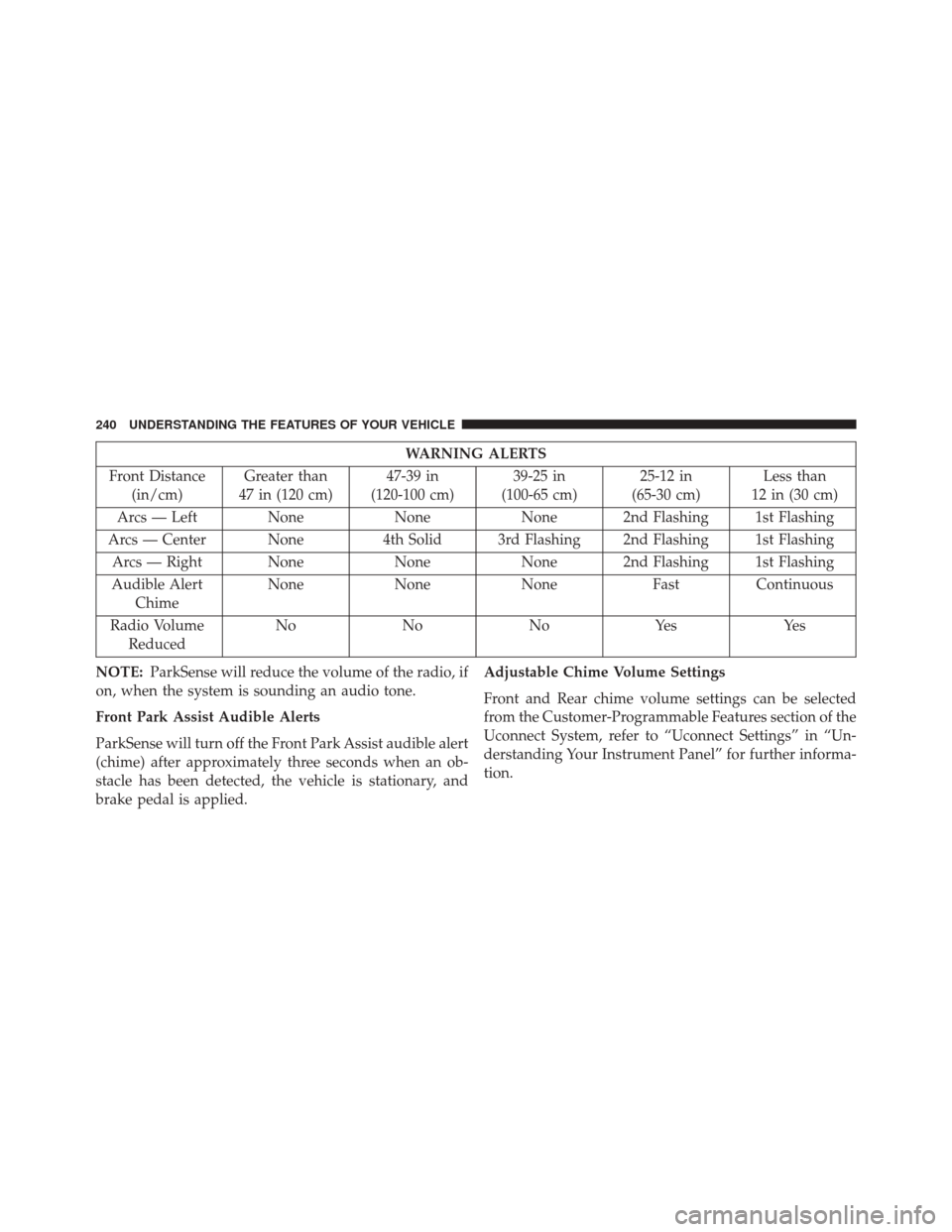
NOTE: ParkSense will reduce the volume of the radio, if
on, when the system is sounding an audio tone.
Front Park Assist Audible Alerts
ParkSense will turn off the Front Park Assist audible alert
(chime) after approximately three seconds when an ob-
stacle has been detected, the vehicle is stationary, and
brake pedal is applied. Adjustable Chime Volume Settings
Front and Rear chime volume settings can be selected
from the Customer-Programmable Features section of the
Uconnect System, refer to “Uconnect Settings” in “Un-
derstanding Your Instrument Panel” for further informa-
tion.
240 UNDERSTANDING THE FEATURES OF YOUR VEHICLE
Page 247 of 702
CAUTION!(Continued)
•The vehicle must be driven slowly when using
ParkSense in order to be able to stop in time when
an obstacle is detected. It is recommended that the
driver looks over his/her shoulder when using
ParkSense.
WARNING!
Drivers must be careful when backing up even when
using ParkSense. Always check carefully behind
your vehicle, look behind you, and be sure to check
for pedestrians, animals, other vehicles, obstructions,
and blind spots before backing up. You are respon-
sible for safety and must continue to pay attention to
your surroundings. Failure to do so can result in
serious injury or death.
PARKSENSE ACTIVE PARK ASSIST SYSTEM —
IF EQUIPPED
The ParkSense Active Park Assist system is intended to
assist the driver during parallel and perpendicular park-
ing maneuvers by identifying a proper parking space,
providing audible/visual instructions, and controlling
the steering wheel. The ParkSense Active Park Assist
system is defined as “semi-automatic” since the driver
maintains control of the accelerator, shift lever and
brakes. Depending on the driver’s parking maneuver
selection, the ParkSense Active Park Assist system is
capable of maneuvering a vehicle into a parallel or a
perpendicular parking space on either side (i.e., driver
side or passenger side).
NOTE:
• The driver is always responsible for controlling the
vehicle, responsible for any surrounding objects, and
must intervene as required.
3
UNDERSTANDING THE FEATURES OF YOUR VEHICLE 245
Page 254 of 702
NOTE:
•It is the drivers responsibility to use the brake and
accelerator during the semi-automatic parking maneu-
ver. •
When the system instructs the driver to remove their
hands from the steering wheel, the driver should check
their surroundings and begin to back up slowly.
• The ParkSense Active Park Assist system will allow a
maximum of six shifts between DRIVE or REVERSE. If
the maneuver cannot be completed within six shifts,
the system will cancel and the DID will instruct the
driver to complete the maneuver manually.
• The system will cancel the maneuver if the vehicle
speed exceeds 5 mph (7 km/h) during active steering
guidance into the parking space. The system will
provide a warning to the driver at 3 mph (5 km/h) that
tells them to slow down. The driver is then responsible
for completing the maneuver if the system is canceled.
• If the system is canceled during the maneuver for any
reason, the driver must take control of the vehicle.
Check Surroundings — Move Backward
252 UNDERSTANDING THE FEATURES OF YOUR VEHICLE
Page 255 of 702
When the vehicle has reached the end of its backward
movement, the system will instruct the driver to check
their surroundings and stop the vehicle’s movement.NOTE:
It is the drivers responsibility to use the brake
and stop the vehicle. The driver should check their
surroundings and be prepared to stop the vehicle either
when instructed to, or when driver intervention is re-
quired.
Once the vehicle is in a standstill condition, the driver
will be instructed to place the shift lever into the DRIVE
position.
Check Surroundings — STOP
3
UNDERSTANDING THE FEATURES OF YOUR VEHICLE 253
Page 257 of 702
When the vehicle has reached the end of its forward
movement, the system will instruct the driver to check
their surroundings and stop the vehicle’s movement.NOTE:
It is the drivers responsibility to use the brake
and stop the vehicle. The driver should check their
surroundings and be prepared to stop the vehicle either
when instructed to, or when driver intervention is re-
quired.
Check Surroundings — Move ForwardCheck Surroundings — STOP
3
UNDERSTANDING THE FEATURES OF YOUR VEHICLE 255