service CHRYSLER 200 2017 2.G Service Manual
[x] Cancel search | Manufacturer: CHRYSLER, Model Year: 2017, Model line: 200, Model: CHRYSLER 200 2017 2.GPages: 539, PDF Size: 5.18 MB
Page 267 of 539
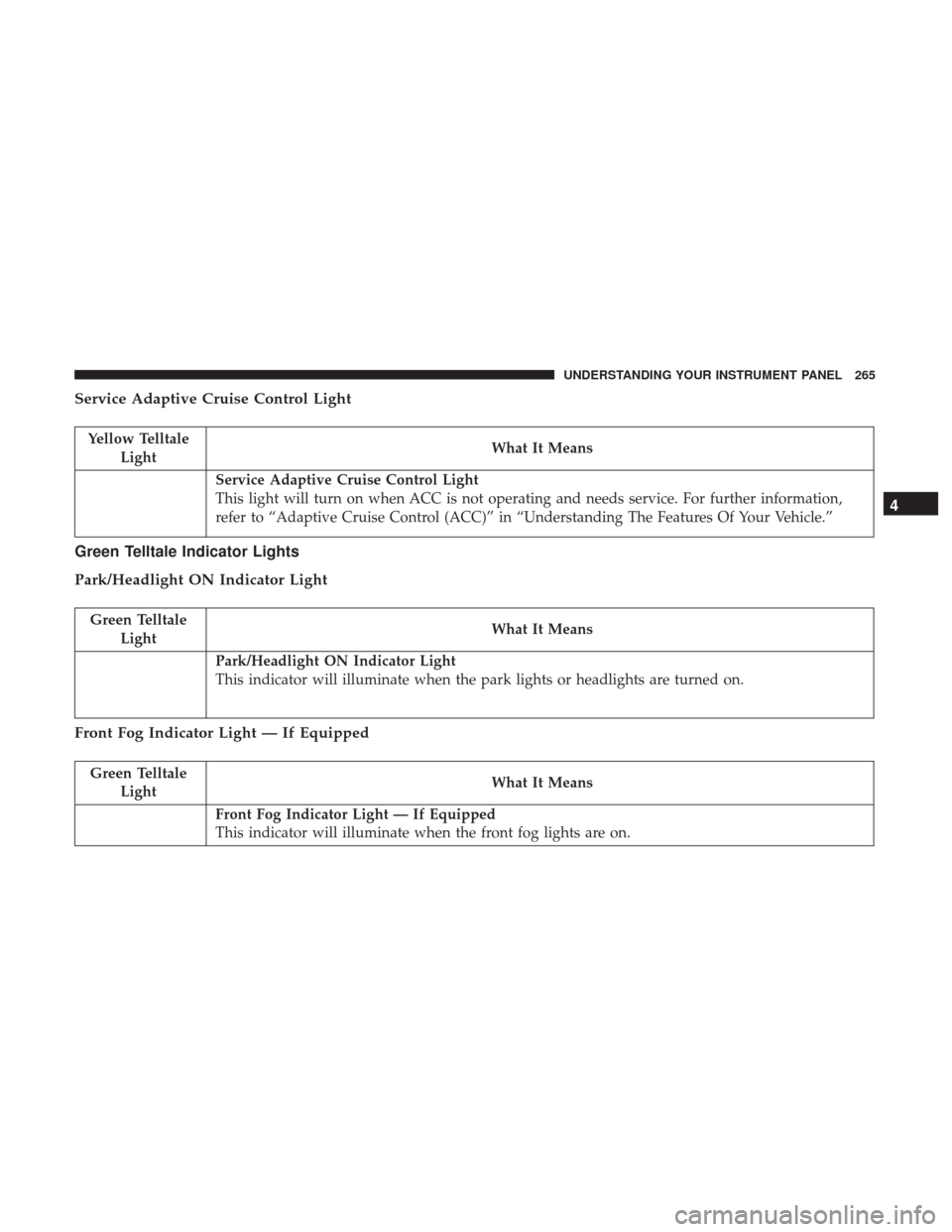
Service Adaptive Cruise Control Light
Yellow TelltaleLight What It Means
Service Adaptive Cruise Control Light
This light will turn on when ACC is not operating and needs service. For further information,
refer to “Adaptive Cruise Control (ACC)” in “Understanding The Features Of Your Vehicle.”
Green Telltale Indicator Lights
Park/Headlight ON Indicator Light
Green Telltale
Light What It Means
Park/Headlight ON Indicator Light
This indicator will illuminate when the park lights or headlights are turned on.
Front Fog Indicator Light — If Equipped
Green Telltale
Light What It Means
Front Fog Indicator Light — If Equipped
This indicator will illuminate when the front fog lights are on.
4
UNDERSTANDING YOUR INSTRUMENT PANEL 265
Page 276 of 539
3. Without pushing the brake pedal, push the ENGINESTART/STOP button once to return the ignition to the
OFF/LOCK position.
The Oil Life can also be reset through the instrument
cluster display.
Secondary Method Of Navigating To The Oil Life Screen
In The Display And Holding OK
1. Without pushing the brake pedal, push the ENGINE START/STOP button and cycle the ignition to the ON/
RUN position (do not start the engine).
2. Push and release the DOWN
arrow button to scroll
downward through the main menu to “Vehicle Info.”
3. Push and release the RIGHTarrow button to access
the “Oil Life” screen.
4. Push and hold the OKbutton to reset the Oil Life.
5. Push and release the UP
arrow button to exit the
screen.
NOTE: If the indicator message illuminates when you
start the vehicle, the oil change indicator system did not
reset. If necessary, repeat this procedure.
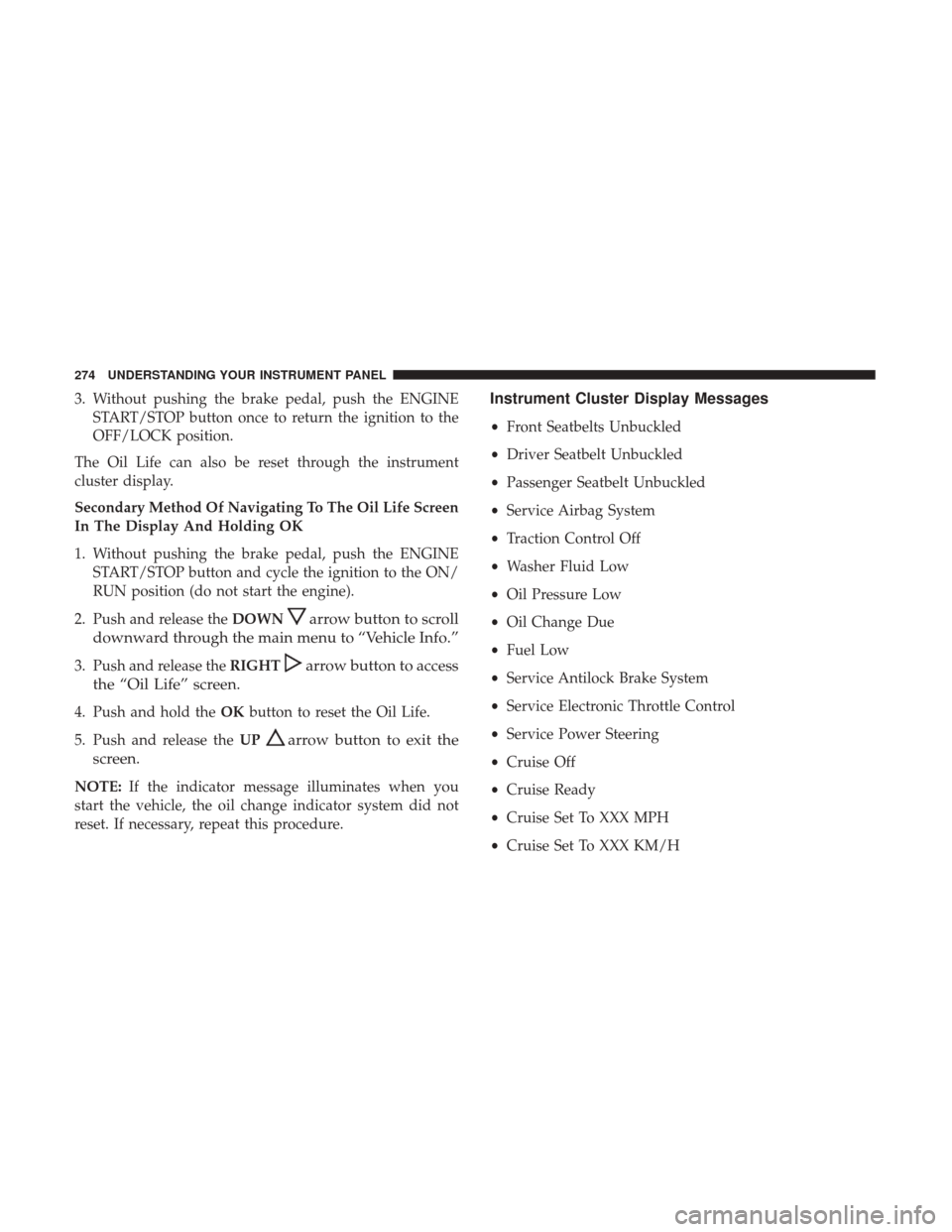
Instrument Cluster Display Messages
• Front Seatbelts Unbuckled
• Driver Seatbelt Unbuckled
• Passenger Seatbelt Unbuckled
• Service Airbag System
• Traction Control Off
• Washer Fluid Low
• Oil Pressure Low
• Oil Change Due
• Fuel Low
• Service Antilock Brake System
• Service Electronic Throttle Control
• Service Power Steering
• Cruise Off
• Cruise Ready
• Cruise Set To XXX MPH
• Cruise Set To XXX KM/H
274 UNDERSTANDING YOUR INSTRUMENT PANEL
Page 277 of 539
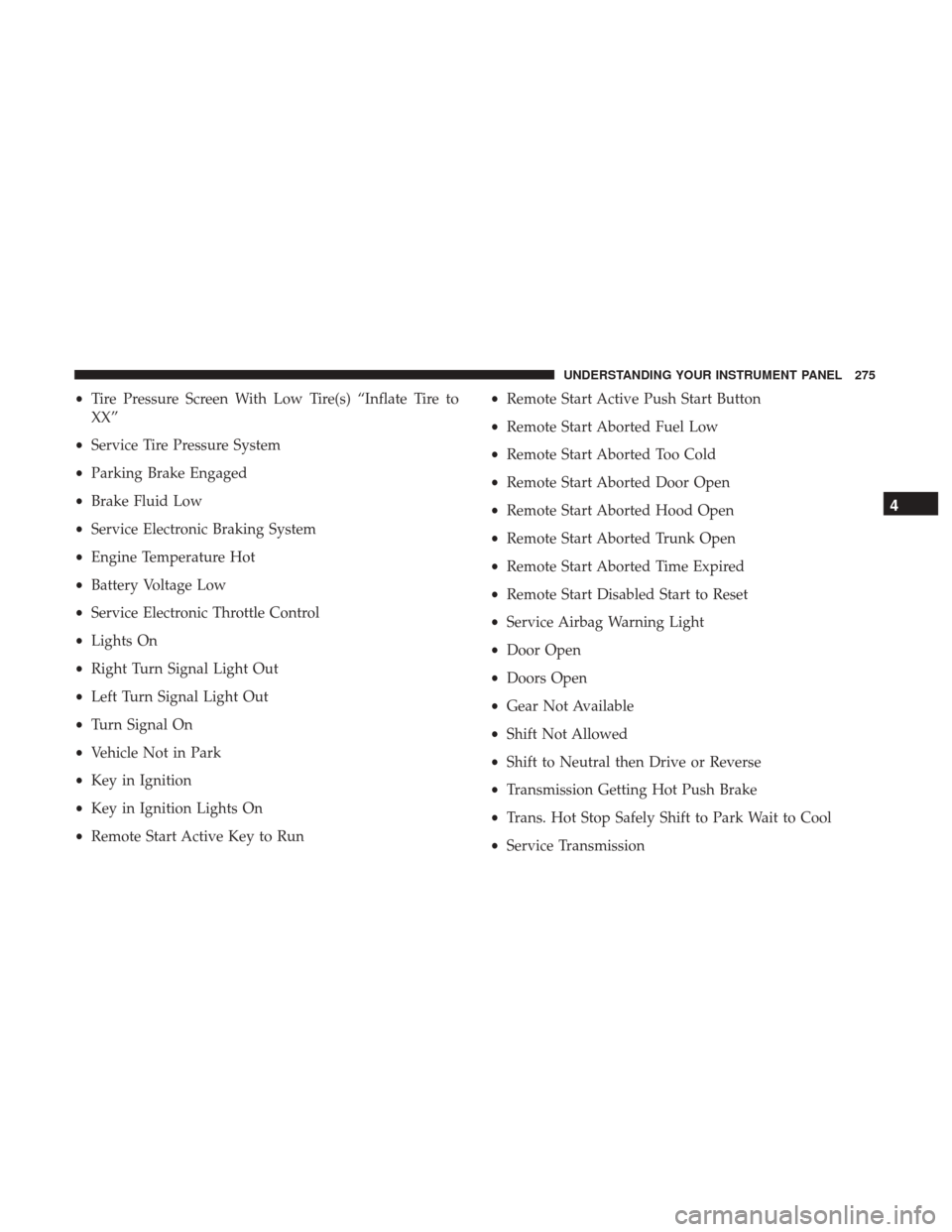
•Tire Pressure Screen With Low Tire(s) “Inflate Tire to
XX”
• Service Tire Pressure System
• Parking Brake Engaged
• Brake Fluid Low
• Service Electronic Braking System
• Engine Temperature Hot
• Battery Voltage Low
• Service Electronic Throttle Control
• Lights On
• Right Turn Signal Light Out
• Left Turn Signal Light Out
• Turn Signal On
• Vehicle Not in Park
• Key in Ignition
• Key in Ignition Lights On
• Remote Start Active Key to Run •
Remote Start Active Push Start Button
• Remote Start Aborted Fuel Low
• Remote Start Aborted Too Cold
• Remote Start Aborted Door Open
• Remote Start Aborted Hood Open
• Remote Start Aborted Trunk Open
• Remote Start Aborted Time Expired
• Remote Start Disabled Start to Reset
• Service Airbag Warning Light
• Door Open
• Doors Open
• Gear Not Available
• Shift Not Allowed
• Shift to Neutral then Drive or Reverse
• Transmission Getting Hot Push Brake
• Trans. Hot Stop Safely Shift to Park Wait to Cool
• Service Transmission
4
UNDERSTANDING YOUR INSTRUMENT PANEL 275
Page 278 of 539
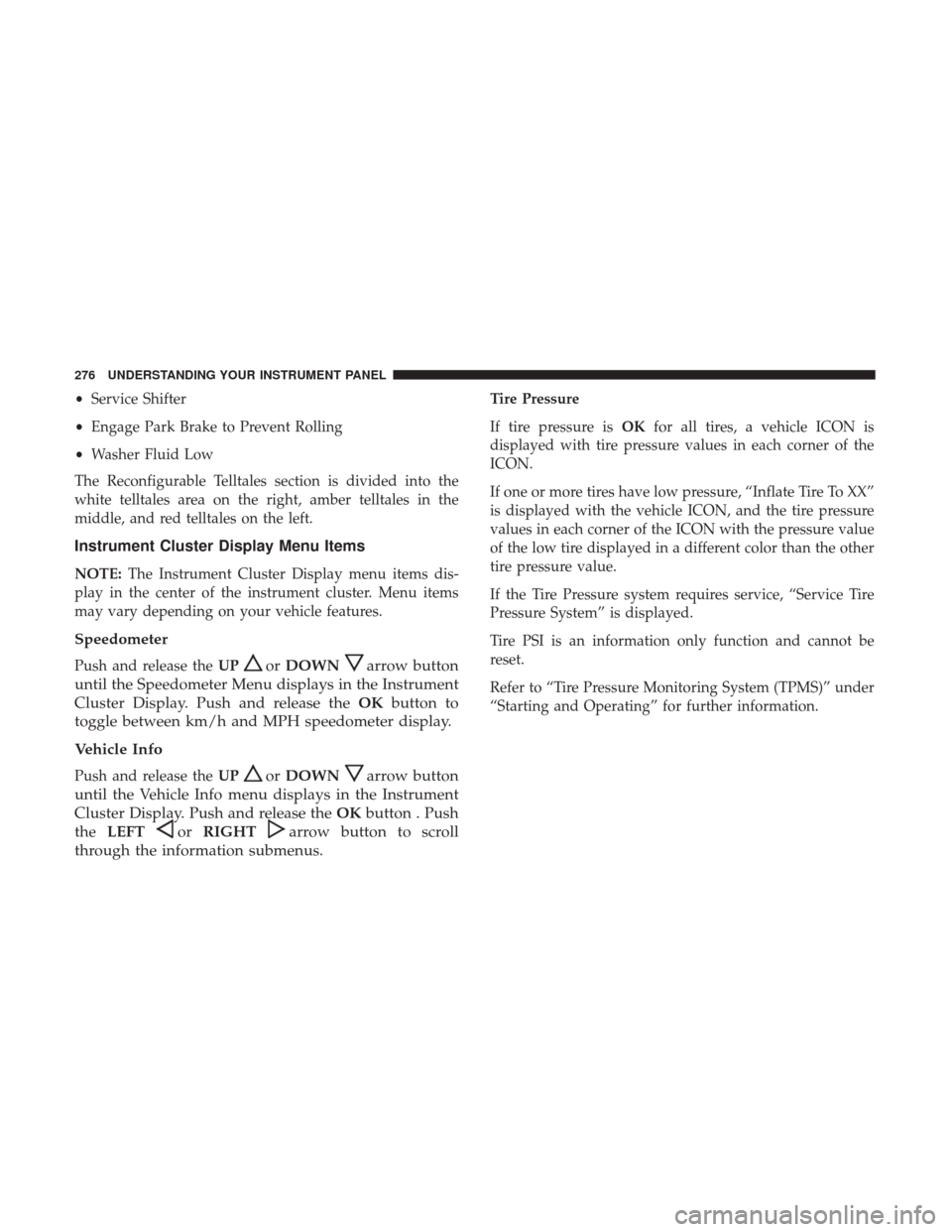
•Service Shifter
• Engage Park Brake to Prevent Rolling
• Washer Fluid Low
The Reconfigurable Telltales section is divided into the
white telltales area on the right, amber telltales in the
middle, and red telltales on the left.
Instrument Cluster Display Menu Items
NOTE: The Instrument Cluster Display menu items dis-
play in the center of the instrument cluster. Menu items
may vary depending on your vehicle features.
Speedometer
Push and release the UPorDOWNarrow button
until the Speedometer Menu displays in the Instrument
Cluster Display. Push and release the OKbutton to
toggle between km/h and MPH speedometer display.
Vehicle Info
Push and release the UPorDOWNarrow button
until the Vehicle Info menu displays in the Instrument
Cluster Display. Push and release the OKbutton . Push
the LEFT
orRIGHTarrow button to scroll
through the information submenus.
Tire Pressure
If tire pressure is OKfor all tires, a vehicle ICON is
displayed with tire pressure values in each corner of the
ICON.
If one or more tires have low pressure, “Inflate Tire To XX”
is displayed with the vehicle ICON, and the tire pressure
values in each corner of the ICON with the pressure value
of the low tire displayed in a different color than the other
tire pressure value.
If the Tire Pressure system requires service, “Service Tire
Pressure System” is displayed.
Tire PSI is an information only function and cannot be
reset.
Refer to “Tire Pressure Monitoring System (TPMS)” under
“Starting and Operating” for further information.
276 UNDERSTANDING YOUR INSTRUMENT PANEL
Page 284 of 539
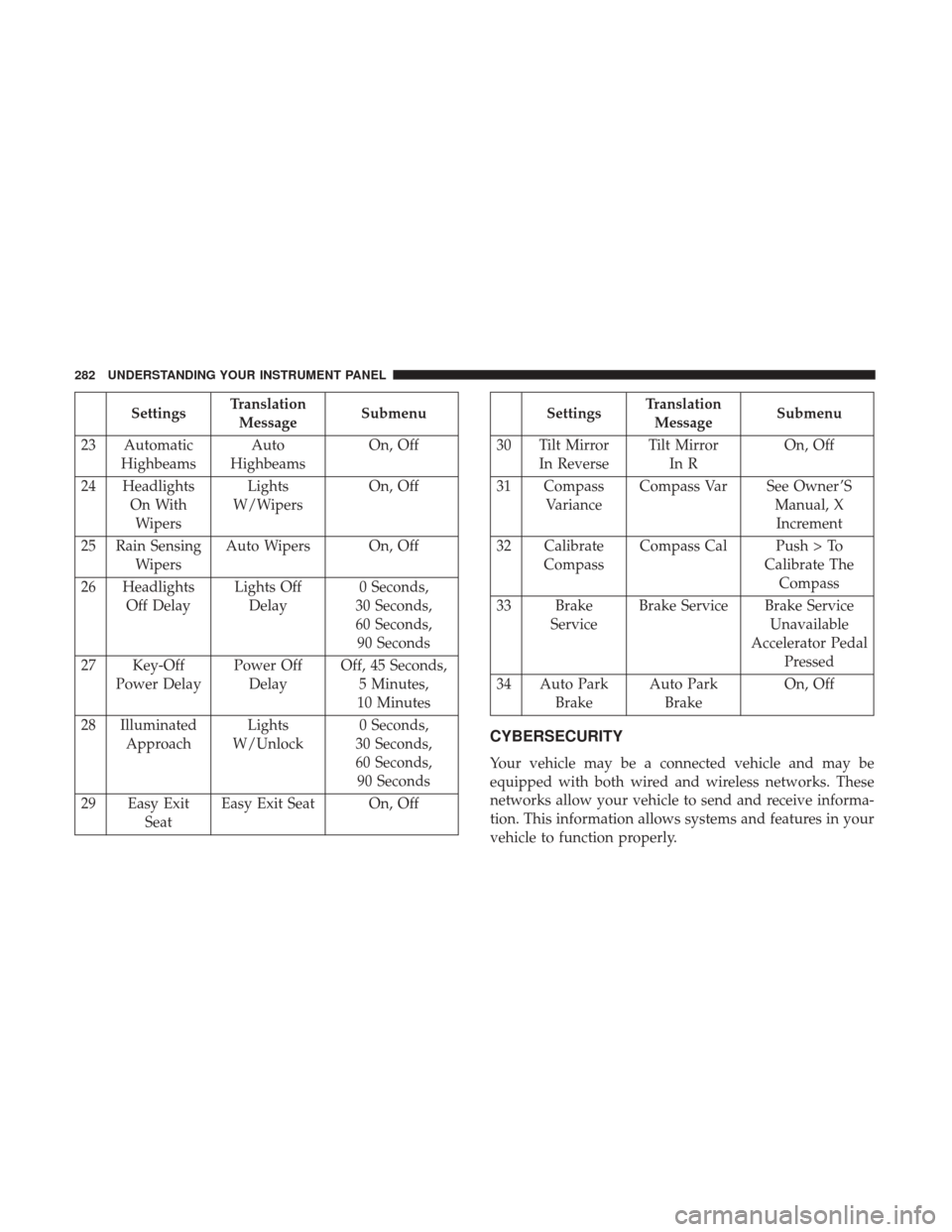
SettingsTranslation
Message Submenu
23 Automatic Highbeams Auto
Highbeams On, Off
24 Headlights On WithWipers Lights
W/Wipers On, Off
25 Rain Sensing Wipers Auto Wipers On, Off
26 Headlights Off Delay Lights Off
Delay 0 Seconds,
30 Seconds,
60 Seconds, 90 Seconds
27 Key-Off Power Delay Power Off
Delay Off, 45 Seconds,
5 Minutes,
10 Minutes
28 Illuminated Approach Lights
W/Unlock 0 Seconds,
30 Seconds,
60 Seconds, 90 Seconds
29 Easy Exit Seat Easy Exit Seat On, OffSettings
Translation
Message Submenu
30 Tilt Mirror In Reverse Tilt Mirror
In R On, Off
31 Compass Variance Compass Var See Owner ’S
Manual, XIncrement
32 Calibrate Compass Compass Cal Push > To
Calibrate TheCompass
33 Brake Service Brake Service Brake Service
Unavailable
Accelerator Pedal Pressed
34 Auto Park Brake Auto Park
Brake On, Off
CYBERSECURITY
Your vehicle may be a connected vehicle and may be
equipped with both wired and wireless networks. These
networks allow your vehicle to send and receive informa-
tion. This information allows systems and features in your
vehicle to function properly.
282 UNDERSTANDING YOUR INSTRUMENT PANEL
Page 294 of 539
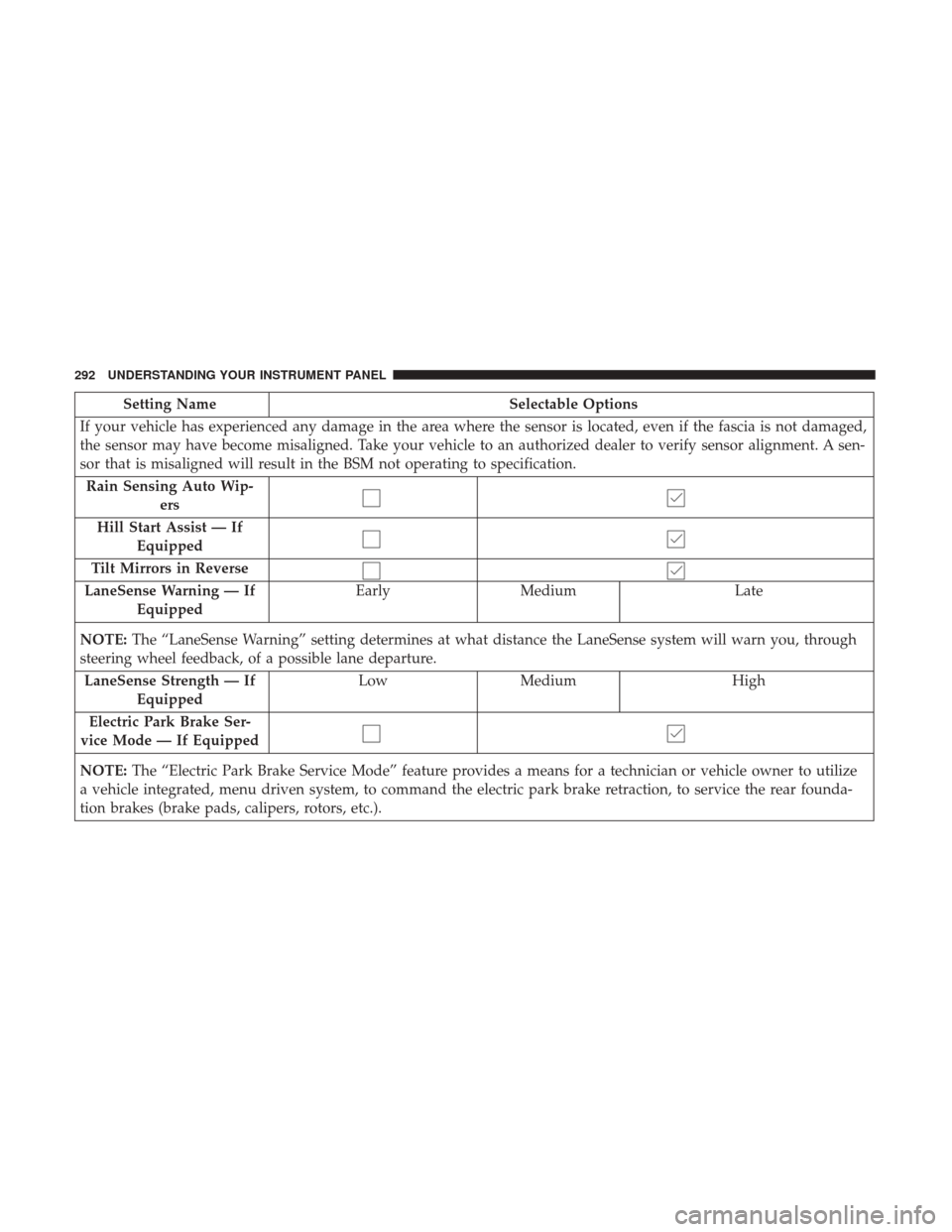
Setting NameSelectable Options
If your vehicle has experienced any damage in the area where the sensor is located, even if the fascia is not damaged,
the sensor may have become misaligned. Take your vehicle to an authorized dealer to verify sensor alignment. A sen-
sor that is misaligned will result in the BSM not operating to specification. Rain Sensing Auto Wip- ers
Hill Start Assist — If Equipped
Tilt Mirrors in Reverse
LaneSense Warning — If Equipped Early
Medium Late
NOTE: The “LaneSense Warning” setting determines at what distance the LaneSense system will warn you, through
steering wheel feedback, of a possible lane departure.
LaneSense Strength — If Equipped Low
Medium High
Electric Park Brake Ser-
vice Mode — If Equipped
NOTE: The “Electric Park Brake Service Mode” feature provides a means for a technician or vehicle owner to utilize
a vehicle integrated, menu driven system, to command the electric park brake retraction, to service the rear founda-
tion brakes (brake pads, calipers, rotors, etc.).
292 UNDERSTANDING YOUR INSTRUMENT PANEL
Page 302 of 539
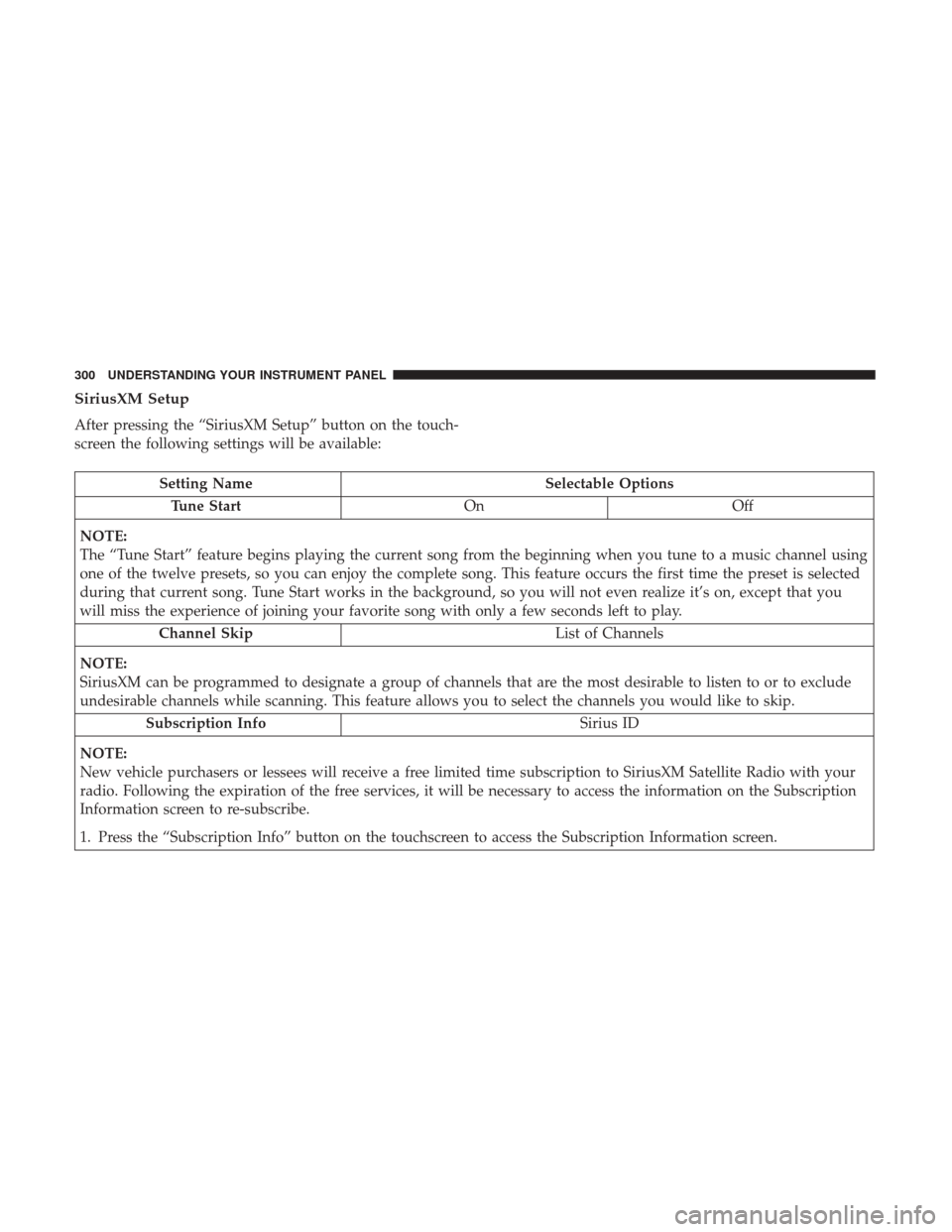
SiriusXM Setup
After pressing the “SiriusXM Setup” button on the touch-
screen the following settings will be available:
Setting NameSelectable Options
Tune Start OnOff
NOTE:
The “Tune Start” feature begins playing the current song from the beginning when you tune to a music channel using
one of the twelve presets, so you can enjoy the complete song. This feature occurs the first time the preset is selected
during that current song. Tune Start works in the background, so you will not even realize it’s on, except that you
will miss the experience of joining your favorite song with only a few seconds left to play. Channel Skip List of Channels
NOTE:
SiriusXM can be programmed to designate a group of channels that are the most desirable to listen to or to exclude
undesirable channels while scanning. This feature allows you to select the channels you would like to skip. Subscription Info Sirius ID
NOTE:
New vehicle purchasers or lessees will receive a free limited time subscription to SiriusXM Satellite Radio with your
radio. Following the expiration of the free services, it will be necessary to access the information on the Subscription
Information screen to re-subscribe.
1. Press the “Subscription Info” button on the touchscreen to access the Subscription Information screen.
300 UNDERSTANDING YOUR INSTRUMENT PANEL
Page 303 of 539
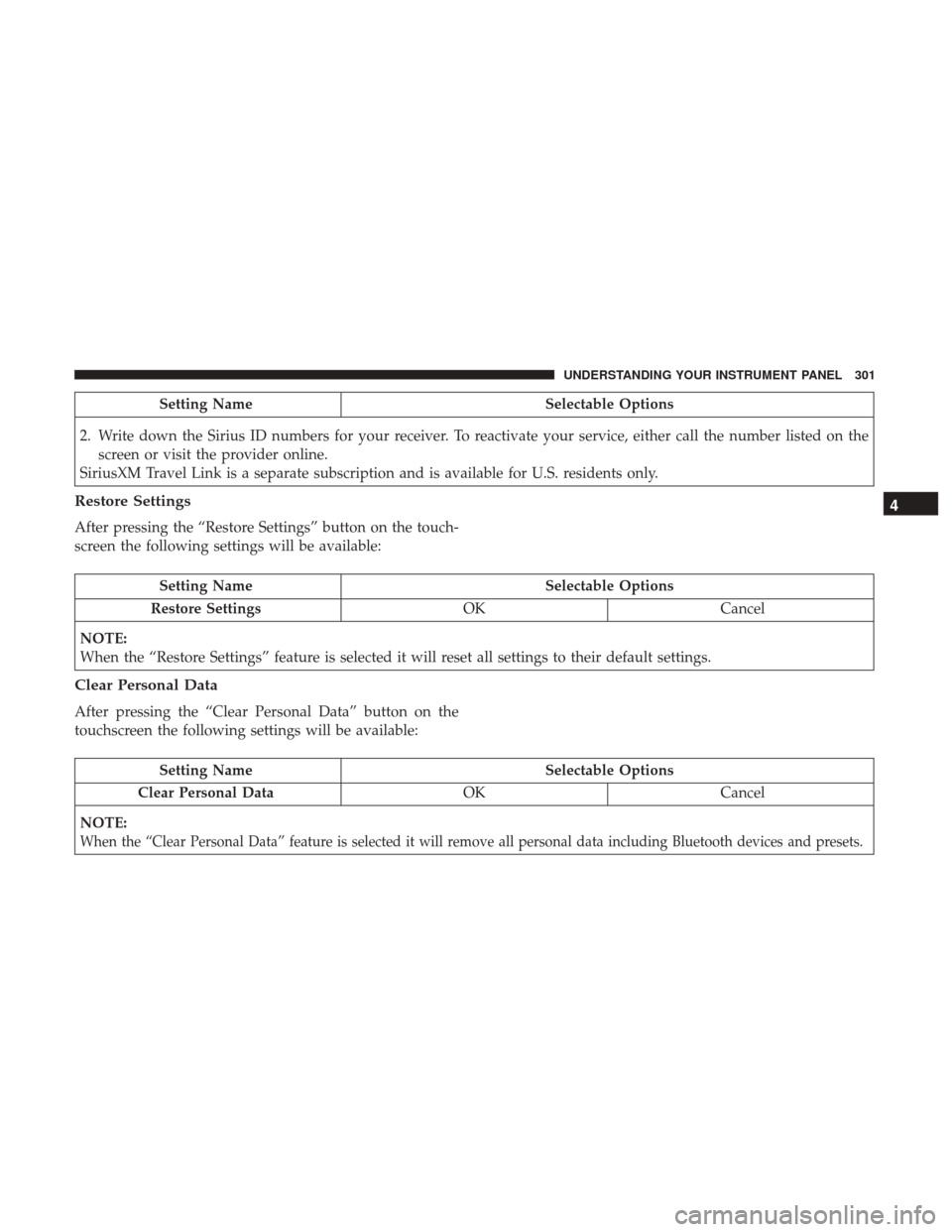
Setting NameSelectable Options
2. Write down the Sirius ID numbers for your receiver. To reactivate your service, either call the number listed on the screen or visit the provider online.
SiriusXM Travel Link is a separate subscription and is available for U.S. residents only.
Restore Settings
After pressing the “Restore Settings” button on the touch-
screen the following settings will be available:
Setting Name Selectable Options
Restore Settings OKCancel
NOTE:
When the “Restore Settings” feature is selected it will reset all settings to their default settings.
Clear Personal Data
After pressing the “Clear Personal Data” button on the
touchscreen the following settings will be available:
Setting Name Selectable Options
Clear Personal Data OKCancel
NOTE:
When the “Clear Personal Data” feature is selected it will remove all personal data including Bluetooth devices and presets.
4
UNDERSTANDING YOUR INSTRUMENT PANEL 301
Page 321 of 539
•The temperature can be displayed in U.S. or Metric units
by selecting the US/Metric customer-programmable fea-
ture. Refer to the “Customer Programmable Features —
Uconnect System Settings” in this section of the manual.
To provide you with maximum comfort in the Automatic
mode during cold start-ups, the blower fan will remain on
low until the engine warms up. The blower will increase in
speed and transition into Auto mode.
Manual Operation Override
This system offers a full complement of manual override
features. The AUTO symbol in the front ATC display will
be turned off when the system is being used in the manual
mode.
NOTE: The system will not automatically sense the pres-
ence of fog, mist or ice on the windshield. DEFROST mode
must be manually selected to clear the windshield and side
glass.
Operating Tips
NOTE: Refer to the chart at the end of this section for
suggested control settings for various weather conditions.
Summer Operation
The engine cooling system must be protected with a
high-quality antifreeze coolant to provide proper corrosion
protection and to protect against engine overheating. OAT
coolant (conforming to MS.90032) is recommended. Refer
to “Maintenance Procedures” in “Maintaining Your Ve-
hicle” for proper coolant selection.
Winter Operation
To ensure the best possible heater and defroster perfor-
mance, make sure the engine cooling system is functioning
properly and the proper amount, type, and concentration
of coolant is used. Refer to “Maintenance Procedures” in
“Maintaining Your Vehicle” for proper coolant selection.
Use of the air Recirculation mode during Winter months is
not recommended because it may cause window fogging.
Vacation/Storage
Any time you store your vehicle or keep it out of service
(i.e., vacation) for two weeks or more, run the air condi-
tioning system at idle for about five minutes in fresh air
with the blower setting in high. This will ensure adequate
system lubrication to minimize the possibility of compres-
sor damage when the system is started again.
4
UNDERSTANDING YOUR INSTRUMENT PANEL 319
Page 324 of 539
PERSONALIZED MENU BAR
The Uconnect features and services in the main menu bar
are easily changed for your convenience. Simply follow
these steps:
1. Press the “Apps
” button to open the App screen.
2. Press and hold, then drag the selected App to replace anexisting shortcut in the main menu bar. The new app shortcut, that was dragged down onto the
main menu bar, will now be an active App/shortcut.
NOTE:
This feature is only available if the vehicle is in
PARK.
UCONNECT VOICE RECOGNITION QUICK TIPS
Introducing Uconnect
Start using Uconnect Voice Recognition with these helpful
quick tips. It provides the key Voice Commands and tips
you need to know to control your Uconnect 5.0 or 8.4/8.4
NAV system.
Uconnect 8.4A/8.4 NAV Main Menu
Uconnect 5.0
322 UNDERSTANDING YOUR INSTRUMENT PANEL