instrument panel CHRYSLER 300 2008 1.G Workshop Manual
[x] Cancel search | Manufacturer: CHRYSLER, Model Year: 2008, Model line: 300, Model: CHRYSLER 300 2008 1.GPages: 519, PDF Size: 7.2 MB
Page 229 of 519
the FUNCTION SELECT button until “ON” or “OFF”
appears. When OFF is selected, the system reverts to the
standard intermittent wiper operation.
“Automatically Move Seat Back on Exit” — If
Equipped
This feature provides automatic driver seat positioning to
enhance driver mobility when entering and exiting the
vehicle. To make your selection, press and release the
FUNCTION SELECT button until “ON” or “OFF” ap-
pears.
NOTE:The seat will return to the memorized seat
location (if Recall Memory with Remote Key Unlock is set
to ON) when the remote keyless entry transmitter is used
to unlock the door. Refer to “Easy Entry/Exit Seat” under
“Driver Memory Seat” in Section 3 of this manual for
more information.
“Flash Lights with Remote Key Lock”
When ON is selected, the front and rear turn signals will
flash when the doors are locked or unlocked with the
remote keyless entry transmitter. This feature may be
selected with or without the sound horn on lock feature
selected. To make your selection, press and release the
FUNCTION SELECT button until “ON” or “OFF” ap-
pears.
“Headlights On with Wipers” (Available with Auto
Headlights Only)
When ON is selected, and the headlight switch is in the
AUTO position, the headlights will turn on approxi-
mately 10 seconds after the wipers are turned on. The
headlights will also turn off when the wipers are turned
off if they were turned on by this feature. To make your
selection, press and release the FUNCTION SELECT
button until “ON” or “OFF” appears.
UNDERSTANDING YOUR INSTRUMENT PANEL 229
4
Page 230 of 519
NOTE:Turning the headlights on during the daytime
causes the instrument panel lights to dim. To increase the
brightness, refer to “Lights” in Section 3 of this manual.
“Delay Turning Headlights Off”
When this feature is selected, the driver can choose to
have the headlights remain on for 0, 30, 60, or 90 seconds
when exiting the vehicle. To make your selection, press
and release the FUNCTION SELECT button until “0,”
“30,” “60,” or “90” appears.
“Tilt Mirrors Down in Reverse” — If Equipped
When ON is selected, the outside rearview mirrors will
tilt downward when the ignition switch is in the ON
position and the transmission is in the “R” (Reverse)
position. The mirrors will move back to their previous
position when the transmission is shifted out of “R”
(Reverse). To make your selection, press and release the
FUNCTION SELECT button until “ON” or “OFF” ap-
pears.
“Turn Headlights On with Remote Key Unlock”
When this feature is selected, the headlights will activate
and remain on for up to 90 seconds when the doors are
unlocked with the remote keyless entry transmitter. To
make your selection, press and release the FUNCTION
SELECT button until “OFF,” “30 sec.,” “60 sec.,” or “90
sec.” appears.
“Delay Power Off to Accessories Until Exit”
When this feature is selected, the power window
switches, radio, hands–free system (if equipped), DVD
video system (if equipped), power sunroof (if equipped),
and power outlets will remain active for up to 60 minutes
after the ignition switch is turned off. Opening a vehicle
door will cancel this feature. To make your selection,
press and release the FUNCTION SELECT button until
“Off,” “45 sec.,” “5 min.,” “10 min.,” “30 min.,” or “60
min.” appears.
230 UNDERSTANDING YOUR INSTRUMENT PANEL
Page 231 of 519
“Confirmation of Voice Commands” — If
Equipped
When ON is selected, all voice commands from the
UConnect™ system are confirmed. To make your selec-
tion, press and release the FUNCTION SELECT button
until “ON” or “OFF” appears.
“Park Assist System” — If Equipped
When ON is selected, the system will scan for objects
behind the vehicle when the transmission is in the “R”
(Reverse) or “N” (Neutral) position. To make your selec-
tion, press and release the FUNCTION SELECT button
until “ON” or “OFF” appears.
“Turn by Turn Navigation” — If Equipped
When ON is selected, the Turn-by-Turn directions will
appear in the display as the vehicle approaches a desig-
nated turn within a programmed route. To make your
selection, press and release the FUNCTION SELECT
button until “ON” or “OFF” appears.
“Display Units of Measure in”
The EVIC, odometer, and navigation system (if
equipped) can be changed between English and Metric
units of measure. To make your selection, press and
release the FUNCTION SELECT button until “US” or
“METRIC” appears.
“Automatic High Beams” — If Equipped
When this feature is selected, the high beam headlights
will deactivate automatically under certain conditions. To
make your selection, press and release the FUNCTION
SELECT button until “ON” or “OFF” appears. Refer to
“SmartBeams” in section 3 of this manual for more
information.
UNDERSTANDING YOUR INSTRUMENT PANEL 231
4
Page 232 of 519
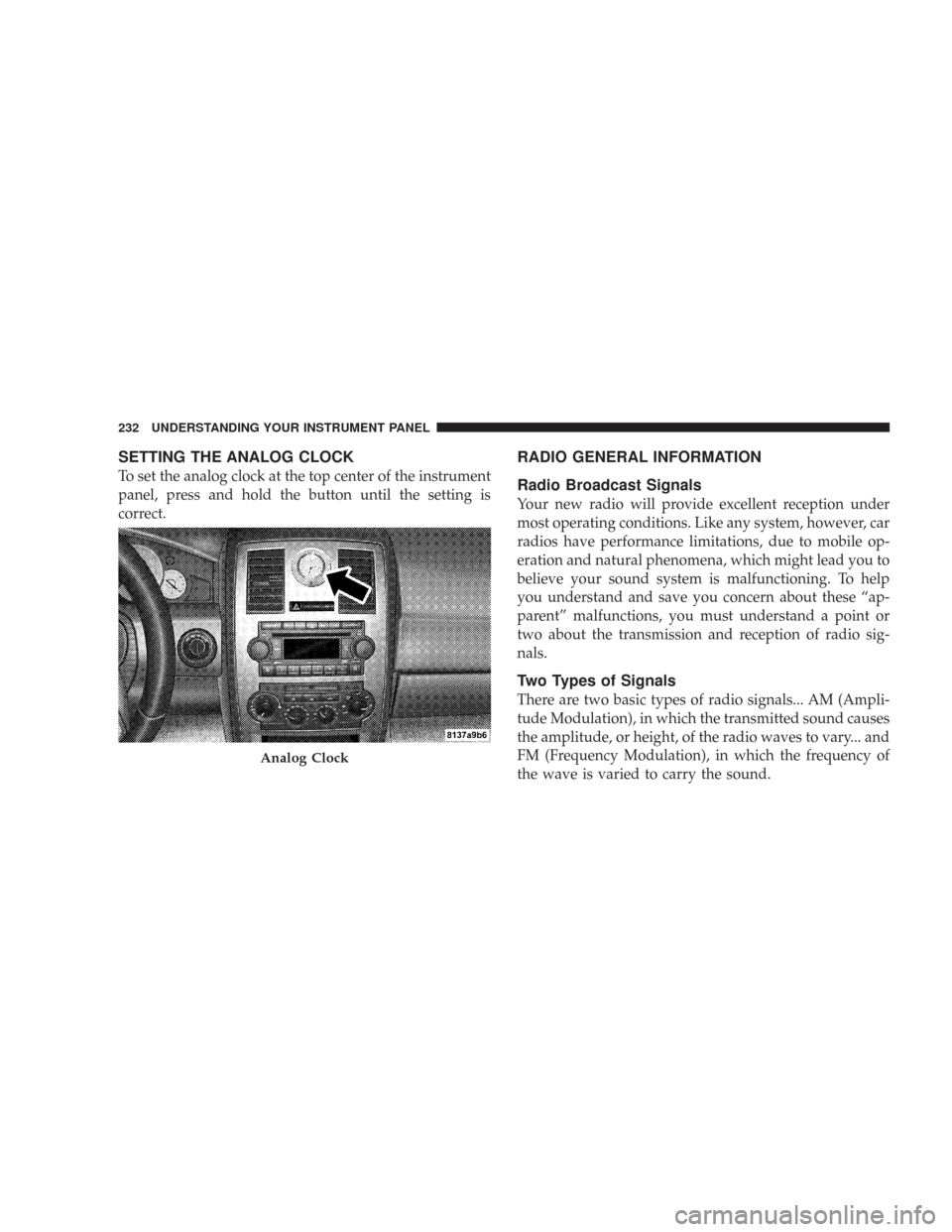
SETTING THE ANALOG CLOCK
To set the analog clock at the top center of the instrument
panel, press and hold the button until the setting is
correct.
RADIO GENERAL INFORMATION
Radio Broadcast Signals
Your new radio will provide excellent reception under
most operating conditions. Like any system, however, car
radios have performance limitations, due to mobile op-
eration and natural phenomena, which might lead you to
believe your sound system is malfunctioning. To help
you understand and save you concern about these “ap-
parent” malfunctions, you must understand a point or
two about the transmission and reception of radio sig-
nals.
Two Types of Signals
There are two basic types of radio signals... AM (Ampli-
tude Modulation), in which the transmitted sound causes
the amplitude, or height, of the radio waves to vary... and
FM (Frequency Modulation), in which the frequency of
the wave is varied to carry the sound.
Analog Clock
232 UNDERSTANDING YOUR INSTRUMENT PANEL
Page 233 of 519
Electrical Disturbances
Radio waves may pick up electrical disturbances during
transmission. They mainly affect the wave amplitude,
and thus remain a part of the AM reception. They
interfere very little with the frequency variations that
carry the FM signal.
AM Reception
AM sound is based on wave amplitude, so AM reception
can be disrupted by such things as lightning, power lines
and neon signs.
FM Reception
Because FM transmission is based on frequency varia-
tions, interference that consists of amplitude variations
can be filtered out, leaving the reception relatively clear,
which is the major feature of FM radio.NOTE:For vehicles not equipped with the Electronic
Vehicle Information Center (EVIC), the radio, steering
wheel radio controls (if equipped), and 6 disc CD/DVD
changer (if equipped) will remain active for 10 minutes
after the ignition switch is turned off. Opening either
front door will cancel this feature.
NOTE:For vehicles equipped with the Electronic Ve-
hicle Information Center (EVIC), the radio, steering
wheel radio controls (if equipped), and 6 disc CD/DVD
changer (if equipped) will remain active for up to 60
minutes after the ignition switch is turned off. Opening
either front door will cancel this feature. The time is
programmable. For details, refer to “Delay Power Off to
Accessories Until Exit,” under “Personal Settings (Cus-
tomer Programmable Features),” under “Electronic Ve-
hicle Information Center (EVIC)” in Section 4 of this
manual.
UNDERSTANDING YOUR INSTRUMENT PANEL 233
4
Page 234 of 519
SALES CODE REN — MULTIMEDIA SYSTEM — IF
EQUIPPED
NOTE:The sales code is located on the lower right side
of the unit’s faceplate.
The REN multimedia system contains a radio, CD/DVD
player, USB port, a 20 gigabyte Hard Drive (HDD), and a
“JukeBox” (virtual CD changer). Sirius Satellite Radio is
optional. The 6.5-inch touch screen allows for easy menu
selection.
A 20 gigabyte Hard Drive (HDD) allows uploads of
music and photos from CDs or through the USB port.
While the Gracenote database finds the artist, track, and
title for the music.
An auxiliary input jack permits passengers to listen to a
portable MP3 player through the vehicle’s speakers. For
vehicles equipped with the Vehicle Entertainment System
(VES), separate audio outputs allow passengers to listento the car speakers while different audio tracks play
through the system’s wireless headphones. This means
rear seat passengers can watch a DVD on the optional
rear-seat entertainment system while the driver and front
seat passenger listen to the radio.
Other special features include direct tune, music type
selections, easy store presets, backup camera display for
vehicles equipped with a backup camera, and on some
models a dual display screen operation. Refer to your
Radio Specific User’s Manual for detailed operating
instructions.
Operating Instructions — Satellite Radio (If
Equipped)
Refer to your Radio Specific User’s Manual for detailed
operating instructions.
234 UNDERSTANDING YOUR INSTRUMENT PANEL
Page 235 of 519
Operating Instructions — Hands-Free
Communication (UConnect™) (If Equipped)
Refer to “Hands-Free Communication (UConnect™)” in
Section 3 of this manual for detailed operating instruc-
tions.
Clock Setting Procedure
Setting the Clock
1. Turn on the system.
2. Touch the screen where the time is displayed. The
clock setting menu will appear on the screen.
3. To move the hour forward, touch the screen where the
word “Hour” with the arrow pointing upward is dis-
played. To move the hour backward, touch the screen
where the word “Hour” with the arrow pointing down-
ward is displayed.4. To move the minute forward, touch the screen where
the word “Min” with the arrow pointing upward is
displayed. To move the minute backward, touch the
screen where the word “Min” with the arrow pointing
downward is displayed.
5. To save the new time setting, touch the screen where
the word “Save” is displayed.Changing Daylight Savings Time
When selected, this feature will display the time of day in
daylight savings time. Proceed as follows to change the
current setting:
1. Turn on the system.
2. Touch the screen where the time is displayed. The
clock setting menu will appear on the screen.
UNDERSTANDING YOUR INSTRUMENT PANEL 235
4
Page 236 of 519
3. When this feature is on, a check mark will appear in
the box next to the words “Daylight Savings.” Touch the
screen where the words “Daylight Savings” are dis-
played to change the current setting.
Show Time if Radio is Off
When selected, this feature will display the time of day
on the touch screen when the system is turned off.
Proceed as follows to change the current setting:
1. Turn on the system.
2. Touch the screen where the time is displayed. The
clock setting menu will appear on the screen.
3. When this feature is on, a check mark will appear in
the box next to the words “Show Time if Radio is Off.”
Touch the screen where the words “Show Time if Radio is
Off” are displayed to change the current setting.
Changing the Time Zone
1. Turn on the system.
2. Touch the screen where the time is displayed. The
clock setting menu will appear on the screen.
3. Touch the screen where the words “Set Time Zone” are
displayed. The time zone selection menu will appear on
the screen.
4. Select a time zone by touching the screen where your
selection appears. If you do not see a time zone that you
want to select, touch the screen where the word “Page” is
displayed to view additional time zones in the menu.
5. Touch the screen where the word “Save” is displayed.
236 UNDERSTANDING YOUR INSTRUMENT PANEL
Page 237 of 519
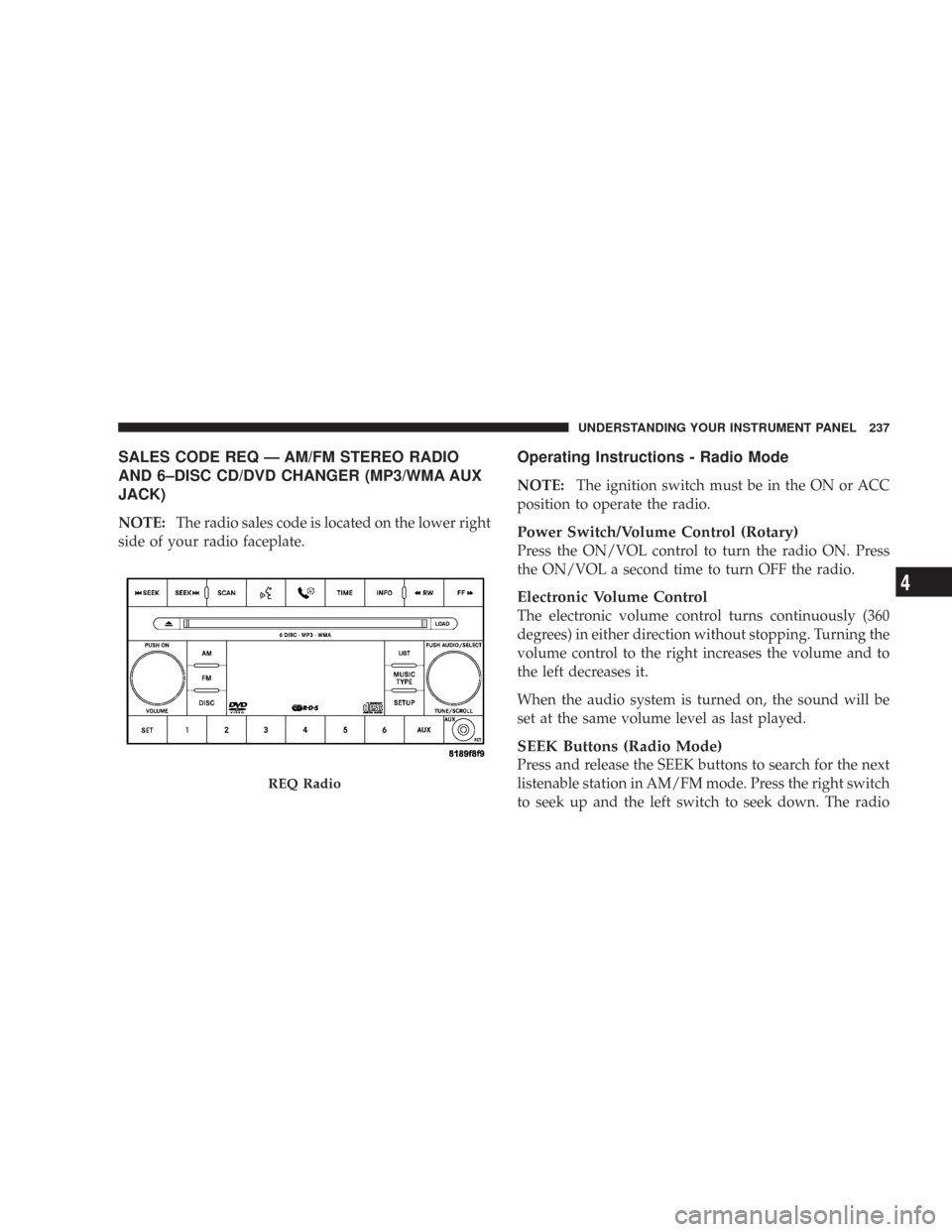
SALES CODE REQ — AM/FM STEREO RADIO
AND 6–DISC CD/DVD CHANGER (MP3/WMA AUX
JACK)
NOTE:The radio sales code is located on the lower right
side of your radio faceplate.
Operating Instructions - Radio Mode
NOTE:The ignition switch must be in the ON or ACC
position to operate the radio.
Power Switch/Volume Control (Rotary)
Press the ON/VOL control to turn the radio ON. Press
the ON/VOL a second time to turn OFF the radio.
Electronic Volume Control
The electronic volume control turns continuously (360
degrees) in either direction without stopping. Turning the
volume control to the right increases the volume and to
the left decreases it.
When the audio system is turned on, the sound will be
set at the same volume level as last played.
SEEK Buttons (Radio Mode)
Press and release the SEEK buttons to search for the next
listenable station in AM/FM mode. Press the right switch
to seek up and the left switch to seek down. The radio
REQ Radio
UNDERSTANDING YOUR INSTRUMENT PANEL 237
4
Page 238 of 519
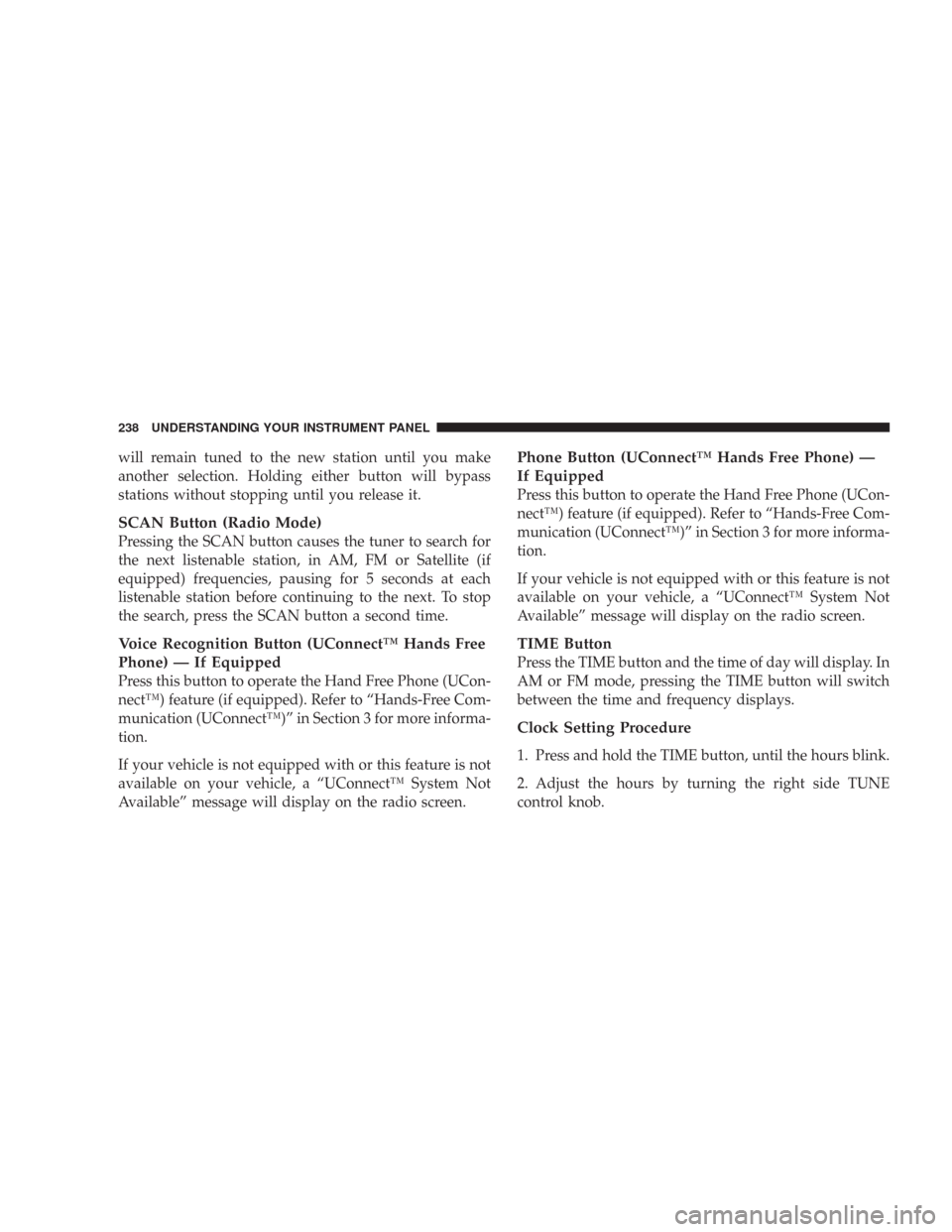
will remain tuned to the new station until you make
another selection. Holding either button will bypass
stations without stopping until you release it.
SCAN Button (Radio Mode)
Pressing the SCAN button causes the tuner to search for
the next listenable station, in AM, FM or Satellite (if
equipped) frequencies, pausing for 5 seconds at each
listenable station before continuing to the next. To stop
the search, press the SCAN button a second time.
Voice Recognition Button (UConnect™ Hands Free
Phone) — If Equipped
Press this button to operate the Hand Free Phone (UCon-
nect™) feature (if equipped). Refer to “Hands-Free Com-
munication (UConnect™)” in Section 3 for more informa-
tion.
If your vehicle is not equipped with or this feature is not
available on your vehicle, a “UConnect™ System Not
Available” message will display on the radio screen.
Phone Button (UConnect™ Hands Free Phone) —
If Equipped
Press this button to operate the Hand Free Phone (UCon-
nect™) feature (if equipped). Refer to “Hands-Free Com-
munication (UConnect™)” in Section 3 for more informa-
tion.
If your vehicle is not equipped with or this feature is not
available on your vehicle, a “UConnect™ System Not
Available” message will display on the radio screen.
TIME Button
Press the TIME button and the time of day will display. In
AM or FM mode, pressing the TIME button will switch
between the time and frequency displays.
Clock Setting Procedure
1. Press and hold the TIME button, until the hours blink.
2. Adjust the hours by turning the right side TUNE
control knob.
238 UNDERSTANDING YOUR INSTRUMENT PANEL