cruise control CHRYSLER 300 2015 2.G User Guide
[x] Cancel search | Manufacturer: CHRYSLER, Model Year: 2015, Model line: 300, Model: CHRYSLER 300 2015 2.GPages: 574, PDF Size: 14.59 MB
Page 181 of 574
•The shift lever/gear selector is removed from the
Drive position.
•The Electronic Stability Control/Traction Control Sys-
tem (ESC/TCS) activates.
•The vehicle parking brake is applied.
•Driver seatbelt is unbuckled at low speeds.
•Driver door is opened at low speeds.
NOTE:
•If your vehicle stays at standstill for longer than two
seconds, then the system will cancel and the brake
force will be ramped-out. The driver will have to apply
the brakes to keep the vehicle at a standstill.
•ACC cannot be resumed if there is a stationary vehicle
in-front of your vehicle in close proximity.
To Turn Off
The system will turn off and erase the set speed in
memory if:
•The Normal (Fixed Speed) Electronic Speed Control
ON/OFF button is pushed.
•The ignition is turned off.
•The Adaptive Cruise Control (ACC) On/Off button is
pushed.
To Resume
If there is a set speed in memory push the RES (resume)
button and then remove your foot from the accelerator
pedal. The DID will display the last set speed.
3
UNDERSTANDING THE FEATURES OF YOUR VEHICLE 179
Page 189 of 574
A cancel message will display on the DID and produce a
warning chime. Driver intervention will be required at
this moment.
While ACC with Stop is holding your vehicle at a
standstill, if the driver seatbelt is unbuckled or the driver
door is opened, the ACC with Stop system will cancel
and the brakes will release. A cancel message will display
on the DID and produce a warning chime. Driver inter-
vention will be required at this moment.
WARNING!
When the ACC system is resumed, the driver must
ensure that there are no pedestrians, vehicles or
objects in the path of the vehicle. Failure to follow
these warnings can result in a collision and death or
serious personal injury.
Adaptive Cruise Control (ACC) Menu
The DID displays the current ACC system settings. The
DID is located in the center of the instrument cluster. The
information it displays depends on ACC system status.
Push the ADAPTIVE CRUISE CONTROL (ACC) ON/
OFF button (located on the steering wheel) until one of
the following displays in the DID:
Adaptive Cruise Control Off
When ACC is deactivated, the display will read “Adap-
tive Cruise Control Off.”
Adaptive Cruise Control Ready
When ACC is activated but the vehicle speed setting has
not been selected, the display will read “Adaptive Cruise
Control Ready.”
3
UNDERSTANDING THE FEATURES OF YOUR VEHICLE 187
Page 191 of 574
vehicle has left these areas. Under rare conditions, when
the radar is not tracking any vehicles or objects in its path
this warning may temporarily occur.
NOTE:If the “ACC/FCW Unavailable Wipe Front Radar
Sensor” warning is active Normal (Fixed Speed) Cruise
Control is still available. For additional information refer
to “Normal (Fixed Speed) Cruise Control Mode” in this
section.
If weather conditions are not a factor, the driver should
examine the sensor. It may require cleaning or removal of
an obstruction. The sensor is located in the center of the
vehicle behind the lower grille.
To keep the ACC System operating properly, it is impor-
tant to note the following maintenance items:
•Always keep the sensor clean. Carefully wipe the
sensor lens with a soft cloth. Be cautious not to damage
the sensor lens.
•Do not remove any screws from the sensor. Doing so
could cause an ACC system malfunction or failure and
require a sensor realignment.
•If the sensor or front end of the vehicle is damaged due
to a collision, see your authorized dealer for service.
•Do not attach or install any accessories near the sensor,
including transparent material or aftermarket grilles.
Doing so could cause an ACC system failure or
malfunction.
When the condition that deactivated the system is no
longer present, the system will return to the “Adaptive
Cruise Control Off” state and will resume function by
simply reactivating it.
3
UNDERSTANDING THE FEATURES OF YOUR VEHICLE 189
Page 198 of 574
Normal (Fixed Speed) Electronic Speed Control
Mode
In addition to Adaptive Cruise Control mode, a Normal
(Fixed Speed) Electronic Speed Control mode is available
for cruising at fixed speeds. The Normal (Fixed Speed)
Electronic Speed Control mode is designed to maintain a
set cruising speed without requiring the driver to operate
the accelerator. Electronic Speed Control can only be
operated if the vehicle speed is above 20 mph (32 km/h).
To change between the different control modes, push the
ADAPTIVE CRUISE CONTROL (ACC) ON/OFF button
which turns the ACC and the NORMAL (Fixed Speed)
ELECTRONIC SPEED CONTROL OFF. Pushing of the
NORMAL (Fixed Speed) ELECTRONIC SPEED CON-
TROL ON/OFF button will result in turning ON (chang-
ing to) the Normal (Fixed Speed) Electronic Speed Con-
trol mode.
WARNING!
In the normal Cruise Control mode, the system will
not react to vehicles ahead. In addition, the proximity
warning does not activate and no alarm will sound
even if you are too close to the vehicle ahead since
neither the presence of the vehicle ahead nor the
vehicle-to vehicle distance is detected. Be sure to
maintain a safe distance between your vehicle and
the vehicle ahead. Always be aware which mode is
selected.
To Set A Desired Speed
Turn the Normal (Fixed Speed) Electronic
Speed Control ON. When the vehicle has
reached the desired speed, push the SET (+) or
SET (-) button and release. Release the accel-
erator and the vehicle will operate at the selected speed.
196 UNDERSTANDING THE FEATURES OF YOUR VEHICLE
Page 199 of 574
Once a speed has been set a message (CRUISE CON-
TROL SET TO MPH/KM) will appear indicating what
speed was set. This light will turn on when the electronic
speed control is SET.
To Vary The Speed Setting
To Increase Speed
When the Normal (Fixed Speed) Electronic Speed Con-
trol is set, you can increase speed by pushing the SET+
button.
The drivers preferred units can be selected through the
instrument panel settings if equipped. Refer to “Under-
standing Your Instrument Panel” for more information.
The speed increment shown is dependant on the speed of
U.S. (mph) or Metric (km/h) units:
U.S. Speed (mph)
•Pushing the SET+button once will result in a 1 mph
increase in set speed. Each subsequent tap of the
button results in an increase of 1 mph.
•If the button is continually pushed, the set speed will
continue to increase in 5 mph increments until the
button is released. The increase in set speed is reflected
in the DID display.
Metric Speed (km/h)
•Pushing the SET+button once will result in a 1 km/h
increase in set speed. Each subsequent tap of the
button results in an increase of 1 km/h.
•If the button is continually pushed, the set speed will
continue to increase in 10 km/h increments until the
button is released. The increase in set speed is reflected
in the DID display.
3
UNDERSTANDING THE FEATURES OF YOUR VEHICLE 197
Page 200 of 574
To Decrease Speed
When the Normal (Fixed Speed) Cruise Control is set,
you can decrease speed by pushing the SET-button.
The drivers preferred units can be selected through the
instrument panel settings if equipped. Refer to “Under-
standing Your Instrument Panel” for more information.
The speed decrement shown is dependant on the speed
of U.S. (mph) or Metric (km/h) units:
U.S. Speed (mph)
•Pushing the SET-button once will result ina1mph
decrease in set speed. Each subsequent tap of the
button results in a decrease of 1 mph.
•If the button is continually pushed, the set speed will
continue to decrease in 5 mph decrements until the
button is released. The decrease in set speed is re-
flected in the DID display.
Metric Speed (km/h)
•Pushing the SET-button once will result in a 1 km/h
decrease in set speed. Each subsequent tap of the
button results in a decrease of 1 km/h.
•If the button is continually pushed, the set speed will
continue to decrease in 10 km/h decrements until the
button is released. The decrease in set speed is re-
flected in the DID display.
To Cancel
The following conditions will cancel the Normal (Fixed
Speed) Electronic Speed Control without clearing the
memory:
•The brake pedal is applied.
•The CANCEL button is pushed.
•The Electronic Stability Control/Traction Control Sys-
tem (ESC/TCS) activates.
198 UNDERSTANDING THE FEATURES OF YOUR VEHICLE
Page 201 of 574
•The vehicle parking brake is applied.
•The braking temperature exceeds normal range (over-
heated).
•The shift lever/gear selector is removed from the
Drive position.
To Resume Speed
To resume a previously set speed, push the RES button
and release. Resume can be used at any speed above
20 mph (32 km/h).
To Turn Off
The system will turn off and erase the set speed in
memory if:
•The Normal (Fixed Speed) Electronic Speed Control
ON/OFF button is pushed.
•The ignition is turned off.
•The Adaptive Cruise Control (ACC) On/Off button is
pushed.
FORWARD COLLISION WARNING (FCW) WITH
MITIGATION — IF EQUIPPED
Forward Collision Warning (FCW) With Mitigation
Operation
The Forward Collision Warning (FCW) system with
mitigation provides the driver with audible warnings,
visual warnings (within the DID), and may apply a brake
jerk to warn the driver when it detects a potential frontal
collision. The warnings and limited braking are intended
to provide the driver with enough time to react, avoid or
mitigate the potential collision.
3
UNDERSTANDING THE FEATURES OF YOUR VEHICLE 199
Page 263 of 574
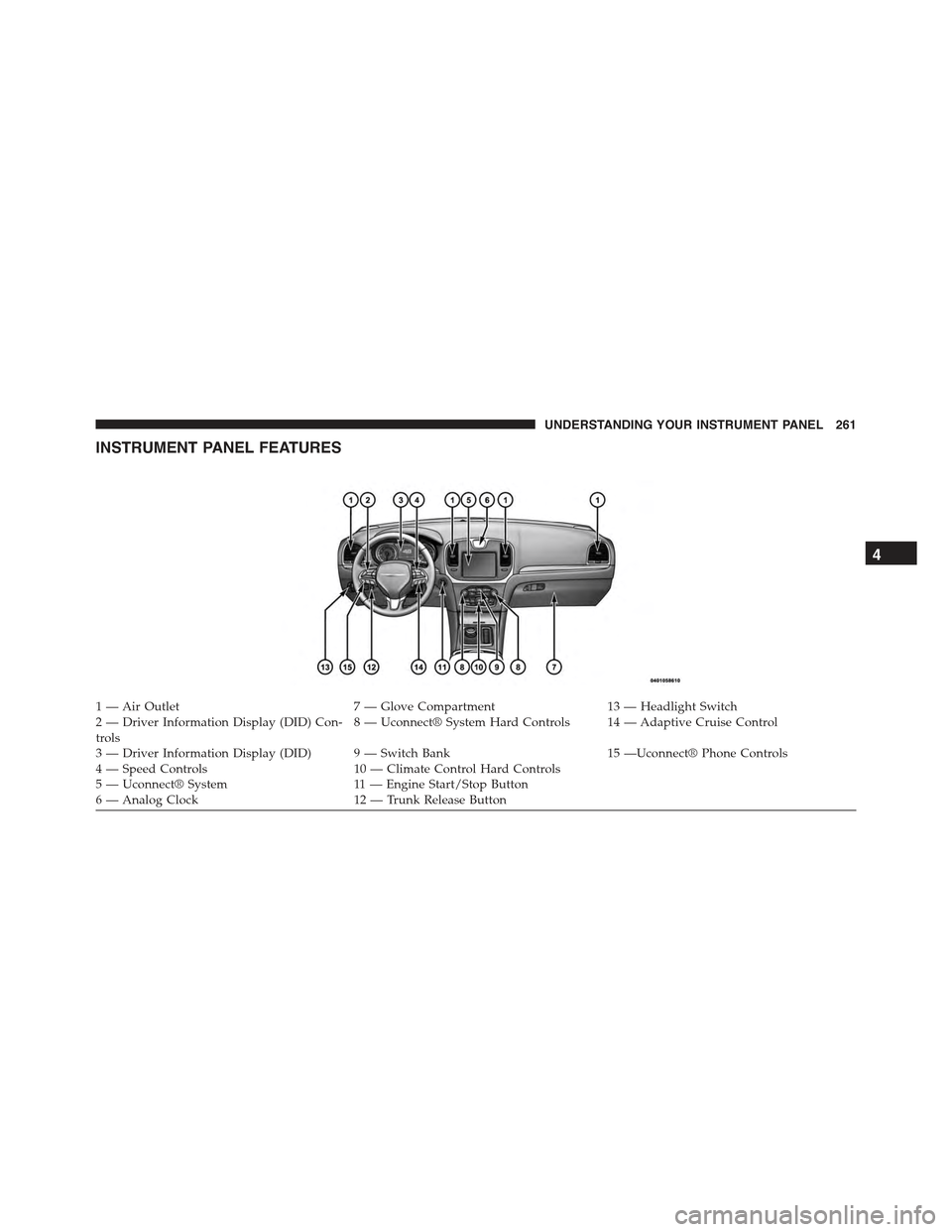
INSTRUMENT PANEL FEATURES
1—AirOutlet7—GloveCompartment13 — Headlight Switch2 — Driver Information Display (DID) Con-trols8 — Uconnect® System Hard Controls 14 — Adaptive Cruise Control
3 — Driver Information Display (DID) 9 — Switch Bank15 —Uconnect® Phone Controls4 — Speed Controls10 — Climate Control Hard Controls5—Uconnect®System11 — E n g i n e S t a r t / S t o p B u t t o n6—AnalogClock12 — Trunk Release Button
4
UNDERSTANDING YOUR INSTRUMENT PANEL 261
Page 514 of 574
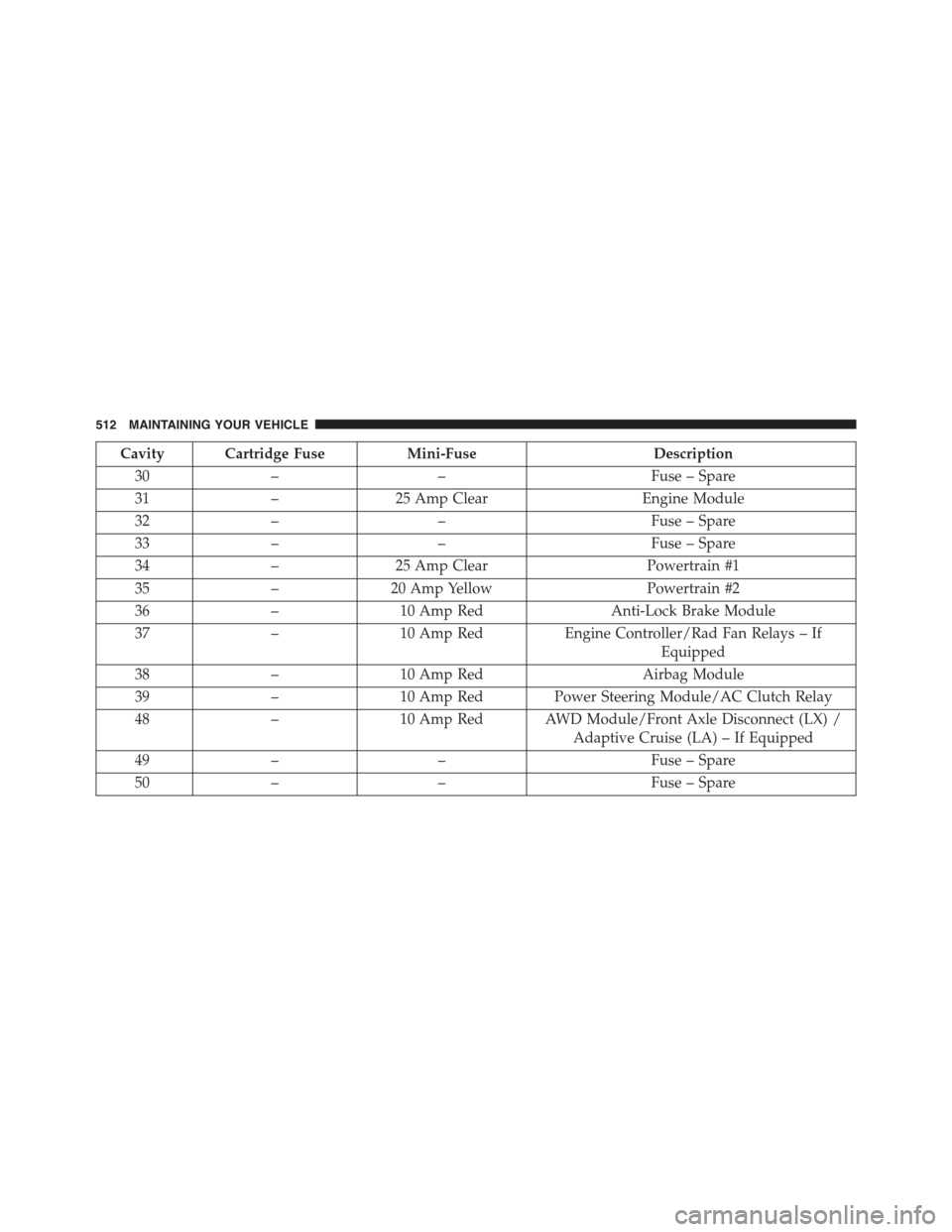
Cavity Cartridge FuseMini-FuseDescription
30––Fuse – Spare
31–25 Amp ClearEngine Module
32––Fuse – Spare
33––Fuse – Spare
34–25 Amp ClearPowertrain #1
35–20 Amp YellowPowertrain #2
36–10 Amp RedAnti-Lock Brake Module
37–10 Amp RedEngine Controller/Rad Fan Relays – If
Equipped
38–10 Amp RedAirbag Module
39–10 Amp Red Power Steering Module/AC Clutch Relay
48–10 Amp Red AWD Module/Front Axle Disconnect (LX) /
Adaptive Cruise (LA) – If Equipped
49––Fuse – Spare
50––Fuse – Spare
512 MAINTAINING YOUR VEHICLE
Page 552 of 574
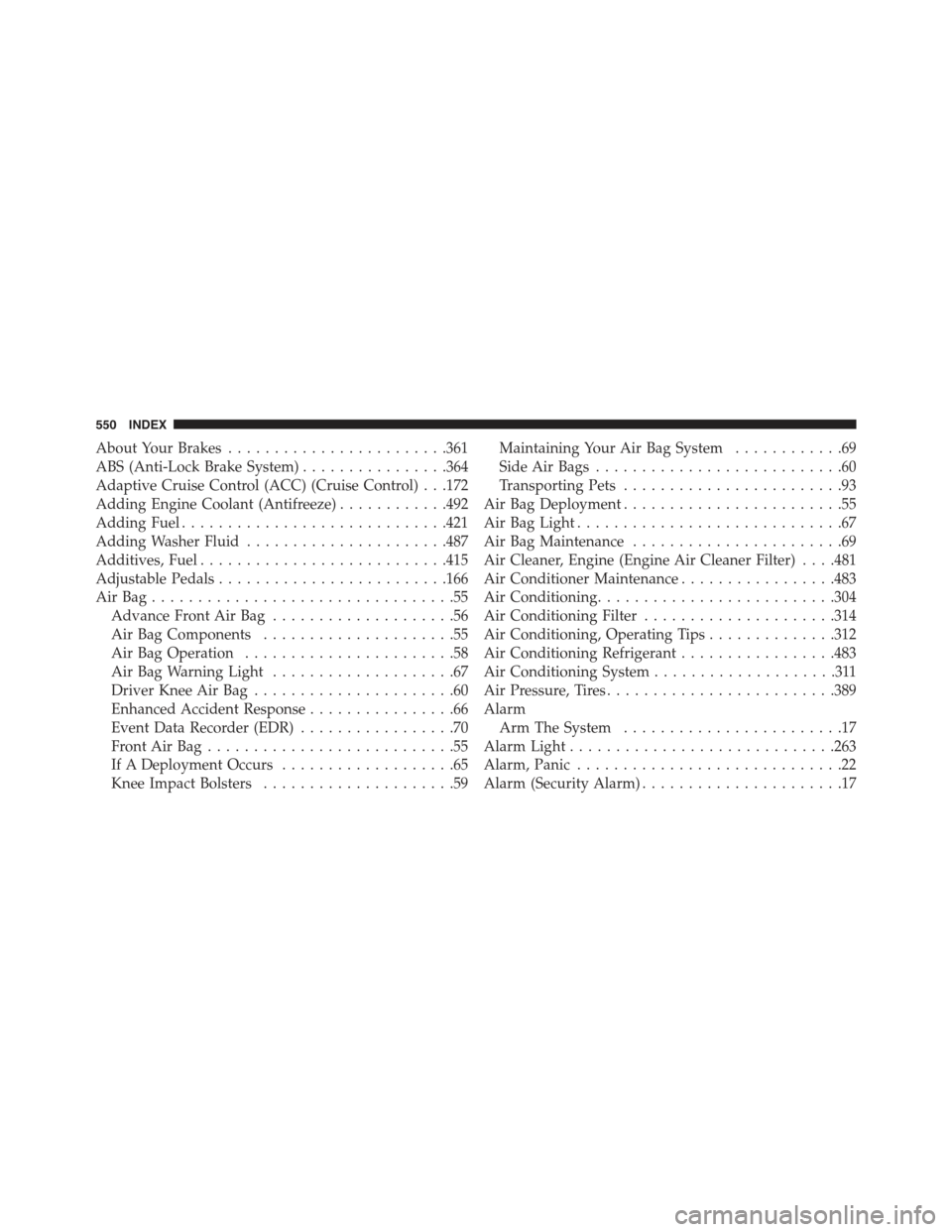
About Your Brakes........................361
ABS (Anti-Lock Brake System)................364
Adaptive Cruise Control (ACC) (Cruise Control) . . .172
Adding Engine Coolant (Antifreeze)............492
Adding Fuel.............................421
Adding Washer Fluid......................487
Additives, Fuel...........................415
Adjustable Pedals.........................166
Air Bag . . . . . . . . . . . . . . . . . . . . . . . . . . . . . . . . .55
Advance Front Air Bag....................56
Air Bag Components.....................55
Air Bag Operation.......................58
Air Bag Warning Light....................67
Driver Knee Air Bag......................60
Enhanced Accident Response................66
Event Data Recorder (EDR).................70
Front Air Bag . . . . . . . . . . . . . . . . . . . . . . . . . . .55
If A Deployment Occurs...................65
Knee Impact Bolsters.....................59
Maintaining Your Air Bag System............69
Side Air Bags...........................60
Transporting Pets........................93
Air Bag Deployment........................55
Air Bag Light.............................67
Air Bag Maintenance.......................69
Air Cleaner, Engine (Engine Air Cleaner Filter) . . . .481
Air Conditioner Maintenance.................483
Air Conditioning..........................304
Air Conditioning Filter.....................314
Air Conditioning, Operating Tips..............312
Air Conditioning Refrigerant.................483
Air Conditioning System....................311
Air Pressure, Tires.........................389
Alarm
Arm The System........................17
Alarm Light.............................263
Alarm, Panic.............................22
Alarm (Security Alarm)......................17
550 INDEX