audio CHRYSLER 300 2015 2.G Owners Manual
[x] Cancel search | Manufacturer: CHRYSLER, Model Year: 2015, Model line: 300, Model: CHRYSLER 300 2015 2.GPages: 574, PDF Size: 14.59 MB
Page 47 of 574
After the sequence completes, the Seat Belt Reminder
Light remains illuminated until the respective seat belts
are buckled. The driver should instruct all other occu-
pants to buckle their seat belts. If an outboard front seat
belt is unbuckled while traveling at speeds greater than
5 mph (8 km/h), BeltAlert will provide both audio and
visual notification.
The outboard front passenger seat BeltAlert is not active
when the outboard front passenger seat is unoccupied.
BeltAlert may be triggered when an animal or heavy
object is on the outboard front passenger seat or when the
seat is folded flat (if equipped). It is recommended that
pets be restrained in the rear seat (if equipped) in pet
harnesses or pet carriers that are secured by seat belts,
and cargo is properly stowed.
BeltAlert can be activated or deactivated by your autho-
rized dealer. FCA US LLC does not recommend deacti-
vating BeltAlert.
NOTE:If BeltAlert has been deactivated, the Seat Belt
Reminder Light will continue to illuminate while the
driver ’s or outboard front passenger ’s (if equipped with
BeltAlert) seat belt remains unbuckled.
Lap/Shoulder Belts
All seating positions in your vehicle are equipped with
lap/shoulder belts.
The seat belt webbing retractor will lock only during very
sudden stops or collisions. This feature allows the shoul-
der part of the seat belt to move freely with you under
normal conditions. However, in a collision the seat belt
will lock and reduce your risk of striking the inside of the
vehicle or being thrown out of the vehicle.
2
THINGS TO KNOW BEFORE STARTING YOUR VEHICLE 45
Page 110 of 574
3. Once a connection between the vehicle and a 9-1-1
operator is made, the 9-1-1 Call system may transmit
the following important vehicle information to a 9-1-1
operator:
•Indication that the occupant placed a 9-1-1 Call.
•The vehicle brand.
•The last known GPS coordinates of the vehicle.
4. You should be able to speak with the 9-1-1 operator
through the vehicle audio system to determine if
additional help is needed.
NOTE:Once a connection is made between the vehicle’s
9-1-1 Call system and the 9-1-1 operator, the 9-1-1 opera-
tor may be able to open a voice connection with the
vehicle to determine if additional help is needed. Once
the 9-1-1 operator opens a voice connection with the
vehicle’s 9-1-1 Call system, the operator should be able to
speak with you or other vehicle occupants and hear
sounds occurring in the vehicle. The vehicle’s 9-1-1 Call
system will attempt to remain connected with the 9-1-1
operator until the 9-1-1 operator terminates the connec-
tion.
5. The 9-1-1 operator may attempt to contact appropriate
emergency responders and provide them with impor-
tant vehicle information and GPS coordinates.
108 UNDERSTANDING THE FEATURES OF YOUR VEHICLE
Page 112 of 574
If the 9-1-1 Call system detects a malfunction, any of the
following may occur at the time the malfunction is
detected, and at the beginning of each ignition cycle:
•The Rearview Mirror light located between the Assist
and 9-1-1 buttons will continuously be illuminated
red.
•The Phone Screen will display the following message
“Vehicle phone requires service. Please contact your
dealer.”
•An In-Vehicle Audio message will state “Vehicle phone
requires service. Please contact your dealer.”
WARNING!
•Ignoring the Rearview Mirror light could mean you
will not have 9-1-1 Call services. If the Rearview
Mirror light is illuminated, have an authorized
dealer service the 9-1-1 Call system immediately.
•The Occupant Restraint Control module turns on
the Air Bag Warning Light on the instrument panel
if a malfunction in any part of the system is
detected. If the Air Bag Warning Light is illumi-
nated, the air bag system may not be working
properly and the 9-1-1 system may not be able to
send a signal to a 9-1-1 operator. If the Air Bag
Warning Light is illuminated, have an authorized
dealer service the ORC system immediately.
11 0 U N D E R S TA N D I N G T H E F E AT U R E S O F Y O U R V E H I C L E
Page 127 of 574
Modes Of Operation
Three selectable modes of operation are available in the
Uconnect® System. Refer to “Uconnect® Settings/
Customer Programmable Features” in “Understanding
Your Instrument Panel” for further information.
Blind Spot Alert Lights Only
When operating in Blind Spot Alert mode, the BSM
system will provide a visual alert in the appropriate side
view mirror based on a detected object. However, when
the system is operating in Rear Cross Path mode, the
system will respond with both visual and audible alerts
when a detected object is present. Whenever an audible
alert is requested, the radio volume is reduced.
Blind Spot Alert Lights/Chime
When operating in Blind Spot Alert Lights/Chime mode,
the BSM system will provide a visual alert in the appro-
priate side view mirror based on a detected object. If the
turn signal is then activated, and it corresponds to an
alert present on that side of the vehicle, an audible chime
will also be sounded. Whenever a turn signal and de-
tected object are present on the same side at the same
time, both the visual and audio alerts will be issued. In
addition to the audible alert the radio (if on) volume will
be reduced.
NOTE:
•Whenever an audible alert is requested by the BSM
system, the radio volume is reduced.
•If the hazard flashers are on, the system will request
the appropriate visual alert only.
When the system is in RCP, the system shall respond with
both visual and audible alerts when a detected object is
present. Whenever an audible alert is requested, the radio
volume is reduced. Turn/hazard signal status is ignored;
the RCP state always requests the chime.
3
UNDERSTANDING THE FEATURES OF YOUR VEHICLE 125
Page 218 of 574
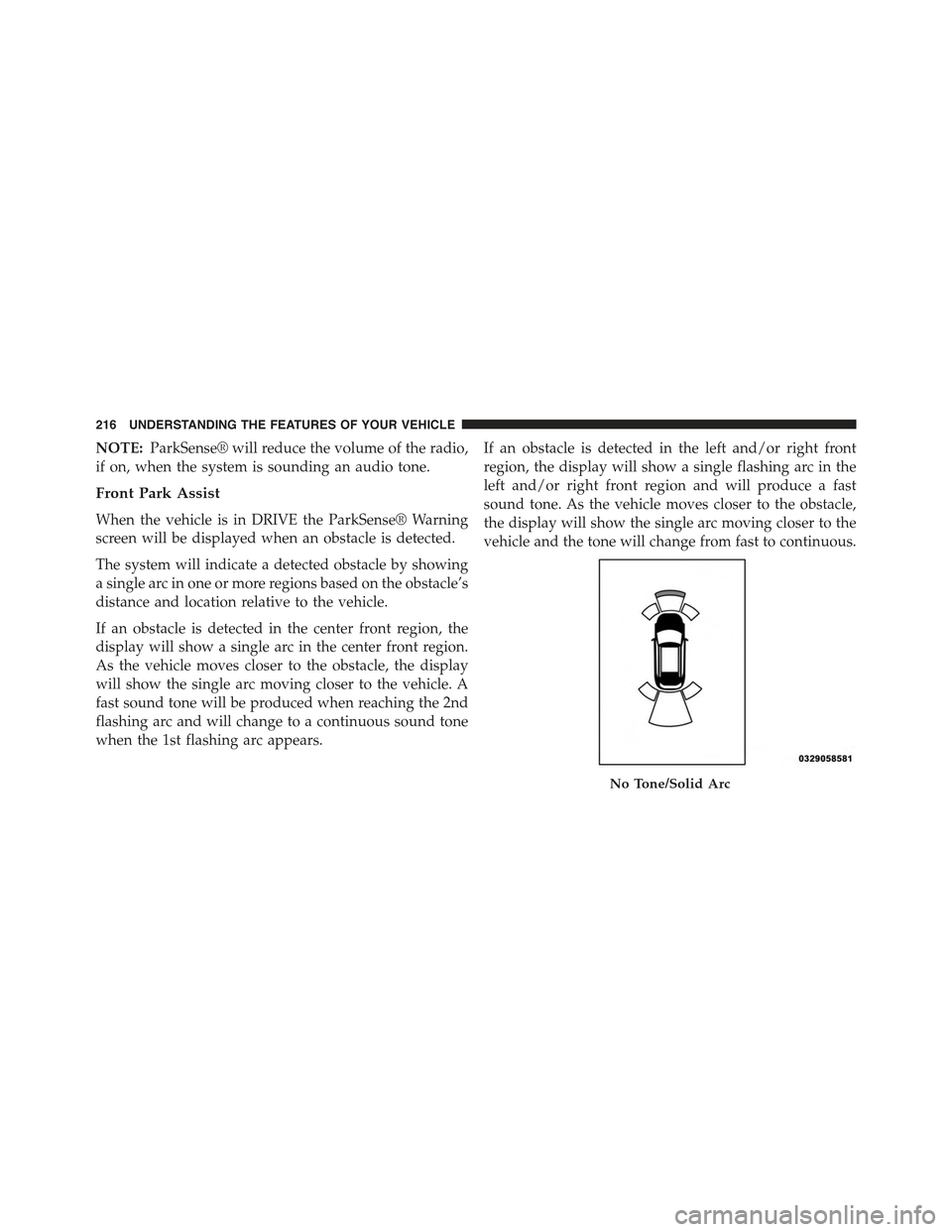
NOTE:ParkSense® will reduce the volume of the radio,
if on, when the system is sounding an audio tone.
Front Park Assist
When the vehicle is in DRIVE the ParkSense® Warning
screen will be displayed when an obstacle is detected.
The system will indicate a detected obstacle by showing
a single arc in one or more regions based on the obstacle’s
distance and location relative to the vehicle.
If an obstacle is detected in the center front region, the
display will show a single arc in the center front region.
As the vehicle moves closer to the obstacle, the display
will show the single arc moving closer to the vehicle. A
fast sound tone will be produced when reaching the 2nd
flashing arc and will change to a continuous sound tone
when the 1st flashing arc appears.
If an obstacle is detected in the left and/or right front
region, the display will show a single flashing arc in the
left and/or right front region and will produce a fast
sound tone. As the vehicle moves closer to the obstacle,
the display will show the single arc moving closer to the
vehicle and the tone will change from fast to continuous.
No Tone/Solid Arc
216 UNDERSTANDING THE FEATURES OF YOUR VEHICLE
Page 220 of 574
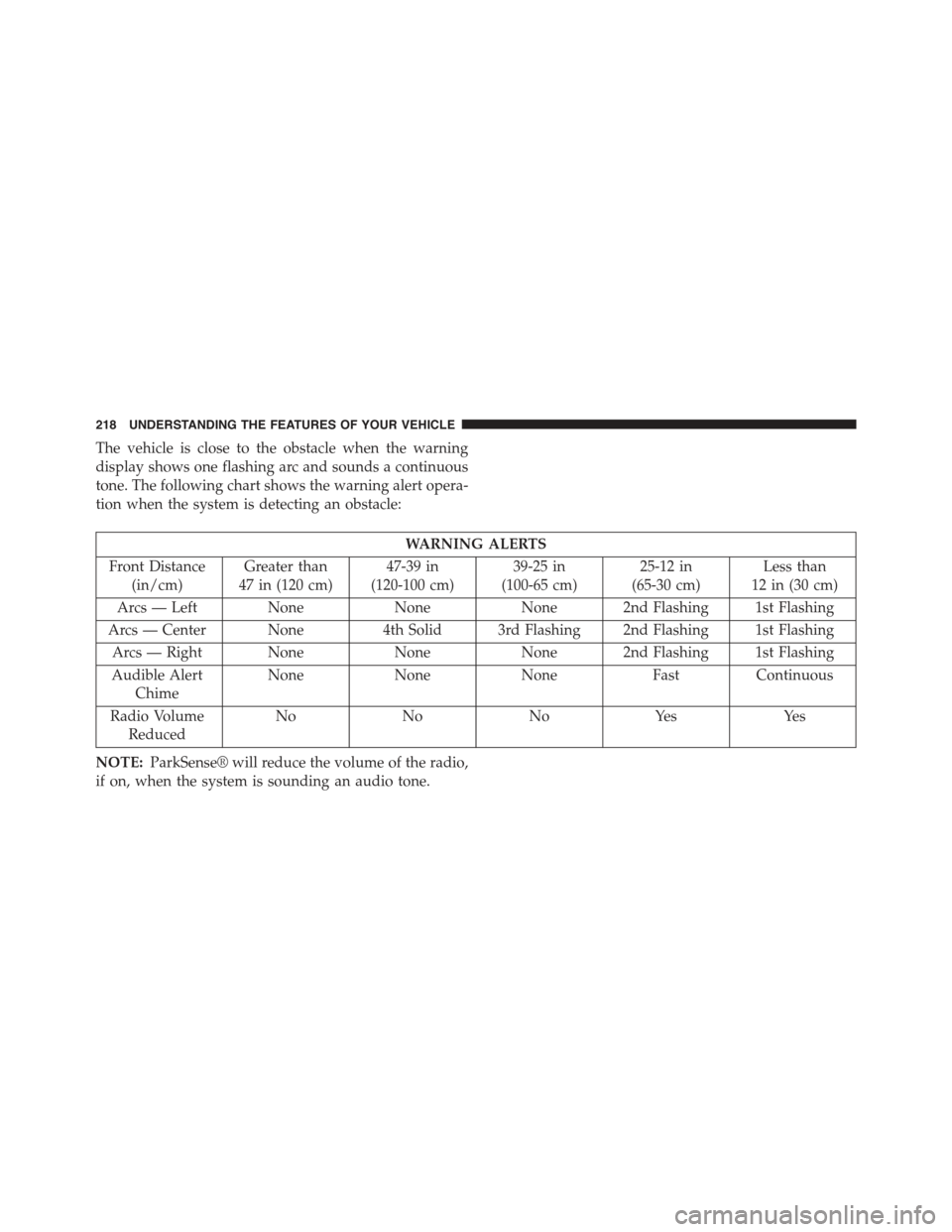
The vehicle is close to the obstacle when the warning
display shows one flashing arc and sounds a continuous
tone. The following chart shows the warning alert opera-
tion when the system is detecting an obstacle:
WARNING ALERTS
Front Distance
(in/cm)
Greater than
47 in (120 cm)
47-39 in
(120-100 cm)
39-25 in
(100-65 cm)
25-12 in
(65-30 cm)
Less than
12 in (30 cm)
Arcs — Left NoneNoneNone 2nd Flashing 1st Flashing
Arcs — Center None4th Solid 3rd Flashing 2nd Flashing 1st Flashing
Arcs — Right NoneNoneNone 2nd Flashing 1st Flashing
Audible Alert
Chime
NoneNoneNoneFastContinuous
Radio Volume
Reduced
NoNoNoYesYes
NOTE:ParkSense® will reduce the volume of the radio,
if on, when the system is sounding an audio tone.
218 UNDERSTANDING THE FEATURES OF YOUR VEHICLE
Page 261 of 574
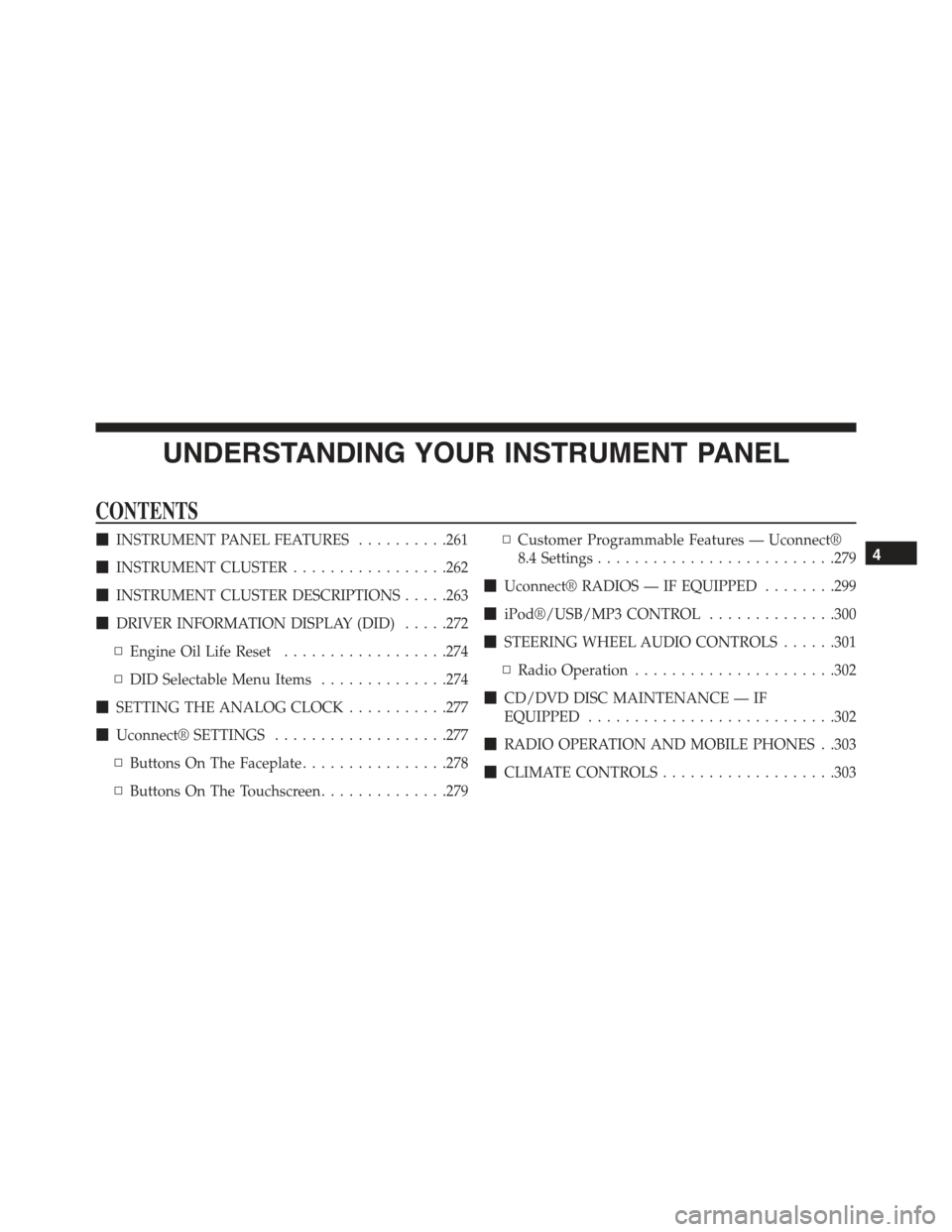
UNDERSTANDING YOUR INSTRUMENT PANEL
CONTENTS
!INSTRUMENT PANEL FEATURES..........261
!INSTRUMENT CLUSTER.................262
!INSTRUMENT CLUSTER DESCRIPTIONS.....263
!DRIVER INFORMATION DISPLAY (DID).....272
▫Engine Oil Life Reset..................274
▫DID Selectable Menu Items..............274
!SETTING THE ANALOG CLOCK...........277
!Uconnect® SETTINGS...................277
▫Buttons On The Faceplate................278
▫Buttons On The Touchscreen..............279
▫Customer Programmable Features — Uconnect®
8.4 Settings..........................279
!Uconnect® RADIOS — IF EQUIPPED........299
!iPod®/USB/MP3 CONTROL..............300
!STEERING WHEEL AUDIO CONTROLS......301
▫Radio Operation......................302
!CD/DVD DISC MAINTENANCE — IF
EQUIPPED...........................302
!RADIO OPERATION AND MOBILE PHONES . .303
!CLIMATE CONTROLS...................303
4
Page 274 of 574
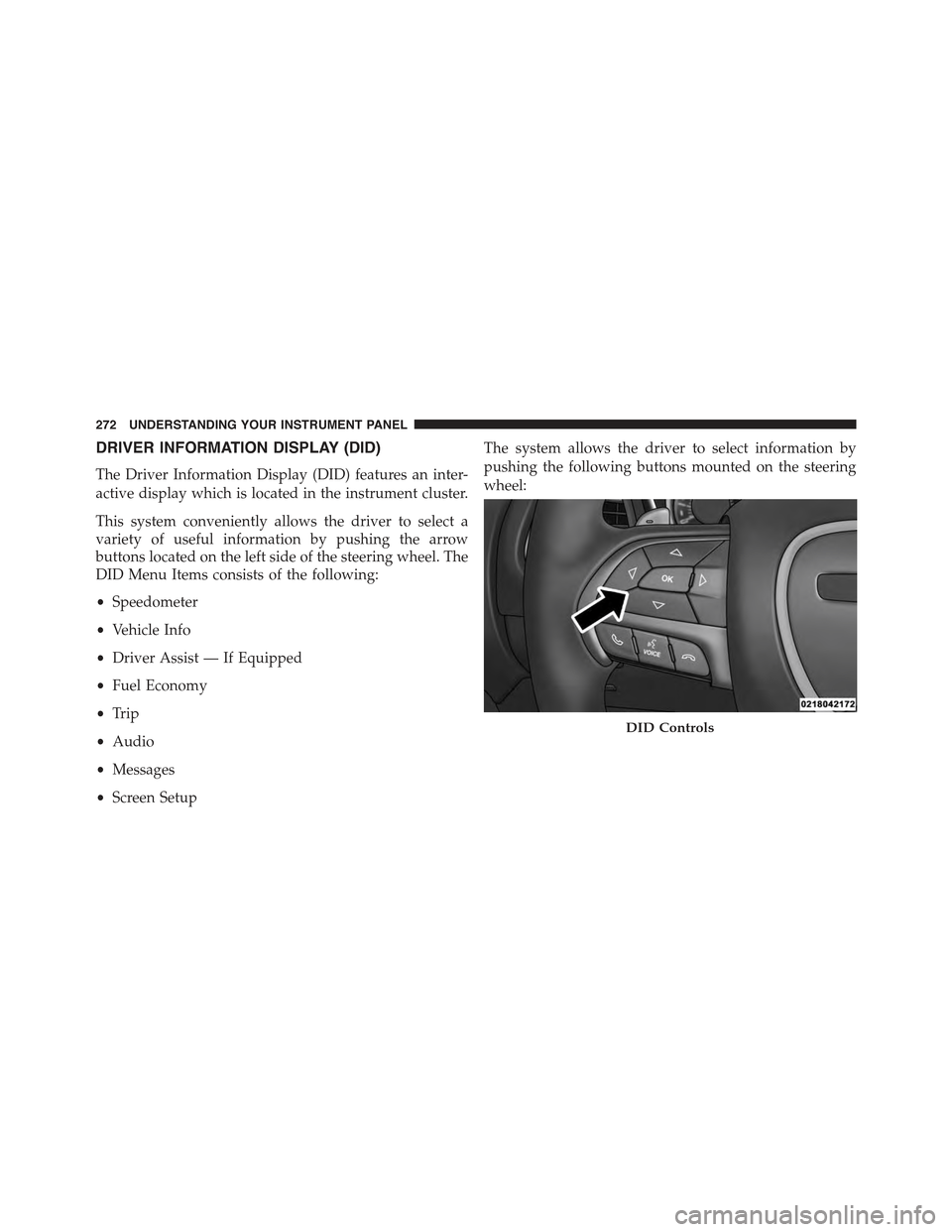
DRIVER INFORMATION DISPLAY (DID)
The Driver Information Display (DID) features an inter-
active display which is located in the instrument cluster.
This system conveniently allows the driver to select a
variety of useful information by pushing the arrow
buttons located on the left side of the steering wheel. The
DID Menu Items consists of the following:
•Speedometer
•Vehicle Info
•Driver Assist — If Equipped
•Fuel Economy
•Trip
•Audio
•Messages
•Screen Setup
The system allows the driver to select information by
pushing the following buttons mounted on the steering
wheel:
DID Controls
272 UNDERSTANDING YOUR INSTRUMENT PANEL
Page 278 of 574
Trip Info
Push and release the UP or DOWN arrow button until
the Trip Menu item is highlighted in the DID (Toggle left
or right to select Trip A or Trip B). The Trip information
will display the following:
•Distance
•Average Fuel Economy
•Elapsed Time
Hold the OK button to reset feature information.
Audio
Push and release the UP or DOWN arrow button until
the Audio Menu displays in the DID.
Stored Messages
Push and release the UP or DOWN arrow button until
the Messages Menu item is highlighted in the DID. This
feature shows the number of stored warning messages.
Pushing the RIGHT arrow button will allow you to see
what the stored messages are.
Screen Setup
Push and release the UP or DOWN arrow button until
the Screen Setup Menu displays in the DID. Push and
release the OK button to enter the sub-menus. The Screen
Setup feature allows you to change what information is
displayed in the instrument cluster as well as the location
that information is displayed.
276 UNDERSTANDING YOUR INSTRUMENT PANEL
Page 281 of 574
Buttons On The Touchscreen
Buttons on the touchscreen are accessible on the
Uconnect® Touchscreen.
CAUTION!
Do not attach any object to touchscreen, doing so can
result in damage to the touchscreen.
Customer Programmable Features — Uconnect®
8.4 Settings
Press the “Apps,” or the “Controls,” button on the
touchscreen, then press the “Settings” button on the
touchscreen to display the menu setting screen. In this
mode the Uconnect® system allows you to access pro-
grammable features that may be equipped such as Dis-
play, Units, Voice, Clock, Safety & Driving Assistance,
Lights, Doors & Locks, Auto-On Comfort & Remote Start,
Engine Off Options, Audio, Phone/Bluetooth®,
SiriusXM Setup, Restore Settings, Clear Personal Data
and System Information.
NOTE:
•Only one touchscreen area may be selected at a time.
•Depending on the vehicles options, feature settings
may vary.
When making a selection, press the button on the touch-
screen to enter the desired mode. Once in the desired
mode, press and release the preferred setting until a
check-mark appears next to the setting, showing that
setting has been selected. Once the setting is complete,
either press the Back Arrow button on the touchscreen to
return to the previous menu, or press the “X” button on
4
UNDERSTANDING YOUR INSTRUMENT PANEL 279