rear view mirror CHRYSLER 300 2018 User Guide
[x] Cancel search | Manufacturer: CHRYSLER, Model Year: 2018, Model line: 300, Model: CHRYSLER 300 2018Pages: 492, PDF Size: 6.67 MB
Page 321 of 492
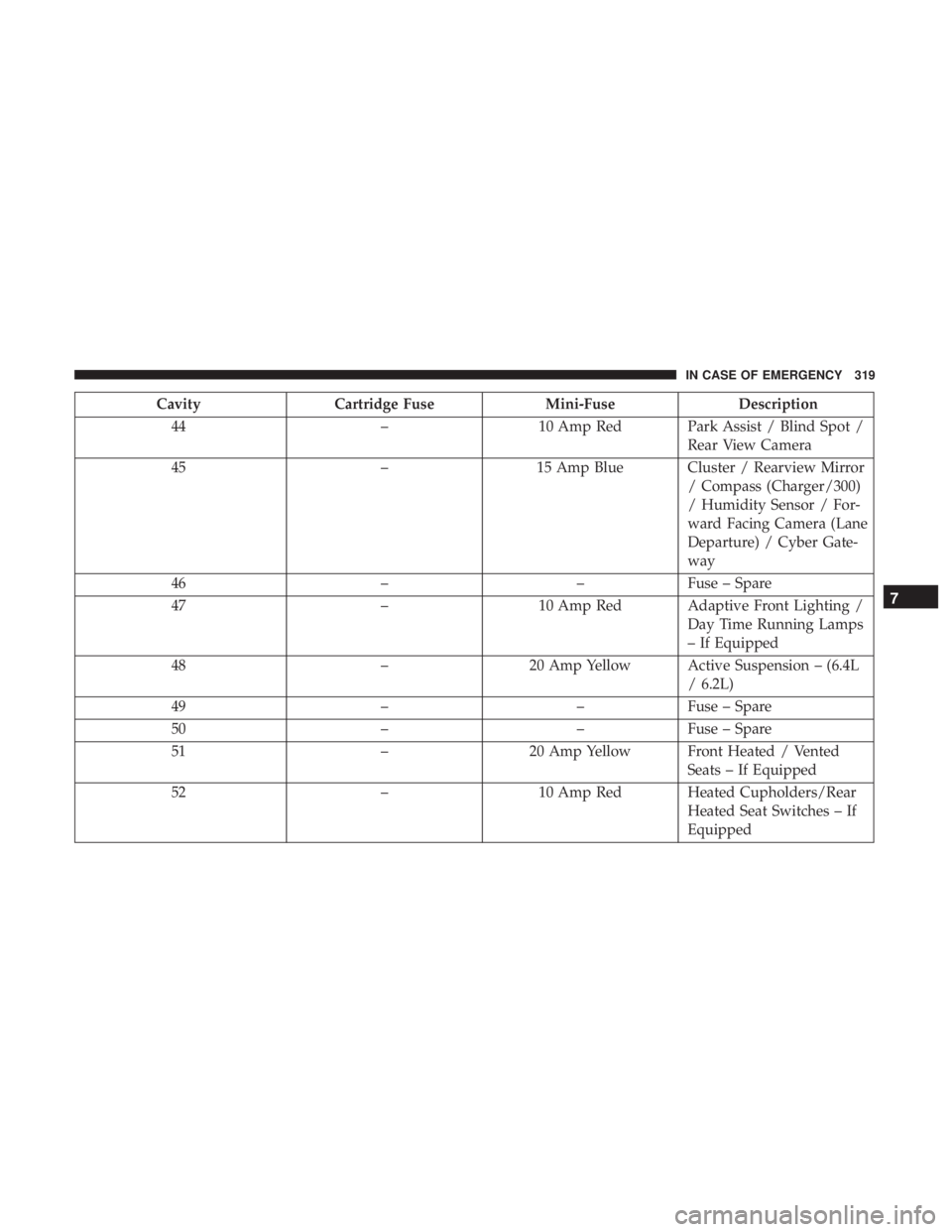
CavityCartridge Fuse Mini-FuseDescription
44 –10 Amp Red Park Assist / Blind Spot /
Rear View Camera
45 –15 Amp Blue Cluster / Rearview Mirror
/ Compass (Charger/300)
/ Humidity Sensor / For-
ward Facing Camera (Lane
Departure) / Cyber Gate-
way
46 ––Fuse – Spare
47 –10 Amp Red Adaptive Front Lighting /
Day Time Running Lamps
– If Equipped
48 –20 Amp Yellow Active Suspension – (6.4L
/ 6.2L)
49 ––Fuse – Spare
50 ––Fuse – Spare
51 –20 Amp Yellow Front Heated / Vented
Seats – If Equipped
52 –10 Amp Red Heated Cupholders/Rear
Heated Seat Switches – If
Equipped
7
IN CASE OF EMERGENCY 319
Page 322 of 492
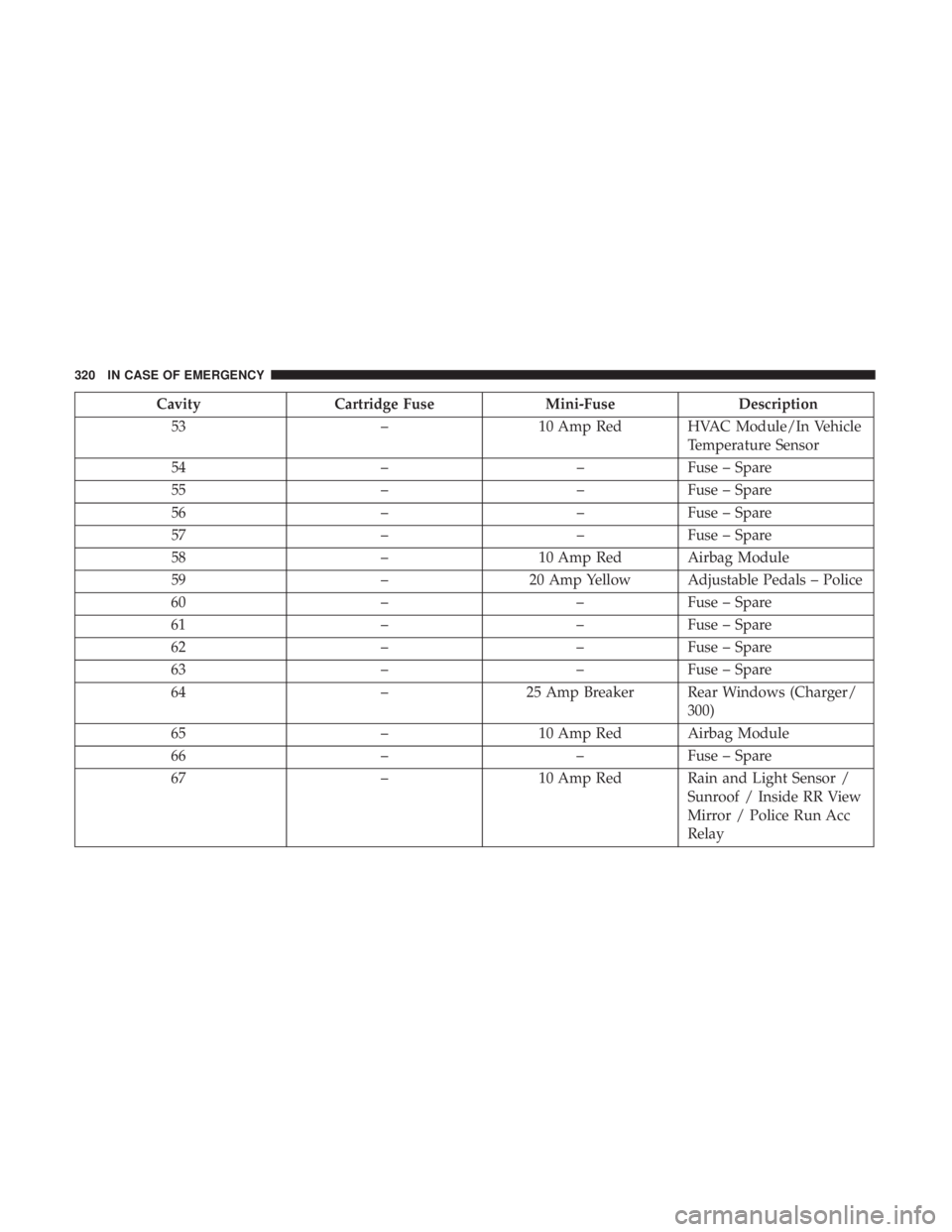
CavityCartridge Fuse Mini-FuseDescription
53 –10 Amp Red HVAC Module/In Vehicle
Temperature Sensor
54 ––Fuse – Spare
55 ––Fuse – Spare
56 ––Fuse – Spare
57 ––Fuse – Spare
58 –10 Amp Red Airbag Module
59 –20 Amp Yellow Adjustable Pedals – Police
60 ––Fuse – Spare
61 ––Fuse – Spare
62 ––Fuse – Spare
63 ––Fuse – Spare
64 –25 Amp Breaker Rear Windows (Charger/
300)
65 –10 Amp Red Airbag Module
66 ––Fuse – Spare
67 –10 Amp Red Rain and Light Sensor /
Sunroof / Inside RR View
Mirror / Police Run Acc
Relay
320 IN CASE OF EMERGENCY
Page 401 of 492
Cleaning Plastic Instrument Cluster Lenses
The lenses in front of the instruments in this vehicle are
molded in clear plastic. When cleaning the lenses, care
must be taken to avoid scratching the plastic.
1. Clean with a wet soft cloth. A mild soap solution may beused, but do not use high alcohol content or abrasive
cleaners. If soap is used, wipe clean with a clean damp
cloth.
2. Dry with a soft cloth.
Leather Parts
Mopar Total Clean is specifically recommended for leather
upholstery.
Your leather upholstery can be best preserved by regular
cleaning with a damp soft cloth. Small particles of dirt can
act as an abrasive and damage the leather upholstery and
should be removed promptly with a damp cloth. Stubborn
soils can be removed easily with a soft cloth and Mopar
Total Clean. Care should be taken to avoid soaking your
leather upholstery with any liquid. Please do not use
polishes, oils, cleaning fluids, solvents, detergents, or
ammonia-based cleaners to clean your leather upholstery.
Application of a leather conditioner is not required to
maintain the original condition. NOTE:
If equipped with light colored leather, it tends to
show any foreign material, dirt, and fabric dye transfer
more so than darker colors. The leather is designed for easy
cleaning, and FCA recommends Mopar total care leather
cleaner applied on a cloth to clean the leather seats as
needed.
CAUTION!
Do not use Alcohol and Alcohol-based and/or Ketone
based cleaning products to clean leather seats, as
damage to the seat may result.
Glass Surfaces
All glass surfaces should be cleaned on a regular basis with
Mopar Glass Cleaner, or any commercial household-type
glass cleaner. Never use an abrasive type cleaner. Use
caution when cleaning the inside rear window equipped
with electric defrosters or windows equipped with radio
antennas. Do not use scrapers or other sharp instruments
that may scratch the elements.
When cleaning the rear view mirror, spray cleaner on the
towel or cloth that you are using. Do not spray cleaner
directly on the mirror.
8
SERVICING AND MAINTENANCE 399
Page 434 of 492
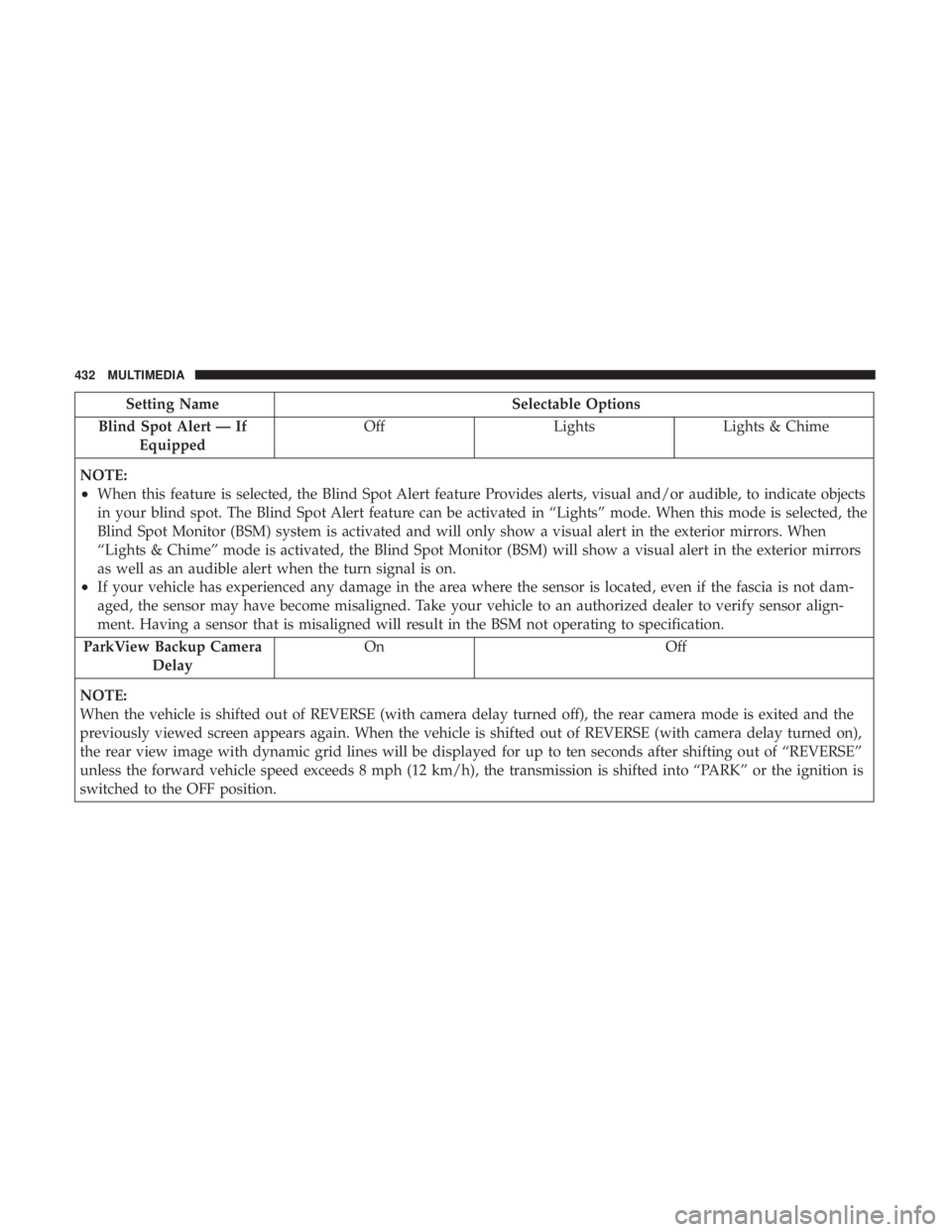
Setting NameSelectable Options
Blind Spot Alert — If Equipped Off
LightsLights & Chime
NOTE:
•When this feature is selected, the Blind Spot Alert feature Provides alerts, visual and/or audible, to indicate objects
in your blind spot. The Blind Spot Alert feature can be activated in “Lights” mode. When this mode is selected, the
Blind Spot Monitor (BSM) system is activated and will only show a visual alert in the exterior mirrors. When
“Lights & Chime” mode is activated, the Blind Spot Monitor (BSM) will show a visual alert in the exterior mirrors
as well as an audible alert when the turn signal is on.
•If your vehicle has experienced any damage in the area where the sensor is located, even if the fascia is not dam-
aged, the sensor may have become misaligned. Take your vehicle to an authorized dealer to verify sensor align-
ment. Having a sensor that is misaligned will result in the BSM not operating to specification.
ParkView Backup Camera Delay On Off
NOTE:
When the vehicle is shifted out of REVERSE (with camera delay turned off), the rear camera mode is exited and the
previously viewed screen appears again. When the vehicle is shifted out of REVERSE (with camera delay turned on),
the rear view image with dynamic grid lines will be displayed for up to ten seconds after shifting out of “REVERSE”
unless the forward vehicle speed exceeds 8 mph (12 km/h), the transmission is shifted into “PARK” or the ignition is
switched to the OFF position.
432 MULTIMEDIA
Page 435 of 492
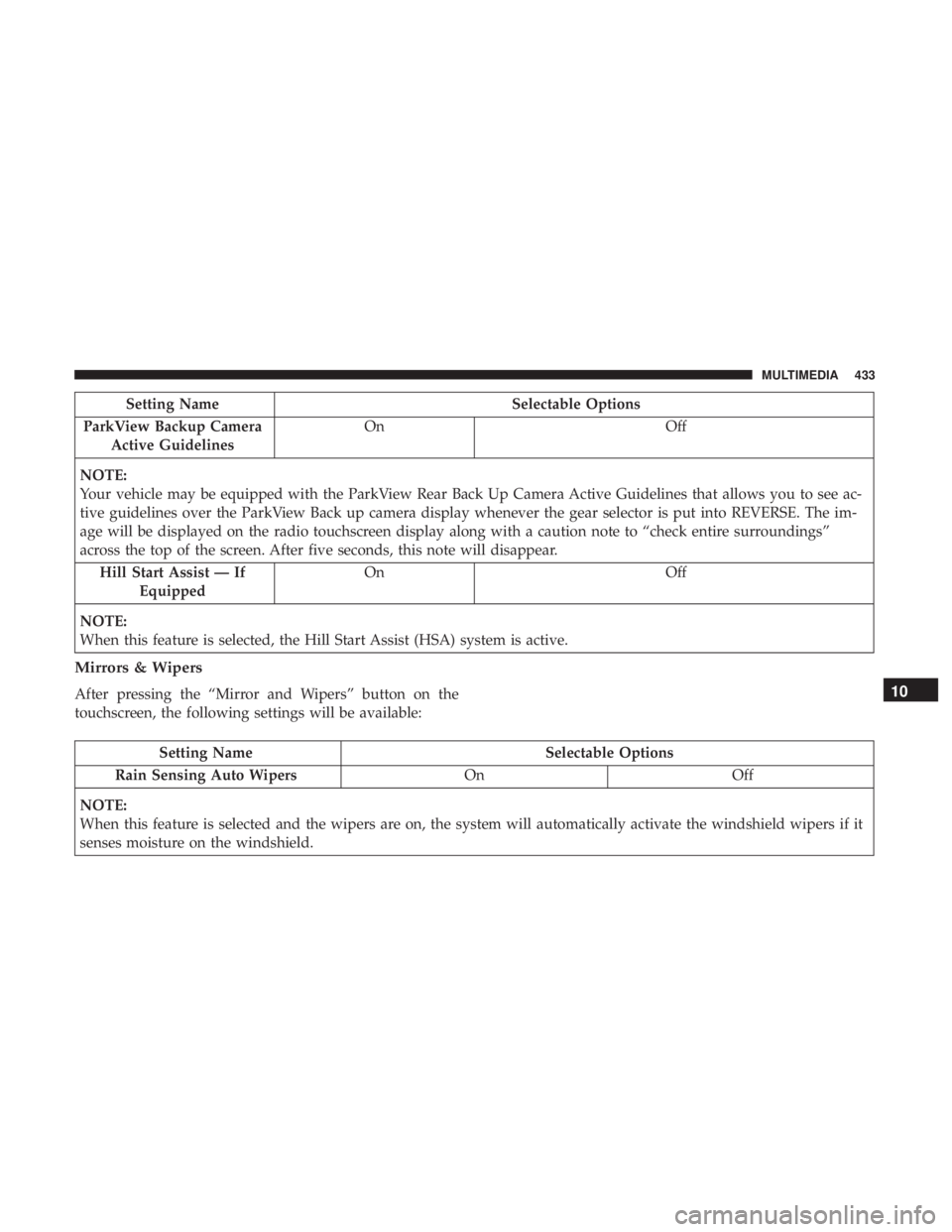
Setting NameSelectable Options
ParkView Backup Camera Active Guidelines On
Off
NOTE:
Your vehicle may be equipped with the ParkView Rear Back Up Camera Active Guidelines that allows you to see ac-
tive guidelines over the ParkView Back up camera display whenever the gear selector is put into REVERSE. The im-
age will be displayed on the radio touchscreen display along with a caution note to “check entire surroundings”
across the top of the screen. After five seconds, this note will disappear. Hill Start Assist — If Equipped On
Off
NOTE:
When this feature is selected, the Hill Start Assist (HSA) system is active.
Mirrors & Wipers
After pressing the “Mirror and Wipers” button on the
touchscreen, the following settings will be available:
Setting Name Selectable Options
Rain Sensing Auto Wipers OnOff
NOTE:
When this feature is selected and the wipers are on, the system will automatically activate the windshield wipers if it
senses moisture on the windshield.
10
MULTIMEDIA 433
Page 452 of 492
NOTE:If you see the NAV icon on the bottom bar, or in the
Apps menus, of your touchscreen, you have the Uconnect
4C NAV system. If not, you have a Uconnect 4C system.
Get Started
All you need to control your Uconnect system with your
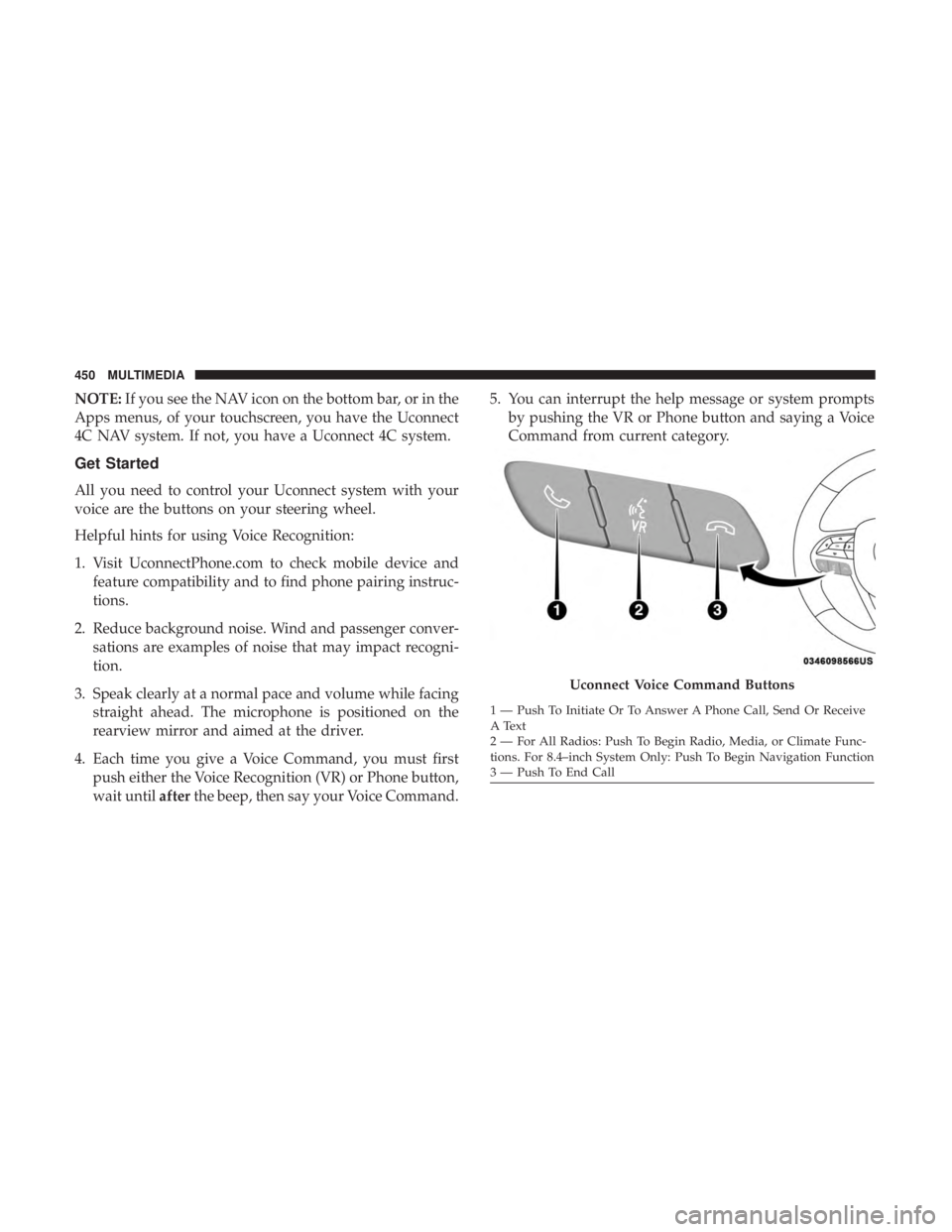
voice are the buttons on your steering wheel.
Helpful hints for using Voice Recognition:
1. Visit UconnectPhone.com to check mobile device and feature compatibility and to find phone pairing instruc-
tions.
2. Reduce background noise. Wind and passenger conver- sations are examples of noise that may impact recogni-
tion.
3. Speak clearly at a normal pace and volume while facing straight ahead. The microphone is positioned on the
rearview mirror and aimed at the driver.
4. Each time you give a Voice Command, you must first push either the Voice Recognition (VR) or Phone button,
wait until afterthe beep, then say your Voice Command. 5. You can interrupt the help message or system prompts
by pushing the VR or Phone button and saying a Voice
Command from current category.
Uconnect Voice Command Buttons
1 — Push To Initiate Or To Answer A Phone Call, Send Or Receive
A Text
2 — For All Radios: Push To Begin Radio, Media, or Climate Func-
tions. For 8.4–inch System Only: Push To Begin Navigation Function
3 — Push To End Call
450 MULTIMEDIA
Page 480 of 492
Headlights.............................. .306
Automatic ..............................64
Cleaning .............................. .396
Delay ..................................65
High Beam/Low Beam Select Switch ...........63
Lights On Reminder .......................66
On With Wipers ..........................65
Passing ................................64
Switch .................................62
Time Delay ..............................65
Washers .............................. .348
Head Restraints ......................... .51, 52
Head Rests ............................ .51, 52
Heated Mirrors .............................61
Heater, Engine Block ....................... .221
High Beam/Low Beam Select (Dimmer) Switch ......63
Hill Start Assist ........................... .147
Hitches Trailer Towing .......................... .285
Holder, Coin ............................. .103
HomeLink (Garage Door Opener) ................96
Hood Prop ................................90
Hood Release ..............................90 Ignition
..................................24
Switch .................................24
Immobilizer (Sentry Key) ......................30
Inside Rearview Mirror ....................57, 298
Instrument Cluster ......................114,115
Descriptions ........................... .135
Display ................................119
Instrument Cluster Display Information Display .......................116
Instrument Panel Lens Cleaning ................399
Interior Appearance Care .....................398
Interior Lights ..............................67
Intermittent Wipers (Delay Wipers) ...............72
Introduction ................................4
Jacking Instructions ........................ .324
Jack Location ............................ .321
Jack Operation ........................ .324, 371
Jump Starting ......................... .328, 329
478 INDEX
Page 482 of 492
Map Reading............................68
Park .............................. .65, 135
Passing ................................64
Reading ................................68
Seat Belt Reminder ...................... .128
Security Alarm ......................... .129
Service ............................... .304
Tire Pressure Monitoring (TPMS) ..........131, 160
Traction Control ........................ .146
Turn Signals ....................63, 67, 135, 212
Vanity Mirror ............................61
Warning Instrument Cluster Descriptions . . . .128, 135
Loading Vehicle ....................... .281, 282
Capacities ............................. .282
Tires................................. .377
Load Leveling System ........................96
Load Shed Battery Saver On ...................123
Load Shed Electrical Load Reduction .............123
Load Shed Intelligent Battery Sensor .............123
Locks Automatic Door ..........................39
Auto Unlock .............................39
Child Protection ..........................39
Power Door .............................34
Low Tire Pressure System .....................160 Lubrication, Body
......................... .357
Lug Nuts ............................... .404
Maintenance Free Battery .....................349
Maintenance Schedule ....................341, 342
Malfunction Indicator Light (Check Engine) . . . .129, 137
Manual Park Release ....................... .332
Manual, Service ........................... .470
Media Hub .............................. .447
Memory Feature (Memory Seats) ................41
Memory Seat ..............................41
Memory Seats And Radio .....................41
Methanol ............................... .407
Mirrors ..................................57
Electric Powered ..........................59
Electric Remote ...........................59
Heated .................................61
Outside ................................
58
Rearview ........................... .57, 298
Vanity .................................61
Modifications/Alterations, Vehicle ................6
Monitor, Tire Pressure System ..................160
Mopar Parts ............................. .469
480 INDEX
Page 483 of 492
MP3 Control............................. .447
Multi-Function Control Lever ...................63
New Vehicle Break-In Period ..................221
Occupant Restraints ........................ .166
Octane Rating, Gasoline (Fuel) ..............405, 413
Oil Change Indicator ........................118
Reset .................................118
Oil, Engine ........................... .351, 413
Capacity .............................. .412
Change Interval ........................ .351
Checking ............................. .348
Dipstick .............................. .348
Disposal .............................. .353
Filter ............................. .353, 413
Filter Disposal .......................... .353
Identification Logo ...................... .351
Materials Added To ...................... .353
Pressure Warning Light ....................128
Recommendation .....................351, 412
Synthetic ............................. .352
Viscosity .......................... .352, 412
Oil Filter, Change ......................... .353
Oil Filter, Selection ......................... .353Oil Pressure Light
......................... .128
Onboard Diagnostic System ...................136
Operating Precautions ...................... .136
Operator Manual (Owner’s Manual) ...............4
Outside Rearview Mirrors .....................58
Overheating, Engine ....................... .331
Owner’s Manual (Operator Manual) ...........4,470
Paddle Shifters ........................... .232
Paddle Shift Mode ......................... .232
Paint Care ............................... .396
Panic Alarm ...............................20
Parking Brake ............................ .222
ParkSense System, Rear ..................... .260
Passive Entry ..............................
35
Pets ................................... .208
Placard, Tire And Loading Information ...........377
Power Brakes ............................... .403
Deck Lid Release .........................91
Distribution Center (Fuses) ..................315
Door Locks ..............................34
Mirrors ................................59
Outlet (Auxiliary Electrical Outlet) ............109
Seats ..................................41
12
INDEX 481