warning CHRYSLER 300 2020 Owner's Manual
[x] Cancel search | Manufacturer: CHRYSLER, Model Year: 2020, Model line: 300, Model: CHRYSLER 300 2020Pages: 328, PDF Size: 14.28 MB
Page 37 of 328

GETTING TO KNOW YOUR VEHICLE35
(Continued)
FRONT VENTILATED SEATS — IF
E
QUIPPED
Located in the seat cushion and seat back are
fans that draw the air from the passenger
compartment and move air through fine
perforations in the seat cover to help keep the
driver and front passenger cooler in higher
ambient temperatures. The fans operate at
two speeds, HI and LO.
The front ventilated seats control buttons are
located within the Uconnect system. You can
gain access to the control buttons through the
climate screen or the controls screen.
Press the ventilated seat button once to
choose HI.
Press the ventilated seat button a second
time to choose LO.
Press the ventilated seat button a third
time to turn the ventilated seat off.
NOTE:
The engine must be running for the ventilated
seats to operate. Vehicles Equipped With Remote Start
On models that are equipped with remote start,
the ventilated seats can be programmed to
come on during a remote start.
This feature can be programmed through the
Uconnect system. Refer to “Uconnect Settings”
in “Multimedia” for further information.
HEAD RESTRAINTS
Head restraints are designed to reduce the risk
of injury by restricting head movement in the
event of a rear impact. Head restraints should
be adjusted so that the top of the head restraint
is located above the top of your ear.
NOTE:
Do not reverse the head restraints (making the
rear of the head restraint face forward) in an
attempt to gain additional clearance to the back
of your head.
REACTIVE HEAD RESTRAINTS — FRONT
S
EATS
The front driver and passenger seats are
equipped with Reactive Head Restraints (RHR).
In the event of a rear impact, the RHR will
automatically extend forward minimizing the
gap between the back of the occupant’s head
and the RHR.
The RHR will automatically return to their
normal position following a rear impact. If the
RHR do not return to their normal position, see
an authorized dealer immediately.WARNING!
All occupants, including the driver, should
not operate a vehicle or sit in a vehicle’s
seat until the head restraints are placed in
their proper positions in order to minimize
the risk of neck injury in the event of a
crash.
Head restraints should never be adjusted
while the vehicle is in motion. Driving a
vehicle with the head restraints improperly
adjusted or removed could cause serious
injury or death in the event of a collision.
WARNING! (Continued)
2
20_LX_OM_EN_USC_t.book Page 35
Page 38 of 328

36GETTING TO KNOW YOUR VEHICLE
(Continued)
To raise the head restraint, pull upward on the
head restraint. To lower the head restraint,
push the adjustment button located at the base
of the head restraint and push downward on the
head restraint.
Front Head Restraint
REAR HEAD RESTRAINTS
The center head restraint has two adjustable
positions: up or down. When the center seat is
being occupied, the head restraint should be in
the raised position. When there are no occupants
in the center seat, the head restraint can be
lowered for maximum visibility for the driver.
To raise the head restraint, pull upward on the
head restraint. To lower the head restraint,
push the adjustment button located at the base
of the head restraint and push downward on the
head restraint.
Rear Head Restraint Adjustment Button
NOTE:
The head restraint should only be removed by
qualified technicians, for service purposes
only. If the center rear head restraint requires
removal, see an authorized dealer.
The outboard head restraints are not adjust -
able.1 — Release Button
2 — Adjustment Button
WARNING!
A loose head restraint thrown forward in a
collision or hard stop could cause serious
injury or death to occupants of the vehicle.
Always securely stow removed head
restraints in a location outside the occu -
pant compartment.
ALL the head restraints MUST be rein -
stalled in the vehicle to properly protect the
occupants. Follow the re-installation
instructions above prior to operating the
vehicle or occupying a seat.
Do not place items over the top of the Reac -
tive Head Restraint, such as coats, seat
covers or portable DVD players. These
items may interfere with the operation of
the Reactive Head Restraint in the event of
a collision and could result in serious injury
or death.
WARNING! (Continued)
WARNING!
ALL the head restraints MUST be reinstalled
in the vehicle to properly protect the
occupants. Follow the re-installation
instructions above prior to operating the
vehicle or occupying a seat.
20_LX_OM_EN_USC_t.book Page 36
Page 39 of 328

GETTING TO KNOW YOUR VEHICLE37
FRONT HEAD RESTRAINT REMOVAL
To remove the head restraint, raise it up as far
as it can go. Then, push the adjustment button
and the release button at the base of each post
while pulling the head restraint up. To reinstall
the head restraint, put the head restraint posts
into the holes. Then, adjust it to the appropriate
height.
NOTE:
Do not reposition the head restraint 180 degrees
to the incorrect position in an attempt to gain
additional clearance to the back of the head.
STEERING WHEEL
MANUAL TILT/TELESCOPING STEERING
C
OLUMN — IF EQUIPPED
This feature allows you to tilt the steering
column upward or downward. It also allows you
to lengthen or shorten the steering column. The
tilt/telescoping lever is located below the
steering wheel at the end of the steering
column.
Manual Tilt/Telescoping Control Handle
To unlock the steering column, pull the lever
downward. To tilt the steering column, move the
steering wheel upward or downward as desired.
To lengthen or shorten the steering column, pull
the steering wheel outward or push it inward as
desired. To lock the steering column in position,
push the lever upward until fully engaged.
WARNING!
A loose head restraint thrown forward in a
collision or hard stop could cause serious
injury or death to occupants of the vehicle.
Always securely stow removed head
restraints in a location outside the occu
-
pant compartment.
ALL the head restraints MUST be rein -
stalled in the vehicle to properly protect the
occupants. Follow the re-installation
instructions above prior to operating the
vehicle or occupying a seat.
WARNING!
Do not adjust the steering column while
driving. Adjusting the steering column while
driving or driving with the steering column
unlocked, could cause the driver to lose
control of the vehicle. Failure to follow this
warning may result in serious injury or death.
2
20_LX_OM_EN_USC_t.book Page 37
Page 40 of 328

38GETTING TO KNOW YOUR VEHICLE
(Continued)
POWER TILT/TELESCOPING STEERING
C
OLUMN — IF EQUIPPED
This feature allows you to tilt the steering
column upward or downward. It also allows you
to lengthen or shorten the steering column. The
power tilt/telescoping steering column switch is
located below the multifunction lever on the
steering column.
Power Tilt/Telescoping Steering Switch
To tilt the steering column, move the switch up
or down as desired. To lengthen or shorten the
steering column, pull the switch toward you or
push the switch away from you as desired.
NOTE:
For vehicles equipped with Driver Memory
Settings, you can use your remote keyless entry
key fob or the memory switch on the driver's door trim panel to return the tilt/telescopic
steering column to saved positions. Refer to
“Driver Memory Settings” in this chapter.
HEATED STEERING WHEEL — IF
E
QUIPPED
The steering wheel contains a heating element
that helps warm your hands in cold weather.
The heated steering wheel has only one
temperature setting. Once the heated steering
wheel has been turned on, it will stay on for an
average of 80 minutes before automatically
shutting off. This time will vary based on
environmental temperatures. The heated
steering wheel can shut off early or may not turn
on when the steering wheel is already warm.
The heated steering wheel control button is
located within the Uconnect system. You can gain access to the control button through the
climate screen or the controls screen.
Press the heated steering wheel button
once to turn the heating element on.
Press the heated steering wheel button a
second time to turn the heating element off.
NOTE:
The engine must be running for the heated
steering wheel to operate.
Vehicles Equipped With Remote Start
On models that are equipped with remote start,
the heated steering wheel can be programmed
to come on during a remote start through the
Uconnect system. Refer to “Uconnect Settings”
in “Multimedia” for further information.
WARNING!
Do not adjust the steering column while
driving. Adjusting the steering column while
driving or driving with the steering column
unlocked, could cause the driver to lose
control of the vehicle. Failure to follow this
warning may result in serious injury or death.
WARNING!
Persons who are unable to feel pain to the
skin because of advanced age, chronic
illness, diabetes, spinal cord injury, medica -
tion, alcohol use, exhaustion, or other phys -
ical conditions must exercise care when
using the steering wheel heater. It may
cause burns even at low temperatures,
especially if used for long periods.
20_LX_OM_EN_USC_t.book Page 38
Page 41 of 328

GETTING TO KNOW YOUR VEHICLE39
MIRRORS
AUTOMATIC DIMMING MIRROR — IF
E
QUIPPED
The mirror head can be adjusted up, down, left,
and right for various drivers. The mirror should
be adjusted to center on the view through the
rear window.
This mirror automatically adjusts for headlight
glare from vehicles behind you.
NOTE:
The Automatic Dimming feature is disabled
when the vehicle is in REVERSE to improve rear
view viewing.
The Automatic Dimming feature can be turned
on or off through the touchscreen.
Automatic Dimming Mirror
Refer to “Uconnect Settings” in “Multimedia”
for further information.
OUTSIDE MIRRORS
To receive maximum benefit, adjust the outside
mirror(s) to center on the adjacent lane of traffic
and a slight overlap of the view obtained from
the inside mirror. NOTE:
The passenger side convex outside mirror will
give a much wider view to the rear, and espe
-
cially of the lane next to your vehicle.
DRIVER'S OUTSIDE AUTOMATIC
D
IMMING MIRROR — IF EQUIPPED
The driver’s outside mirror will automatically
adjust for glare from vehicles behind you. This
feature is controlled by the inside automatic
dimming mirror and will automatically adjust for
headlight glare when the inside mirror adjusts.
Do not place anything on the steering wheel
that insulates against heat, such as a
blanket or steering wheel covers of any type
and material. This may cause the steering
wheel heater to overheat.
WARNING! (Continued)
CAUTION!
To avoid damage to the mirror during
cleaning, never spray any cleaning solution
directly onto the mirror. Apply the solution
onto a clean cloth and wipe the mirror clean.
WARNING!
Vehicles and other objects seen in an outside
convex mirror will look smaller and farther
away than they really are. Relying too much
on side convex mirrors could cause you to
collide with another vehicle or other object.
Use your inside mirror when judging the size
or distance of a vehicle seen in a side convex
mirror.
2
20_LX_OM_EN_USC_t.book Page 39
Page 42 of 328

40GETTING TO KNOW YOUR VEHICLE
OUTSIDE MIRRORS WITH TURN SIGNAL
A
ND APPROACH LIGHTING — IF
E
QUIPPED
Driver and passenger outside mirrors with turn
signal and approach lighting contain four LEDs,
which are located in the upper outer corner of
each mirror.
Three of the LEDs are turn signal indicators,
which flash with the corresponding turn signal
lights in the front and rear of the vehicle.
Turning on the Hazard Warning flashers will also
activate these LEDs.
The fourth LED supplies illuminated entry
lighting, which turns on in both mirrors when
you use the remote keyless entry key fob or
open any door. This LED shines outward to
illuminate the front and rear door handles. It
also shines downward to illuminate the area in
front of the doors.
The illuminated entry lighting fades to off after
about 30 seconds or it will fade to off
immediately once the ignition is placed into the
ON/RUN position. NOTE:
The approach lighting will not function when the
gear selector is moved out of the PARK position.POWER MIRRORS
The power mirror controls are located on the
driver's door trim panel.
Power Mirror Control
The power mirror controls consist of mirror
select buttons and a four-way mirror control
switch. To adjust a mirror, push either the L
(left) or R (right) button to select the mirror that
you want to adjust. NOTE:
A light in the select button will illuminate indi
-
cating the mirror is activated and can be
adjusted.
Using the mirror control switch, push on any of
the four arrows for the direction that you want
the mirror to move.
Power mirror preselected positions can be
controlled by the optional Memory Settings
Feature. Refer to “Driver Memory Settings” in
this chapter for further information.
POWER FOLDING OUTSIDE MIRRORS —
I
F EQUIPPED
If equipped with power folding mirrors, they can
be electrically folded rearward and unfolded
into the drive position.
The switch for the power folding mirrors is
located between the power mirror switches
L (left) and R (right). Push the switch once and
the mirrors will fold in, pushing the switch a
second time will return the mirrors to the
normal driving position.
If the mirror is manually folded after electrically
cycled, a potential extra button push is required
to get the mirrors back to the drive position.
1 — Mirror Direction Control
2 — Right Mirror Selection
3 — Left Mirror Selection
20_LX_OM_EN_USC_t.book Page 40
Page 45 of 328
GETTING TO KNOW YOUR VEHICLE43
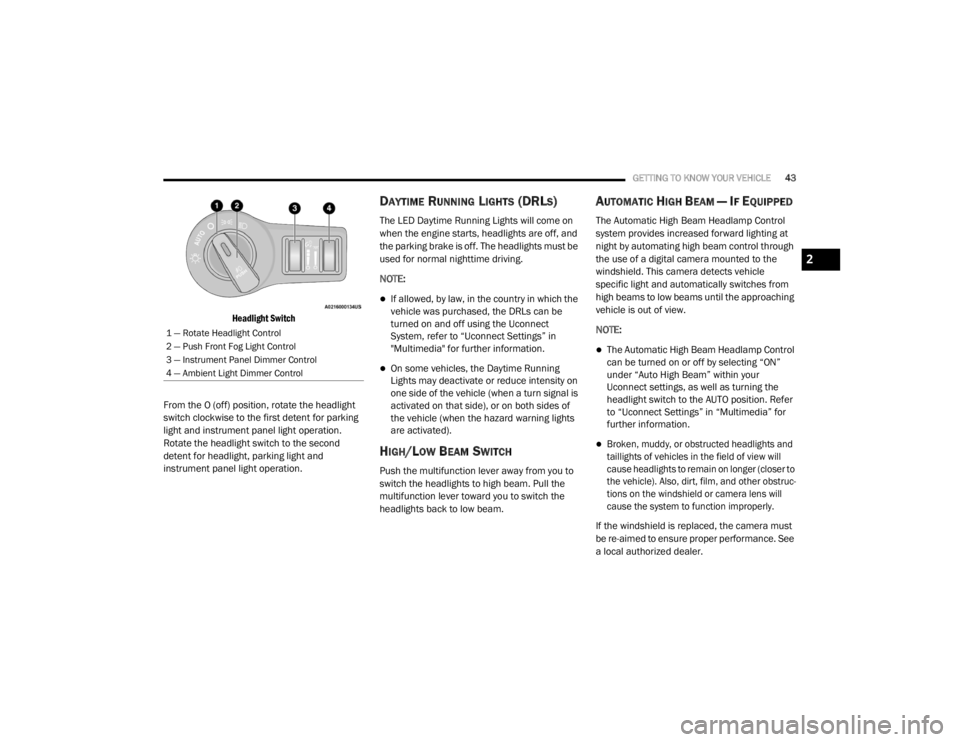
Headlight Switch
From the O (off) position, rotate the headlight
switch clockwise to the first detent for parking
light and instrument panel light operation.
Rotate the headlight switch to the second
detent for headlight, parking light and
instrument panel light operation.
DAYTIME RUNNING LIGHTS (DRLS)
The LED Daytime Running Lights will come on
when the engine starts, headlights are off, and
the parking brake is off. The headlights must be
used for normal nighttime driving.
NOTE:
If allowed, by law, in the country in which the
vehicle was purchased, the DRLs can be
turned on and off using the Uconnect
System, refer to “Uconnect Settings” in
"Multimedia" for further information.
On some vehicles, the Daytime Running
Lights may deactivate or reduce intensity on
one side of the vehicle (when a turn signal is
activated on that side), or on both sides of
the vehicle (when the hazard warning lights
are activated).
HIGH/LOW BEAM SWITCH
Push the multifunction lever away from you to
switch the headlights to high beam. Pull the
multifunction lever toward you to switch the
headlights back to low beam.
AUTOMATIC HIGH BEAM — IF EQUIPPED
The Automatic High Beam Headlamp Control
system provides increased forward lighting at
night by automating high beam control through
the use of a digital camera mounted to the
windshield. This camera detects vehicle
specific light and automatically switches from
high beams to low beams until the approaching
vehicle is out of view.
NOTE:
The Automatic High Beam Headlamp Control
can be turned on or off by selecting “ON”
under “Auto High Beam” within your
Uconnect settings, as well as turning the
headlight switch to the AUTO position. Refer
to “Uconnect Settings” in “Multimedia” for
further information.
Broken, muddy, or obstructed headlights and
taillights of vehicles in the field of view will
cause headlights to remain on longer (closer to
the vehicle). Also, dirt, film, and other obstruc -
tions on the windshield or camera lens will
cause the system to function improperly.
If the windshield is replaced, the camera must
be re-aimed to ensure proper performance. See
a local authorized dealer.
1 — Rotate Headlight Control
2 — Push Front Fog Light Control
3 — Instrument Panel Dimmer Control
4 — Ambient Light Dimmer Control
2
20_LX_OM_EN_USC_t.book Page 43
Page 51 of 328

GETTING TO KNOW YOUR VEHICLE49
Intermittent Wiper System
Use the intermittent wiper when weather
conditions make a single wiping cycle with a
variable pause between cycles desirable.
Rotate the end of the multifunction lever to the
first detent position, and then turn the end of
the lever to select the desired delay interval.
There are four delay settings, which allow you to
regulate the wipe interval from a minimum of
one cycle every second to a maximum of
approximately 18 seconds between cycles when the vehicle speed is over 10 mph
(16 km/h). The delay intervals will double in
duration when the vehicle speed is 10 mph
(16 km/h) or less.
Windshield Washers
To use the washer, push the multifunction lever
inward (toward the steering column) and hold it
for as long as washer spray is desired.
If you activate the washer while the windshield
wiper control is in the delay range, the wipers
will operate for two wipe cycles after releasing
the lever and then resume the intermittent
interval previously selected.
If you activate the washer while the windshield
wiper is turned off, the wipers will operate for
three wipe cycles and then turn off.
Mist Feature
Rotate the end of the lever downward to the
MIST position to activate a single wipe cycle to
clear off road mist or spray from a passing
vehicle. The wipers will continue to operate until
you release the multifunction lever.
NOTE:
The mist feature does not activate the washer
pump; therefore, no washer fluid will be sprayed
on the windshield. The wash function must be
used in order to spray the windshield with
washer fluid.
RAIN SENSING WIPERS — IF EQUIPPED
This feature senses rain or snowfall on the
windshield and automatically activates the
wipers for the driver. The feature is especially
useful for road splash or over spray from the
windshield washers of the vehicle ahead.
Rotate the end of the multifunction lever to one
of four settings to activate this feature.
The sensitivity of the system can be adjusted
with the multifunction lever. Wiper delay
position 1 is the least sensitive, and wiper delay
position 4 is the most sensitive. Setting 3
should be used for normal rain conditions.
Settings 1 and 2 can be used if the driver
In cold weather, always turn off the wiper
switch and allow the wipers to return to the
park position before turning off the engine.
If the wiper switch is left on and the wipers
freeze to the windshield, damage to the
wiper motor may occur when the vehicle is
restarted.
Always remove any buildup of snow that
prevents the windshield wiper blades from
returning to the off position. If the wind
-
shield wiper control is turned off and the
blades cannot return to the off position,
damage to the wiper motor may occur.
CAUTION! (Continued)
WARNING!
Sudden loss of visibility through the
windshield could lead to a collision. You might
not see other vehicles or other obstacles. To
avoid sudden icing of the windshield during
freezing weather, warm the windshield with
the defroster before and during windshield
washer use.
2
20_LX_OM_EN_USC_t.book Page 49
Page 59 of 328

GETTING TO KNOW YOUR VEHICLE57
Cabin Air Filter
The climate control system filters out dust and
pollen from the air. Contact an authorized
dealer to service your cabin air filter, and to
have it replaced when needed.
Operating Tips Chart
WINDOWS
POWER WINDOW CONTROLS
The window controls on the driver's door control
all the door windows.
Power Window Switches
There are single window controls on each
passenger door trim panel, which operate the
passenger door windows. The window controls will operate only when the ignition is in the ACC
or ON/RUN position.
NOTE:
For vehicles equipped with the Uconnect
system, the power window switches will remain
active for up to 10 minutes after the ignition is
placed in the OFF position. Opening either front
door will cancel this feature. The time is
programmable. Refer to “Uconnect Settings” in
“Multimedia” for further information.
WEATHER CONTROL SETTINGS
Hot Weather And
Vehicle Interior Is Very Hot Set the mode control to
, on, and blower on high. Roll down the
windows for a minute to flush out the hot air.
Adjust the controls as needed to achieve comfort.
Warm Weather Turn
on and set the mode
control to the position.
Cool Sunny Operate in position.
Cool & Humid Conditions Set the mode control to
and turn on to
keep windows clear.
Cold Weather Set the mode control to
the position. If
windshield fogging starts
to occur, move the control
to the position.
WEATHER CONTROL SETTINGS
WARNING!
Never leave children unattended in a vehicle,
and do not let children play with power
windows. Do not leave the key fob in or near
the vehicle, or in a location accessible to
children, and do not leave the ignition of a
vehicle equipped with Keyless Enter-N-Go in
the ACC or ON/RUN mode. Occupants,
particularly unattended children, can become
entrapped by the windows while operating
the power window switches. Such entrapment
may result in serious injury or death.
2
20_LX_OM_EN_USC_t.book Page 57
Page 60 of 328

58GETTING TO KNOW YOUR VEHICLE
Auto-Down Feature
The driver and, in some models, passenger
power window switches have an Auto-Down
feature. Push the window switch to the second
detent, release, and the window will go down
automatically.
To open the window part way, push the window
switch to the first detent and release it when
you want the window to stop.
To stop the window from going all the way down
during the Auto-Down operation, pull up on the
switch briefly.
Auto-Up Feature With Anti-Pinch Protection
— If Equipped
Pull window up switch to second detent for at
least a half of a second and the window will go
up automatically.
To stop the window during an Auto-Up
operation, push or pull the window switch again.
To close the window part way, pull and hold the
window switch briefly and release it when you
want the window to stop. NOTE:
If the window runs into any obstacle during
Auto-Closure, it will reverse direction and
then go back down. Remove the obstacle and
use the window switch again to close the
window.
Any impact due to rough road conditions may
trigger the Auto-Reverse function unexpect
-
edly during auto-closure. If this happens, pull
and hold the switch to close the window
manually.
Reset Auto-Up
Should the Auto-Up feature stop working, the
window may need to be reset. To reset Auto-Up:
1. Make sure the door is fully closed.
2. Pull the window switch up to close the
window completely and continue to hold the
switch up for an additional two seconds
after the window is closed. 3. Push the window switch down firmly to the
second detent to open the window
completely and continue to hold the switch
down for an additional two seconds after
the window is fully open.
Window Lockout Switch
The window lockout switch on the driver's door
trim panel allows you to disable the window
controls on the rear passenger doors and the
rear sunscreen (if equipped). To disable the
window controls and the rear sunscreen, push
and release the window lockout button (setting
it in the down position). To enable the window
controls and the rear sunscreen, push and
release the window lockout button again
(setting it in the up position).
Window Lockout Switch
WARNING!
There is no anti-pinch protection when the
window is almost closed. Be sure to clear all
objects from the window before closing.
20_LX_OM_EN_USC_t.book Page 58