ECO mode CHRYSLER 300 2020 Owners Manual
[x] Cancel search | Manufacturer: CHRYSLER, Model Year: 2020, Model line: 300, Model: CHRYSLER 300 2020Pages: 328, PDF Size: 14.28 MB
Page 6 of 328

4
EMISSIONS INSPECTION AND MAINTENANCE
PROGRAMS ...........................................................93
SAFETY
SAFETY FEATURES ...............................................95 Anti-Lock Brake System (ABS) ................... 95
Electronic Brake Control (EBC) System ...... 96
AUXILIARY DRIVING SYSTEMS ........................ 102
Blind Spot Monitoring (BSM) —
If Equipped .................................................102 Forward Collision Warning (FCW) With
Mitigation Operation - If Equipped ............106 Tire Pressure Monitoring
System (TPMS) ........................................... 109
OCCUPANT RESTRAINT SYSTEMS .................. 113
Occupant Restraint Systems Features ....113
Important Safety Precautions ...................114Seat Belt Systems ..................................... 114Supplemental Restraint Systems (SRS) ...121Child Restraints..........................................130Transporting Pets ......................................142
SAFETY TIPS ...................................................... 142
Transporting Passengers ..........................142
Exhaust Gas ...............................................143Safety Checks You Should Make Inside
The Vehicle ................................................143 Periodic Safety Checks You Should
Make Outside The Vehicle ........................ 145
STARTING AND OPERATING
STARTING THE ENGINE ....................................146
Automatic Transmission ........................... 146
Keyless Enter-N-Go — Ignition ................... 146
Normal Starting ......................................... 146
Cold Weather Operation
(Below –22°F Or −30°C) ......................... 149 If Engine Fails To Start .............................. 149
After Starting .............................................. 149
ENGINE BLOCK HEATER — IF EQUIPPED .......149
ENGINE BREAK-IN RECOMMENDATIONS .......150
PARKING BRAKE ................................................ 150
AUTOMATIC TRANSMISSION ............................ 151
Ignition Park Interlock ............................... 153Brake/Transmission Shift Interlock
System ....................................................... 153 Eight-Speed Automatic Transmission ...... 153
SPORT MODE — IF EQUIPPED .......................... 159
FUEL SAVER TECHNOLOGY 5.7L ONLY —
IF EQUIPPED ....................................................... 160
POWER STEERING .............................................160
SPEED CONTROL — IF EQUIPPED .................... 160
To Activate.................................................. 161
To Set A Desired Speed ............................ 161
To Vary The Speed Setting ....................... 161
To Accelerate For Passing ........................ 162
To Resume Speed .................................... 162
To Deactivate ............................................ 162 ADAPTIVE CRUISE CONTROL (ACC) —
IF EQUIPPED ...................................................... 163
Adaptive Cruise Control (ACC)
Operation ................................................... 164 Activating Adaptive Cruise
Control (ACC) .............................................. 165 To Activate/Deactivate.............................. 165
To Set A Desired ACC Speed..................... 166
To Cancel ................................................... 166
To Turn Off ................................................. 166To Resume ................................................. 166To Vary The ACC Speed ............................. 167
Setting The Following Distance In ACC .... 168
Overtake Aid............................................... 169
ACC Operation At Stop............................... 169Adaptive Cruise Control (ACC) Menu ........ 170
Display Warnings And Maintenance ........ 170
Precautions While Driving With ACC......... 172
General Information .................................. 174
Normal (Fixed Speed) Cruise Control
Mode .......................................................... 174
PARKSENSE FRONT AND REAR PARK ASSIST —
IF EQUIPPED ....................................................... 177
ParkSense Sensors ................................... 177
ParkSense Warning Display...................... 177
ParkSense Display..................................... 178
Enabling And Disabling ParkSense .......... 181
20_LX_OM_EN_USC_t.book Page 4
Page 7 of 328

5
Service The ParkSense Park Assist
System ........................................................ 182 Cleaning The ParkSense System ..............182
ParkSense System Usage Precautions ....182
LANESENSE — IF EQUIPPED ........................... 183
LaneSense Operation ................................183Turning LaneSense On Or Off ...................184LaneSense Warning Message ..................184
Changing LaneSense Status .....................186
PARKVIEW REAR BACK UP CAMERA ............. 186
REFUELING THE VEHICLE ................................. 188
Emergency Fuel Filler Door Release.........189
VEHICLE LOADING ............................................ 190
Vehicle Certification Label ........................ 190Gross Vehicle Weight Rating (GVWR) .......190
Gross Axle Weight Rating (GAWR) ........... 190Overloading ................................................190
Loading ......................................................190
TRAILER TOWING .............................................. 191
Common Towing Definitions .....................191Trailer Hitch Classification ........................ 193Trailer Towing Weights (Maximum Trailer
Weight Ratings) .........................................194 Trailer And Tongue Weight .......................194
Towing Requirements ................................195Towing Tips ................................................197 RECREATIONAL TOWING
(BEHIND MOTORHOME, ETC.) .......................... 198
DRIVING TIPS ...................................................... 198
Driving On Slippery Surfaces .................... 198
Driving Through Water .............................. 199
IN CASE OF EMERGENCY
HAZARD WARNING FLASHERS .......................201
ASSIST AND SOS MIRROR —
IF EQUIPPED ....................................................... 201General Information .................................. 205
BULB REPLACEMENT ........................................ 206
Replacement Bulbs ................................... 206
Replacing Exterior Bulbs ........................... 207
FUSES ..................................................................209
General Information .................................. 210Underhood Fuses ...................................... 210
Rear Interior Fuses .................................... 213
JACKING AND TIRE CHANGING ........................217
Jack Location/Spare Tire Stowage ........... 218
Preparations For Jacking .......................... 218Jacking And Changing A Tire .................... 219
Road Tire Installation ................................ 222
JUMP STARTING ................................................ 222
Preparations For Jump Start ..................... 222Jump Starting Procedure .......................... 223 REFUELING IN EMERGENCY –
IF EQUIPPED ...................................................... 224
IF YOUR ENGINE OVERHEATS ......................... 225
MANUAL PARK RELEASE ................................ 225
FREEING A STUCK VEHICLE ............................. 227
TOWING A DISABLED VEHICLE ........................ 228 All Wheel Drive (AWD) Models .................. 229Rear-Wheel Drive (RWD) Models ............. 229
ENHANCED ACCIDENT RESPONSE
SYSTEM (EARS) ................................................. 230
EVENT DATA RECORDER (EDR) ....................... 230
SERVICING AND MAINTENANCE
SCHEDULED SERVICING .................................. 231
Maintenance Plan ..................................... 232
ENGINE COMPARTMENT .................................. 236
3.6L Engine ............................................... 236
5.7L Engine ............................................... 237
Checking Oil Level .................................... 238Adding Washer Fluid ................................. 238Maintenance-Free Battery ....................... 238Pressure Washing...................................... 239
20_LX_OM_EN_USC_t.book Page 5
Page 9 of 328

7
STEERING WHEEL AUDIO CONTROLS ............ 302 Radio Operation .........................................302
Media Mode ...............................................302
AUX/USB CONTROL........................................... 302
RADIO OPERATION AND MOBILE PHONES.... 303
Regulatory And Safety Information........... 303
UCONNECT VOICE RECOGNITION
QUICK TIPS ........................................................ 304
Introducing Uconnect ................................304Get Started .................................................304
Basic Voice Commands .............................305Radio ..........................................................305Media ..........................................................305Phone .........................................................306
Voice Text Reply .........................................306
Climate .......................................................307Navigation (4C NAV) ..................................307Siri® Eyes Free — If Equipped ..................307
Do Not Disturb ..........................................308Android Auto™ — If Equipped ...................308Apple CarPlay® — If Equipped ................. 309
General Information ..................................309Additional Information ...............................310
CUSTOMER ASSISTANCE
SUGGESTIONS FOR OBTAINING SERVICE
FOR YOUR VEHICLE .......................................... 311
Prepare For The Appointment................... 311
Prepare A List............................................. 311
Be Reasonable With Requests ................. 311
IF YOU NEED ASSISTANCE ...............................311
FCA US LLC Customer Center ................... 312
FCA Canada Inc. Customer Center ........... 312
In Mexico Contact ...................................... 312
Puerto Rico And US Virgin Islands ............ 312
Customer Assistance For The Hearing Or
Speech Impaired (TDD/TTY) ..................... 312 Service Contract ....................................... 312 WARRANTY INFORMATION .............................. 313
MOPAR PARTS................................................... 313
REPORTING SAFETY DEFECTS ........................ 313
In The 50 United States And
Washington, D.C. ....................................... 313 In Canada ................................................... 313
PUBLICATION ORDER FORMS ........................ 314
20_LX_OM_EN_USC_t.book Page 7
Page 10 of 328

8
INTRODUCTION
Dear Customer,
Congratulations on the purchase of your new vehicle. Be assured that it represents precision workmanship, distinctive styling, and high quality. This
Owner's Manual has been prepared with the assistance of service and engineering specialists to acquaint you with the operation and maintenance of
your vehicle. It is supplemented by customer-oriented documents. Within this information, you will find a description of the services that FCA US LLC
offers to its customers as well as the details of the terms and conditions for maintaining its validity. Please take the time to read all of these publications
carefully before driving your vehicle for the first time. Following the instructions, recommendations, tips, and important warnings in this manual will help
assure safe and enjoyable operation of your vehicle.
This Owner’s Manual describes all versions of this vehicle. Options and equipment dedicated to specific markets or versions are not expressly indicated
in the text. Therefore, you should only consider the information which is related to the trim level, engine, and version that you have purchased. Any
content introduced throughout the Owner’s Information, that may or may not be applicable to your vehicle, will be identified with the wording “If
Equipped”. All data contained in this publication are intended to help you use your vehicle in the best possible way. FCA US LLC aims at a constant
improvement of the vehicles produced. For this reason, it reserves the right to make changes to the model described for technical and/or commercial
reasons. For further information, contact an authorized dealer.
When it comes to service, remember that the authorized dealers know your vehicle best, have factory-trained technicians and genuine MOPAR® parts,
and care about your satisfaction.
20_LX_OM_EN_USC_t.book Page 8
Page 17 of 328
GETTING TO KNOW YOUR VEHICLE15
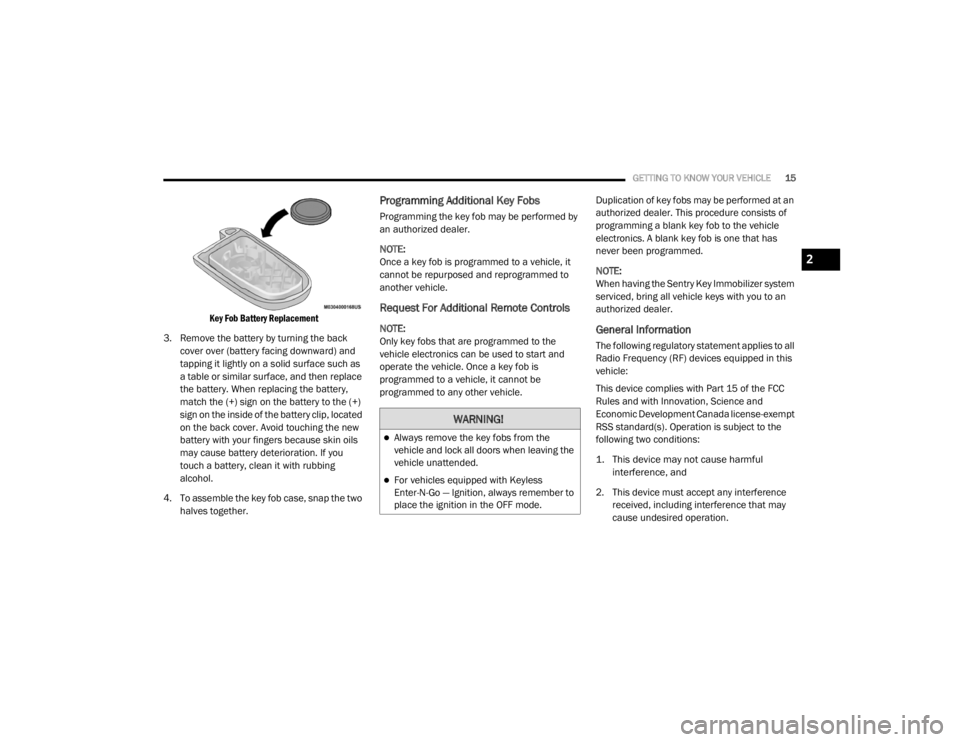
Key Fob Battery Replacement
3. Remove the battery by turning the back cover over (battery facing downward) and
tapping it lightly on a solid surface such as
a table or similar surface, and then replace
the battery. When replacing the battery,
match the (+) sign on the battery to the (+)
sign on the inside of the battery clip, located
on the back cover. Avoid touching the new
battery with your fingers because skin oils
may cause battery deterioration. If you
touch a battery, clean it with rubbing
alcohol.
4. To assemble the key fob case, snap the two halves together.
Programming Additional Key Fobs
Programming the key fob may be performed by
an authorized dealer.
NOTE:
Once a key fob is programmed to a vehicle, it
cannot be repurposed and reprogrammed to
another vehicle.
Request For Additional Remote Controls
NOTE:
Only key fobs that are programmed to the
vehicle electronics can be used to start and
operate the vehicle. Once a key fob is
programmed to a vehicle, it cannot be
programmed to any other vehicle. Duplication of key fobs may be performed at an
authorized dealer. This procedure consists of
programming a blank key fob to the vehicle
electronics. A blank key fob is one that has
never been programmed.
NOTE:
When having the Sentry Key Immobilizer system
serviced, bring all vehicle keys with you to an
authorized dealer.General Information
The following regulatory statement applies to all
Radio Frequency (RF) devices equipped in this
vehicle:
This device complies with Part 15 of the FCC
Rules and with Innovation, Science and
Economic Development Canada license-exempt
RSS standard(s). Operation is subject to the
following two conditions:
1. This device may not cause harmful
interference, and
2. This device must accept any interference received, including interference that may
cause undesired operation.
WARNING!
Always remove the key fobs from the
vehicle and lock all doors when leaving the
vehicle unattended.
For vehicles equipped with Keyless
Enter-N-Go — Ignition, always remember to
place the ignition in the OFF mode.
2
20_LX_OM_EN_USC_t.book Page 15
Page 18 of 328
16GETTING TO KNOW YOUR VEHICLE
Le présent appareil est conforme aux CNR
d`Innovation, Science and Economic
Development applicables aux appareils radio
exempts de licence. L'exploitation est autorisée
aux deux conditions suivantes:
1. l'appareil ne doit pas produire de
brouillage, et
2. l'utilisateur de l'appareil doit accepter tout brouillage radioélectrique subi, même si le
brouillage est susceptible d'en compro -
mettre le fonctionnement.
La operación de este equipo está sujeta a las
siguientes dos condiciones:
1. es posible que este equipo o dispositivo no cause interferencia perjudicial y
2. este equipo o dispositivo debe aceptar cualquier interferencia, incluyendo la que
pueda causar su operación no deseada.
NOTE:
Changes or modifications not expressly
approved by the party responsible for compli -
ance could void the user’s authority to operate
the equipment.IGNITION SWITCH
KEYLESS PUSH BUTTON IGNITION
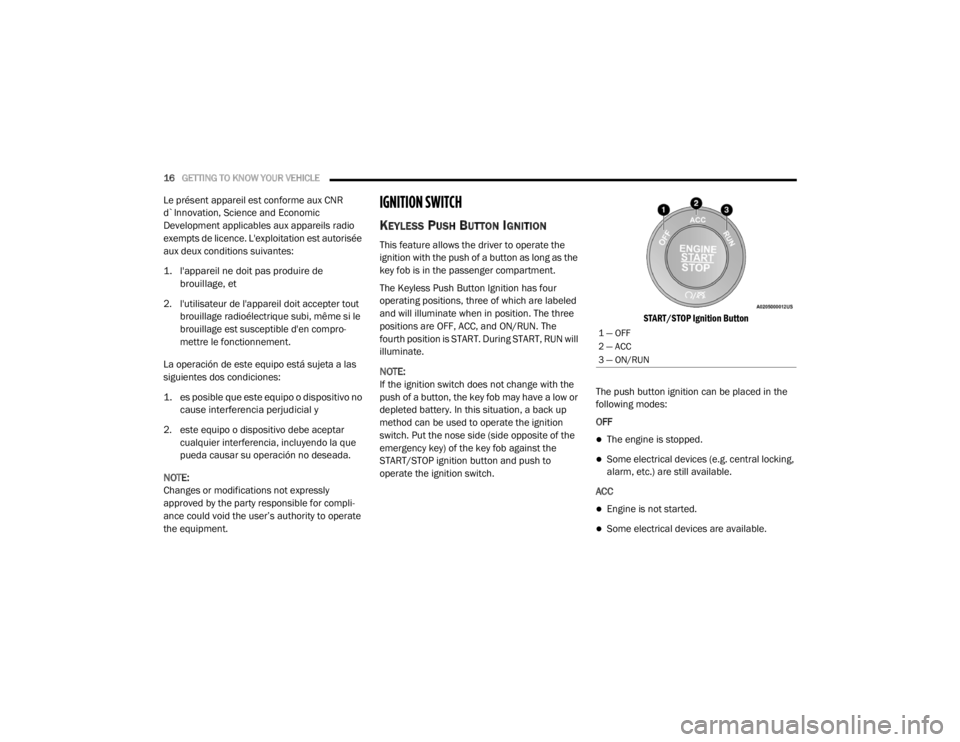
This feature allows the driver to operate the
ignition with the push of a button as long as the
key fob is in the passenger compartment.
The Keyless Push Button Ignition has four
operating positions, three of which are labeled
and will illuminate when in position. The three
positions are OFF, ACC, and ON/RUN. The
fourth position is START. During START, RUN will
illuminate.
NOTE:
If the ignition switch does not change with the
push of a button, the key fob may have a low or
depleted battery. In this situation, a back up
method can be used to operate the ignition
switch. Put the nose side (side opposite of the
emergency key) of the key fob against the
START/STOP ignition button and push to
operate the ignition switch.
START/STOP Ignition Button
The push button ignition can be placed in the
following modes:
OFF
The engine is stopped.
Some electrical devices (e.g. central locking,
alarm, etc.) are still available.
ACC
Engine is not started.
Some electrical devices are available.
1 — OFF
2 — ACC
3 — ON/RUN
20_LX_OM_EN_USC_t.book Page 16
Page 20 of 328
18GETTING TO KNOW YOUR VEHICLE
(Continued)
REMOTE START — IF EQUIPPED
HOW TO USE REMOTE START — IF
E
QUIPPED
Push remote start button on the key
fob twice within five seconds. Pushing
the remote start button a third time
shuts the engine off.
To drive the vehicle, push the unlock button,
and push the ignition to the ON/RUN position.
NOTE:
With remote start, the engine will only run for
15 minutes (timeout) unless the ignition is
placed in the ON/RUN position.
The vehicle must be started using the START/
STOP ignition button after two consecutive
timeouts.
All of the following conditions must be met
before the engine will remote start:
Gear selector in PARK
Doors closed
Hood closed
Trunk closed
Hazard switch off
Brake switch inactive (brake pedal not
pushed)
Battery at an acceptable charge level
PANIC button not pushed
System not disabled from previous remote
start event
Vehicle alarm system indicator flashing
Ignition in STOP/OFF position
Fuel level meets minimum requirement
Vehicle security alarm is not signaling an
intrusion
Malfunction indicator is not illuminated
Do not leave the key fob in or near the
vehicle, or in a location accessible to chil-
dren, and do not leave the ignition of a
vehicle equipped with Keyless Enter-N-Go
in the ON/RUN mode. A child could operate
power windows, other controls, or move the
vehicle.
Do not leave children or animals inside
parked vehicles in hot weather. Interior
heat build-up may cause serious injury or
death.
CAUTION!
An unlocked vehicle is an invitation for
thieves. Always remove key fob from the
vehicle and lock all doors when leaving the
vehicle unattended.
WARNING! (Continued)
WARNING!
Do not start or run an engine in a closed
garage or confined area. Exhaust gas
contains Carbon Monoxide (CO) which is
odorless and colorless. Carbon Monoxide is
poisonous and can cause serious injury or
death when inhaled.
20_LX_OM_EN_USC_t.book Page 18
Page 21 of 328

GETTING TO KNOW YOUR VEHICLE19
REMOTE START ABORT MESSAGE ON
T
HE INSTRUMENT CLUSTER DISPLAY —
I
F EQUIPPED
The following messages will display in the
instrument cluster display if the vehicle fails to
remote start or exits remote start prematurely:
Remote Start Aborted — Door Open
Remote Start Aborted — Hood Open
Remote Start Aborted — Fuel Low
Remote Start Aborted — Trunk Open
Remote Start Disabled — Start Vehicle To
Reset
Remote Start Aborted — Too Cold
Remote Start Aborted — Time Expired
The message will stay active until the ignition is
placed in the ON/RUN position.
TO ENTER REMOTE START MODE
Push and release the remote start button on the
key fob twice within five seconds. The vehicle
doors will lock, the parking lights will flash, and
the horn will chirp twice (if programmed). Then,
the engine will start, and the vehicle will remain
in the Remote Start mode for a 15 minute cycle.
NOTE:
If an engine fault is present or fuel level is
low, the vehicle will start and then shut down
in 10 seconds.
The park lamps will turn on and remain on
during Remote Start mode.
For security, power window and power
sunroof operation (if equipped) are disabled
when the vehicle is in the Remote Start
mode.
The engine can be started two consecutive
times with the key fob. However, the ignition
must be cycled by pushing the START/STOP
ignition button twice (or the ignition switch
must be placed in the ON/RUN position)
before you can repeat the start sequence for
a third cycle.
TO EXIT REMOTE START MODE
W
ITHOUT DRIVING THE VEHICLE
Push and release the remote start button one
time or allow the engine to run for the entire
15 minute cycle.
NOTE:
To avoid unintentional shutdowns, the system
will disable for two seconds after receiving a
valid remote start request.
TO EXIT REMOTE START MODE AND
D
RIVE THE VEHICLE
Before the end of 15 minute cycle, push and
release the unlock button on the key fob to
unlock the doors and disarm the vehicle
security alarm (if equipped). Then, prior to the
end of the 15 minute cycle, push and release
the START/STOP ignition button.
NOTE:
For vehicles not equipped with the Keyless
Enter-N-Go — Passive Entry feature, the igni -
tion switch must be in the ON/RUN position
in order to drive the vehicle.
Keep key fobs away from children. Opera -
tion of the Remote Start System, windows,
door locks or other controls could cause
serious injury or death.
WARNING! (Continued)
2
20_LX_OM_EN_USC_t.book Page 19
Page 26 of 328
24GETTING TO KNOW YOUR VEHICLE
POWER DOOR LOCKS
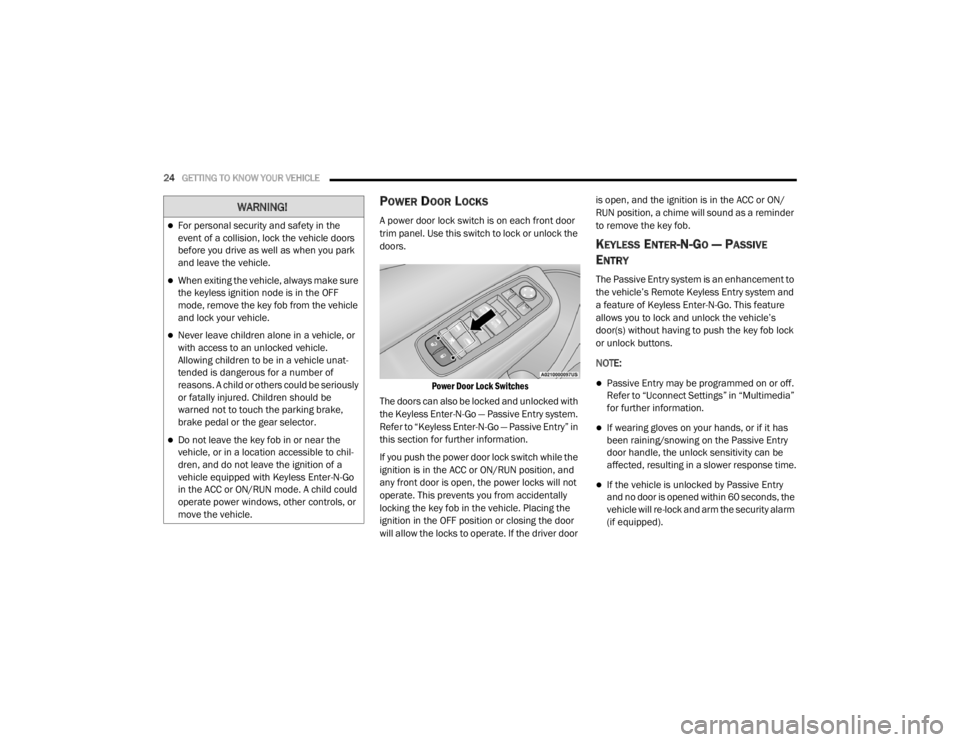
A power door lock switch is on each front door
trim panel. Use this switch to lock or unlock the
doors.
Power Door Lock Switches
The doors can also be locked and unlocked with
the Keyless Enter-N-Go — Passive Entry system.
Refer to “Keyless Enter-N-Go — Passive Entry” in
this section for further information.
If you push the power door lock switch while the
ignition is in the ACC or ON/RUN position, and
any front door is open, the power locks will not
operate. This prevents you from accidentally
locking the key fob in the vehicle. Placing the
ignition in the OFF position or closing the door
will allow the locks to operate. If the driver door is open, and the ignition is in the ACC or ON/
RUN position, a chime will sound as a reminder
to remove the key fob.
KEYLESS ENTER-N-GO — PASSIVE
E
NTRY
The Passive Entry system is an enhancement to
the vehicle’s Remote Keyless Entry system and
a feature of Keyless Enter-N-Go. This feature
allows you to lock and unlock the vehicle’s
door(s) without having to push the key fob lock
or unlock buttons.
NOTE:
Passive Entry may be programmed on or off.
Refer to “Uconnect Settings” in “Multimedia”
for further information.
If wearing gloves on your hands, or if it has
been raining/snowing on the Passive Entry
door handle, the unlock sensitivity can be
affected, resulting in a slower response time.
If the vehicle is unlocked by Passive Entry
and no door is opened within 60 seconds, the
vehicle will re-lock and arm the security alarm
(if equipped).
WARNING!
For personal security and safety in the
event of a collision, lock the vehicle doors
before you drive as well as when you park
and leave the vehicle.
When exiting the vehicle, always make sure
the keyless ignition node is in the OFF
mode, remove the key fob from the vehicle
and lock your vehicle.
Never leave children alone in a vehicle, or
with access to an unlocked vehicle.
Allowing children to be in a vehicle unat -
tended is dangerous for a number of
reasons. A child or others could be seriously
or fatally injured. Children should be
warned not to touch the parking brake,
brake pedal or the gear selector.
Do not leave the key fob in or near the
vehicle, or in a location accessible to chil-
dren, and do not leave the ignition of a
vehicle equipped with Keyless Enter-N-Go
in the ACC or ON/RUN mode. A child could
operate power windows, other controls, or
move the vehicle.
20_LX_OM_EN_USC_t.book Page 24
Page 33 of 328

GETTING TO KNOW YOUR VEHICLE31
(Continued)
NOTE:
You may experience deformation in the seat
cushion from the seat belt buckles if the seats
are left folded for an extended period of time.
This is normal and by simply opening the seats
to the open position, over time the seat cushion
will return to its normal shape.
When the seatback is folded to the upright
position, make sure it is latched by strongly
pulling on the top of the seatback above the
seat strap.POWER SEATS
On models equipped with power seats, the
switches are located on the outboard side of the
seat near the floor. Use these switches to move
the driver’s seat up, down, forward, rearward or
to recline the seatback.
Power Seat Switches
Adjusting The Seat Forward Or Rearward
The seat can be adjusted both forward and
rearward. Push the seat switch forward or
rearward. The seat will move in the direction of
the switch. Release the switch when the desired
position has been reached.
WARNING!
Be certain that the seatback is securely
locked into position. If the seatback is not
securely locked into position, the seat will
not provide the proper stability for child
seats and/or passengers. An improperly
latched seat could cause serious injury.
The cargo area in the rear of the vehicle
(with the rear seatbacks in the locked-up or
folded down position) should not be used
as a play area by children when the vehicle
is in motion. They could be seriously injured
in a collision. Children should be seated
and using the proper restraint system.
1 — Seatback Control (If Equipped)
2 — Seat Control
WARNING!
Adjusting a seat while driving may be
dangerous. Moving a seat while driving could
result in loss of control which could cause a
collision and serious injury or death.
Seats should be adjusted before fastening
the seat belts and while the vehicle is
parked. Serious injury or death could result
from a poorly adjusted seat belt.
Do not ride with the seatback reclined so
that the shoulder belt is no longer resting
against your chest. In a collision you could
slide under the seat belt, which could result
in serious injury or death.
CAUTION!
Do not place any article under a power seat
or impede its ability to move as it may cause
damage to the seat controls. Seat travel may
become limited if movement is stopped by an
obstruction in the seat's path.
WARNING! (Continued)
2
20_LX_OM_EN_USC_t.book Page 31