light CHRYSLER 300 C 2008 1.G Workshop Manual
[x] Cancel search | Manufacturer: CHRYSLER, Model Year: 2008, Model line: 300 C, Model: CHRYSLER 300 C 2008 1.GPages: 520, PDF Size: 5.43 MB
Page 178 of 520

These lights also turn on when a door is opened, or when
the unlock button on the remote keyless entry transmitter
is pressed, or when the dimmer control is turned fully
upward, past the second detent.
Sunglasses Storage
At the rear of the console, a compartment is provided for
the storage of a pair of sunglasses.
The storage compartment access is a\4push/push\4design.
Push the raised bar on the compartment door to open.
Push the raised bar to close.
GARAGE DOOR OPENER — IF EQUIPPED
HomeLink\2replaces up to three remote controls (hand
held transmitters) that operate devices such as garage
door openers, motorized gates, lighting, or home security
systems. The HomeLink\2unit operates off of your vehi-
cle’s battery.NOTE:HomeLink\2is disabled when the Vehicle Secu-
rity Alarm is active.
WARNING!
Your motorized door or gate will open and close
while you are training the Universal Transceiver. Do
not train the transceiver if people or pets are in the
path of the door or gate. Only use this transceiver
with a garage door opener that has a “stop and
reverse” feature as required by federal safety stan-
dards. This includes most garage door opener models
manufactured after 1982. Do not use a garage door
opener without these safety features. Call toll-free
1–800–355–3515 or, on the Internet at
www.HomeLink.com for safety information or
assistance.
UNDERSTANDING THE FEATURES OF YOUR VEHICLE 177
3
Page 183 of 520
Then proceed with Step 4 under “Programming
HomeLink.” earlier in this section.
Using HomeLink\5
To operate, simply press and release the programmed
HomeLink\2button. Activation will now occur for the
trained device (i.e. garage door opener, gate operator,
security system, entry door lock, home/office lighting,
etc. The hand-held transmitter of the device may also be
used at any time.
Reprogramming a Single HomeLink\5Button
To re-program a channel that has been previously
trained, follow these steps:
1. Turn the ignition switch to the ON/RUN position.
2. Press and hold the desired HomeLink\2button for 20
seconds until the EVIC display states “CHANNEL #
TRAINING.”Do not release the button.3.Without releasing the button,proceed with PRO-
GRAMMING HOMELINK Step #2 and follow all remain-
ing steps.
Security
It is advised to erase all channels before you sell or turn
in your vehicle.
To do this, press and hold the two outside buttons for 20
seconds until the EVIC message states “CHANNELS
CLEARED.” Note that all channels will be erased. Indi-
vidual channels cannot be erased.
The HomeLink\2Universal Transceiver is disabled when
the Vehicle Security Alarm is active.
182 UNDERSTANDING THE FEATURES OF YOUR VEHICLE
Page 188 of 520
Sunroof Fully Closed
Press the switch forward and release to ensure that the
sunroof is fully closed.
ELECTRICAL POWER OUTLETS
There are two 12-volt electrical outlets on this vehicle.
Both of the outlets are protected by a fuse.
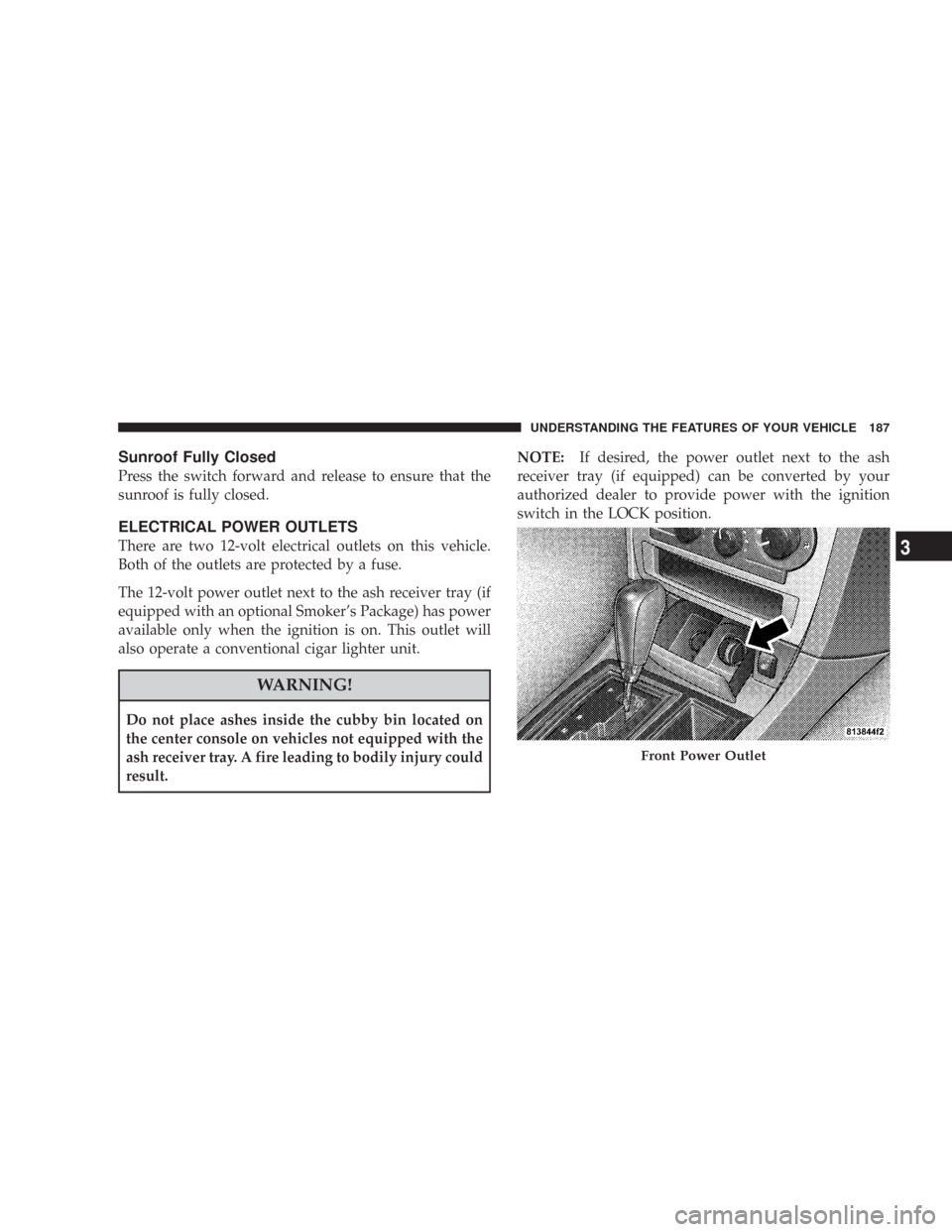
The 12-volt power outlet next to the ash receiver tray (if
equipped with an optional Smoker’s Package) has power
available only when the ignition is on. This outlet will
also operate a conventional cigar lighter unit.
WARNING!
Do not place ashes inside the cubby bin located on
the center console on vehicles not equipped with the
ash receiver tray. A fire leading to bodily injury could
result.NOTE:If desired, the power outlet next to the ash
receiver tray (if equipped) can be converted by your
authorized dealer to provide power with the ignition
switch in the LOCK position.
Front Power Outlet
UNDERSTANDING THE FEATURES OF YOUR VEHICLE 187
3
Page 189 of 520
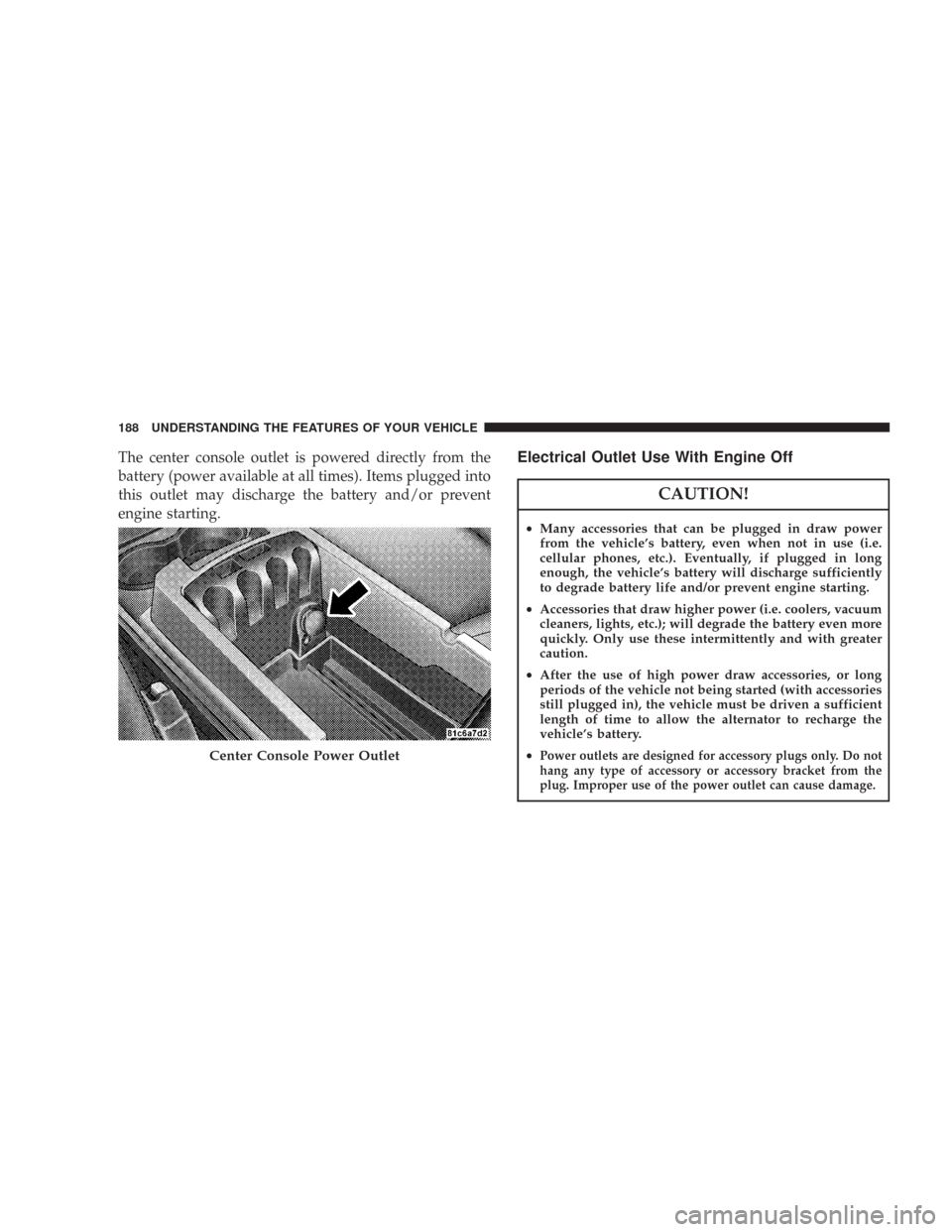
The center console outlet is powered directly from the
battery (power available at all times). Items plugged into
this outlet may discharge the battery and/or prevent
engine starting.Electrical Outlet Use With Engine Off
CAUTION!
•Many accessories that can be plugged in draw power
from the vehicle’s battery, even when not in use (i.e.
cellular phones, etc.). Eventually, if plugged in long
enough, the vehicle’s battery will discharge sufficiently
to degrade battery life and/or prevent engine starting.
•Accessories that draw higher power (i.e. coolers, vacuum
cleaners, lights, etc.); will degrade the battery even more
quickly. Only use these intermittently and with greater
caution.
•After the use of high power draw accessories, or long
periods of the vehicle not being started (with accessories
still plugged in), the vehicle must be driven a sufficient
length of time to allow the alternator to recharge the
vehicle’s battery.
•
Power outlets are designed for accessory plugs only. Do not
hang any type of accessory or accessory bracket from the
plug. Improper use of the power outlet can cause damage.Center Console Power Outlet
188 UNDERSTANDING THE FEATURES OF YOUR VEHICLE
Page 200 of 520
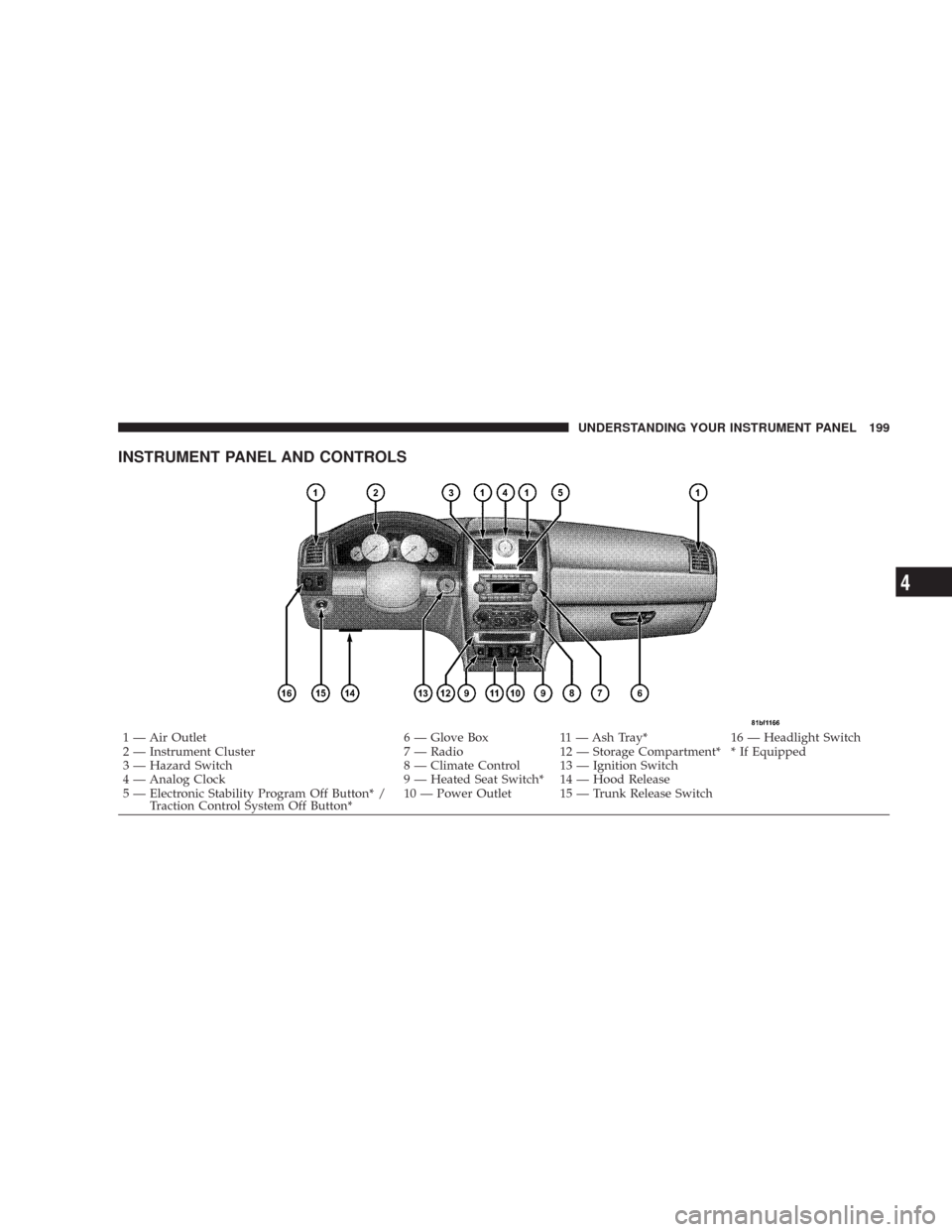
INSTRUMENT PANEL AND CONTROLS
1 — Air Outlet 6 — Glove Box 11 — Ash Tray* 16 — Headlight Switch
2 — Instrument Cluster 7 — Radio 12 — Storage Compartment* * If Equipped
3 — Hazard Switch 8 — Climate Control 13 — Ignition Switch
4 — Analog Clock 9 — Heated Seat Switch* 14 — Hood Release
5 — Electronic Stability Program Off Button* /
Traction Control System Off Button*10 — Power Outlet 15 — Trunk Release SwitchUNDERSTANDING YOUR INSTRUMENT PANEL 199
4
Page 203 of 520
INSTRUMENT CLUSTER DESCRIPTIONS
1. Electronic Speed Control/Adaptive Cruise Control
(ACC) Indicator Light — If Equipped
This light will turn on when the electronic
speed control or ACC is ON. (See page 148 for
more information.) (See page 152 for more
information.)
2. Low Fuel Indicator Light
This light will turn on and a single chime will
sound when the fuel level drops to 1/8 tank. (See
page 369 for more information.)
3. Front Fog Light Indicator — If Equipped
This light will turn on when the front fog lights are
ON. (See page 134 for more information.)
4. Turn Signal Indicators
The arrow will flash with the exterior turn signal
when the turn signal lever is operated.NOTE:A continuous chime will sound if the vehicle is
driven more than 1 mile (1.6 km) with either turn signal
on.
NOTE:Check for a defective outside light bulb if either
indicator flashes at a rapid rate.(See page 135 for more
information.)
5. Speedometer
Indicates vehicle speed.
6. Odometer/Trip Odometer
The odometer shows the total distance the vehicle has
been driven. The trip odometer shows individual trip
mileage. Refer to “Trip Odometer Button” for additional
information.
NOTE:U.S. federal regulations require upon transfer of
vehicle ownership, the seller certify the mileage the
vehicle has been driven. Therefore, if the odometer
reading is changed because of repair or replacement, be
202 UNDERSTANDING YOUR INSTRUMENT PANEL
Page 204 of 520
sure to keep a record of the reading before and after the
service so that the correct mileage can be determined.
On vehicles equipped with a Premium Instrument Clus-
ter, this display shows the Electronic Vehicle Information
Center (EVIC) messages when the appropriate conditions
exist. (See page 213 for more information.)
Loose Fuel Filler Cap Message
If the vehicle diagnostic system determines that the fuel
filler cap is loose, improperly installed, or damaged, a
“Check Gascap” message will display in the Electronic
Vehicle Information Center (EVIC) — if equipped.
Tighten the fuel filler cap properly and press the odom-
eter reset button to turn off the message. If the problem
continues, the message will appear the next time the
vehicle is started.A loose, improperly installed, or damaged fuel filler cap
may also turn on the Malfunction Indicator Light (MIL).
(See page 417 for more information.)
Change Oil Message (Base Cluster)
Your vehicle is equipped with an engine oil change
indicator system. The “Change Oil” message will flash in
the instrument cluster odometer for approximately 12
seconds after a single chime has sounded to indicate the
next scheduled oil change interval. The engine oil change
indicator system is duty cycle based, which means the
engine oil change interval may fluctuate dependent upon
your personal driving style.
Unless reset, this message will continue to display each
time you turn the ignition switch to the ON position. To
turn off the message temporarily, press and release the
Trip Odometer button on the instrument cluster. To reset
UNDERSTANDING YOUR INSTRUMENT PANEL 203
4
Page 205 of 520

the oil change indicator system (after performing the
scheduled maintenance) perform the following proce-
dure:
1. Turn the ignition switch to the ON position (Do not
start the engine).
2. Fully depress the accelerator pedal slowly three
times within 10 seconds.
3. Turn the ignition switch to the LOCK position.
NOTE:If the indicator message illuminates when you
start the vehicle, the oil change indicator system did not
reset. If necessary, repeat this procedure.
7. Tachometer
The red segments indicate the maximum permissible
engine revolutions-per-minute (r.p.m. x 1000) for each
gear range. Ease up on the accelerator before reaching the
red area.8. Engine Temperature Warning Light
This light will turn on and a single chime will
sound to warn of an overheated engine condition.
When this light turns on, the engine temperature
is critically hot. The vehicle should be turned off imme-
diately and serviced as soon as possible. (See page 393 for
more information.)
9. Anti-Lock Brake Light — If Equipped
This light monitors the Anti-Lock Brake System.
The light will turn on when the ignition switch is
turned to the ON position and may stay on for as long as
four seconds.
If the ABS light remains on or turns on while driving,
then the Anti-Lock portion of the brake system is not
functioning and service is required. However, the con-
ventional brake system will continue to operate normally
if the BRAKE warning light is not on.
204 UNDERSTANDING YOUR INSTRUMENT PANEL
Page 206 of 520
If the ABS light is on, the brake system should be serviced
as soon as possible to restore the benefits of Anti-Lock
brakes. If the ABS light does not turn on when the
Ignition switch is turned to the ON position, have the
light inspected by an authorized dealer. (See page 325 for
more information.)
10. Electronic Stability Program (ESP) / Brake Assist
System (BAS) Malfunction Indicator Light
The yellow ESP/BAS malfunction indicator
light will turn on when the key in the ignition
switch is turned to the ON position. The light
should go out with the engine running. The
system will turn this light on continuously while the
engine running if it detects a malfunction in either the
ESP or the BAS or both. (See page 331 for more informa-
tion.)11. Airbag Warning Light
This light will turn on for 6 to 8 seconds as a
bulb check when the ignition switch is first
turned ON. If the light is either not on during
starting, or stays on, or turns on while driving,
then have the system inspected at your authorized dealer
as soon as possible. (See page 64 for more information.)
12. Brake System Warning Light
This light monitors various brake functions,
including brake fluid level and parking brake
application. If the brake light turns on, it may
indicate that the parking brake is applied, that
the brake fluid level is low, or that there is a problem with
the anti-lock brake system (if equipped).
The dual brake system provides a reserve braking capac-
ity to a portion of the hydraulic system in the event of a
failure. Failure of either half of the dual brake system is
UNDERSTANDING YOUR INSTRUMENT PANEL 205
4
Page 207 of 520
indicated by the Brake Warning Light, which will turn on
when the brake fluid level in the master cylinder drops
below a specified level.
The light will remain on until the cause is corrected.
NOTE:The light may flash momentarily during sharp
cornering maneuvers due to a change in fluid level. If so,
the vehicle should have service performed and the brake
fluid level checked.
Immediate repair is necessary if brake failure is indicated.
WARNING!
Driving a vehicle with the brake light on is danger-
ous. Part of the brake system may have failed. It will
take longer to stop the vehicle. You could have an
accident. Have the vehicle checked immediately.Vehicles equipped with Anti-Lock brakes (ABS) are also
equipped with Electronic Brake Force Distribution (EBD).
Both the Brake Warning Light and the ABS Light will
turn on in the event of an EBD failure. Immediate repair
of the ABS system is required in the event of an EBD
failure.
The operation of the Brake Warning Light can be checked
by turning the ignition switch from the LOCK position to
the ON position. The light should turn on for approxi-
mately two seconds and then turn off. The light will
remain on if the parking brake is applied or if a brake
fault is detected. If the parking brake is not applied and
the light remains on, or if the light does not turn on, have
the light inspected by an authorized dealer.
NOTE:The light will turn on when the ignition switch
in the ON position and the parking brake is applied. This
206 UNDERSTANDING YOUR INSTRUMENT PANEL