lock CHRYSLER 300 C 2008 1.G Workshop Manual
[x] Cancel search | Manufacturer: CHRYSLER, Model Year: 2008, Model line: 300 C, Model: CHRYSLER 300 C 2008 1.GPages: 520, PDF Size: 5.43 MB
Page 168 of 520

NOTE:Installing a vehicle front-end protector or an
aftermarket grille or modifying the grille is not recom-
mended. Doing so may block the sensor and inhibit ACC
operation.
ACC Unavailable Warning
If the system turns off, and the EVIC displays\4ACC
UNAVAILABLE,\4there may be a temporary malfunction
that limits ACC functionality. In this case, ACC will be
temporarily unavailable. If this occurs, try activating
ACC again later, following a key cycle. If the problem
persists, see your authorized dealer.
Service ACC Warning
If the system turns off, and the EVIC displays “SERVICE
ACC,” it indicates there is an internal system fault that
requires service from an authorized dealer.
UNDERSTANDING THE FEATURES OF YOUR VEHICLE 167
3
Page 178 of 520

These lights also turn on when a door is opened, or when
the unlock button on the remote keyless entry transmitter
is pressed, or when the dimmer control is turned fully
upward, past the second detent.
Sunglasses Storage
At the rear of the console, a compartment is provided for
the storage of a pair of sunglasses.
The storage compartment access is a\4push/push\4design.
Push the raised bar on the compartment door to open.
Push the raised bar to close.
GARAGE DOOR OPENER — IF EQUIPPED
HomeLink\2replaces up to three remote controls (hand
held transmitters) that operate devices such as garage
door openers, motorized gates, lighting, or home security
systems. The HomeLink\2unit operates off of your vehi-
cle’s battery.NOTE:HomeLink\2is disabled when the Vehicle Secu-
rity Alarm is active.
WARNING!
Your motorized door or gate will open and close
while you are training the Universal Transceiver. Do
not train the transceiver if people or pets are in the
path of the door or gate. Only use this transceiver
with a garage door opener that has a “stop and
reverse” feature as required by federal safety stan-
dards. This includes most garage door opener models
manufactured after 1982. Do not use a garage door
opener without these safety features. Call toll-free
1–800–355–3515 or, on the Internet at
www.HomeLink.com for safety information or
assistance.
UNDERSTANDING THE FEATURES OF YOUR VEHICLE 177
3
Page 183 of 520
Then proceed with Step 4 under “Programming
HomeLink.” earlier in this section.
Using HomeLink\5
To operate, simply press and release the programmed
HomeLink\2button. Activation will now occur for the
trained device (i.e. garage door opener, gate operator,
security system, entry door lock, home/office lighting,
etc. The hand-held transmitter of the device may also be
used at any time.
Reprogramming a Single HomeLink\5Button
To re-program a channel that has been previously
trained, follow these steps:
1. Turn the ignition switch to the ON/RUN position.
2. Press and hold the desired HomeLink\2button for 20
seconds until the EVIC display states “CHANNEL #
TRAINING.”Do not release the button.3.Without releasing the button,proceed with PRO-
GRAMMING HOMELINK Step #2 and follow all remain-
ing steps.
Security
It is advised to erase all channels before you sell or turn
in your vehicle.
To do this, press and hold the two outside buttons for 20
seconds until the EVIC message states “CHANNELS
CLEARED.” Note that all channels will be erased. Indi-
vidual channels cannot be erased.
The HomeLink\2Universal Transceiver is disabled when
the Vehicle Security Alarm is active.
182 UNDERSTANDING THE FEATURES OF YOUR VEHICLE
Page 188 of 520
Sunroof Fully Closed
Press the switch forward and release to ensure that the
sunroof is fully closed.
ELECTRICAL POWER OUTLETS
There are two 12-volt electrical outlets on this vehicle.
Both of the outlets are protected by a fuse.
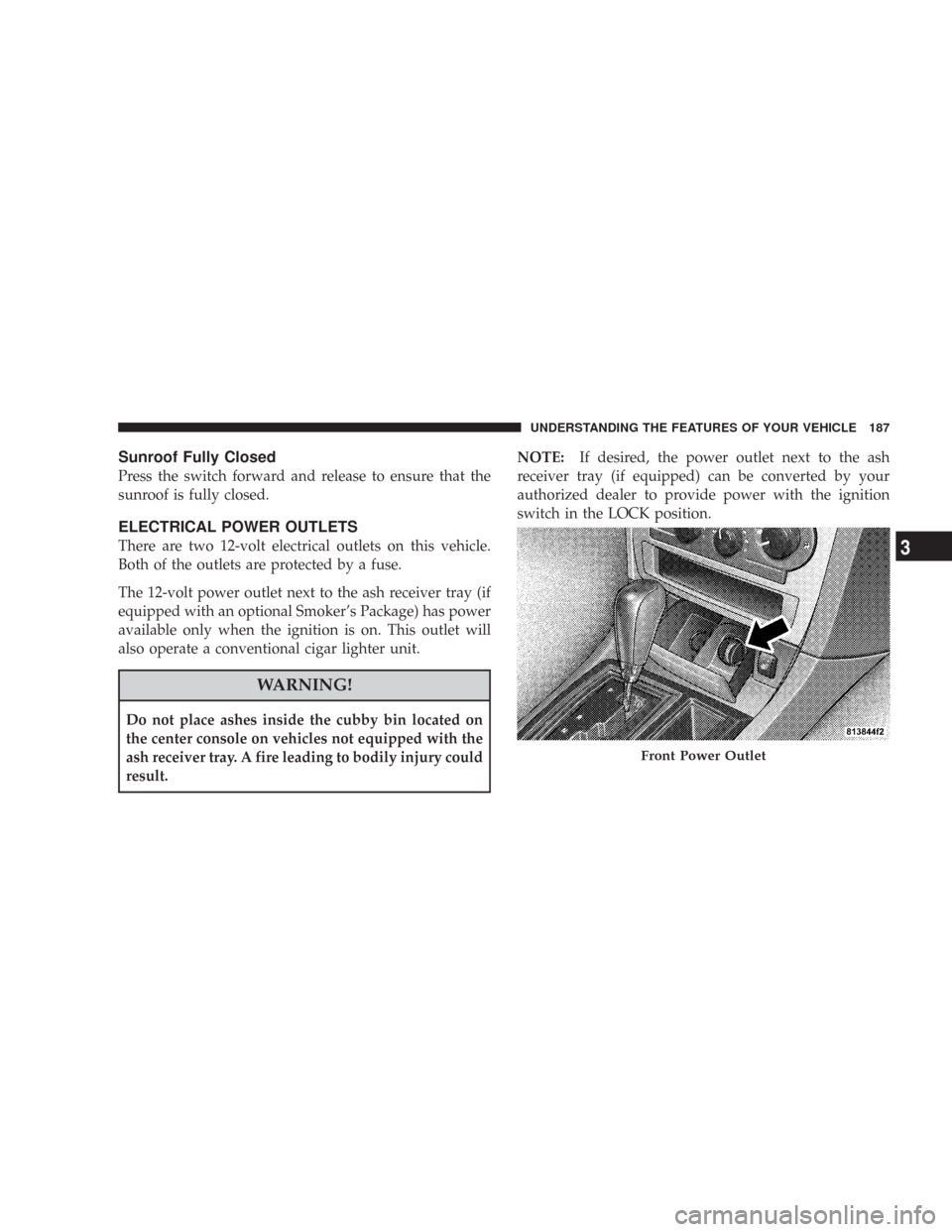
The 12-volt power outlet next to the ash receiver tray (if
equipped with an optional Smoker’s Package) has power
available only when the ignition is on. This outlet will
also operate a conventional cigar lighter unit.
WARNING!
Do not place ashes inside the cubby bin located on
the center console on vehicles not equipped with the
ash receiver tray. A fire leading to bodily injury could
result.NOTE:If desired, the power outlet next to the ash
receiver tray (if equipped) can be converted by your
authorized dealer to provide power with the ignition
switch in the LOCK position.
Front Power Outlet
UNDERSTANDING THE FEATURES OF YOUR VEHICLE 187
3
Page 193 of 520

front-opening lid allows for easy access to the storage
compartment for the both the driver and the front
passenger.
Cargo Area
The 60/40 split-folding rear seat provides cargo-carrying
versatility. The seatbacks fold down easily by pulling
nylon tabs between the seatbacks and the bolsters. When
the seats are folded down, they provide a continuous,
nearly flat extension of the load floor.
When the seatback is folded to the upright position, make
sure it is latched by strongly pulling on the top of the
seatback above the seat strap.
WARNING!
•Be certain that the seatback is securely locked into
position. If the seatback in not securely locked into
position, the seat will not provide the proper
stability for child seats and/or passengers. An
improperly latched seat could cause serious injury.
•The cargo area in the rear of the vehicle (with the
rear seatbacks in the locked-up or folded down
position) should not be used as a play area by
children when the vehicle is in motion. They could
be seriously injured in an accident. Children
should be seated and using the proper restraint
system.
•To help protect against personal injury, passengers
should not be seated in the rear cargo area. The
rear cargo space is intended for load carrying
purposes only, not for passengers, who should sit
in seats and use seat belts.
192 UNDERSTANDING THE FEATURES OF YOUR VEHICLE
Page 196 of 520
UNDERSTANDING YOUR INSTRUMENT PANEL
CONTENTS
\1Instrument Panel And Controls.............199
\1Base Instrument Cluster..................200
\1Premium Instrument Cluster...............201
\1Instrument Cluster Descriptions............202
\1Electronic Vehicle Information Center (EVIC) —
If Equipped...........................213
\3Electronic Vehicle Information Center (EVIC)
Displays............................215
\3Oil Change Required...................218
\3Trip Functions.......................219\3Compass Display.....................222
\3Telephone — If Equipped...............224
\3Navigation — If Equipped...............226
\3Personal Settings
(Customer Programmable Features)........227
\1Setting The Analog Clock.................232
\1Radio General Information................232
\3Radio Broadcast Signals.................232
\3Two Types Of Signals..................2324
Page 197 of 520

\3Electrical Disturbances..................233
\3AM Reception.......................233
\3FM Reception........................233
\1Sales Code REN — Multimedia System —
If Equipped...........................234
\3Operating Instructions —
Satellite Radio (If Equipped).............234
\3Operating Instructions — Hands-Free
Communication (UConnect™)
(If Equipped)........................235
\3Clock Setting Procedure.................235
\1Sales Code REQ — AM/FM Stereo Radio And
6–Disc CD/DVD Changer
(MP3/WMA AUX Jack)..................237
\3Operating Instructions - Radio Mode.......237\3Operation Instructions - (Disc Mode For CD
And MP3/WMA Audio Play, DVD-Video)....245
\3Notes On Playing MP3/WMA Files........247
\3List Button
(Disc Mode For MP3/WMA Play)..........250
\3Info Button
(Disc Mode For MP3/WMA Play)..........250
\1Sales Code RER — Multimedia System —
If Equipped...........................252
\3Operating Instructions — Satellite Radio.....253
\3Operating Instructions — Hands-Free
Communication (UConnect™)
(If Equipped)........................253
\3Clock Setting Procedure.................253
196 UNDERSTANDING YOUR INSTRUMENT PANEL
Page 200 of 520
INSTRUMENT PANEL AND CONTROLS
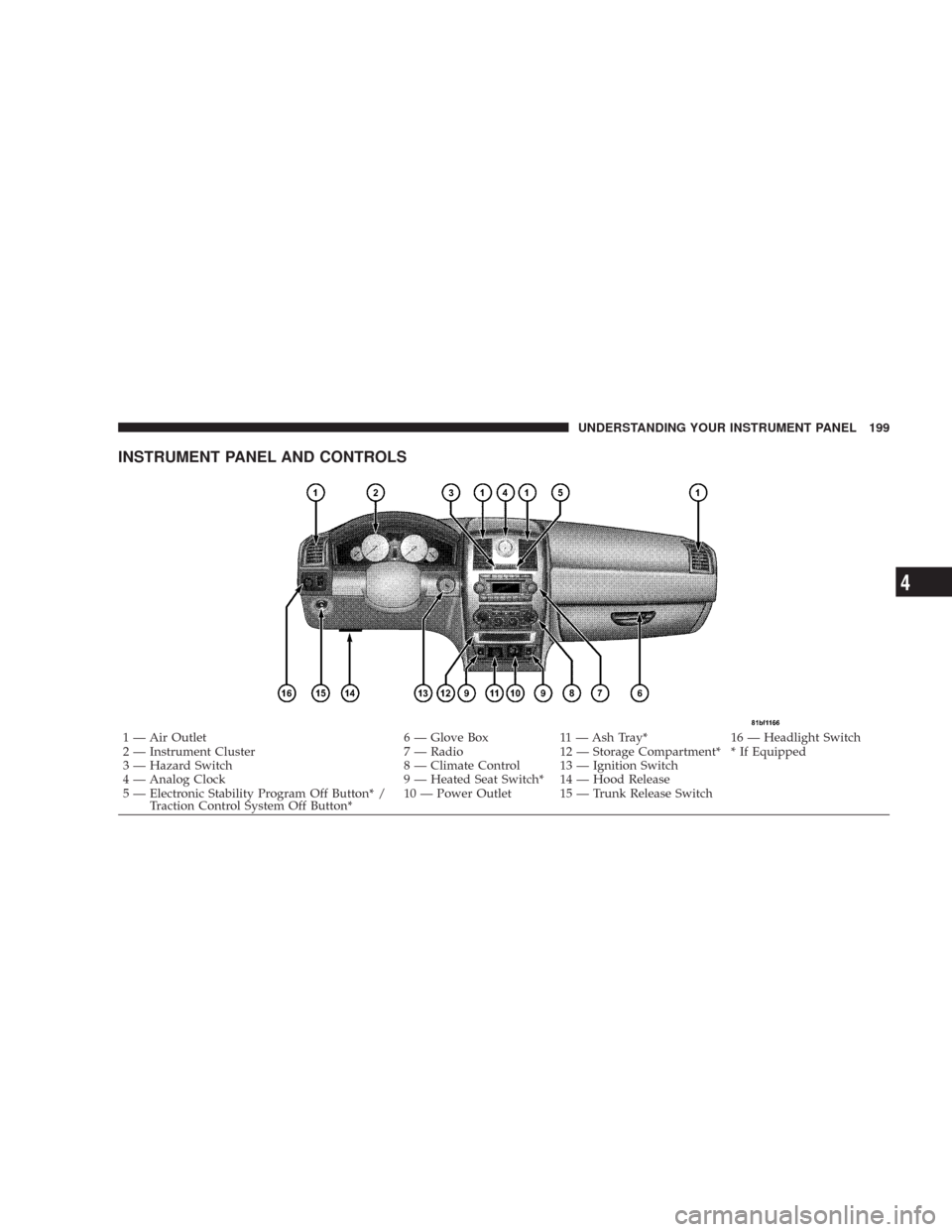
1 — Air Outlet 6 — Glove Box 11 — Ash Tray* 16 — Headlight Switch
2 — Instrument Cluster 7 — Radio 12 — Storage Compartment* * If Equipped
3 — Hazard Switch 8 — Climate Control 13 — Ignition Switch
4 — Analog Clock 9 — Heated Seat Switch* 14 — Hood Release
5 — Electronic Stability Program Off Button* /
Traction Control System Off Button*10 — Power Outlet 15 — Trunk Release SwitchUNDERSTANDING YOUR INSTRUMENT PANEL 199
4
Page 205 of 520

the oil change indicator system (after performing the
scheduled maintenance) perform the following proce-
dure:
1. Turn the ignition switch to the ON position (Do not
start the engine).
2. Fully depress the accelerator pedal slowly three
times within 10 seconds.
3. Turn the ignition switch to the LOCK position.
NOTE:If the indicator message illuminates when you
start the vehicle, the oil change indicator system did not
reset. If necessary, repeat this procedure.
7. Tachometer
The red segments indicate the maximum permissible
engine revolutions-per-minute (r.p.m. x 1000) for each
gear range. Ease up on the accelerator before reaching the
red area.8. Engine Temperature Warning Light
This light will turn on and a single chime will
sound to warn of an overheated engine condition.
When this light turns on, the engine temperature
is critically hot. The vehicle should be turned off imme-
diately and serviced as soon as possible. (See page 393 for
more information.)
9. Anti-Lock Brake Light — If Equipped
This light monitors the Anti-Lock Brake System.
The light will turn on when the ignition switch is
turned to the ON position and may stay on for as long as
four seconds.
If the ABS light remains on or turns on while driving,
then the Anti-Lock portion of the brake system is not
functioning and service is required. However, the con-
ventional brake system will continue to operate normally
if the BRAKE warning light is not on.
204 UNDERSTANDING YOUR INSTRUMENT PANEL
Page 206 of 520
If the ABS light is on, the brake system should be serviced
as soon as possible to restore the benefits of Anti-Lock
brakes. If the ABS light does not turn on when the
Ignition switch is turned to the ON position, have the
light inspected by an authorized dealer. (See page 325 for
more information.)
10. Electronic Stability Program (ESP) / Brake Assist
System (BAS) Malfunction Indicator Light
The yellow ESP/BAS malfunction indicator
light will turn on when the key in the ignition
switch is turned to the ON position. The light
should go out with the engine running. The
system will turn this light on continuously while the
engine running if it detects a malfunction in either the
ESP or the BAS or both. (See page 331 for more informa-
tion.)11. Airbag Warning Light
This light will turn on for 6 to 8 seconds as a
bulb check when the ignition switch is first
turned ON. If the light is either not on during
starting, or stays on, or turns on while driving,
then have the system inspected at your authorized dealer
as soon as possible. (See page 64 for more information.)
12. Brake System Warning Light
This light monitors various brake functions,
including brake fluid level and parking brake
application. If the brake light turns on, it may
indicate that the parking brake is applied, that
the brake fluid level is low, or that there is a problem with
the anti-lock brake system (if equipped).
The dual brake system provides a reserve braking capac-
ity to a portion of the hydraulic system in the event of a
failure. Failure of either half of the dual brake system is
UNDERSTANDING YOUR INSTRUMENT PANEL 205
4