lock CHRYSLER 300 C 2008 1.G Repair Manual
[x] Cancel search | Manufacturer: CHRYSLER, Model Year: 2008, Model line: 300 C, Model: CHRYSLER 300 C 2008 1.GPages: 520, PDF Size: 5.43 MB
Page 207 of 520
indicated by the Brake Warning Light, which will turn on
when the brake fluid level in the master cylinder drops
below a specified level.
The light will remain on until the cause is corrected.
NOTE:The light may flash momentarily during sharp
cornering maneuvers due to a change in fluid level. If so,
the vehicle should have service performed and the brake
fluid level checked.
Immediate repair is necessary if brake failure is indicated.
WARNING!
Driving a vehicle with the brake light on is danger-
ous. Part of the brake system may have failed. It will
take longer to stop the vehicle. You could have an
accident. Have the vehicle checked immediately.Vehicles equipped with Anti-Lock brakes (ABS) are also
equipped with Electronic Brake Force Distribution (EBD).
Both the Brake Warning Light and the ABS Light will
turn on in the event of an EBD failure. Immediate repair
of the ABS system is required in the event of an EBD
failure.
The operation of the Brake Warning Light can be checked
by turning the ignition switch from the LOCK position to
the ON position. The light should turn on for approxi-
mately two seconds and then turn off. The light will
remain on if the parking brake is applied or if a brake
fault is detected. If the parking brake is not applied and
the light remains on, or if the light does not turn on, have
the light inspected by an authorized dealer.
NOTE:The light will turn on when the ignition switch
in the ON position and the parking brake is applied. This
206 UNDERSTANDING YOUR INSTRUMENT PANEL
Page 220 of 520
1. Turn the ignition switch to the ON position (Do not
start the engine).
2. Fully depress the accelerator pedal slowly three times
within 10 seconds.
3. Turn the ignition switch to the LOCK position.
NOTE:If the indicator message illuminates when you
start the vehicle, the oil change indicator system did not
reset. If necessary, repeat this procedure.
Trip Functions
Press and release the MENU button until one of the
following Trip Functions displays in the EVIC:
•Average Fuel Economy / Fuel Saver Mode
•Distance To Empty
•Trip A
•Trip B
•Elapsed Time
•Display Units of Measure in
Press the SCROLL button to cycle through all the Trip
Computer functions.
The Trip Functions mode displays the following informa-
tion:
•Average Fuel Economy / Fuel Saver Mode
Shows the average fuel economy since the last reset.
When the fuel economy is reset, the display will read
“RESET” or show dashes for two seconds. Then, the
history information will be erased, and the averaging will
continue from the last fuel average reading before the
reset.
Vehicles with the 5.7L Multi-Displacement System (MDS)
may be equipped with the FUEL SAVER MODE in the
Trip Functions of the EVIC. The FUEL SAVER MODE
message will display above the average fuel economy in
UNDERSTANDING YOUR INSTRUMENT PANEL 219
4
Page 228 of 520

Personal Settings (Customer Programmable
Features)
Personal Settings allows the driver to set and recall
features when the transmission is in PARK.
Press and release the MENU button until Personal Set-
tings displays in the EVIC.
Use the SCROLL button to display one of the following
choices:
“Language”
When in this display you may select one of five lan-
guages for all display nomenclature, including the trip
functions and the navigation system (if equipped). Press
the FUNCTION SELECT button while in this display to
select English, Espanol, Deutsch, Italiano, or Francais.
Then, as you continue, the information will display in the
selected language.NOTE:The EVIC will not change the UConnect™
language selection. Please refer to “Language Selection”
in the HANDS–FREE COMMUNICATION (UConnect™)
section of this manual for details.
“Lock Doors Automatically at 15 mph (24 Km/h)”
When ON is selected, all doors will lock automatically
when the vehicle reaches a speed of 15 mph (24 km/h).
To make your selection, press and release the FUNC-
TION SELECT button until “ON” or “OFF” appears.
“Unlock Doors Automatically on Exit”
When ON is selected, all doors will unlock when the
vehicle is stopped and the transmission is in the “P”
(Park) or “N” (Neutral) position and the driver’s door is
opened. To make your selection, press and release the
FUNCTION SELECT button until “ON” or “OFF” ap-
pears.
UNDERSTANDING YOUR INSTRUMENT PANEL 227
4
Page 229 of 520
“Remote Key Unlock”
WhenDriver Door 1st Pressis selected, only the driver’s
door will unlock on the first press of the remote keyless
entry unlock button. When Driver Door 1st Press is
selected, you must press of the remote keyless entry
unlock button twice to unlock the passenger’s doors.
WhenAll Doors 1st Pressis selected, all of the doors will
unlock on the first press of the remote keyless entry
unlock button. To make your selection, press and release
the FUNCTION SELECT button until “Driver Door 1st
Press” or “All Doors 1st Press” appears.
“Recall Memory with Remote Key Unlock” — If
Equipped
When ON is selected, you can use your Remote Keyless
Entry Transmitter to recall one of two pre-programmed
memory profiles. Each memory profile contains desired
position settings for the driver seat, side mirror, adjust-
able pedals (if equipped), and power tilt and telescopic
steering column (if equipped), and a set of desired radiostation presets. When OFF is selected, only the memory
switch on the driver’s door panel will recall memory
profiles. To make your selection, press and release the
FUNCTION SELECT button until “ON” or “OFF” ap-
pears. Refer to “Driver Memory Seat” in Section 3 of this
manual for more information.
“Sound Horn with Remote Key Lock”
When ON is selected, a short horn sound will occur when
the remote keyless entry “Lock” button is pressed. This
feature may be selected with or without the flash lights
on lock/unlock feature. To make your selection, press
and release the FUNCTION SELECT button until “ON”
or “OFF” appears.
“Rain Sensing Intermittent Wipers” — If Equipped
When ON is selected, the system will automatically
activate the windshield wipers if it senses moisture on
the windshield. To make your selection, press and release
228 UNDERSTANDING YOUR INSTRUMENT PANEL
Page 230 of 520
the FUNCTION SELECT button until “ON” or “OFF”
appears. When OFF is selected, the system reverts to the
standard intermittent wiper operation.
“Automatically Move Seat Back on Exit” — If
Equipped
This feature provides automatic driver seat positioning to
enhance driver mobility when entering and exiting the
vehicle. To make your selection, press and release the
FUNCTION SELECT button until “ON” or “OFF” ap-
pears.
NOTE:The seat will return to the memorized seat
location (if Recall Memory with Remote Key Unlock is set
to ON) when the remote keyless entry transmitter is used
to unlock the door. Refer to “Easy Entry/Exit Seat” under
“Driver Memory Seat” in Section 3 of this manual for
more information.
“Flash Lights with Remote Key Lock”
When ON is selected, the front and rear turn signals will
flash when the doors are locked or unlocked with the
remote keyless entry transmitter. This feature may be
selected with or without the sound horn on lock feature
selected. To make your selection, press and release the
FUNCTION SELECT button until “ON” or “OFF” ap-
pears.
“Headlights On with Wipers” (Available with Auto
Headlights Only)
When ON is selected, and the headlight switch is in the
AUTO position, the headlights will turn on approxi-
mately 10 seconds after the wipers are turned on. The
headlights will also turn off when the wipers are turned
off if they were turned on by this feature. To make your
selection, press and release the FUNCTION SELECT
button until “ON” or “OFF” appears.
UNDERSTANDING YOUR INSTRUMENT PANEL 229
4
Page 231 of 520
NOTE:Turning the headlights on during the daytime
causes the instrument panel lights to dim. To increase the
brightness, refer to “Lights” in Section 3 of this manual.
“Delay Turning Headlights Off”
When this feature is selected, the driver can choose to
have the headlights remain on for 0, 30, 60, or 90 seconds
when exiting the vehicle. To make your selection, press
and release the FUNCTION SELECT button until “0,”
“30,” “60,” or “90” appears.
“Tilt Mirrors Down in Reverse” — If Equipped
When ON is selected, the outside rearview mirrors will
tilt downward when the ignition switch is in the ON
position and the transmission is in the “R” (Reverse)
position. The mirrors will move back to their previous
position when the transmission is shifted out of “R”
(Reverse). To make your selection, press and release the
FUNCTION SELECT button until “ON” or “OFF” ap-
pears.
“Turn Headlights On with Remote Key Unlock”
When this feature is selected, the headlights will activate
and remain on for up to 90 seconds when the doors are
unlocked with the remote keyless entry transmitter. To
make your selection, press and release the FUNCTION
SELECT button until “OFF,” “30 sec.,” “60 sec.,” or “90
sec.” appears.
“Delay Power Off to Accessories Until Exit”
When this feature is selected, the power window
switches, radio, hands–free system (if equipped), DVD
video system (if equipped), power sunroof (if equipped),
and power outlets will remain active for up to 60 minutes
after the ignition switch is turned off. Opening a vehicle
door will cancel this feature. To make your selection,
press and release the FUNCTION SELECT button until
“Off,” “45 sec.,” “5 min.,” “10 min.,” “30 min.,” or “60
min.” appears.
230 UNDERSTANDING YOUR INSTRUMENT PANEL
Page 233 of 520
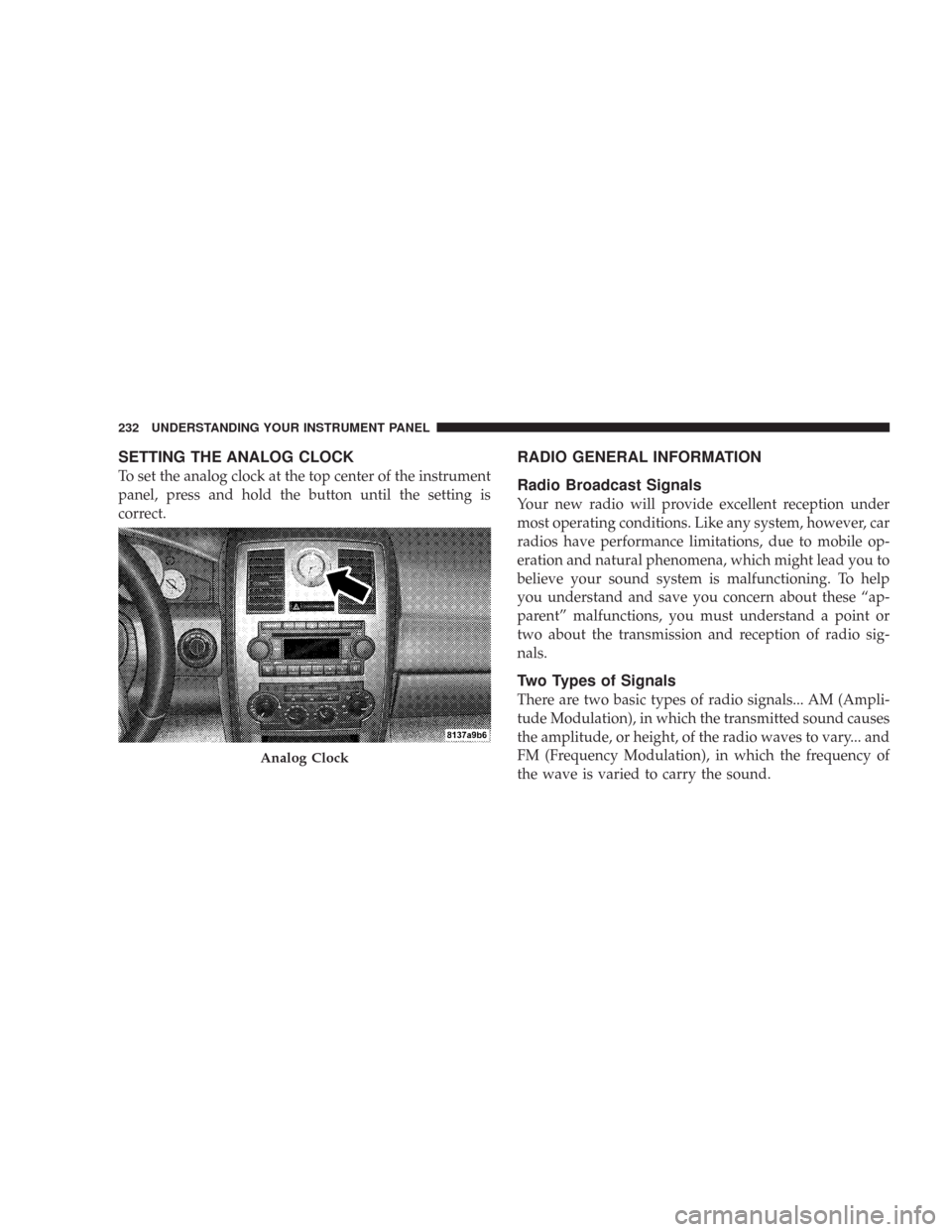
SETTING THE ANALOG CLOCK
To set the analog clock at the top center of the instrument
panel, press and hold the button until the setting is
correct.
RADIO GENERAL INFORMATION
Radio Broadcast Signals
Your new radio will provide excellent reception under
most operating conditions. Like any system, however, car
radios have performance limitations, due to mobile op-
eration and natural phenomena, which might lead you to
believe your sound system is malfunctioning. To help
you understand and save you concern about these “ap-
parent” malfunctions, you must understand a point or
two about the transmission and reception of radio sig-
nals.
Two Types of Signals
There are two basic types of radio signals... AM (Ampli-
tude Modulation), in which the transmitted sound causes
the amplitude, or height, of the radio waves to vary... and
FM (Frequency Modulation), in which the frequency of
the wave is varied to carry the sound.
Analog Clock
232 UNDERSTANDING YOUR INSTRUMENT PANEL
Page 236 of 520
Operating Instructions — Hands-Free
Communication (UConnect™) (If Equipped)
Refer to “Hands-Free Communication (UConnect™)” in
Section 3 of this manual for detailed operating instruc-
tions.
Clock Setting Procedure
Setting the Clock
1. Turn on the system.
2. Touch the screen where the time is displayed. The
clock setting menu will appear on the screen.
3. To move the hour forward, touch the screen where the
word “Hour” with the arrow pointing upward is dis-
played. To move the hour backward, touch the screen
where the word “Hour” with the arrow pointing down-
ward is displayed.4. To move the minute forward, touch the screen where
the word “Min” with the arrow pointing upward is
displayed. To move the minute backward, touch the
screen where the word “Min” with the arrow pointing
downward is displayed.
5. To save the new time setting, touch the screen where
the word “Save” is displayed.Changing Daylight Savings Time
When selected, this feature will display the time of day in
daylight savings time. Proceed as follows to change the
current setting:
1. Turn on the system.
2. Touch the screen where the time is displayed. The
clock setting menu will appear on the screen.
UNDERSTANDING YOUR INSTRUMENT PANEL 235
4
Page 237 of 520
3. When this feature is on, a check mark will appear in
the box next to the words “Daylight Savings.” Touch the
screen where the words “Daylight Savings” are dis-
played to change the current setting.
Show Time if Radio is Off
When selected, this feature will display the time of day
on the touch screen when the system is turned off.
Proceed as follows to change the current setting:
1. Turn on the system.
2. Touch the screen where the time is displayed. The
clock setting menu will appear on the screen.
3. When this feature is on, a check mark will appear in
the box next to the words “Show Time if Radio is Off.”
Touch the screen where the words “Show Time if Radio is
Off” are displayed to change the current setting.
Changing the Time Zone
1. Turn on the system.
2. Touch the screen where the time is displayed. The
clock setting menu will appear on the screen.
3. Touch the screen where the words “Set Time Zone” are
displayed. The time zone selection menu will appear on
the screen.
4. Select a time zone by touching the screen where your
selection appears. If you do not see a time zone that you
want to select, touch the screen where the word “Page” is
displayed to view additional time zones in the menu.
5. Touch the screen where the word “Save” is displayed.
236 UNDERSTANDING YOUR INSTRUMENT PANEL
Page 239 of 520
will remain tuned to the new station until you make
another selection. Holding either button will bypass
stations without stopping until you release it.
SCAN Button (Radio Mode)
Pressing the SCAN button causes the tuner to search for
the next listenable station, in AM, FM or Satellite (if
equipped) frequencies, pausing for 5 seconds at each
listenable station before continuing to the next. To stop
the search, press the SCAN button a second time.
Voice Recognition Button (UConnect™ Hands Free
Phone) — If Equipped
Press this button to operate the Hand Free Phone (UCon-
nect™) feature (if equipped). Refer to “Hands-Free Com-
munication (UConnect™)” in Section 3 for more informa-
tion.
If your vehicle is not equipped with or this feature is not
available on your vehicle, a “UConnect™ System Not
Available” message will display on the radio screen.
Phone Button (UConnect™ Hands Free Phone) —
If Equipped
Press this button to operate the Hand Free Phone (UCon-
nect™) feature (if equipped). Refer to “Hands-Free Com-
munication (UConnect™)” in Section 3 for more informa-
tion.
If your vehicle is not equipped with or this feature is not
available on your vehicle, a “UConnect™ System Not
Available” message will display on the radio screen.
TIME Button
Press the TIME button and the time of day will display. In
AM or FM mode, pressing the TIME button will switch
between the time and frequency displays.
Clock Setting Procedure
1. Press and hold the TIME button, until the hours blink.
2. Adjust the hours by turning the right side TUNE
control knob.
238 UNDERSTANDING YOUR INSTRUMENT PANEL