wheel CHRYSLER 300 LX 2005 User Guide
[x] Cancel search | Manufacturer: CHRYSLER, Model Year: 2005, Model line: 300 LX, Model: CHRYSLER 300 LX 2005Pages: 374, PDF Size: 7.09 MB
Page 111 of 374
The traction control system (TCS) warning
light is located in the instrument cluster. The
TCS light will flash as soon as the tires lose
traction and the wheels begin to spin. This
indicates that the TCS system is active. If the TCS
warning light begins to flash during acceleration, ease up
on the accelerator and apply as little throttle as possible.
Be sure to adapt your speed and driving to the prevailing
road conditions. When the TCS warning light is illumi-
nated continuously, the TCS is switched off. To return to
the enhanced vehicle stability offered by TCS, press the
TCS switch (the TCS warning light in the instrument
cluster goes out). Avoid spinning one drive wheel. This
may cause serious damage to the drive train and is not
covered by the DaimlerChrysler warranty.
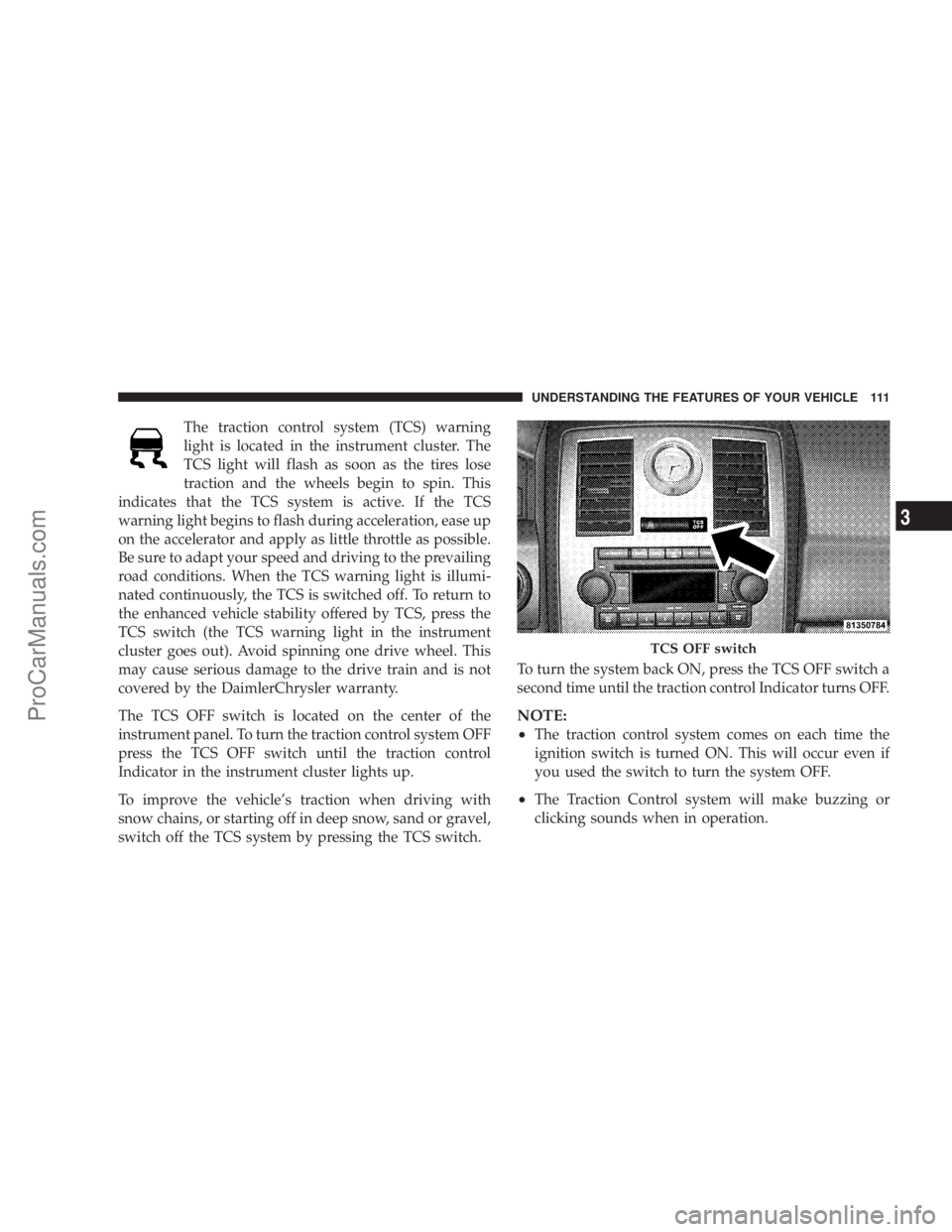
The TCS OFF switch is located on the center of the
instrument panel. To turn the traction control system OFF
press the TCS OFF switch until the traction control
Indicator in the instrument cluster lights up.
To improve the vehicle's traction when driving with
snow chains, or starting off in deep snow, sand or gravel,
switch off the TCS system by pressing the TCS switch.To turn the system back ON, press the TCS OFF switch a
second time until the traction control Indicator turns OFF.
NOTE:
²
The traction control system comes on each time the
ignition switch is turned ON. This will occur even if
you used the switch to turn the system OFF.
²The Traction Control system will make buzzing or
clicking sounds when in operation.
TCS OFF switch
UNDERSTANDING THE FEATURES OF YOUR VEHICLE 111
3
ProCarManuals.com
Page 113 of 374

Once the brake pedal is released, the BAS is deactivated.
The yellow BAS malfunction indicator light
comes on with the key in the ignition switch
turned to the ªONº position. The light should
go out with the engine running. If the BAS
malfunction indicator light comes on continuously with
the engine running, a malfunction has been detected in
either the BAS or the ESP system. If this light stays
illuminated, have the BAS and ESP checked at your
authorized dealer as soon as possible.
The malfunction indicator lamp for the ESP is
combined with the BAS on some models. The
yellow BAS malfunction indicator light and the
yellow ESP warning light in the instrument
cluster both come on with the key in the ignition switch
turned to the ªONº position. They should go out with the
engine running. If the BAS/ESP malfunction indicator
light comes on continuously with the engine running, a
malfunction has been detected in either the BAS or the
ESP system. If this light stays illuminated, have the BAS
and ESP checked at your authorized dealer as soon as
possible.ELECTRONIC STABILITY PROGRAM (ESP)Ð IF
EQUIPPED
WARNING!
ESP cannot prevent the natural laws of physics from
acting on the vehicle, nor can it increase the traction
afforded. The ESP cannot prevent accidents, includ-
ing those resulting from excessive speed in turns, or
hydroplaning. Only a safe, attentive, and skillful
driver can prevent accidents. The capabilities of an
ESP-equipped vehicle must never be exploited in a
reckless or dangerous manner which could jeopar-
dize the user's safety or the safety of others.
The ESP enhances directional control and reduces driving
wheel spin of the vehicle under various driving condi-
tions. The system operates when the vehicle speed is
greater than 7.8 mph (12.6 km/h).
The ESP system corrects for over/understeering of the
vehicle by applying brakes to the appropriate wheel.
Engine torque is also limited.
UNDERSTANDING THE FEATURES OF YOUR VEHICLE 113
3
ProCarManuals.com
Page 114 of 374

The ESP warning light, located in the instru-
ment cluster, starts to flash as soon as the ESP
system sensor's information varies from the
driver's intended path. The ESP warning light
also flashes when traction control is activated. If the ESP
warning light begins to flash during acceleration, ease up
on the accelerator and apply as little throttle as possible.
Be sure to adapt your speed and driving to the prevailing
road conditions. When the ESP warning light is illumi-
nated continuously, the ESP is switched off. To return to
the enhanced vehicle stability offered by ESP, press the
ESP OFF switch (the ESP warning light in the instrument
cluster goes out). Avoid spinning one drive wheel. This
may cause serious damage to the drive train and is not
covered by the DaimlerChrysler warranty.
To improve the vehicle's traction when driving with
snow chains, or starting off in deep snow, sand or gravel,
switch off the ESP system by pressing the ESP OFF
switch.With the ESP system switched off, the engine torque
reduction feature is cancelled. Therefore, the enhanced
vehicle stability offered by ESP is unavailable. ESP al-
ways operates under braking, even with the switch in the
OFF position. When the ESP system is disabled (if one
drive wheel loses traction and begins to spin) the brake is
applied by the ESP system to control wheel slip. This
wheel slip control is active at vehicle speeds between
approximately 24 mph (40 km/h) and 50 mph (80 km/h).
ESP OFF Switch
114 UNDERSTANDING THE FEATURES OF YOUR VEHICLE
ProCarManuals.com
Page 115 of 374

CAUTION!
If the vehicle is towed with the front axle raised, the
engine must be shut off (key in the ignition switch to
the OFF/LOCK or ACC position). Otherwise the ESP
will immediately be engaged and will apply the rear
wheel brakes.
Synchronizing ESP
The malfunction indicator lamp for the ESP is
combined with the BAS on some models. If the
power supply was interrupted (battery discon-
nected or discharged), the ESP/BAS malfunc-
tion indicator light may be illuminated with the engine
running. Turn the steering wheel completely to the left
and then to the right. The ESP/BAS malfunction indica-
tor light should go out.
If the power supply was interrupted (battery
disconnected or discharged), the BAS malfunc-
tion indicator light may be illuminated with
the engine running. Turn the steering wheelcompletely to the left and then to the right. The BAS
malfunction indicator light should go out.
ELECTRONIC SPEED CONTROL
When engaged, this device takes over the accelerator
operation at speeds greater than 25 mph (40 km/h). The
speed control switch consists of a stalk mounted lever
located on the steering column.
Electronic Speed Control Lever
UNDERSTANDING THE FEATURES OF YOUR VEHICLE 115
3
ProCarManuals.com
Page 116 of 374

To Activate:
Push and release the speed control lever (ªON/OFFº)
once and an LED on the lever will illuminate indicating
that the electronic speed control is ON. To turn the
system OFF, Push and release the lever (ªON/OFFº)
again and the system and indicator will turn off.
WARNING!
Leaving the Electronic Speed Control system on
when not in use is dangerous. You could accidently
set the system or cause it to go faster than you want.
You could lose control and have an accident. Always
leave the system OFF when you aren't using it.
To Set At A Desired Speed:
When the vehicle has reached the desired speed, pull the
lever toward you and release. Release the accelerator and
the vehicle will operate at the selected speed.
NOTE:Speed control will only function in third, fourth,
or fifth gear when in the Autostick Mode Ð if equipped.
NOTE:The speed control may not engage if a different
size tire is installed on one wheel, such as the compact
spare tire.
To Deactivate:
A soft tap on the brake pedal, pushing the lever away
from you (ªCANCELº) or normal braking while slowing
the vehicle will deactivate the speed control without
erasing the memory. Pushing and releasing the lever
(ªON/OFFº) or turning off the ignition erases the speed
memory.
To Resume Speed:
To resume a previously set speed, push the lever up and
release (ªACC/RESº). Resume can be used at any speed
above 20 mph (32 km/h).
To Vary the Speed Setting:
When the speed control is set, speed can be increased by
pushing the lever up and holding (ªACC/RESº). When
the lever is released, a new set speed will be established.
Pushing the lever up and releasing (ªACC/RESº) once
will result in a 1 mph (1.6 km/h) speed increase. Each
time the lever is pushed up and released, speed increases
116 UNDERSTANDING THE FEATURES OF YOUR VEHICLE
ProCarManuals.com
Page 140 of 374
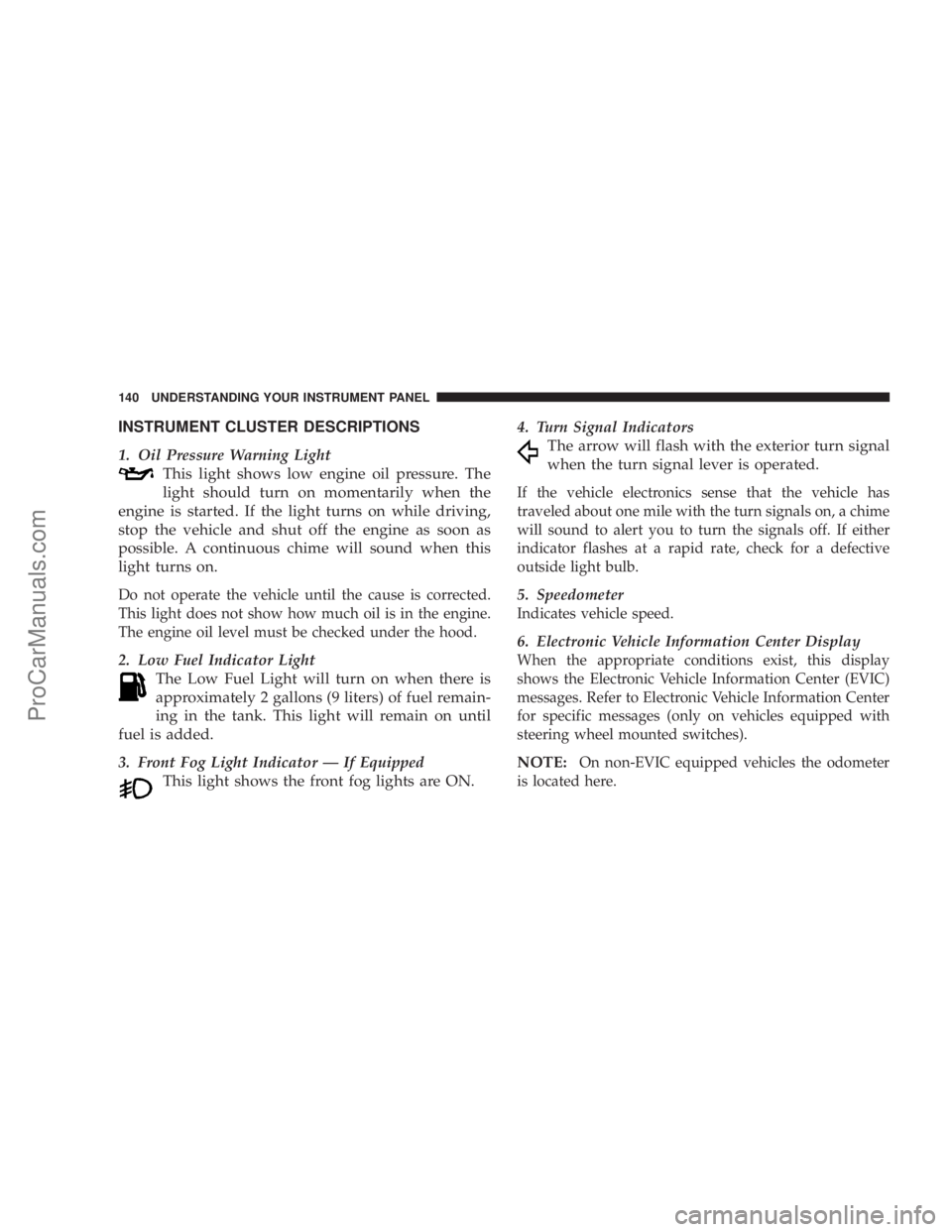
INSTRUMENT CLUSTER DESCRIPTIONS
1. Oil Pressure Warning Light
This light shows low engine oil pressure. The
light should turn on momentarily when the
engine is started. If the light turns on while driving,
stop the vehicle and shut off the engine as soon as
possible. A continuous chime will sound when this
light turns on.
Do not operate the vehicle until the cause is corrected.
This light does not show how much oil is in the engine.
The engine oil level must be checked under the hood.
2. Low Fuel Indicator Light
The Low Fuel Light will turn on when there is
approximately 2 gallons (9 liters) of fuel remain-
ing in the tank. This light will remain on until
fuel is added.
3. Front Fog Light Indicator Ð If Equipped
This light shows the front fog lights are ON.4. Turn Signal Indicators
The arrow will flash with the exterior turn signal
when the turn signal lever is operated.
If the vehicle electronics sense that the vehicle has
traveled about one mile with the turn signals on, a chime
will sound to alert you to turn the signals off. If either
indicator flashes at a rapid rate, check for a defective
outside light bulb.
5. Speedometer
Indicates vehicle speed.
6. Electronic Vehicle Information Center Display
When the appropriate conditions exist, this display
shows the Electronic Vehicle Information Center (EVIC)
messages. Refer to Electronic Vehicle Information Center
for specific messages (only on vehicles equipped with
steering wheel mounted switches).
NOTE:On non-EVIC equipped vehicles the odometer
is located here.
140 UNDERSTANDING YOUR INSTRUMENT PANEL
ProCarManuals.com
Page 144 of 374
CAUTION!
Driving with a hot engine cooling system could
damage your vehicle. If temperature gauge reads (H),
pull over and stop the vehicle. Idle the vehicle with
the air conditioner turned off until the pointer drops
back into the normal range. If the pointer remains on
the ªHº, and you hear continuous chimes, turn the
engine off immediately, and call for service.
WARNING!
A hot engine cooling system is dangerous. You or
others could be badly burned by steam or boiling
coolant. You may want to call a service center if your
vehicle overheats. If you decide to look under the
hood yourself, see Section 7 of this manual. Follow
the warnings under the Cooling System Pressure
Cap paragraph.
15. Trip Odometer Button
Trip Odometer Button Ð Standard Cluster
The word9TRIP9will appear when this button is pressed.
Push in and hold the button for two seconds when the
trip odometer is displayed to reset it to 0 miles or
kilometers. A second press of the button will display the
outside temperature in the odometer.
Trip Odometer Button Ð Premium Cluster
Press this button to change the display from odometer to
either of the two trip odometer settings. The letter ªAº or
ªBº will appear when in the trip odometer mode. Push in
and hold the button for two seconds to reset the trip
odometer to 0 miles or kilometers. The odometer must be
in trip mode to reset.
16. High Beam Light
This light shows that the headlights are on high
beam. Push the Multi-Function lever away from
the steering wheel to switch the headlights to high
beam.
144 UNDERSTANDING YOUR INSTRUMENT PANEL
ProCarManuals.com
Page 147 of 374

ELECTRONIC VEHICLE INFORMATION CENTER
(EVIC)±If Equipped
The Electronic Vehicle Information Center (EVIC) fea-
tures a driver-interactive display. It is located in the
upper part of the cluster between the speedometer and
tachometer. Vehicles equipped with steering wheel
mounted switches (described in this section) will also be
equipped with the EVIC. This system conveniently al-
lows the driver to select a variety of useful information
by pressing the switches mounted on the steering wheel.
The EVIC consists of the following:
²System Status
²Vehicle information warning message displays
²Tire Pressure Monitor System Ð If Equipped
²Personal Settings (customer programmable features)
²Compass display
²Outside temperature display
²Trip computer functions
²UConnectŸ hands-free communication system dis-
plays Ð If Equipped
²Navigation system screens Ð If Equipped
²Audio mode display
Press and release the MENU button and the
mode displayed will change between Trip
Functions, Navigation (If Equipped), System
Status, Personal Settings, and Telephone (If
Equipped).
UNDERSTANDING YOUR INSTRUMENT PANEL 147
4
ProCarManuals.com
Page 154 of 374
The EVIC displays this symbol to indicate that
the U-Connect phone is currently not available.
Navigation Ð If Equipped
Navigation Display Control
Press and release the MENU button until Navigation is
displayed in the EVIC. When the Navigation System is
On, the steering wheel buttons can be used to select the
Map or Menu display on the Navigation Unit. When the
Menu display is active, the SCROLL buttons can be used
to scroll through the list, the FUNCTION SELECT button
can be used to select an item, and the AUDIO MODE
SELECT button can be used to return to the previous
menu. When the Map display is active, pressing the
FUNCTION SELECT button will change the Navigation
Unit Display to the Menu.
Turn By Turn Directions
If Turn by Turn Navigation is enabled through Personal
Settings, the Navigation System will provide turn by turn
directions to the programmed destination in the EVIC
display. The name of the approaching road is displayed
at the top of the screen, followed by an arrow to show the
direction of the turn and the remaining distance to the
turn counted down.
Personal Settings (Customer Programmable
Features)
This allows the driver to set and recall features when the
transmission is in PARK.
Press and release the MENU button until Personal Set-
tings is displayed in the EVIC.
Use the SCROLL buttons to display one of the following
choices:
Language
When in this display you may select one of five lan-
guages for all display nomenclature, including the trip
Phone
Not
Avail-
able
154 UNDERSTANDING YOUR INSTRUMENT PANEL
ProCarManuals.com
Page 190 of 374

REMOTE SOUND SYSTEM CONTROLS
The remote sound system controls are located on the
surface of the steering wheel at the 3 and 9 o'clock
positions.
Some models feature an Electronic Vehicle Information
Center (EVIC) with driver-interactive display. This is
located in the upper part of the instrument cluster
between the speedometer and tachometer. The audio
mode of the EVIC can display any one of twelve radio
station preset frequencies, CD disc number, CD tracknumber, tape, or one of 200 Satellite radio channels
depending on which radio is in the vehicle.
The VOLUME switch controls the volume of
the sound system. Pressing the top of the
rocker switch will increase the volume and
pressing the bottom of the rocker switch will
decrease the volume.
The AUDIO MODE SELECT button changes
the mode of the radio from AM to FM to Tape
to CD, or to Satellite (SAT) depending on
which radio is in the vehicle.
The FUNCTION SELECT button advances the
radio to the next preset, changes the tape side
being played, or changes the current disc when
used in audio mode.
The SCROLL buttons change selections such as
radio station, CD track, or satellite radio chan-
nel depending on the current mode.
190 UNDERSTANDING YOUR INSTRUMENT PANEL
ProCarManuals.com