belt CHRYSLER 300 LX 2005 Owner's Manual
[x] Cancel search | Manufacturer: CHRYSLER, Model Year: 2005, Model line: 300 LX, Model: CHRYSLER 300 LX 2005Pages: 374, PDF Size: 7.09 MB
Page 56 of 374
In the rear seat, you may have trouble tightening the
lap/shoulder belt on the child restraint because the
buckle or latch plate is too close to the belt path opening
on the restraint. Disconnect the latch plate from the
buckle and twist the short buckle-end belt several times
to shorten it. Insert the latch plate into the buckle with the
release button facing out.
If the belt still can't be tightened, or if by pulling and
pushing on the restraint loosens the belt, you may need
to do something more. Disconnect the latch plate from
the buckle, turn the buckle around, and insert the latch
plate into the buckle again. If you still can't make the
child restraint secure, try a different seating position.
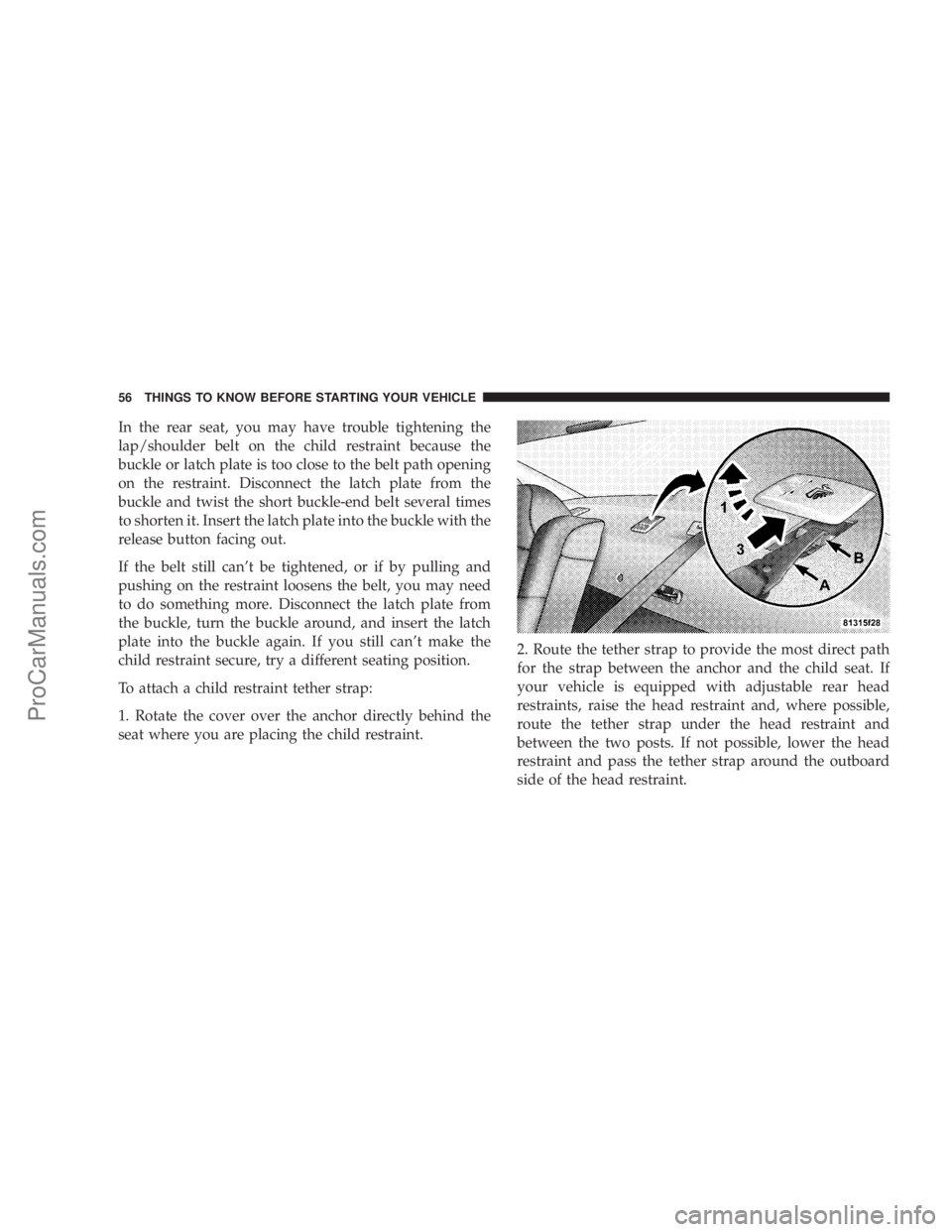
To attach a child restraint tether strap:
1. Rotate the cover over the anchor directly behind the
seat where you are placing the child restraint.2. Route the tether strap to provide the most direct path
for the strap between the anchor and the child seat. If
your vehicle is equipped with adjustable rear head
restraints, raise the head restraint and, where possible,
route the tether strap under the head restraint and
between the two posts. If not possible, lower the head
restraint and pass the tether strap around the outboard
side of the head restraint.
56 THINGS TO KNOW BEFORE STARTING YOUR VEHICLE
ProCarManuals.com
Page 57 of 374
3. Attach the tether strap hook (A) of the child restraint to
the anchor (B) and remove slack in the tether strap
according to the child restraint manufacturer's instruc-
tions.
WARNING!
An incorrectly anchored tether strap could lead to
increased head motion and possible injury to the
child. Use only the anchor positions directly behind
the child seat to secure a child restraint top tether
strap.
Transporting Pets
Airbags deploying in the front seat could harm your pet.
An unrestrained pet will be thrown about and possibly
injured, or injure a passenger during panic braking or in
a collision.
Pets should be restrained in the rear seat in pet harnesses
or pet carriers that are secured by seat belts.
ENGINE BREAK-IN RECOMMENDATIONS
A long break-in period is not required for the engine in
your new vehicle.
Drive moderately during the first 300 miles (500 km).
After the initial 60 miles (100 km), speeds up to 50 or 55
mph (80 or 90 km/h) are desirable.
While cruising, brief full-throttle acceleration, within the
limits of local traffic laws, contributes to a good break-in.
Wide open throttle acceleration in low gear can be
detrimental and should be avoided.
The engine oil installed in the engine at the factory is a
high quality energy conserving type lubricant. Oil
changes should be consistent with anticipated climate
conditions under which vehicle operations will occur.
The recommended viscosity and quality grades are
shown in Section 7 of this manual. NON-DETERGENT
OR STRAIGHT MINERAL OILS MUST NEVER BE
USED.
THINGS TO KNOW BEFORE STARTING YOUR VEHICLE 57
2
ProCarManuals.com
Page 58 of 374
A new engine may consume some oil during its first few
thousand miles (kilometers) of operation. This should be
considered as a normal part of the break-in and not
interpreted as an indication of difficulty.
SAFETY TIPS
Exhaust Gas
WARNING!
Exhaust gases can injure or kill. They contain carbon
monoxide (CO) which is colorless and odorless.
Breathing it can make you unconscious and can
eventually poison you. To avoid breathing (CO)
follow the safety tips below.
Do not run the engine in a closed garage or in confined
areas any longer than needed to move your vehicle in or
out of the area.
If it is necessary to sit in a parked vehicle with the engine
running, adjust your heating or cooling controls to force
outside air into the vehicle. Set the blower at high speed.
WARNING!
If you are required to drive with the trunk open,
make sure that all windows are closed, and the
climate control blower switch is set at high speed.
DO NOT use the recirculation mode.
Safety Checks You Should Make Inside The
Vehicle
Seat Belts
Inspect the belt system periodically, checking for cuts,
frays and loose parts. Damaged parts must be replaced
immediately. Do not disassemble or modify the system.
Front seat belt assemblies must be replaced after a
collision. Rear seat belt assemblies must be replaced after
a collision if they have been damaged (bent retractor, torn
webbing, etc. If there is any question regarding belt or
retractor condition, replace the belt.
Airbag Light
The light should come on and remain on for 6 to 8
seconds as a bulb check when the ignition switch is first
58 THINGS TO KNOW BEFORE STARTING YOUR VEHICLE
ProCarManuals.com
Page 90 of 374
WARNING!
Adjusting a seat while the vehicle is moving is
dangerous. The sudden movement of the seat could
cause you to lose control. The seat belt might not be
properly adjusted and you could be injured. Adjust
the seat only while the vehicle is parked.
CAUTION!
Do not place any article under a power seat as it may
cause damage to the seat controls.
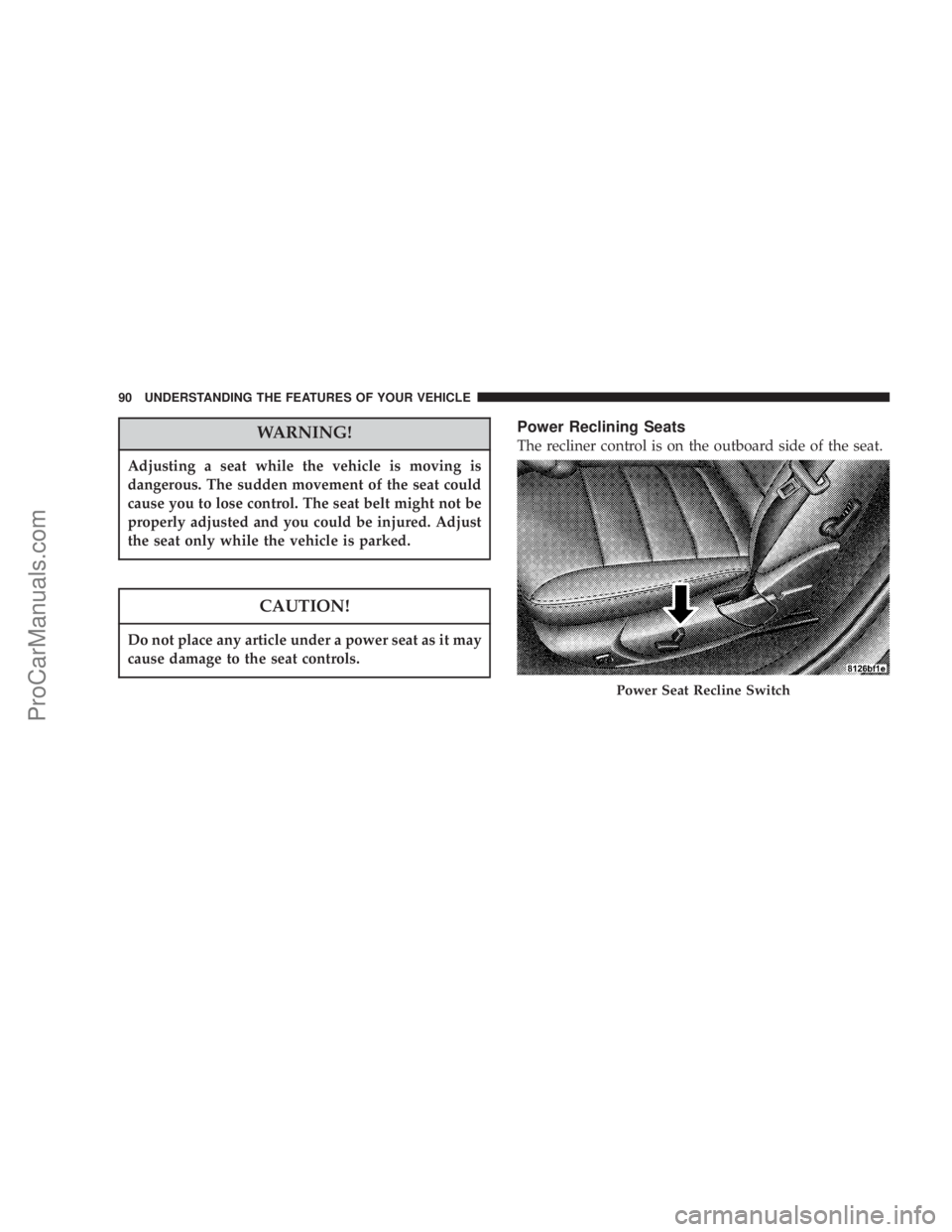
Power Reclining Seats
The recliner control is on the outboard side of the seat.
Power Seat Recline Switch
90 UNDERSTANDING THE FEATURES OF YOUR VEHICLE
ProCarManuals.com
Page 91 of 374
WARNING!
Do not ride with the seatback reclined so that the
shoulder belt is no longer resting against your chest.
In a collision you could slide under the seat belt and
be seriously or even fatally injured. Use the recliner
only when the vehicle is parked.
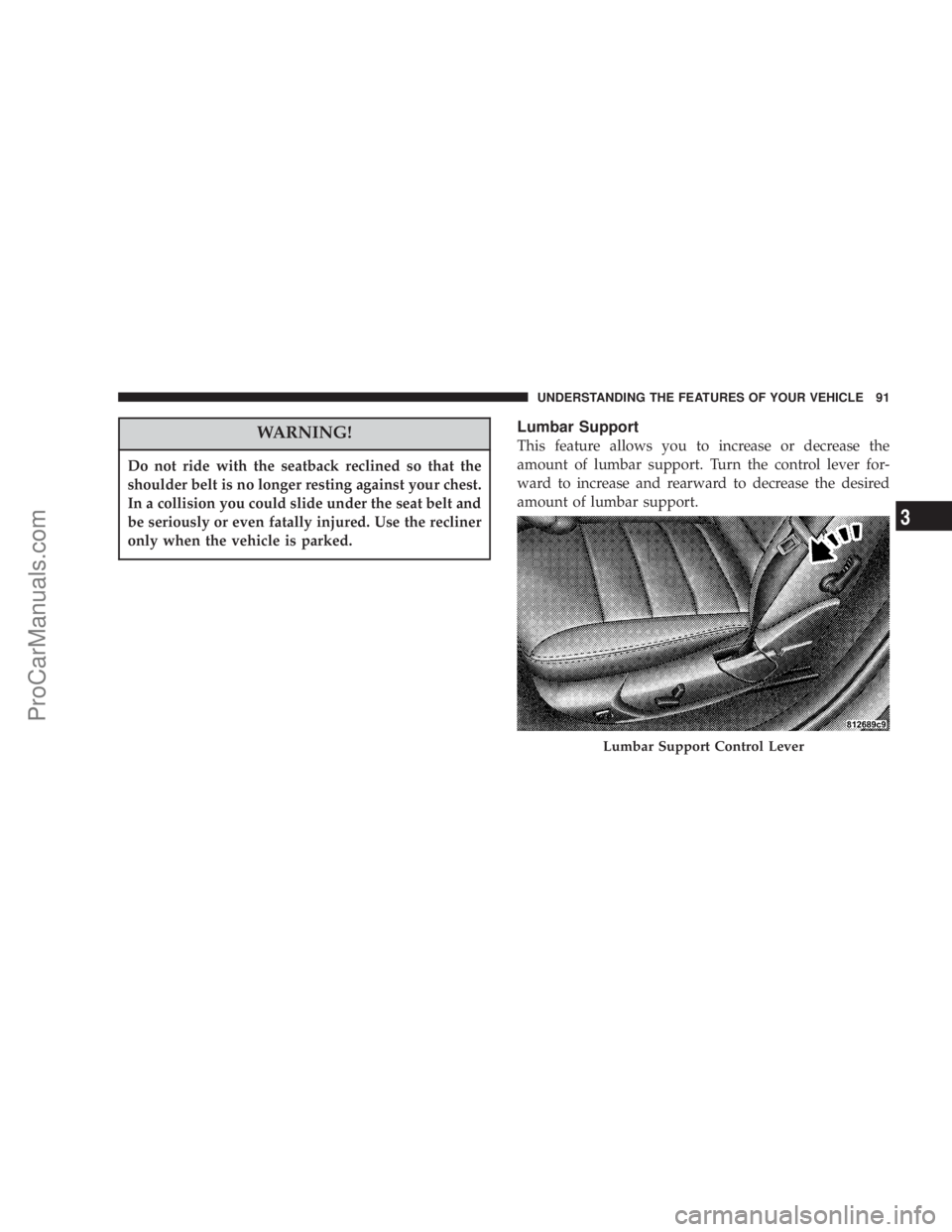
Lumbar Support
This feature allows you to increase or decrease the
amount of lumbar support. Turn the control lever for-
ward to increase and rearward to decrease the desired
amount of lumbar support.
Lumbar Support Control Lever
UNDERSTANDING THE FEATURES OF YOUR VEHICLE 91
3
ProCarManuals.com
Page 95 of 374
setting 1, and the second transmitter trained will be
associated with memory setting 2. Additional transmit-
ters will not be associated with a memory setting.
Driver's Seat Glide ±To ± Exit Feature Ð If
Equipped
This feature provides ease of entry and exit for the driver
by moving the driver's seat approximately 2±1/8 inches
(55mm) rearward on exit and the same distance forward
after entry, provided that the seat is not in the full
rearward position.
After entry, the seat will return to its previously set
position after one of the following occurs:
²The ignition switch is turned on
²The seatbelt is fastened (the seat moves when the seat
belt buckle is buckled.)
The seat moves when the seat belt buckle is buckled.This feature can be turned off by performing the follow-
ing procedure:
1. Press and hold the Set (S) button on the memory seat
switch (located on the driver's door panel).
2. Move the horizontal seat switch rearward.
3. Release the Set (S) button and the horizontal seat
switch.
During exit, the seat will move rearward from the set
position when the key is removed from the ignition
providing that the seat is not in the full rearward
position.
This feature can be turned on or off by performing the
following procedure.
1. Press and hold the Set (S) button.
2. Move the horizontal seat switch rearward.
UNDERSTANDING THE FEATURES OF YOUR VEHICLE 95
3
ProCarManuals.com
Page 126 of 374
WARNING!
²Never leave children in a vehicle, with the keys in
the ignition switch. Occupants, particularly unat-
tended children, can become entrapped by the
power sunroof while operating the power sunroof
switch. Such entrapment may result in serious
injury or death.
²In an accident, there is a greater risk of being
thrown from a vehicle with an open sunroof. You
could also be seriously injured or killed. Always
fasten your seat belt properly and make sure all
passengers are properly secured too.
²Do not allow small children to operate the sun-
roof. Never allow fingers or other body parts, or
any object to project through the sunroof opening.
Injury may result.
Wind Buffeting
Wind buffeting can be described as the perception of
pressure on the ears or a helicopter type sound in the
ears. Your vehicle may exhibit wind buffeting with the
windows down, or the sunroof (if equipped) in certain
open or partially open positions. This is a normal occur-
rence and can be minimized. If the buffeting occurs with
the rear windows open, open the front and rear windows
together to minimize the buffeting. If the buffeting occurs
with the sunroof open, adjust the sunroof opening to
minimize the buffeting or open any window.
Sunroof Maintenance
Use only a non-abrasive cleaner and a soft cloth to clean
the glass panel.
126 UNDERSTANDING THE FEATURES OF YOUR VEHICLE
ProCarManuals.com
Page 131 of 374
Cargo Tie-Down Hooks
The tie-downs located on cargo area floor and on the rear
trim panels should be used to safely secure loads when
vehicle is moving.
WARNING!
²Cargo tie-down hooks are not safe anchors for a
child seat tether strap. In a sudden stop or colli-
sion a hook could pull loose and allow the child
seat to come loose. A child could be badly injured.
Use only the anchors provided for child seat
tethers.
²The weight and position of cargo and passengers
can change the vehicle center of gravity and
vehicle handling. To avoid loss of control result-
ing in personal injury, follow these guidelines for
loading your vehicle:
²Always place cargo evenly on the cargo floor. Put
heavier objects as low and as far forward as possible.
²Place as much cargo as possible in front of the rear
axle. Too much weight or improperly placed weight
over or behind the rear axle can cause the rear of the
vehicle to sway.
²Do not pile luggage or cargo higher than the top of the
seatback. This could impair visibility or become a
dangerous projectile in a sudden stop or collision.
WARNING!
To help protect against personal injury, passengers
should not be seated in the rear cargo area. The rear
cargo space is intended for load carrying purposes
only, not for passengers, who should sit in seats and
use seat belts.
UNDERSTANDING THE FEATURES OF YOUR VEHICLE 131
3
ProCarManuals.com
Page 145 of 374

17. Transmission Range Indicator
This display indicator shows the automatic transmission
gear selection.
18. Seat Belt Reminder Light
When the ignition switch is first turned ON, this
light will turn on for 5 to 8 seconds as a bulb
check. During the bulb check, if the driver's seat
belt is unbuckled, a chime will sound. After the bulb
check or when driving, if the driver seat belt remains
unbuckled, the Seat Belt Warning Light will flash or
remain on continuously. Refer to9Enhanced Driver
Seat Belt Reminder System (BeltAlertŸ)9in the Occu-
pant Restraints section for more information.
19. Fuel Gauge
The pointer shows the level of fuel in the fuel tank when
the ignition switch is in the ON position.
20. Electronic Throttle Control (ETC) Light
This light informs you of a problem with the
Electronic Throttle Control system. If a prob-
lem is detected the light will come on while
the engine is running. Cycle the ignition key
when the vehicle has completely stopped and the gearselector is placed in the PARK position. The light
should turn off. If the light remains lit with the engine
running your vehicle will usually be drivable, how-
ever, see your dealer for service as soon as possible. If
the light is flashing when the engine is running,
immediate service is required and you may experience
reduced performance, an elevated/rough idle or en-
gine stall and your vehicle may require towing. The
light will come on when the ignition is first turned on
and remain on briefly as a bulb check. If the light does
not come on during starting, have the system checked
by an authorized dealer.
21. Tire Pressure Monitor Warning Light Ð If
Equipped
This light will turn on continuously when
there is a Low tire pressure condition. The
light will also turn on if a problem exist with
any tire sensor. When a system fault is
detected, the indicator lamp will flash repetitively for
ten seconds. The flash cycle will repeat every ten
minutes or until the fault condition is removed and
UNDERSTANDING YOUR INSTRUMENT PANEL 145
4
ProCarManuals.com
Page 148 of 374

Pressing the FUNCTION SELECT button ac-
cepts a selected choice. The Function Select
button also advances the radio preset when the
EVIC is in the Compass/Temp/Audio screen.
Use the SCROLL buttons to scroll through Trip
Functions, Navigation (If Equipped), System
Status Messages, and Personal Settings (Cus-
tomer Programmable Features). The SCROLL
buttons also seek up and down (radio station or CD track
number).
The AUDIO MODE SELECT button is used to
select the Compass/Temp/Audio screen. If
Compass/Temp/Audio is already being dis-
played when the AUDIO MODE SELECT but-
ton is pressed, the radio mode will change from AM to
FM to Tape to CD, or to Satellite (SAT) depending on
which radio is in the vehicle. This button can also be used
to return to a previous navigation menu selection.
When the appropriate conditions exist, the Electronic
Vehicle Information Center (EVIC) displays the following
messages.²Turn Signal On (with a continuous warning chime)
²Left Front Turn Signal Lamp Out (with a single chime)
²Left Rear Turn Signal Lamp Out (with a single chime)
²Right Front Turn Signal Lamp Out (with a single
chime)
²Right Rear Turn Signal Lamp Out (with a single
chime)
²RKE Battery Low (with a single chime)
²Memory #1/#2 Profile Set
²Memory #1/#2 Profile Recall
²Memory System Disabled ± Vehicle Not In Park (with
a single chime)
²Memory System Disabled ± Seat Belt Buckled (with a
single chime)
²Personal Settings Not Available ± Vehicle Not in Park
²Left/Right Front Door Ajar (one or more, with a single
chime if speed is above 1 mph)
148 UNDERSTANDING YOUR INSTRUMENT PANEL
ProCarManuals.com