warning CHRYSLER 300 LX 2005 Service Manual
[x] Cancel search | Manufacturer: CHRYSLER, Model Year: 2005, Model line: 300 LX, Model: CHRYSLER 300 LX 2005Pages: 374, PDF Size: 7.09 MB
Page 116 of 374

To Activate:
Push and release the speed control lever (ªON/OFFº)
once and an LED on the lever will illuminate indicating
that the electronic speed control is ON. To turn the
system OFF, Push and release the lever (ªON/OFFº)
again and the system and indicator will turn off.
WARNING!
Leaving the Electronic Speed Control system on
when not in use is dangerous. You could accidently
set the system or cause it to go faster than you want.
You could lose control and have an accident. Always
leave the system OFF when you aren't using it.
To Set At A Desired Speed:
When the vehicle has reached the desired speed, pull the
lever toward you and release. Release the accelerator and
the vehicle will operate at the selected speed.
NOTE:Speed control will only function in third, fourth,
or fifth gear when in the Autostick Mode Ð if equipped.
NOTE:The speed control may not engage if a different
size tire is installed on one wheel, such as the compact
spare tire.
To Deactivate:
A soft tap on the brake pedal, pushing the lever away
from you (ªCANCELº) or normal braking while slowing
the vehicle will deactivate the speed control without
erasing the memory. Pushing and releasing the lever
(ªON/OFFº) or turning off the ignition erases the speed
memory.
To Resume Speed:
To resume a previously set speed, push the lever up and
release (ªACC/RESº). Resume can be used at any speed
above 20 mph (32 km/h).
To Vary the Speed Setting:
When the speed control is set, speed can be increased by
pushing the lever up and holding (ªACC/RESº). When
the lever is released, a new set speed will be established.
Pushing the lever up and releasing (ªACC/RESº) once
will result in a 1 mph (1.6 km/h) speed increase. Each
time the lever is pushed up and released, speed increases
116 UNDERSTANDING THE FEATURES OF YOUR VEHICLE
ProCarManuals.com
Page 117 of 374
so that pushing the lever up and releasing three times
will increase speed by 3 mph (4.8 km/h), etc.
To decrease speed while speed control is set, push the
lever down and hold (ªCOASTº). Release the lever when
the desired speed is reached, and the new speed will be
set.
Pushing down and releasing the lever (ªCOASTº) once
will result in a 1 mph (2 km/h) speed decrease. Each time
the lever is pushed down and released, speed decreases.
To Accelerate For Passing:
Depress the accelerator as you would normally. When the
pedal is released, the vehicle will return to the set speed.
NOTE:The speed control system maintains speed up
and down hills. A slight speed change on moderate hills
is normal.
Four speed automatic transmissions will experience a
downshift to 3rd gear while climbing uphill or descend-
ing downhill. This downshift to 3rd gear is necessary to
maintain vehicle set speed.On steep hills a greater speed loss or gain may occur so
it may be preferable to drive without speed control.
WARNING!
Speed Control can be dangerous where the system
can't maintain a constant speed. Your vehicle could
go too fast for the conditions, and you could lose
control. An accident could be the result. Don't use
Speed Control in heavy traffic or on roads that are
winding, icy, snow-covered, or slippery.
UNDERSTANDING THE FEATURES OF YOUR VEHICLE 117
3
ProCarManuals.com
Page 119 of 374
GARAGE DOOR OPENER Ð IF EQUIPPED
The HomeLinktUniversal Transceiver replaces up to
three remote controls (hand held transmitters) that oper-
ate devices such as garage door openers, motorized
gates, or home lighting. It triggers these devices at the
push of a button. The Universal Transceiver operates off
your vehicle's battery and charging system; no batteries
are needed.
NOTE:The HomeLinktUniversal Transceiver is dis-
abled when the Vehicle Theft Alarm is active.
For additional information on HomeLinkt, call 1±800±
355±3515, or on the internet at www.homelink.com.
WARNING!
A moving garage door can cause injury to people and
pets in the path of the door. People or pets could be
seriously or fatally injured. Only use this transceiver
with a garage door opener that has a ªstop and
reverseº feature as required by federal safety stan-
dards. This includes most garage door opener mod-
els manufactured after 1982. Do not use a garage
door opener without these safety features it could
cause injury or death. Call toll-free 1±800±355±3515
or, on the Internet at www.homelink.com for safety
information or assistance.
Programming HomeLink
NOTE:
When programming a garage door opener, it is
advised to park outside the garage. It is also recom-
mended that a new battery be placed in the hand-held
transmitter of the device being programmed to
HomeLink for quicker training and accurate transmis-
sion of the radio-frequency signal.
UNDERSTANDING THE FEATURES OF YOUR VEHICLE 119
3
ProCarManuals.com
Page 120 of 374
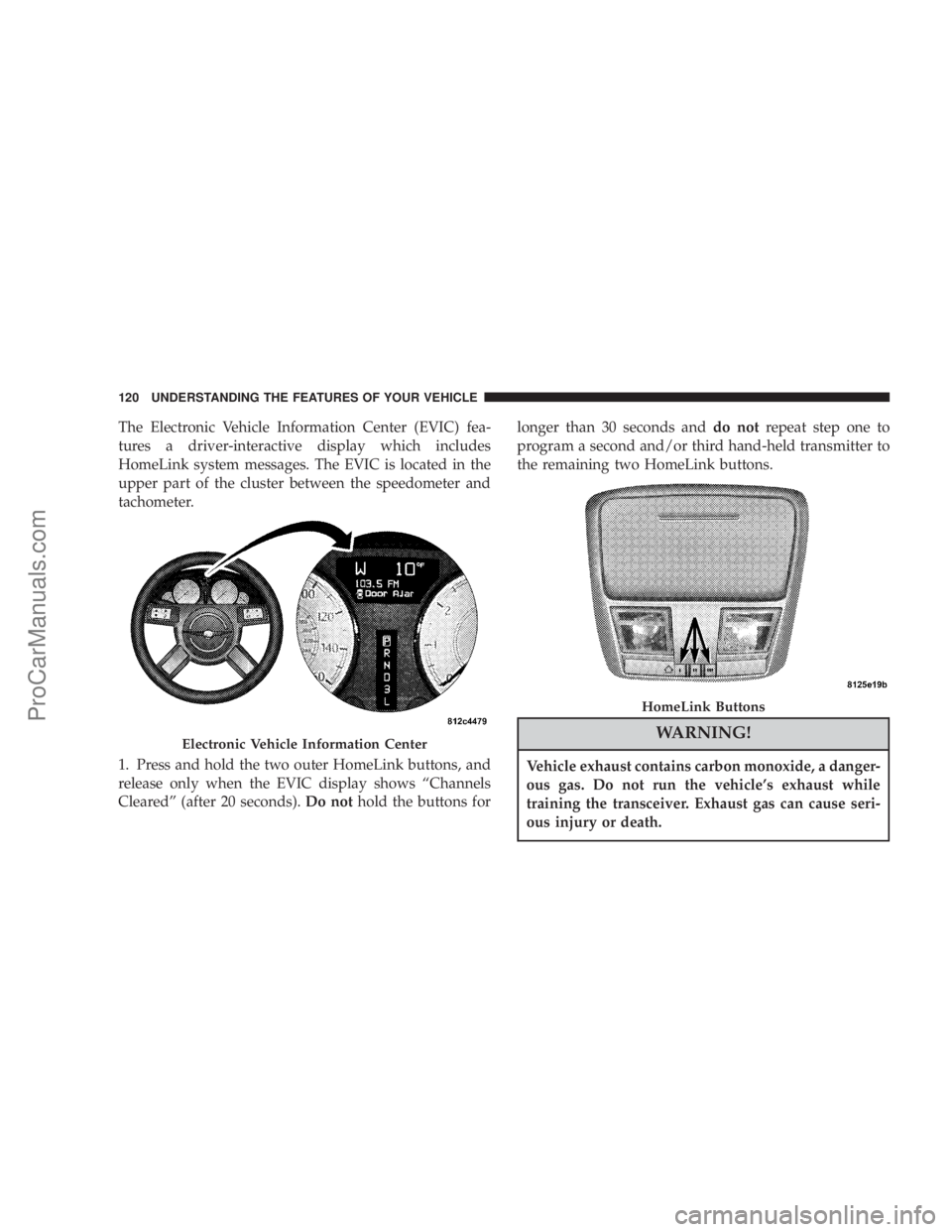
The Electronic Vehicle Information Center (EVIC) fea-
tures a driver-interactive display which includes
HomeLink system messages. The EVIC is located in the
upper part of the cluster between the speedometer and
tachometer.
1. Press and hold the two outer HomeLink buttons, and
release only when the EVIC display shows ªChannels
Clearedº (after 20 seconds).Do nothold the buttons forlonger than 30 seconds anddo notrepeat step one to
program a second and/or third hand-held transmitter to
the remaining two HomeLink buttons.
WARNING!
Vehicle exhaust contains carbon monoxide, a danger-
ous gas. Do not run the vehicle's exhaust while
training the transceiver. Exhaust gas can cause seri-
ous injury or death.
Electronic Vehicle Information Center
HomeLink Buttons
120 UNDERSTANDING THE FEATURES OF YOUR VEHICLE
ProCarManuals.com
Page 121 of 374
WARNING!
Your motorized door or gate will open and close
while you are training the Universal Transceiver. Do
not train the transceiver if people or pets are in the
path of the door or gate. A moving door or gate can
cause serious injury or death to people and pets or
damage to objects.
2. Position the end of your hand-held transmitter 1-3
inches (3-8 cm) away from the HomeLink buttons.
3. Simultaneously press and hold both the HomeLink
button that you want to train and the hand-held trans-
mitter buttons.Do not release the buttons until step 4
has been completed.
NOTE:Some gate operators and garage door openers
may require you to replace this Programming Step 3 with
procedures noted in the9Gate Operator/Canadian Pro-
gramming9section.4. The EVIC display will show ªChannel X Trainingº
(where X is Channel 1, 2, or 3). Release both buttons after
the EVIC display shows ªChannel X Trainedº.
NOTE:If the EVIC display shows ªDid Not Trainº
repeat steps 2±4.
5. Press and hold the just trained HomeLink button and
observe the EVIC display. If the EVIC display shows
ªChannel X Transmitº (where X is Channel 1, 2, or 3),
programming is complete and your device should acti-
vate when the HomeLink button is pressed and released.
NOTE:To program the remaining two HomeLink but-
tons, begin with9Programming9step two. Do not repeat
step one.
NOTE:If your hand-held transmitter appears to pro-
gram the universal transceiver, but your garage door
does not operate using the transmitter and your garage
door opener was manufactured after 1995, your garage
door opener may have a multiple security code system
(rolling code system). Please proceed to steps 6±8 to
UNDERSTANDING THE FEATURES OF YOUR VEHICLE 121
3
ProCarManuals.com
Page 126 of 374
WARNING!
²Never leave children in a vehicle, with the keys in
the ignition switch. Occupants, particularly unat-
tended children, can become entrapped by the
power sunroof while operating the power sunroof
switch. Such entrapment may result in serious
injury or death.
²In an accident, there is a greater risk of being
thrown from a vehicle with an open sunroof. You
could also be seriously injured or killed. Always
fasten your seat belt properly and make sure all
passengers are properly secured too.
²Do not allow small children to operate the sun-
roof. Never allow fingers or other body parts, or
any object to project through the sunroof opening.
Injury may result.
Wind Buffeting
Wind buffeting can be described as the perception of
pressure on the ears or a helicopter type sound in the
ears. Your vehicle may exhibit wind buffeting with the
windows down, or the sunroof (if equipped) in certain
open or partially open positions. This is a normal occur-
rence and can be minimized. If the buffeting occurs with
the rear windows open, open the front and rear windows
together to minimize the buffeting. If the buffeting occurs
with the sunroof open, adjust the sunroof opening to
minimize the buffeting or open any window.
Sunroof Maintenance
Use only a non-abrasive cleaner and a soft cloth to clean
the glass panel.
126 UNDERSTANDING THE FEATURES OF YOUR VEHICLE
ProCarManuals.com
Page 127 of 374
ELECTRICAL POWER OUTLETS
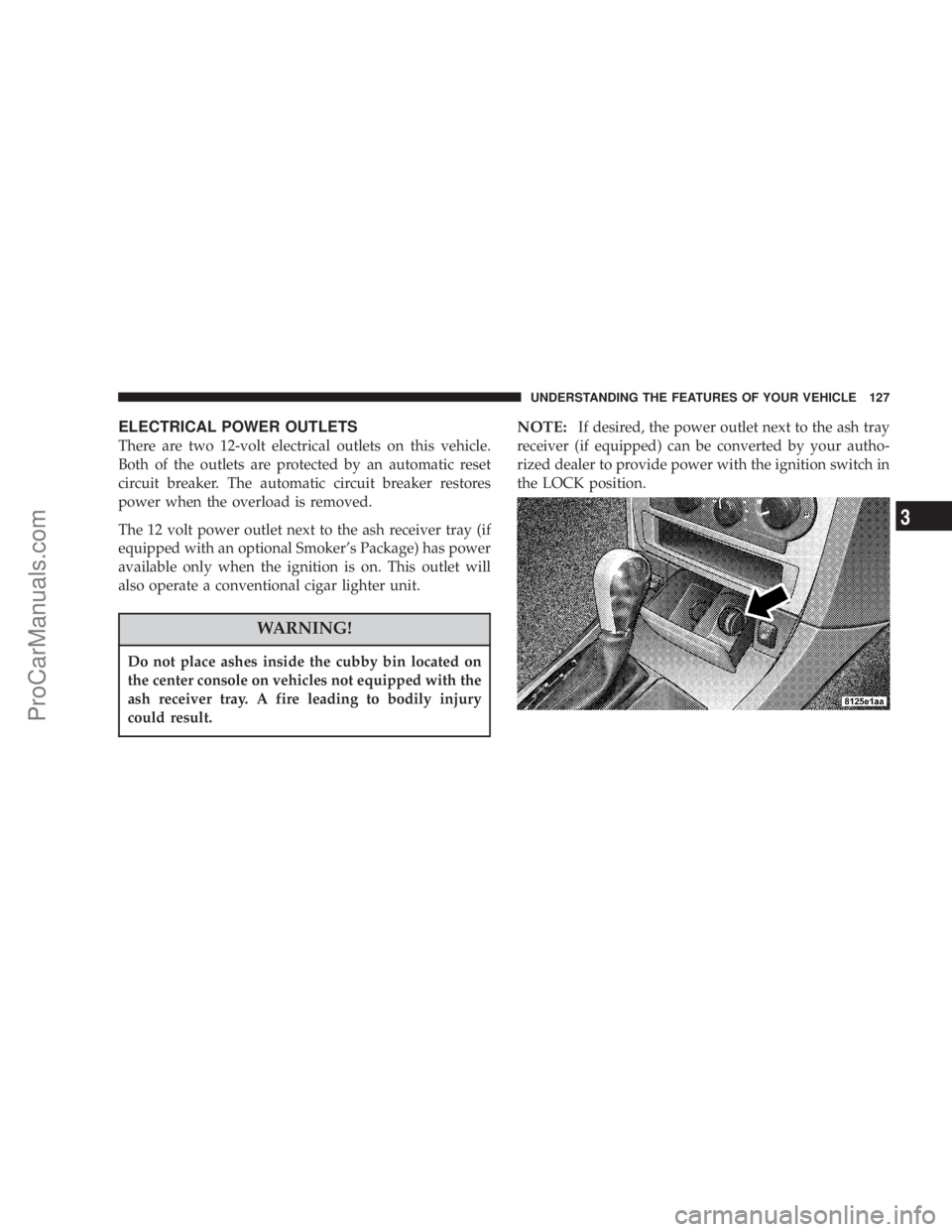
There are two 12-volt electrical outlets on this vehicle.
Both of the outlets are protected by an automatic reset
circuit breaker. The automatic circuit breaker restores
power when the overload is removed.
The 12 volt power outlet next to the ash receiver tray (if
equipped with an optional Smoker's Package) has power
available only when the ignition is on. This outlet will
also operate a conventional cigar lighter unit.
WARNING!
Do not place ashes inside the cubby bin located on
the center console on vehicles not equipped with the
ash receiver tray. A fire leading to bodily injury
could result.
NOTE:If desired, the power outlet next to the ash tray
receiver (if equipped) can be converted by your autho-
rized dealer to provide power with the ignition switch in
the LOCK position.
UNDERSTANDING THE FEATURES OF YOUR VEHICLE 127
3
ProCarManuals.com
Page 131 of 374
Cargo Tie-Down Hooks
The tie-downs located on cargo area floor and on the rear
trim panels should be used to safely secure loads when
vehicle is moving.
WARNING!
²Cargo tie-down hooks are not safe anchors for a
child seat tether strap. In a sudden stop or colli-
sion a hook could pull loose and allow the child
seat to come loose. A child could be badly injured.
Use only the anchors provided for child seat
tethers.
²The weight and position of cargo and passengers
can change the vehicle center of gravity and
vehicle handling. To avoid loss of control result-
ing in personal injury, follow these guidelines for
loading your vehicle:
²Always place cargo evenly on the cargo floor. Put
heavier objects as low and as far forward as possible.
²Place as much cargo as possible in front of the rear
axle. Too much weight or improperly placed weight
over or behind the rear axle can cause the rear of the
vehicle to sway.
²Do not pile luggage or cargo higher than the top of the
seatback. This could impair visibility or become a
dangerous projectile in a sudden stop or collision.
WARNING!
To help protect against personal injury, passengers
should not be seated in the rear cargo area. The rear
cargo space is intended for load carrying purposes
only, not for passengers, who should sit in seats and
use seat belts.
UNDERSTANDING THE FEATURES OF YOUR VEHICLE 131
3
ProCarManuals.com
Page 140 of 374
INSTRUMENT CLUSTER DESCRIPTIONS
1. Oil Pressure Warning Light
This light shows low engine oil pressure. The
light should turn on momentarily when the
engine is started. If the light turns on while driving,
stop the vehicle and shut off the engine as soon as
possible. A continuous chime will sound when this
light turns on.
Do not operate the vehicle until the cause is corrected.
This light does not show how much oil is in the engine.
The engine oil level must be checked under the hood.
2. Low Fuel Indicator Light
The Low Fuel Light will turn on when there is
approximately 2 gallons (9 liters) of fuel remain-
ing in the tank. This light will remain on until
fuel is added.
3. Front Fog Light Indicator Ð If Equipped
This light shows the front fog lights are ON.4. Turn Signal Indicators
The arrow will flash with the exterior turn signal
when the turn signal lever is operated.
If the vehicle electronics sense that the vehicle has
traveled about one mile with the turn signals on, a chime
will sound to alert you to turn the signals off. If either
indicator flashes at a rapid rate, check for a defective
outside light bulb.
5. Speedometer
Indicates vehicle speed.
6. Electronic Vehicle Information Center Display
When the appropriate conditions exist, this display
shows the Electronic Vehicle Information Center (EVIC)
messages. Refer to Electronic Vehicle Information Center
for specific messages (only on vehicles equipped with
steering wheel mounted switches).
NOTE:On non-EVIC equipped vehicles the odometer
is located here.
140 UNDERSTANDING YOUR INSTRUMENT PANEL
ProCarManuals.com
Page 141 of 374

7. Tachometer
The red segments indicate the maximum permissible
engine revolutions-per-minute (r.p.m. x 1000) for each
gear range. Before reaching the red area, ease up on the
accelerator.
8. Engine Temperature Warning Light
This light illuminates, and will be accompanied
by a single chime to warn of an overheated
engine condition. The engine temperature is
critically hot, and the vehicle should be turned off
immediately. The vehicle should be serviced as soon
as possible.
9. Anti-Lock Brake Light
This light monitors the Anti-Lock Brake System.
The light will turn on when the ignition switch
is turned to the ON position and may stay on for as
long as four seconds.
If the ABS light remains on or turns on while driving, it
indicates that the Anti-Lock portion of the brake system
is not functioning and that service is required. However,
the conventional brake system will continue to operate
normally if the BRAKE warning light is not on.If the ABS light is on, the brake system should be serviced
as soon as possible to restore the benefits of Anti-Lock
brakes. If the ABS light does not turn on when the
Ignition switch is turned to the ON position, have the
light inspected by an authorized dealer.
10. Brake Assist System (BAS) Warning
Light/Electronic Stability Program (ESP) Warning
Light Ð If Equipped
The yellow Brake Assist System (BAS) mal-
function indicator light in the instrument
cluster comes on with the key in the ignition
switch turned to the ªONº position. The
light should go out with the engine running. If the
BAS malfunction indicator light comes on continu-
ously with the engine running, a malfunction has been
detected in either the BAS, or the Electronic Stability
Program (ESP) system. If this light stays illuminated,
have the BAS and ESP checked at your authorized
dealer as soon as possible.
The yellow malfunction indicator lamp for
the ESP is combined with the BAS on some
models. The yellow BAS malfunction indica-
tor light and the yellow ESP warning light in
UNDERSTANDING YOUR INSTRUMENT PANEL 141
4
ProCarManuals.com