seat CHRYSLER 300 M 2004 1.G Service Manual
[x] Cancel search | Manufacturer: CHRYSLER, Model Year: 2004, Model line: 300 M, Model: CHRYSLER 300 M 2004 1.GPages: 277, PDF Size: 5.69 MB
Page 93 of 277
Remote Unlock Driver’s Door 1st
When this feature is selected only the driver’s door will
unlock on the first press of the remote keyless entry
unlock button and require a second press to unlock the
remaining locked doors. WhenREMOTE UNLOCK ALL
DOORSis selected all of the doors will unlock at the first
press of the remote keyless entry unlock button. Pressing
the STEP button when in this display will select DRIV-
ER’S DOOR 1ST or ALL DOORS.
Remote Linked To Memory (Available with
Memory Seat Only)
When this feature is selected the memory seat, mirror,
and radio settings will return to the memory set position
when the remote keyless entry “Unlock” button is
pressed. If this feature is not selected then the memory
seat, mirror, and radio settings can only return to the
memory set position using the door mounted switch.
Pressing the STEP button when in this display will select
“Yes” or “No.”
Sound Horn with Lock
When this feature is selected a short horn sound will
occur when the remote keyless entry “Lock” button is
pressed. This feature may be selected with or without the
flash lights on lock/unlock feature. Pressing the STEP
button when in this display will select “Yes” or “No.”
Flash Lights with Lock/Unlock
When this feature is selected, the front and rear turn
signals will flash when the doors are locked or unlocked
using the remote keyless entry transmitter. This feature
may be selected with or without the sound horn on lock
feature selected. Pressing the STEP button when in this
display will select “Yes” or “No.”
Headlamp Delay
When this feature is selected the driver can choose, when
exiting the vehicle, to have the headlamps remain on for
30, 60, or 90 seconds, or not remain on. Pressing the STEP
button when in this display will select 30, 60, 90, or OFF.
UNDERSTANDING THE FEATURES OF YOUR VEHICLE 93
3
Page 94 of 277
Headlamp On With Wipers (Available with Auto
Headlights Only)
When this feature is selected and the headlight switch
has at least once been moved to the AUTO position, the
headlights will turn on when the wipers are turned on.
The headlights will also turn off when the wipers are
turned off if they were turned on in this way. Pressing the
STEP button when in this display will select “Yes” or
“No.”
NOTE:Turning the headlights on during the daytime
causes the instrument panel lights to dim. To increase the
brightness, refer to “Lights” in this section.
Service Interval
When this feature is selected a service interval between
2,000 (3 200 km) and 6,000 miles (9 600 km) in 500 mile
(800 km) increments may be selected. Pressing the STEP
button when in this display will select distances between
2,000 (3 200 km) and 6,000 miles (9 600 km) in 500 mile
(800 km) increments.
Reset Service Distance (Displays Only if Service
Interval was Changed)
When this feature is selected the current accumulated
service distance can be reset to the newly selected service
interval. Pressing the STEP button when in this display
will select “Yes” or “No.”
Easy Exit Seat
When this feature is selected the driver’s seat moves
rearward two inches (55 mm) or to the farthest rearward
position if this distance is less than two inches (55 mm)
when the key is removed from the ignition switch so that
the driver can more easily exit the vehicle. The seat will
return to the memorized seat location (if REMOTE LINK
TO MEMORY is set to YES) when the remote keyless
entry transmitter is used to unlock the door. Pressing the
STEP button when in this display will select “Yes” or
“No.”
94 UNDERSTANDING THE FEATURES OF YOUR VEHICLE
Page 114 of 277
7. Turn Signal Indicators
The arrow will flash in unison with the exterior
turn signal, when using the turn signal lever.
8. High Beam Indicator
This light shows that the headlights are on high
beam. Pull the turn signal lever towards the
steering wheel to switch the headlights from high or
low beam.
9. Seat Belt Reminder Light
The light will come on after the ignition is
turned on. The light will remain lit until the seat
belt is fastened.
10. Door Ajar Light
This light shows that a door is not completely
closed. A warning chime will sound if the vehicle
is moving with a door partially closed.
11. Speedometer
Shows vehicle speed in miles-per-hour or kilometers-per-
hour.
12. Low Washer Fluid Light
This symbol will light whenever the fluid reser-
voir is less than 1/4 filled. Adding washer fluid
will cause the light to go out the next time the
ignition is cycled. A warning chime will sound when
the light comes on.
13. Cruise (Speed Control) Light
This light shows that the Speed Control System is ON.
14. Temperature Light
This light warns of an overheated engine cool-
ant condition. A warning chime will sound
when the light comes on.
15. Engine Coolant Temperature Gauge
The temperature gauge shows engine coolant
temperature. Any reading within the 5 gauge
marks between Hot and Cold shows that the
engine cooling system is operating properly. The
gauge pointer may show a higher than normal tem-
perature when driving in hot weather, up mountain
grades, in heavy stop and go traffic, or when towing a
trailer.
114 UNDERSTANDING YOUR INSTRUMENT PANEL
Page 150 of 277
Hot Weather Automatic Recirculation
The system will automatically recirculate the air inside
the vehicle when the interior is very warm. This will
provide maximum cooling. The system will also occa-
sionally return to REC on hot, humid days to maintain
occupant comfort. See Operating Tips chart at the end of
this section for suggested control settings in different
weather conditions.
Side Window Demisters
Side window demisters are located on the instrument
panel. These non adjustable outlets direct air toward the
side windows in any mode except Panel or Panel Recir-
culation. The air is directed toward the area of the side
windows through which you view the outside rearview
mirrors.
Rear Seat Air Outlets
The center console on vehicles with bucket seats has
upper and lower outlets located on the rear of the
console.
Air is directed through the outlets in all Modes. A control
can be used to direct the flow of air to either the upper or
lower outlets.
On vehicles with 50/50 bench seats, air is routed under
the seats.
150 UNDERSTANDING YOUR INSTRUMENT PANEL
Page 179 of 277
VEHICLE LOADING
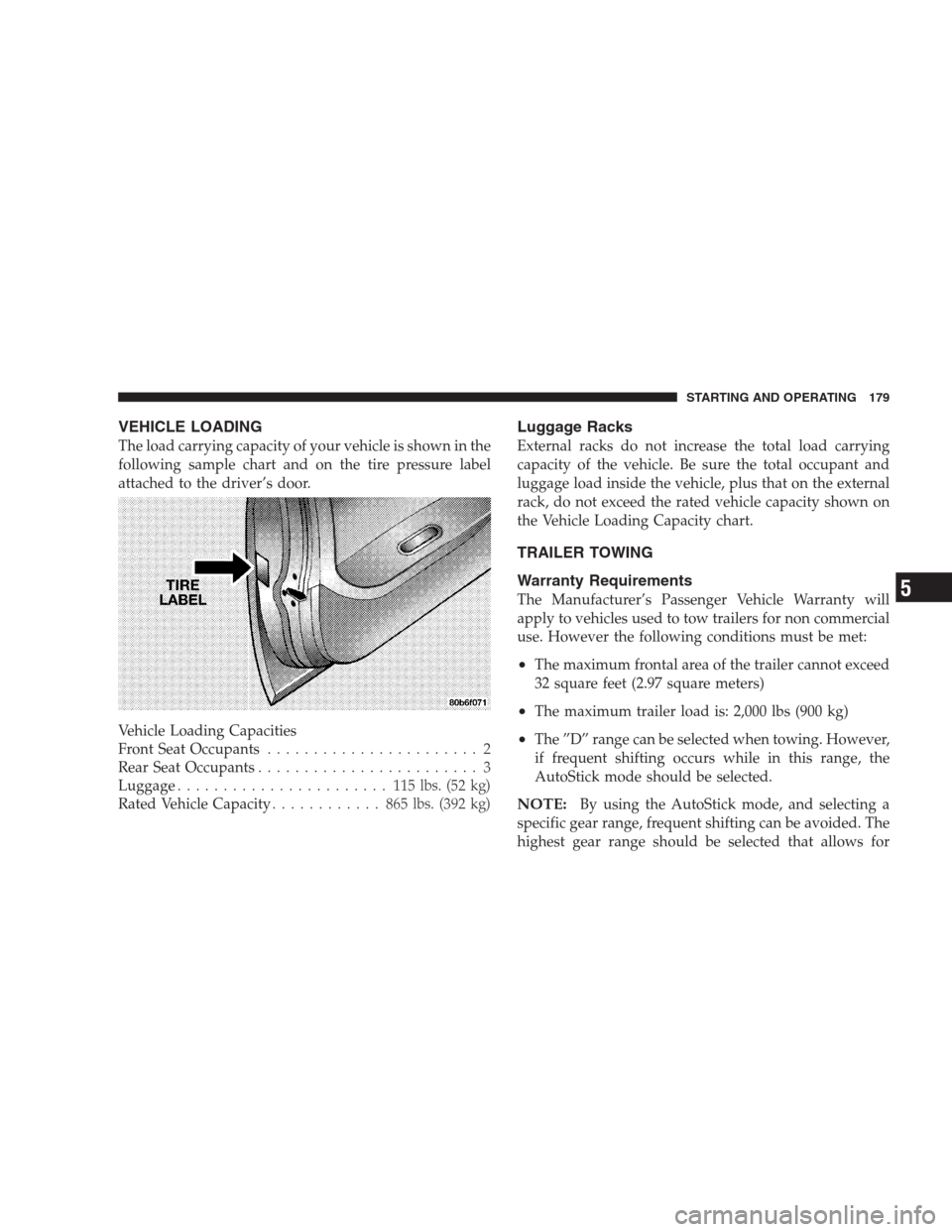
The load carrying capacity of your vehicle is shown in the
following sample chart and on the tire pressure label
attached to the driver’s door.
Vehicle Loading Capacities
Front Seat Occupants....................... 2
Rear Seat Occupants........................ 3
Luggage....................... 115lbs. (52 kg)
Rated Vehicle Capacity............ 865lbs. (392 kg)
Luggage Racks
External racks do not increase the total load carrying
capacity of the vehicle. Be sure the total occupant and
luggage load inside the vehicle, plus that on the external
rack, do not exceed the rated vehicle capacity shown on
the Vehicle Loading Capacity chart.
TRAILER TOWING
Warranty Requirements
The Manufacturer’s Passenger Vehicle Warranty will
apply to vehicles used to tow trailers for non commercial
use. However the following conditions must be met:
•The maximum frontal area of the trailer cannot exceed
32 square feet (2.97 square meters)
•The maximum trailer load is: 2,000 lbs (900 kg)
•The ”D” range can be selected when towing. However,
if frequent shifting occurs while in this range, the
AutoStick mode should be selected.
NOTE:By using the AutoStick mode, and selecting a
specific gear range, frequent shifting can be avoided. The
highest gear range should be selected that allows for
STARTING AND OPERATING 179
5
Page 222 of 277
Fluid Level Check
The fluid level in the automatic transaxle should be
checked whenever the vehicle is serviced. Operation with
an improper fluid level will greatly reduce the life of the
transaxle and of the fluid.
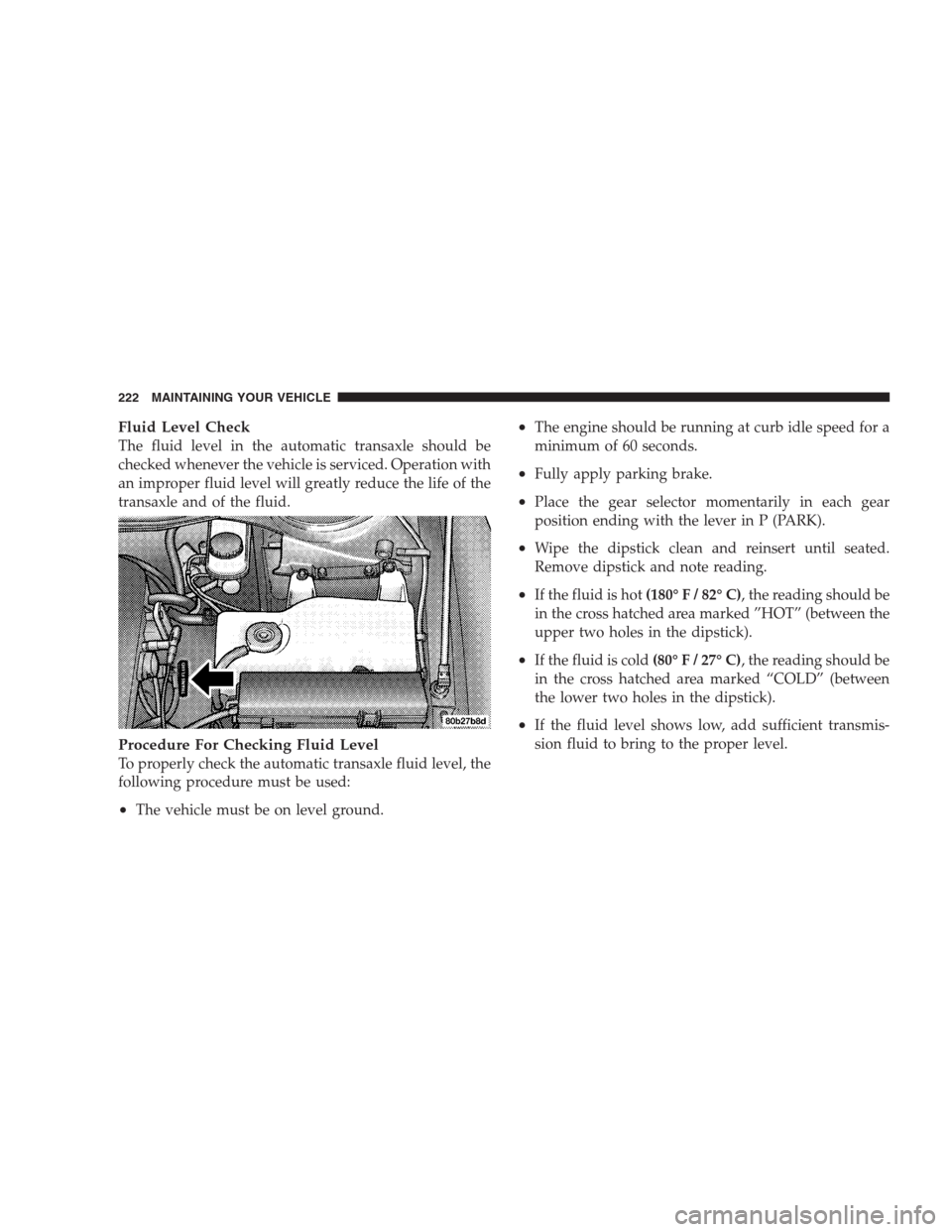
Procedure For Checking Fluid Level
To properly check the automatic transaxle fluid level, the
following procedure must be used:
•The vehicle must be on level ground.
•The engine should be running at curb idle speed for a
minimum of 60 seconds.
•Fully apply parking brake.
•Place the gear selector momentarily in each gear
position ending with the lever in P (PARK).
•Wipe the dipstick clean and reinsert until seated.
Remove dipstick and note reading.
•If the fluid is hot(180° F / 82° C), the reading should be
in the cross hatched area marked ”HOT” (between the
upper two holes in the dipstick).
•If the fluid is cold(80° F / 27° C), the reading should be
in the cross hatched area marked “COLD” (between
the lower two holes in the dipstick).
•If the fluid level shows low, add sufficient transmis-
sion fluid to bring to the proper level.
222 MAINTAINING YOUR VEHICLE
Page 223 of 277
CAUTION!
Do not overfill. Dirt and water in the transaxle can
cause serious damage. To prevent dirt and water
from entering the transaxle after checking or replen-
ishing fluid, make certain that the dipstick cap is
seated properly.
Fluid and Filter Changes
Automatic transmission fluid and filter should be
changed as follows:
Maintenance schedule “A”— No change necessary.
Maintenance schedule “B”–Every 60,000 miles (96 000
km) change fluid and filter under the following condi-
tions:
•Police, taxi, limousine, commercial type operation, or
trailer towing where the vehicle is drivenregularlyfor
more than 45 minutes of continuous operation.
NOTE:Refer to Section 8 of this manual for mainte-
nance schedules.If the transaxle is disassembled for any reason, the fluid
and filter should be changed.
Special Additives
The manufacturer recommends against the addition of
any fluid additives to the transaxle. The only exception to
this policy is the use of special dyes to aid in detecting
fluid leaks. The use of transmission sealers should be
avoided as they may adversely affect seals.
Appearance Care And Protection From Corrosion
Protection of Body and Paint from Corrosion
Vehicle body care requirements vary according to geo-
graphic locations and usage. Chemicals that make roads
passable in snow and ice, and those that are sprayed on
trees and road surfaces during other seasons, are highly
corrosive to the metal in your vehicle. Outside parking,
which exposes your vehicle to airborne contaminants,
road surfaces on which the vehicle is operated, extreme
hot or cold weather and other extreme conditions will
have an adverse effect on paint, metal trim, and under-
body protection.
MAINTAINING YOUR VEHICLE 223
7
Page 226 of 277
CAUTION!
The use of vinyl, leather or plastic protectants may
cause excessive gloss and/or discoloration of interior
trim parts.
Leather Seat Care and Cleaning
Leather is best preserved by regular cleaning with a
damp soft cloth. Small particles of dirt can act as an
abrasive and damage the leather surface and should be
removed immediately with a damp cloth. Stubborn soils
can be removed easily with a soft cloth and Mopar Total
Clean. Care should be taken to avoid soaking the leather
with any liquid. Please do not use polishes, oils, cleaning
fluids, solvents, detergents, or ammonia based cleaners
to clean the leather. Application of a leather conditioner is
not required to maintain the original condition.
Wooden Steering Wheel Care — If Equipped
If your vehicle is equipped with a wood steering wheel,
it is finished with a clear topcoat. Please take care to
avoid scratching the surface with sharp or abrasive
materials.
Cleaning Headlights
Your vehicle has plastic headlights that are lighter and
less susceptible to stone breakage than glass headlights.
Plastic is not as scratch resistant as glass and therefore
different lens cleaning procedures must be followed.
To minimize the possibility of scratching the lenses and
reducing light output, avoid wiping with a dry cloth. To
remove road dirt, wash with a mild soap solution fol-
lowed by rinsing.
Do not use abrasive cleaning components, solvents, steel
wool or other aggressive material to clean the lenses.
Glass Surfaces
All glass surfaces should be cleaned on a regular basis
with any commercial household-type glass cleaner.
Never use an abrasive type cleaner. Use caution when
cleaning inside rear windows equipped with electric
defrosters. Do not use scrapers or other sharp instru-
ments which may scratch the elements.
Instrument Panel Cover
The instrument panel cover has a low glare surface which
minimizes reflections in the windshield. Do not use
226 MAINTAINING YOUR VEHICLE
Page 227 of 277
protectants or other products which may cause undesir-
able reflections. Use soap and warm water to restore the
low glare surface.
Cleaning Plastic Instrument Cluster Lenses
The lenses in front of the instruments in this vehicle are
molded in clear plastic. When cleaning the lenses, care
must be taken to avoid scratching the plastic.
•Clean with a wet soft rag. A mild soap solution may be
used, but do not use high alcohol content or abrasive
cleaners. If soap is used, wipe clean with a clean damp
rag.
•Dry with a soft tissue.
Seat Belt Maintenance
Do not bleach, dye or clean the belts with chemical
solvents or abrasive cleaners. This will weaken the fabric.
If the belts need cleaning, use a mild soap solution or
lukewarm water. Do not remove the belts from the
vehicle to wash them.
Replace the belts if they appear frayed or worn or if the
buckles do not work properly.
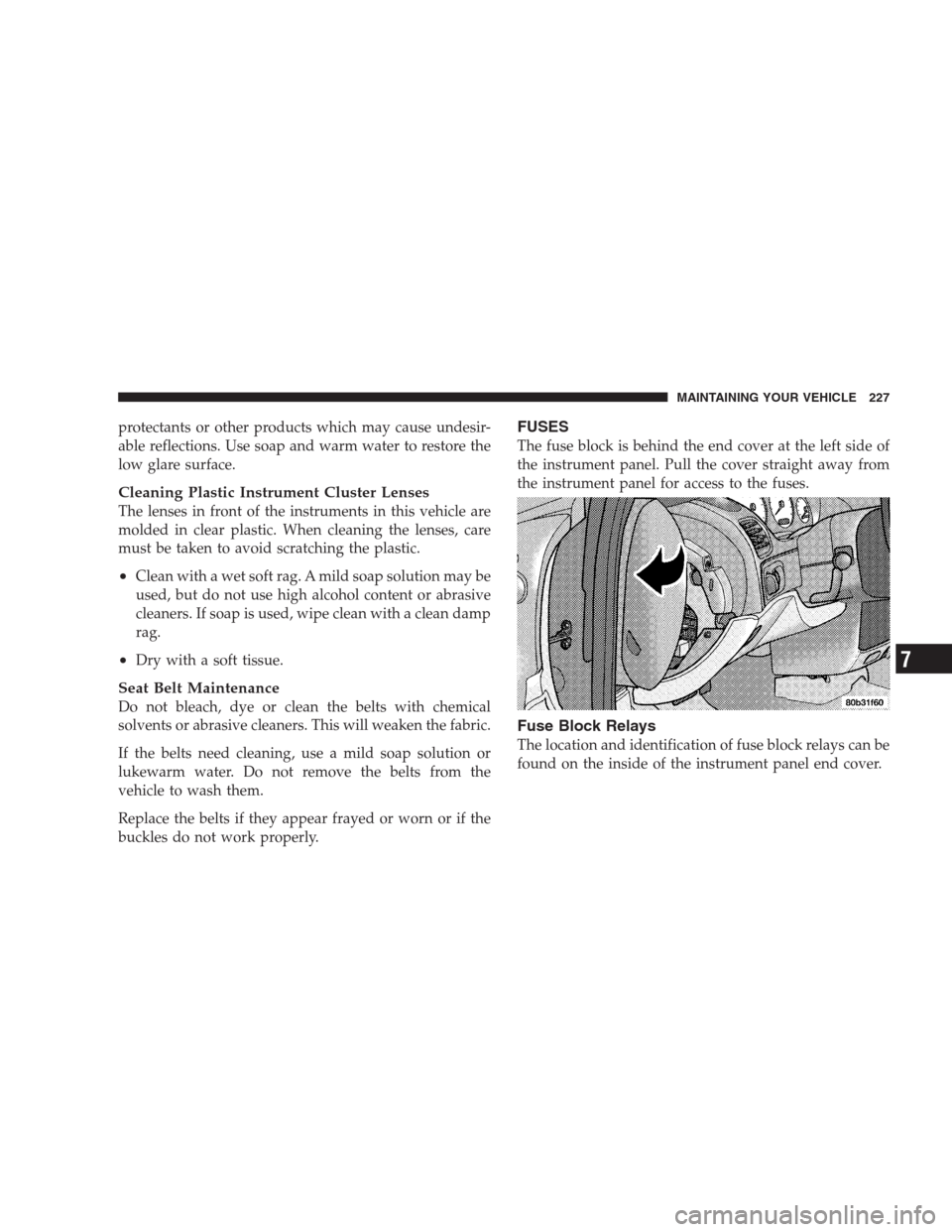
FUSES
The fuse block is behind the end cover at the left side of
the instrument panel. Pull the cover straight away from
the instrument panel for access to the fuses.
Fuse Block Relays
The location and identification of fuse block relays can be
found on the inside of the instrument panel end cover.
MAINTAINING YOUR VEHICLE 227
7
Page 229 of 277
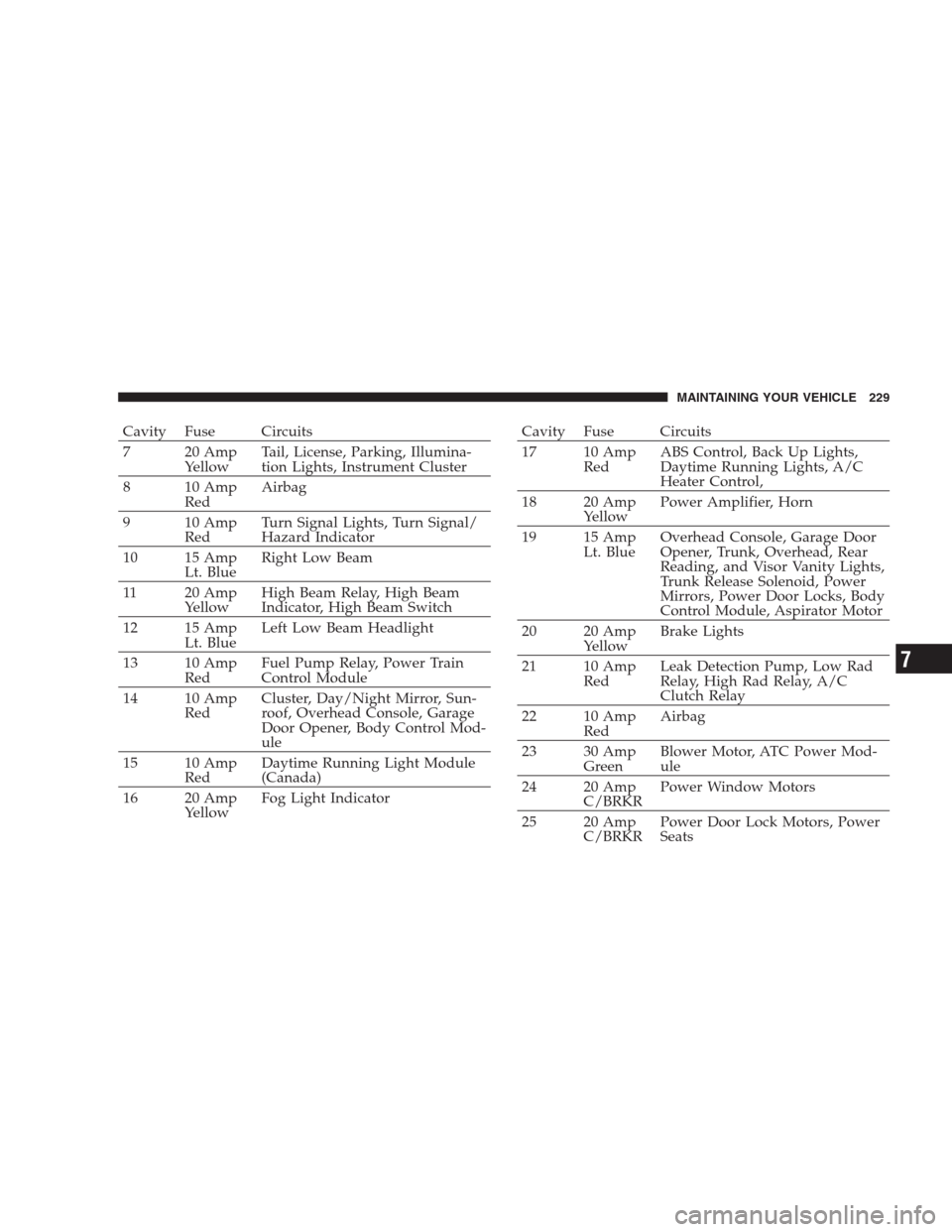
Cavity Fuse Circuits
7 20 Amp
YellowTail, License, Parking, Illumina-
tion Lights, Instrument Cluster
8 10 Amp
RedAirbag
9 10 Amp
RedTurn Signal Lights, Turn Signal/
Hazard Indicator
10 15 Amp
Lt. BlueRight Low Beam
11 20 Amp
YellowHigh Beam Relay, High Beam
Indicator, High Beam Switch
12 15 Amp
Lt. BlueLeft Low Beam Headlight
13 10 Amp
RedFuel Pump Relay, Power Train
Control Module
14 10 Amp
RedCluster, Day/Night Mirror, Sun-
roof, Overhead Console, Garage
Door Opener, Body Control Mod-
ule
15 10 Amp
RedDaytime Running Light Module
(Canada)
16 20 Amp
YellowFog Light IndicatorCavity Fuse Circuits
17 10 Amp
RedABS Control, Back Up Lights,
Daytime Running Lights, A/C
Heater Control,
18 20 Amp
YellowPower Amplifier, Horn
19 15 Amp
Lt. BlueOverhead Console, Garage Door
Opener, Trunk, Overhead, Rear
Reading, and Visor Vanity Lights,
Trunk Release Solenoid, Power
Mirrors, Power Door Locks, Body
Control Module, Aspirator Motor
20 20 Amp
YellowBrake Lights
21 10 Amp
RedLeak Detection Pump, Low Rad
Relay, High Rad Relay, A/C
Clutch Relay
22 10 Amp
RedAirbag
23 30 Amp
GreenBlower Motor, ATC Power Mod-
ule
24 20 Amp
C/BRKRPower Window Motors
25 20 Amp
C/BRKRPower Door Lock Motors, Power
Seats
MAINTAINING YOUR VEHICLE 229
7