brake CHRYSLER 300 S 2012 User Guide
[x] Cancel search | Manufacturer: CHRYSLER, Model Year: 2012, Model line: 300 S, Model: CHRYSLER 300 S 2012Pages: 116, PDF Size: 3.21 MB
Page 30 of 116
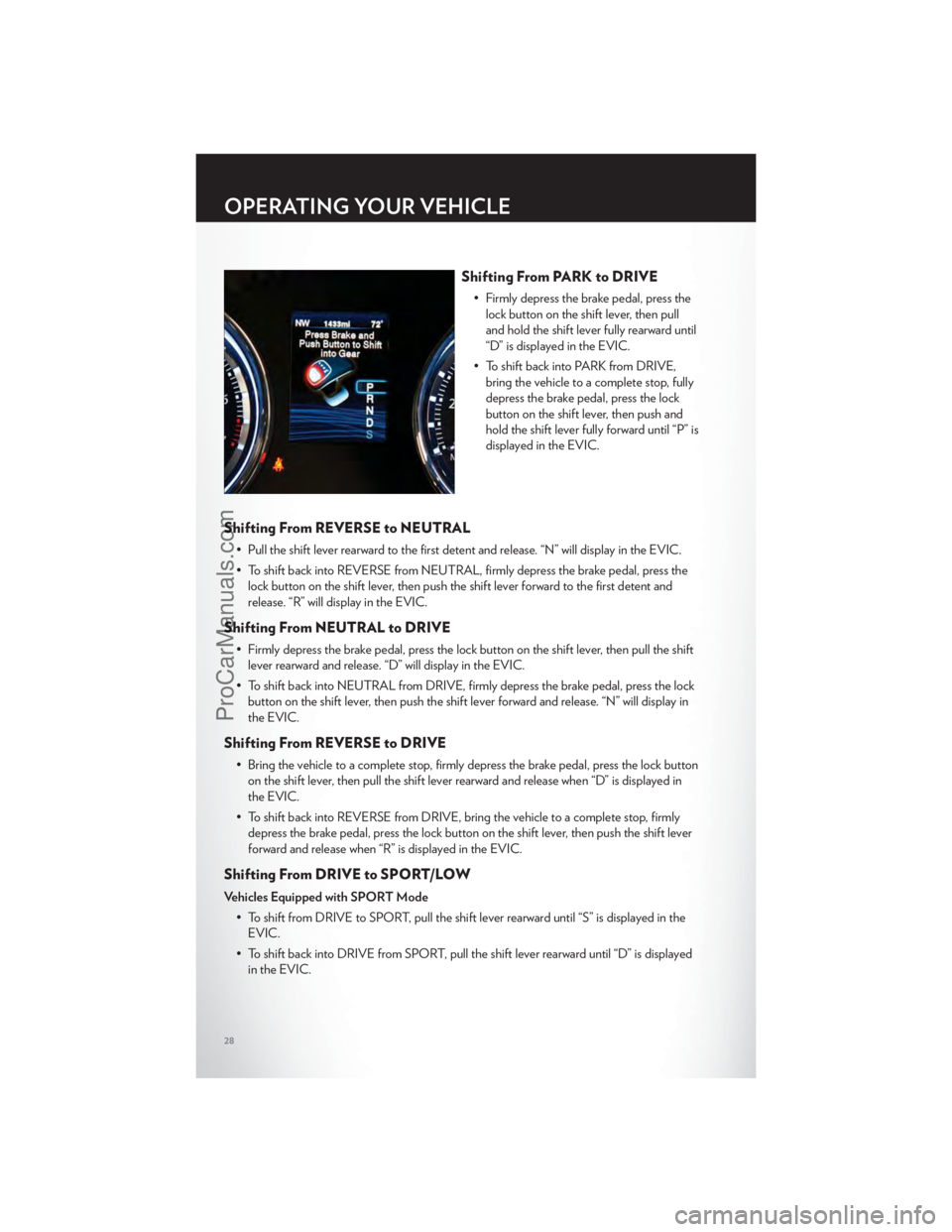
Shifting From PARK to DRIVE
• Firmly depress the brake pedal, press thelock button on the shift lever, then pull
and hold the shift lever fully rearward until
“D” is displayed in the EVIC.
• To shift back into PARK from DRIVE, bring the vehicle to a complete stop, fully
depress the brake pedal, press the lock
button on the shift lever, then push and
hold the shift lever fully forward until “P” is
displayed in the EVIC.
Shifting From REVERSE to NEUTRAL
• Pull the shift lever rearward to the first detent and release. “N” will display in the EVIC.
• To shift back into REVERSE from NEUTRAL, firmly depress the brake pedal, press thelock button on the shift lever, then push the shift lever forward to the first detent and
release. “R” will display in the EVIC.
Shifting From NEUTRAL to DRIVE
• Firmly depress the brake pedal, press the lock button on the shift lever, then pull the shiftlever rearward and release. “D” will display in the EVIC.
• To shift back into NEUTRAL from DRIVE, firmly depress the brake pedal, press the lock button on the shift lever, then push the shift lever forward and release. “N” will display in
the EVIC.
Shifting From REVERSE to DRIVE
• Bring the vehicle to a complete stop, firmly depress the brake pedal, press the lock buttonon the shift lever, then pull the shift lever rearward and release when “D” is displayed in
the EVIC.
• To shift back into REVERSE from DRIVE, bring the vehicle to a complete stop, firmly depress the brake pedal, press the lock button on the shift lever, then push the shift lever
forward and release when “R” is displayed in the EVIC.
Shifting From DRIVE to SPORT/LOW
Vehicles Equipped with SPORT Mode
• To shift from DRIVE to SPORT, pull the shift lever rearward until “S” is displayed in theEVIC.
• To shift back into DRIVE from SPORT, pull the shift lever rearward until “D” is displayed in the EVIC.
OPERATING YOUR VEHICLE
28
ProCarManuals.com
Page 64 of 116
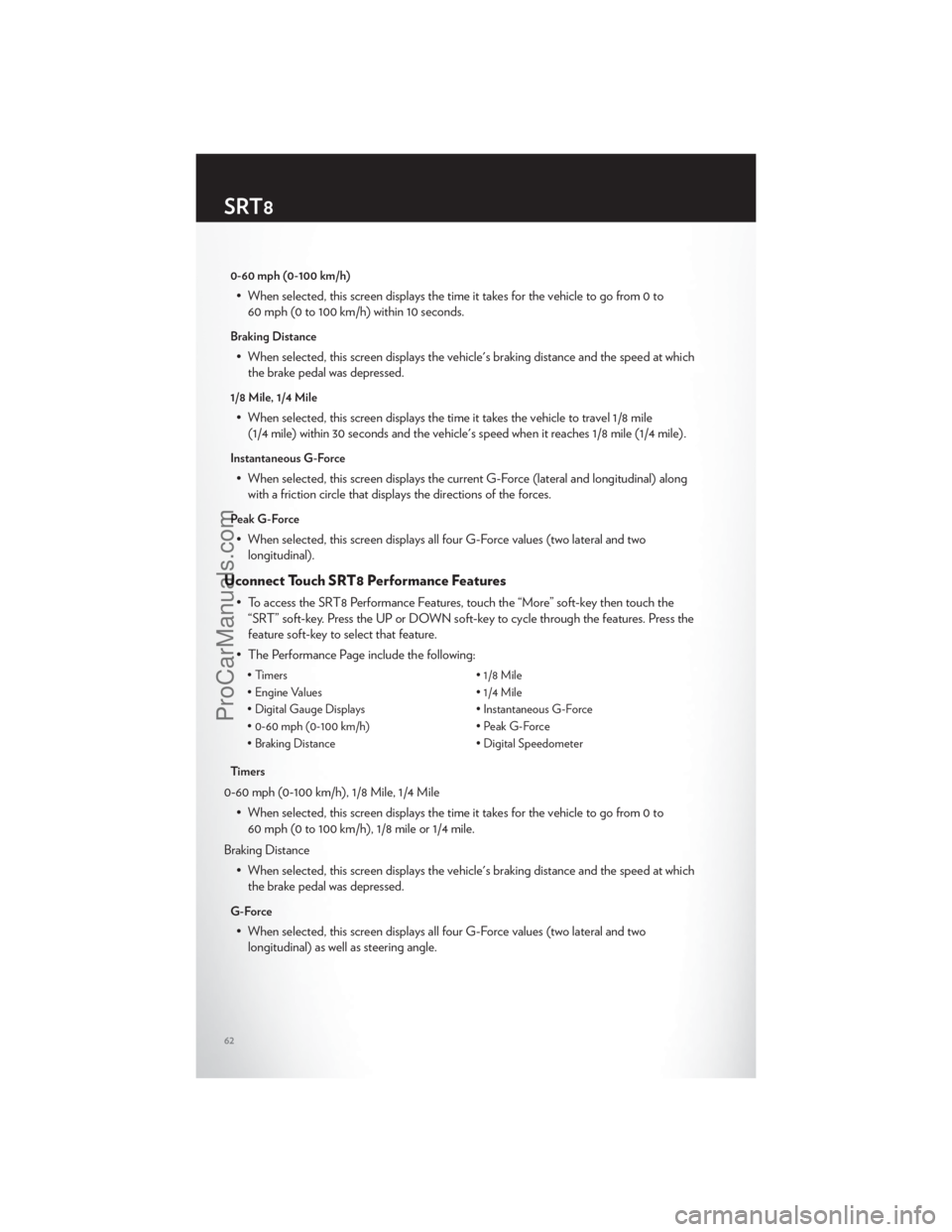
0-60 mph (0-100 km/h)
• When selected, this screen displays the time it takes for the vehicle to go from 0 to60 mph (0 to 100 km/h) within 10 seconds.
Braking Distance
• When selected, this screen displays the vehicle's braking distance and the speed at whichthe brake pedal was depressed.
1/8 Mile, 1/4 Mile
• When selected, this screen displays the time it takes the vehicle to travel 1/8 mile(1/4 mile) within 30 seconds and the vehicle's speed when it reaches 1/8 mile (1/4 mile).
Instantaneous G-Force
• When selected, this screen displays the current G-Force (lateral and longitudinal) alongwith a friction circle that displays the directions of the forces.
Peak G-Force
• When selected, this screen displays all four G-Force values (two lateral and twolongitudinal).
Uconnect Touch SRT8 Performance Features
• To access the SRT8 Performance Features, touch the “More” soft-key then touch the“SRT” soft-key. Press the UP or DOWN soft-key to cycle through the features. Press the
feature soft-key to select that feature.
• The Performance Page include the following:
• Timers • 1/8 Mile
• Engine Values • 1/4 Mile
• Digital Gauge Displays • Instantaneous G-Force
• 0-60 mph (0-100 km/h) • Peak G-Force
• Braking Distance • Digital Speedometer
Timers
0-60 mph (0-100 km/h), 1/8 Mile, 1/4 Mile • When selected, this screen displays the time it takes for the vehicle to go from 0 to60 mph (0 to 100 km/h), 1/8 mile or 1/4 mile.
Braking Distance • When selected, this screen displays the vehicle's braking distance and the speed at whichthe brake pedal was depressed.
G-Force
• When selected, this screen displays all four G-Force values (two lateral and twolongitudinal) as well as steering angle.
SRT8
62
ProCarManuals.com
Page 68 of 116
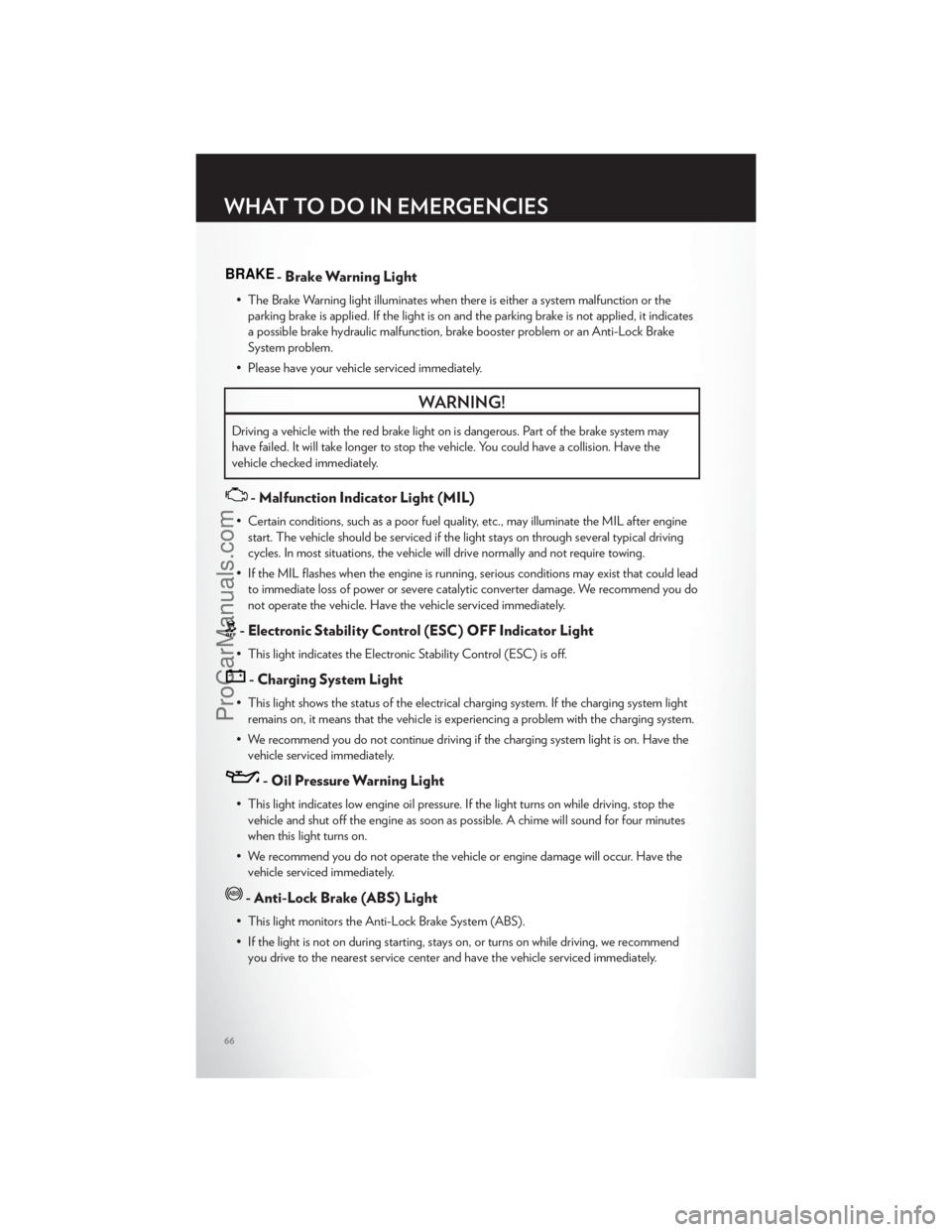
BRAKE- Brake Warning Light
• The Brake Warning light illuminates when there is either a system malfunction or theparking brake is applied. If the light is on and the parking brake is not applied, it indicates
a possible brake hydraulic malfunction, brake booster problem or an Anti-Lock Brake
System problem.
• Please have your vehicle serviced immediately.
WARNING!
Driving a vehicle with the red brake light on is dangerous. Part of the brake system may
have failed. It will take longer to stop the vehicle. You could have a collision. Have the
vehicle checked immediately.
- Malfunction Indicator Light (MIL)
• Certain conditions, such as a poor fuel quality, etc., may illuminate the MIL after engine start. The vehicle should be serviced if the light stays on through several typical driving
cycles. In most situations, the vehicle will drive normally and not require towing.
• If the MIL flashes when the engine is running, serious conditions may exist that could lead to immediate loss of power or severe catalytic converter damage. We recommend you do
not operate the vehicle. Have the vehicle serviced immediately.
- Electronic Stability Control (ESC) OFF Indicator Light
• This light indicates the Electronic Stability Control (ESC) is off.
- Charging System Light
• This light shows the status of the electrical charging system. If the charging system lightremains on, it means that the vehicle is experiencing a problem with the charging system.
• We recommend you do not continue driving if the charging system light is on. Have the vehicle serviced immediately.
- Oil Pressure Warning Light
• This light indicates low engine oil pressure. If the light turns on while driving, stop thevehicle and shut off the engine as soon as possible. A chime will sound for four minutes
when this light turns on.
• We recommend you do not operate the vehicle or engine damage will occur. Have the vehicle serviced immediately.
- Anti-Lock Brake (ABS) Light
• This light monitors the Anti-Lock Brake System (ABS).
• If the light is not on during starting, stays on, or turns on while driving, we recommendyou drive to the nearest service center and have the vehicle serviced immediately.
WHAT TO DO IN EMERGENCIES
66
ProCarManuals.com
Page 69 of 116
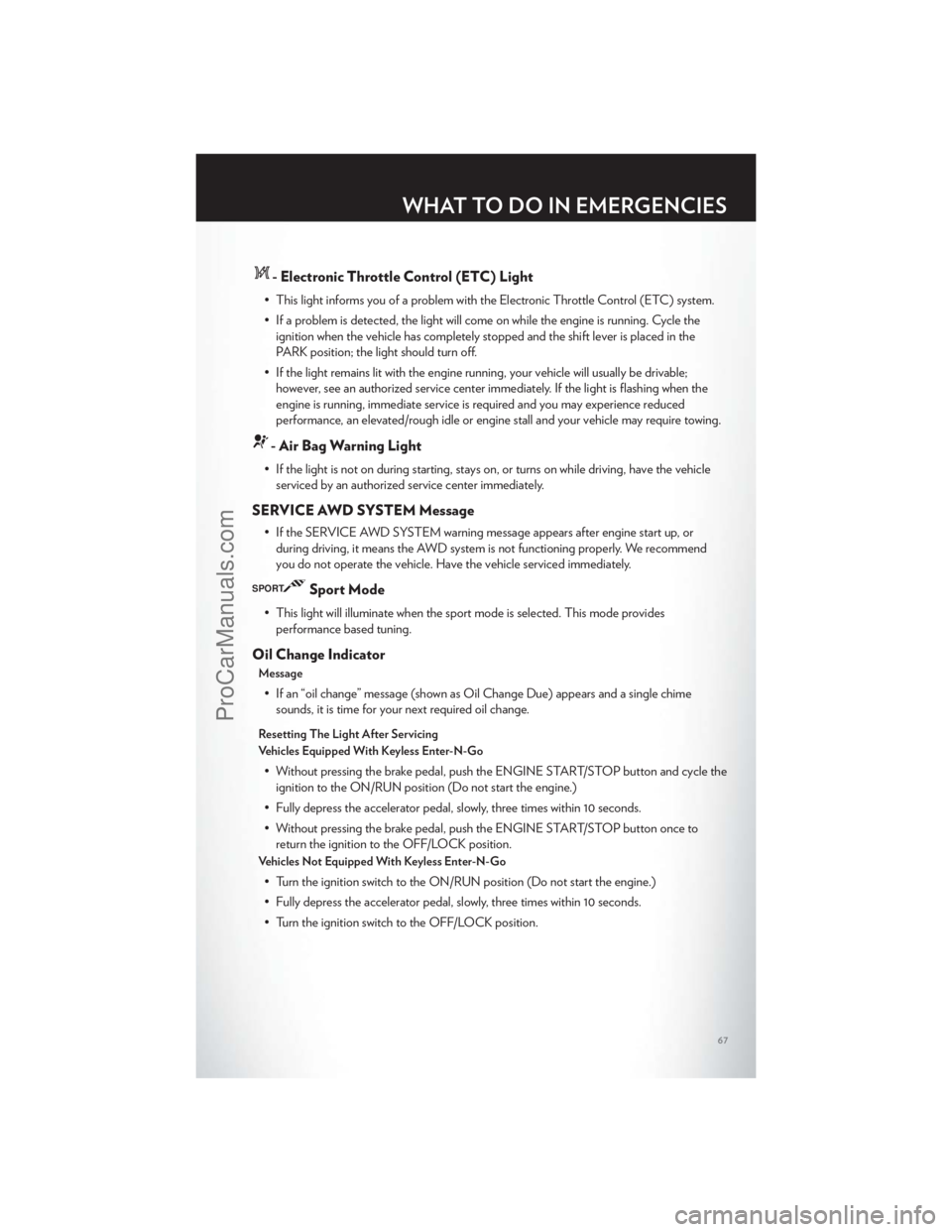
- Electronic Throttle Control (ETC) Light
• This light informs you of a problem with the Electronic Throttle Control (ETC) system.
• If a problem is detected, the light will come on while the engine is running. Cycle theignition when the vehicle has completely stopped and the shift lever is placed in the
PARK position; the light should turn off.
• If the light remains lit with the engine running, your vehicle will usually be drivable; however, see an authorized service center immediately. If the light is flashing when the
engine is running, immediate service is required and you may experience reduced
performance, an elevated/rough idle or engine stall and your vehicle may require towing.
- Air Bag Warning Light
• If the light is not on during starting, stays on, or turns on while driving, have the vehicleserviced by an authorized service center immediately.
SERVICE AWD SYSTEM Message
• If the SERVICE AWD SYSTEM warning message appears after engine start up, orduring driving, it means the AWD system is not functioning properly. We recommend
you do not operate the vehicle. Have the vehicle serviced immediately.
SPORTSport Mode
• This light will illuminate when the sport mode is selected. This mode providesperformance based tuning.
Oil Change Indicator
Message
• If an “oil change” message (shown as Oil Change Due) appears and a single chimesounds, it is time for your next required oil change.
Resetting The Light After Servicing
Vehicles Equipped With Keyless Enter-N-Go
• Without pressing the brake pedal, push the ENGINE START/STOP button and cycle theignition to the ON/RUN position (Do not start the engine.)
• Fully depress the accelerator pedal, slowly, three times within 10 seconds.
• Without pressing the brake pedal, push the ENGINE START/STOP button once to return the ignition to the OFF/LOCK position.
Vehicles Not Equipped With Keyless Enter-N-Go
• Turn the ignition switch to the ON/RUN position (Do not start the engine.)
• Fully depress the accelerator pedal, slowly, three times within 10 seconds.
• Turn the ignition switch to the OFF/LOCK position.
WHAT TO DO IN EMERGENCIES
67
ProCarManuals.com
Page 72 of 116
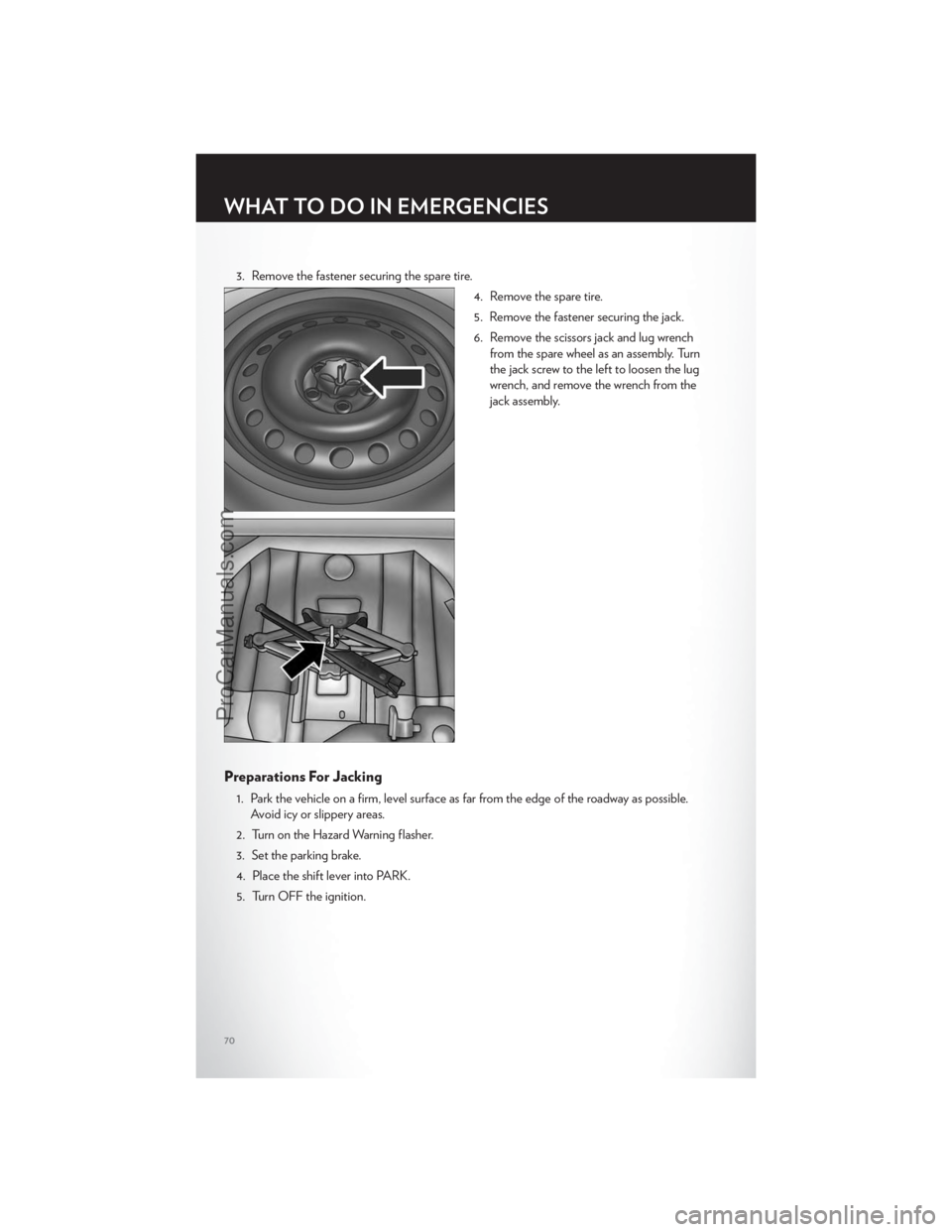
3. Remove the fastener securing the spare tire.4. Remove the spare tire.
5. Remove the fastener securing the jack.
6. Remove the scissors jack and lug wrenchfrom the spare wheel as an assembly. Turn
the jack screw to the left to loosen the lug
wrench, and remove the wrench from the
jack assembly.
Preparations For Jacking
1. Park the vehicle on a firm, level surface as far from the edge of the roadway as possible.Avoid icy or slippery areas.
2. Turn on the Hazard Warning flasher.
3. Set the parking brake.
4. Place the shift lever into PARK.
5. Turn OFF the ignition.
WHAT TO DO IN EMERGENCIES
70
ProCarManuals.com
Page 75 of 116
CAUTION!
Do not attempt to raise the vehicle by jacking on locations other than those indicated in the
Jacking Instructions for this vehicle.
WARNING!
• Do not attempt to change a tire on the side of the vehicle close to moving traffic. Pull farenough off the road to avoid the danger of being hit when operating the jack or
changing the wheel.
• Being under a jacked-up vehicle is dangerous. The vehicle could slip off the jack and fall on you. You could be crushed. Never put any part of your body under a vehicle that is on
a jack.
• Never start or run the engine while the vehicle is on a jack. If you need to get under a raised vehicle, take it to a service center where it can be raised on a lift.
• The jack is designed to be used as a tool for changing tires only. The jack should not be used to lift the vehicle for service purposes. The vehicle should be jacked on a firm level
surface only. Avoid ice or slippery areas.
• A loose tire or jack thrown forward in a collision or hard stop could endanger the occupants of the vehicle. Always stow the jack parts and the spare tire in the places
provided.
• Carefully follow these tire changing warnings to help prevent personal injury or damage to your vehicle:
• Always park on a firm, level surface as far from the edge of the roadway as possible before raising the vehicle.
• Turn on the Hazard Warning flasher.
• Block the wheel diagonally opposite the wheel to be raised.
• Set the parking brake firmly and set an automatic transmission in PARK; a manual transmission in REVERSE.
• Do not let anyone sit in the vehicle when it is on a jack.
• Do not get under the vehicle when it is on a jack.
• Only use the jack in the positions indicated and for lifting this vehicle during a tire change.
• If working on or near a roadway, be extremely careful of motor traffic.
• Raising the vehicle higher than necessary can make the vehicle less stable. It could slip off the jack and hurt someone near it. Raise the vehicle only enough to remove the tire.
• To avoid the risk of forcing the vehicle off the jack, do not fully tighten the wheel nuts until the vehicle has been lowered. Failure to follow this warning may result in personal
injury.
• A loose tire or jack thrown forward in a collision or hard stop could endanger the occupants of the vehicle. Always stow the jack parts and the spare tire in the places
provided.
(Continued)
WHAT TO DO IN EMERGENCIES
73
ProCarManuals.com
Page 76 of 116
WARNING!(Continued)
• The limited-use spare tires are for emergency use only. Installation of this limited-usespare tire affects vehicle handling. With this tire, do not drive more than 60 mph
(100 km/h). Keep inflated to the cold tire inflation pressure listed on either your tire
placard or limited-use spare tire and wheel assembly. Replace (or repair) the original tire
at the first opportunity and reinstall it on your vehicle. Failure to do so could result in loss
of vehicle control.
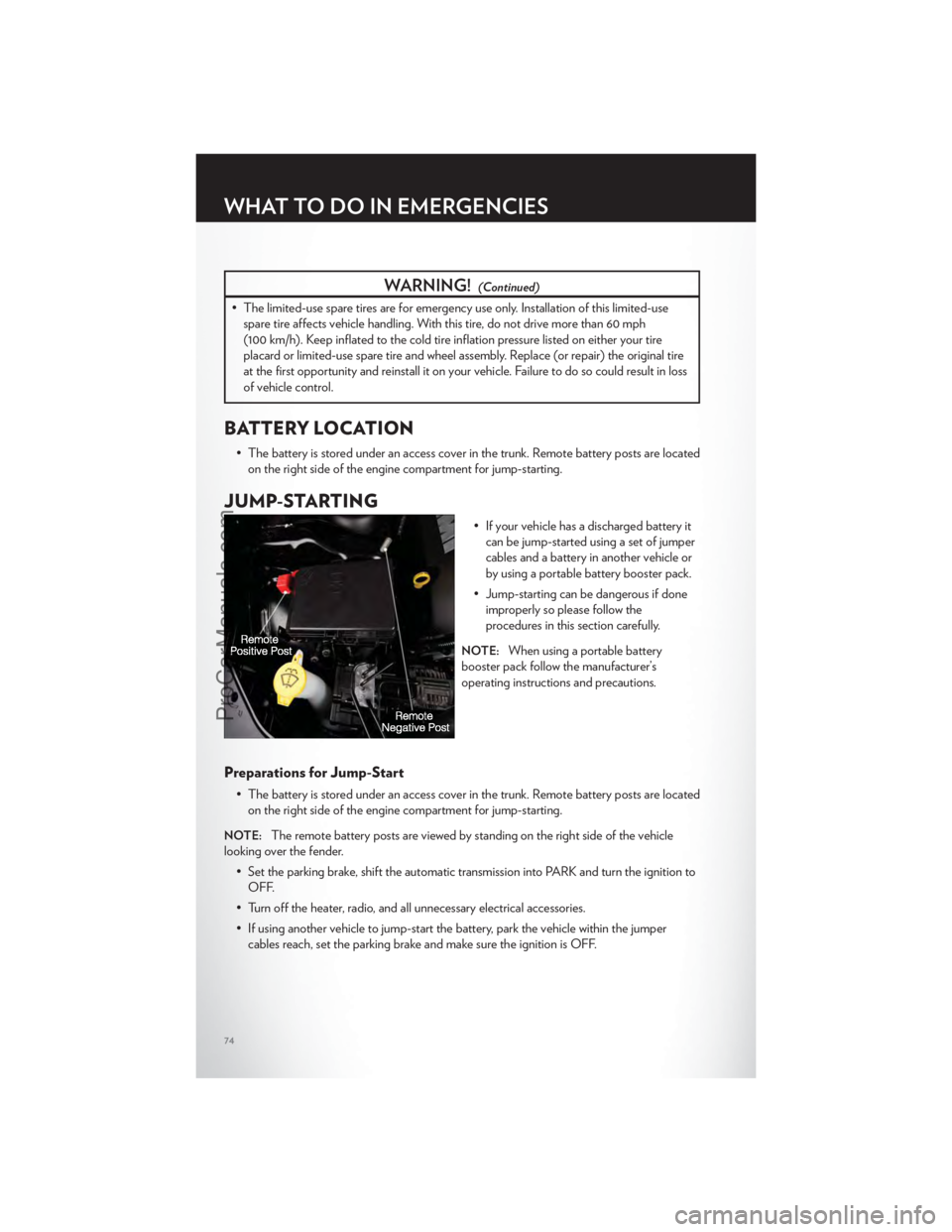
BATTERY LOCATION
• The battery is stored under an access cover in the trunk. Remote battery posts are locatedon the right side of the engine compartment for jump-starting.
JUMP-STARTING
• If your vehicle has a discharged battery itcan be jump-started using a set of jumper
cables and a battery in another vehicle or
by using a portable battery booster pack.
• Jump-starting can be dangerous if done improperly so please follow the
procedures in this section carefully.
NOTE:When using a portable battery
booster pack follow the manufacturer’s
operating instructions and precautions.
Preparations for Jump-Start
• The battery is stored under an access cover in the trunk. Remote battery posts are located on the right side of the engine compartment for jump-starting.
NOTE:The remote battery posts are viewed by standing on the right side of the vehicle
looking over the fender.
• Set the parking brake, shift the automatic transmission into PARK and turn the ignition toOFF.
• Turn off the heater, radio, and all unnecessary electrical accessories.
• If using another vehicle to jump-start the battery, park the vehicle within the jumper cables reach, set the parking brake and make sure the ignition is OFF.
WHAT TO DO IN EMERGENCIES
74
ProCarManuals.com
Page 78 of 116
WARNING!(Continued)
• Take care to avoid the radiator cooling fan whenever the hood is raised. It can startanytime the ignition switch is on. You can be injured by moving fan blades.
• Remove any metal jewelry, such as watch bands or bracelets, that might make an inadvertent electrical contact. You could be severely injured.
• Batteries contain sulfuric acid that can burn your skin or eyes and generate hydrogen gas which is flammable and explosive. Keep open flames or sparks away from the battery.
• Do not allow vehicles to touch each other as this could establish a ground connection and personal injury could result.
• Failure to follow this procedure could result in personal injury or property damage due to battery explosion.
• Do not connect the cable to the negative post (-)of the discharged battery. The
resulting electrical spark could cause the battery to explode and could result in personal
injury.
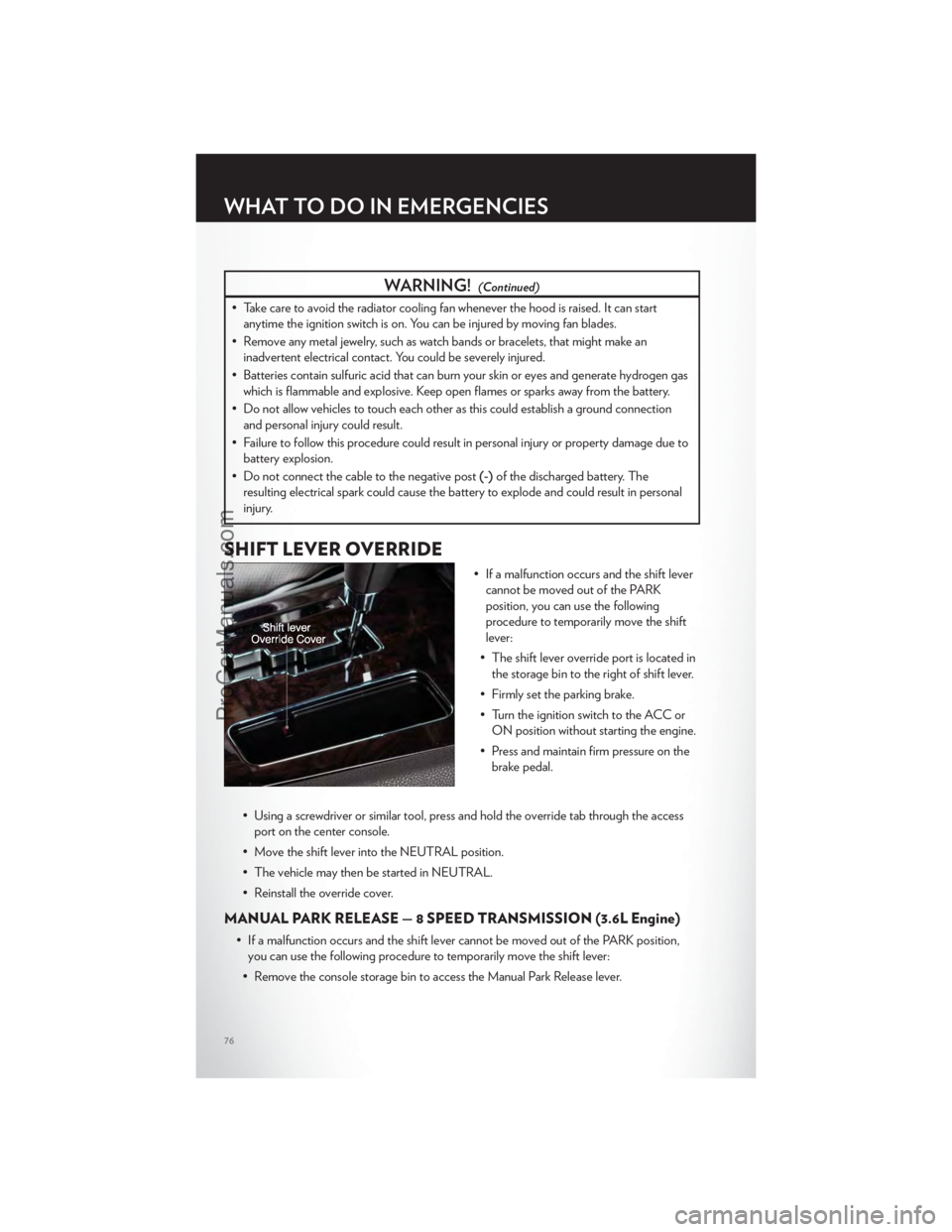
SHIFT LEVER OVERRIDE
• If a malfunction occurs and the shift lever cannot be moved out of the PARK
position, you can use the following
procedure to temporarily move the shift
lever:
• The shift lever override port is located in the storage bin to the right of shift lever.
• Firmly set the parking brake.
• Turn the ignition switch to the ACC or ON position without starting the engine.
• Press and maintain firm pressure on the brake pedal.
• Using a screwdriver or similar tool, press and hold the override tab through the access port on the center console.
• Move the shift lever into the NEUTRAL position.
• The vehicle may then be started in NEUTRAL.
• Reinstall the override cover.
MANUAL PARK RELEASE — 8 SPEED TRANSMISSION (3.6L Engine)
• If a malfunction occurs and the shift lever cannot be moved out of the PARK position, you can use the following procedure to temporarily move the shift lever:
• Remove the console storage bin to access the Manual Park Release lever.
WHAT TO DO IN EMERGENCIES
76
ProCarManuals.com
Page 79 of 116
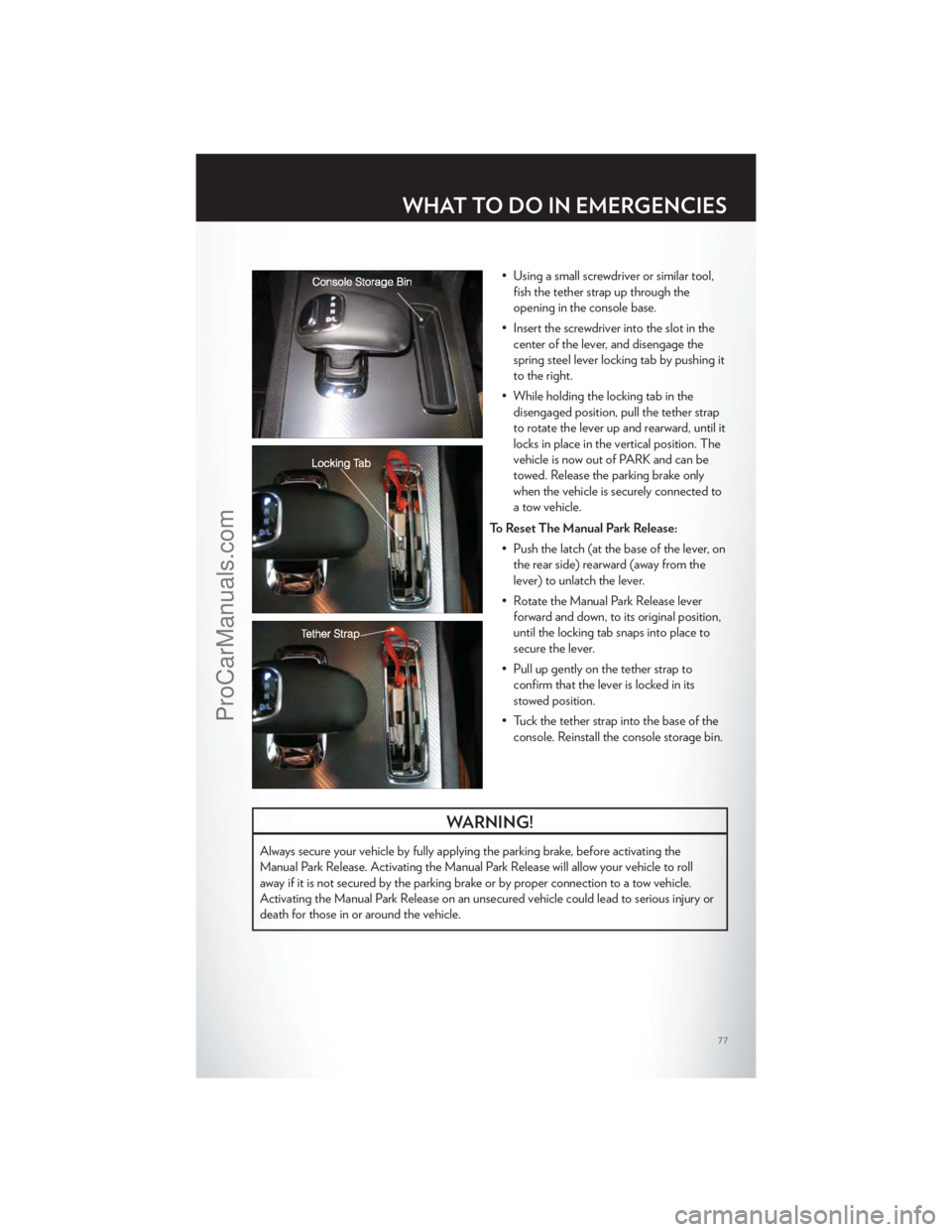
• Using a small screwdriver or similar tool,fish the tether strap up through the
opening in the console base.
• Insert the screwdriver into the slot in the center of the lever, and disengage the
spring steel lever locking tab by pushing it
to the right.
• While holding the locking tab in the disengaged position, pull the tether strap
to rotate the lever up and rearward, until it
locks in place in the vertical position. The
vehicle is now out of PARK and can be
towed. Release the parking brake only
when the vehicle is securely connected to
a tow vehicle.
To Reset The Manual Park Release: • Push the latch (at the base of the lever, onthe rear side) rearward (away from the
lever) to unlatch the lever.
• Rotate the Manual Park Release lever forward and down, to its original position,
until the locking tab snaps into place to
secure the lever.
• Pull up gently on the tether strap to confirm that the lever is locked in its
stowed position.
• Tuck the tether strap into the base of the console. Reinstall the console storage bin.
WARNING!
Always secure your vehicle by fully applying the parking brake, before activating the
Manual Park Release. Activating the Manual Park Release will allow your vehicle to roll
away if it is not secured by the parking brake or by proper connection to a tow vehicle.
Activating the Manual Park Release on an unsecured vehicle could lead to serious injury or
death for those in or around the vehicle.
WHAT TO DO IN EMERGENCIES
77
ProCarManuals.com
Page 82 of 116
EVENT DATA RECORDER (EDR)
• This vehicle is equipped with an event data recorder (EDR). The main purpose of anEDR is to record, in certain crash or near crash-like situations, such as an air bag
deployment or hitting a road obstacle, data that will assist in understanding how a
vehicle’s systems performed. The EDR is designed to record data related to vehicle
dynamics and safety systems for a short period of time, typically 30 seconds or less. The
EDR in this vehicle is designed to record such data as:
• How various systems in your vehicle were operating;
• Whether or not the driver and passenger safety belts were buckled/fastened;
• How far (if at all) the driver was depressing the accelerator and/or brake pedal; and,
• How fast the vehicle was traveling.
• These data can help provide a better understanding of the circumstances in which crashes and injuries occur.
NOTE:EDR data are recorded by your vehicle only if a non-trivial crash situation occurs; no
data are recorded by the EDR under normal driving conditions and no personal data (e.g.
name, gender, age, and crash location) are recorded. However, other parties, such as law
enforcement, could combine the EDR data with the type of personally identifying data
routinely acquired during a crash investigation.
• To read data recorded by an EDR, special equipment is required, and access to thevehicle or the EDR is needed. In addition to the vehicle manufacturer, other parties such
as law enforcement, that have the special equipment, can read the information if they
have access to the vehicle or the EDR.
WHAT TO DO IN EMERGENCIES
80
ProCarManuals.com