instrument panel CHRYSLER ASPEN 2008 2.G User Guide
[x] Cancel search | Manufacturer: CHRYSLER, Model Year: 2008, Model line: ASPEN, Model: CHRYSLER ASPEN 2008 2.GPages: 479, PDF Size: 4.3 MB
Page 88 of 479
WARNING!
Vehicles and other objects seen in the right side
convex mirror will look smaller and farther away
than they really are. Relying too much on your right
side mirror could cause you to collide with another
vehicle or other object. Use your inside mirror when
judging the size or distance of a vehicle seen in the
right side mirror.
Illuminated Vanity Mirrors Ð If Equipped
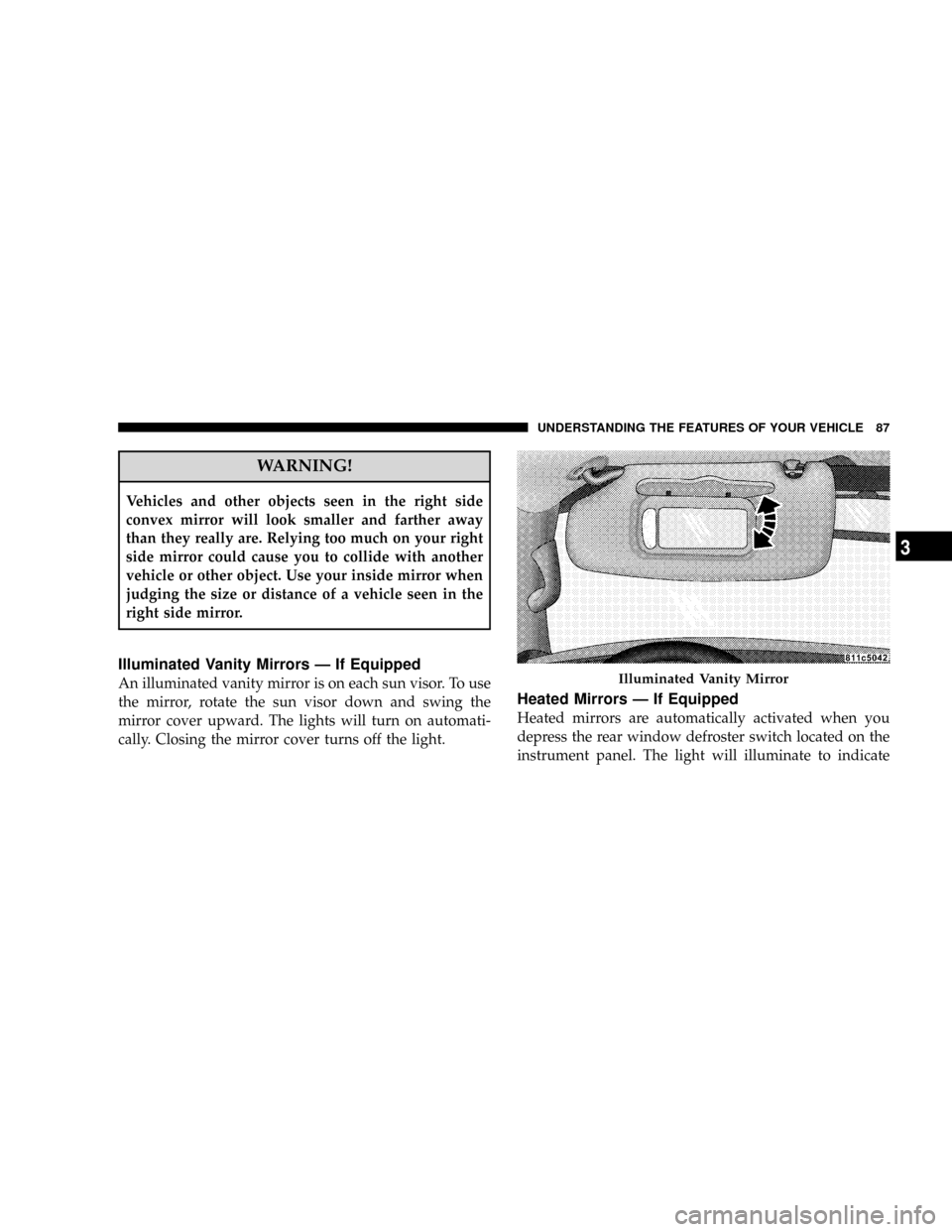
An illuminated vanity mirror is on each sun visor. To use
the mirror, rotate the sun visor down and swing the
mirror cover upward. The lights will turn on automati-
cally. Closing the mirror cover turns off the light.
Heated Mirrors Ð If Equipped
Heated mirrors are automatically activated when you
depress the rear window defroster switch located on the
instrument panel. The light will illuminate to indicate
Illuminated Vanity Mirror
UNDERSTANDING THE FEATURES OF YOUR VEHICLE 87
3
Page 104 of 479
NOTE:
²You may not hear all of the tones due to cellular phone
network configurations; this is normal.
²Some paging and voice mail systems have system time
out settings that are too short and may not allow the
use of this feature.
Barge In - Overriding Prompts
The ªVoice Recognitionº button can be used when you
wish to skip part of a prompt and issue your voice
recognition command immediately. For example, if a
prompt is asking9Would you like to pair a phone, clear
a{,9you could press the ªVoice Recognitionº button and
say,9Pair a Phone9to select that option without having to
listen to the rest of the voice prompt.
Turning Confirmation Prompts On/Off
Turning confirmation prompts off will stop the system
from confirming your choices (e.g., the UConnecttsys-
tem will not repeat a phone number before you dial it).
²Press the PHONE button to begin.
²After the9Ready9prompt and the following beep, say
9Setup Confirmations.9The UConnecttsystem will
play the current confirmation prompt status and you
will be given the choice to change it.
Phone and Network Status Indicators
If available on the radio and/or on a premium display
such as the instrument panel cluster, and supported by
your cell phone, the UConnecttsystem will provide
notification to inform you of your phone and network
status when you are attempting to make a phone call
using UConnectt. The status is given for roaming, net-
work signal strength, phone battery strength, etc.
Dialing Using the Cellular Phone Keypad
You can dial a phone number with your cellular phone
keypad and still use the UConnecttsystem (while dial-
ing via the cell phone keypad, the user must exercise
caution and take precautionary safety measures). By
UNDERSTANDING THE FEATURES OF YOUR VEHICLE 103
3
Page 125 of 479
4-Way Passenger's Power Seat Ð If Equipped
The front passenger's power seat switches are located on
the right side of the passenger seat lower side trim. The
bottom switch controls forward/rearward adjustment.
The top switch controls the seatback recline adjustment.
NOTE:The 4-way seat does not have an up/down
adjustment.
Heated Seats Ð If Equipped
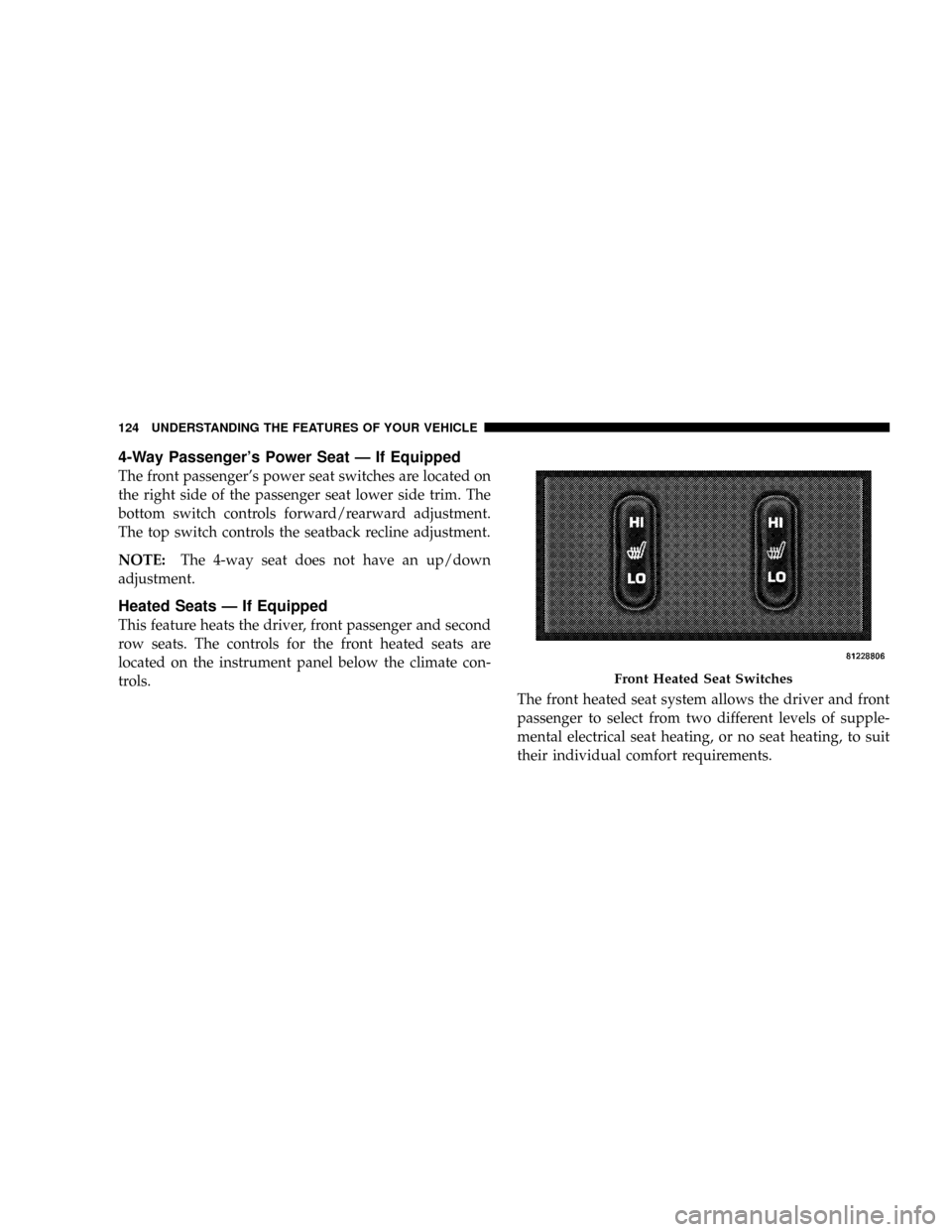
This feature heats the driver, front passenger and second
row seats. The controls for the front heated seats are
located on the instrument panel below the climate con-
trols.
The front heated seat system allows the driver and front
passenger to select from two different levels of supple-
mental electrical seat heating, or no seat heating, to suit
their individual comfort requirements.
Front Heated Seat Switches
124 UNDERSTANDING THE FEATURES OF YOUR VEHICLE
Page 143 of 479
the Electronic Vehicle Information Center (EVIC). For
details, refer to ªPersonal Settings (Customer Program-
mable Features)º under ªOverhead Console with Elec-
tronic Vehicle Information Center (EVIC) ± If Equippedº
in Section 3.
TO OPEN AND CLOSE THE HOOD
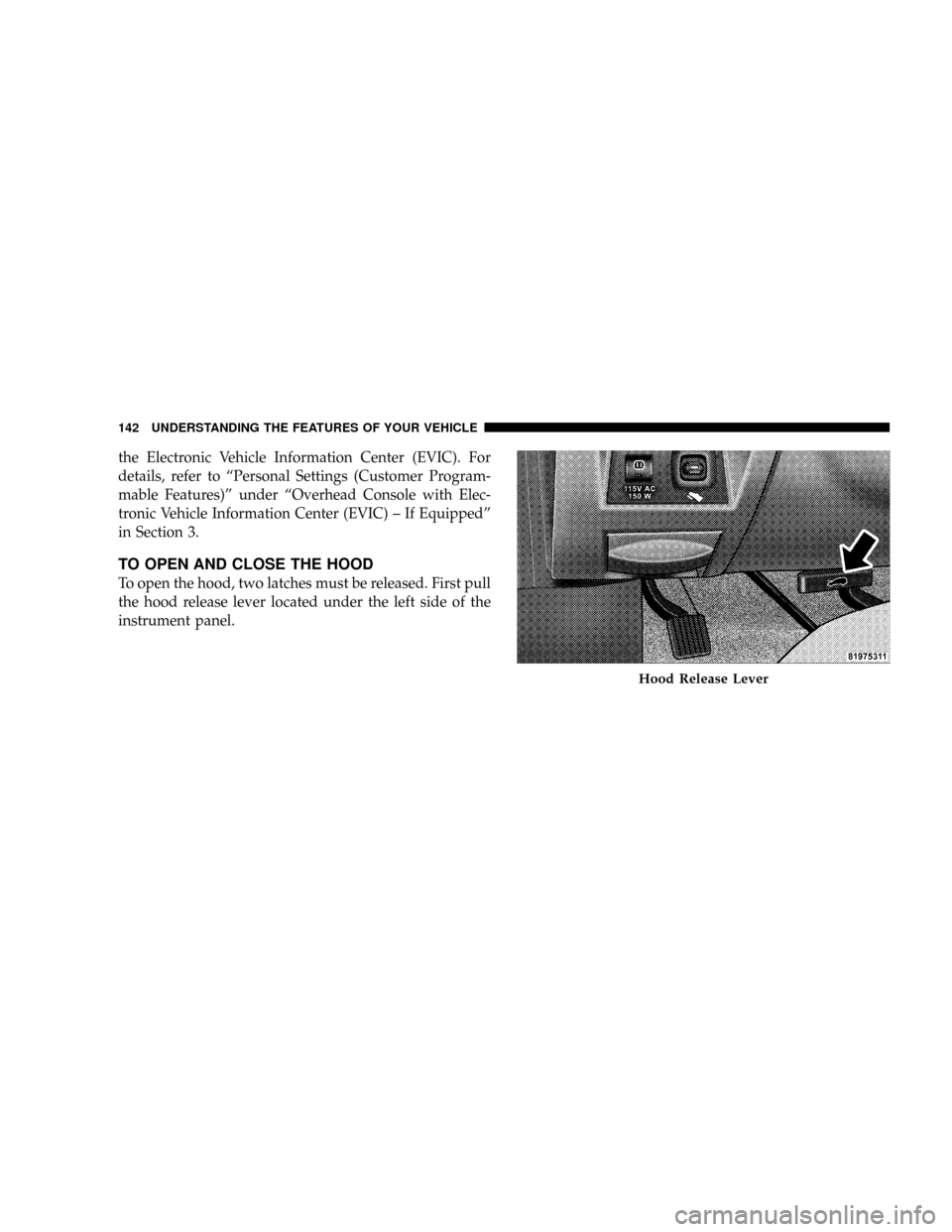
To open the hood, two latches must be released. First pull
the hood release lever located under the left side of the
instrument panel.
Hood Release Lever
142 UNDERSTANDING THE FEATURES OF YOUR VEHICLE
Page 146 of 479

Interior Lights
Courtesy and dome lights are turned on when the front
doors are opened, when the dimmer control (rotating
wheel on the right side of the switch) is rotated to the
second upward detent position, or when the UNLOCK
button is pressed on the key fob. When a door is openand the interior lights are on, rotating the dimmer control
all of the way down to the OFF detent will cause all the
interior lights to go out. This allows the doors to stay
open for extended periods of time without discharging
the vehicle's battery.
The brightness of the instrument panel lighting can be
regulated by rotating the dimmer control up (brighter) or
down (dimmer). When the headlights are ON you can
supplement the brightness of the odometer, trip odom-
eter, radio and overhead console by rotating the control
up until you hear a click. This feature is termed the
9Parade9mode and is useful when headlights are re-
quired during the day.Battery Saver
To protect the life of your vehicle's battery, load shedding
is provided for both the interior and exterior lights.
Dimmer Control
UNDERSTANDING THE FEATURES OF YOUR VEHICLE 145
3
Page 148 of 479
Automatic Headlights Ð If Equipped
Automatic headlights can be activated by rotating the
rotary headlight switch to the symbol ªA.º The head-
lights will turn on when the engine is running and the
ambient light sensor indicates that the headlights should
be activated. The headlights will turn off if the headlight
switch is rotated to the OFF position or 90 seconds after
the ignition is turned to OFF.
Headlights, Parking Lights, Panel Lights
When the headlight switch is rotated to the first position
to the right, the parking lights, taillights, side marker
lights, license plate light and instrument panel lights are
all turned on. The headlights will turn ON when the
switch is rotated to the second position.
Your vehicle is equipped with plastic headlight lenses
that are lighter and less susceptible to stone breakage
than glass headlights.Plastic is not as scratch resistant as glass and therefore
different lens cleaning procedures must be followed.
To minimize the possibility of scratching the lenses and
reducing light output, avoid wiping with a dry cloth. To
remove road dirt, wash with a mild soap solution fol-
lowed by rinsing.
Do not use abrasive cleaning components, solvents, steel
wool or other abrasive materials to clean the lenses.Illuminated Entry
Headlights turn on for 90 seconds, when the Remote
Keyless Entry UNLOCK button is pressed.
The illuminated entry time is programmable on vehicles
equipped with the Electronic Vehicle Information Center
(EVIC). For details, refer to ªPersonal Settings (Customer
Programmable Features)º under ªOverhead Console
with Electronic Vehicle Information Center (EVIC) ± If
Equippedº in Section 3.
UNDERSTANDING THE FEATURES OF YOUR VEHICLE 147
3
Page 186 of 479
ELECTRICAL POWER OUTLETS
This vehicle has three auxiliary power outlets that can
provide up to 20 Amps of current for accessories de-
signed for use with the standard power outlet adapters.
The outlet located in the lower portion of the instrument
panel has a snap on plastic cap so that it can be covered
when not in use. As a safety precaution, the outlet in the
instrument panel only operates with the ignition switch
ON. When the optional Cigar Lighter heating element is
used, it heats when pushed in and pops out automati-
cally when ready for use.To preserve the heating
element, do not hold the lighter in the heating position.
There are two additional 12 V/(20 total Amps for both
outlets) power outlets, one located in the storage bin of
the center console and another located in the right rear
cargo area. These outlets can be reconfigured by the
customer to operate only when the ignition is ON(switched battery fed) or with the ignition ON or OFF
(battery fed) to allow for cellular telephone charging and
or operation while the ignition is off.
NOTE:All accessories connected to these outlets should
be removed or turned OFF when the vehicle is not in use
to protect the battery against discharge (unless the cus-
tomer has reconfigured the fuse block to switched battery
feed). (See page 187 for more information.)
115V Inverter Outlet ± If Equipped
This vehicle may also be equipped with a 115 Volt (150
Watts Maximum) outlet on the rear of the front center
console. These outlets can power cell phones, electronics
and other low power devices. This plug is controlled by
a switch located in left lower instrument panel.
Press the switch to turn the power on to the outlet. Press
the switch a second to turn the power off.
UNDERSTANDING THE FEATURES OF YOUR VEHICLE 185
3
Page 190 of 479
FLOOR CONSOLE
Front Floor Console Features
The floor console between the driver's and front passen-
ger's seat, has the following features:
²Miscellaneous storage compartments
²Portable phone storage bin
²Portable phone cord routing on the sides of the console
lid and the base.
²12 Volt reconfigurable power outlet inside storage
compartment
²Side open armrest lid
²Tissue holder and pen holder
²Coin slots
²Removable CD bin
²115 V Inverter Plug
²RCA Jacks
The coin slots are located under the instrument panel
center stack.
Cupholders
Your vehicle has eight cupholders. Four are located in the
center console, two are located in the second row armrest
or rear floor console (if equipped), and two are located in
the left-hand quarter panel for third row occupants. The
cupholders and storage bin located in the front of the
center console can be accessed by pressing on the access
doors.
UNDERSTANDING THE FEATURES OF YOUR VEHICLE 189
3
Page 198 of 479
INSTRUMENT PANEL AND CONTROLS
CONTENTS
mInstruments And Controls.................201
mInstrument Cluster......................202
mInstrument Cluster Description.............203
mElectronic Digital Clock..................214
NClock Setting Procedure.................215
mSetting The Analog Clock.................215
mRadio General Information................216
NRadio Broadcast Signals.................216
NTwo Types Of Signals..................216NElectrical Disturbances..................216
NAM Reception.......................216
NFM Reception........................216
mSales Code REN Ð Multimedia System Ð If
Equipped............................217
NOperating Instructions Ð Satellite Radio (If
Equipped)..........................218
NOperating Instructions Ð Voice Recognition
System (VR) (If Equipped)...............2184
Page 199 of 479
NOperating Instructions Ð Hands-Free
Communication (UConnectt) (If Equipped) . . . 218
NClock Setting Procedure.................218
mSales Code RER Ð Multimedia System Ð If
Equipped............................220
NOperating Instructions Ð Satellite Radio.....221
NOperating Instructions Ð Hands-Free
Communication (UConnectt) (If Equipped) . . . 221
NClock Setting Procedure.................221
mSales Code RES Ð AM/FM Stereo Radio With
CD Player (MP3 AUX Jack)................224
NOperating Instructions - Radio Mode.......224
NOperation Instructions - CD Mode For CD And
MP3 Audio Play......................230
NNotes On Playing MP3 Files.............232NList Button (CD Mode For MP3 Play).......235
NInfo Button (CD Mode For MP3 Play).......235
mSatellite Radio (RSC) Ð If Equipped
(RER/REQ/REN Radios Only).............236
NSystem Activation.....................236
NElectronic Serial Number/Sirius Identification
Number (ENS/SID)....................237
NSelecting Satellite Mode.................237
NSatellite Antenna......................238
NReception Quality.....................238
NOperating Instructions - Satellite Mode......238
NOperating Instructions - Hands-Free Phone (If
Equipped)..........................241
198 INSTRUMENT PANEL AND CONTROLS