radio CHRYSLER ASPEN 2008 2.G User Guide
[x] Cancel search | Manufacturer: CHRYSLER, Model Year: 2008, Model line: ASPEN, Model: CHRYSLER ASPEN 2008 2.GPages: 479, PDF Size: 4.3 MB
Page 116 of 479

General Information
This device complies with part 15 of the FCC rules and
RSS 210 of Industry Canada. Operation is subject to the
following conditions:
²This device may not cause harmful interference.
²This device must accept any interference received,
including interference that may cause undesired op-
eration.
VOICE RECOGNITION SYSTEM (VR) Ð IF
EQUIPPED
Voice Recognition System (VR) Operation
This Voice Recognition System allows you to
control your AM, FM radio, satellite radio, disc
player, and a memo recorder.NOTE:In a stressful situation, take care to speak into
the Voice Interface System as calmly and normally as
possible. The ability of the Voice Interface System to
recognize user voice commands may be negatively af-
fected by rapid speaking or a raised voice level.
WARNING!
Any voice commanded system should be used only
in safe driving conditions and all attention should be
kept on the roadway ahead. Failure to do so may
result in an accident causing serious injury or death.
When you press the VR hard-key, you will hear a beep.
The beep is your signal to give a command.
NOTE:If you do not say a command within a few
seconds, the system will present you with a list of
options.
UNDERSTANDING THE FEATURES OF YOUR VEHICLE 115
3
Page 117 of 479

If you ever wish to interrupt the system while it lists
options, press the VR hard-key, listen for the beep, and
say your command.
Pressing the VR hard-key while the system is speaking is
known as ªbarging in.º The system will be interrupted
and you can add or change commands. This will become
helpful once you start to learn the options.
NOTE:At any time, you can say the words CANCEL,
HELP, or MAIN MENU.
These commands are universal and can be used from any
menu. All other commands can be used depending upon
the active application.
For example, if you are in the disc menu and you are
listening to FM radio, you can speak commands from the
disc menu or from the FM radio menu.
When using this system, you should speak clearly and at
a normal speaking volume.The system will best recognize your speech if the win-
dows are closed, and the heater/air-conditioning fan is
set to low.
At any point, if the system does not recognize one of your
commands, you will be prompted to repeat it.
To hear the first available Menu, press the VR hard-key
and say HELP or MAIN MENU.
Commands
The Voice Recognition System understands two types of
commands. Global commands are available at all times.
Local commands are available if the supported radio
mode is active.
Changing the Volume
1. Start a dialogue by pressing the VR hard-key.
2. Say a command (e.g., HELP).
116 UNDERSTANDING THE FEATURES OF YOUR VEHICLE
Page 118 of 479

3. Use the ON/OFF VOLUME rotary knob to adjust the
volume to a comfortable level while the voice recognition
system is speaking. Please note the volume setting for VR
is different then the audio system.
Main Menu
Start a dialogue by pressing the VR hard-key. You may
say MAIN MENU to switch to the main menu.
In this mode, you can say the following commands:
²RADIO (to switch to the radio mode)
²DISC (to switch to the disc mode)
²MEMO (to switch to the memo recorder)
Radio AM (or Radio Long Wave or Radio Medium
Wave - if equipped)
To switch to the AM band say AM or RADIO AM. In this
mode, you may say the following commands:
²FREQUENCY (to change the frequency)
²NEXT STATION (to select the next station)
²PREVIOUS STATION (to select the previous station)
²RADIO MENU (to switch to the radio menu)
²MAIN MENU (to switch to the main menu)
Radio FM
To switch to the FM band say FM or RADIO FM. In this
mode, you may say the following commands:
²FREQUENCY (to change the frequency)
²NEXT STATION (to select the next station)
²PREVIOUS STATION (to select the previous station)
²RADIO MENU (to switch to the radio menu)
²MAIN MENU (to switch to the main menu)
UNDERSTANDING THE FEATURES OF YOUR VEHICLE 117
3
Page 119 of 479

Satellite Radio
To switch to satellite radio mode say SAT or SATELLITE
RADIO. In this mode, you may say the following com-
mands:
²CHANNEL NUMBER (to change the channel by its
spoken number)
²NEXT CHANNEL (to select the next channel)
²PREVIOUS CHANNEL (to select the previous chan-
nel)
²LIST CHANNEL (to hear a list of available channels)
²SELECT NAME (to say the name of a channel)
²RADIO MENU (to switch to the radio menu)
²MAIN MENU (to switch to the main menu)
Disc
To switch to the disc mode say DISC. In this mode, you
may say the following commands:
²TRACK (#) (to change the track)
²NEXT TRACK (to play the next track)
²PREVIOUS TRACK (to play the previous track)
²MAIN MENU (to switch to the main menu)
Memo
To switch to the voice recorder mode say MEMO. In this
mode, you may say the following commands:
²NEW MEMO (to record a new memo) Ð During the
recording you may press the VR hard-key to stop
recording. You continue by saying one of the following
commands:
þSAVE (to save the memo)
118 UNDERSTANDING THE FEATURES OF YOUR VEHICLE
Page 138 of 479
DRIVER MEMORY SYSTEM Ð IF EQUIPPED
Once programmed, the memory buttons 1 and 2 on the
driver's door panel can be used to recall the driver's seat
position, driver's outside mirror position, adjustable
brake and accelerator pedals position, Automatic Tem-
perature Control (ATC) temperature and radio station
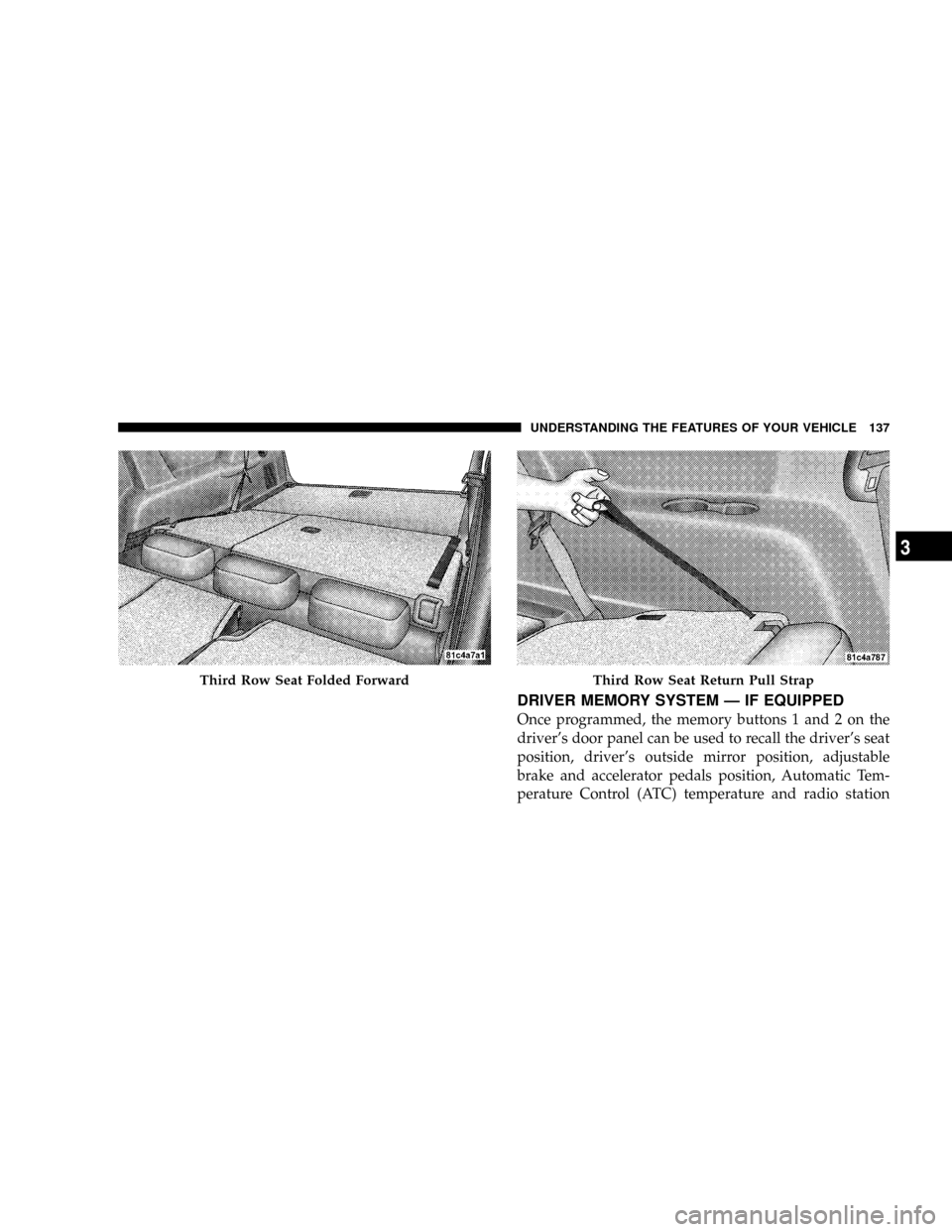
Third Row Seat Folded ForwardThird Row Seat Return Pull Strap
UNDERSTANDING THE FEATURES OF YOUR VEHICLE 137
3
Page 140 of 479
3. Turn on the radio and set the radio station presets (up
to 10 AM and 10 FM stations can be set).
4. Adjust the Automatic Temperature Control (ATC)
while the ATC is in Auto mode.
5. Press and release the SET (S) button located on the
driver's door.
6. Within five seconds, press and release memory button
1 or 2 on the driver's door. The next step must be
performed within 10 seconds if you desire to also use a
RKE Transmitter to recall memory positions.
7. Press and release the LOCK button on one of the
transmitters.
8. Insert the ignition key and turn the ignition switch to
the ON position.9. Repeat the above steps to set the next memory posi-
tion using the other numbered memory button or to link
another RKE Transmitter to memory.
NOTE:A chime sound may be heard if Setting Memory
was inhibited for any reason.
Memory Position Recall
NOTE:
²The driver's seat belt must be unbuckled to recall
memory positions.
²The vehicle must be in PARK to recall memory posi-
tions.
²Not all motors may be moved at one time. Please refer
to the 8-way power seat description in this section.
UNDERSTANDING THE FEATURES OF YOUR VEHICLE 139
3
Page 146 of 479

Interior Lights
Courtesy and dome lights are turned on when the front
doors are opened, when the dimmer control (rotating
wheel on the right side of the switch) is rotated to the
second upward detent position, or when the UNLOCK
button is pressed on the key fob. When a door is openand the interior lights are on, rotating the dimmer control
all of the way down to the OFF detent will cause all the
interior lights to go out. This allows the doors to stay
open for extended periods of time without discharging
the vehicle's battery.
The brightness of the instrument panel lighting can be
regulated by rotating the dimmer control up (brighter) or
down (dimmer). When the headlights are ON you can
supplement the brightness of the odometer, trip odom-
eter, radio and overhead console by rotating the control
up until you hear a click. This feature is termed the
9Parade9mode and is useful when headlights are re-
quired during the day.Battery Saver
To protect the life of your vehicle's battery, load shedding
is provided for both the interior and exterior lights.
Dimmer Control
UNDERSTANDING THE FEATURES OF YOUR VEHICLE 145
3
Page 162 of 479
The system dimly illuminates the two outermost yellow
LEDs when it is ON and detecting no obstacles. The
following chart shows the warning display operation
when the system is detecting an obstacle:
WARNING DISPLAY DISTANCES
DISPLAY LED OBSTACLE DISTANCE FROM: LED COLOR AUDIBLE SIGNAL
REAR CORNERS REAR CENTER
1st LED 78.7 in (200 cm) Yellow None
2nd LED 51.1 in (130 cm) Yellow None
3rd LED 45.2 in (115 cm) Yellow None
4th LED 31.5 in (80 cm) 39.3 in (100 cm) Yellow None
5th LED 25.5 in (65 cm) 33.5 in (85 cm) Yellow None
6th LED 20 in (50 cm) 27.6 in (70 cm) Yellow None
7th LED 16 in (40 cm) 19.7 in (50 cm) Red at 12 in (30 cm) Intermittent
8th LED 6 in (15 cm) 11.81 in (30 cm) Red at 8 in (20 cm) Continuous
NOTE:The Rear Park Assist system will MUTE the
radio, if on, when the system is sounding an audio tone.
UNDERSTANDING THE FEATURES OF YOUR VEHICLE 161
3
Page 164 of 479
NOTE:
²Ensure that the rear bumper is free of dirt and debris
to keep the system operating properly.
²Jackhammers, large trucks, and other vibrations could
affect the performance of the system.
If ªService Park Assist Systemº appears in the Electronic
Vehicle Information Center (EVIC) after making sure the
rear bumper is clean, please see your authorized dealer.
To turn on/off the rear park assist system, refer to
ªPersonal Settings (Customer Programmable Features)º
under ªOverhead Console with Electronic Vehicle Infor-
mation Center (EVIC) ± If Equippedº in Section 3.
REAR CAMERA Ð IF EQUIPPED
Your vehicle may be equipped with a Rear Camera
system that allows you to see an on-screen image (located
in the screen of your Radio) of the rear of your vehicle
whenever it is put into REVERSE. The camera is located
in the light bar over the rear license plate.
NOTE:Refer to ªSetting Display Propertiesº under
ªSystem Settingsº in the Navigation User's Manual for
instructions regarding navigation screen brightness ad-
justments.
Use the following steps to access the Rear Backup Cam-
era feature:
1. Start the engine.
2. Depress the brake pedal and place the shift lever in
REVERSE.
3. Wait one to two seconds, and the camera view will
display on the Radio screen.
UNDERSTANDING THE FEATURES OF YOUR VEHICLE 163
3
Page 172 of 479
stopped and the transmission is in the PARK or
NEUTRAL position and the driver's door is opened.
To make your selection, press and release the RESET
button until ªONº or ªOFFº appears.
²ªRKE UNLOCK DRV DR 1stº ± WhenDRV DR 1stis
selected, only the driver's door will unlock on the first
press of the RKE UNLOCK button. When Driver Door
1st Press is selected, you must press the Remote
Keyless Entry UNLOCK button twice to unlock the
passenger's doors. To make your selection, press and
release the RESET button until ªDRV DR 1st º appears.
²ªRKE UNLOCK ALL DR 1STº ± When AllALL DR
1STis selected, all of the doors will unlock on the first
press of the RKE UNLOCK button. To make your
selection, press and release the RESET button until
ªAll DR 1stº appears.
²MEM. RECALL WITH RKE > ON ± When ON is
selected, pressing the UNLOCK button on the RKEwill recall the memory settings for the seat, mirror and
radio. To make your selection, press and release the
RESET button until ªON9or ªOFFº appears.
²ªSOUND HORN W/LOCK > ONº ± When ON is
selected, a short horn sound will occur when the
Remote Keyless Entry LOCK button is pressed. This
feature may be selected with or without the flash lights
on lock/unlock feature. To make your selection, press
and release the RESET button until ªONº or ªOFFº
appears.
²ªFLASH LAMPS W/LOCK >ONº ± When ON is
selected, the front and rear turn signals will flash when
the doors are locked or unlocked with the RKE Trans-
mitter. This feature may be selected with or without
the sound horn on lock feature selected. To make your
selection, press and release the RESET button until
ªONº or ªOFFº appears.
UNDERSTANDING THE FEATURES OF YOUR VEHICLE 171
3