radio CHRYSLER ASPEN 2008 2.G Owners Manual
[x] Cancel search | Manufacturer: CHRYSLER, Model Year: 2008, Model line: ASPEN, Model: CHRYSLER ASPEN 2008 2.GPages: 479, PDF Size: 4.3 MB
Page 19 of 479
WARNING!
The key cannot be turned to LOCK until the shift
lever is in the PARK position. Do not attempt to pull
the shift lever out of PARK after the key is in the
LOCK position.
NOTE:The steering wheel will lock when the key is
removed, and when the steering wheel is turned around
115 degrees clockwise or 65 degrees counterclockwise
from the center position.
Ignition Accessory Delay Feature
The power window switches, radio, hands±free system
(if equipped), and power outlets will remain active for 10
minutes after the ignition switch is turned off. Opening
either front door will cancel this feature.For vehicles equipped with the Electronic Vehicle Infor-
mation Center (EVIC), the time for this feature is pro-
grammable. For details, refer to ªPersonal Settings
(Customer-Programmable Features)º/ªKEY OFF
POWER DELAY > OFFº under ªElectronic Vehicle Infor-
mation Center (EVIC)º in Section 3 of this manual.
SECURITY ALARM SYSTEM Ð IF EQUIPPED
This system monitors the vehicle doors, liftgate, and
ignition for unauthorized operation. When the Security
Alarm System is activated, the system provides both
audible and visual signals. The horn will sound repeat-
edly for three minutes and the headlights and Security
light in the instrument cluster will flash for an additional
15 minutes. The engine will not run until the system is
disarmed.
18 THINGS TO KNOW BEFORE STARTING YOUR VEHICLE
Page 22 of 479
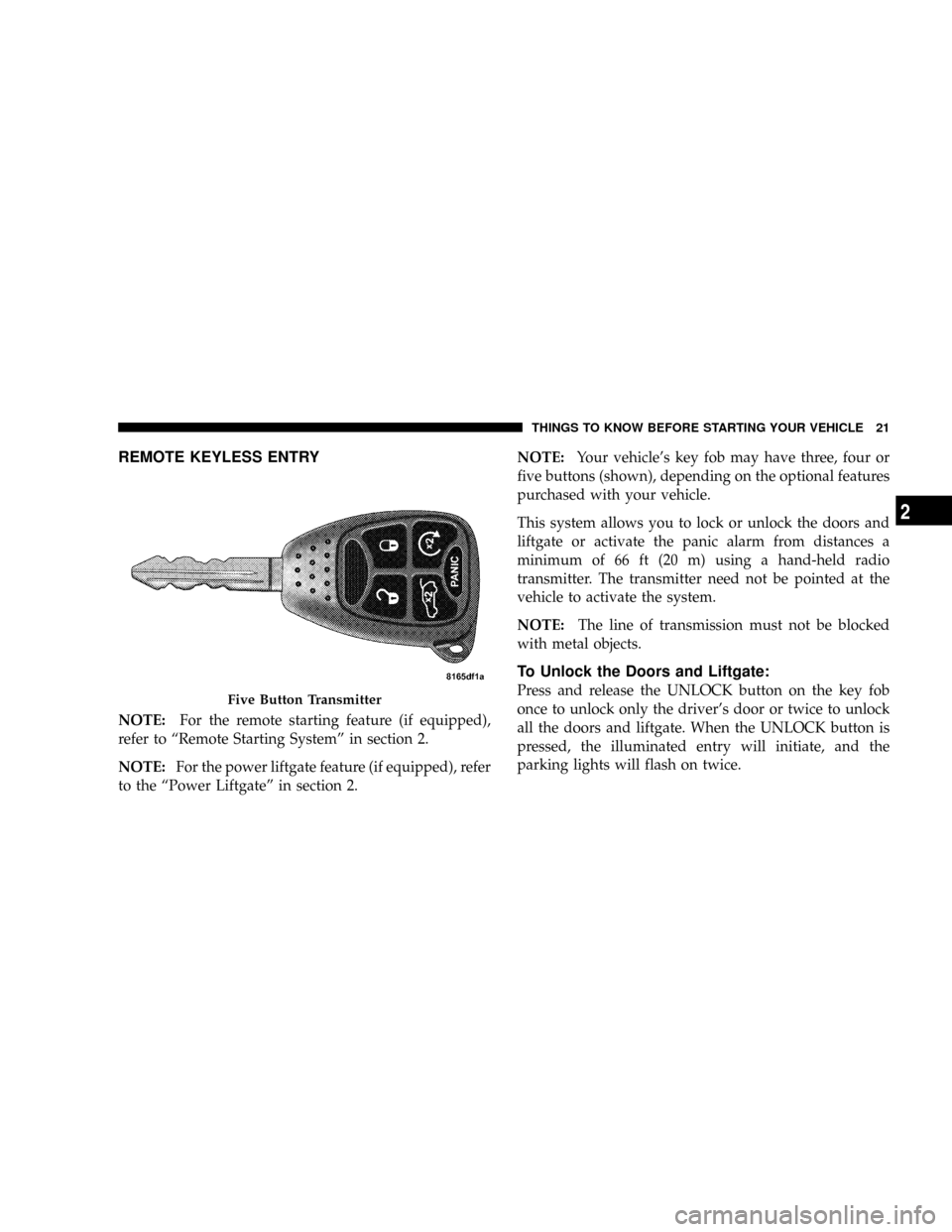
REMOTE KEYLESS ENTRY
NOTE:For the remote starting feature (if equipped),
refer to ªRemote Starting Systemº in section 2.
NOTE:For the power liftgate feature (if equipped), refer
to the ªPower Liftgateº in section 2.NOTE:Your vehicle's key fob may have three, four or
five buttons (shown), depending on the optional features
purchased with your vehicle.
This system allows you to lock or unlock the doors and
liftgate or activate the panic alarm from distances a
minimum of 66 ft (20 m) using a hand-held radio
transmitter. The transmitter need not be pointed at the
vehicle to activate the system.
NOTE:The line of transmission must not be blocked
with metal objects.
To Unlock the Doors and Liftgate:
Press and release the UNLOCK button on the key fob
once to unlock only the driver's door or twice to unlock
all the doors and liftgate. When the UNLOCK button is
pressed, the illuminated entry will initiate, and the
parking lights will flash on twice.Five Button Transmitter
THINGS TO KNOW BEFORE STARTING YOUR VEHICLE 21
2
Page 26 of 479
General Information
This device complies with part 15 of FCC rules and with
RS-210 of Industry Canada. Operation is subject to the
following conditions:
1. This device may not cause harmful interference.
2. This device must accept any interference that may be
received including interference that may cause undesired
operation.
NOTE:Changes or modifications not expressly ap-
proved by the party responsible for compliance could
void the user's authority to operate the equipment.
If your Remote Lock Control fails to operate from a
normal distance, check for these two conditions.
1. Weak batteries in transmitter. The expected life of the
batteries is five years.2. Closeness to a radio transmitter, such as a radio station
tower, airport transmitter, military base, and some mobile
or CB radios.
Programming Additional Transmitters
Vehicles will be shipped from the assembly plants with
two key fob transmitters programmed only for that
vehicle. A total of eight key fobs can be programmed for
your vehicle. Additional key fobs can be programmed to
your vehicle through the use of a currently programmed
fob.
NOTE:When entering program mode using that key
fob, all other programmed key fobs will be erased and
you will have to reprogram them for your vehicle.
Use the following procedure to program additional key
fobs if the vehicle is not equipped with Sentry Keyt:
1. Enter your vehicle and close all doors.
THINGS TO KNOW BEFORE STARTING YOUR VEHICLE 25
2
Page 89 of 479
that the heating elements are ON. Turning OFF the rear
window defroster or the ignition will deactivate the
heated mirrors.
Automatic Dimming Driver's Exterior Mirror Ð If
Equipped
This mirror will automatically adjust for annoying light
glare from vehicles behind you. This feature is controlled
by the inside mirror and can be turned off by pressing the
button at the base of the inside mirror.
HANDS-FREE COMMUNICATION (UConnectT)Ð
IF EQUIPPED
NOTE: The sales code RER radio contains an inte-
grated Hands-Free Communication (UConnectt) sys-
tem. Refer to your ªNavigation User's Manualº for
UConnecttsystem operating instructions for this radio.
UConnecttis a voice-activated, hands-free, in-vehicle
communications system. UConnecttallows you to dial aphone number with your cellular phone using simple
voice commands (e.g.,9Callº{ªMikeº{ºWork9or9Dialº
{ª248-555-12129). Your cellular phone's audio is trans-
mitted through your vehicle's audio system; the system
will automatically mute your radio when using the
UConnecttsystem.
NOTE:The UConnecttsystem requires a cellular phone
equipped with the Bluetootht9Hands-Free Profile,9Ve r -
sion 0.96 or higher. See the UConnecttwebsite for
supported phones.
NOTE:For UConnecttcustomer support, visit the
following websites:²www.chrysler.com/uconnect
²www.dodge.com/uconnect
²www.jeep.com/uconnect
²or call 1±877±855±8400
88 UNDERSTANDING THE FEATURES OF YOUR VEHICLE
Page 90 of 479
UConnecttallows you to transfer calls between the
system and your cellular phone as you enter or exit your
vehicle and enables you to mute the system's microphone
for private conversation.
The UConnecttphonebook enables you to store up to 32
names, with four numbers per name. Each language has
a separate 32-name phonebook accessible only in that
language. This system is driven through your Bluetootht
ªHands-Free profileº cellular phone. UConnecttfeatures
Bluetoothttechnology - the global standard that enables
different electronic devices to connect to each other
without wires or a docking station, so UConnecttworks
no matter where you stow your cellular phone (be it your
purse, pocket, or briefcase), as long as your phone is
turned on and has been paired to the vehicle's
UConnecttsystem. The UConnecttsystem allows up to
seven cellular phones to be linked to the system. Only
one linked (or paired) cellular phone can be used with thesystem at a time. The system is available in English,
Spanish, or French languages (as equipped).
PHONE Button
The rearview mirror contains the microphone
for the system (depending on the type of
mirror and radio equipped), and either the
radio or the mirror has the two control buttons
(PHONE Button and VOICE RECOGNITION button)
that will enable you to access the system.
Voice Recognition Button
Actual button location may vary with radio.
The individual buttons are described in the
ªOperationº section.
The UConnecttsystem can be used with any Hands-Free
Profile certified Bluetoothtcellular phone. See the
UConnecttwebsite for supported phones. If your cellu-
lar phone supports a different profile (e.g., Headset
UNDERSTANDING THE FEATURES OF YOUR VEHICLE 89
3
Page 91 of 479
Profile) you may not be able to use any UConnectt
features. Refer to your cellular service provider or the
phone manufacturer for details.
The UConnecttsystem is fully integrated with the vehi-
cle's audio system. The volume of the UConnecttsystem
can be adjusted either from the radio volume control
knob or from the steering wheel radio control (right
switch), if so equipped.
The radio display will be used for visual prompts from
the UConnecttsystem such as9CELL9or caller ID on
certain radios.
Operation
Voice commands can be used to operate the UConnectt
system and to navigate through the UConnecttmenu
structure. Voice commands are required after most
UConnecttsystem prompts. You will be prompted for a
specific command and then guided through the available
options.
²Prior to giving a voice command, one must wait for
the beep, which follows the9Ready9prompt or another
prompt.
²For certain operations, compound commands can be
used. For example, instead of saying9Setup9and then
9Phone Pairing,9the following compound command
can be said:9Setup Phone Pairing.9
²For each feature explanation in this section, only the
combined form of the voice command is given. You
can also break the commands into parts and say each
part of the command when you are asked for it. For
example, you can use the combined form voice com-
mand9Phonebook New Entry,9or you can break the
combined form command into two voice commands:
9Phonebook9and9New Entry.9Please remember, the
UConnecttsystem works best when you talk in a
normal conversational tone, as if speaking to someone
sitting a few feet/meters away from you.
90 UNDERSTANDING THE FEATURES OF YOUR VEHICLE
Page 92 of 479
Voice Command Tree
Refer to ªVoice Treeº in this section.
Help Command
If you need assistance at any prompt, or if you want to
know your options at any prompt, say9Help9following
the beep. The UConnecttsystem will play all the options
at any prompt if you ask for help.
To activate the UConnecttsystem from idle, simply press
the PHONE button and follow the audible prompts for
directions. All UConnecttsystem sessions begin with a
press of the PHONE button on the radio control head.
Cancel Command
At any prompt, after the beep, you can say9Cancel9and
you will be returned to the main menu. However, in a
few instances the system will take you back to the
previous menu.
Pair (Link) UConnecttSystem to a Cellular Phone
To begin using your UConnecttsystem, you must pair
your compatible Bluetoothtenabled cellular phone.
To complete the pairing process, you will need to refer-
ence your cellular phone owner's manual. The
UConnecttwebsite may also provide detailed instruc-
tions for pairing.
The following are general phone to UConnecttsystem
pairing instructions:
²Press the PHONE button to begin.
²After the9Ready9prompt and the following beep, say
9Setup Phone Pairing.9
²When prompted, after the beep, say9Pair a Phone9and
follow the audible prompts.
²You will be asked to say a four-digit Personal Identi-
fication Number (PIN), which you will later need to
UNDERSTANDING THE FEATURES OF YOUR VEHICLE 91
3
Page 94 of 479
²The UConnecttsystem will confirm the phone num-
ber and then dial. The number will appear in the
display of certain radios.
Call by Saying a Name
²
Press the PHONE button to begin.
²After the9Ready9prompt and the following beep, say
ªCall.9
²The system will prompt you to say the name of the
person you want to call.
²After the9Ready9prompt and the following beep, say
the name of the person you want to call. For example,
you can say9John Doe,9where John Doe is a previ-
ously stored name entry in the UConnecttphonebook.
To learn how to store a name in the phonebook, refer
to9Add Names to Your UConnecttPhonebook,9in
this section.
²The UConnecttsystem will confirm the name and
then dial the corresponding phone number, which
may appear in the display of certain radios.
Add Names to Your UConnecttPhonebook
NOTE:Adding names to the phonebook is recom-
mended when the vehicle is not in motion.
²Press the PHONE button to begin.
²After the9Ready9prompt and the following beep, say
9Phonebook New Entry.9
²When prompted, say the name of the new entry. Use of
long names helps the voice recognition and it is
recommended. For example, say9Robert Smith9or
9Robert9instead of9Bob.9
UNDERSTANDING THE FEATURES OF YOUR VEHICLE 93
3
Page 104 of 479
NOTE:
²You may not hear all of the tones due to cellular phone
network configurations; this is normal.
²Some paging and voice mail systems have system time
out settings that are too short and may not allow the
use of this feature.
Barge In - Overriding Prompts
The ªVoice Recognitionº button can be used when you
wish to skip part of a prompt and issue your voice
recognition command immediately. For example, if a
prompt is asking9Would you like to pair a phone, clear
a{,9you could press the ªVoice Recognitionº button and
say,9Pair a Phone9to select that option without having to
listen to the rest of the voice prompt.
Turning Confirmation Prompts On/Off
Turning confirmation prompts off will stop the system
from confirming your choices (e.g., the UConnecttsys-
tem will not repeat a phone number before you dial it).
²Press the PHONE button to begin.
²After the9Ready9prompt and the following beep, say
9Setup Confirmations.9The UConnecttsystem will
play the current confirmation prompt status and you
will be given the choice to change it.
Phone and Network Status Indicators
If available on the radio and/or on a premium display
such as the instrument panel cluster, and supported by
your cell phone, the UConnecttsystem will provide
notification to inform you of your phone and network
status when you are attempting to make a phone call
using UConnectt. The status is given for roaming, net-
work signal strength, phone battery strength, etc.
Dialing Using the Cellular Phone Keypad
You can dial a phone number with your cellular phone
keypad and still use the UConnecttsystem (while dial-
ing via the cell phone keypad, the user must exercise
caution and take precautionary safety measures). By
UNDERSTANDING THE FEATURES OF YOUR VEHICLE 103
3
Page 107 of 479

Delete UConnecttPaired Cellular Phones
²
Press the PHONE button to begin.
²After the9Ready9prompt and the following beep, say
9Setup Phone Pairing.9
²At the next prompt, say9Delete9and follow the
prompts.
²You can also press the ªVoice Recognitionº button at
any time while the list is being played, and then
choose the phone you wish to delete.
Things You Should Know About Your UConnectT
System
UConnecttTutorial
To hear a brief tutorial of the system features, press the
PHONE button and say ªUConnecttTutorial.º
Voice Training
For users experiencing difficulty with the system recog-
nizing their voice commands or numbers, the UConnectt
system Voice Training feature may be used. To enter this
training mode, follow one of the two following proce-
dures:
From outside the UConnecttmode (e.g., from radio
mode):
²Press and hold the ªVoice Recognitionº button for five
seconds until the session begins, or,
²Press the ªVoice Recognitionº button and say the
9Setup, Voice Training9command.
Repeat the words and phrases when prompted by the
UConnecttsystem. For best results, the Voice Training
session should be completed when the vehicle is parked
with the engine running, all windows closed, and the
blower fan switched OFF.
106 UNDERSTANDING THE FEATURES OF YOUR VEHICLE