lights CHRYSLER ASPEN 2008 2.G Owner's Manual
[x] Cancel search | Manufacturer: CHRYSLER, Model Year: 2008, Model line: ASPEN, Model: CHRYSLER ASPEN 2008 2.GPages: 479, PDF Size: 4.3 MB
Page 166 of 479
CAUTION!
²To avoid vehicle damage, the Rear Camera System
should only be used as a parking aid and is unable
to view every obstacle or object in your drive path.
²To avoid vehicle damage, the vehicle must be
driven slowly when using the Rear Camera Sys-
tem to be able to stop in time when an obstacle is
seen. It is recommended that the driver look fre-
quently over his/her shoulder when using the Rear
Camera System.
NOTE:If snow, ice, mud, or anything else builds up on
the camera lens, clean the lens, rinse with water, and dry
with a soft cloth. Do not cover the lens.
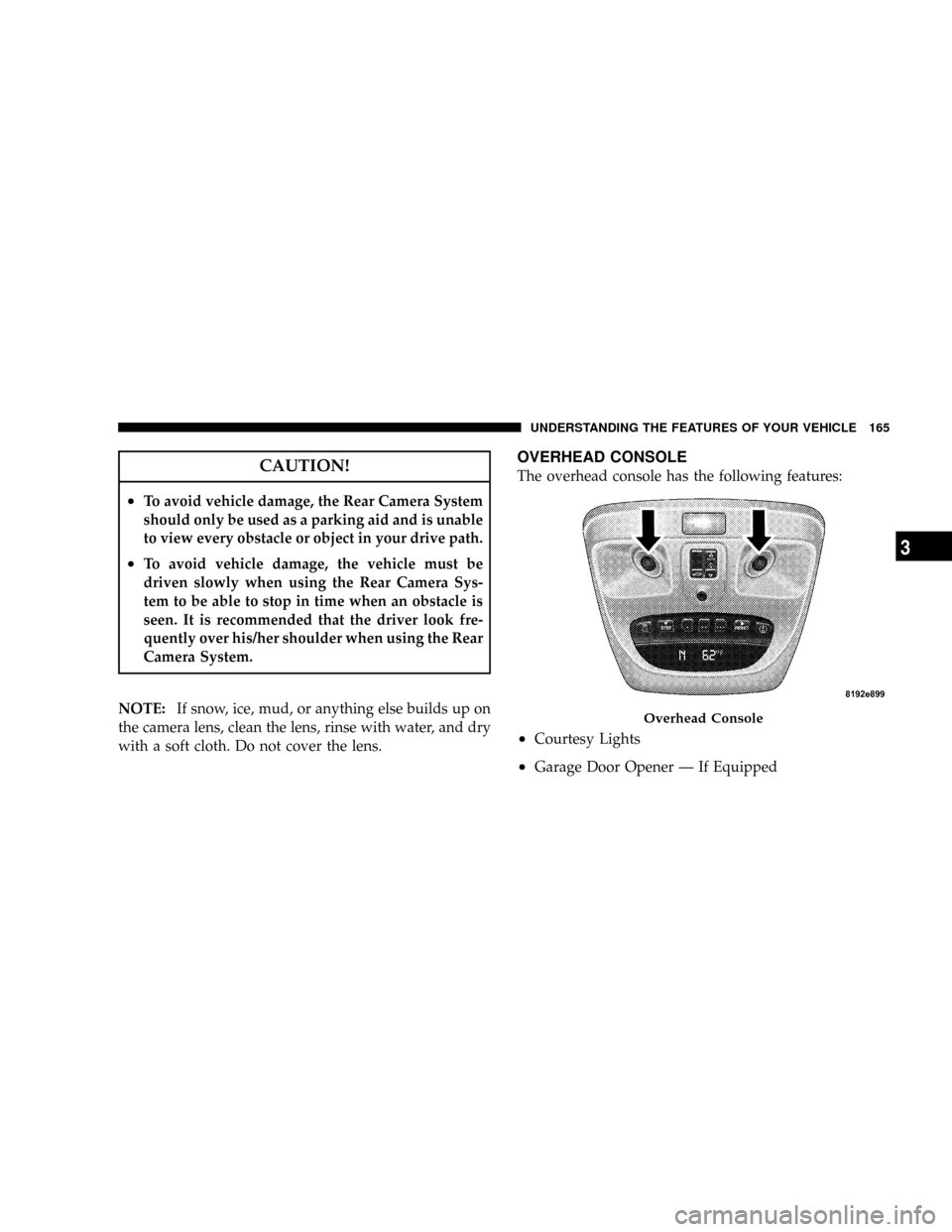
OVERHEAD CONSOLE
The overhead console has the following features:
²Courtesy Lights
²Garage Door Opener Ð If Equipped
Overhead Console
UNDERSTANDING THE FEATURES OF YOUR VEHICLE 165
3
Page 167 of 479

²Electronic Vehicle Information Center (EVIC) Ð If
Equipped
Courtesy/Reading Lights
Near the front of the console is one courtesy and two
reading lights.
All lights illuminate as courtesy lights when a door is
opened, when the dimmer control is rotated to the
courtesy light position (fully upward position), or when
the UNLOCK button is pressed on the Remote Keyless
Entry (RKE) Transmitter, if so equipped. The two round
lamps are also operated individually as reading lights by
pressing the center of each lens.
NOTE:The courtesy/reading lights will remain on until
the switch is pressed a second time, so be sure they have
been turned off before leaving the vehicle. If the interior
lights are left on after the vehicle is turned OFF, they will
turn off after 15 minutes.
OVERHEAD CONSOLE WITH ELECTRONIC
VEHICLE INFORMATION CENTER (EVIC) Ð IF
EQUIPPED
The overhead console contains dome/reading lights, and
an Electronic Vehicle Information Center (EVIC).
Dome/Reading Lights
Located in the overhead console are two dome/reading
lights.
The dome/reading lights illuminate when a door is
opened or when the interior lights are turned on by
rotating the dimmer control located on the headlight
switch.
The reading lights are activated by pressing the center of
each lens.
NOTE:The dome/reading lights will remain on until
the switch is pressed a second time, so be sure they have
been turned off before leaving the vehicle.
166 UNDERSTANDING THE FEATURES OF YOUR VEHICLE
Page 172 of 479
stopped and the transmission is in the PARK or
NEUTRAL position and the driver's door is opened.
To make your selection, press and release the RESET
button until ªONº or ªOFFº appears.
²ªRKE UNLOCK DRV DR 1stº ± WhenDRV DR 1stis
selected, only the driver's door will unlock on the first
press of the RKE UNLOCK button. When Driver Door
1st Press is selected, you must press the Remote
Keyless Entry UNLOCK button twice to unlock the
passenger's doors. To make your selection, press and
release the RESET button until ªDRV DR 1st º appears.
²ªRKE UNLOCK ALL DR 1STº ± When AllALL DR
1STis selected, all of the doors will unlock on the first
press of the RKE UNLOCK button. To make your
selection, press and release the RESET button until
ªAll DR 1stº appears.
²MEM. RECALL WITH RKE > ON ± When ON is
selected, pressing the UNLOCK button on the RKEwill recall the memory settings for the seat, mirror and
radio. To make your selection, press and release the
RESET button until ªON9or ªOFFº appears.
²ªSOUND HORN W/LOCK > ONº ± When ON is
selected, a short horn sound will occur when the
Remote Keyless Entry LOCK button is pressed. This
feature may be selected with or without the flash lights
on lock/unlock feature. To make your selection, press
and release the RESET button until ªONº or ªOFFº
appears.
²ªFLASH LAMPS W/LOCK >ONº ± When ON is
selected, the front and rear turn signals will flash when
the doors are locked or unlocked with the RKE Trans-
mitter. This feature may be selected with or without
the sound horn on lock feature selected. To make your
selection, press and release the RESET button until
ªONº or ªOFFº appears.
UNDERSTANDING THE FEATURES OF YOUR VEHICLE 171
3
Page 173 of 479
²ªHEADLAMP OFF DELAY > 0 SECº ± When this
feature is selected, the driver can choose to have the
headlamps remain on for 0, 30, 60, or 90 seconds when
exiting the vehicle. To make your selection, press and
release the RESET button until ª0,º ª30,º ª60,º or ª90º
appears.
NOTE:The headlamp switch must be in the ªAº auto
mode before this feature will work.
²HEADLAMPS W/WIPERS > ON ± When ON is
selected, the headlamps will automatically turn on
when the wiper switch is activated.
²EASY EXIT SEAT > ON ± When ON is selected, and
the key is removed from the ignition, the driver's seat
will automatically move rearward to allow easy exit.
²TILT MIRRORS IN ªRº > ON ± When ON is selected,
and the transmission is put in REVERSE, the outside
mirrors will tilt downward.
²ªKEY OFF POWER DELAY> OFFº ± When this feature
is selected, the power window switches, radio, hands±
free system (if equipped), and power outlets will
remain active for up to 10 minutes after the ignition
switch is turned off. Opening a vehicle door will
cancel this feature. To make your selection, press and
release the RESET button until ªOff,º ª45 sec.,º ª5
min.,º ª10 min.º appears.
²ªILLUMINATED APRCH > OFFº ± When this feature
is selected, the headlights will activate and remain on
for up to 90 seconds when the doors are unlocked with
the RKE Transmitter. To make your selection, press
and release the RESET button until ªOFF,º ª30 sec.,º
ª60 sec.,º or ª90 sec.º appears.
²PARK ASST. SYSTEM > ON ± When YES is selected,
the Rear Park Assist System is activated. When NO is
selected, the System is deactivated.
172 UNDERSTANDING THE FEATURES OF YOUR VEHICLE
Page 188 of 479

Electrical Outlet Use With Engine OFF (Battery
Fed Configuration)
CAUTION!
²Many accessories that can be plugged in draw
power from the vehicle's battery, even when not
in use (i.e., cellular phones, etc.). Eventually, if
plugged in long enough, the vehicle's battery will
discharge sufficiently to degrade battery life
and/or prevent engine starting.
²Accessories that draw higher power (i.e., coolers,
vacuum cleaners, lights, etc.), will discharge the
battery even more quickly. Only use these inter-
mittently and with greater caution.
²After the use of high power draw accessories, or
long periods of the vehicle not being started (with
accessories still plugged in), the vehicle must be
driven a sufficient length of time to allow the
generator to recharge the vehicle's battery.
115V Inverter Plug
UNDERSTANDING THE FEATURES OF YOUR VEHICLE 187
3
Page 204 of 479
INSTRUMENT CLUSTER DESCRIPTION
1. Fuel Gage
The fuel gage shows level of fuel in the tank when
ignition switch is in the ON position.
2. Temperature Gage
The temperature gage indicates engine coolant
temperature. Any reading within the normal
range indicates that the cooling system is operat-
ing satisfactorily. The gage needle in V6 and V8 engines
will likely indicate a high temperature when driving in
hot weather, up mountain grades, in heavy traffic, or
when towing a trailer. If the needle rises to the ªHº mark,
stop the vehicle, shift into NEUTRAL and increase engine
speed for two to three minutes. If the temperature
reading does not return to normal, see your authorized
dealer for service immediately..
CAUTION!
Do not leave your vehicle unattended with the en-
gine running as you would not be able to react to the
temperature indicator if the engine overheats.
The gage pointer will remain near its last reading when
the engine is turned off. It will return to a true reading
when the engine is restarted.
3. Turn Signal Indicators
When a turn signal is activated, a right-pointing or
left-pointing arrow lights up and flashes to indicate the
direction of the turn. These indicators also indicate
proper operation of the front and rear turn signal lights.
If either indicator flashes at a faster rate than normal,
check for a defective bulb. If either indicator fails to light
up when the lever is moved, check for a defective fuse or
turn signal LED. A single chime is activated when the
INSTRUMENT PANEL AND CONTROLS 203
4
Page 205 of 479
left/right turn signal is left on with the engine RPM
vehicle speed greater than 15 mph (24 km/h) for more
than one mile.
4. Low Fuel Warning Light
This indicator lights when the fuel gage reads 1/16
of a tank or less.
5. High Beam Indicator
Indicates that headlights are on high beam.
6. Seat Belt Reminder Light
This light comes on for several seconds after the
ignition is turned ON as a reminder to ªbuckle
up.º This light will remain on as long as the seat
belt remains unbuckled. If this light flashes, it indicates a
fault in the airbag system. Have the system checked by
your authorized dealer.7. Coolant Temperature Light
This light warns of an overheated engine condi-
tion. For a bulb check, this light will come on
momentarily when the ignition is turned ON. If
the light turns on while driving, stop the vehicle, shift
into NEUTRAL and increase the engine speed for two to
three minutes. If the temperature reading does not return
to normal, see your authorized dealer for service imme-
diately.
CAUTION!
Driving with a hot engine cooling system could
damage your vehicle. If the temperature light is on,
safely pull over and stop the vehicle. Idle the vehicle
in NEUTRAL with the air conditioner turned off
until the light turns off. If the if the light remains on,
turn the engine off immediately, and call for service.
204 INSTRUMENT PANEL AND CONTROLS
Page 206 of 479
WARNING!
A hot engine cooling system is dangerous. You or
others could be badly burned by steam or boiling
coolant. You may want to call a service center if your
vehicle overheats. If you decide to look under the
hood yourself, refer to ªCooling System Pressure
Capº under ªCooling Systemº in Section 7. Follow
the warnings under the paragraph.
8. Speedometer
The speedometer shows the speed of the vehicle.
9. Voltage Light
This light monitors the electrical system voltage.
The light should turn on momentarily as the
engine is started. If the light stays on or turns on while
driving, it indicates a problem with the charging system.
See your authorized dealer for service immediately.10. Security Light
This light will flash rapidly for approximately 15 seconds
when the Vehicle Security Alarm is arming. The light will
flash at a slower speed continuously after the alarm is set.
The Security light will also come on for about three
seconds when the ignition is first turned on.
11. ABS Warning Light
This light monitors the Anti-Lock Brake System
(ABS) which is described elsewhere in this
manual. This light will come on when the
ignition key is turned to the ON position and
may stay on for approximately three seconds. If this light
remains on or comes on during driving, it indicates that
the Anti-Lock portion of the brake system is not func-
tioning and that service is required. See your authorized
dealer immediately. With the ABS malfunctioning, the
Brake Assist System (BAS) and Electronic Stability Pro-
gram (ESP) are also switched off. Both malfunction
indicator lights illuminate with the engine running. If the
INSTRUMENT PANEL AND CONTROLS 205
4
Page 209 of 479
Unless reset, this message will continue to display each
time you turn the ignition switch to the ON/RUN
position. To turn off the message temporarily, press and
release the Trip Odometer button on the instrument
cluster. To reset the oil change indicator system (after
performing the scheduled maintenance) refer to the fol-
lowing procedure.
1. Turn the ignition switch to the ON position(Do not
start the engine).
2. Fully depress the accelerator pedal slowly three
times within 10 seconds.
3. Turn the ignition switch to the OFF/LOCK position.
NOTE:If the indicator message illuminates when you
start the vehicle, the oil change indicator system did not
reset. If necessary repeat this procedure.16. Odometer
The odometer shows the total distance the vehicle has
been driven.
U.S. federal regulations require that upon transfer of
vehicle ownership, the seller certify to the purchaser the
correct mileage that the vehicle has been driven. There-
fore, if the odometer reading is changed during repair or
replacement, be sure to keep a record of the reading
before and after the service so that the correct mileage can
be determined.
17. Fog Light Indicator
This light shows when the fog lights are ON.
18. Electronic Stability Program (ESP) Indicator Light
The yellow ESP indicator light in the speedom-
eter area illuminates with the key in the igni-
tion switch turned to the ON/RUN position. It
should go out with the engine running. The
208 INSTRUMENT PANEL AND CONTROLS
Page 214 of 479
tires or wheels on your vehicle to ensure that the replace-
ment or alternate tires and wheels allow the TPMS to
continue to function properly.
CAUTION!
The TPMS has been optimized for the original
equipment tires and wheels. TPMS pressures and
warning have been established for the tire size
equipped on your vehicle. Undesirable system opera-
tion or sensor damage may result when using re-
placement equipment that is not of the same size,
type, and/or style. Aftermarket wheels can cause
sensor damage. Do not use tire sealant from a can, or
balance beads if your vehicle is equipped with a
TPMS, as damage to the sensors may result.25. Airbag Indicator
The indicator lights and remains lit for six to
eight seconds when the ignition is first turned
ON. If the light does not come on when the
ignition is first turned on, or the light stays on
or comes on while driving, have the airbag system
checked by an authorized dealer.
26. 4WD Indicator
Indicates when the transfer case is in 4WD position.
27. SVC (Service) 4WD Indicator
The SVC 4WD lights will come on when the ignition key
is turned to the ON position and will stay on for two
seconds. If the light stays on or comes on during driving,
it means that the 4WD system is not functioning properly
and that service is required. See your authorized dealer
for service.
INSTRUMENT PANEL AND CONTROLS 213
4