reset CHRYSLER ASPEN 2008 2.G Owner's Manual
[x] Cancel search | Manufacturer: CHRYSLER, Model Year: 2008, Model line: ASPEN, Model: CHRYSLER ASPEN 2008 2.GPages: 479, PDF Size: 4.3 MB
Page 231 of 479

Every time a preset button is used, a corresponding
button number will display.
Buttons1-6
These buttons tune the radio to the stations that you
commit to pushbutton memory (12 AM and 12 FM
stations).
DISC Button
Pressing the DISC button will allow you to switch from
AM/FM modes to Disc modes.
Operation Instructions - CD MODE for CD and
MP3 Audio Play
NOTE:The ignition switch must be in the ON or ACC
position to operate the radio.
NOTE:This radio is capable of playing compact discs
(CD), recordable compact discs (CD-R), rewritable com-
pact discs (CD-RW), compact discs with MP3 tracks and
multisession compact discs with CD and MP3 tracks.
Inserting Compact Disc(s)
Gently insert one CD into the CD player with the CD
label facing up. The CD will automatically be pulled into
the CD player and the CD icon will illuminate on the
radio display. If a CD does not go into the slot more than
an inch (2.5 cm), a disc may already be loaded and must
be ejected before a new disc can be loaded.
If you insert a disc with the ignition ON and the radio
ON, the unit will switch from radio to CD mode and
begin to play when you insert the disc. The display will
show the disc number, the track number, and index time
in minutes and seconds. Play will begin at the start of
track 1.
230 INSTRUMENT PANEL AND CONTROLS
Page 240 of 479

SCAN Button
Pressing the SCAN button causes the tuner to search for
the next channel, pausing for eight seconds before con-
tinuing to the next. To stop the search, press the SCAN
button a second time.
INFO Button
Pressing the INFO button will cycle between Artist, Song
Title, and Composer (if available) information. Also,
pressing and holding the INFO button for an additional
three seconds will make the radio display the Song Title
all of the time (press and hold again to return to normal
display).
RW/FF
Pressing the RW (Rewind) or FF (Fast Forward) buttons
causes the tuner to search for the next channel in the
direction of the arrows.
TUNE Control (Rotary)
Turn the rotary TUNE/SCROLL control knob clockwise
to increase or counterclockwise to decrease the channel.
MUSIC TYPE Button
Pressing this button once will turn on the Music Type
mode for five seconds. Pressing the MUSIC TYPE button
or turning the TUNE/SCROLL control knob within five
seconds will allow the program format type to be se-
lected.
Toggle the MUSIC TYPE button again to select the music
type.
By pressing the SEEK button when the Music Type
function is active, the radio will be tuned to the next
channel with the same selected Music Type name.
If a preset button is activated while in the Music Type
(Program Type) mode, the Music Type mode will be
exited and the radio will tune to the preset channel.
INSTRUMENT PANEL AND CONTROLS 239
4
Page 241 of 479

SETUP Button
Pressing the SETUP button allows you to select the
following items:
²Display Sirius ID number Ð Press the AUDIO/
SELECT button to display the Sirius ID number. This
number is used to activate, deactivate, or change the
Sirius subscription.
SET Button ± To Set the Pushbutton Memory
When you are receiving a channel that you wish to
commit to pushbutton memory, press the SET button.
The symbol SET 1 will now show in the display window.
Select the button (1-6) you wish to lock onto this channel
and press and release that button. If a button is not
selected within five seconds after pressing the SET but-
ton, the channel will continue to play but will not be
stored into pushbutton memory.You may add a second channel to each pushbutton by
repeating the above procedure with this exception: Press
the SET button twice and SET 2 will show in the display
window. Each button can be set for SET 1 and SET 2. This
allows a total of 12 Satellite channels to be stored into
pushbutton memory. The channels stored in SET 2
memory can be selected by pressing the pushbutton
twice.
Every time a preset button is used, a corresponding
button number will display.
Buttons1-6
These buttons tune the radio to the channels that you
commit to pushbutton memory (12 Satellite stations).
240 INSTRUMENT PANEL AND CONTROLS
Page 246 of 479
Radio Preset Buttons
In the List mode, the radio preset buttons are used as
shortcuts to the following lists on the iPodtdevice.
²1 ± Playlists
²2 ± Artists
²3 ± Albums
²4 ± Genres
²5 - Audiobooks
²6 ± Podcasts
After pressing a preset button, you will see the list you
are in on the top line and the first item in that list on the
second line.
To exit the List mode without selecting a track, press the
same preset button again to go back to Play mode.LIST Button
Pressing the LIST button will take to the top level menu
of the iPodt. This takes you to the same top level menu
as on your iPodt. Turn the TUNE/SCROLL knob to list
the top menu item you wish to select and then press the
TUNE/SCROLL knob. This will take you to the next sub
menu list item of the iPodtand you can follow the same
steps to go to the desired track in that list. Not all iPodt
sub menu levels are available on this system.
MUSIC TYPE Button
The MUSIC TYPE button is another shortcut button to
the genre listing on your iPodt.
INSTRUMENT PANEL AND CONTROLS 245
4
Page 248 of 479
Left-Hand Switch Functions for Radio Operation
²
Press the top of the switch to SEEK the next listenable
station up from the current setting.
²Press the bottom of the switch to SEEK the next
listenable station down from the current setting.
²Press the button in the center of the switch to tune to
the next preset that you have programmed.
Left-Hand Switch Functions for Media (i.e., CD)
Operation
²
Press the top of the switch once to listen to the next
track.
²Press the bottom of the switch once either to listen to
the beginning of the current track or to listen to the
beginning of the previous track if it is within one
second after the current track begins to play.
²Press the switch up or down twice to listen to the
second track, three times to listen to the third track,
and so forth.
²Press the button located in the center of the switch to
change to the next preset that you have programmed.
COMPACT DISC MAINTENANCE
To keep the compact discs in good condition, take the
following precautions:
1. Handle the disc by its edge; avoid touching the
surface.
2. If the disc is stained, clean the surface with a soft cloth,
wiping from center to edge.
3. Do not apply paper or tape to the disc; avoid scratch-
ing the disc.
4. Do not use solvents such as benzine, thinner, cleaners,
or antistatic sprays.
INSTRUMENT PANEL AND CONTROLS 247
4
Page 338 of 479

WARNING!
²Never have any smoking materials lit in or near
the vehicle when the gas cap is removed or the
tank filled.
²Never add fuel when the engine is running. This is
in violation of most state and federal fire regula-
tions and may cause the Malfunction Indicator
Light to turn on.
NOTE:Tighten the gas cap about 1/4 turn until you
hear one click. This is an indication that cap is properly
tightened.
If the gas cap is not tightened properly, the Malfunction
Indicator Light will come on. Be sure the gas cap is
tightened every time the vehicle is refueled.
WARNING!
A fire may result if gasoline is pumped into a
portable container that is inside of a vehicle. You
could be burned. Always place gas containers on the
ground while filling.
Loose Fuel Filler Cap (Gas Cap) Message
After fuel is added, the vehicle diagnostic system can
determine if the fuel filler cap is loose, improperly
installed, or damaged. A loose fuel filler cap message will
be displayed in the instrument cluster. Tighten the gas
cap until a9clicking9sound is heard. This is an indication
that the gas cap is properly tightened. Press the odometer
RESET button to turn the message off. If the problem
persists, the message will appear the next time the
vehicle is started. This might indicate a damaged cap. If
STARTING AND OPERATING 337
5
Page 388 of 479
the odometer RESET button to turn the message off. If the
problem persists, the message will appear the next time
the vehicle is started. This might indicate a damaged cap.
If the problem is detected twice in a row, the system will
turn on the MIL. Resolving the problem will turn the MIL
off.
EMISSIONS INSPECTION AND MAINTENANCE
PROGRAMS
In some localities, it may be a legal requirement to pass
an inspection of your vehicle's emissions control system.
Failure to pass could prevent vehicle registration.
For states which have an I/M (Inspection and
Maintenance) requirement, this check verifies the
following: the Malfunction Indicator Lamp (MIL)
is functioning and is not on when the engine is running,
and that the On Board Diagnostic (OBD) system is ready
for testing.Normally, the OBD system will be ready. The OBD
system maynotbe ready if your vehicle was recently
serviced, if you recently had a dead battery, or a battery
replacement. If the OBD system is determined not ready
for the I/M test, your vehicle may fail the test.
Your vehicle has a simple ignition key actuated test
which you can use prior to going to the test station. To
check if your vehicle's OBD system is ready, you must do
the following:
1. Insert your ignition key into the ignition switch.
2. Turn the ignition to the ON position, but do not crank
or start the engine. If you crank or start the engine, you
will have to start this test over.
3. As soon as you turn your key to the ON position, you
will see your MIL symbol come on as part of a normal
bulb check.
MAINTAINING YOUR VEHICLE 387
7
Page 442 of 479
oil if it has been 6 months since your last oil change
even if the oil change indicator message is NOT
illuminated.
²Change your engine oil more often if you drive your
vehicle off-road for an extended period of time.
²Under no circumstances should oil change intervals
exceed 6,000 mi (10 000 km) or 6 months, whichever
comes first.
Your authorized dealer will reset the oil change indicator
message after completing the scheduled oil change. If this
scheduled oil change is performed by someone other
than your authorized dealer the message can be reset by
referring to the steps described under ªOIL CHANGE
REQUIRED ± If Equippedº under ªSystem Status (EVIC
Displays)º in Section 3, or under ªOdometer/Trip Odom-
eterº under ªInstrument Cluster Descriptionº in Section
4.At Each Stop for Fuel
²Check the engine oil level about five minutes after a
fully warmed engine is shut off. Checking the oil level
while the vehicle is on level ground will improve the
accuracy of the oil level reading. Add oil only when
the level is at or below the ADD or MIN mark.
²Check the windshield washer solvent and add if
required.
Once a Month
²Check tire pressure and look for unusual wear or
damage.
²Inspect the battery and clean and tighten the terminals
as required.
²Check the fluid levels of coolant reservoir, brake
master cylinder, power steering and transmission and
add as needed.
MAINTENANCE SCHEDULES 441
8
M
A
I
N
T
E
N
A
N
C
E
S
C
H
E
D
U
L
E
S
Page 470 of 479
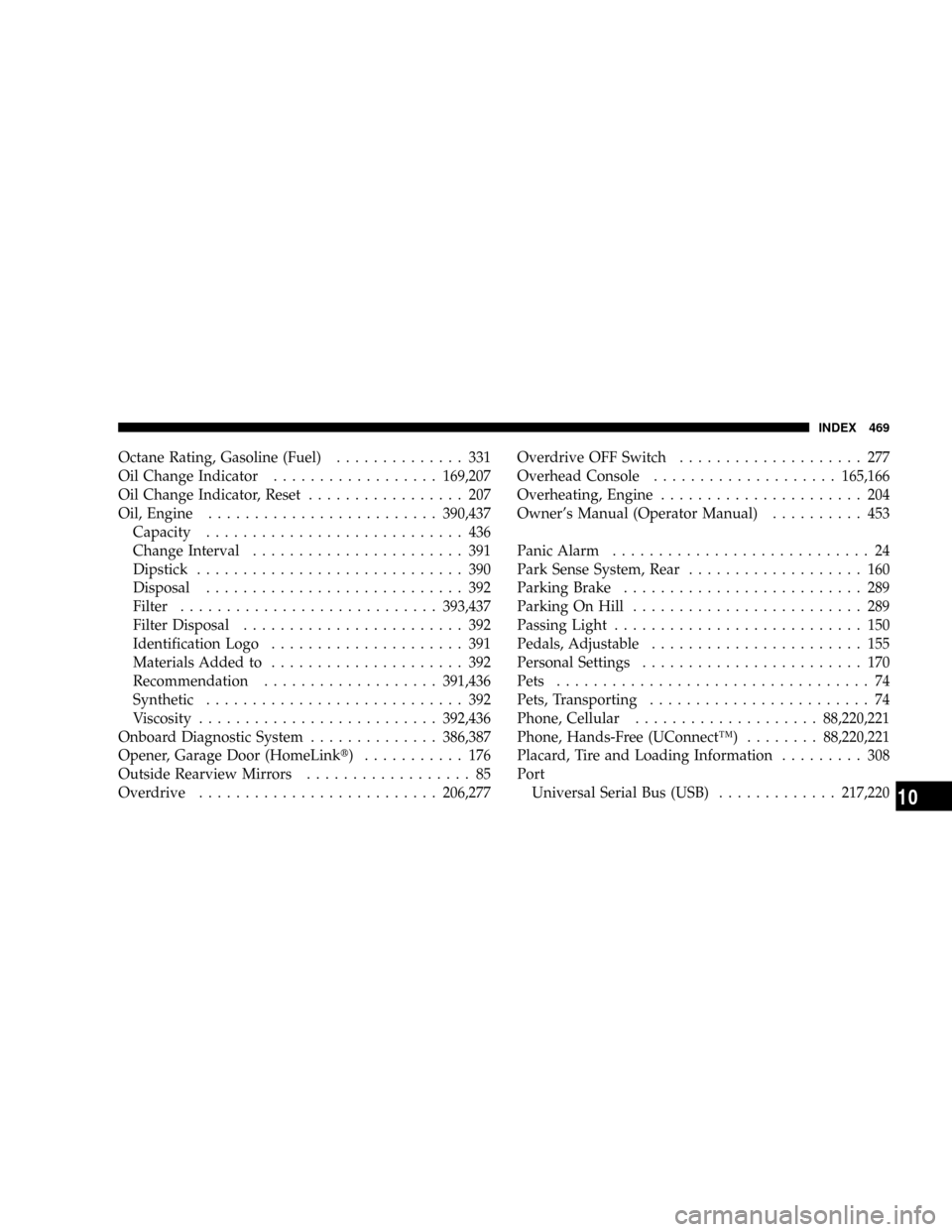
Octane Rating, Gasoline (Fuel).............. 331
Oil Change Indicator..................169,207
Oil Change Indicator, Reset................. 207
Oil, Engine.........................390,437
Capacity............................ 436
Change Interval....................... 391
Dipstick............................. 390
Disposal............................ 392
Filter............................393,437
Filter Disposal........................ 392
Identification Logo..................... 391
Materials Added to..................... 392
Recommendation...................391,436
Synthetic............................ 392
Viscosity..........................392,436
Onboard Diagnostic System..............386,387
Opener, Garage Door (HomeLinkt) ........... 176
Outside Rearview Mirrors.................. 85
Overdrive..........................206,277Overdrive OFF Switch.................... 277
Overhead Console....................165,166
Overheating, Engine...................... 204
Owner's Manual (Operator Manual).......... 453
Panic Alarm............................ 24
Park Sense System, Rear................... 160
Parking Brake.......................... 289
Parking On Hill......................... 289
Passing Light........................... 150
Pedals, Adjustable....................... 155
Personal Settings........................ 170
Pets.................................. 74
Pets, Transporting........................ 74
Phone, Cellular....................88,220,221
Phone, Hands-Free (UConnectŸ)........88,220,221
Placard, Tire and Loading Information......... 308
Port
Universal Serial Bus (USB).............217,220
INDEX 469
10
Page 472 of 479

Rearview Mirrors........................ 84
Reclining Front Seats..................... 121
Recorder, Event Data...................... 62
Recreational Towing...................... 360
Shifting into Transfer Case Neutral (N)....... 361
Shifting out of Transfer Case Neutral (N)..... 362
Reformulated Gasoline.................... 332
Refrigerant............................ 399
Release, Hood.......................... 142
Reminder, Seat Belt....................... 51
Remote Keyless Entry (RKE)................. 21
Remote Sound System (Radio) Controls........ 246
Remote Starting System.................... 28
Replacement Keys........................ 15
Replacement Parts....................... 388
Replacement Tires....................... 319
Reporting Safety Defects................... 452
Resetting Oil Change Indicator...........169,207
Restraints, Child.......................64,69Restraints, Occupant...................... 41
Rocking Vehicle When Stuck................ 378
Roll Over Warning........................ 4
Roof Type Carrier....................... 192
Rotation, Tires.......................... 323
Safety Checks Inside Vehicle................. 76
Safety Checks Outside Vehicle............... 77
Safety Defects, Reporting.................. 452
Safety, Exhaust Gas....................... 40
Safety Information, Tire................... 303
Safety Tips............................. 75
Satellite Radio...............217,218,220,221,236
Satellite Radio Antenna................... 238
Schedule, Maintenance.................... 440
Seat Belt Maintenance.................... 419
Seat Belt Reminder....................... 51
Seat Belts..........................41,42,76
And Pregnant Women................... 52
INDEX 471
10