ignition CHRYSLER ASPEN 2008 2.G Service Manual
[x] Cancel search | Manufacturer: CHRYSLER, Model Year: 2008, Model line: ASPEN, Model: CHRYSLER ASPEN 2008 2.GPages: 479, PDF Size: 4.3 MB
Page 158 of 479
can be reactivated by pushing the speed control switch
ON/OFF button and re-establishing the desired vehicle
SET speed.
Push the ON/OFF button to the ON position. In the
instrument cluster, the word ªCRUISEº illuminates when
the system is on.
To Set At A Desired Speed
When the vehicle has reached the desired speed, press
and release the SET button. Release the accelerator and
the vehicle will operate at the selected speed.
To Deactivate
A soft tap on the brake pedal, normal braking, or pressing
the CANCEL button will deactivate the speed control
without erasing the memory. Pushing the ON/OFF but-
ton to the OFF position or turning off the ignition erases
the memory.
WARNING!
Leaving the Speed Control on when not in use is
dangerous. You could accidentally set the system to
cause it to go faster than you want. You could lose
control and have an accident. Always leave the sys-
tem off when you aren't using it.
To Resume Speed
To resume a previously set speed, push and release the
RESUME button. Resume can be used at any speed above
(refer to the following table for the speed for your specific
engine).
UNDERSTANDING THE FEATURES OF YOUR VEHICLE 157
3
Page 168 of 479
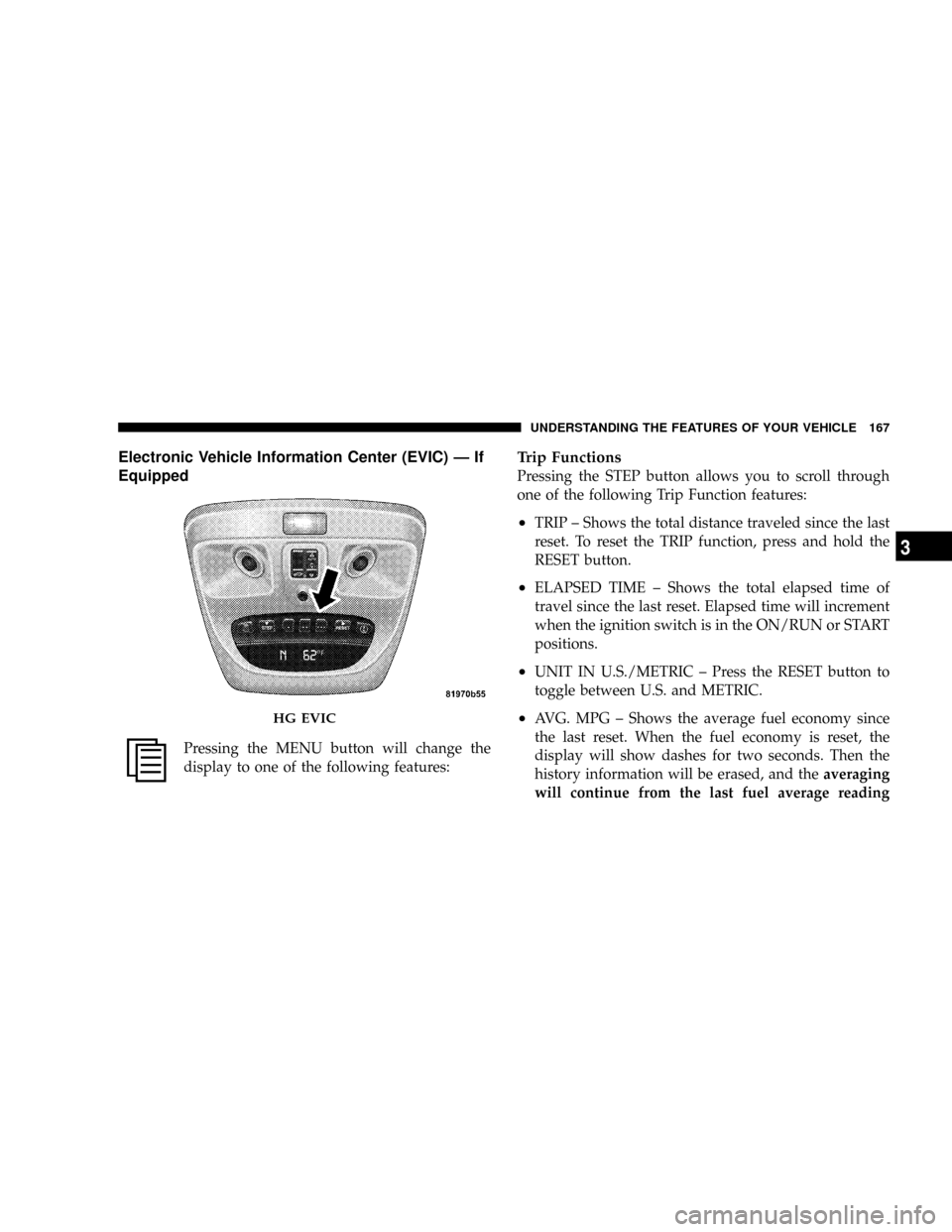
Electronic Vehicle Information Center (EVIC) Ð If
Equipped
Pressing the MENU button will change the
display to one of the following features:
Trip Functions
Pressing the STEP button allows you to scroll through
one of the following Trip Function features:
²TRIP ± Shows the total distance traveled since the last
reset. To reset the TRIP function, press and hold the
RESET button.
²ELAPSED TIME ± Shows the total elapsed time of
travel since the last reset. Elapsed time will increment
when the ignition switch is in the ON/RUN or START
positions.
²UNIT IN U.S./METRIC ± Press the RESET button to
toggle between U.S. and METRIC.
²AVG. MPG ± Shows the average fuel economy since
the last reset. When the fuel economy is reset, the
display will show dashes for two seconds. Then the
history information will be erased, and theaveraging
will continue from the last fuel average readingHG EVIC
UNDERSTANDING THE FEATURES OF YOUR VEHICLE 167
3
Page 170 of 479
²TURN SIGNALS ON (with a continuous warning
chime)
²PERSONAL SETTINGS NOT AVAILABLE ± Vehicle
not in PARK
²LEFT/RIGHT FRONT DOOR AJAR (one or more,
with a single chime if speed is above 1 mph/1 km/h)
²LEFT/RIGHT REAR DOOR AJAR (one or more, with
a single chime if speed is above 1 mph/1 km/h)
²DOOR(S) AJAR (with a single chime if vehicle is in
motion)
²LOW WASHER FLUID (with a single chime)
²OIL CHANGE REQUIRED (with a single chime)
²SERVICE PARK ASSIST SYSTEM (with a single chime)
²SERVICE PARK ASSIST SYSTEM
²COOLANT LOW
²LIFTGATE OPEN
²CHECK TPM SYSTEM (with single chime) (Premium
TPM System Only)
OIL CHANGE REQUIRED Ð If Equipped
Your vehicle is equipped with an engine oil change
indicator system. The ªOil Change Requiredº message
will flash in the EVIC display for approximately 10
seconds after a single chime has sounded to indicate the
next scheduled oil change interval. The engine oil change
indicator system is duty cycle based, which means the
engine oil change interval may fluctuate dependent upon
your personal driving style.
Unless reset, this message will continue to display each
time you turn the ignition switch to the ON/RUN
position. To turn off the message temporarily, press and
release the MENU button. To reset the oil change indica-
tor system (after performing the scheduled maintenance),
refer to the following procedure.
UNDERSTANDING THE FEATURES OF YOUR VEHICLE 169
3
Page 171 of 479
1. Turn the ignition switch to the ON position(Do not
start the engine).
2. Fully depress the accelerator pedal slowly three times
within 10 seconds.
3. Turn the ignition switch to the OFF/LOCK position.
NOTE:If the indicator message illuminates when you
start the vehicle, the oil change indicator system did not
reset. If necessary, repeat this procedure.
Personal Settings (Customer-Programmable
Features)
Personal Settings allows the driver to set and recall
features when the transmission is in PARK. If the trans-
mission is not in PARK the EVIC will display NOT
AVAILABLE and VEHICLE NOT IN PARK.Press and release the MENU button until the
Personal Settings displays on the EVIC.
Use the STEP button to display one of the following:
²ªLANGUAGEº ± When in this display, you may select
one of several different languages for all display
nomenclature, including the trip functions. Press the
RESET button while in this display to select your
preferred language. Then, as you continue, the infor-
mation will display in the selected language.
²ªAUTO DOOR LOCK > ONº ± When ON is selected,
all doors will lock automatically when the vehicle
reaches a speed of 15 mph (24 km/h). To make your
selection, press and release the RESET button until
ªONº or ªOFFº appears.
²ªAUTO UNLOCK ON EXIT > ONº ± When ON is
selected, all doors will unlock when the vehicle is
170 UNDERSTANDING THE FEATURES OF YOUR VEHICLE
Page 173 of 479
²ªHEADLAMP OFF DELAY > 0 SECº ± When this
feature is selected, the driver can choose to have the
headlamps remain on for 0, 30, 60, or 90 seconds when
exiting the vehicle. To make your selection, press and
release the RESET button until ª0,º ª30,º ª60,º or ª90º
appears.
NOTE:The headlamp switch must be in the ªAº auto
mode before this feature will work.
²HEADLAMPS W/WIPERS > ON ± When ON is
selected, the headlamps will automatically turn on
when the wiper switch is activated.
²EASY EXIT SEAT > ON ± When ON is selected, and
the key is removed from the ignition, the driver's seat
will automatically move rearward to allow easy exit.
²TILT MIRRORS IN ªRº > ON ± When ON is selected,
and the transmission is put in REVERSE, the outside
mirrors will tilt downward.
²ªKEY OFF POWER DELAY> OFFº ± When this feature
is selected, the power window switches, radio, hands±
free system (if equipped), and power outlets will
remain active for up to 10 minutes after the ignition
switch is turned off. Opening a vehicle door will
cancel this feature. To make your selection, press and
release the RESET button until ªOff,º ª45 sec.,º ª5
min.,º ª10 min.º appears.
²ªILLUMINATED APRCH > OFFº ± When this feature
is selected, the headlights will activate and remain on
for up to 90 seconds when the doors are unlocked with
the RKE Transmitter. To make your selection, press
and release the RESET button until ªOFF,º ª30 sec.,º
ª60 sec.,º or ª90 sec.º appears.
²PARK ASST. SYSTEM > ON ± When YES is selected,
the Rear Park Assist System is activated. When NO is
selected, the System is deactivated.
172 UNDERSTANDING THE FEATURES OF YOUR VEHICLE
Page 175 of 479

Manual Compass Calibration
If the compass appears erratic and the ªCALº message
does not appear in the EVIC display, you must put the
compass into the Calibration Mode manually as follows:
1.Turn the ignition switch to the ON/RUN position.
2.Press the MENU buttonuntil ªPersonal
Settingsº is displayed.
3.Press the STEP buttonuntil ªCalibrate Compass YESº
is displayed.
4.Press and release the RESET buttonto start the
calibration. The message ªCALº will display on the
compass temperature screen in the EVIC.5.Slowly drive the vehicle at a speed of 5 mph (8 km/h)
in a complete 360Écircle, (in an area free from large
metal or metallic objects) until the ªCALº message
turns off. The compass will now function normally.
Compass Variance
Compass variance is the difference between magnetic
North and geographic North. In some areas of the
country, the difference between magnetic and geographic
North is great enough to cause the compass to give false
readings. If this occurs, the compass variance must be set
using the following procedure:
NOTE:Magnetic materials should be kept away from
the overhead console. This is where the compass sensor is
located.
174 UNDERSTANDING THE FEATURES OF YOUR VEHICLE
Page 176 of 479

1.Turn the ignition switch to the ON/RUN position.
2.Press the MENU buttonuntil ªPersonal
Settingsº is displayed.
3.Press the STEP buttonuntil ªCompass Varianceº is
displayed.
4.Press and release RESET buttonuntil the proper
variance zone is selected according to the variance map.
5.Press and release the Compass/Temperature button
to exit.
Variance Map
UNDERSTANDING THE FEATURES OF YOUR VEHICLE 175
3
Page 179 of 479
It is recommended that a new battery be placed in the
hand-held transmitter of the device being programmed
to HomeLinktfor more efficient training and accurate
transmission of the radio-frequency signal.
Your vehicle should be parked outside of the garage
while training.
1. Turn the ignition switch to the ON/RUN position.
2. Place the hand-held transmitter 1 to 3 in (3 to 8 cm)
from the HomeLinktbuttons while keeping the EVIC
display in view.
For optimal training, point the battery end of the hand-
held transmitter away from the HomeLinkt.
3. Simultaneously, press and hold both the chosen
HomeLinktbutton and the hand-held transmitter button
until the EVIC display changes from ªCHANNEL #
TRAININGº to ªCHANNEL # TRAINED.ºThen release both the HomeLinktand hand-held trans-
mitter buttons.
If the EVIC display states ªDID NOT TRAINº repeat Step
3. If the signal is too weak, replace the battery in the
original hand-held transmitter.
It may take up to 30 seconds, or longer, in rare cases. The
garage door may open and close while you train.
NOTE:Some gate operators and garage door openers
may require you to replace Step 3 with procedures noted
in the ªGate Operator/Canadian Programmingº section.
4. Press and hold the just-trained HomeLinktbutton. If
the channel has been trained, the EVIC display will now
state ªCHANNEL # TRANSMIT.º
If the EVIC display still states ªCHANNEL # TRAIN-
INGº repeat Step 3.
178 UNDERSTANDING THE FEATURES OF YOUR VEHICLE
Page 182 of 479

Using HomeLinkT
To operate, simply press and release the programmed
HomeLinktbutton. Activation will now occur for the
trained device (i.e., garage door opener, gate operator,
security system, entry door lock, home/office lighting,
etc.) The hand-held transmitter of the device may also be
used at any time.
Reprogramming A Single HomeLinkTButton
To reprogram a channel that has been previously trained,
follow these steps:
1. Turn the ignition switch to the ON/RUN position.
2. Press and hold the desired HomeLinktbutton for 20
seconds until the EVIC display states ªCHANNEL #
TRAINING.ºDo not release the button.
3.Without releasing the button,proceed with Program-
ming HomeLinktStep 2 and follow all remaining steps.
Security
It is advised to erase all channels before you sell or turn
in your vehicle.
To do this, press and hold the two outside buttons for 20
seconds until the EVIC message states ªCHANNELS
CLEARED.º Note that all channels will be erased. Indi-
vidual channels cannot be erased.
The HomeLinktUniversal Transceiver is disabled when
the Vehicle Security Alarm is active.
Troubleshooting Tips
If you are having trouble programming HomeLinkt, here
are some of the most common solutions:
²Replace the battery in the original transmitter.
²Press the learn button on the garage door opener to
complete the training for rolling code.
UNDERSTANDING THE FEATURES OF YOUR VEHICLE 181
3
Page 184 of 479
the panel is venting, pressing the ªcloseº end of the
rocker switch returns it to the closed position. Both
opening and closing operations in the vent mode occur
only while the switch is held.
NOTE:The sunroof will continue to operate for 10
minutes after the ignition is turned OFF or until the
driver's door is opened. This feature may be disabled by
your authorized dealer.
Express Open Feature
During the Express Open operation, any movement of
the switch will stop the sunroof and it will remain in a
partial open position. Again, momentarily pressing the
switch rearward will activate the Express Open Feature.
To close the sunroof, hold the switch in the forward
position. Again, any release of the switch will stop the
movement and the sunroof will remain in a partial opencondition until the switch is pushed forward again. To
close fully, hold the switch in the forward position until
the glass movement has stopped.
The sunshade can be opened manually. It will also open
as the sunroof opens. The sunshade cannot be closed if
the sunroof is open.
WARNING!
Never leave children alone in a vehicle. Leaving
unattended children in a vehicle is dangerous for a
number of reasons. A child or others could be seri-
ously or fatally injured. Don't leave the keys in the
ignition. A child could operate power windows,
other controls, or move the vehicle.
UNDERSTANDING THE FEATURES OF YOUR VEHICLE 183
3