ignition CHRYSLER ASPEN 2009 2.G Service Manual
[x] Cancel search | Manufacturer: CHRYSLER, Model Year: 2009, Model line: ASPEN, Model: CHRYSLER ASPEN 2009 2.GPages: 481, PDF Size: 9.28 MB
Page 164 of 481
CAUTION!
²The Rear Park Assist system is only a parking aid
and it is unable to recognize every obstacle, in-
cluding small obstacles. Parking curbs might be
temporarily detected or not detected at all. Ob-
stacles located above or below the sensors will not
be detected when they are in close proximity.
²The vehicle must be driven slowly when using the
Rear Park Assist system to be able to stop in time
when the obstacle is detected. It is recommended
that the driver look over his/her shoulder when
using the Rear Park Assist system.
NOTE:
²Ensure that the rear bumper is free of dirt and debris
to keep the system operating properly.
²Jackhammers, large trucks, and other vibrations could
affect the performance of the system.
Enable/Disable The Rear Park Assist System
There are times when you may want to disable the Rear
Park Assist system, such as when towing a trailer.
The system can be turned ON or OFF through the
Electronic Vehicle Information (EVIC) ± if equipped.
Refer to ªPersonal Settings (Customer Programmable
Features)º under ªOverhead Console with Electronic
Vehicle Information Center (EVIC) ± If Equippedº in
Section 3.
Service The Rear Park Assist System
When the Rear Park Assist System is defective, the EVIC
will display the ªSERVICE PARK ASSIST SYSTEMº
message along with a single chime once per ignition
cycle. Refer to ªElectronic Vehicle Information Center
(EVIC)º in Section 3 of this manual. The Park Assist
display will also light the red led's indicating a problem.
Under this condition the Rear Park Assist System will not
operate.
162 UNDERSTANDING THE FEATURES OF YOUR VEHICLE
Page 169 of 481

Electronic Vehicle Information Center (EVIC) Ð If
Equipped
Pressing the MENU button will change the
display to one of the following features:
Trip Functions
Pressing the STEP button allows you to scroll through
one of the following Trip Function features:
²TRIP ± Shows the total distance traveled since the last
reset. To reset the TRIP function, press and hold the
RESET button.
²ELAPSED TIME ± Shows the total elapsed time of
travel since the last reset. Elapsed time will increment
when the ignition switch is in the ON/RUN or START
positions.
²UNIT IN U.S./METRIC ± Press the RESET button to
toggle between U.S. and METRIC.
Overhead Console with EVIC
UNDERSTANDING THE FEATURES OF YOUR VEHICLE 167
3
Page 172 of 481
Unless reset, this message will continue to display each
time you turn the ignition switch to the ON/RUN
position. To turn off the message temporarily, press and
release the MENU button. To reset the oil change indica-
tor system (after performing the scheduled maintenance),
refer to the following procedure.
1. Turn the ignition switch to the ON position(Do not
start the engine).
2. Fully depress the accelerator pedal slowly three times
within 10 seconds.
3. Turn the ignition switch to the OFF/LOCK position.
NOTE:If the indicator message illuminates when you
start the vehicle, the oil change indicator system did not
reset. If necessary, repeat this procedure.Personal Settings (Customer-Programmable
Features)
Personal Settings allows the driver to set and recall
features when the transmission is in PARK. If the trans-
mission is not in PARK the EVIC will display NOT
AVAILABLE and VEHICLE NOT IN PARK.
Press and release the MENU button until the
Personal Settings displays on the EVIC.
Use the STEP button to display one of the following:
²ªLANGUAGEº ± When in this display, you may select
one of several different languages for all display
nomenclature, including the trip functions. Press the
RESET button while in this display to select your
preferred language. Then, as you continue, the infor-
mation will display in the selected language.
170 UNDERSTANDING THE FEATURES OF YOUR VEHICLE
Page 174 of 481
²ªFLASH LAMPS W/LOCK >ONº ± When ON is
selected, the front and rear turn signals will flash when
the doors are locked or unlocked with the RKE Trans-
mitter. This feature may be selected with or without
the sound horn on lock feature selected. To make your
selection, press and release the RESET button until
ªONº or ªOFFº appears.
²ªHEADLAMP OFF DELAY > 0 SECº ± When this
feature is selected, the driver can choose to have the
headlamps remain on for 0, 30, 60, or 90 seconds when
exiting the vehicle. To make your selection, press and
release the RESET button until ª0,º ª30,º ª60,º or ª90º
appears.
NOTE:The headlamp switch must be in the ªAº auto
mode before this feature will work.
²HEADLAMPS W/WIPERS > ON ± When ON is
selected, the headlamps will automatically turn on
when the wiper switch is activated.
²EASY EXIT SEAT > ON ± When ON is selected, and
the key is removed from the ignition, the driver's seat
will automatically move rearward to allow easy exit.
²TILT MIRRORS IN ªRº > ON ± When ON is selected,
and the transmission is put in REVERSE, the outside
mirrors will tilt downward.
²ªKEY OFF POWER DELAY> OFFº ± When this feature
is selected, the power window switches, radio, hands±
free system (if equipped), and power outlets will
remain active for up to 10 minutes after the ignition
switch is turned off. Opening a vehicle door will
cancel this feature. To make your selection, press and
release the RESET button until ªOff,º ª45 sec.,º ª5
min.,º ª10 min.º appears.
²ªILLUMINATED APRCH > OFFº ± When this feature
is selected, the headlights will activate and remain on
for up to 90 seconds when the doors are unlocked with
172 UNDERSTANDING THE FEATURES OF YOUR VEHICLE
Page 176 of 481

Automatic Compass Calibration
This compass is self-calibrating, which reduces the need
to calibrate the compass manually. When the vehicle is
new, the compass may appear erratic and the EVIC will
display ªCALº until the compass is calibrated. You may
also calibrate the compass by completing one or more
360É turns at speeds less than 5 mph (8 km/h) (in an area
free from large metal or metallic objects) until the ªCALº
message displayed in the EVIC turns off. The compass
will now function normally.
Manual Compass Calibration
If the compass appears erratic and the ªCALº message
does not appear in the EVIC display, you must put the
compass into the Calibration Mode manually as follows:
1.Turn the ignition switch to the ON/RUN position.2.Press the MENU buttonuntil ªPersonal
Settingsº is displayed.
3.Press the STEP buttonuntil ªCalibrate Compass YESº
is displayed.
4.Press and release the RESET buttonto start the
calibration. The message ªCALº will display on the
compass temperature screen in the EVIC.
5.Slowly drive the vehicle at a speed of 5 mph (8 km/h)
in a complete 360Écircle, (in an area free from large
metal or metallic objects) until the ªCALº message
turns off. The compass will now function normally.
Compass Variance
Compass variance is the difference between magnetic
North and geographic North. In some areas of the
country, the difference between magnetic and geographic
174 UNDERSTANDING THE FEATURES OF YOUR VEHICLE
Page 177 of 481
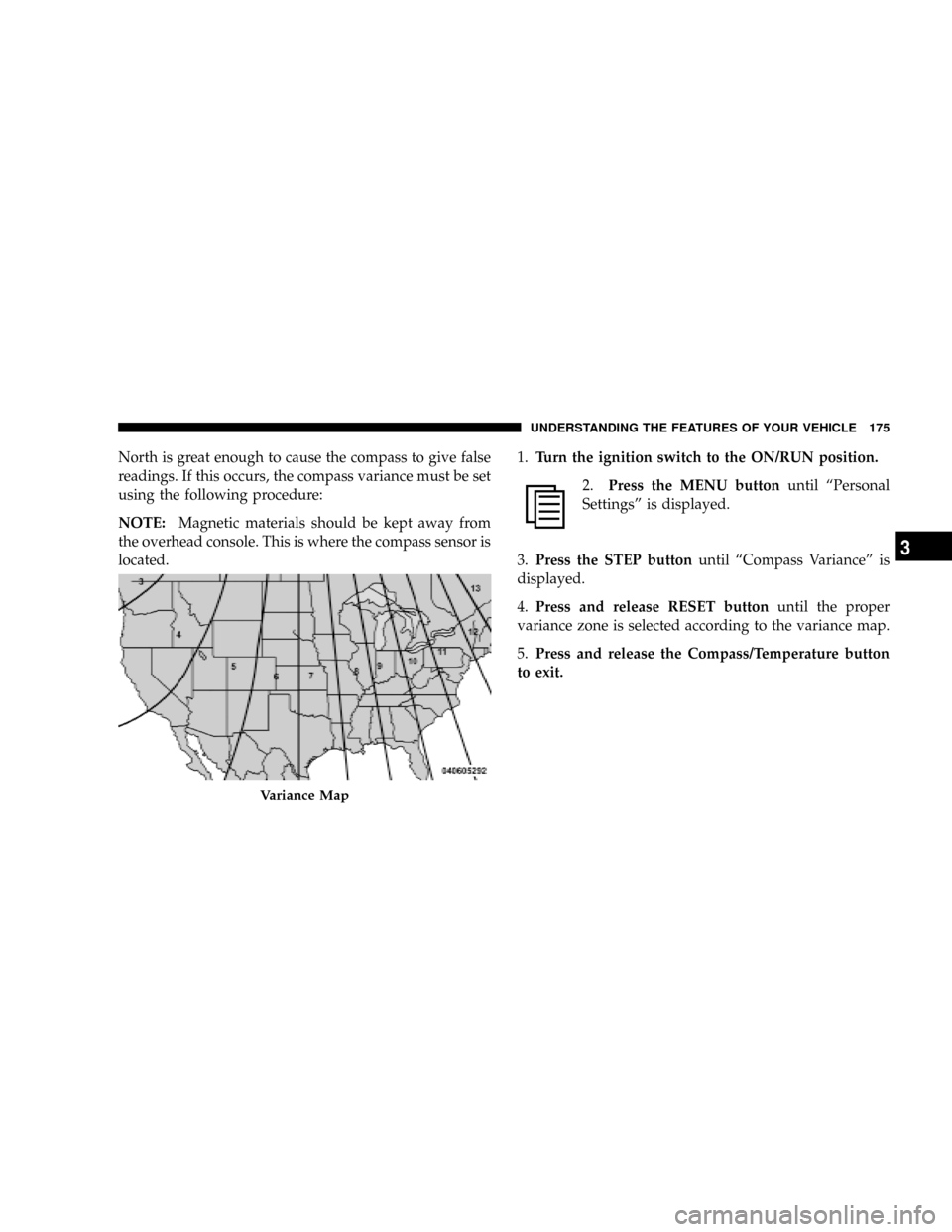
North is great enough to cause the compass to give false
readings. If this occurs, the compass variance must be set
using the following procedure:
NOTE:Magnetic materials should be kept away from
the overhead console. This is where the compass sensor is
located.1.Turn the ignition switch to the ON/RUN position.
2.Press the MENU buttonuntil ªPersonal
Settingsº is displayed.
3.Press the STEP buttonuntil ªCompass Varianceº is
displayed.
4.Press and release RESET buttonuntil the proper
variance zone is selected according to the variance map.
5.Press and release the Compass/Temperature button
to exit.
Variance Map
UNDERSTANDING THE FEATURES OF YOUR VEHICLE 175
3
Page 180 of 481
It is recommended that a new battery be placed in the
hand-held transmitter of the device being programmed
to HomeLinktfor more efficient training and accurate
transmission of the radio-frequency signal.
Your vehicle should be parked outside of the garage
while training.
1. Turn the ignition switch to the ON/RUN position.
2. Place the hand-held transmitter 1 to 3 in (3 to 8 cm)
from the HomeLinktbuttons while keeping the EVIC
display in view.
For optimal training, point the battery end of the hand-
held transmitter away from the HomeLinkt.
3. Simultaneously, press and hold both the chosen
HomeLinktbutton and the hand-held transmitter button
until the EVIC display changes from ªCHANNEL #
TRAININGº to ªCHANNEL # TRAINED.ºThen release both the HomeLinktand hand-held trans-
mitter buttons.
If the EVIC display states ªDID NOT TRAINº repeat Step
3. If the signal is too weak, replace the battery in the
original hand-held transmitter.
It may take up to 30 seconds, or longer, in rare cases. The
garage door may open and close while you train.
NOTE:Some gate operators and garage door openers
may require you to replace Step 3 with procedures noted
in the ªGate Operator/Canadian Programmingº section.
4. Press and hold the just-trained HomeLinktbutton. If
the channel has been trained, the EVIC display will now
state ªCHANNEL # TRANSMIT.º
If the EVIC display still states ªCHANNEL # TRAIN-
INGº repeat Step 3.
178 UNDERSTANDING THE FEATURES OF YOUR VEHICLE
Page 183 of 481
3. Continue to press and hold the HomeLinktbutton
while you press and release - every two seconds
(ªcycleº) your hand-held transmitter until HomeLinkt
has successfully accepted the frequency signal. The
EVIC display will change from ªCHANNEL # TRAIN-
INGº to ªCHANNEL # TRAINED.º
If you unplugged the device for training, plug it back in
at this time.
Then proceed with Step 4 under ªProgramming
HomeLinktº earlier in this section.
Using HomeLinkT
To operate, simply press and release the programmed
HomeLinktbutton. Activation will now occur for the
trained device (i.e., garage door opener, gate operator,
security system, entry door lock, home/office lighting,
etc.) The hand-held transmitter of the device may also be
used at any time.
Reprogramming A Single HomeLinkTButton
To reprogram a channel that has been previously trained,
follow these steps:
1. Turn the ignition switch to the ON/RUN position.
2. Press and hold the desired HomeLinktbutton for 20
seconds until the EVIC display states ªCHANNEL #
TRAINING.ºDo not release the button.
3.Without releasing the button,proceed with Program-
ming HomeLinktStep 2 and follow all remaining steps.
Security
It is advised to erase all channels before you sell or turn
in your vehicle.
To do this, press and hold the two outside buttons for 20
seconds until the EVIC message states ªCHANNELS
CLEARED.º Note that all channels will be erased. Indi-
vidual channels cannot be erased.
UNDERSTANDING THE FEATURES OF YOUR VEHICLE 181
3
Page 185 of 481
POWER SUNROOF Ð IF EQUIPPED
The power sunroof control is located between the sun
visors on the overhead console.
Press and hold the OPEN button rearward to fully open
the sunroof. The sunroof can be stopped at any position
between closed and full open. Momentarily pressing the
OPEN button rearward will activate the Express Open
Feature, causing the sunroof to open automatically.
To close the panel, the CLOSE end of the switch must be
pressed and held.
Press and hold the VENT button to open the vent. The
sunroof can be stopped at any position between closed
and full vent. To close the sunroof from the vent position,
press and hold the CLOSE button forward. Releasing the
button will stop the movement of the sunroof and the
sunroof will remain in the partial vent position until the
button is pushed forward again.NOTE:²The sunroof will continue to operate for 10 minutes
after the ignition is turned OFF or until the driver's
door is opened. This feature may be disabled by your
authorized dealer.
²The Power Accessory Delay feature is programmable
on vehicles equipped with the Electronic Vehicle In-
formation Center (EVIC). For details, refer to ªPer-
sonal Settings (Customer Programmable Features)º
under ªOverhead Console with Electronic Vehicle In-
formation Center (EVIC) ± If Equippedº in Section 3.
Express Open Feature
During the Express Open operation, any movement of
the switch will stop the sunroof and it will remain in a
partial open position. Again, momentarily pressing the
switch rearward will activate the Express Open Feature.
UNDERSTANDING THE FEATURES OF YOUR VEHICLE 183
3
Page 186 of 481
To close the sunroof, hold the switch in the forward
position. Again, any release of the switch will stop the
movement and the sunroof will remain in a partial open
condition until the switch is pushed forward again. To
close fully, hold the switch in the forward position until
the glass movement has stopped.
The sunshade can be opened manually. It will also open
as the sunroof opens. The sunshade cannot be closed if
the sunroof is open.
WARNING!
Never leave children alone in a vehicle. Leaving
unattended children in a vehicle is dangerous for a
number of reasons. A child or others could be seri-
ously or fatally injured. Don't leave the key in the
ignition. A child could operate power windows,
other controls, or move the vehicle.
WARNING!
In an accident, there is a greater risk of being thrown
from a vehicle with an open sunroof. You could also
be seriously injured or killed. Always fasten your
seat belt properly and make sure all passengers are
properly secured too.
Do not allow small children to operate the sunroof.
Never allow fingers or other body parts, or any object
to project through the sunroof opening. Injury may
result.
Wind Buffeting
Wind buffeting can be described as the perception of
pressure on the ears or a helicopter type sound in the
ears. Your vehicle may exhibit wind buffeting with the
windows down, or the sunroof (if equipped) in certain
open or partially open positions. This is a normal occur-
rence and can be minimized. If the buffeting occurs with
184 UNDERSTANDING THE FEATURES OF YOUR VEHICLE