display CHRYSLER ASPEN 2009 2.G Workshop Manual
[x] Cancel search | Manufacturer: CHRYSLER, Model Year: 2009, Model line: ASPEN, Model: CHRYSLER ASPEN 2009 2.GPages: 481, PDF Size: 9.28 MB
Page 251 of 481
SCAN Button (When Equipped)
Pressing the SCAN button causes the tuner to search for
the next channel, pausing for eight seconds before con-
tinuing to the next. To stop the search, press the SCAN
button a second time.
INFO Button Ð Except REU Radio
Pressing the INFO button will cycle the display informa-
tion between Artist, Song Title, and Composer (if avail-
able). Also, pressing and holding the INFO button for an
additional three seconds will make the radio display the
Song Title all of the time (press and hold again to return
to normal display).
INFO Button Ð REU Radio
Pressing the INFO button will display information about
Artist, Song Title, and Composer (if available). Pressing
the INFO button again will close the INFO screen.
RW/FF
Pressing the RW (Rewind) or FF (Fast Forward) buttons
causes the tuner to search for the next channel in the
direction of the arrows.
TUNE Control (Rotary)
Turn the rotary Tune/Scroll control knob clockwise to
increase or counterclockwise to decrease the channel.
MUSIC TYPE Button Ð Except REU Radio
Pressing this button once will turn on the Music Type
mode for five seconds. Pressing the MUSIC TYPE button
or turning the Tune/Scroll control knob within five
seconds will allow the program format type to be se-
lected.
Toggle the MUSIC TYPE button again to select the music
type.
UNDERSTANDING YOUR INSTRUMENT PANEL 249
4
Page 252 of 481
By pressing the SEEK button when the Music Type
function is active, the radio will be tuned to the next
channel with the same selected Music Type name.
If a preset button is activated while in the Music Type
(Program Type) mode, the Music Type mode will be
exited and the radio will tune to the preset channel.
MUSIC TYPE Button Ð REU Radio
Pressing this button provides a MUSIC TYPES list from
which you can make a selection. Once a selection is
made, you can seek up, or down, or scan the channels
and the radio will tune to the next station matching the
selected format. There is no time-out for this screen.
Pressing the MUSIC TYPE button again will close the
MUSIC TYPE screen. Once closed, seek up, seek down,
and scan will no longer be based on your selection.
SETUP Button
Pressing the SETUP button allows you to select the
following items:
²Display Sirius ID number Ð Press the AUDIO/
SELECT button to display the Sirius ID number. This
number is used to activate, deactivate, or change the
Sirius subscription.
SET Button ± To Set the Pushbutton Memory
When you are receiving a channel that you wish to
commit to pushbutton memory, press the SET button.
The symbol SET 1 will now show in the display window.
Select the button (1-6) you wish to lock onto this channel
and press and release that button. If a button is not
selected within five seconds after pressing the SET but-
ton, the channel will continue to play but will not be
stored into pushbutton memory.
250 UNDERSTANDING YOUR INSTRUMENT PANEL
Page 253 of 481
You may add a second channel to each pushbutton by
repeating the above procedure with this exception: Press
the SET button twice and SET 2 will show in the display
window. Each button can be set for SET 1 and SET 2. This
allows a total of 12 Satellite channels to be stored into
pushbutton memory. The channels stored in SET 2
memory can be selected by pressing the pushbutton
twice.
Every time a preset button is used, a corresponding
button number will display.
Buttons1-6
These buttons tune the radio to the channels that you
commit to pushbutton memory (12 Satellite stations).
Operating Instructions - Hands-Free Phone (If
Equipped)
Refer to ªHands-Free Communication (UConnectt)º in
Section 3.
Operating Instructions - Video Entertainment
System (VEST) (If Equipped)
Refer to separate ªVideo Entertainment System (VESt)
Guide.º
SIRIUS BACKSEAT TVŸ Ð IF EQUIPPED
Satellite video uses direct satellite receiver broadcasting
technology to provide streaming video coast to coast. The
subscription service provider is SIRIUS Satellite Radio.
SIRIUS Backseat TVŸ offers three video channels for
family entertainment, directly from its satellites and
broadcasting studios.
NOTE:SIRIUS service is not available in Hawaii and
has limited coverage in Alaska.
Refer to your Video Entertainment System (VES)t, RER
Navigation or REN Multimedia User Manuals for de-
tailed operating instructions.
UNDERSTANDING YOUR INSTRUMENT PANEL 251
4
Page 254 of 481
VIDEO ENTERTAINMENT SYSTEM (SALES CODE
XRV) Ð IF EQUIPPED
The optional Video Entertainment System (VES)Ÿ con-
sists of a DVD player and LCD (liquid crystal display)
screen, a battery-powered remote control, and two head-
sets. The system is located in the headliner behind the
front row seat. Refer to your VESŸ User's Manual for
detailed operating instructions.
REMOTE SOUND SYSTEM CONTROLS Ð IF
EQUIPPED
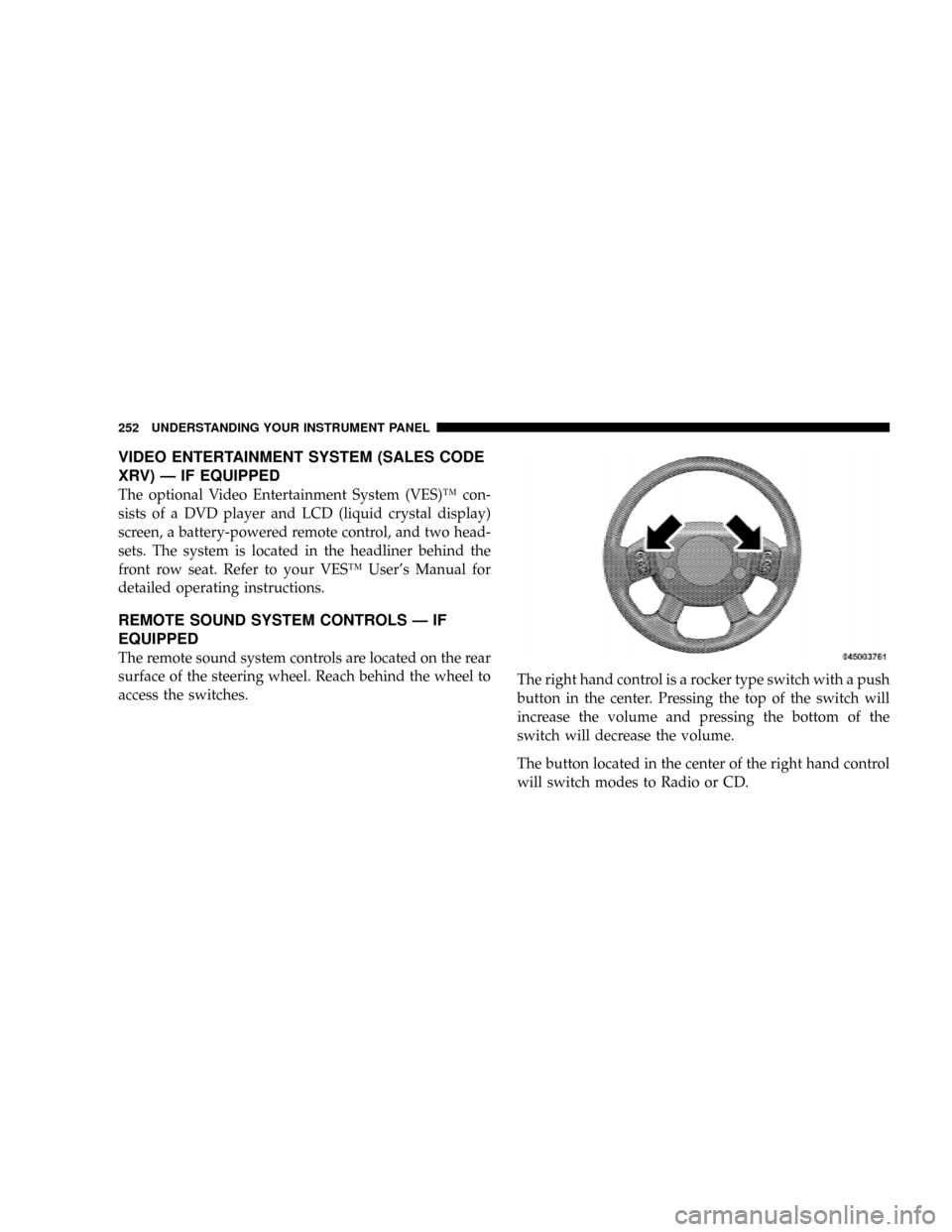
The remote sound system controls are located on the rear
surface of the steering wheel. Reach behind the wheel to
access the switches.The right hand control is a rocker type switch with a push
button in the center. Pressing the top of the switch will
increase the volume and pressing the bottom of the
switch will decrease the volume.
The button located in the center of the right hand control
will switch modes to Radio or CD.
252 UNDERSTANDING YOUR INSTRUMENT PANEL
Page 262 of 481

Automatic Temperature Control (ATC) Ð If Equipped
The control can be turned on by pressing the Power knob.
When the control is turned on, it will be in the last mode
prior to being turned off. Pressing the Power knob again
will turn off the control. The control can also be turned on
by pressing any button and it will display the corre-
sponding operation mode for that button.
Automatic Control
The ATC system can maintain a steady comfort level in
various weather conditions with a simple operation:
²Select your desired temperature setting by pressing
the + or - side of the Temp rocker switches. A digital
temperature setting for driver and passenger will be
displayed. The ATC system uses an infrared sensor
located in the overhead console to measure the tem-
perature of the driver and passengers. Based on the
sensor input, the system will automatically control
comfort by varying the temperature, fan speed, and
mode. This maintains a comfortable temperature, even
under changing conditions. It is important that objects
are not blocking the infrared sensor. It is also impor-
tant that objects are not used that may scratch or
damage it in any way.
Automatic Temperature Control
260 UNDERSTANDING YOUR INSTRUMENT PANEL
Page 263 of 481
Level Of Automatic Control
72ÉF (22ÉC) is the recommended setting for maximum
comfort for the average person, however, this may vary.
NOTE:The temperature setting can be adjusted at any
time without affecting automatic control operation. It is
not necessary to move the temperature setting for cold or
hot vehicles. The system automatically adjusts the tem-
perature, mode and fan speed to provide comfort as
quickly as possible.
NOTE:In cold weather, the fan will not turn on in Auto
mode until the engine coolant has warmed up suffi-
ciently. This is indicated by the ªWARM UP DELAYº
message on the display.
NOTE:The temperature can be displayed in U.S. or
Metric by selecting the U.S./METRIC Customer-
Programmable feature. Refer to9Overhead ConsoleCustomer-Programmable Features9in Section 3. The
mode will also be shown in the display and will change
as required during automatic operation.
NOTE:The system can be put into recirculate mode
without affecting ATC operation. This will prevent out-
side air from entering the vehicle. Use this mode to
temporarily block out any outside odors, smoke, or dust.
Manual Control (ATC)
You may also choose to customize your comfort by
selecting the fan speed and mode manually. Turning the
fan speed knob or any mode button places the system
into manual operation.
While in manual operation there are six fan speeds
available and the choice of any mode. The airflow
temperature is adjusted automatically to maintain the
desired comfort level. You can adjust the temperature by
pressing the + or - Temp rocker switches.
UNDERSTANDING YOUR INSTRUMENT PANEL 261
4
Page 264 of 481
FAN Control
Use this knob to regulate the amount of air delivered
through the system in any mode you select. Rotation
of the knob to increase (clockwise) or decrease (counter-
clockwise) fan speed.
Air Conditioning Operation
Press this button to enable the air conditioning
system. Compressor operation is automatic when
you press the AUTO button and no snowflake is
shown. A snowflake indicates that the A/C system is
enabled. The snowflake will not be displayed in AUTO
mode even though the A/C system is enabled.
The compressor may operate at any temperature above
32ÉF (0ÉC).
NOTE:The compressor will not engage until the engine
has been running for several seconds. Slight changes inengine speed or power may be noticed when the com-
pressor cycles. This is a normal occurrence since the
compressor will cycle on and off to maintain comfort and
improve fuel economy.
Recirculate Button
Press this button to recirculate the air inside the
vehicle. Outside air is prevented from entering
the vehicle. Use this mode to temporarily block
out any outside odors, smoke, dust or when
rapid cooling of the interior is required.
Manual control of recirculation is possible only in Panel,
Floor, and Bi-Level modes. It will not operate in Mix, or
Defrost modes. The recirculation symbol will flash three
times indicating recirculation is not available in these
modes.
262 UNDERSTANDING YOUR INSTRUMENT PANEL
Page 266 of 481
Rear Temperature Control (ATC)
The REAR button cycles through the following modes:
Rear Control From Front
This allows the driver or passenger to control the rear
blower speeds rotating the Power/Fan knob and the rear
temperature using the PASS/REAR Temp +/- rocker
switch. While in this mode, pressing the POWER/FAN
knob will turn the rear system off. Pressing the Power/
Fan knob will turn the rear system back on.
NOTE:The display will show a9REAR9fan speed graph
and a9REAR9digital temp setting.
CONTROL IN REAR
This allows the passengers in the second row seats to
control the blower speed and temperature by means of the
rear control located in the rear of the center floor console as
described under the9Rear Zone Climate Control.9
NOTE:The front display will show ªCONTROL IN
REAR.º
REAR OFF
This turns the rear system off. The control will return to
the front system display after approximately five seconds
if no buttons are pushed while in one of the rear system
displays. You may also return to the front system display
sooner by pushing any button except the Power/Fan
knob, the REAR button, or the driver/passenger Temp
rocker buttons.
NOTE:The display will show ªREAR OFF.º
REAR AUTO
This mode places the rear system in automatic tempera-
ture control. Rear temperature can be set as desired (72ÉF
[22ÉC] recommended for average person) and will be
displayed digitally on the front control when in rear
mode.
Rear Window Defrosting and Rear Window
Washer/Wiper
Refer to ªRear Window Featuresº in Section 4.
264 UNDERSTANDING YOUR INSTRUMENT PANEL
Page 334 of 481
3. However, after driving the vehicle for up to 10 min-
utes above 15 mph (25 km/h), the TPM Telltale Lamp
will flash on and off for 75 seconds and then remain on
solid.
4. For each subsequent ignition key cycle, a chime will
sound and the TPM Telltale Light will flash on and off for
75 seconds and then remain on solid.
5. Once you repair or replace the original road tire, and
reinstall it on the vehicle in place of the full size spare tire,
the TPMS will update automatically and the TPM Telltale
Lamp will turn OFF, as long as no tire pressure is below
the low-pressure warning limit in any of the four active
road tires. The vehicle may need to be driven for up to 10
minutes above 15 mph (25 km/h) in order for the TPMS
to receive this information.
Premium System ± If Equipped
The Tire Pressure Monitor System (TPMS) uses wireless
technology with wheel rim mounted electronic sensors tomonitor tire pressure levels. Sensors, mounted to each
wheel as part of the valve stem, transmit tire pressure
readings to the receiver module.
NOTE:It is particularly important for you to check the
tire pressure in all of your tires regularly and to maintain
the proper pressure.
The TPMS consists of the following components:
²Receiver module
²Four tire pressure monitoring sensors
²Three trigger modules (mounted in three of the four
wheel wells).
²Various TPMS messages, which display in the Elec-
tronic Vehicle Information Center (EVIC), and a
graphic displaying tire pressures.
²Yellow Tire Pressure Monitoring Telltale Light.
332 STARTING AND OPERATING
Page 335 of 481
Tire Pressure Monitoring Low Pressure Warnings
The Tire Pressure Monitoring Telltale Light will illumi-
nate in the instrument cluster, and an audible chime will
be activated when one or more of the four active road tire
pressures are low. In addition, the EVIC will display a
graphic of the pressure value(s) with the low tire(s)
flashing.
Should a low tire condition occur on any of the four
active road tire(s), you should stop as soon as possible,
and inflate the low tire(s) that is flashing on the graphic
display to the vehicle's recommended cold placard pres-
sure value. The system will automatically update, the
graphic display of the pressure value(s) will stop flash-
ing, and the Tire Pressure Monitoring Telltale Light will
extinguish once the updated tire pressure(s) have been
received. The vehicle may need to be driven for up to 10
minutes above 15 mph (25 km/h) to receive this
information.
Check TPMS Message
The Tire Pressure Monitoring Telltale Light will flash on
and off for 75 seconds, and remain on solid when a
system fault is detected. The system fault will also sound
a chime. The EVIC will display a ªCHECK TPM SYS-
TEMº message for three seconds. This text message is
then followed by a graphic display, with ª- - -ª in place of
the pressure value(s) indicating which tire pressure
monitoring sensor(s) is not being received.
If the ignition key is cycled, this sequence will repeat,
providing the system fault still exists. If the system fault
no longer exists, the Tire Pressure Monitoring Telltale
Light will no longer flash, the9CHECK TPM SYSTEM9
text message will not be present, and a pressure value
will be displayed instead of dashes. A system fault can
occur by any of the following scenarios: 1) Jamming due
to electronic devices or driving next to facilities emitting
the same radio frequencies as the TPM sensors;. 2)
Installing some form of aftermarket window tinting that
STARTING AND OPERATING 333
5