radio CHRYSLER ASPEN 2009 2.G Repair Manual
[x] Cancel search | Manufacturer: CHRYSLER, Model Year: 2009, Model line: ASPEN, Model: CHRYSLER ASPEN 2009 2.GPages: 481, PDF Size: 9.28 MB
Page 254 of 481
VIDEO ENTERTAINMENT SYSTEM (SALES CODE
XRV) Ð IF EQUIPPED
The optional Video Entertainment System (VES)Ÿ con-
sists of a DVD player and LCD (liquid crystal display)
screen, a battery-powered remote control, and two head-
sets. The system is located in the headliner behind the
front row seat. Refer to your VESŸ User's Manual for
detailed operating instructions.
REMOTE SOUND SYSTEM CONTROLS Ð IF
EQUIPPED
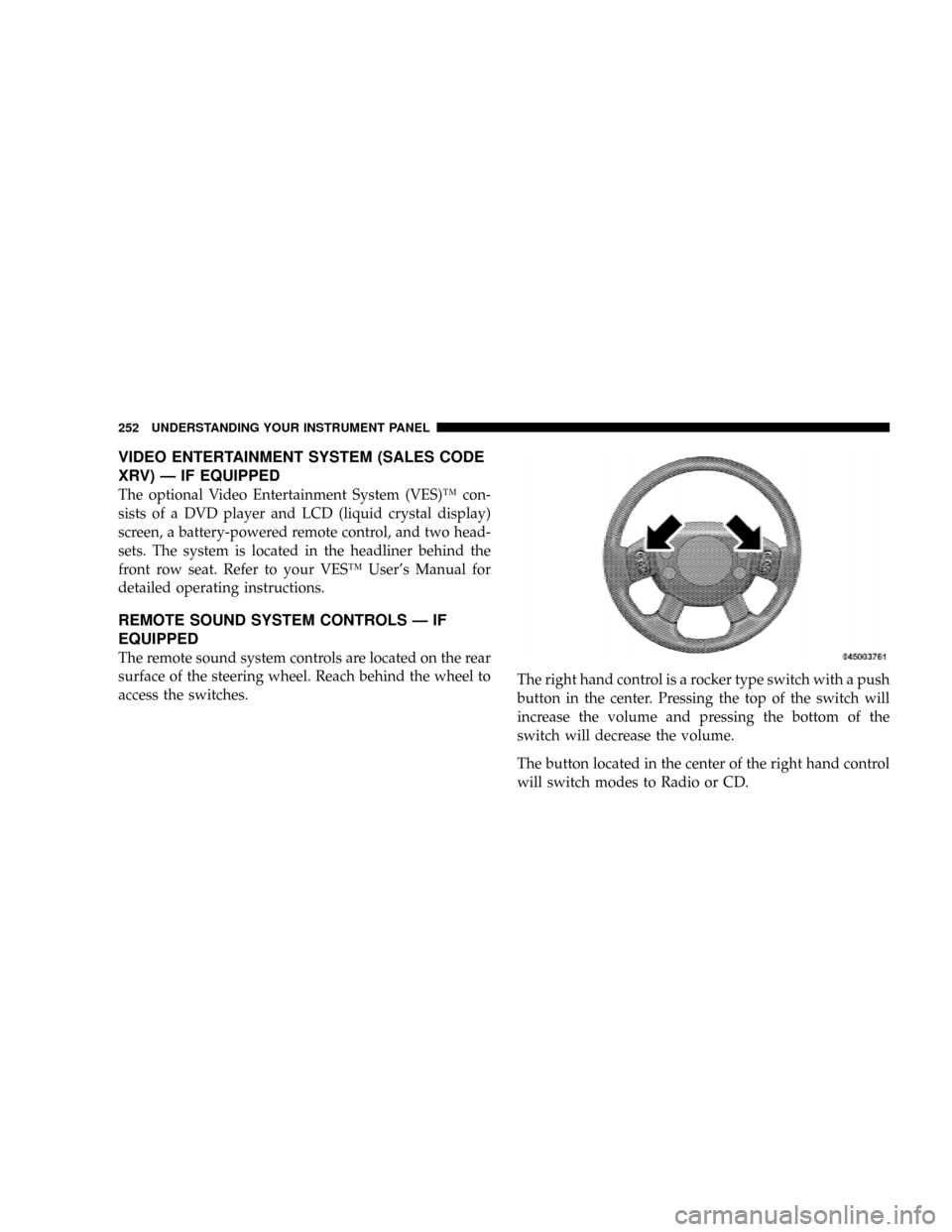
The remote sound system controls are located on the rear
surface of the steering wheel. Reach behind the wheel to
access the switches.The right hand control is a rocker type switch with a push
button in the center. Pressing the top of the switch will
increase the volume and pressing the bottom of the
switch will decrease the volume.
The button located in the center of the right hand control
will switch modes to Radio or CD.
252 UNDERSTANDING YOUR INSTRUMENT PANEL
Page 255 of 481
The left hand control is a rocker type switch with a push
button in the center. The function of the left hand control
is different depending on which mode you are in.
The following describes the left hand control operation in
each mode.
Radio Operation
Pressing the top of the switch will SEEK up for the next
listenable station and pressing the bottom of the switch
will SEEK down for the next listenable station.
The button located in the center of the left hand control
will tune to the next pre-set station that you have
programmed in the radio pre-set push-buttons.
CD Player
Pressing the top of the switch once will go to the next
track on the CD. Pressing the bottom of the switch oncewill go to the beginning of the current track or to the
beginning of the previous track if it is within one second
after the current track begins to play.
If you press the switch up or down twice it plays the
second track, three times, it will play the third, etc.
The button in the center of the left hand switch changes
CD's on the 6±Disc in-dash CD changer radio. This
button does not function for all other radios.
CD/DVD MAINTENANCE
To keep the CD/DVD in good condition, take the follow-
ing precautions:
1. Handle the disc by its edge; avoid touching the
surface.
2. If the disc is stained, clean the surface with a soft cloth,
wiping from center to edge.
UNDERSTANDING YOUR INSTRUMENT PANEL 253
4
Page 256 of 481
3. Do not apply paper or tape to the disc; avoid scratch-
ing the disc.
4. Do not use solvents such as benzine, thinner, cleaners,
or antistatic sprays.
5. Store the disc in its case after playing.
6. Do not expose the disc to direct sunlight.
7. Do not store the disc where temperatures may become
too high.
NOTE:If you experience difficulty in playing a particu-
lar disc, it may be damaged (i.e. scratched, reflective
coating removed, a hair, moisture or dew on the disc)
oversized, or have theft protection encoding. Try a
known good disc before considering disc player service.RADIO OPERATION AND CELLULAR PHONES
Under certain conditions, the cellular phone being ON in
your vehicle can cause erratic or noisy performance from
your radio. This condition may be lessened or eliminated
by relocating the cellular phone antenna. This condition
is not harmful to the radio. If your radio performance
does not satisfactorily ªclearº by the repositioning of the
antenna, it is recommended that the radio volume be
turned down or off during cellular phone operation.
254 UNDERSTANDING YOUR INSTRUMENT PANEL
Page 299 of 481
WARNING!
Pumping of the Anti-Lock Brakes will diminish their
effectiveness and may lead to an accident. Pumping
makes the stopping distance longer. Just press firmly
on your brake pedal when you need to slow down or
stop.
WARNING!
²The Anti-Lock Brake System (ABS) cannot prevent
the natural laws of physics from acting on the
vehicle, nor can it increase braking or steering
efficiency beyond that afforded by the condition
of the vehicle brakes and tires or the traction
afforded.
(Continued)
WARNING! (Continued)
²The ABS cannot prevent accidents, including
those resulting from excessive speed in turns,
following another vehicle too closely, or hydro-
planing. Only a safe, attentive, and skillful driver
can prevent accidents.
²The capabilities of an ABS equipped vehicle must
never be exploited in a reckless or dangerous
manner, which could jeopardize the user's safety
or the safety of others.
CAUTION!
The Anti-Lock Brake System (ABS) is subject to
possible detrimental effects of electronic interference
caused by improperly installed aftermarket radios or
telephones.
STARTING AND OPERATING 297
5
Page 333 of 481
The Tire Pressure Monitoring Telltale Lamp will
illuminate in the instrument cluster, and an au-
dible chime will be activated when one or more of
the four active road tire pressures are low. Should this
occur, you should stop as soon as possible, check the
inflation pressure of each tire on your vehicle, and inflate
each tire to the vehicle's recommended cold placard
pressure value. The system will automatically update
and the Tire Pressure Monitoring Telltale Lamp will
extinguish once the updated tire pressures have been
received. The vehicle may need to be driven for up to 10
minutes above 15 mph (25 km/h) to receive this infor-
mation.
The Tire Pressure Monitoring Telltale Lamp will flash on
and off for 75 seconds, and remain on solid when a system
fault is detected. The system fault will also sound a chime.
If the ignition key is cycled, this sequence will repeat,
providing the system fault still exists. The Tire Pressure
Monitoring Telltale Lamp will turn off when the faultcondition no longer exists. A system fault can occur by any
of the following scenarios: 1) Jamming due to electronic
devices or driving next to facilities emitting the same radio
frequencies as the TPM sensors; 2) Installing some form of
aftermarket window tinting that affects radio wave sig-
nals; 3) Lots of snow or ice around the wheels or wheel
housings; 4) Using tire chains on the vehicle; 5) Using
wheels/tires not equipped with TPM sensors.
NOTE: Your vehicle is equipped with a non-matching
full size spare wheel and tire assembly.
1. This spare tire does not have a tire pressure monitor-
ing sensor. Therefore, the TPMS will not monitor the tire
pressure in the spare tire.
2. If you install the full size spare tire in place of a road
tire that has a pressure below the low-pressure warning
limit, upon the next ignition key cycle a chime will sound
and the TPM Telltale Lamp will still turn ON due to the
low tire.
STARTING AND OPERATING 331
5
Page 335 of 481
Tire Pressure Monitoring Low Pressure Warnings
The Tire Pressure Monitoring Telltale Light will illumi-
nate in the instrument cluster, and an audible chime will
be activated when one or more of the four active road tire
pressures are low. In addition, the EVIC will display a
graphic of the pressure value(s) with the low tire(s)
flashing.
Should a low tire condition occur on any of the four
active road tire(s), you should stop as soon as possible,
and inflate the low tire(s) that is flashing on the graphic
display to the vehicle's recommended cold placard pres-
sure value. The system will automatically update, the
graphic display of the pressure value(s) will stop flash-
ing, and the Tire Pressure Monitoring Telltale Light will
extinguish once the updated tire pressure(s) have been
received. The vehicle may need to be driven for up to 10
minutes above 15 mph (25 km/h) to receive this
information.
Check TPMS Message
The Tire Pressure Monitoring Telltale Light will flash on
and off for 75 seconds, and remain on solid when a
system fault is detected. The system fault will also sound
a chime. The EVIC will display a ªCHECK TPM SYS-
TEMº message for three seconds. This text message is
then followed by a graphic display, with ª- - -ª in place of
the pressure value(s) indicating which tire pressure
monitoring sensor(s) is not being received.
If the ignition key is cycled, this sequence will repeat,
providing the system fault still exists. If the system fault
no longer exists, the Tire Pressure Monitoring Telltale
Light will no longer flash, the9CHECK TPM SYSTEM9
text message will not be present, and a pressure value
will be displayed instead of dashes. A system fault can
occur by any of the following scenarios: 1) Jamming due
to electronic devices or driving next to facilities emitting
the same radio frequencies as the TPM sensors;. 2)
Installing some form of aftermarket window tinting that
STARTING AND OPERATING 333
5
Page 336 of 481
affects radio wave signals; 3) Lots of snow or ice around
the wheels or wheel housings; 4) Using tire chains on the
vehicle; 5) Using wheels/tires not equipped with TPM
sensors.
NOTE:Your vehicle is equipped with a non-matching
full size spare wheel and tire assembly.
1. This spare tire does not have a tire pressure monitor-
ing sensor. Therefore, the TPMS will not monitor the tire
pressure in the spare tire.
2. If you install the full size spare tire in place of a road
tire that has a pressure below the low-pressure warning
limit, upon the next ignition key cycle, a chime will
sound and the TPM Telltale Light will still turn ON. In
addition, the graphic in the EVIC will still display a
flashing pressure value.
3. However, after driving the vehicle for up to 10 min-
utes above 15 mph (25 km/h), the TPM Telltale Light willflash on and off for 75 seconds and then remain on solid.
The EVIC will display a ªCHECK TPM SYSTEMº mes-
sage for three seconds and then display dashes (- - -) in
place of the pressure value.
4. For each subsequent ignition key cycle, a chime will
sound and the TPM Telltale Light will flash on and off for
75 seconds and then remain on solid. The EVIC will
display a ªCHECK TPM SYSTEMº message for three
seconds, and then display dashes (- - -) in place of a
pressure value.
5. Once you repair or replace the original road tire, and
reinstall it on the vehicle in place of the full size spare tire,
the TPMS will update automatically. In addition, the
TPM Telltale Light will turn OFF and the graphic in the
EVIC will display a new pressure value instead of dashes
(- - -), as long as no tire pressure is below the low-
pressure warning limit in any of the four active road tires.
334 STARTING AND OPERATING
Page 380 of 481
If the indicator is dark or shows a green dot, proceed as
follows:
1. Wear eye protection and remove all metal jewelry such
as watch bands or bracelets which might make an
unintended electrical contact.
2. Park the booster vehicle within cable reach but with-
out letting the vehicles touch. Set the parking brake, place
the automatic transmission in PARK and turn the ignition
OFF on both vehicles.
3. Turn OFF the heater, radio and all unnecessary elec-
trical loads.
4. Connect one end of a jumper cable to the positive
terminal of the booster battery. Connect the other end of
the same cable to the positive terminal of the discharged
battery.WARNING!
Do not permit vehicles to touch each other as this
could establish a ground connection and personal
injury could result.
5. Connect the other cable, first to the negative terminal
of the booster battery and then to the engine of the
vehicle with the discharged battery. Make sure you have
a good contact on the engine.
WARNING!
Do not connect the cable to the negative post of the
discharge battery. The resulting electrical spark could
cause the battery to explode.
(Continued)
378 WHAT TO DO IN EMERGENCIES
Page 418 of 481
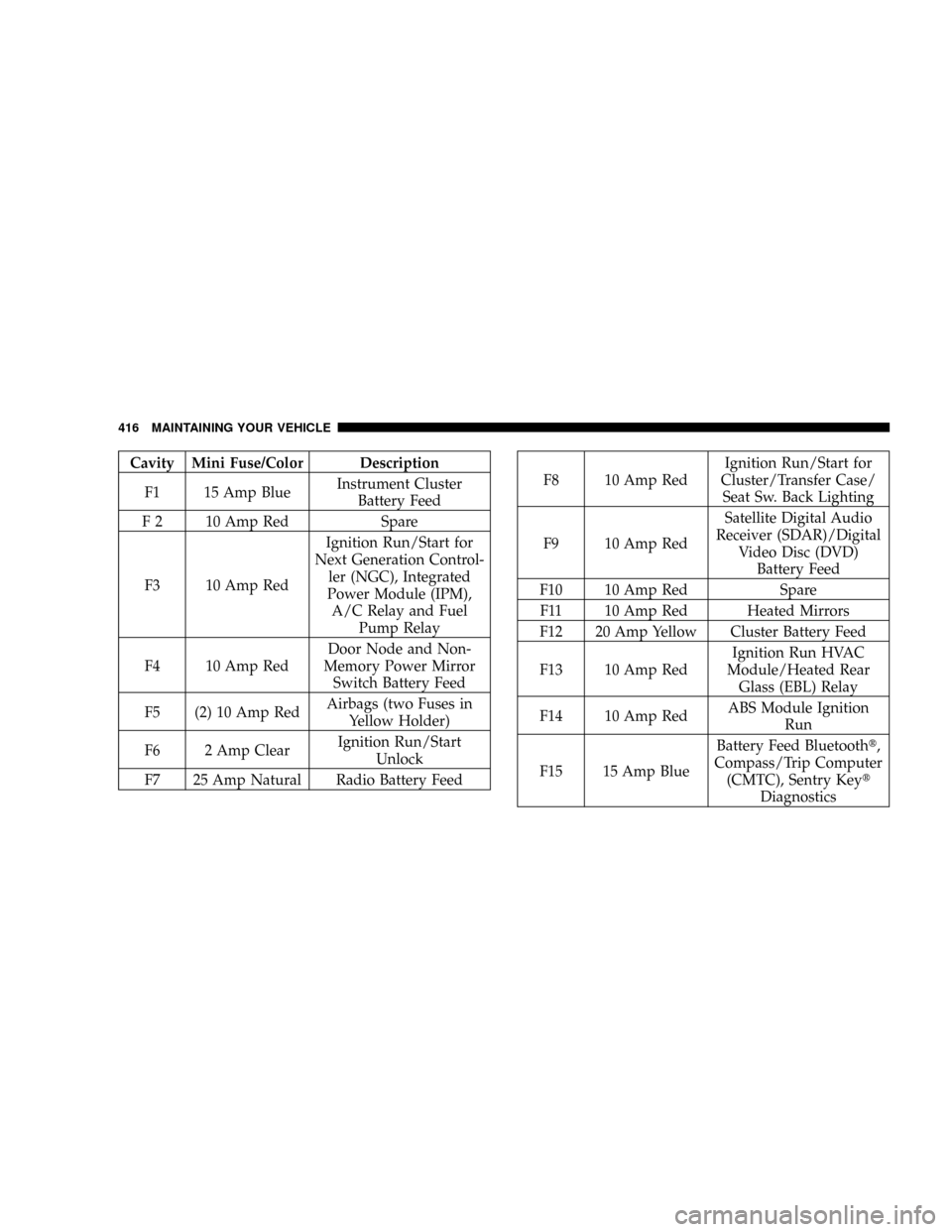
Cavity Mini Fuse/Color Description
F1 15 Amp BlueInstrument Cluster
Battery Feed
F 2 10 Amp Red Spare
F3 10 Amp RedIgnition Run/Start for
Next Generation Control-
ler (NGC), Integrated
Power Module (IPM),
A/C Relay and Fuel
Pump Relay
F4 10 Amp RedDoor Node and Non-
Memory Power Mirror
Switch Battery Feed
F5 (2) 10 Amp RedAirbags (two Fuses in
Yellow Holder)
F6 2 Amp ClearIgnition Run/Start
Unlock
F7 25 Amp Natural Radio Battery Feed
F8 10 Amp RedIgnition Run/Start for
Cluster/Transfer Case/
Seat Sw. Back Lighting
F9 10 Amp RedSatellite Digital Audio
Receiver (SDAR)/Digital
Video Disc (DVD)
Battery Feed
F10 10 Amp Red Spare
F11 10 Amp Red Heated Mirrors
F12 20 Amp Yellow Cluster Battery Feed
F13 10 Amp RedIgnition Run HVAC
Module/Heated Rear
Glass (EBL) Relay
F14 10 Amp RedABS Module Ignition
Run
F15 15 Amp BlueBattery Feed Bluetootht,
Compass/Trip Computer
(CMTC), Sentry Keyt
Diagnostics
416 MAINTAINING YOUR VEHICLE
Page 462 of 481
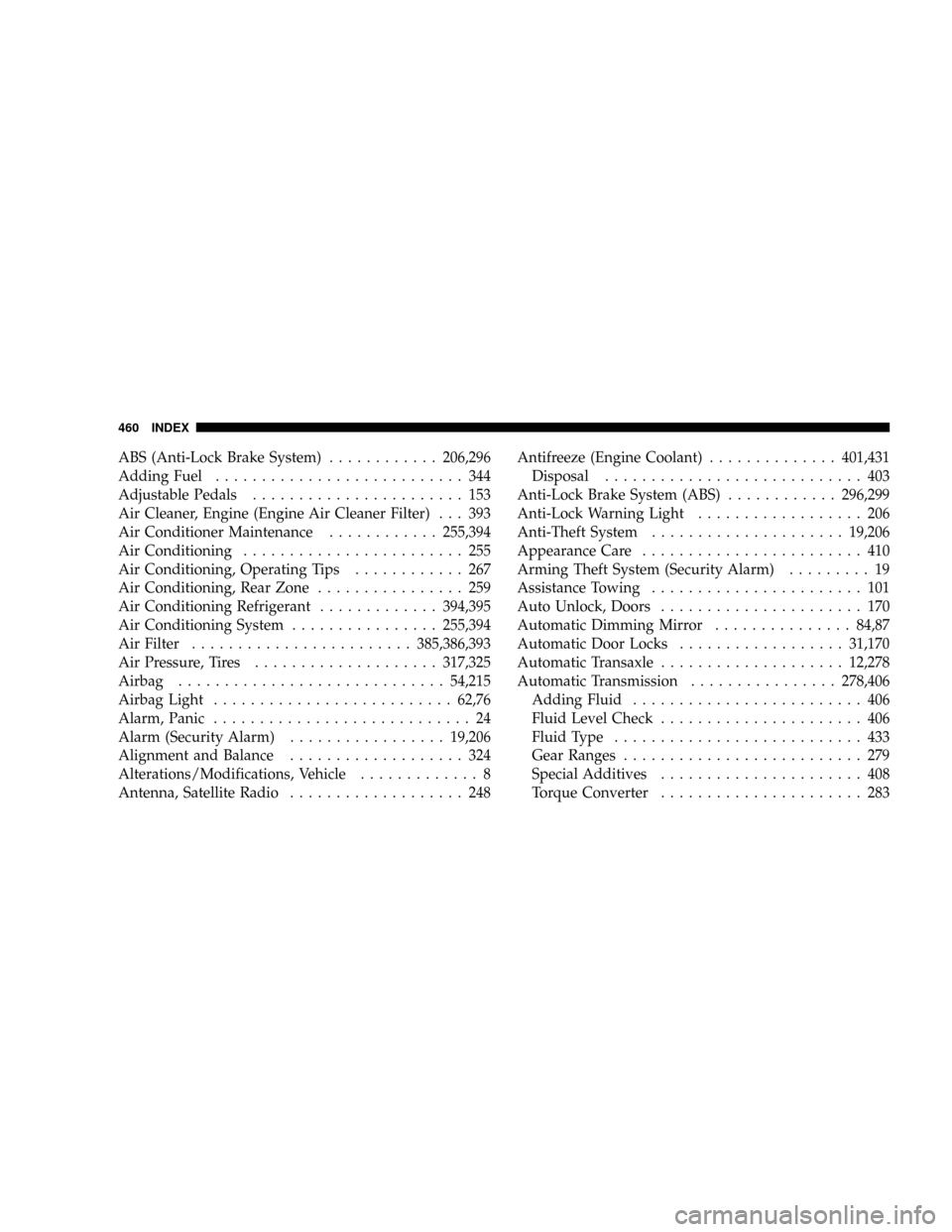
ABS (Anti-Lock Brake System)............206,296
Adding Fuel........................... 344
Adjustable Pedals....................... 153
Air Cleaner, Engine (Engine Air Cleaner Filter) . . . 393
Air Conditioner Maintenance............255,394
Air Conditioning........................ 255
Air Conditioning, Operating Tips............ 267
Air Conditioning, Rear Zone................ 259
Air Conditioning Refrigerant.............394,395
Air Conditioning System................255,394
Air Filter........................385,386,393
Air Pressure, Tires....................317,325
Airbag.............................54,215
Airbag Light..........................62,76
Alarm, Panic............................ 24
Alarm (Security Alarm).................19,206
Alignment and Balance................... 324
Alterations/Modifications, Vehicle............. 8
Antenna, Satellite Radio................... 248Antifreeze (Engine Coolant)..............401,431
Disposal............................ 403
Anti-Lock Brake System (ABS)............296,299
Anti-Lock Warning Light.................. 206
Anti-Theft System.....................19,206
Appearance Care........................ 410
Arming Theft System (Security Alarm)......... 19
Assistance Towing....................... 101
Auto Unlock, Doors...................... 170
Automatic Dimming Mirror...............84,87
Automatic Door Locks..................31,170
Automatic Transaxle....................12,278
Automatic Transmission................278,406
Adding Fluid......................... 406
Fluid Level Check...................... 406
Fluid Type........................... 433
Gear Ranges.......................... 279
Special Additives...................... 408
Torque Converter...................... 283
460 INDEX