change time CHRYSLER ASPEN 2009 2.G Owners Manual
[x] Cancel search | Manufacturer: CHRYSLER, Model Year: 2009, Model line: ASPEN, Model: CHRYSLER ASPEN 2009 2.GPages: 481, PDF Size: 9.28 MB
Page 78 of 481
mispositioned parts. Open seams or loose connections
could permit exhaust fumes to seep into the passenger
compartment. In addition, inspect the exhaust system
each time the vehicle is raised for lubrication or oil
change. Replace or adjust as required.
Safety Checks You Should Make Inside The
Vehicle
Heater Defroster Ducts
Inspect the heater defroster ducts for proper operation.
Check for proper airflow through all defroster ducts. If
there are any question regarding the operation of your
heater defroster ducts, have the system checked by an
authorized dealer.
Seat Belts
Inspect the belt system periodically, checking for cuts,
frays and loose parts. Damaged parts must be replaced
immediately. Do not disassemble or modify the system.Seat belt assemblies must be replaced after an accident if
they have been damaged (bent retractor, torn webbing,
etc.) or if the front airbags have deployed. If there is any
question regarding belt or retractor condition, replace the
belt.
Airbag Light
The Airbag light should come on and remain on for six to
eight seconds as a bulb check when the ignition switch is
first turned ON. If the light is not lit during starting, see
your authorized dealer. If the light stays on, flickers or
comes on while driving, have the system checked by an
authorized dealer. If there is a problem with the airbag
light, the seat belt light will flash.
76 THINGS TO KNOW BEFORE STARTING YOUR VEHICLE
Page 105 of 481
numbers, followed by9Send,9is also to be used for
navigating through an automated customer service cen-
ter menu structure, and to leave a number on a pager.
You can also send stored UConnecttphonebook entries
as tones for fast and easy access to voice mail and pager
entries. To use this feature, dial the number you wish to
call and then press the ªVoice Recognitionº button and
say, ªSend.º The system will prompt you to enter the
name or number and say the name of the phonebook
entry you wish to send. The UConnecttsystem will then
send the corresponding phone number associated with
the phonebook entry, as tones over the phone.
NOTE:
²You may not hear all of the tones due to cellular phone
network configurations; this is normal.
²Some paging and voice mail systems have system time
out settings that are too short and may not allow the
use of this feature.
Barge In - Overriding Prompts
The ªVoice Recognitionº button can be used when you
wish to skip part of a prompt and issue your voice
recognition command immediately. For example, if a
prompt is asking9Would you like to pair a phone, clear
a{,9you could press the ªVoice Recognitionº button and
say,9Pair a Phone9to select that option without having to
listen to the rest of the voice prompt.
Turning Confirmation Prompts On/Off
Turning confirmation prompts off will stop the system
from confirming your choices (e.g., the UConnecttsys-
tem will not repeat a phone number before you dial it).
²Press the PHONE button to begin.
²After the9Ready9prompt and the following beep, say
9Setup Confirmations.9The UConnecttsystem will
play the current confirmation prompt status and you
will be given the choice to change it.
UNDERSTANDING THE FEATURES OF YOUR VEHICLE 103
3
Page 111 of 481
²low-to-medium vehicle speed,
²low road noise,
²smooth road surface,
²fully closed windows,
²dry weather conditions, and
²operation from the driver's seat.
²Performance, such as audio clarity, echo, and loudness
to a large degree rely on the phone and network, and
not the UConnecttsystem.
²Echo at the far end can sometimes be reduced by
lowering the in-vehicle audio volume.
²In a convertible vehicle, system performance may be
compromised with the convertible top down.
BluetoothtCommunication Link
Cellular phones have been found to lose connection to
the UConnecttsystem. When this happens, the connec-
tion can generally be re-established by switching the
phone off/on. Your cell phone is recommended to remain
in BluetoothtON mode.
Power-Up
After switching the ignition key from OFF to either ON
or ACC position, or after a language change, you must
wait at least five seconds prior to using the system.
UNDERSTANDING THE FEATURES OF YOUR VEHICLE 109
3
Page 118 of 481
Pressing the VR hard-key while the system is speaking is
known as ªbarging in.º The system will be interrupted
and you can add or change commands. This will become
helpful once you start to learn the options.
NOTE:At any time, you can say the words CANCEL,
HELP, or MAIN MENU.
These commands are universal and can be used from any
menu. All other commands can be used depending upon
the active application.
For example, if you are in the disc menu and you are
listening to FM radio, you can speak commands from the
disc menu or from the FM radio menu.
When using this system, you should speak clearly and at
a normal speaking volume.
The system will best recognize your speech if the win-
dows are closed, and the heater/air-conditioning fan is
set to low.At any point, if the system does not recognize one of your
commands, you will be prompted to repeat it.
To hear the first available Menu, press the VR hard-key
and say HELP or MAIN MENU.
Commands
The Voice Recognition System understands two types of
commands. Global commands are available at all times.
Local commands are available if the supported radio
mode is active.
Changing the Volume
1. Start a dialogue by pressing the VR hard-key.
2. Say a command (e.g., HELP).
3. Use the ON/OFF VOLUME rotary knob to adjust the
volume to a comfortable level while the voice recognition
system is speaking. Please note the volume setting for VR
is different then the audio system.
116 UNDERSTANDING THE FEATURES OF YOUR VEHICLE
Page 150 of 481
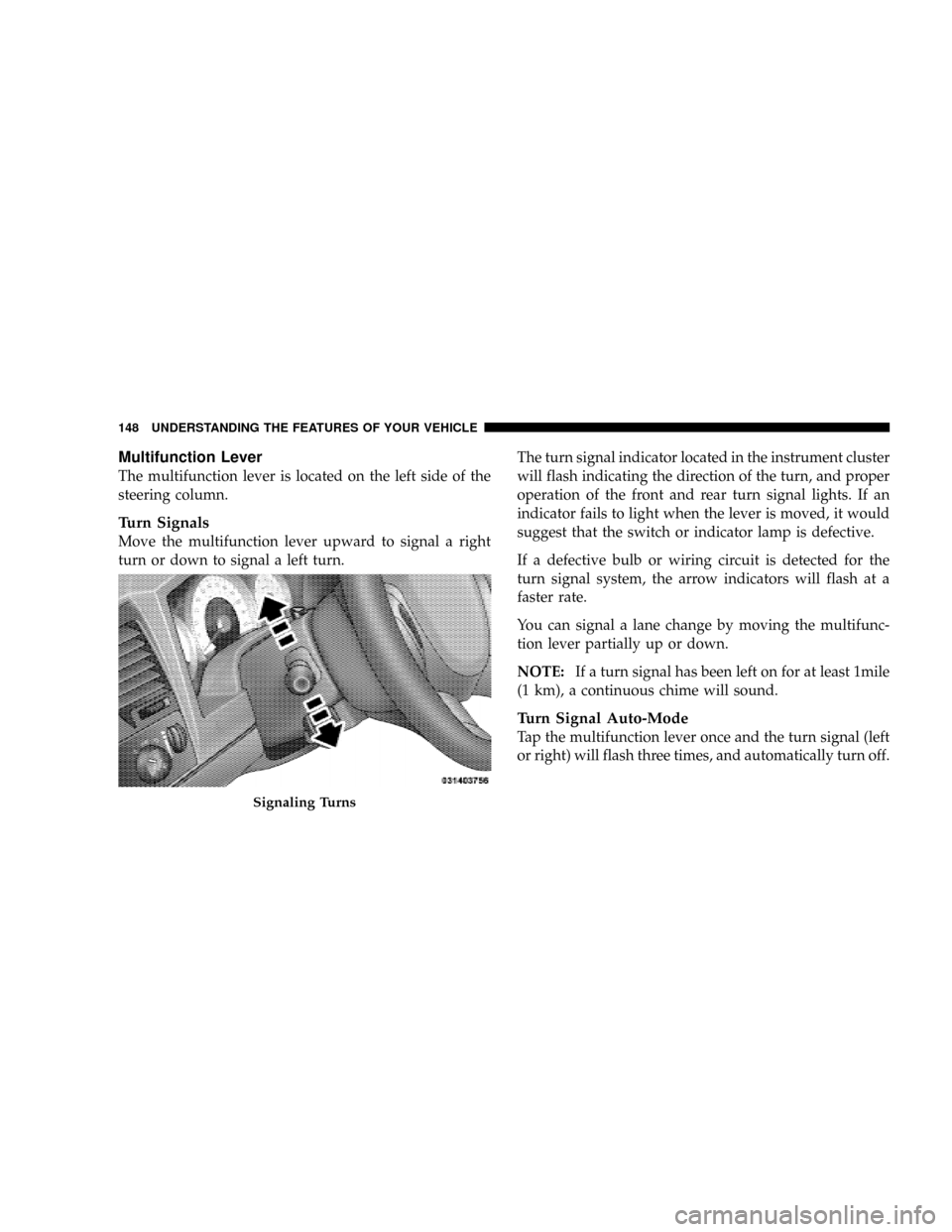
Multifunction Lever
The multifunction lever is located on the left side of the
steering column.
Turn Signals
Move the multifunction lever upward to signal a right
turn or down to signal a left turn.The turn signal indicator located in the instrument cluster
will flash indicating the direction of the turn, and proper
operation of the front and rear turn signal lights. If an
indicator fails to light when the lever is moved, it would
suggest that the switch or indicator lamp is defective.
If a defective bulb or wiring circuit is detected for the
turn signal system, the arrow indicators will flash at a
faster rate.
You can signal a lane change by moving the multifunc-
tion lever partially up or down.
NOTE:If a turn signal has been left on for at least 1mile
(1 km), a continuous chime will sound.
Turn Signal Auto-Mode
Tap the multifunction lever once and the turn signal (left
or right) will flash three times, and automatically turn off.
Signaling Turns
148 UNDERSTANDING THE FEATURES OF YOUR VEHICLE
Page 169 of 481

Electronic Vehicle Information Center (EVIC) Ð If
Equipped
Pressing the MENU button will change the
display to one of the following features:
Trip Functions
Pressing the STEP button allows you to scroll through
one of the following Trip Function features:
²TRIP ± Shows the total distance traveled since the last
reset. To reset the TRIP function, press and hold the
RESET button.
²ELAPSED TIME ± Shows the total elapsed time of
travel since the last reset. Elapsed time will increment
when the ignition switch is in the ON/RUN or START
positions.
²UNIT IN U.S./METRIC ± Press the RESET button to
toggle between U.S. and METRIC.
Overhead Console with EVIC
UNDERSTANDING THE FEATURES OF YOUR VEHICLE 167
3
Page 170 of 481
²AVG. MPG ± Shows the average fuel economy since
the last reset. When the fuel economy is reset, the
display will show dashes for two seconds. Then the
history information will be erased, and theaveraging
will continue from the last fuel average reading
before the reset. (Example: If your EVIC displays 18
AVG. MPG and the RESET button is pressed, the
previous averaging history will be erased and the
display will return to the 18 AVG. MPG, not to 0 AVG.
MPG). The display may take several miles/kilometers
for the value to change, depending upon driving
habits. If equipped with a 5.7L engine and Multi
Displacement System (MDS), FUEL SAVER may be
displayed along with the actual AVG. MPG. If
equipped with MDS option, the EVIC will display
FUEL SAVER when in fuel economy mode.
²MI TO EMPTY (Distance To Empty) ± Shows the
estimated distance that can be traveled with the fuel
remaining in the tank. This estimated distance isdetermined by a weighted average of fuel economy,
according to the current fuel tank level. MI TO EMPTY
cannot be reset through the RESET button.
NOTE:Significant changes in driving style or vehicle
loading will greatly affect the actual drivable distance of
the vehicle, regardless of the DTE displayed value.
When the DTE value is less than 30 miles (48 km)
estimated driving distance, the DTE display will change
to a text display of9LOW FUEL.9This display will
continue until the vehicle runs out of fuel. Adding a
significant amount of fuel to the vehicle will turn off the
9LOW FUEL9text and a new DTE value will display.
²Global Reset ± If the RESET button is pressed twice
within two seconds while in any of the three resettable
displays (AVG. MPG, ET (ELAPSED TIME) and TRIP),
all three displays will be reset.
168 UNDERSTANDING THE FEATURES OF YOUR VEHICLE
Page 172 of 481
Unless reset, this message will continue to display each
time you turn the ignition switch to the ON/RUN
position. To turn off the message temporarily, press and
release the MENU button. To reset the oil change indica-
tor system (after performing the scheduled maintenance),
refer to the following procedure.
1. Turn the ignition switch to the ON position(Do not
start the engine).
2. Fully depress the accelerator pedal slowly three times
within 10 seconds.
3. Turn the ignition switch to the OFF/LOCK position.
NOTE:If the indicator message illuminates when you
start the vehicle, the oil change indicator system did not
reset. If necessary, repeat this procedure.Personal Settings (Customer-Programmable
Features)
Personal Settings allows the driver to set and recall
features when the transmission is in PARK. If the trans-
mission is not in PARK the EVIC will display NOT
AVAILABLE and VEHICLE NOT IN PARK.
Press and release the MENU button until the
Personal Settings displays on the EVIC.
Use the STEP button to display one of the following:
²ªLANGUAGEº ± When in this display, you may select
one of several different languages for all display
nomenclature, including the trip functions. Press the
RESET button while in this display to select your
preferred language. Then, as you continue, the infor-
mation will display in the selected language.
170 UNDERSTANDING THE FEATURES OF YOUR VEHICLE
Page 183 of 481
3. Continue to press and hold the HomeLinktbutton
while you press and release - every two seconds
(ªcycleº) your hand-held transmitter until HomeLinkt
has successfully accepted the frequency signal. The
EVIC display will change from ªCHANNEL # TRAIN-
INGº to ªCHANNEL # TRAINED.º
If you unplugged the device for training, plug it back in
at this time.
Then proceed with Step 4 under ªProgramming
HomeLinktº earlier in this section.
Using HomeLinkT
To operate, simply press and release the programmed
HomeLinktbutton. Activation will now occur for the
trained device (i.e., garage door opener, gate operator,
security system, entry door lock, home/office lighting,
etc.) The hand-held transmitter of the device may also be
used at any time.
Reprogramming A Single HomeLinkTButton
To reprogram a channel that has been previously trained,
follow these steps:
1. Turn the ignition switch to the ON/RUN position.
2. Press and hold the desired HomeLinktbutton for 20
seconds until the EVIC display states ªCHANNEL #
TRAINING.ºDo not release the button.
3.Without releasing the button,proceed with Program-
ming HomeLinktStep 2 and follow all remaining steps.
Security
It is advised to erase all channels before you sell or turn
in your vehicle.
To do this, press and hold the two outside buttons for 20
seconds until the EVIC message states ªCHANNELS
CLEARED.º Note that all channels will be erased. Indi-
vidual channels cannot be erased.
UNDERSTANDING THE FEATURES OF YOUR VEHICLE 181
3
Page 210 of 481
Vehicle Warning Messages
For non-Electronic Vehicle Information Center (EVIC)
equipped vehicles, when the appropriate conditions ex-
ist, messages such as ªdoor ajarº (indicates that a door(s)
may be ajar), ªgASCAPº (which indicates that your gas
cap is possibly loose or damaged),9CHANgE OILº
(indicates that the engine oil should be changed), ªLo-
WASHº (low washer fluid), and ªnoFUSEº (indicates
that the IOD fuse is removed from the Integrated Power
Module), will display in the odometer.
NOTE:If the vehicle is equipped with an EVIC, most
warnings will display in the EVIC. For additional infor-
mation, refer to ªElectronic Vehicle Information Center
(EVIC) Ð If Equippedº in Section 3.
The outside temperature will display in the odometer for
non-EVIC equipped vehicles. Pressing the trip odometer
RESET button toggles the feature back to the odometer.Change Oil Message
Your vehicle is equipped with an engine oil change
indicator system. The ªChange Oilº message will flash in
the instrument cluster odometer for approximately 12
seconds after a single chime has sounded to indicate the
next scheduled oil change interval. The engine oil change
indicator system is duty cycle based, which means the
engine oil change interval may fluctuate dependent upon
your personal driving style.
Unless reset, this message will continue to display each
time you turn the ignition switch to the ON/RUN
position. To turn off the message temporarily, press and
release the Trip Odometer button on the instrument
cluster. To reset the oil change indicator system (after
performing the scheduled maintenance) refer to the fol-
lowing procedure.
1. Turn the ignition switch to the ON position(Do not
start the engine).
208 UNDERSTANDING YOUR INSTRUMENT PANEL