parking brake CHRYSLER CARAVAN 2005 Owner's Guide
[x] Cancel search | Manufacturer: CHRYSLER, Model Year: 2005, Model line: CARAVAN, Model: CHRYSLER CARAVAN 2005Pages: 2339, PDF Size: 59.69 MB
Page 190 of 2339
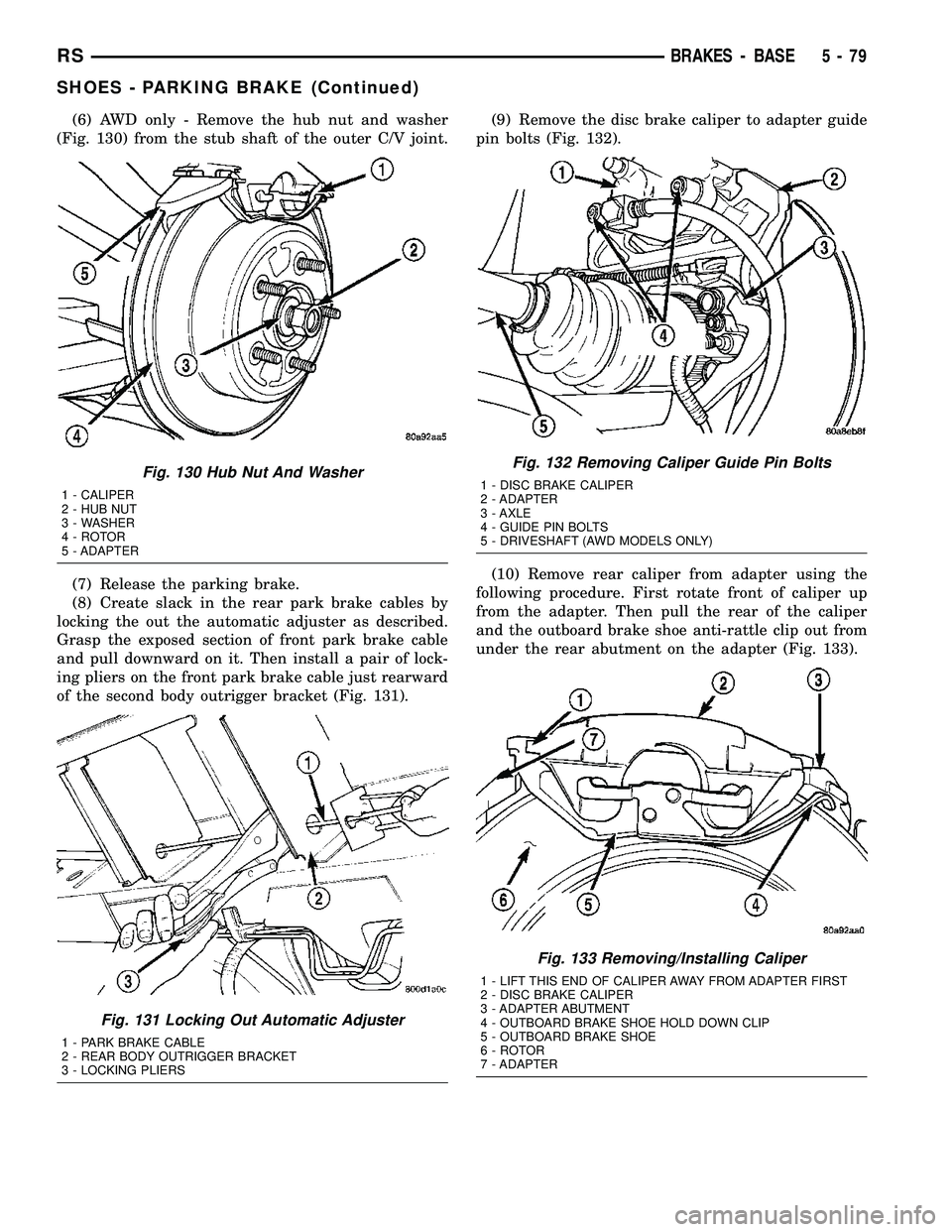
(6) AWD only - Remove the hub nut and washer
(Fig. 130) from the stub shaft of the outer C/V joint.
(7) Release the parking brake.
(8) Create slack in the rear park brake cables by
locking the out the automatic adjuster as described.
Grasp the exposed section of front park brake cable
and pull downward on it. Then install a pair of lock-
ing pliers on the front park brake cable just rearward
of the second body outrigger bracket (Fig. 131).(9) Remove the disc brake caliper to adapter guide
pin bolts (Fig. 132).
(10) Remove rear caliper from adapter using the
following procedure. First rotate front of caliper up
from the adapter. Then pull the rear of the caliper
and the outboard brake shoe anti-rattle clip out from
under the rear abutment on the adapter (Fig. 133).
Fig. 130 Hub Nut And Washer
1 - CALIPER
2 - HUB NUT
3 - WASHER
4 - ROTOR
5 - ADAPTER
Fig. 131 Locking Out Automatic Adjuster
1 - PARK BRAKE CABLE
2 - REAR BODY OUTRIGGER BRACKET
3 - LOCKING PLIERS
Fig. 132 Removing Caliper Guide Pin Bolts
1 - DISC BRAKE CALIPER
2 - ADAPTER
3 - AXLE
4 - GUIDE PIN BOLTS
5 - DRIVESHAFT (AWD MODELS ONLY)
Fig. 133 Removing/Installing Caliper
1 - LIFT THIS END OF CALIPER AWAY FROM ADAPTER FIRST
2 - DISC BRAKE CALIPER
3 - ADAPTER ABUTMENT
4 - OUTBOARD BRAKE SHOE HOLD DOWN CLIP
5 - OUTBOARD BRAKE SHOE
6 - ROTOR
7 - ADAPTER
RSBRAKES - BASE5-79
SHOES - PARKING BRAKE (Continued)
Page 191 of 2339

(11) Support caliper to prevent the weight of the
caliper from damaging the flexible brake hose (Fig.
134).
(12) Remove the rotor from the hub/bearing.
(13) Remove the park brake cable mounting bolt to
adapter.
(14) Remove the end of the park brake cable from
the actuator lever on the adapter (Fig. 135).(15) Remove the end of the park brake cable from
the adapter. Park brake cable is removed from
adapter using a 1/2 wrench slipped over the park
brake cable retainer as show in (Fig. 136) to com-
press the locking tabs on the park brake cable
retainer.
(16) AWD only - Remove ABS wheel speed sensor
head from hub/bearing (Fig. 137).
Fig. 134 Correctly Supported Caliper
1 - WIRE
2 - CALIPER
3 - ADAPTER
4 - ROTOR
5 - INNER FENDER
Fig. 135 Park Brake Cable Attachment To Actuator
1 - ADAPTER
2 - PARK BRAKE CABLE
3 - ACTUATOR
4 - AXLE
5 - DRIVESHAFT
6 - PARK BRAKE CABLE RETAINER
7 - HORSESHOE CLIP
Fig. 136 Park Brake Cable Removal From Adapter
1 - DRIVESHAFT
2 - 1/2º WRENCH
3 - PARK BRAKE CABLE
4 - PARK BRAKE CABLE RETAINER
5 - ADAPTER
Fig. 137 Speed Sensor Attaching Bolt (AWD)
1 - ADAPTER
2 - TONE WHEEL
3 - WHEEL SPEED SENSOR
4 - AXLE
5 - BOLT
6 - DRIVESHAFT
5 - 80 BRAKES - BASERS
SHOES - PARKING BRAKE (Continued)
Page 192 of 2339

(17) FWD only - Remove the ABS wheel speed sen-
sor from the hub/bearing in the following fashion:
(a) Remove secondary (yellow) retaining clip at
rear of wheel speed sensor head (Fig. 138).
(b) Push up on metal retaining clip (Fig. 138)
until it bottoms. This will release wheel speed sen-
sor head from hub and bearing. While holding
metal clip up, pull back on wheel speed sensor
head removing it from hub and bearing.
(c) Remove wheel speed sensor from hub/bear-
ing.
(18) Remove the hub/bearing-to-axle mounting
bolts (Fig. 139).(19) Remove the hub/bearing (Fig. 140).
Fig. 138 Sensor Connection At Hub And Bearing
1 - SECONDARY SENSOR RETAINING CLIP
2 - METAL SENSOR RETAINING CLIP
3 - HUB AND BEARING
Fig. 139 Hub/Bearing Mounting Bolts (AWD Shown)
1 - DRIVESHAFT
2 - MOUNTING BOLTS
3 - AXLE
4 - MOUNTING BOLTS
5 - ADAPTER
Fig. 140 Hub/Bearing Removal/Installation (AWD
Shown)
1 - PARK BRAKE BRAKE SHOE
2 - OUTER C/V JOINT
3 - HUB/BEARING
4 - PARK BRAKE BRAKE SHOE
5 - STUB SHAFT
RSBRAKES - BASE5-81
SHOES - PARKING BRAKE (Continued)
Page 193 of 2339
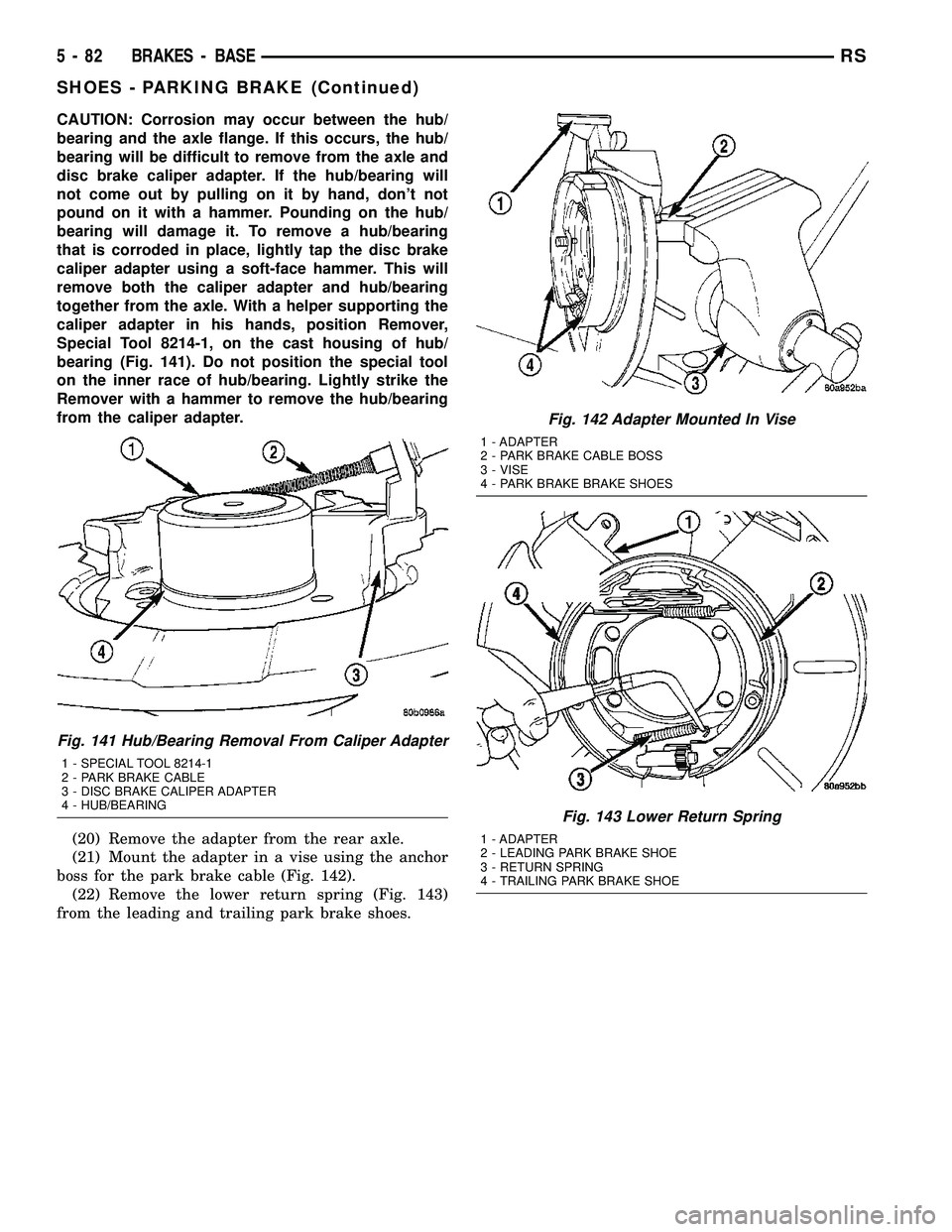
CAUTION: Corrosion may occur between the hub/
bearing and the axle flange. If this occurs, the hub/
bearing will be difficult to remove from the axle and
disc brake caliper adapter. If the hub/bearing will
not come out by pulling on it by hand, don't not
pound on it with a hammer. Pounding on the hub/
bearing will damage it. To remove a hub/bearing
that is corroded in place, lightly tap the disc brake
caliper adapter using a soft-face hammer. This will
remove both the caliper adapter and hub/bearing
together from the axle. With a helper supporting the
caliper adapter in his hands, position Remover,
Special Tool 8214-1, on the cast housing of hub/
bearing (Fig. 141). Do not position the special tool
on the inner race of hub/bearing. Lightly strike the
Remover with a hammer to remove the hub/bearing
from the caliper adapter.
(20) Remove the adapter from the rear axle.
(21) Mount the adapter in a vise using the anchor
boss for the park brake cable (Fig. 142).
(22) Remove the lower return spring (Fig. 143)
from the leading and trailing park brake shoes.
Fig. 141 Hub/Bearing Removal From Caliper Adapter
1 - SPECIAL TOOL 8214-1
2 - PARK BRAKE CABLE
3 - DISC BRAKE CALIPER ADAPTER
4 - HUB/BEARING
Fig. 142 Adapter Mounted In Vise
1 - ADAPTER
2 - PARK BRAKE CABLE BOSS
3 - VISE
4 - PARK BRAKE BRAKE SHOES
Fig. 143 Lower Return Spring
1 - ADAPTER
2 - LEADING PARK BRAKE SHOE
3 - RETURN SPRING
4 - TRAILING PARK BRAKE SHOE
5 - 82 BRAKES - BASERS
SHOES - PARKING BRAKE (Continued)
Page 194 of 2339
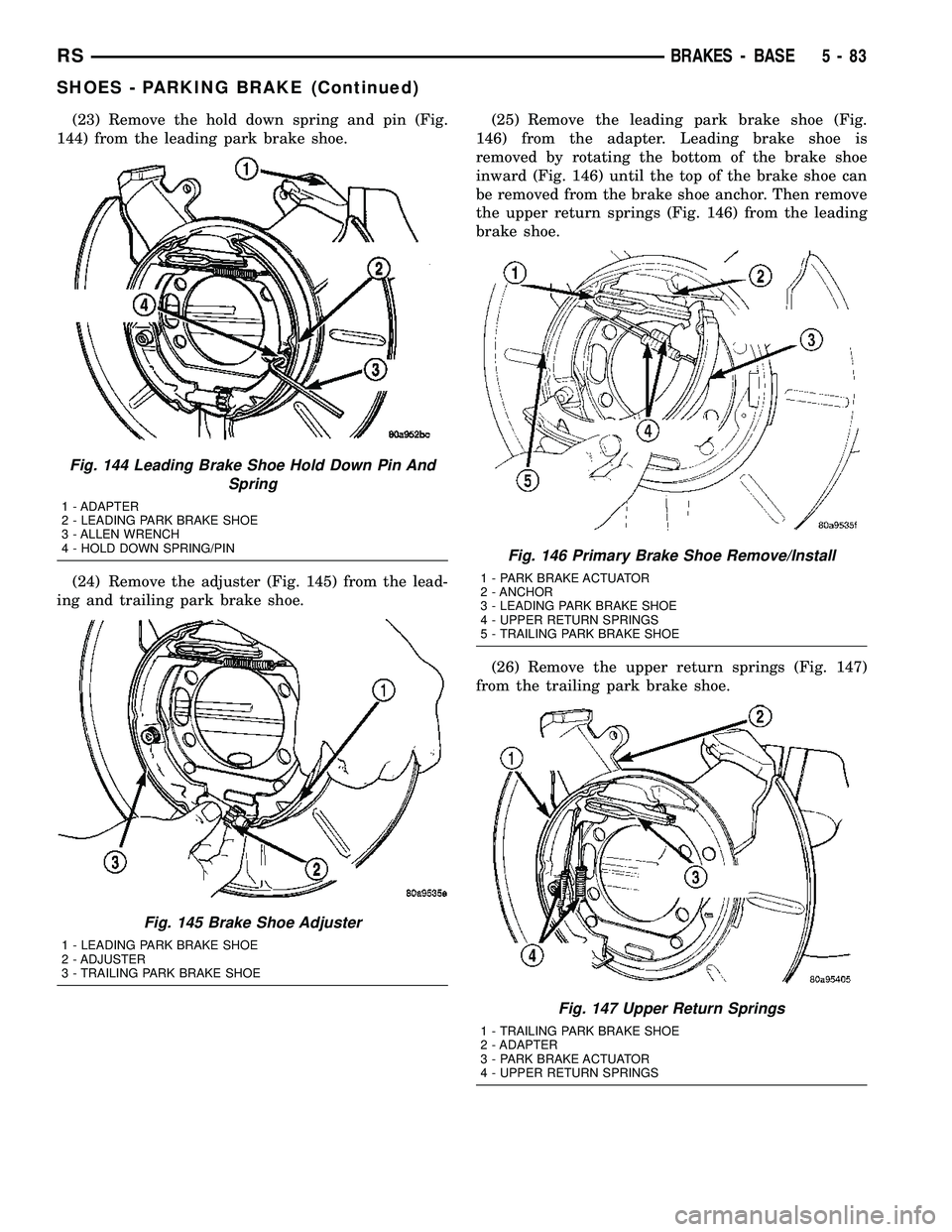
(23) Remove the hold down spring and pin (Fig.
144) from the leading park brake shoe.
(24) Remove the adjuster (Fig. 145) from the lead-
ing and trailing park brake shoe.(25) Remove the leading park brake shoe (Fig.
146) from the adapter. Leading brake shoe is
removed by rotating the bottom of the brake shoe
inward (Fig. 146) until the top of the brake shoe can
be removed from the brake shoe anchor. Then remove
the upper return springs (Fig. 146) from the leading
brake shoe.
(26) Remove the upper return springs (Fig. 147)
from the trailing park brake shoe.
Fig. 144 Leading Brake Shoe Hold Down Pin And
Spring
1 - ADAPTER
2 - LEADING PARK BRAKE SHOE
3 - ALLEN WRENCH
4 - HOLD DOWN SPRING/PIN
Fig. 145 Brake Shoe Adjuster
1 - LEADING PARK BRAKE SHOE
2 - ADJUSTER
3 - TRAILING PARK BRAKE SHOE
Fig. 146 Primary Brake Shoe Remove/Install
1 - PARK BRAKE ACTUATOR
2 - ANCHOR
3 - LEADING PARK BRAKE SHOE
4 - UPPER RETURN SPRINGS
5 - TRAILING PARK BRAKE SHOE
Fig. 147 Upper Return Springs
1 - TRAILING PARK BRAKE SHOE
2 - ADAPTER
3 - PARK BRAKE ACTUATOR
4 - UPPER RETURN SPRINGS
RSBRAKES - BASE5-83
SHOES - PARKING BRAKE (Continued)
Page 195 of 2339
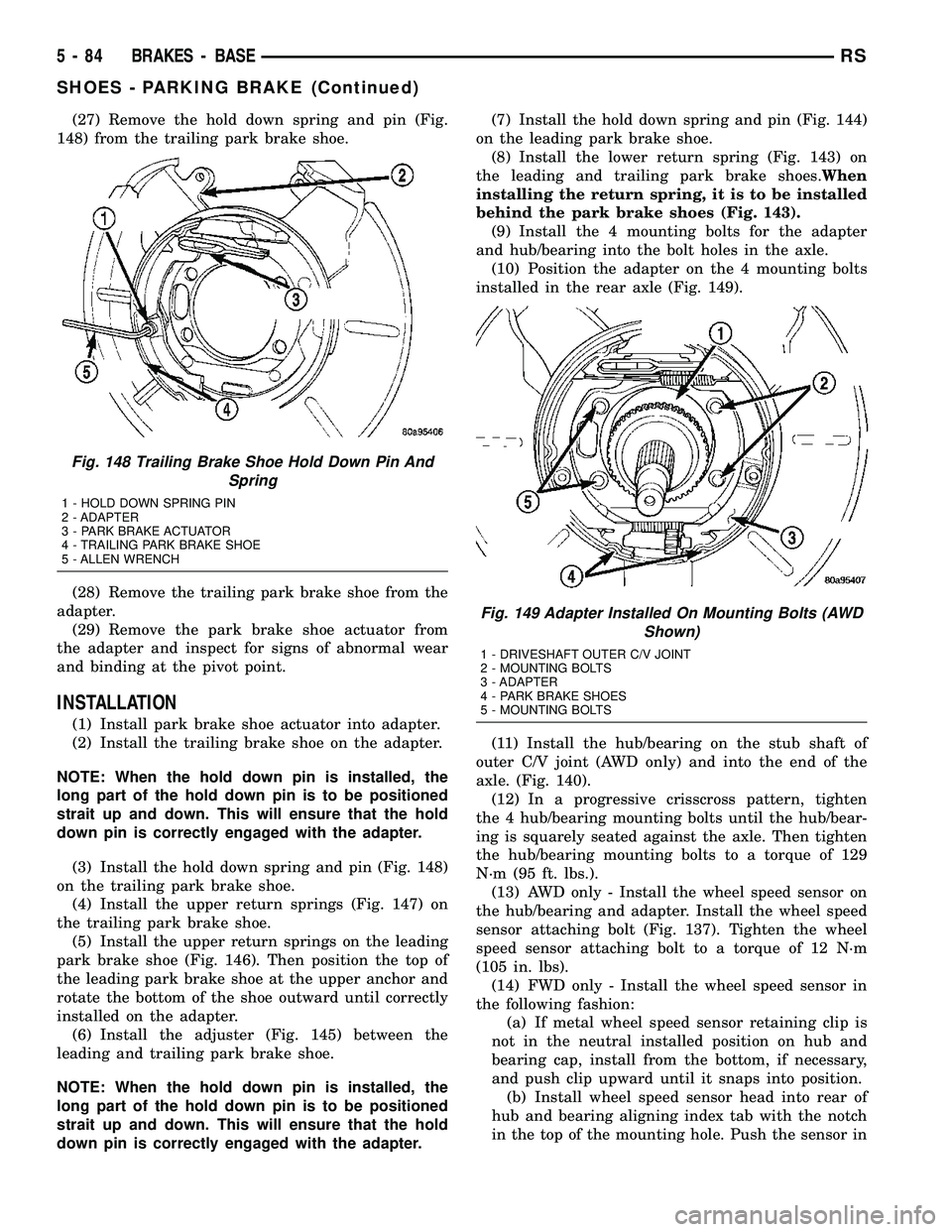
(27) Remove the hold down spring and pin (Fig.
148) from the trailing park brake shoe.
(28) Remove the trailing park brake shoe from the
adapter.
(29) Remove the park brake shoe actuator from
the adapter and inspect for signs of abnormal wear
and binding at the pivot point.
INSTALLATION
(1) Install park brake shoe actuator into adapter.
(2) Install the trailing brake shoe on the adapter.
NOTE: When the hold down pin is installed, the
long part of the hold down pin is to be positioned
strait up and down. This will ensure that the hold
down pin is correctly engaged with the adapter.
(3) Install the hold down spring and pin (Fig. 148)
on the trailing park brake shoe.
(4) Install the upper return springs (Fig. 147) on
the trailing park brake shoe.
(5) Install the upper return springs on the leading
park brake shoe (Fig. 146). Then position the top of
the leading park brake shoe at the upper anchor and
rotate the bottom of the shoe outward until correctly
installed on the adapter.
(6) Install the adjuster (Fig. 145) between the
leading and trailing park brake shoe.
NOTE: When the hold down pin is installed, the
long part of the hold down pin is to be positioned
strait up and down. This will ensure that the hold
down pin is correctly engaged with the adapter.(7) Install the hold down spring and pin (Fig. 144)
on the leading park brake shoe.
(8) Install the lower return spring (Fig. 143) on
the leading and trailing park brake shoes.When
installing the return spring, it is to be installed
behind the park brake shoes (Fig. 143).
(9) Install the 4 mounting bolts for the adapter
and hub/bearing into the bolt holes in the axle.
(10) Position the adapter on the 4 mounting bolts
installed in the rear axle (Fig. 149).
(11) Install the hub/bearing on the stub shaft of
outer C/V joint (AWD only) and into the end of the
axle. (Fig. 140).
(12) In a progressive crisscross pattern, tighten
the 4 hub/bearing mounting bolts until the hub/bear-
ing is squarely seated against the axle. Then tighten
the hub/bearing mounting bolts to a torque of 129
N´m (95 ft. lbs.).
(13) AWD only - Install the wheel speed sensor on
the hub/bearing and adapter. Install the wheel speed
sensor attaching bolt (Fig. 137). Tighten the wheel
speed sensor attaching bolt to a torque of 12 N´m
(105 in. lbs).
(14) FWD only - Install the wheel speed sensor in
the following fashion:
(a) If metal wheel speed sensor retaining clip is
not in the neutral installed position on hub and
bearing cap, install from the bottom, if necessary,
and push clip upward until it snaps into position.
(b) Install wheel speed sensor head into rear of
hub and bearing aligning index tab with the notch
in the top of the mounting hole. Push the sensor in
Fig. 148 Trailing Brake Shoe Hold Down Pin And
Spring
1 - HOLD DOWN SPRING PIN
2 - ADAPTER
3 - PARK BRAKE ACTUATOR
4 - TRAILING PARK BRAKE SHOE
5 - ALLEN WRENCH
Fig. 149 Adapter Installed On Mounting Bolts (AWD
Shown)
1 - DRIVESHAFT OUTER C/V JOINT
2 - MOUNTING BOLTS
3 - ADAPTER
4 - PARK BRAKE SHOES
5 - MOUNTING BOLTS
5 - 84 BRAKES - BASERS
SHOES - PARKING BRAKE (Continued)
Page 196 of 2339

until it snaps into place on the metal retaining
clip.
(c) Install secondary (yellow) retaining clip over
wheel speed sensor head and engage the tabs on
each side.
(15) Install the park brake cable into its mounting
hole in the adapter.Be sure all the locking tabs
on the park brake cable retainer are expanded
out to ensure the cable will not pull out of the
adapter.
(16) Install the end of the park brake cable on the
park brake actuator lever (Fig. 135).
(17) Attach park brake cable to adapter using
mounting bolt.
(18) Remove the locking pliers (Fig. 131) from the
front park brake cable.
(19) Adjust the park brake drum-in-hat brake
shoes. (Refer to 5 - BRAKES/PARKING BRAKE/
SHOES - ADJUSTMENTS).
(20) Install the rotor on the hub/bearing.
(21) Carefully lower caliper and brake shoes over
rotor and onto the adapter using the reverse proce-
dure for removal (Fig. 133).
CAUTION: When installing guide pin bolts extreme
caution should be taken not to crossthread the cal-
iper guide pin bolts.
(22) Install the caliper guide pin bolts (Fig. 132).
Tighten the guide pin bolts to a torque of 35 N´m (26
ft. lbs.).
(23) AWD only - Clean all foreign material off the
threads of the outer C/V joint stub shaft. Install the
washer and hub nut (Fig. 130) on the stub shaft of
the outer C/V joint.
(24) AWD only - Set the parking brake.
(25) AWD only - Tighten the hub nut to a torque of
244 N´m (180 ft. lbs.).
(26) AWD only - Install the spring washer (Fig.
129) on the stub shaft of the outer C/V joint.
(27) AWD only - Install the nut retainer and cotter
pin (Fig. 128) on the stub shaft of the outer C/V joint.
(28) Install the wheel and tire assembly. Tighten
the wheel mounting stud nuts in proper sequence
until all nuts are torqued to half specification. Then
repeat the tightening sequence to the full specified
torque of 135 N´m (100 ft. lbs.).
(29) Lower vehicle.
(30) Fully apply and release the park brake pedal
one time. This will seat and correctly adjust the park
brake cables.
CAUTION: Before moving vehicle, pump the brake
pedal several times to insure the vehicle has a firm
brake pedal to adequately stop vehicle.(31) Road test the vehicle and make several stops
to wear off any foreign material on the brakes and to
seat the brake shoe linings.
ADJUSTMENTS
ADJUSTMENT - PARKING BRAKE SHOES
CAUTION: Before adjusting the park brake shoes be
sure that the park brake pedal is in the fully
released position. If park brake pedal is not in the
fully released position, the park brake shoes can
not be accurately adjusted.
(1) Raise vehicle.
(2) Remove tire and wheel.
(3) Remove disc brake caliper from caliper adapter
(Fig. 150). (Refer to 5 - BRAKES/HYDRAULIC/ME-
CHANICAL/DISC BRAKE CALIPERS - REMOVAL).
(4) Remove rotor from hub/bearing.
NOTE: When measuring the brake drum diameter,
the diameter should be measured in the center of
the area in which the park brake shoes contact the
surface of the brake drum.
Fig. 150 Disc Brake Caliper
1 - DISC BRAKE CALIPER
2 - ADAPTER
3 - AXLE
4 - GUIDE PIN BOLTS
5 - DRIVESHAFT (AWD MODELS ONLY)
RSBRAKES - BASE5-85
SHOES - PARKING BRAKE (Continued)
Page 197 of 2339

(5) Using Brake Shoe Gauge, Special Tool C-3919,
or equivalent,accuratelymeasure the inside diam-
eter of the park brake drum portion of the rotor (Fig.
151).
(6) Using a ruler that reads in 64th of an inch,
accurately read the measurement of the inside diam-
eter of the park brake drum from the special tool
(Fig. 152).
(7) Reduce the inside diameter measurement of
the brake drum that was taken using Special Tool
C-3919 by 1/64 of an inch. Reset Gauge, Brake Shoe,
Special Tool C-3919 or the equivalent used, so that
the outside measurement jaws are set to the reduced
measurement (Fig. 153).
(8) Place Gauge, Brake Shoe, Special Tool C-3919,
or equivalent over the park brake shoes. The special
tool must be located diagonally across at the top of
one shoe and bottom of opposite shoe (widest point)
of the park brake shoes.(9) Using the star wheel adjuster, adjust the park
brake shoes until the lining on the park brake shoes
just touches the jaws on the special tool.
(10) Repeat step 8 above and measure shoes in
both directions.
(11) Install brake rotor on hub and bearing.
(12) Rotate rotor to verify that the park brake
shoes are not dragging on the brake drum. If park
brake shoes are dragging, remove rotor and back off
star wheel adjuster one notch and recheck for brake
shoe drag against drum. Continue with the previous
step until brake shoes are not dragging on brake
drum.
(13) Install disc brake caliper on caliper adapter
(Fig. 150). (Refer to 5 - BRAKES/HYDRAULIC/ME-
CHANICAL/DISC BRAKE CALIPERS - INSTALLA-
TION).
(14) Install wheel and tire.
(15) Tighten the wheel mounting nuts in the
proper sequence until all nuts are torqued to half the
specified torque. Then repeat the tightening sequence
to the full specified torque of 135 N´m (100 ft. lbs.).
(16) Lower vehicle.
(17) Apply and release the park brake pedal one
time. This will seat and correctly adjust the park
brake cables.
CAUTION: Before moving vehicle, pump brake
pedal several times to ensure the vehicle has a firm
enough pedal to stop the vehicle.
(18) Road test the vehicle to ensure proper func-
tion of the vehicle's brake system.
Fig. 151 Measuring Park Brake Drum Diameter
Fig. 152 Reading Park Brake Drum Diameter
1 - SPECIAL TOOL C-3919
2 - RULER
Fig. 153 Setting Gauge To Park Brake Shoe
Measurement
1 - RULER
2 - SPECIAL TOOL C-3919
5 - 86 BRAKES - BASERS
SHOES - PARKING BRAKE (Continued)
Page 281 of 2339
PARK ASSIST SYSTEM
The Park Assist System display activates an audi-
ble tone that changes from intermittent to continu-
ous as the final two Light Emitting Diodes (LED's)
are illuminated on one side or both sides of the dis-
play.
The system detection length from the rear of the
vehicle is 0.3 meters to 1.5 meters. This area extends
around the rear side of the vehicle. The system detec-
tion height from the ground is 0.2 meters to about
1.5 meters. The radio mutes when the system acti-
vates its audible tone.
When the driver selects Reverse the system scans
for objects behind the vehicle using four sensors
located in the rear bumper. A warning display above
the rear window provides both visible and audible
warnings indicating the range of the object.
The system is active only when the transmission
gear selector is in reverse for vehicle speeds less than
16 Km/h (10 mph). If the vehicle's Parking/Emer-
gency Brake is applied, the system is deactivated.
The display contains two sets of yellow and red
Light Emitting Diode's (LED's) that the driver can
see as they look over their shoulder while backing
up. Each side of the vehicle has its own warning
LED's. The system provides a visual warning by illu-
minating one or more yellow LED's as the vehicle
gets closer to the object. As the vehicle continues to
approach the object, one red LED is illuminated and
the system emits a series of short beeps. The tone
will remain constant and both red LED's are illumi-
nated once the vehicle is within 12 inches (30.5 cm)
of the object.
The system can be turned ON or OFF through the
Electronic Vehicle Information Center (EVIC) when
the vehicle is in PARK. If the park assist system is
turned OFF, a single chime will sound and the EVIC
will display the following message ªREAR PARK
ASSIST OFFº, when the vehicle is in reverse.
²Ensure that the rear bumper is free of dirt and
debris to keep the system operating properly.
²Jackhammers, large trucks, and other vibrations
could affect the performance of the system.
²Ensure that the parking brake is not applied.
If ªService Park Assist Systemº appears in the
EVIC after making sure the rear bumper is clean,
proceed to diagnose the system using a scan tool and
the appropriate diagnostic information.
WARNING
On vehicles equipped with airbags, disable
the airbag system before attempting any steer-
ing wheel, steering column, or instrument
panel component diagnosis or service. Discon-
nect and isolate the battery negative (ground)
cable, then wait two minutes for the airbag sys-
tem capacitor to discharge before performing
further diagnosis or service. This is the only
sure way to disable the airbag system. Failure
to take the proper precautions could result in
accidental airbag deployment, personal injury,
or death.
DIAGNOSIS AND TESTING - CHIME SYSTEM
Refer to the proper Body Diagnostic Procedures
manual for complete Diagnosis and Testing of the
Chime System.
NO TONE WHEN IGNITION SWITCH IS TURNED ON
AND DRIVER'S SEAT BELT IS NOT BUCKLED.
(1) Using a DRB llltscan tool, actuate chime
(BCM actuates).
(2) Using a voltmeter, check for voltage:
(a) BCM has two battery feeds at pin 1 and pin
5 of the 6±way connector.
(b) Pin 5 of the (BX2) 32 way connector of the
BCM for ignition feed.
(c) Check voltage (PX2) connector, pin 34 for 12v.
(d) If voltage OK, go to step Step 3
(e) If NO voltage repair as necessary. Refer to
the appropriate wiring information. The wiring
information includes wiring diagrams, proper wire
and connector repair procedures, further details on
wire harness routing and retention, as well as pin-
out and location views for the various wire harness
connectors, splices and grounds.
(3) Check drivers seat belt buckle switch input
(from Occupant Restraint Controller (ORC) for a
closed circuit when not buckled. If input not seen,
look for open in wiring or switch. The switch is
grounded when belt is not buckled.
(4) Verify Programmable Communication Interface
(PCI) data bus communication between ORC and
BCM.
8B - 2 CHIME/BUZZERRS
CHIME/BUZZER (Continued)
Page 284 of 2339
²System diagnostics - diagnosis and error han-
dling (sensors, display, module).
²Data exchange over the Programmable Commu-
nication Interface (PCI) data bus.
OPERATION
The module has a number of functions:
²Supply voltage to the sensors and display.
²Disconnection of the display with bus idle and
over voltage Vmax.
²Triggering the sensors.
²Analyze echo delay times and calculate obstacle
distances.
²Bi-directional data communication to the display
for diagnosis.
²System diagnostics - diagnosis and error han-
dling (sensors, display, module).
²Data exchange over the Programmable Commu-
nication Interface (PCI) data bus.
The system detection length from the rear of the
vehicle is 0.3 meters to 1.5 meters. This area extends
around the rear side of the vehicle. The system detec-
tion height from the ground is 0.2 meters to about
1.5 meters. The radio mutes when the system acti-
vates its audible tone.When the driver selects Reverse, the system scans
for objects behind the vehicle using four sensors
located in the rear bumper. Objects can be detected
from up to 1.5 meters. A warning display above the
rear window provides both visible and audible warn-
ings indicating the range of the object.
The system is active only when the vehicle is in
reverse for vehicle speeds less than 16 Km/h (10
mph). If the vehicles Parking/Emergency Brake is
applied, the system is deactivated.
The display contains two sets of yellow and red
Light Emitting Diode's (LED's) that the driver can
see as they look over their shoulder while backing
up. Each side of the vehicle has its own warning
LED's. The system provides a visual warning by illu-
minating one or more yellow LED's as the vehicle
gets closer to the object. As the vehicle continues to
approaches the object, one red LED is illuminated
and the system emits a series of short beeps. The
tone will remain constant and both red LED's are
illuminated once the vehicle is within 12 inches (30.5
cm) of the object.
The system can be turned ON or OFF through the
Electronic Vehicle Information Center (EVIC) when
the vehicle is in PARK. If the park assist system is
turned OFF, a single chime will sound and the EVIC
will display the following message ªREAR PARK
ASSIST OFFº, when the vehicle is in reverse.
²Ensure that the rear bumper is free of dirt and
debris to keep the system operating properly.
²Jackhammers, large trucks, and other vibrations
could affect the performance of the system.
²Ensure that the parking brake is not applied.
If ªService Park Assist Systemº appears in the
EVIC after making sure the rear bumper is clean,
proceed to diagnose the system using a scan tool and
the appropriate diagnostic information.
To diagnose the Park Assist Module, use a scan
tool and the appropriate body diagnostic information.
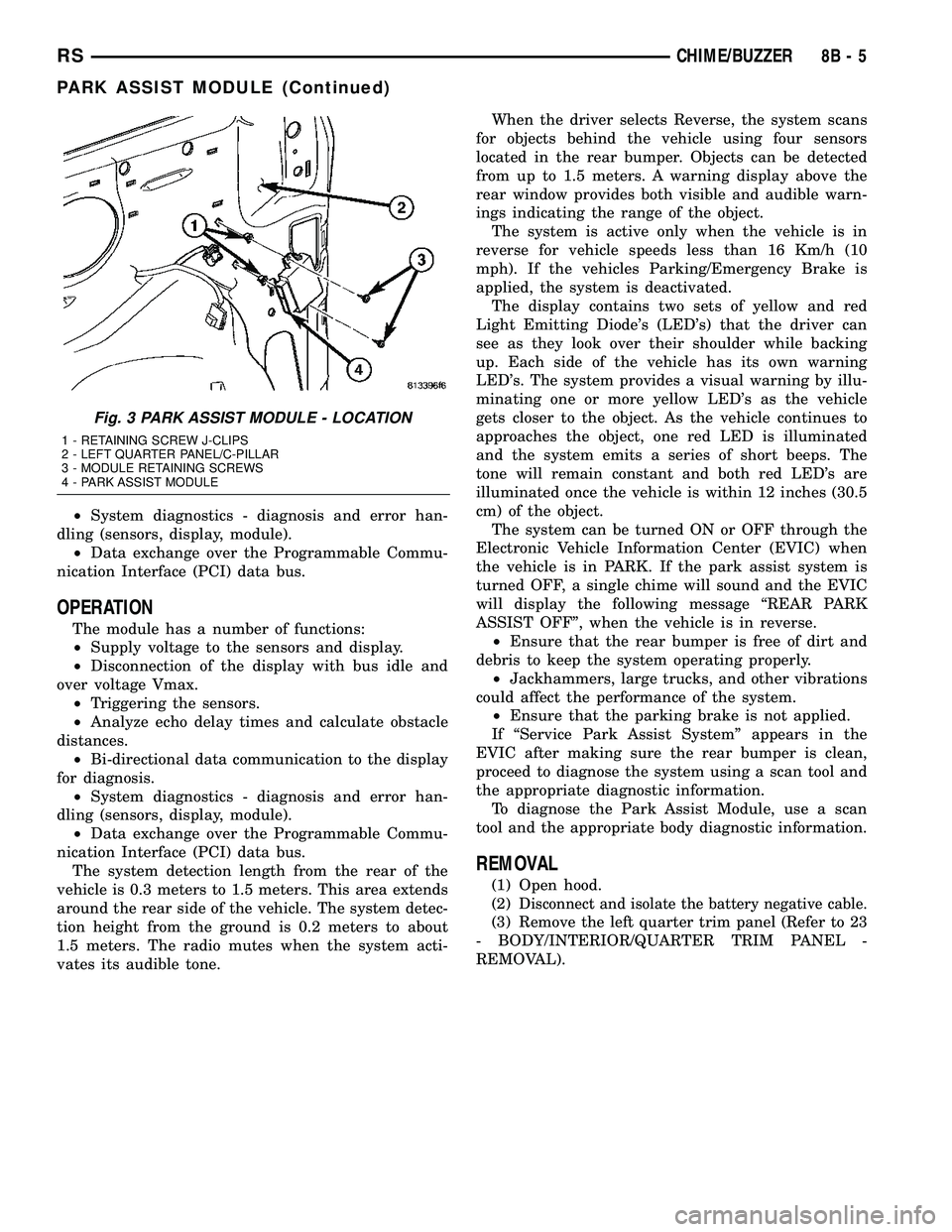
REMOVAL
(1) Open hood.
(2)
Disconnect and isolate the battery negative cable.
(3) Remove the left quarter trim panel (Refer to 23
- BODY/INTERIOR/QUARTER TRIM PANEL -
REMOVAL).
Fig. 3 PARK ASSIST MODULE - LOCATION
1 - RETAINING SCREW J-CLIPS
2 - LEFT QUARTER PANEL/C-PILLAR
3 - MODULE RETAINING SCREWS
4 - PARK ASSIST MODULE
RSCHIME/BUZZER8B-5
PARK ASSIST MODULE (Continued)