lock CHRYSLER PACIFICA 2004 1.G Workshop Manual
[x] Cancel search | Manufacturer: CHRYSLER, Model Year: 2004, Model line: PACIFICA, Model: CHRYSLER PACIFICA 2004 1.GPages: 361, PDF Size: 5.21 MB
Page 154 of 361

²Off Mode
Shows a blank display.
²Step Button
Push this button to cycle through all the Mini-trip
functions.
To Reset The Display
Pressing and releasing the Reset button once will clear
the resettable function currently being displayed. The
resettable function is average fuel economy. Reset will
only occur if the resettable function is currently being
displayed.
SETTING THE ANALOG CLOCK
To set the analog clock at the top center of the instrument
panel, press and hold the button until the setting is
correct.
ELECTRONIC DIGITAL CLOCK
The clock and radio each use the display panel built into
the radio. A digital readout shows the time in hours and
minutes whenever the ignition switch is in the ON or
ACC position and the time button is pressed.
When the ignition switch is in the OFF position, or when
the radio frequency is being displayed, time keeping is
accurately maintained.
Clock Setting Procedure
1. Turn the ignition switch to the ON or ACC position
and press the time button. Using the tip of a ballpoint pen
or similar object, press either the hour (H) or minute (M)
buttons on the radio.
2. Press the H button to set hours or the M button to set
minutes. The time setting will increase each time you
press a button.
154 UNDERSTANDING YOUR INSTRUMENT PANEL
Page 155 of 361
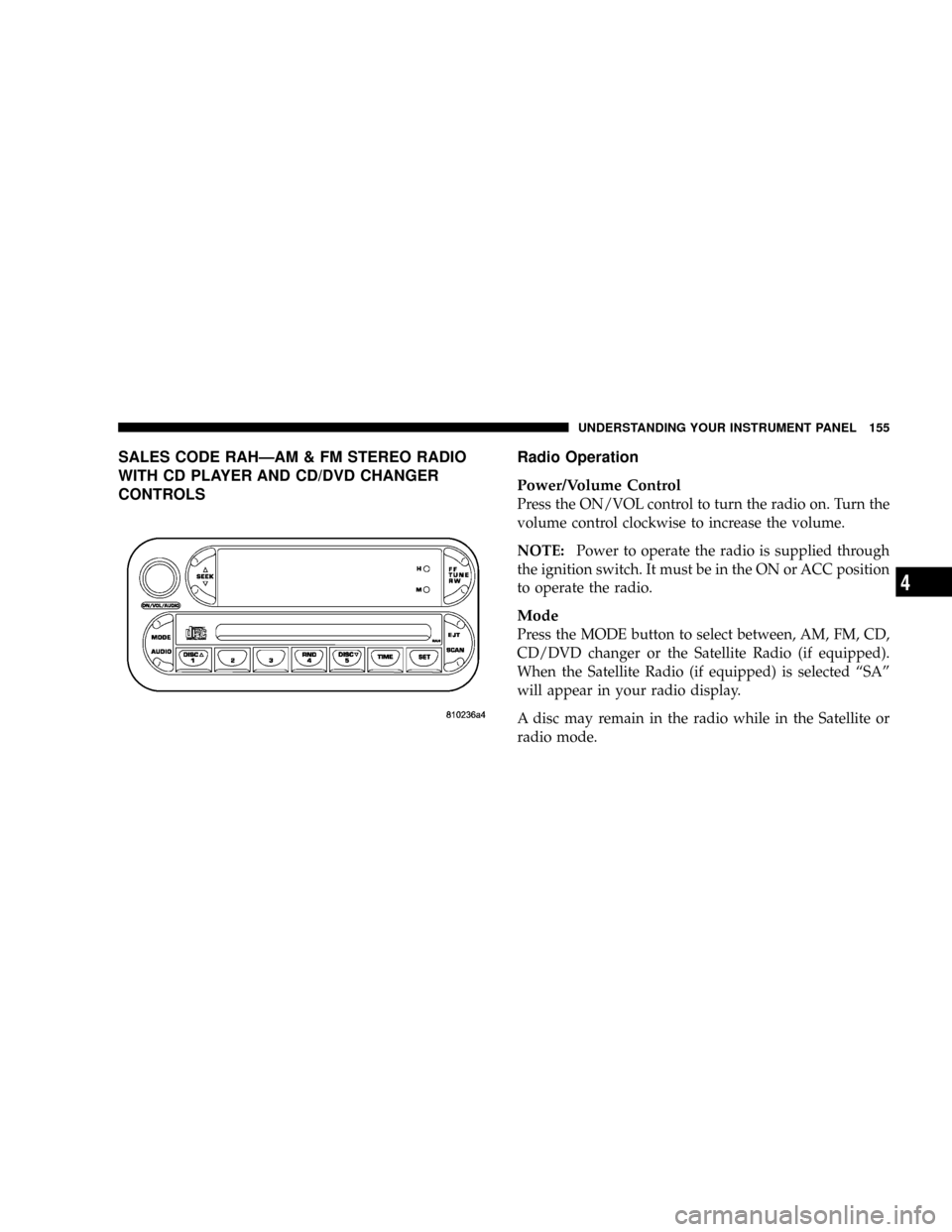
SALES CODE RAHÐAM & FM STEREO RADIO
WITH CD PLAYER AND CD/DVD CHANGER
CONTROLSRadio Operation
Power/Volume Control
Press the ON/VOL control to turn the radio on. Turn the
volume control clockwise to increase the volume.
NOTE:Power to operate the radio is supplied through
the ignition switch. It must be in the ON or ACC position
to operate the radio.
Mode
Press the MODE button to select between, AM, FM, CD,
CD/DVD changer or the Satellite Radio (if equipped).
When the Satellite Radio (if equipped) is selected ªSAº
will appear in your radio display.
A disc may remain in the radio while in the Satellite or
radio mode.
UNDERSTANDING YOUR INSTRUMENT PANEL 155
4
Page 156 of 361

Seek
Press and release the SEEK button to search for the next
station in either the AM, FM or Satellite mode. Press the
top of the button to seek up and the bottom to seek down.
The radio will remain tuned to the new station until you
make another selection. Holding the button in will by-
pass stations without stopping until you release it.
Tuning
Press the TUNE control up or down to increase or
decrease the frequency. If you press and hold the button,
the radio will continue to tune until you release the
button. The frequency will be displayed and continu-
ously updated while the button is pressed.
Balance
The Balance control adjusts the left-to-right speaker bal-
ance. Press the AUDIO button, select BALANCE, then
turn the volume knob to adjust the balance.
Fade
The Fade control provides for balance between the front
and rear speakers. Press the AUDIO button, select FADE,
then turn the volume knob to adjust the fade balance.
Tone Control
The Bass and/or Treble controls sound for the desired
tone. Press the AUDIO button, select Bass or TREBLE,
then turn the volume knob to increase or decrease
amplification of the band.
To Set The Radio Push-Button Memory
When you are receiving a station that you wish to
commit to push-button memory, press the SET button.
SET 1 will show in the display window. Select the
push-button you wish to lock onto this station and press
and release that button. If a station is not selected within
5 seconds after pressing the SET button, the station will
continue to play but will not be locked into push-button
memory.
156 UNDERSTANDING YOUR INSTRUMENT PANEL
Page 157 of 361
You may add a second station to each push-button by
repeating the above procedure with this exception: Press
the SET button twice and SET 2 will show in the display
window. Each button can be set for SET 1 and SET 2 in
both AM and FM. This allows a total of 10 AM and 10 FM
stations to be locked into memory. You can recall the
stations stored in SET 2 memory by pressing the push-
button twice.
To Change From Clock To Radio Mode
Press the TIME button to change the display between
radio frequency and time.
General Information
This radio complies with Part 15 of FCC rules and with
RSS-210 of Industry Canada. Operation is subject to the
following conditions:1. This device may not cause harmful interference,
2. This device must accept any interference received,
including interference that may cause undesired opera-
tion.
NOTE:Changes or modifications not expressively ap-
proved by the party responsible for compliance could
void the user's authority to operate the equipment.
CD Player Operation
NOTE:The ignition switch must be in the ON or ACC
position and the volume control ON before the CD player
will operate.
UNDERSTANDING YOUR INSTRUMENT PANEL 157
4
Page 163 of 361
Fade
The Fade control provides for balance between the front
and rear speakers. Press the FADE button in and it will
pop out. Adjust the balance and push the button back in.
Tone Control
The tone controls affect the BASS and TREBLE frequency
bands. Each is controlled by a slider control with a detent
at the mid position. Moving a control up or down
increases or decreases amplification of the band. The mid
position provides a balanced output.
AM/FM Selection
Press the AM/FM button to toggle between AM and FM
mode. The operating mode will be displayed next to the
station frequency. The display will show ªSTº when a
stereo station is received (FM only).
To Set The Radio Push-Button Memory
When you are receiving a station that you wish to
commit to push-button memory, press the SET button.SET 1 will now show in the display window. Select the
ª1±5º button you wish to lock onto this station and press
and release that button. If a button is not selected within
5 seconds after pressing the SET button, the station will
continue to play but will not be locked into push-button
memory.
You may add a second station to each push-button by
repeating the above procedure with this exception: Press
the SET button twice and SET 2 will show in the display
window. Each button can be set for SET 1 and SET 2 in
both AM and FM. This allows a total of 10 AM and 10 FM
stations to be locked into push-button memory. The
stations stored in SET 2 memory can be selected by
pressing the push-button twice.
Time
Press the TIME button to change the display between
radio frequency and time.
UNDERSTANDING YOUR INSTRUMENT PANEL 163
4
Page 164 of 361

To set the clock, use a ballpoint pen or similar object to
press the hour (H) or minute (M) buttons on the radio,
The time setting will increase each time you press the
button. Press any other button to exit from the clock
setting mode.
General Information
This radio complies with Part 15 of FCC rules and with
RSS-210 of Industry Canada. Operation is subject to the
following conditions:
1. This device may not cause harmful interference,
2. This device must accept any interference received,
including interference that may cause undesired opera-
tion.
NOTE:Changes or modifications not expressively ap-
proved by the party responsible for compliance could
void the user's authority to operate the equipment.
Tape Player Operation
Insert the cassette with the exposed tape side toward the
right and the mechanical action of the player will gently
pull the cassette into the play position.
NOTE:When subjected to extremely cold temperatures,
the tape mechanism may require a few minutes to warm
up for proper operation. Sometimes poor playback may
be experienced due to a defective cassette tape. Clean and
demagnetize the tape heads at least twice a year.
Tape Side йD/PTY
Pressing the¹Dbutton during tape mode will cause the
other side of the tape to be played. The display will
confirm the selected tape play direction. The time is
always displayed.
Tape
Press the TAPE button to select the Tape mode.
164 UNDERSTANDING YOUR INSTRUMENT PANEL
Page 176 of 361

Scan Button
Pressing the scan button will automatically find the
audio signal that is transmitted from the CD/DVD
changer when the rear audio/video system and the
headphones are on. This button is used only if the
headphones are locked on to a source other than the
vehicle's radio.
NOTE:When the ªGREEN LEDº is showing the head-
phones are receiving the audio signal. When the ªRED
LEDº is showing the headphones are searching for the
audio signal
Headphone Battery Service
²Using a key or similar flat object insert into the slot.
²Pry on the release tab to open the cover.
²Replace the batteries and reinstall the cover.
The replacement batteries for the headphones are three
AAA batteries.
176 UNDERSTANDING YOUR INSTRUMENT PANEL
Page 178 of 361

REMOTE SOUND SYSTEM CONTROLS
The remote sound system controls are located on the rear
surface of the steering wheel at the 3 and 9 o'clock
positions.
The right hand rocker switch has a push button in the
center and controls the volume and mode of the sound
system. Pressing the top of the rocker switch will increase
the volume and pressing the bottom of the rocker switch
will decrease the volume. Pressing the center button
changes the operation of the radio from AM to FM to
Tape or CD mode depending on which radio is in the
vehicle.
The left hand rocker switch has a push button in the
center. The function of the left hand switch is different
depending on which mode you are in.
The following describes the left hand rocker switch
operation in each mode:
Radio Operation
Pressing the top of the switch will SEEK up for the next
listenable station and pressing the bottom of the switch
will SEEK down for the next listenable station.
The button located in the center of the left hand switch
will tune to the next pre-set station that you have
programmed in the radio pre-set push-button.
Tape Player
Pressing the top of the switch once will go to the next
selection on the cassette. Pressing the bottom of the
switch once will go to the beginning of the current
selection or to the beginning of the previous selection if it
is within the first 5 seconds of the current selection.
If you press the switch up or down twice it plays the
second selection, three times, it will play the third, etc.
The button in the center of the left hand switch has no
function in this mode.
178 UNDERSTANDING YOUR INSTRUMENT PANEL
Page 182 of 361

RADIO OPERATION AND CELLULAR PHONES
Under certain conditions, the cellular phone being On in
your vehicle can cause erratic or noisy performance from
your radio. This condition may be lessened or eliminated
by relocating the cellular phone antenna. This condition
is not harmful to the radio. If your radio performance
does not satisfactorily ªclearº by the repositioning of the
antenna, it is recommended that the radio volume be
turned down or off during cellular phone operation.
NAVIGATION SYSTEM Ð IF EQUIPPED
The navigation system provides maps, turn identifica-
tion, selection menus and instructions for selecting a
variety of destinations and routes. The buttons to operate
the system are located on the instrument panel next to the
analog clock.
Refer to your Navigation User's Manual for detailed
operating instructions.The navigation DVD unit is located in the underfloor
storage compartment in the rear cargo area. A single disc
containing map information for the entire United States
and parts of Canada is stored in the DVD unit. Updated
DVD's are available from your authorized dealer.
182 UNDERSTANDING YOUR INSTRUMENT PANEL
Page 195 of 361
STARTING AND OPERATING
CONTENTS
mStarting Procedures.....................198
NNormal Starting......................198
mEngine Block Heater Ð If Equipped.........200
mAutomatic Transmission..................201
NBrake/Transmission Interlock System.......201
NAutomatic Transmission Ignition Interlock
System.............................202
NFour Speed Automatic Transmission........202
mAutoStick............................204NAutoStick Operation...................204
NAutoStick General Information............204
mAll Wheel Drive Ð If Equipped............205
mParking Brake.........................206
mBrake System..........................208
NAnti-Lock Brake System................208
mPower Steering........................211
mTraction Control Ð If Equipped............212
5