radio CHRYSLER PACIFICA 2004 1.G Owners Manual
[x] Cancel search | Manufacturer: CHRYSLER, Model Year: 2004, Model line: PACIFICA, Model: CHRYSLER PACIFICA 2004 1.GPages: 361, PDF Size: 5.21 MB
Page 12 of 361
NOTE:The power window switches, radio, power
sunroof, and power outlets will remain active for up to 45
seconds after the ignition switch has been turned off.
Opening either front door will cancel this feature.
WARNING!
Leaving children in a vehicle unattended is danger-
ous for a number of reasons. A child or others could
be injured. Children should be warned not to touch
the parking brake, brake pedal or the gear selector
lever. Don't leave the keys in the ignition. A child
could operate power windows, other controls, or
move the vehicle.
CAUTION!
An unlocked car is an invitation to thieves. Always
remove key from the ignition and lock all doors
when leaving the vehicle unattended.
Key-In-Ignition Reminder
If you open the driver's door and the key is in the ignition
switch, a chime will sound to remind you to remove the key.
SENTRY KEY
The Sentry Key Immobilizer System prevents unautho-
rized operation of the vehicle by disabling the engine.
The system will shut the engine off after 2 seconds of
running if an invalid key is used to start the vehicle. This
system utilizes ignition keys which have an electronic
chip (transponder) embedded into them. Only keys that
have been programmed to the vehicle can be used to start
and operate the vehicle.
12 THINGS TO KNOW BEFORE STARTING YOUR VEHICLE
Page 19 of 361

To activate the system, open the rear door and move the
child lock control, located near the door's rear latch, to
the ON position.When the child lock system is engaged the door can be
opened only by using the outside door handle even
though the inside door lock is in the unlocked position.
REMOTE KEYLESS ENTRY
This system allows you to lock or unlock the doors and
liftgate, and activate the panic alarm from distances up to
about 23 feet (7 meters) using a hand held radio trans-
mitter. The transmitter need not be pointed at the vehicle
to activate the system.
THINGS TO KNOW BEFORE STARTING YOUR VEHICLE 19
2
Page 21 of 361

To lock the doors and liftgate:
Press and release the LOCK button on the transmitter to
lock all doors and liftgate. The horn will chirp once to
acknowledge the signal. If desired, the ªSound Horn On
Lockº feature can be turned on and off by referring to the
Customer Programmable Features of the ªElectronic Ve-
hicle Information Center (EVIC)º section or by following
these steps.
1. Press the LOCK button for 4 to 10 seconds.
2. While the LOCK button is pressed (after 4 seconds),
press the PANIC button. Release both buttons.
The ªSound Horn On Lockº feature can be reactivated by
repeating this procedure.
Using The Panic Alarm:
To turn the panic alarm feature ON or OFF, press and
hold the PANIC button on the transmitter for at least one
second and release. When the panic alarm is on, the
headlights and park lights will flash, the horn will pulse
on and off and the interior lights will turn on.
The panic alarm will stay on for 3 minutes unless you
turn it off by pressing the PANIC button a second time or
turn the ignition switch to the ON position.
NOTE:When you turn off the panic alarm by pressing
the PANIC button a second time, you may have to be
closer to the vehicle due to the radio frequency noises of
the system.
THINGS TO KNOW BEFORE STARTING YOUR VEHICLE 21
2
Page 23 of 361

General Information
This device complies with part 15 of the FCC rules and
RSS 210 of Industry Canada. Operation is subject to the
following conditions:
²This device may not cause harmful interference.
²This device must accept any interference received,
including interference that may cause undesired op-
eration.
If your Remote Keyless Entry transmitter fails to operate
from a normal distance, check for these two conditions.
1. A weak battery in the transmitter. The expected life of
the battery is a minimum of three years.
2. Closeness to a radio transmitter such as a radio station
tower, airport transmitter, and some mobile or CB radios.
Transmitter Battery Service
The recommended replacement battery is one CR2032
battery.
NOTE:Do not touch the battery terminals that are on
the back housing or the printed circuit board.
1. With the transmitter buttons facing down, use a small
screwdriver or similar flat object to pry the two halves of
the transmitter apart. Make sure not to damage the
rubber gasket during removal.
THINGS TO KNOW BEFORE STARTING YOUR VEHICLE 23
2
Page 73 of 361

Illuminated Vanity Mirrors
An illuminated vanity mirror is on the sun visor. To use
the mirror, rotate the sun visor down and swing the
mirror cover upward. The lights turn on automatically.
Closing the mirror cover turns off the lights.
Sun Visor Extension
This feature has a pull out extension on the sun visor for
increased coverage.
HANDS±FREE COMMUNICATION (UConnectŸ) Ð
IF EQUIPPED
UConnectŸ is a voice-activated, hands-free, in-vehicle
communications system. UConnectŸ; allows you to dial
your cellular phone using simple voice commands (e.g.,
ªCall Mike Workº or ªDial 248-555-1212º). Your cellular
phone's audio is transmitted through your vehicle's
stereo system; the system will automatically mute your
radio before receiving or sending a call.
UConnectŸ allows you to transfer calls between the
system and your cellular phone as you enter or exit your
vehicle, and enables you to mute the system's micro-
phone for private conversations.
UNDERSTANDING THE FEATURES OF YOUR VEHICLE 73
3
Page 75 of 361

prompts as well as the other party's voice in a conversa-
tion will be played over your vehicle's stereo system. The
volume of the UConnectŸ system can be controlled
through your normal stereo controls.
The radio display will be used for visual prompts from
the UConnectŸ system such as caller ID.
Operation
Voice commands can be used in the operation of the
UConnectŸ system and to navigate through the UCon-
nectŸ menu structure. Voice commands should be given
after each UConnectŸ system prompt. You will be
prompted for a specific command and then guided
through the available options. There are two ways to give
commands to the UConnectŸ system:
²You can say9Dial9at the9Ready9prompt. When
prompted for the phone number you wish to dial, say
the phone number (9123 456 78909).
²Alternatively as you become familiar with the UCon-
nectŸ system, you can combine the commands and
say9Dial 123 456 78909.
Pairing a Cellular Phone to the UConnectŸ System
To begin using your UConnectŸ system, you must pair
your compatible BluetoothŸ enabled cellular phone. To
complete the registration process, you will need to refer-
ence your cellular phone owner's manual.
²Press the 'Phone' button to begin.
²After the9Ready9prompt, say9Setup Phone Pairing9.
²You will be asked to say a four-digit pin number into
the UConnectŸ system which you will later need to
enter into your cellular phone during the cellular
phone pairing process. You can enter any four-digit
pin number. You will not need to remember this pin
number after the initial registration process.
UNDERSTANDING THE FEATURES OF YOUR VEHICLE 75
3
Page 88 of 361

NOTE:
²If the lights in the second row heated seat switch begin
to flash when the switch is pressed, it indicates that the
heated seat is not functioning properly and that ser-
vice is required. See your authorized dealer for service.
²Once a heat setting is selected, heat will be felt within
2 to 3 minutes.
²The heated seats will turn off when the ignition switch
is turned to the OFF position.
Memory Seat Ð If Equipped
If your vehicle is equipped with memory systems, your
remote keyless entry transmitter or memory seat buttons
on the driver's door panel can be used to recall the
driver's seat, outside mirrors, adjustable pedals (if
equipped) and radio station presets to saved positions.The memory seat buttons located on the driver's door
will always recall stored settings. The remote keyless
entry transmitter can be programmed to recall positions
when the UNLOCK button is pressed. Refer to the
following procedure on how to link a remote keyless
entry transmitter to a position.
88 UNDERSTANDING THE FEATURES OF YOUR VEHICLE
Page 89 of 361

NOTE:The vehicle must be in Park to recall memory
positions. If a recall is attempted when the vehicle is not
in Park, a message will be displayed in the Electronic
Vehicle Information Center (EVIC).
To recall memory positions press memory button number
1 if you are recalling the memory position for driver one
or press memory button number 2 if you are recalling the
memory position for driver two. A recall can be cancelled
by pressing any of the memory buttons during a recall.
When a recall is cancelled, the seat stops moving and a
delay of approximately one second will occur before any
other recalls can be selected.
Your vehicle has been delivered with two remote keyless
entry transmitters. One or both transmitters can be linked
to either memory position. Up to eight remote keyless
entry transmitters can be used with your vehicle. The
memory seat system can also accommodate up to eighttransmitters linked to either of the two stored seat
positions or any combination of the two positions.
To Program Memory Seat Buttons & RKE
Transmitters, Follow These Steps:
1. Turn the ignition switch to the ON position.
2. Select Remote Linked to Memory from the EVIC and
enter ªYesº.
3. Use the seat, mirror and adjustable pedal switches to
adjust the seat, recliner, side view mirrors and adjustable
pedals to the desired positions.
4. Set the radio station presets (up to 10 AM and 10 FM
stations can be set).
5. Turn the ignition switch to the OFF position and
remove the key.
UNDERSTANDING THE FEATURES OF YOUR VEHICLE 89
3
Page 105 of 361

Parade Mode (Daytime Brightness Feature)
Rotate the dimmer control upward to
the first detent. This feature brightens
the odometer and radio display when
the parking lights or headlights are on
during daylight conditions.
Automatic Headlights
This system automatically turns your headlights ON or
OFF based on ambient light levels. To turn the system
ON, turn the end of the Multi-Function Lever to the third
detent position. When the system is ON, the Headlight
Time Delay feature is also ON. This means your head-
lights will stay ON for up to 90 seconds after you turn the
ignition switch OFF. To turn the Automatic System OFF,
turn the end of the Multi-Function Lever to the OFF
position.NOTE:The engine must be running before the head-
lights will come ON in the Automatic mode.
Daytime Running Lights (Canada Only)
The high beam headlights will come on as Daytime
Running Lights whenever the ignition switch is on, the
headlights are off, and the parking brake is off. The
headlight switch must be used for normal night time
driving.
Lights-on Reminder
If the headlights or parking lights are on after the ignition
is turned OFF, a chime will sound to alert the driver
when the driver's door is opened.
Headlight Time Delay
This feature provides the safety of headlight illumination
for up to 90 seconds, when leaving your vehicle in an
unlighted area.
UNDERSTANDING THE FEATURES OF YOUR VEHICLE 105
3
Page 116 of 361
Programming HomeLink
NOTE:When programming a garage door opener, it is
advised to park outside the garage. Some vehicles may
require the ignition switch to be turned to the second (or
9accessories9) position for programming and/or opera-
tion of HomeLink. It is also recommended that a new
battery be placed in the hand-held transmitter of the
device being programmed to HomeLink for quicker
training and accurate transmission of the radio-frequency
signal.
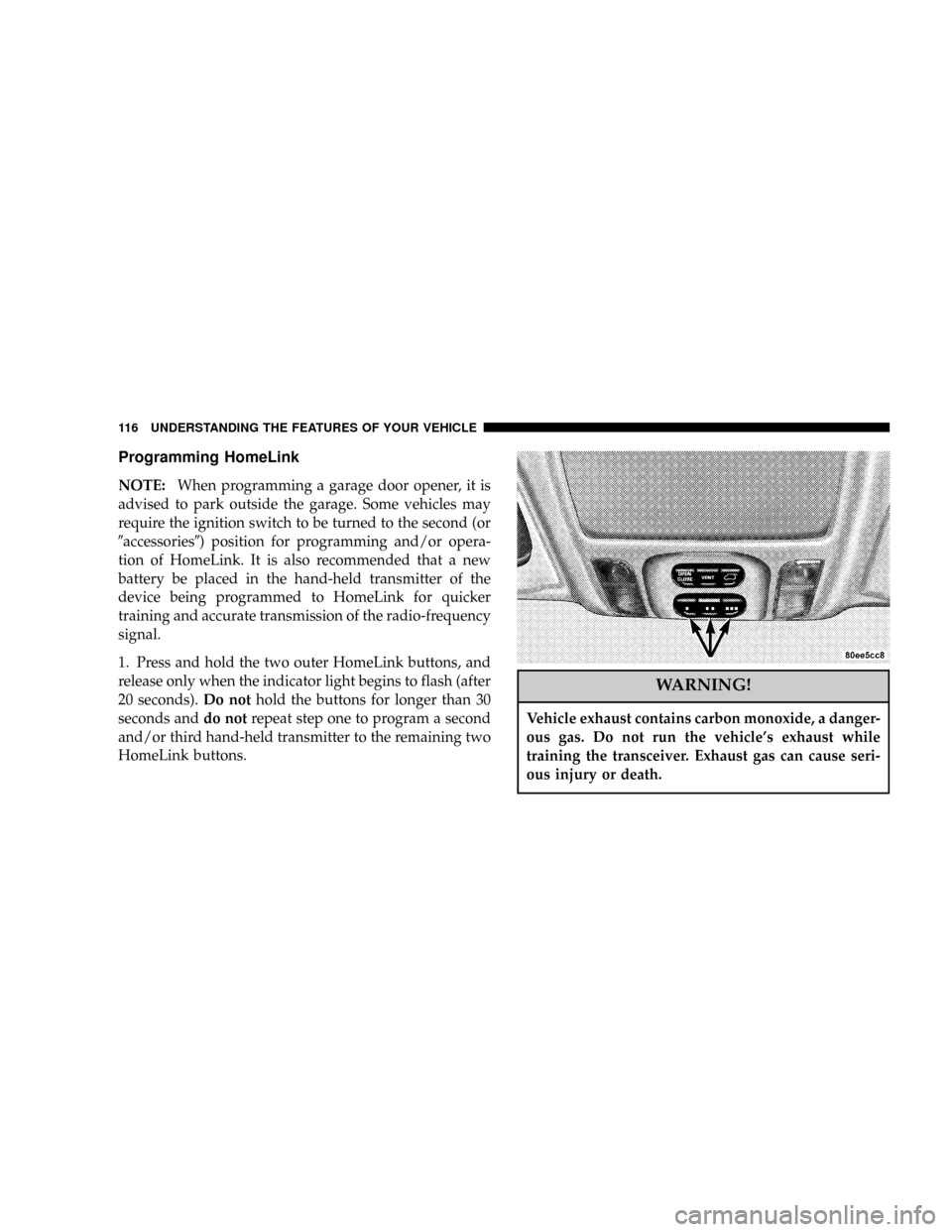
1. Press and hold the two outer HomeLink buttons, and
release only when the indicator light begins to flash (after
20 seconds).Do nothold the buttons for longer than 30
seconds anddo notrepeat step one to program a second
and/or third hand-held transmitter to the remaining two
HomeLink buttons.
WARNING!
Vehicle exhaust contains carbon monoxide, a danger-
ous gas. Do not run the vehicle's exhaust while
training the transceiver. Exhaust gas can cause seri-
ous injury or death.
116 UNDERSTANDING THE FEATURES OF YOUR VEHICLE