ignition CHRYSLER PACIFICA 2005 1.G Service Manual
[x] Cancel search | Manufacturer: CHRYSLER, Model Year: 2005, Model line: PACIFICA, Model: CHRYSLER PACIFICA 2005 1.GPages: 376, PDF Size: 10.32 MB
Page 151 of 376

Driving on a significantly underinflated tire causes the
tire to overheat and can lead to tire failure. Underinfla-
tion also reduces fuel efficiency and tire tread life, and
may affect the vehicle’s handling and stopping ability.
Each tire, including the spare, should be checked
monthly when cold and set to the recommended inflation
pressure as specified in the tire and loading information
placard and owner’s manual.
22. Airbag Light
This light turns on and remains on for 6 to 8
seconds as a bulb check when the ignition
switch is first turned ON. If the light is not on
during starting, stays on, or turns on while
driving, have the system inspected by an authorized
dealer as soon as possible.23. Electronic Vehicle Information Center Display
When the appropriate conditions exist, this display
shows the Electronic Vehicle Information Center (EVIC)
messages.
24. Engine Temperature Warning Light
This light warns of an overheated engine condi-
tion. If this light is accompanied by a continuous
chime, the engine temperature is critically hot, and
the vehicle should be turned off immediately. The vehicle
should be serviced as soon as possible.
ELECTRONIC VEHICLE INFORMATION CENTER
(EVIC)
The Electronic Vehicle Information Center (EVIC) con-
sists of the following:
•Vehicle information warning message displays
•Tire Pressure Monitor System — If Equipped
•Customer programmable features
UNDERSTANDING YOUR INSTRUMENT PANEL 151
4
Page 157 of 376

Reset Service Distance (Displays Only if Service
Interval was Changed)
When this feature is selected the current accumulated
service distance can be reset to the newly selected service
interval. Pressing the STEP button when in this display
will select “Yes” or “No.”
Power Accessory Delay?
When this feature is selected, the power window
switches, radio, hands–free system, DVD video system,
power sunroof, and power outlets will remain active for
up to 45 seconds after the ignition switch has been turned
off. Opening a vehicle door or liftgate will cancel this
feature.
Easy Exit Seat? (Available with Memory Seat Only)
When this feature is selected, the driver’s seat moves
rearward 5 cm (2 inches) or to the farthest rearward
position if this distance is less than 5 cm (2 inches) when
the key is removed from the ignition switch so that thedriver can more easily exit the vehicle. The seat will
return to the memorized seat location (if REMOTE LINK
TO MEMORY is set to YES) when the remote keyless
entry transmitter is used to unlock the door. Pressing the
STEP button when in this display will select “Yes” or
“No.”
Retrain Tire Sensors (Available with Tire Pressure
Monitor System Only)
The Tire Pressure Monitor system must be retrained
following a tire rotation or wheel rim mounted sensor
replacement. See your authorized dealer for service.
Compass Display — If Equipped
This display provides one of eight compass readings to
indicate the direction the vehicle is facing.
UNDERSTANDING YOUR INSTRUMENT PANEL 157
4
Page 158 of 376

Automatic Compass Calibration
This compass is self calibrating which eliminates the
need to manually set the compass. When the vehicle is
new, the compass may appear erratic and the EVIC will
display “COMPASS CALIBRATING” until the compass
is calibrated. The compass will calibrate automatically
after approximately 40 seconds if no buttons are pressed
and the vehicle is in Park. You may also calibrate the
compass by completing one 360° turn in an area free from
large metal or metallic objects, the “COMPASS CALI-
BRATING” EVIC message will turn off and the compass
will function normally.
Manual Compass Calibration
If the compass appears erratic and the “COMPASS CALI-
BRATING” message does not appear in the EVIC display,
you must put the compass into the Calibration Mode
manually.To put into a Calibration Mode:Turn on the ignition
switch and set the display to Compass. Press the RESET
button for at least 10 seconds until the “COMPASS
CALIBRATING” message appears. Release the RESET
button and complete one 360° turn in an area free from
large metal objects. The “COMPASS CALIBRATING”
message will turn off and the compass will function
normally.
Compass Variance
Compass Variance is the difference between magnetic
North and Geographic North. In some areas of the
country, the difference between magnetic and geographic
North is great enough to cause the compass to give false
readings. If this occurs, the compass variance must be set.
NOTE:Magnetic materials should be kept away from
the overhead console.
158 UNDERSTANDING YOUR INSTRUMENT PANEL
Page 159 of 376

To set the variance:Turn the ignition switch ON and set
the display to Compass. Press the RESET button for
approximately 5 seconds but no more than 10 seconds.
The “COMPASS VARIANCE” message and the last vari-
ance zone number will be displayed. Press the STEP
button to select the proper variance zone as shown in the
map. Press the RESET button to set the new variance
zone and resume normal operation.
Mini-Trip Functions — If Equipped
This displays information on the following:
•Average Fuel Economy (ECO AVG)
Shows the average fuel economy since the last reset. The
minimum average fuel economy that will be displayed
on reset is 0.3 mpg.
•Distance To Empty (DTE)
Shows the estimated distance that can be travelled with
the fuel remaining in the tank. This estimated distance is
determined using the MPG for the last few minutes.
UNDERSTANDING YOUR INSTRUMENT PANEL 159
4
Page 160 of 376

•Off Mode
Shows a blank display.
•Step Button
Push this button to cycle through all the Mini-trip
functions.
To Reset The Display
Pressing and releasing the Reset button once will clear
the resettable function currently being displayed. The
resettable function is average fuel economy. Reset will
only occur if the resettable function is currently being
displayed.
SETTING THE ANALOG CLOCK
To set the analog clock at the top center of the instrument
panel, press and hold the button until the setting is
correct.
ELECTRONIC DIGITAL CLOCK
The clock and radio each use the display panel built into
the radio. A digital readout shows the time in hours and
minutes whenever the ignition switch is in the ON or
ACC position and the time button is pressed.
When the ignition switch is in the OFF position, or when
the radio frequency is being displayed, time keeping is
accurately maintained.
Clock Setting Procedure
1. Turn the ignition switch to the ON or ACC position
and press the time button. Using the tip of a ballpoint pen
or similar object, press either the hour (H) or minute (M)
buttons on the radio.
2. Press the H button to set hours or the M button to set
minutes. The time setting will increase each time you
press a button.
160 UNDERSTANDING YOUR INSTRUMENT PANEL
Page 161 of 376

SALES CODE RAH—AM & FM STEREO RADIO
WITH CD PLAYER AND CD/DVD CHANGER
CONTROLSRadio Operation
Power/Volume Control
Press the ON/VOL control to turn the radio on. Turn the
volume control clockwise to increase the volume.
NOTE:Power to operate the radio is supplied through
the ignition switch. It must be in the ON or ACC position
to operate the radio.
Mode
Press the MODE button to select between, AM, FM, CD,
CD/DVD changer or the Satellite Radio (if equipped).
When the Satellite Radio (if equipped) is selected “SA”
will appear in your radio display.
A disc may remain in the radio while in the Satellite or
radio mode.
Seek
Press and release the SEEK button to search for the next
station in either the AM, FM or Satellite mode. Press the
UNDERSTANDING YOUR INSTRUMENT PANEL 161
4
Page 163 of 376
both AM and FM. This allows a total of 10 AM and 10 FM
stations to be locked into memory. You can recall the
stations stored in SET 2 memory by pressing the push-
button twice.
To Change From Clock To Radio Mode
Press the TIME button to change the display between
radio frequency and time.
General Information
This radio complies with Part 15 of FCC rules and with
RSS-210 of Industry Canada. Operation is subject to the
following conditions:
1. This device may not cause harmful interference,
2. This device must accept any interference received,
including interference that may cause undesired opera-
tion.NOTE:Changes or modifications not expressively ap-
proved by the party responsible for compliance could
void the user’s authority to operate the equipment.
CD Player Operation
NOTE:The ignition switch must be in the ON or ACC
position and the volume control ON before the CD player
will operate.
Inserting The Compact Disc
CAUTION!
This CD player will accept only 4–3/4 inch (12cm)
discs only. The use of other sized discs may damage
the CD player mechanism.
You may either insert or eject a disc with the radio OFF.
UNDERSTANDING YOUR INSTRUMENT PANEL 163
4
Page 164 of 376

If you insert a disc with the ignition ON and the radio
OFF, the display will show the time of day. If you insert
a disc with the ignition OFF, the display will show the
time of day for about 5 seconds, then go out.
If the power is ON, the unit will switch from radio to CD
mode and begin to play when you insert the disc. The
display will show the track number and index time in
minutes and seconds. Play will begin at the start of track
1.
Seek
Press the top of the SEEK button for the next selection on
the CD. Press the bottom of the button to return to the
beginning of the current selection, or return to the
beginning of the previous selection if the CD is within the
first 10 seconds of the current selection.
EJT — Eject
Press the EJT button and the disc will unload and move
to the entrance for easy removal. The unit will switch to
the radio mode.
If you do not remove the disc within 15 seconds, it will be
reloaded. The radio mode will continue to appear.
The disc can be ejected with the radio OFF.
FF/TUNE/RW
Press FF (Fast Forward) and the CD player will begin to
fast forward until FF is released. The RW ( Reverse)
button works in a similar manner.
RND — Random Play
Press the RND button while the CD is playing to activate
Random Play. This feature plays the selections on the
compact disc in random order to provide an interesting
change of pace.
164 UNDERSTANDING YOUR INSTRUMENT PANEL
Page 166 of 376
Radio Operation
Power/Volume Control
Press the ON/VOL control to turn the radio on. Turn the
volume control to the right to increase the volume.
NOTE:Power to operate the radio is supplied through
the ignition switch. It must be in the ON or ACC position
to operate the radio.
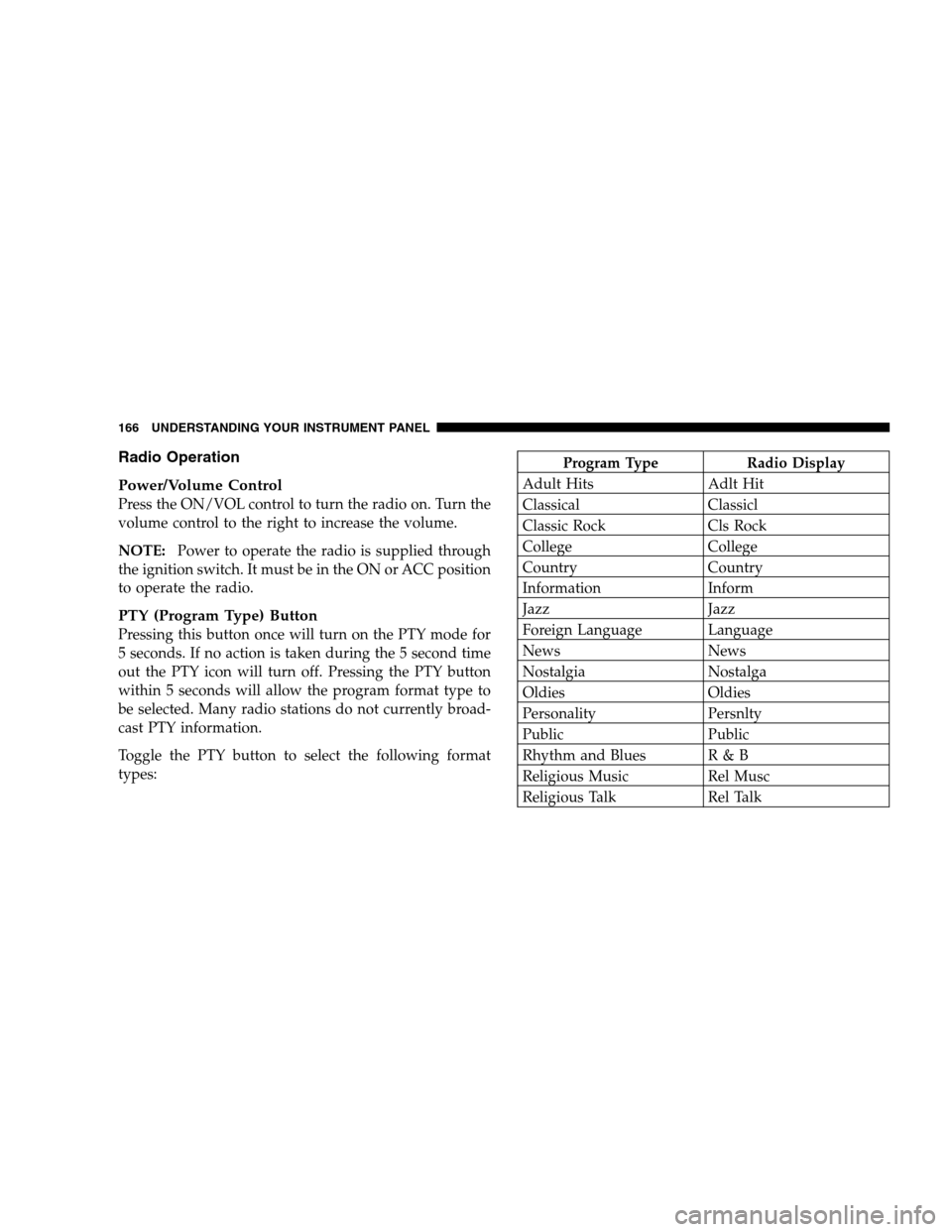
PTY (Program Type) Button
Pressing this button once will turn on the PTY mode for
5 seconds. If no action is taken during the 5 second time
out the PTY icon will turn off. Pressing the PTY button
within 5 seconds will allow the program format type to
be selected. Many radio stations do not currently broad-
cast PTY information.
Toggle the PTY button to select the following format
types:
Program Type Radio Display
Adult Hits Adlt Hit
Classical Classicl
Classic Rock Cls Rock
College College
Country Country
Information Inform
Jazz Jazz
Foreign Language Language
News News
Nostalgia Nostalga
Oldies Oldies
Personality Persnlty
Public Public
Rhythm and Blues R & B
Religious Music Rel Musc
Religious Talk Rel Talk
166 UNDERSTANDING YOUR INSTRUMENT PANEL
Page 171 of 376

Rewind — RW
Press the RW button down momentarily to reverse the
tape direction. The tape will rewind until the button is
pressed again or until the beginning of the tape is
reached. At the beginning of the tape, the tape will play
in the opposite direction.
EJT Tape
Press the EJT TAPE button and the cassette will disen-
gage and eject from the radio.
Metal Tape Selection (70µs)
If a standard 70 µ (metal) tape is inserted into the player,
the player will automatically select the correct equaliza-
tion.
Pinch Roller Release
If ignition power or the radio ON/OFF switch are turned
off, the pinch roller will automatically retract to protectthe tape from any damage. When power is restored to the
tape player, the pinch roller will automatically reengage
and the tape will resume play.
Dolby Noise Reduction
The Dolby Noise Reduction System* is on when-
ever the tape player is on, but may be switched
on/off.
To turn the Dolby Noise Reduction System on/off: Press
the Dolby NR button (button 2) after you insert the tape.
The NR light in the display will go off when the Dolby
System is off.
* ”Dolby” noise reduction manufactured under license
from Dolby Laboratories Licensing Corporation. Dolby
and the double-D symbol are trademarks of Dolby Labo-
ratories Licensing Corporation.
UNDERSTANDING YOUR INSTRUMENT PANEL 171
4