radio CHRYSLER PACIFICA 2005 1.G Service Manual
[x] Cancel search | Manufacturer: CHRYSLER, Model Year: 2005, Model line: PACIFICA, Model: CHRYSLER PACIFICA 2005 1.GPages: 376, PDF Size: 10.32 MB
Page 190 of 376

REMOTE SOUND SYSTEM CONTROLS
The remote sound system controls are located on the rear
surface of the steering wheel at the 3 and 9 o’clock
positions.
The right hand rocker switch has a push button in the
center and controls the volume and mode of the sound
system. Pressing the top of the rocker switch will increase
the volume and pressing the bottom of the rocker switch
will decrease the volume. Pressing the center button
changes the operation of the radio from AM to FM to
Tape or CD mode depending on which radio is in the
vehicle.
The left hand rocker switch has a push button in the
center. The function of the left hand switch is different
depending on which mode you are in.
The following describes the left hand rocker switch
operation in each mode:
Radio Operation
Pressing the top of the switch will SEEK up for the next
listenable station and pressing the bottom of the switch
will SEEK down for the next listenable station.
The button located in the center of the left hand switch
will tune to the next pre-set station that you have
programmed in the radio pre-set push-button.
Tape Player
Pressing the top of the switch once will go to the next
selection on the cassette. Pressing the bottom of the
switch once will go to the beginning of the current
selection or to the beginning of the previous selection if it
is within the first 5 seconds of the current selection.
If you press the switch up or down twice it plays the
second selection, three times, it will play the third, etc.
The button in the center of the left hand switch has no
function in this mode.
190 UNDERSTANDING YOUR INSTRUMENT PANEL
Page 191 of 376

CD Player
Pressing the top of the switch once will go to the next
track on the CD. Pressing the bottom of the switch once
will go to the beginning of the current track or to the
beginning of the previous track if it is within one second
after the current track begins to play.
If you press the switch up or down twice it plays the
second track, three times, it will play the third, etc.
The button in the center of the left hand switch has no
function in this mode.
RADIO GENERAL INFORMATION
Radio Broadcast Signals
Your new radio will provide excellent reception under
most operating conditions. Like any system, however, car
radios have performance limitations, due to mobile op-
eration and natural phenomena, which might lead you to
believe your sound system is malfunctioning. To helpyou understand and save you concern about these “ap-
parent” malfunctions, you must understand a point or
two about the transmission and reception of radio sig-
nals.
Two Types of Signals
There are two basic types of radio signals... AM or
Amplitude Modulation, in which the transmitted sound
causes the amplitude, or height, of the radio waves to
vary... and FM or Frequency Modulation, in which the
frequency of the wave is varied to carry the sound.
Electrical Disturbances
Radio waves may pick up electrical disturbances during
transmission. They mainly affect the wave amplitude,
and thus remain a part of the AM reception. They
interfere very little with the frequency variations that
carry the FM signal.
UNDERSTANDING YOUR INSTRUMENT PANEL 191
4
Page 192 of 376

AM Reception
AM sound is based on wave amplitude, so AM reception
can be disrupted by such things as lightning, power lines
and neon signs.
FM Reception
Because FM transmission is based on frequency varia-
tions, interference that consists of amplitude variations
can be filtered out, leaving the reception relatively clear,
which is the major feature of FM radio.
NOTE:On vehicles so equipped the radio, steering
wheel radio controls and 6 disc CD/DVD changer if
equipped, will remain active for up to 45 seconds after
the ignition switch has been turned off. Opening a
vehicle front door will cancel this feature.
CASSETTE TAPE AND PLAYER MAINTENANCE
To keep the cassette tapes and player in good condition,
take the following precautions:
1. Do not use cassette tapes longer than C-90; otherwise,
sound quality and tape durability will be greatly dimin-
ished.
2. Keep the cassette tape in its case to protect from
slackness and dust when it is not in use.
3. Keep the cassette tape away from direct sunlight, heat
and magnetic fields such as the radio speakers.
4. Before inserting a tape, make sure that the label is
adhering flatly to the cassette.
5. A loose tape should be corrected before use. To rewind
a loose tape, insert the eraser end of a pencil into the tape
drive gear and twist the pencil in the required directions.
192 UNDERSTANDING YOUR INSTRUMENT PANEL
Page 194 of 376

RADIO OPERATION AND CELLULAR PHONES
Under certain conditions, the cellular phone being On in
your vehicle can cause erratic or noisy performance from
your radio. This condition may be lessened or eliminated
by relocating the cellular phone antenna. This condition
is not harmful to the radio. If your radio performance
does not satisfactorily “clear” by the repositioning of the
antenna, it is recommended that the radio volume be
turned down or off during cellular phone operation.
NAVIGATION SYSTEM — IF EQUIPPED
The navigation system provides maps, turn identifica-
tion, selection menus and instructions for selecting a
variety of destinations and routes. The buttons to operate
the system are located on the instrument panel next to the
analog clock.
Refer to your Navigation User’s Manual for detailed
operating instructions.The navigation DVD unit is located in the underfloor
storage compartment in the rear cargo area. A single disc
containing map information for the entire United States
and parts of Canada is stored in the DVD unit. Updated
DVD’s are available from your authorized dealer.
194 UNDERSTANDING YOUR INSTRUMENT PANEL
Page 222 of 376

•and a slight drop or fall away of the brake pedal at the
end of the stop.
These are all normal characteristics of ABS.
WARNING!
The Anti-Lock Brake System contains sophisticated
electronic equipment that may be susceptible to
interference caused by improperly installed or high
output radio transmitting equipment. This interfer-
ence can cause possible loss of anti-lock braking
capability. Installation of such equipment should be
performed by qualified professionals.
All vehicle wheels and tires must be the same size and
type and tires must be properly inflated to produce
accurate signals for the computer.
POWER STEERING
The standard power steering system will give you good
vehicle response and increased ease of maneuverability
in tight spaces. The system will provide mechanical
steering capability if power assist is lost.
If for some reason, the power assist is interrupted, it will
still be possible to steer your vehicle. Under these condi-
tions you will observe a substantial increase in steering
effort, especially at very low vehicle speeds and during
parking maneuvers.
NOTE:Increased noise levels at the end of the steering
wheel travel are considered normal and does not indicate
that there is a problem with the power steering system.
WARNING!
Continued operation with reduced power steering
assist could pose a safety risk to yourself and others.
Service should be obtained as soon as possible.
222 STARTING AND OPERATING
Page 243 of 376
![CHRYSLER PACIFICA 2005 1.G Service Manual 1,2,3, OR 4 TIRE(S) LOW PRESSURE
Low tire pressure levels of 25 psi [1.72 bars] (172 kPa) or
less detected in one or more tires.
Inspect all tires for proper inflation pressure, once the
proper tire p](/img/25/8499/w960_8499-242.png "CHRYSLER PACIFICA 2005 1.G Service Manual 1,2,3, OR 4 TIRE(S) LOW PRESSURE
Low tire pressure levels of 25 psi [1.72 bars] (172 kPa) or
less detected in one or more tires.
Inspect all tires for proper inflation pressure, once the
proper tire p")
1,2,3, OR 4 TIRE(S) LOW PRESSURE
Low tire pressure levels of 25 psi [1.72 bars] (172 kPa) or
less detected in one or more tires.
Inspect all tires for proper inflation pressure, once the
proper tire pressure has been set, the TPM system
warning will reset automatically when the vehicle has
been driven for at least 2 minutes at or above 20 mph (32
km/h).
1,2,3, OR 4 TIRE(S) HIGH PRESSURE
High tire pressure levels of 45 psi [3.10 bars] (310 kPa) or
more detected in one or more tires.
Inspect all tires for proper inflation pressure, once the
proper tire pressure has been set, the TPM system
warning will reset automatically when the vehicle has
been driven for at least 2 minutes at or above 20 mph (32
km/h).
SERVICE TIRE PRESSURE SYSTEM/SEE
OWNER’S MANUAL
The Tire Pressure Monitor System (TPM) system requires
service.
See your authorized dealer for service.
TIRE PRESSURE UNAVAILABLE
The TPM system function is temporarily unavailable due
to external electromagnetic interference, such as portable
electronic devices, or near by radio or TV towers.
Move the vehicle to an area free from radio, TV antennas
and transmitting towers or disconnect any portable elec-
tronic devices. Once the external interference is removed
the TPM system will resume normal operation and “TIRE
PRESSURE NOW AVAILABLE” will appear in the Elec-
tronic Vehicle Information Center (EVIC) display.
STARTING AND OPERATING 243
5
Page 271 of 376
WARNING!
•Do not attempt to push or tow your vehicle to get it
started. Vehicles equipped with an automatic trans-
mission cannot be started this way. Unburned fuel
could enter the catalytic converter and once the
engine has started, ignite and damage the converter
and vehicle. If the vehicle has a discharged battery,
booster cables may be used to obtain a start from
another vehicle. This type of start can be dangerous
if done improperly, so follow this procedure care-
fully.
•Battery fluid is a corrosive acid solution; do not
allow battery fluid to contact eyes, skin or clothing.
Don’t lean over battery when attaching clamps or
allow the clamps to touch each other. If acid splashes
in eyes or on skin, flush contaminated area immedi-
ately with large quantities of water.
•A battery generates hydrogen gas which is flam-
mable and explosive. Keep flame or spark away from
the vent holes. Do not use a booster battery or any
other booster source with an output that exceeds 12
volts.
1. Wear eye protection and remove any metal jewelry
such as watch bands or bracelets that might make an
inadvertent electrical contact.
2. When boost is provided by a battery in another
vehicle, park that vehicle within booster cable reach and
without letting the vehicles touch. Set the parking brake,
place the automatic transmission in PARK and turn the
ignition switch to the OFF position for both vehicles.
3. Turn off the heater, radio and all unnecessary electrical
loads.
4. Connect one end of a jumper cable to the positive
terminal of the discharged battery. Connect the other end
of the same cable to the positive terminal of the booster
battery.
WHAT TO DO IN EMERGENCIES 271
6
Page 315 of 376

Glass Surfaces
All glass surfaces should be cleaned on a regular basis
with any commercial household-type glass cleaner.
Never use an abrasive type cleaner. Use caution when
cleaning the inside rear window equipped with electric
defrosters or the right rear quarter window equipped
with the radio antenna. Do not use scrapers or other
sharp instruments which may scratch the elements.
When cleaning the rear view mirror, spray cleaner on the
towel or rag that you are using. Do not spray cleaner
directly on the mirror.
Cleaning Plastic Instrument Cluster Lenses
The lenses in front of the instruments in this vehicle are
molded in clear plastic. When cleaning the lenses, care
must be taken to avoid scratching the plastic.1. Clean with a wet soft rag. A mild soap solution may be
used, but do not use high alcohol content or abrasive
cleaners. If soap is used, wipe clean with a clean damp
rag.
2. Dry with a soft tissue.
Seat Belt Maintenance
Do not bleach, dye or clean the belts with chemical
solvents or abrasive cleaners. This will weaken the fabric.
Sun damage can also weaken the fabric.
If the belts need cleaning, use a mild soap solution or
lukewarm water. Do not remove the belts from the car to
wash them.
Replace the belts if they appear frayed or worn or if the
buckles do not work properly.
MAINTAINING YOUR VEHICLE 315
7
Page 318 of 376
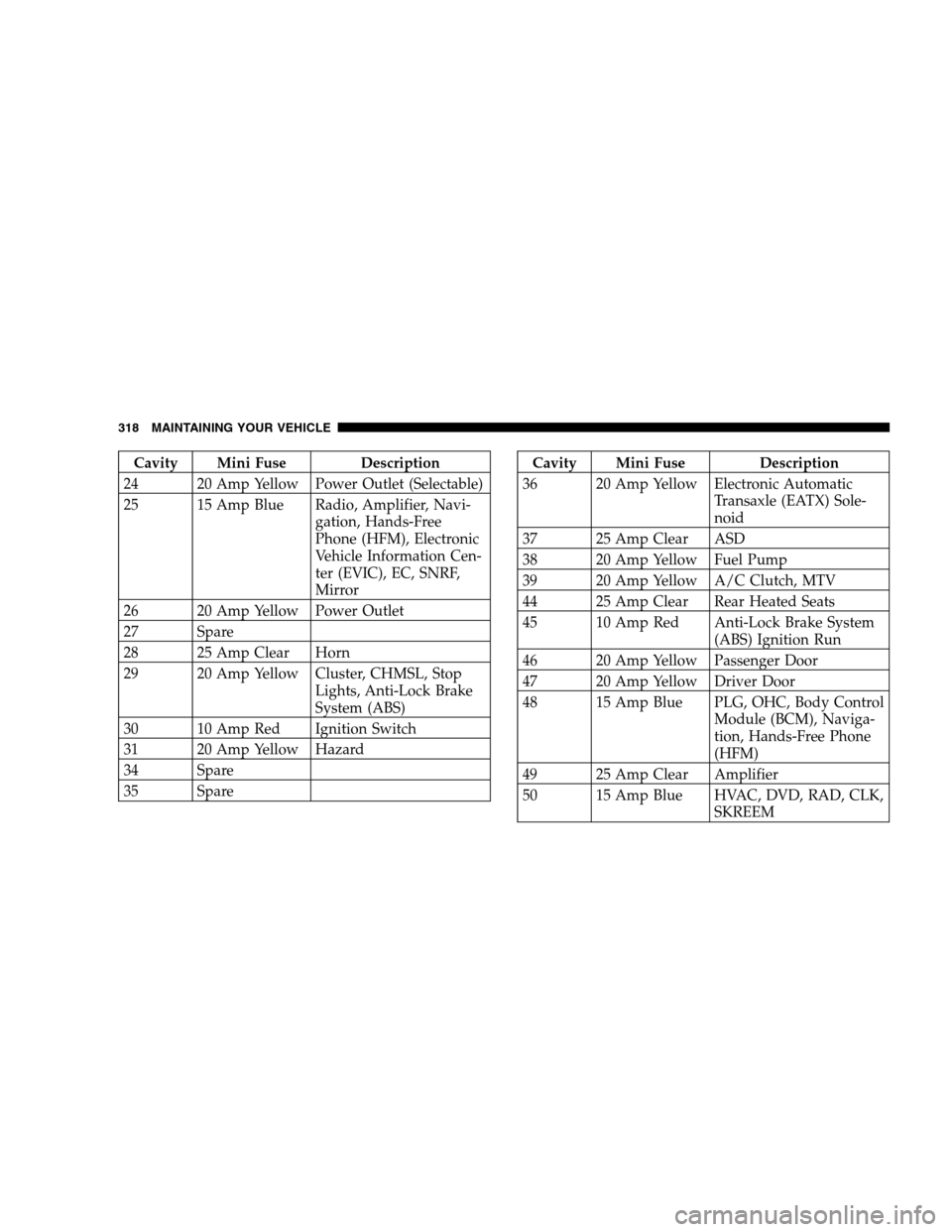
Cavity Mini Fuse Description
24 20 Amp Yellow Power Outlet (Selectable)
25 15 Amp Blue Radio, Amplifier, Navi-
gation, Hands-Free
Phone (HFM), Electronic
Vehicle Information Cen-
ter (EVIC), EC, SNRF,
Mirror
26 20 Amp Yellow Power Outlet
27 Spare
28 25 Amp Clear Horn
29 20 Amp Yellow Cluster, CHMSL, Stop
Lights, Anti-Lock Brake
System (ABS)
30 10 Amp Red Ignition Switch
31 20 Amp Yellow Hazard
34 Spare
35 SpareCavity Mini Fuse Description
36 20 Amp Yellow Electronic Automatic
Transaxle (EATX) Sole-
noid
37 25 Amp Clear ASD
38 20 Amp Yellow Fuel Pump
39 20 Amp Yellow A/C Clutch, MTV
44 25 Amp Clear Rear Heated Seats
45 10 Amp Red Anti-Lock Brake System
(ABS) Ignition Run
46 20 Amp Yellow Passenger Door
47 20 Amp Yellow Driver Door
48 15 Amp Blue PLG, OHC, Body Control
Module (BCM), Naviga-
tion, Hands-Free Phone
(HFM)
49 25 Amp Clear Amplifier
50 15 Amp Blue HVAC, DVD, RAD, CLK,
SKREEM
318 MAINTAINING YOUR VEHICLE
Page 360 of 376

Adding Fuel........................... 252
Adding Washer Fluid.................. 115,297
Additives, Fuel......................... 250
Adjustable Pedals........................ 118
Air Conditioner Maintenance............... 293
Air Conditioning Filter.................204,294
Air Conditioning Refrigerant............... 293
Air Conditioning System................195,293
Air Pressure, Tires....................... 234
Airbag................................ 42
Airbag Deployment....................... 49
Airbag Light.....................46,51,61,151
Airbag Maintenance....................... 50
Airbag, Side............................ 48
Alarm System........................... 24
Alignment and Balance................... 241
All Wheel Drive...................217,242,310
Alterations/Modifications, Vehicle............. 7
Antenna, Satellite Radio................... 189Antifreeze Disposal...................... 301
Antifreeze (Engine Coolant)...........299,300,325
Anti-Lock Brake System................... 220
Anti-Lock Warning Light.................. 145
Anti-Theft Security Alarm.................. 24
Appearance Care........................ 311
Arming Theft System...................... 24
Auto Down Power Windows................ 30
Automatic Dimming Mirror................. 67
Automatic Door Locks...................17,18
Automatic Headlights..................... 111
Automatic Temperature Control............. 195
Automatic Transaxle...................213,307
Adding Fluid......................... 327
Filter............................... 309
Fluid and Filter Changes................. 309
Fluid Level Check...................... 308
Interlock System....................... 214
Reset Mode.......................... 214
360 INDEX