light CHRYSLER PACIFICA 2007 1.G User Guide
[x] Cancel search | Manufacturer: CHRYSLER, Model Year: 2007, Model line: PACIFICA, Model: CHRYSLER PACIFICA 2007 1.GPages: 464, PDF Size: 5.92 MB
Page 23 of 464
•On non EVIC – equipped vehicles perform the follow-
ing steps:
1. Perform this operation while standing outside the
vehicle.
2. Press and hold the LOCK button on your key fob.
3. Continue to hold the LOCK button, wait at least 4
seconds, but no longer than 10 seconds, then press and
hold the PANIC button. Release both buttons at the same
time.
4. To reactivate the feature, repeat this procedure.
5. If the programming procedure was unsuccessful see
your authorized dealer for programming assistance.To Open/Close Power Liftgate — If Equipped
Press the LIFTGATE button twice within five seconds to
open/close the power liftgate. The liftgate will beep for 2
seconds and then open/close. If the button is pushed
while the liftgate is being power closed, the liftgate will
reverse to the full open position.
If the liftgate is locked and is not equipped with a
powered liftgate, pressing the button will result in the
liftgate becoming unlocked for 30 seconds allowing you
to manually access the liftgate area. The liftgate will
re-lock automatically within 10 seconds once the liftgate
is closed.
Flash Lights On Lock/Unlock
The Flash Lights With Lock or Unlock feature can be
turned on or off.
THINGS TO KNOW BEFORE STARTING YOUR VEHICLE 23
2
Page 24 of 464
•On electronic vehicle information center (EVIC)
equipped vehicles refer to “Flash Lights On Lock/
Unlock?” under “Use Factory Settings?” in the EVIC
section of this manual.
•On non EVIC - equipped vehicles perform the follow-
ing steps:
1. Perform this operation while standing outside the
vehicle.
2. Press and hold the LOCK button on your key fob.
3. Continue to hold the LOCK button, wait at least 4
seconds, but no longer than 10 seconds, then press and
hold the UNLOCK button. Release both buttons at the
same time.
4. To reactivate the feature, repeat this procedure.
5. If the programming procedure was unsuccessful see
your authorized dealer for programming assistance.
Using The Panic Alarm:
To activate the Panic mode while the ignition is OFF press
and release the PANIC button on the transmitter once.
When the Panic mode is activated, the interior lights will
illuminate, the headlamps and parking lights will flash,
and the horn will sound.
To cancel the Panic mode press and release the PANIC
button on the transmitter a second time. Panic mode will
automatically cancel after 3 minutes or if the vehicle is
started and exceeds 15 mph. During the Panic Mode, the
door locks and remote keyless entry systems will func-
tion normally. Panic mode will not disarm the security
system on vehicles so equipped.
NOTE:When you turn off the panic alarm by pressing
the PANIC button a second time, you may have to be
closer to the vehicle due to the radio frequency noises of
the system.
24 THINGS TO KNOW BEFORE STARTING YOUR VEHICLE
Page 34 of 464
The time is customer programmable through the Elec-
tronic Vehicle Information Center (EVIC). Refer to
“Power Accessory Delay?” under “Personal Settings
(Customer Programmable Features)” in Section 4 of this
manual for details.
Auto Up Feature with Anti–Pinch Protection — If
Equipped
Lift the window switch to the second detent, release, and
the window will go up automatically.
To stop the window from going all the way up during the
auto-up operation, push down on the switch briefly.
To close the window part way, lift the window switch to
the first detent and release when you want the window to
stop.NOTE:If the window runs into any obstacle during
auto-closure, it will reverse direction and then stop.
Remove the obstacle and use the window switch again to
close the window.
NOTE:Any impact due to rough road conditions may
trigger the auto reverse function unexpectedly during
auto-closure. If this happens, pull the switch lightly to the
first detent and hold to close window manually.
WARNING!
There is no anti-pinch protection when the window
is almost closed. To avoid personal injury be sure to
clear your arms, hands, fingers and all objects from
the window path before closing.
34 THINGS TO KNOW BEFORE STARTING YOUR VEHICLE
Page 38 of 464
When the remote button is pressed the “Lamp Flash”
feature is enabled the tail lights will flash to signal that
the liftgate is opening or closing. A beeping signal will
sound two seconds before the liftgate starts to open or
close.
WARNING!
During power operation, personal injury or cargo
damage may occur. Ensure the liftgate travel path is
clear. Make sure the liftgate is closed and latched
before driving away.
NOTE:
•If anything obstructs the power liftgate while it is
closing or opening, the liftgate will automatically
reverse to the closed or open position, provided it
meets sufficient resistance.
•There are also pinch sensors attached to the side of the
liftgate. Light pressure anywhere along these strips
will cause the liftgate to return to the open position.
•The power liftgate must be in the full open position for
any of the close buttons to operate. If the liftgate is not
fully open, press the open button to fully open the
liftgate and then press close.
•If the liftgate release switch is activated while the
power liftgate is closing, the liftgate will reverse to the
full open position.
38 THINGS TO KNOW BEFORE STARTING YOUR VEHICLE
Page 40 of 464
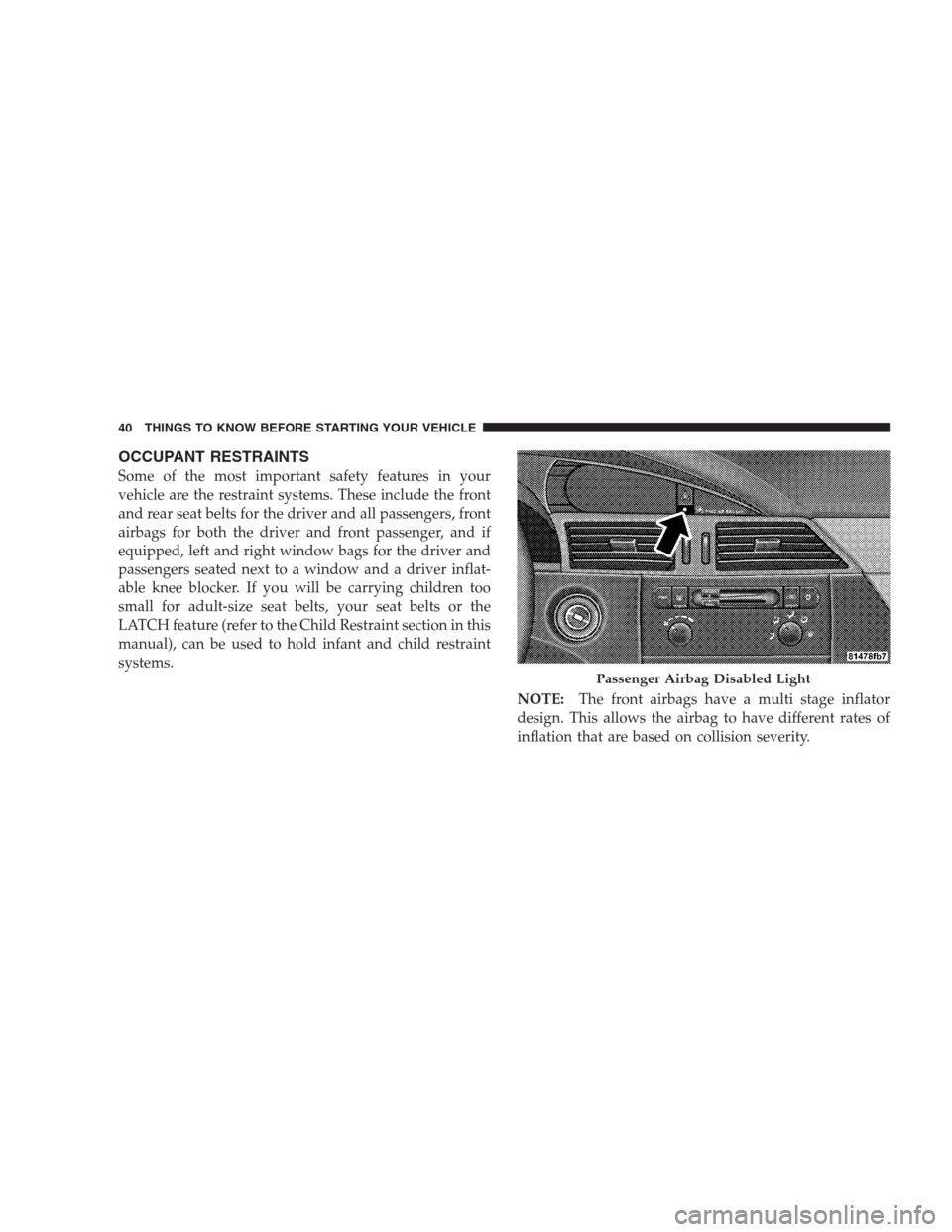
OCCUPANT RESTRAINTS
Some of the most important safety features in your
vehicle are the restraint systems. These include the front
and rear seat belts for the driver and all passengers, front
airbags for both the driver and front passenger, and if
equipped, left and right window bags for the driver and
passengers seated next to a window and a driver inflat-
able knee blocker. If you will be carrying children too
small for adult-size seat belts, your seat belts or the
LATCH feature (refer to the Child Restraint section in this
manual), can be used to hold infant and child restraint
systems.
NOTE:The front airbags have a multi stage inflator
design. This allows the airbag to have different rates of
inflation that are based on collision severity.
Passenger Airbag Disabled Light
40 THINGS TO KNOW BEFORE STARTING YOUR VEHICLE
Page 48 of 464
Enhanced Seat Belt Use Reminder System
(BeltAlert) — Driver Front Seat Only
If the occupied driver’s seat belt has not been buckled
within 60 seconds of starting the vehicle and if the vehicle
speed is greater than 5 mph (8 km/h), the Enhanced
Warning System (BeltAlert) will alert the driver to buckle
their seat belt. The driver should also instruct all other
occupants to buckle their seat belts. Once the warning is
triggered, the Enhanced Warning System (BeltAlert) will
continue to chime and flash the Seat Belt Warning Light
for 96 seconds or until the driver’s seat belt is buckled.
The Enhanced Warning System (BeltAlert) will be reacti-
vated if the driver’s seat belt is unbuckled for more than
10 seconds and the vehicle speed is greater than 5 mph (8
km/h).
Belt Alert Programming
The Enhanced Warning System (BeltAlert) can be en-
abled or disabled by your authorized dealer or by
following these steps:
NOTE:The following steps must occur within the first
60 seconds of the ignition switch being turned to the
ON/RUN position. DaimlerChrysler does not recom-
mend deactivating the Enhanced Warning System
(BeltAlert).
1. Turn the ignition switch to the OFF/LOCK position,
and buckle the driver’s seat belt.
2. Turn the ignition switch to the ON/RUN position
(engine does not need to be running), and wait for the
Seat Belt Warning Light to turn off.
48 THINGS TO KNOW BEFORE STARTING YOUR VEHICLE
Page 49 of 464
3. Within 60 seconds of turning the ignition switch to the
ON/RUN position, unbuckle and then re-buckle the
driver’s seat belt at least three times within 10 seconds,
ending with the seat belt buckled.
NOTE:Watch for the Seat Belt Warning Light to turn on
while unbuckling and off while re-buckling the seat belt.
It may be necessary to retract the seat belt each time,
while unbuckling and re-buckling the seat belt.
4. Turn the ignition switch to the OFF/LOCK position. A
single chime will sound to signify that you have success-
fully completed the programming.
The Enhanced Warning System (BeltAlert) can be reacti-
vated by repeating this procedure.
NOTE:Although the Enhanced Warning System
(BeltAlert) has been deactivated, the Seat Belt Warning
Light will continue to illuminate while the driver’s or
front passenger’s seat belt remains unbuckled.Seat Belts and Pregnant Women
We recommend that pregnant women use the seat belts
throughout their pregnancies. Keeping the mother safe is
the best way to keep the baby safe.
Pregnant women should wear the lap part of the belt
across the thighs and as snug across the hips as possible.
Keep the belt low so that it does not come across the
abdomen. That way the strong bones of the hips will take
the force if there is a collision.
Seat Belt Extender
If a seat belt is too short, even when fully extended and
when the adjustable upper shoulder belt anchorage (if
equipped) is in its lowest position, your dealer can
provide you with a seat belt extender. This extender
should be used only if the existing belt is not long
enough. When it is not required, remove the extender
and stow it.
THINGS TO KNOW BEFORE STARTING YOUR VEHICLE 49
2
Page 55 of 464
Airbag System Components
The airbag system consists of the following:
•Occupant Restraint Controller (ORC)
•AIRBAG Light
•Driver Airbag
•Front Passenger Airbag
•Supplemental Side Curtain Airbags (If Equipped)
•Front Impact Sensors
•Side Impact Sensors (If Equipped)
•Steering Wheel and Column
•Instrument Panel
•Interconnecting Wiring
•Seat Belt Reminder Light
•Knee Impact Bolster
•Driver Inflatable Knee Blocker
•Front Passenger Seat Occupant Classification System
(OCS) — If Equipped
Occupant Classification Module
Passenger Airbag Disabled (PAD) Indicator Light
Interconnecting Wiring
Bladder Assembly
Belt Tension Sensor
•Front Seat Belt Buckle Pretensioners
THINGS TO KNOW BEFORE STARTING YOUR VEHICLE 55
2
Page 56 of 464
How The Airbag System Works
•
TheOccupant Restraint Controller (ORC)determines
if a frontal collision is severe enough to require the
airbags to inflate. Based on the level of collision
severity, the front control module determines the
proper rate of inflation. The front airbag inflators are
designed to provide different rates of airbag inflation.
•The ORC may modify the rate of inflation based on the
occupant size provided by the Occupant Classification
Module.
•The ORC will not detect side, roll over, or rear impacts.
•The ORC monitors the readiness of the electronic parts
of the system whenever the ignition switch is in the
START or RUN positions. These include all of the
items listed above except the steering wheel andcolumn, instrument panel and passenger knee bol-
sters. If the key is in the OFF position, in the ACC
position, or not in the ignition, the airbags are not on
and will not inflate.
•Also, the ORC turns on the AIRBAG warn-
ing light and PAD indicator light in the
center of the instrument panel for 6 to 8
seconds for a self-check when the ignition is
first turned on. After the self-check, the AIRBAG
warning light will turn off. The PAD indicator light
will function normally (Refer to “Passenger Airbag
Disable (PAD) Indicator Light” in this section). If the
ORC detects a malfunction in any part of the system, it
turns on the AIRBAG warning light either momen-
tarily or continuously. A single chime will sound if the
light comes on again after initial start up.
56 THINGS TO KNOW BEFORE STARTING YOUR VEHICLE
Page 57 of 464
WARNING!
Ignoring the AIRBAG warning light in your instru-
ment panel could mean you won’t have the airbags
to protect you in a collision. If the light does not
come on, stays on after you start the vehicle, or if it
comes on as you drive, have the airbag system
checked right away.
•TheDriver and Passenger Airbag/Inflator Unitsare
located in the center of the steering wheel and the right
side of the instrument panel. When the ORC and
impact sensors detects a collision requiring the air-
bags, it signals the inflator units. A large quantity of
nontoxic gas is generated to inflate the front airbags.
Different airbag inflation rates may be possible based
on collision severity and occupant size. The steering
wheel hub trim cover and the upper right side of the
instrument panel separate and fold out of the way asthe airbags inflate to their full size. The airbags fully
inflate in about 50–70 milliseconds. This is about half
of the time it takes to blink your eyes. The airbags then
quickly deflate while helping to restrain the driver and
front passenger.
The driver’s and passenger’s front airbag gas is vented
through the airbag material towards the instrument
panel. In this way the airbags do not interfere with
your control of the vehicle.•TheSide Impact SRS Window Bagsare designed to
activate only in certain side collisions. When the ORC
and the side impact sensors (with side impact option)
detects a collision requiring the window bags to
inflate, it signals the inflators on the crash side of the
vehicle. A quantity of nontoxic gas is generated to
inflate the window bag. The inflating window bag
pushes the outside edge of the headliner out of the
way and covers the window. The airbag inflates in
THINGS TO KNOW BEFORE STARTING YOUR VEHICLE 57
2