radio CHRYSLER PACIFICA 2008 1.G User Guide
[x] Cancel search | Manufacturer: CHRYSLER, Model Year: 2008, Model line: PACIFICA, Model: CHRYSLER PACIFICA 2008 1.GPages: 457, PDF Size: 6.7 MB
Page 106 of 457

²Press the 'Phone' button to begin.
²After the9Ready9prompt and the following beep, say
9Setup Select Phone9and follow the prompts.
²You can also press the8Voice Recognition' button
anytime while the list is being played, and then choose
the phone that you wish to select.
²The selected phone will be used for the next phone
call. If the selected phone is not available, the UCon-
nectŸ system will return to using the highest priority
phone present in or near (approximately with in 30
feet) the vehicle.
Delete UConnectŸ Paired Cellular Phones
²
Press the 'Phone' button to begin.
²After the9Ready9prompt and the following beep, say
9Setup Phone Pairing.9
²At the next prompt, say9Delete9and follow the
prompts.
²You can also press the8Voice Recognition' button
anytime while the list is being played and then choose
the phone you wish to delete.
Things You Should Know About Your UConnectŸ
System
Voice Training
For users experiencing difficulty with the system recog-
nizing their voice commands or numbers, the UCon-
nectŸ system Voice Training feature may be used. To
enter this training mode, follow one of the two proce-
dures:
From outside the UConnectŸ mode (e.g. from radio
mode)
²Press and hold the `Voice Recognition' button for 5
seconds until the session begins, or,
106 UNDERSTANDING THE FEATURES OF YOUR VEHICLE
Page 129 of 457

DRIVER MEMORY SEAT Ð IF EQUIPPED
If your vehicle is equipped with memory systems, your
remote keyless entry transmitter or memory seat buttons
on the driver's door panel can be used to recall the
driver's seat, outside mirrors, adjustable pedals (if
equipped) and radio station presets to saved positions.The memory seat buttons located on the driver's door
will always recall stored settings. The remote keyless
entry transmitter can be programmed to recall positions
when the UNLOCK button is pressed. Refer to the
following procedure on how to link a remote keyless
entry transmitter to a position.
NOTE:The vehicle must be in Park to recall memory
positions. If a recall is attempted when the vehicle is not
in Park, a message will be displayed in the Electronic
Vehicle Information Center (EVIC).
To recall memory positions press memory button number
1 if you are recalling the memory position for driver one
or press memory button number 2 if you are recalling the
memory position for driver two. A recall can be cancelled
by pressing any of the memory buttons during a recall.
When a recall is cancelled, the seat stops moving and a
delay of approximately one second will occur before any
other recalls can be selected.
Driver Memory Switches
UNDERSTANDING THE FEATURES OF YOUR VEHICLE 129
3
Page 130 of 457

Your vehicle has been delivered with two remote keyless
entry transmitters. One or both transmitters can be linked
to either memory position. Up to eight remote keyless
entry transmitters can be used with your vehicle. The
memory seat system can also accommodate up to eight
transmitters linked to either of the two stored seat
positions or any combination of the two positions.
To Program Memory Seat Buttons & RKE
Transmitters, Follow These Steps:
1. Turn the ignition switch to the ON position.
2. Select Remote Linked to Memory from the EVIC and
enter ªYesº.
3. Use the seat, mirror and adjustable pedal switches to
adjust the seat, recliner, side view mirrors and adjustable
pedals to the desired positions.
4. Set the radio station presets.5. Turn the ignition switch to the OFF position and
remove the key.
6. Press and release the SET (S) button located on the
driver's door. A light in the button will flash telling you
that you are in the set memory mode. You have five
seconds to complete the next step.
7. Within 5 seconds, press and release button 1 or 2 on
the driver's door. A chime will sound signaling you that
the driver memory has been set. A message will also be
displayed in the Electronic Vehicle Information Center
(EVIC), indicating a position has been set.
8. Within 5 seconds, press and release the LOCK button
on one of the Remote Keyless Entry Transmitters. A
chime will sound signaling you that the transmitter has
been successfully linked. A message will also be dis-
played in the Electronic Vehicle Information Center
(EVIC), indicating the transmitter has been linked.
130 UNDERSTANDING THE FEATURES OF YOUR VEHICLE
Page 137 of 457

Dome Light Position
Rotate the dimmer control completely
upward to the second detent to turn
on the interior lights. The interior
lights will remain on when the dim-
mer control is in this position.
Interior light Defeat (OFF)
Rotate the dimmer control to the ex-
treme bottom ªOFFº position. The in-
terior lights will remain off when the
doors are open.
Parade Mode (Daytime Brightness Feature)
Rotate the dimmer control upward to
the first detent. This feature brightens
the odometer and radio display when
the parking lights or headlights are on
during daylight conditions.
Automatic Headlights
This system automatically turns your headlights ON or
OFF based on ambient light levels. To turn the system
ON, turn the end of the Multi-Function Lever to the third
detent position. When the system is ON, the Headlight
Time Delay feature is also ON. This means your head-
lights will stay ON for up to 90 seconds after you turn the
ignition switch OFF. To turn the Automatic System OFF,
turn the end of the Multi-Function Lever to the OFF
position.
UNDERSTANDING THE FEATURES OF YOUR VEHICLE 137
3
Page 148 of 457

to HomeLinktfor more efficient training and accurate
transmission of the radio-frequency signal.
Your vehicle should be parked outside of the garage
while training.
1. Turn the ignition switch to the ON/RUN position.
2. Place the hand-held transmitter 1±3 inches (3±8 cm)
from the HomeLinktbuttons while keeping the indicator
in view.
For optimal training, point the battery end of the hand-
held transmitter away from the HomeLinkt.
3. Simultaneously press and hold both the chosen
HomeLinktbutton and the hand-held transmitter button
until the until the red HomeLinktindicator changes from
a slow to a rapid flash rate or the EVIC display changes
fromªCHANNEL # TRAININGºtoªCHANNEL #
TRAINED.ºThen release both the HomeLinktand hand-held trans-
mitter buttons.
If the EVIC display statesªDID NOT TRAINºrepeat
Step 3. If the signal is too weak, replace the battery in the
original hand-held transmitter.
It may take up to 30 seconds, or longer in rare cases. The
garage door may open & close while you train.
NOTE:Some gate operators and garage door openers
may require you to replace Step #3 with procedures
noted in the ªGate Operator/Canadian Programmingº
section.
4. Press and hold the newly-trained HomeLinktbutton.
If the channel has been trained, the EVIC display will
now stateªCHANNEL # TRANSMIT.º
If the EVIC display still statesªCHANNEL # TRAIN-
INGºrepeat Step 3.
148 UNDERSTANDING THE FEATURES OF YOUR VEHICLE
Page 150 of 457

7. Return to the vehicle and press the programmed
HomeLinktbutton twice (holding the button for 2 sec-
onds each time). If the device is plugged in and activates,
programming is complete.
If the device does not activate, press the button a third
time (for 2 seconds) to complete the training.
NOTE:If you are have any problems, or require assis-
tance, please call toll-free 1±800±355±3515 or, on the
Internet at www.HomeLink.com for information or assis-
tance.
To program the remaining two HomeLinktbuttons,
repeat each step for each remaining button.DO NOT
ERASE THE CHANNELS.Canadian Programming/Gate Programming
Canadian radio-frequency laws require transmitter sig-
nals to9time-out9(or quit) after several seconds of
transmission which may not be long enough for
HomeLinktto pick up the signal during programming.
Similar to this Canadian law, some U.S. gate operators are
designed to9time-out9in the same manner.
It may be helpful to unplug the device during the cycling
process to prevent possible overheating of the garage
door or gate motor.
If you are having difficulties programming a garage door
opener or a gate operator, replace ªProgramming
HomeLinkº Step 3 with the following:
3. Continue to press and hold the HomeLinktbutton
while you press and release - every two seconds
(ªcycleº) your hand-held transmitter until HomeLinkt
has successfully accepted the frequency signal. The red
HomeLinktindicator will change from a slow to rapid
150 UNDERSTANDING THE FEATURES OF YOUR VEHICLE
Page 163 of 457
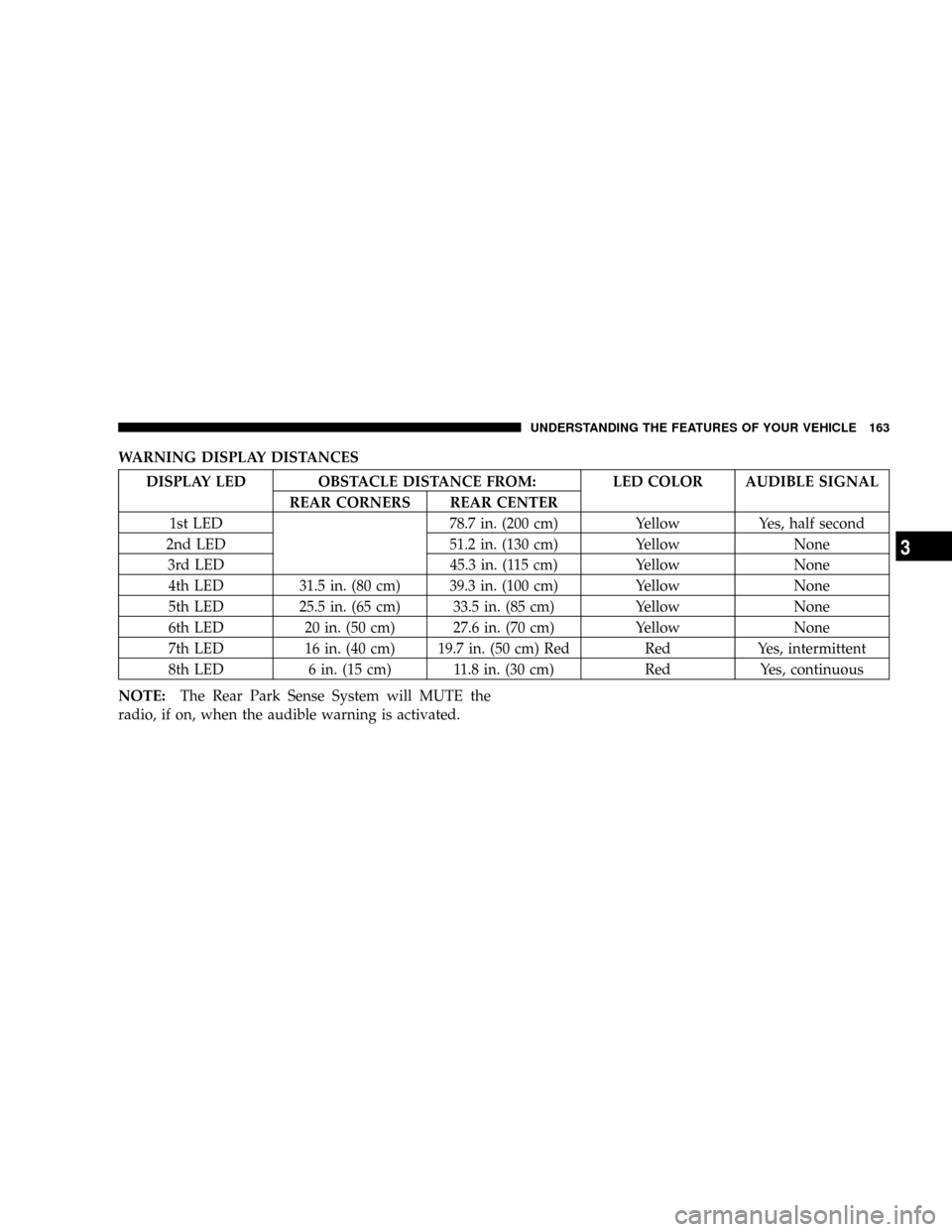
WARNING DISPLAY DISTANCES
DISPLAY LED OBSTACLE DISTANCE FROM: LED COLOR AUDIBLE SIGNAL
REAR CORNERS REAR CENTER
1st LED 78.7 in. (200 cm) Yellow Yes, half second
2nd LED 51.2 in. (130 cm) Yellow None
3rd LED 45.3 in. (115 cm) Yellow None
4th LED 31.5 in. (80 cm) 39.3 in. (100 cm) Yellow None
5th LED 25.5 in. (65 cm) 33.5 in. (85 cm) Yellow None
6th LED 20 in. (50 cm) 27.6 in. (70 cm) Yellow None
7th LED 16 in. (40 cm) 19.7 in. (50 cm) Red Red Yes, intermittent
8th LED 6 in. (15 cm) 11.8 in. (30 cm) Red Yes, continuous
NOTE:The Rear Park Sense System will MUTE the
radio, if on, when the audible warning is activated.
UNDERSTANDING THE FEATURES OF YOUR VEHICLE 163
3
Page 172 of 457

Sunroof Maintenance
Use only a non-abrasive cleaner and a soft cloth to clean
the glass panel.
ELECTRICAL POWER OUTLETS
There are two 12 volt power outlets located on the
instrument panel below the radio. The driver's side outlet
is controlled by the ignition switch and the passenger
side outlet is connected directly to the battery. The
driver's side outlet will also operate a conventional cigar
lighter unit (if equipped with an optional Smoker's
Package).
A third outlet is located on the back of the front center
console near the floor, and is also controlled by the
ignition switch.
A fourth outlet is located on the driver's side, in the rear
cargo area and is also controlled by the ignition switch.
Front Power Outlets
172 UNDERSTANDING THE FEATURES OF YOUR VEHICLE
Page 181 of 457

UNDERSTANDING YOUR INSTRUMENT PANEL
CONTENTS
mInstrument Panel And Controls.............184
mBase Instrument Cluster..................185
mPremium Instrument Cluster...............186
mInstrument Cluster Descriptions............187
mElectronic Vehicle Information Center (EVIC) Ð
If Equipped...........................199
NOil Change Required...................202
NCustomer Programmable Features Ð
If Equipped.........................203
NCompass Display Ð If Equipped..........207NMini-Trip Functions Ð If Equipped........208
mSetting The Analog Clock.................209
mElectronic Digital Clock..................209
NClock Setting Procedure.................210
mRadio General Information................210
NRadio Broadcast Signals.................210
NTwo Types Of Signals..................211
NElectrical Disturbances..................211
NAM Reception.......................2114
Page 182 of 457

NFM Reception........................211
mSales Code RAH Ð AM & FM Stereo Radio With
CD Player And CD/DVD Changer Controls....212
NRadio Operation......................212
NCD Player Operation...................216
NCD/DVD Changer Operation.............218
NNotes On Playing MP3 Files.............218
NOperation Instructions - (CD Mode For MP3
Audio Play).........................220
mSales Code REV Ð AM & FM Stereo Radio With
CD Player And CD/DVD Changer Controls....222
NRadio Operation......................222
NCD Player Operation...................226
NCD/DVD Changer Operation.............228NNotes On Playing MP3 Files.............228
NOperation Instructions - (CD Mode For MP3
Audio Play).........................230
NOperating Instructions Ð MP3 Player, Portable
Walkman...........................231
NOperating Instructions Ð Video
Games/Camcorders...................231
m6 Disc CD/DVD Changer (RDV) Ð If Equipped . 232
NOperating Instructions Ð CD/DVD Changer . . 233
NEject (EJT) Button.....................235
NOperating Instructions Ð Remote Control....235
NOperating Instructions Ð Video Screen......239
NOperating Instructions Ð Headphones......241
NOperating Instructions Ð Auxiliary Input....243
182 UNDERSTANDING YOUR INSTRUMENT PANEL