turn signal CHRYSLER PACIFICA 2017 2.G Owner's Manual
[x] Cancel search | Manufacturer: CHRYSLER, Model Year: 2017, Model line: PACIFICA, Model: CHRYSLER PACIFICA 2017 2.GPages: 828, PDF Size: 7.58 MB
Page 469 of 828
NOTE:If the vehicle is driven above approximately
15 mph (25 km/h), the DID will instruct the driver to
slow down. If the vehicle is driven above approximately
18 mph (30 km/h), the system will cancel. The driver
must then reactivate the system by pushing the
ParkSense Active Park Assist switch.
• The outer surface and the underside of the front and
rear fascias/bumpers are clean and clear of snow, ice,
mud, dirt or other obstruction.
When pushed, the LED on the ParkSense Active Park
Assist switch will blink momentarily, and then the LED
will turn OFF if any of the above conditions are not
present.Parallel Parking Space Assistance Operation/
Display
When the ParkSense Active Park Assist system is enabled
the “Active ParkSense Searching - Press OK for Perpen-
dicular Park” message will appear in the Driver Informa-
tion Display (DID). You may switch to perpendicular
parking if you desire. Push the OK button on the left side
steering wheel switch to change your parking space
setting.
NOTE:
• When searching for a parking space, use the turn
signal indicator to select which side of the vehicle you
want to perform the parking maneuver. The ParkSense
Active Park Assist system will automatically search for
a parking space on the passenger’s side of the vehicle
if the turn signal is not activated.
6
STARTING AND OPERATING 467
Page 480 of 828
NOTE:
•When searching for a parking space, use the turn
signal indicator to select which side of the vehicle you
want to perform the parking maneuver. The ParkSense
Active Park Assist system will automatically search for
a parking space on the passenger’s side of the vehicle
if the turn signal is not activated.
• The driver needs to make sure that the selected
parking space for the maneuver remains free and clear
of any obstructions (e.g. pedestrians, bicycles, etc.).
• The driver is responsible to ensure that the selected
parking space is suitable for the maneuver and free/
clear of anything that may be overhanging or protrud-
ing into the parking space (e.g., ladders, tailgates, etc.
from surrounding objects/vehicles). •
When seeking for a parking space, the driver should
drive as parallel or perpendicular (depending on the
type of maneuver) to other vehicles as possible.
• The feature will only indicate the last detected parking
space (example: if passing multiple available parking
spaces, the system will only indicate the last detected
parking space for the maneuver).
When an available parking space has been found, and the
vehicle is not in position, you will be instructed to move
forward to position the vehicle for a perpendicular
parking sequence.
478 STARTING AND OPERATING
Page 490 of 828
uses a forward looking camera to detect lane markings
and measure vehicle position within the lane boundaries.
When both lane markings are detected and the driver
unintentionally drifts out of the lane (no turn signal
applied), the LaneSense system provides a haptic warn-
ing in the form of torque applied to the steering wheel to
prompt the driver to remain within the lane boundaries.
If the driver continues to unintentionally drift out of the
lane, the LaneSense system provides a visual warning
through the Driver Information Display (DID) to prompt
the driver to remain within the lane boundaries.
The driver may manually override the haptic warning by
applying torque into the steering wheel at any time.
When only a single lane marking is detected and the
driver unintentionally drifts across the lane marking (noturn signal applied), the LaneSense system provides a
visual warning through the DID to prompt the driver to
remain within the lane. When only a single lane marking
is detected, a haptic (torque) warning will not be pro-
vided.
NOTE:
When operating conditions have been met, the
LaneSense system will monitor if the driver ’s hands are
on the steering wheel and provides an audible warning
to the driver when the driver ’s hands are not detected on
the steering wheel. The system will cancel if the driver
does not return their hands to the wheel.
488 STARTING AND OPERATING
Page 496 of 828
Changing LaneSense Status
The LaneSense system has settings to adjust the intensity
of the torque warning and the warning zone sensitivity
(Early/Medium/Late) that you can configure through
the Uconnect system screen. Refer to “Uconnect Settings”
in “Multimedia” for further information.
NOTE:
•When enabled the system operates above 37 mph
(60 km/h) and below 112 mph (180 km/h).
• Use of the turn signal suppresses the warnings.
• The system will not apply torque to the steering wheel
whenever a safety system engages. (anti-lock brakes,
traction control system, electronic stability control,
forward collision warning, etc.).
PARKVIEW REAR BACK UP CAMERA — IF
EQUIPPED
Your vehicle may be equipped with the ParkView Rear
Back Up Camera that allows you to see an on-screen
image of the rear surroundings of your vehicle whenever
the gear selector is put into REVERSE. The image will be
displayed on the touchscreen display along with a cau-
tion note “Check Entire Surroundings” across the top of
the screen. After five seconds this note will disappear.
The ParkView camera is located on the rear of the vehicle
above the rear license plate.
NOTE: The ParkView Rear Back Up Camera has pro-
grammable modes of operation that may be selected
through the Uconnect System. Refer to “Uconnect Set-
tings” in “Multimedia” for further information.
494 STARTING AND OPERATING
Page 520 of 828
WARNING!
•Do not connect trailer brakes to your vehicle’s
hydraulic brake lines. It can overload your brake
system and cause it to fail. You might not have
brakes when you need them and could have a
collision.
• Towing any trailer will increase your stopping
distance. When towing you should allow for addi-
tional space between your vehicle and the vehicle
in front of you. Failure to do so could result in a
collision.
CAUTION!
If the trailer weighs more than 1,000 lbs (453 kg)
loaded, it should have its own brakes and they
should be of adequate capacity. Failure to do this
(Continued)
CAUTION! (Continued)
could lead to accelerated brake lining wear, higher
brake pedal effort, and longer stopping distances.
Towing Requirements — Trailer Lights And Wiring
Whenever you pull a trailer, regardless of the trailer size,
stoplights and turn signals on the trailer are required for
motoring safety.
The Trailer Tow Package may include a four- and seven-
pin wiring harness. Use a factory approved trailer har-
ness and connector.
NOTE:Do not cut or splice wiring into the vehicles
wiring harness.
The electrical connections are all complete to the vehicle
but you must mate the harness to a trailer connector.
Refer to the following illustrations.
518 STARTING AND OPERATING
Page 531 of 828
HAZARD WARNING FLASHERS
The Hazard Warning flasher switch is located in the
lower center area of the instrument panel.Push the switch to turn on the Hazard Warning
flasher. When the switch is activated, all direc-
tional turn signals will flash on and off to warn oncoming
traffic of an emergency. Push the switch a second time to
turn off the Hazard Warning flashers.
This is an emergency warning system and it should not
be used when the vehicle is in motion. Use it when your
vehicle is disabled and it is creating a safety hazard for
other motorists.
When you must leave the vehicle to seek assistance, the
Hazard Warning flashers will continue to operate even
though the ignition is placed in the OFF position.
NOTE: With extended use, the Hazard Warning flashers
may wear down your battery.
ASSIST AND 9–1–1 REARVIEW MIRROR — IF
EQUIPPED
A single ball joint mirror is provided in the vehicle. It is
a twist on mirror that has a fixed position at the wind-
shield. The mirror installs on the windshield button with
a counterclockwise rotation and requires no tools for
mounting. The mirror head can be adjusted up, down,
left, and right for various drivers. The mirror should be
adjusted to center on the view through the rear window.
NOTE: The Automatic Dimming Mirror feature is dis-
abled when the vehicle is in reverse gear to improve rear
view viewing.
The Automatic Dimming Mirror feature can be turned
On or Off using the Mirror Dimming Button on the
mirror.
7
IN CASE OF EMERGENCY 529
Page 540 of 828
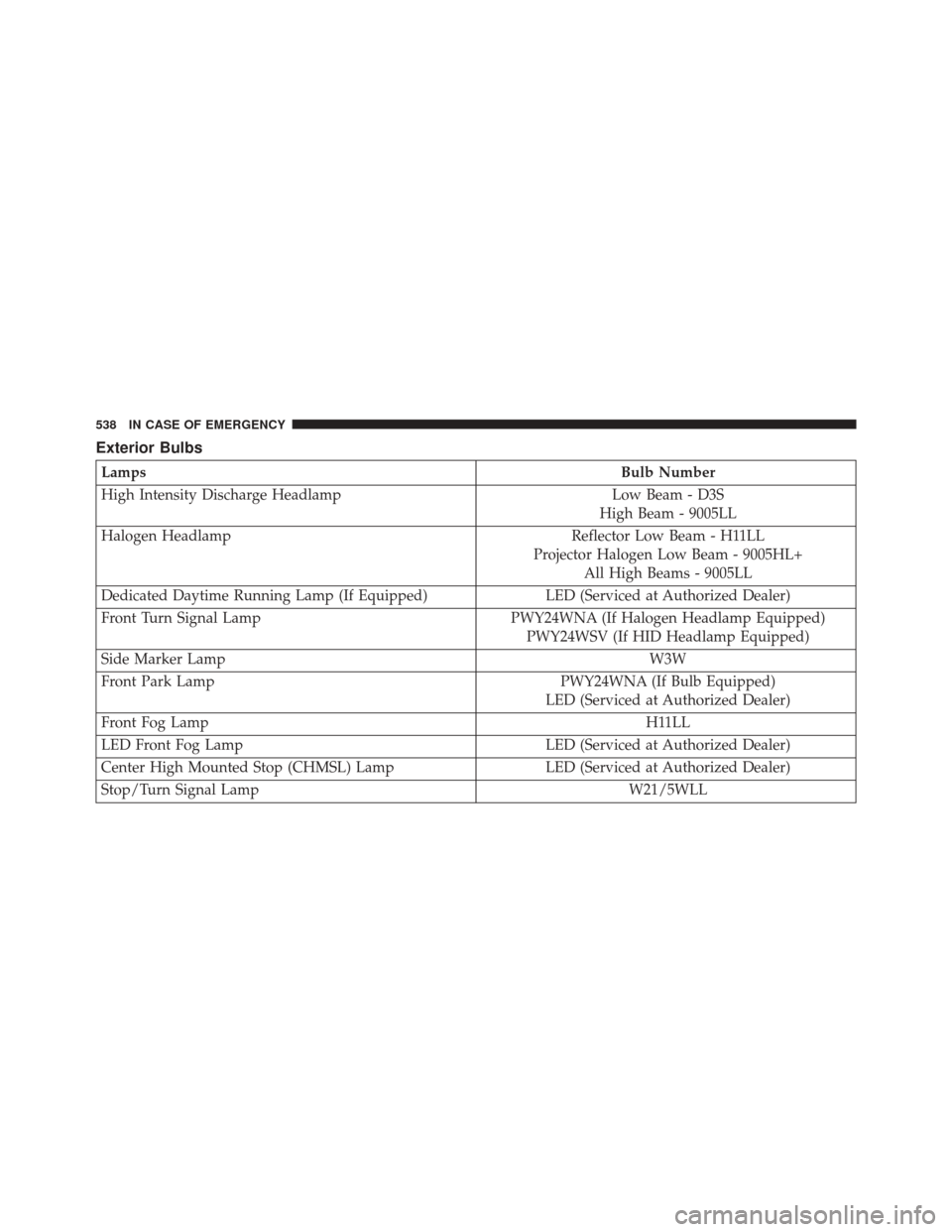
Exterior Bulbs
LampsBulb Number
High Intensity Discharge Headlamp Low Beam - D3S
High Beam - 9005LL
Halogen Headlamp Reflector Low Beam - H11LL
Projector Halogen Low Beam - 9005HL+ All High Beams - 9005LL
Dedicated Daytime Running Lamp (If Equipped) LED (Serviced at Authorized Dealer)
Front Turn Signal Lamp PWY24WNA (If Halogen Headlamp Equipped)
PWY24WSV (If HID Headlamp Equipped)
Side Marker Lamp W3W
Front Park Lamp PWY24WNA (If Bulb Equipped)
LED (Serviced at Authorized Dealer)
Front Fog Lamp H11LL
LED Front Fog Lamp LED (Serviced at Authorized Dealer)
Center High Mounted Stop (CHMSL) Lamp LED (Serviced at Authorized Dealer)
Stop/Turn Signal Lamp W21/5WLL
538 IN CASE OF EMERGENCY
Page 544 of 828
5. Install the bulb and connector assembly into theheadlamp housing and rotate clockwise to lock it in
place.
6. Install the headlamp bulb cap in the headlamp hous- ing and rotate clockwise to lock it in place.
Front Turn Signal Lamp
1. Open the hood.
2. Twist the front turn signal lamp socket assemblycounterclockwise, and then remove the front turn
signal lamp assembly from the lamp housing.
3. Pull the bulb out of the socket and insert the replace-ment bulb.
4. Install the front turn signal lamp socket assembly into the housing, and rotate the front turn signal lamp
socket clockwise to lock it in place.
Front Turn Signal Lamp Socket
542 IN CASE OF EMERGENCY
Page 702 of 828
•Rear ParkSense Braking Assist
When this feature is selected, the ParkSense system will
detect objects located behind the vehicle and utilize
autonomous braking to help stop the vehicle (only en-
abled when ParkSense is also on). The system can be
enabled or disabled by pressing the “Rear ParkSense
Braking Assist” button on the touchscreen, until a check-
mark appears next to setting, indicating that the setting
had been selected.
• Blind Spot Alert — If Equipped
When this feature is selected, the Blind Spot Alert feature
provides alerts, visual and/or audible, to indicate objects
in your blind spot. The Blind Spot Alert feature can be
activated in “Lights” mode. When this mode is selected,
the Blind Spot Monitor (BSM) system is activated and
will only show a visual alert in the exterior mirrors.
When “Lights & Chime” mode is activated, the Blind
Spot Monitor (BSM) will show a visual alert in the exterior mirrors as well as an audible alert when the turn
signal is on. The KeySense default is “Light & Chime”.
Press the “Lights” or “Lights & Chime” button on the
touchscreen to change the Blind Spot Alert status.
NOTE:
If your vehicle has experienced any damage in
the area where the sensor is located, even if the fascia is
not damaged, the sensor may have become misaligned.
Take your vehicle to an authorized dealer to verify sensor
alignment. Having a sensor that is misaligned will result
in the BSM not operating to specification.
• Maximum Vehicle Speed
To set the maximum vehicle speed, press the “+” or “-”
button to select from 65/70/75/80/85 MPH (90/95/100/
105/110 km/h).
700 MULTIMEDIA
Page 708 of 828
•LaneSense Warning — If Equipped
When this feature is selected, it sets the distance at which
the steering wheel will provide feedback for potential
lane departures. The LDW sensitivity can be set to
provide either an “early,” “medium,” or “late” warning
zone start point. The default setting is “Medium”.
• LaneSense Strength — If Equipped
When this feature is selected, it sets the strength of the
steering wheel feedback for potential lane departures.
The amount of directional torque the steering system can
apply to the steering wheel to correct for vehicle lane
departure can be set at “Low,” “Medium” or “High.” The
default setting is “Medium”.
• Blind Spot Alert — If Equipped
When this feature is selected, the Blind Spot Alert feature
can be set to Off, Lights or Lights and Chime. The Blind
Spot Alert feature can be activated in Lights mode. When this mode is selected, the Blind Spot Monitor (BSM)
system is activated and will only show a visual alert in
the outside mirrors. When Lights & Chime mode is
activated, the Blind Spot Monitor (BSM) will show a
visual alert in the outside mirrors as well as an audible
alert when the turn signal is on. When Off is selected, the
Blind Spot Monitor (BSM) system is deactivated. To
change the Blind Spot Alert status, press the “Off,”
“Lights” or “Lights & Chime” button on the touchscreen.
Then press the back arrow button on the touchscreen.
The default setting is “Lights”
NOTE:
If your vehicle has experienced any damage in
the area where the sensor is located, even if the fascia is
not damaged, the sensor may have become misaligned.
Take your vehicle to an authorized dealer to verify sensor
alignment. A sensor that is misaligned will result in the
BSM not operating to specification.
706 MULTIMEDIA