Transmission CHRYSLER PACIFICA 2017 2.G Workshop Manual
[x] Cancel search | Manufacturer: CHRYSLER, Model Year: 2017, Model line: PACIFICA, Model: CHRYSLER PACIFICA 2017 2.GPages: 828, PDF Size: 7.58 MB
Page 639 of 828
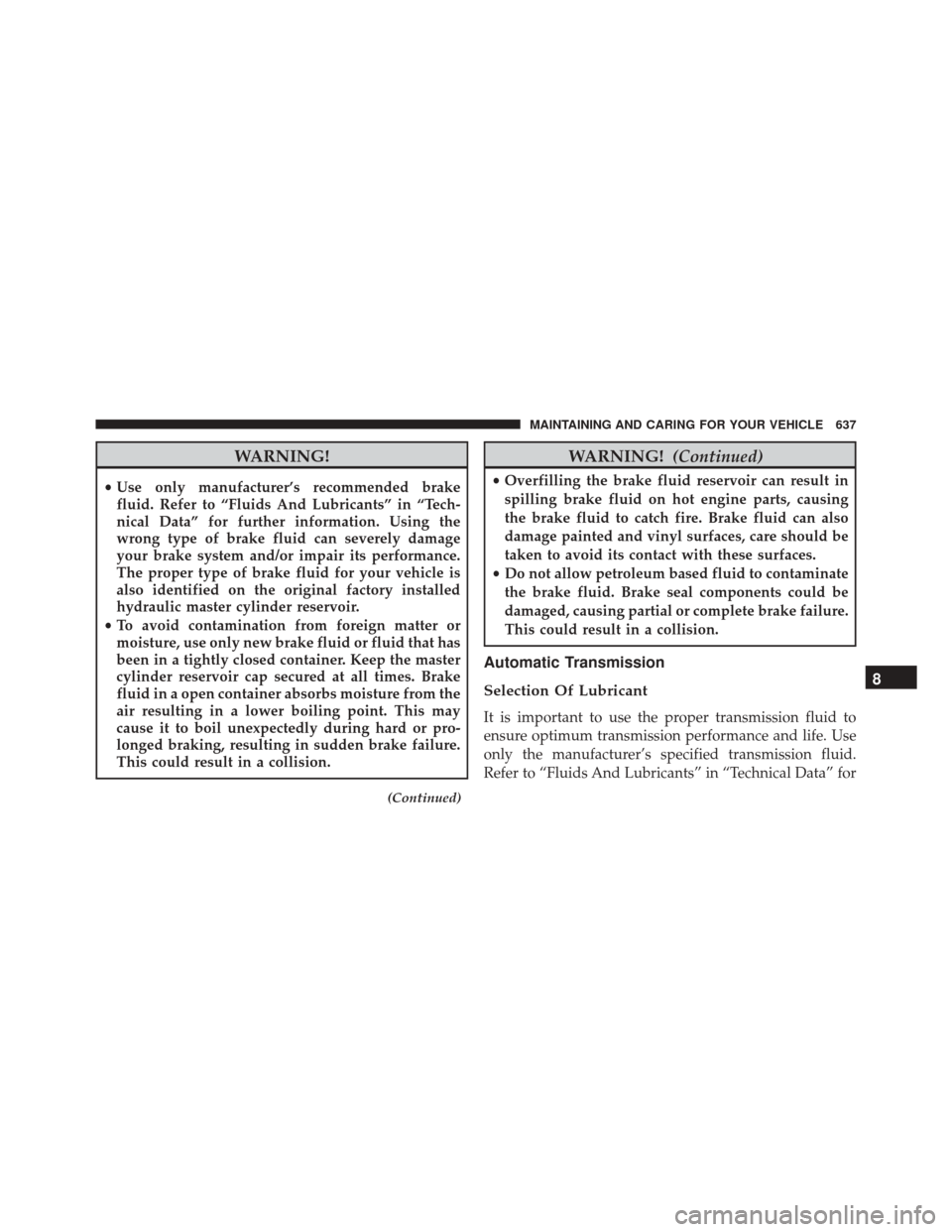
WARNING!
•Use only manufacturer’s recommended brake
fluid. Refer to “Fluids And Lubricants” in “Tech-
nical Data” for further information. Using the
wrong type of brake fluid can severely damage
your brake system and/or impair its performance.
The proper type of brake fluid for your vehicle is
also identified on the original factory installed
hydraulic master cylinder reservoir.
• To avoid contamination from foreign matter or
moisture, use only new brake fluid or fluid that has
been in a tightly closed container. Keep the master
cylinder reservoir cap secured at all times. Brake
fluid in a open container absorbs moisture from the
air resulting in a lower boiling point. This may
cause it to boil unexpectedly during hard or pro-
longed braking, resulting in sudden brake failure.
This could result in a collision.
(Continued)
WARNING! (Continued)
•Overfilling the brake fluid reservoir can result in
spilling brake fluid on hot engine parts, causing
the brake fluid to catch fire. Brake fluid can also
damage painted and vinyl surfaces, care should be
taken to avoid its contact with these surfaces.
• Do not allow petroleum based fluid to contaminate
the brake fluid. Brake seal components could be
damaged, causing partial or complete brake failure.
This could result in a collision.
Automatic Transmission
Selection Of Lubricant
It is important to use the proper transmission fluid to
ensure optimum transmission performance and life. Use
only the manufacturer’s specified transmission fluid.
Refer to “Fluids And Lubricants” in “Technical Data” for
8
MAINTAINING AND CARING FOR YOUR VEHICLE 637
Page 640 of 828
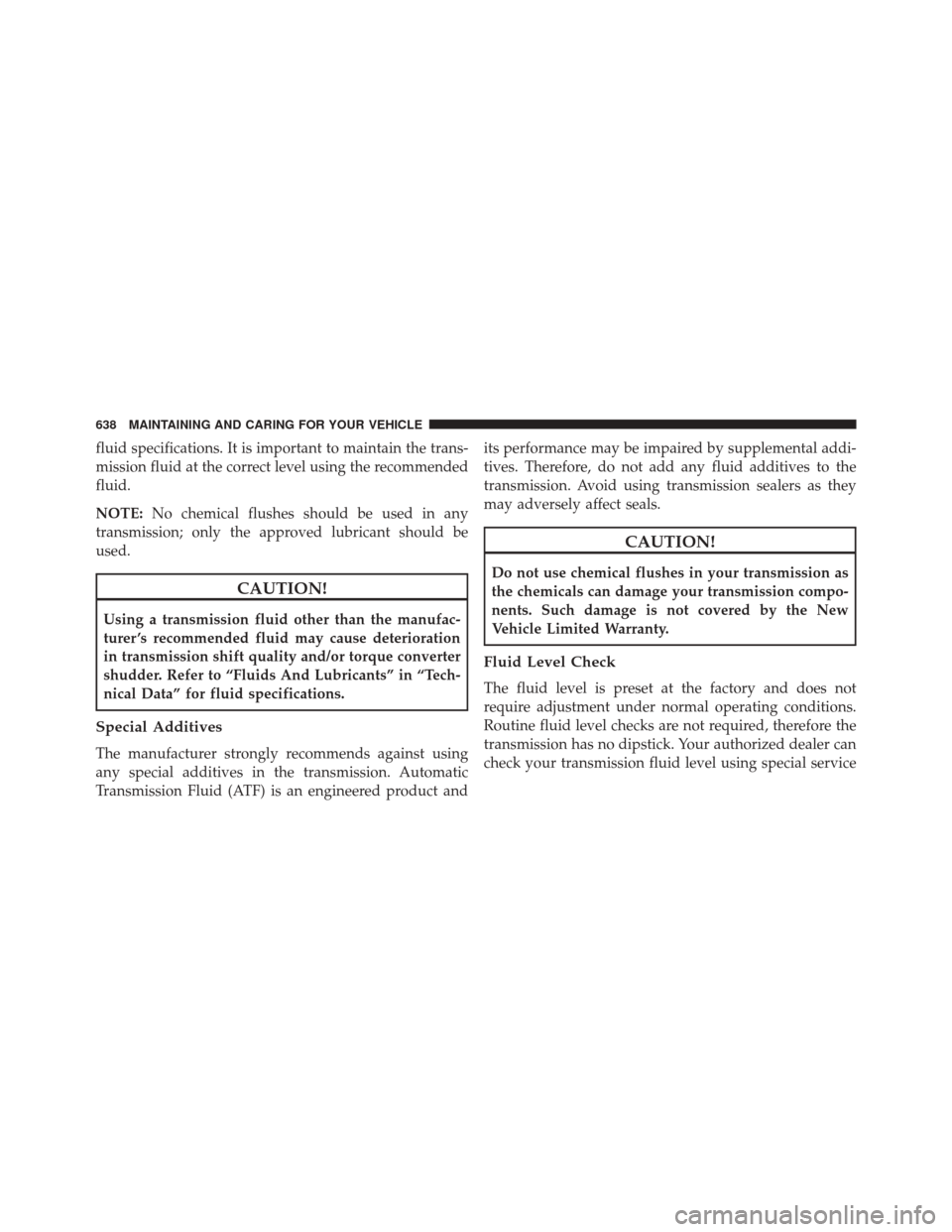
fluid specifications. It is important to maintain the trans-
mission fluid at the correct level using the recommended
fluid.
NOTE:No chemical flushes should be used in any
transmission; only the approved lubricant should be
used.
CAUTION!
Using a transmission fluid other than the manufac-
turer ’s recommended fluid may cause deterioration
in transmission shift quality and/or torque converter
shudder. Refer to “Fluids And Lubricants” in “Tech-
nical Data” for fluid specifications.
Special Additives
The manufacturer strongly recommends against using
any special additives in the transmission. Automatic
Transmission Fluid (ATF) is an engineered product and its performance may be impaired by supplemental addi-
tives. Therefore, do not add any fluid additives to the
transmission. Avoid using transmission sealers as they
may adversely affect seals.
CAUTION!
Do not use chemical flushes in your transmission as
the chemicals can damage your transmission compo-
nents. Such damage is not covered by the New
Vehicle Limited Warranty.
Fluid Level Check
The fluid level is preset at the factory and does not
require adjustment under normal operating conditions.
Routine fluid level checks are not required, therefore the
transmission has no dipstick. Your authorized dealer can
check your transmission fluid level using special service
638 MAINTAINING AND CARING FOR YOUR VEHICLE
Page 641 of 828
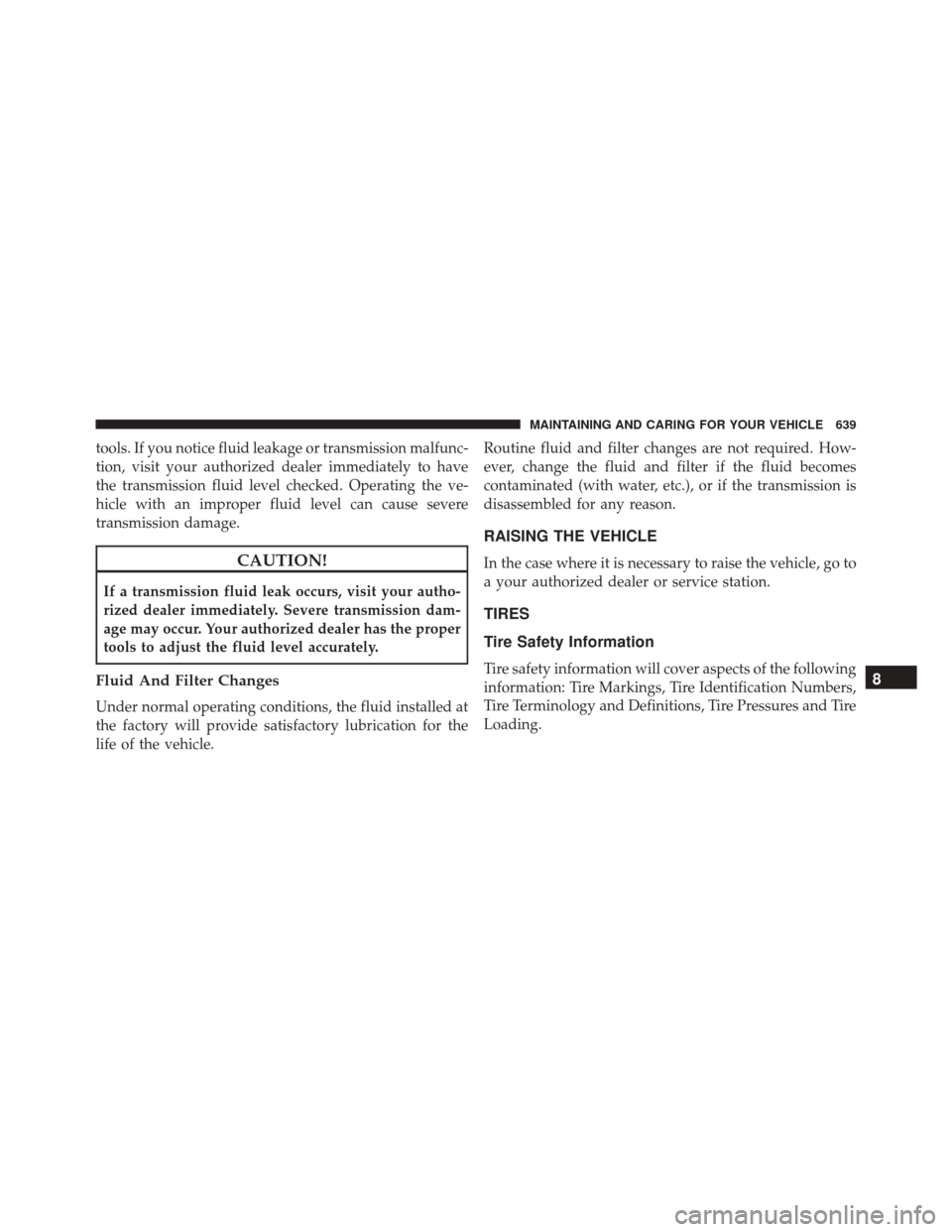
tools. If you notice fluid leakage or transmission malfunc-
tion, visit your authorized dealer immediately to have
the transmission fluid level checked. Operating the ve-
hicle with an improper fluid level can cause severe
transmission damage.
CAUTION!
If a transmission fluid leak occurs, visit your autho-
rized dealer immediately. Severe transmission dam-
age may occur. Your authorized dealer has the proper
tools to adjust the fluid level accurately.
Fluid And Filter Changes
Under normal operating conditions, the fluid installed at
the factory will provide satisfactory lubrication for the
life of the vehicle.Routine fluid and filter changes are not required. How-
ever, change the fluid and filter if the fluid becomes
contaminated (with water, etc.), or if the transmission is
disassembled for any reason.
RAISING THE VEHICLE
In the case where it is necessary to raise the vehicle, go to
a your authorized dealer or service station.
TIRES
Tire Safety Information
Tire safety information will cover aspects of the following
information: Tire Markings, Tire Identification Numbers,
Tire Terminology and Definitions, Tire Pressures and Tire
Loading.8
MAINTAINING AND CARING FOR YOUR VEHICLE 639
Page 691 of 828
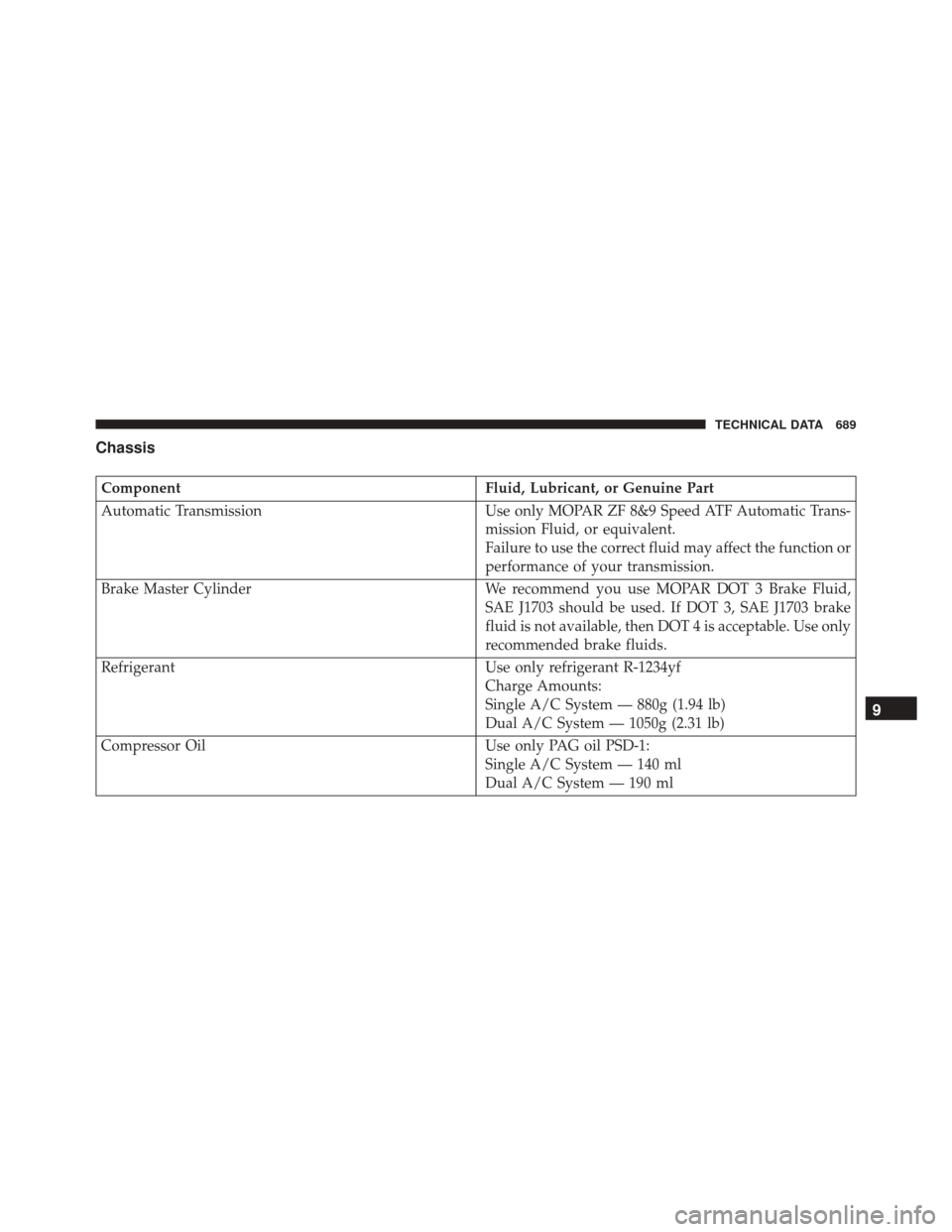
Chassis
ComponentFluid, Lubricant, or Genuine Part
Automatic Transmission Use only MOPAR ZF 8&9 Speed ATF Automatic Trans-
mission Fluid, or equivalent.
Failure to use the correct fluid may affect the function or
performance of your transmission.
Brake Master Cylinder We recommend you use MOPAR DOT 3 Brake Fluid,
SAE J1703 should be used. If DOT 3, SAE J1703 brake
fluid is not available, then DOT 4 is acceptable. Use only
recommended brake fluids.
Refrigerant Use only refrigerant R-1234yf
Charge Amounts:
Single A/C System — 880g (1.94 lb)
Dual A/C System — 1050g (2.31 lb)
Compressor Oil Use only PAG oil PSD-1:
Single A/C System — 140 ml
Dual A/C System — 190 ml
9
TECHNICAL DATA 689
Page 701 of 828
•Forward Collision Warning Active Braking
The FCW system includes Advanced Brake Assist (ABA).
When this feature is selected, the ABA applies additional
brake pressure when the driver requests insufficient
brake pressure to avoid a potential frontal collision. The
ABA system becomes active at 5 mph (8 km/h). The
system can be enabled or disabled by pressing “Forward
Collision Warning Active Braking” button on the touch-
screen.
• ParkSense — If Equipped
The ParkSense system will scan for objects behind the
vehicle when the transmission gear selector is in RE-
VERSE and the vehicle speed is less than 7 mph
(11 km/h). The system can be enabled with Sound Only,
or Sound and Display. •
Front ParkSense Volume
The chime volume settings include LOW, MEDIUM, and
HIGH. The KeySense default volume setting is ME-
DIUM. To make your selection, press the “Front
ParkSense Vol.” button on the touchscreen, until a check-
mark appears next to setting, indicating that the setting
has been selected. ParkSense will retain its last known
configuration state through ignition cycles.
• Rear ParkSense Volume
The chime volume settings include LOW, MEDIUM, and
HIGH. The KeySense default volume setting is ME-
DIUM. To make your selection, press the “Rear
ParkSense Vol.” button on the touchscreen, until a check-
mark appears next to setting, indicating that the setting
had been selected. ParkSense will retain its last known
configuration state through ignition cycles.
10
MULTIMEDIA 699
Page 706 of 828
8 mph (13 km/h), the transmission is shifted into PARK
or the ignition is switched to the OFF position.
•ParkView Backup Camera Delay — If Equipped
Press the “Parkview Backup camera Delay” button
on the touchscreen to turn the ParkView Delay ON or
OFF.
• ParkView Backup Camera Active Guide Lines — If
Equipped When this feature is enabled, active (dynamic) grid
lines are overlaid on the Rear Backup Camera image
to illustrate the width of the vehicle and its projected
back up path based on the steering wheel position. A
dashed center line overlay indicates the center of the
vehicle to assist with parking or aligning to a hitch/
receiver.
• Forward Collision Warning On/Off — If Equipped
The default status of FCW is “On”, this allows the system
to warn you of a possible collision with the vehicle in front of you. The forward collision button is located in
the Uconnect display in the controls settings. To turn the
FCW system OFF, push the forward collision button once
to turn the system OFF. To turn the FCW system back
ON, push the forward collision button again to turn the
system ON. Changing the FCW status to “OFF” prevents
the system from warning you of a possible collision with
the vehicle in front of you.
•
Forward Collision Warning-Plus (FCW+) — If
Equipped
The Front Collision Warning (FCW+) feature can be can
be set to Far, Med or Near. The default status of FCW+ is
the Med setting. This means the system will warn you of
a possible collision with the vehicle in front of you when
you are a relatively medium distance away. This gives
you the medium reaction time. To change the setting for
a more dynamic driving experience, select the Near
setting. This warns you of a possible collision when you
704 MULTIMEDIA
Page 707 of 828
are much closer to the vehicle in front of you. To change
the FCW+ status, press and release the “Near” “Med” or
“Far” buttons.
•Forward Collision Warning-Plus (FCW+) Active
Braking — If Equipped The FCW+ system includes Advanced Brake Assist
(ABA). When this feature is selected, it will apply the
brakes to slow your vehicle in case of potential
forward collision. The ABA applies additional brake
pressure when the driver requests insufficient brake
pressure to avoid a potential frontal collision. The
ABA system becomes active at 5 mph (8 km/h).
• ParkSense — If Equipped
The ParkSense system will scan for objects behind the
vehicle when the transmission gear selector is in RE-
VERSE and the vehicle speed is less than 7 mph
(11 km/h). It will provide an alert (audible and/or visual) to indicate the proximity to other objects. The
system can be enabled with Sound Only, or Sound and
Display.
•
Rear ParkSense Volume — If Equipped
Rear Park Assist chime volume settings can be se-
lected from the EVIC/DID or Uconnect System (if
equipped). The chime volume settings include
“LOW,” “MEDIUM,” and “HIGH.” The factory de-
fault volume setting is MEDIUM.
• Front ParkSense Volume — If Equipped
Front Park Assist chime volume settings can be
selected from the EVIC/DID or Uconnect System (if
equipped). The chime volume settings include
“LOW,” “MEDIUM,” and “HIGH.” The factory de-
fault volume setting is MEDIUM.
• Rear ParkSense Braking Assist — If Equipped
When this feature is selected, the park assist system
will detect objects located behind the vehicle and
utilize autonomous braking to stop the vehicle.
10
MULTIMEDIA 705
Page 709 of 828
•Hill Start Assist — If Equipped
When this feature is selected, the Hill Start Assist (HSA)
system is active. Refer to “Electronic Brake Control
System” in “Safety” for system function and operating
information. To make your selection, press the “Hill Start
Assist” button on the touchscreen and make your selec-
tion. Press the back arrow button on the touchscreen to
return to the previous menu.
• Rain Sensing Auto Wipers
When this feature is selected, the system will automati-
cally activate the windshield wipers if it senses moisture
on the windshield. To make your selection, press the
“Rain Sensing” button on the touchscreen and make your
selection. Press the back arrow button on the touchscreen
to return to the previous menu. •
Tilt Side Mirrors In Reverse
When this feature is selected, the exterior sideview
mirrors will tilt downward when the ignition is in the
RUN position and the gear selector is in the REVERSE
position. The mirrors will move back to their previous
position when the transmission is shifted out of RE-
VERSE. To make your selection, press the “Tilt Mirrors In
Reverse” button on the touchscreen and make your
selection. Press the back arrow button on the touchscreen
to return to the previous menu.
Lights
After pressing the “Lights” button on the touchscreen the
following settings will be available.
• Headlight Off Delay
When this feature is selected, it allows the adjustment of
the amount of time the headlights remain on after the
engine is shut off. To change the Headlights Off Delay
10
MULTIMEDIA 707
Page 712 of 828
NOTE:The seat will return to the memorized seat
location (if Recall Memory with Remote Key Unlock is set
to ON) when the Remote Keyless Entry (RKE) Key Fob is
used to unlock the door.
• Power Liftgate Alert
When this feature is selected, an alert plays when the
power liftgate is raising or lowering. To make your
selection, press the “Power Liftgate Alert” button on the
touchscreen and select from “On” or “Off.”
• Sliding Door Alert
When this feature is selected, a chime plays when the
sliding door reverses or an obstacle is sensed. To make
your selection, press the “Sliding Door Alert” button on
the touchscreen and select from “On” or “Off.”
• Hands Free Lift Gate
When this feature is selected, the rear liftgate can opened
or closed using a Foot Activation in a single-kick motion. To make your selection, press the “Hands Free Lift Gate”
button on the touchscreen and select from “On” or “Off.”
•
Hands Free Sliding Door
When this feature is selected, the sliding doors can
opened or closed using a Foot Activation in a single-kick
motion. To make your selection, press the “Hands Free
Sliding Door” button on the touchscreen and select from
“On” or “Off.”
• Auto Unlock On Exit
When this feature is selected, all doors will unlock when
the vehicle is stopped and the transmission is in the
PARK or NEUTRAL position and the driver’s door is
opened. To make your selection, press the “Auto Unlock
on Exit” button on the touchscreen and select from “On”
or “Off.”
710 MULTIMEDIA
Page 722 of 828
•ParkSense — If Equipped
The ParkSense system will scan for objects behind the
vehicle when the transmission gear selector is in RE-
VERSE and the vehicle speed is less than 7 mph
(11 km/h). The system can be enabled with Sound Only,
or Sound and Display. To change the ParkSense status,
press and release the checkbox for “Sound” or “Sound
and Display.”
• Front ParkSense Volume
The chime volume settings include LOW, MEDIUM, and
HIGH. The KeySense default volume setting is ME-
DIUM. To make your selection, press the “Front
ParkSense Vol.” button on the touchscreen, until a check-
mark appears next to setting, indicating that the setting
has been selected. ParkSense will retain its last known
configuration state through ignition cycles. •
Rear ParkSense Volume
The chime volume settings include LOW, MEDIUM, and
HIGH. The KeySense default volume setting is ME-
DIUM. To make your selection, press the “Rear
ParkSense Vol.” button on the touchscreen, until a check-
mark appears next to setting, indicating that the setting
had been selected. ParkSense will retain its last known
configuration state through ignition cycles.
• Rear ParkSense Braking Assist
When this feature is selected, the ParkSense system will
detect objects located behind the vehicle and utilize
autonomous braking to help stop the vehicle (only en-
abled when ParkSense is also on). The system can be
enabled or disabled by pressing the “Rear ParkSense
Braking Assist” button on the touchscreen, until a check-
mark appears next to setting, indicating that the setting
had been selected.
720 MULTIMEDIA