service CHRYSLER PACIFICA 2018 Owners Manual
[x] Cancel search | Manufacturer: CHRYSLER, Model Year: 2018, Model line: PACIFICA, Model: CHRYSLER PACIFICA 2018Pages: 696, PDF Size: 8.48 MB
Page 536 of 696
Snow Tires
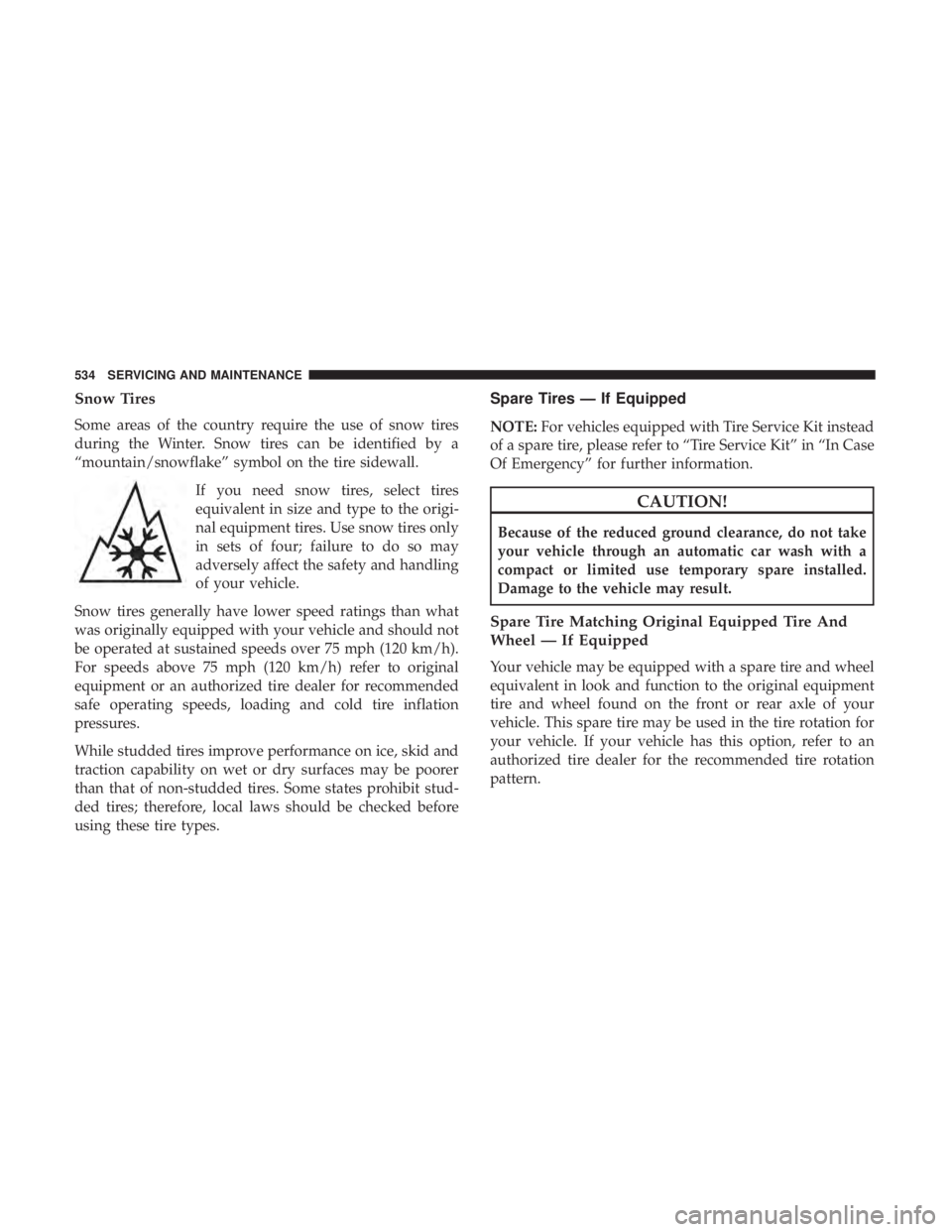
Some areas of the country require the use of snow tires
during the Winter. Snow tires can be identified by a
“mountain/snowflake” symbol on the tire sidewall.If you need snow tires, select tires
equivalent in size and type to the origi-
nal equipment tires. Use snow tires only
in sets of four; failure to do so may
adversely affect the safety and handling
of your vehicle.
Snow tires generally have lower speed ratings than what
was originally equipped with your vehicle and should not
be operated at sustained speeds over 75 mph (120 km/h).
For speeds above 75 mph (120 km/h) refer to original
equipment or an authorized tire dealer for recommended
safe operating speeds, loading and cold tire inflation
pressures.
While studded tires improve performance on ice, skid and
traction capability on wet or dry surfaces may be poorer
than that of non-studded tires. Some states prohibit stud-
ded tires; therefore, local laws should be checked before
using these tire types.
Spare Tires — If Equipped
NOTE: For vehicles equipped with Tire Service Kit instead
of a spare tire, please refer to “Tire Service Kit” in “In Case
Of Emergency” for further information.
CAUTION!
Because of the reduced ground clearance, do not take
your vehicle through an automatic car wash with a
compact or limited use temporary spare installed.
Damage to the vehicle may result.
Spare Tire Matching Original Equipped Tire And
Wheel — If Equipped
Your vehicle may be equipped with a spare tire and wheel
equivalent in look and function to the original equipment
tire and wheel found on the front or rear axle of your
vehicle. This spare tire may be used in the tire rotation for
your vehicle. If your vehicle has this option, refer to an
authorized tire dealer for the recommended tire rotation
pattern.
534 SERVICING AND MAINTENANCE
Page 542 of 696
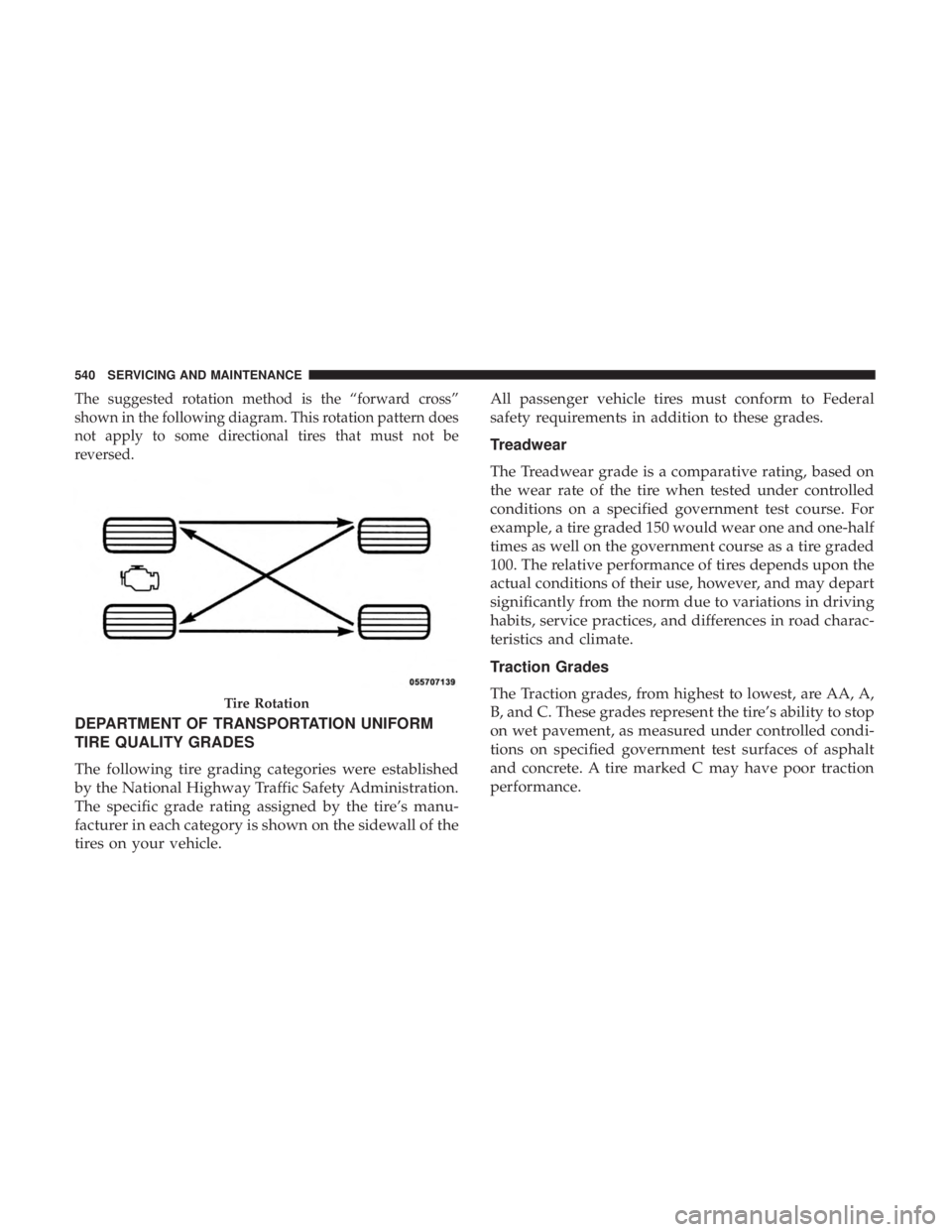
The suggested rotation method is the “forward cross”
shown in the following diagram. This rotation pattern does
not apply to some directional tires that must not be
reversed.
DEPARTMENT OF TRANSPORTATION UNIFORM
TIRE QUALITY GRADES
The following tire grading categories were established
by the National Highway Traffic Safety Administration.
The specific grade rating assigned by the tire’s manu-
facturer in each category is shown on the sidewall of the
tires on your vehicle.All passenger vehicle tires must conform to Federal
safety requirements in addition to these grades.
Treadwear
The Treadwear grade is a comparative rating, based on
the wear rate of the tire when tested under controlled
conditions on a specified government test course. For
example, a tire graded 150 would wear one and one-half
times as well on the government course as a tire graded
100. The relative performance of tires depends upon the
actual conditions of their use, however, and may depart
significantly from the norm due to variations in driving
habits, service practices, and differences in road charac-
teristics and climate.
Traction Grades
The Traction grades, from highest to lowest, are AA, A,
B, and C. These grades represent the tire’s ability to stop
on wet pavement, as measured under controlled condi-
tions on specified government test surfaces of asphalt
and concrete. A tire marked C may have poor traction
performance.
Tire Rotation
540 SERVICING AND MAINTENANCE
Page 553 of 696

Poor quality gasoline can cause problems such as hard
starting, stalling, and hesitations. If you experience these
symptoms, try another brand of gasoline before consider-
ing service for the vehicle.
Reformulated Gasoline
Many areas of the country require the use of cleaner
burning gasoline referred to as “Reformulated Gasoline”.
Reformulated gasoline contains oxygenates and are specifi-
cally blended to reduce vehicle emissions and improve air
quality.
The use of reformulated gasoline is recommended. Prop-
erly blended reformulated gasoline will provide improved
performance and durability of engine and fuel system
components.
Materials Added To Fuel
Besides using unleaded gasoline with the proper octane
rating, gasolines that contain detergents, corrosion and
stability additives are recommended. Using gasolines that
have these additives will help improve fuel economy,
reduce emissions, and maintain vehicle performance.Designated TOP TIER Detergent Gaso-
line contains a higher level of detergents
to further aide in minimizing engine
and fuel system deposits. When avail-
able, the usage of TOP TIER Detergent
gasoline is recommended. Visit
www.toptiergas.com for a list of TOP
TIER Detergent Gasoline Retailers.
Indiscriminate use of fuel system cleaning agents should be
avoided. Many of these materials intended for gum and
varnish removal may contain active solvents or similar
ingredients. These can harm fuel system gasket and dia-
phragm materials.
Gasoline/Oxygenate Blends
Some fuel suppliers blend unleaded gasoline with oxygen-
ates such as ethanol.
CAUTION!
DO NOT use E-85, gasoline containing methanol, or
gasoline containing more than 15% ethanol (E-15). Use
of these blends may result in starting and drivability
(Continued)
9
TECHNICAL SPECIFICATIONS 551
Page 555 of 696
MMT In Gasoline
Methylcyclopentadienyl Manganese Tricarbonyl (MMT) is
a manganese-containing metallic additive that is blended
into some gasoline to increase octane. Gasoline blended
with MMT provides no performance advantage beyond
gasoline of the same octane number without MMT. Gaso-
line blended with MMT reduces spark plug life and
reduces emissions system performance in some vehicles.
The manufacturer recommends that gasoline without
MMT be used in your vehicle. The MMT content of
gasoline may not be indicated on the gasoline pump;
therefore, you should ask your gasoline retailer whether
the gasoline contains MMT. MMT is prohibited in Federal
and California reformulated gasoline.
Fuel System Cautions
CAUTION!
Follow these guidelines to maintain your vehicle’s
performance:
•The use of leaded gasoline is prohibited by Federal
law. Using leaded gasoline can impair engine perfor-
mance and damage the emissions control system.
(Continued)
CAUTION! (Continued)
•An out-of-tune engine or certain fuel or ignition
malfunctions can cause the catalytic converter to
overheat. If you notice a pungent burning odor or
some light smoke, your engine may be out of tune or
malfunctioning and may require immediate service.
Contact an authorized dealer for service assistance.
• The use of fuel additives, which are now being sold
as octane enhancers, is not recommended. Most of
these products contain high concentrations of metha-
nol. Fuel system damage or vehicle performance
problems resulting from the use of such fuels or
additives is not the responsibility of the manufac-
turer and may void or not be covered under the New
Vehicle Limited Warranty.
NOTE: Intentional tampering with the emissions control
system can result in civil penalties being assessed against
you.
9
TECHNICAL SPECIFICATIONS 553
Page 564 of 696
UCONNECT SYSTEMS
For detailed information about your Uconnect system,
refer to your Uconnect Owner ’s Manual Supplement.
NOTE:Uconnect screen images are for illustration pur-
poses only and may not reflect exact software for your
vehicle.
DRAG & DROP MENU BAR
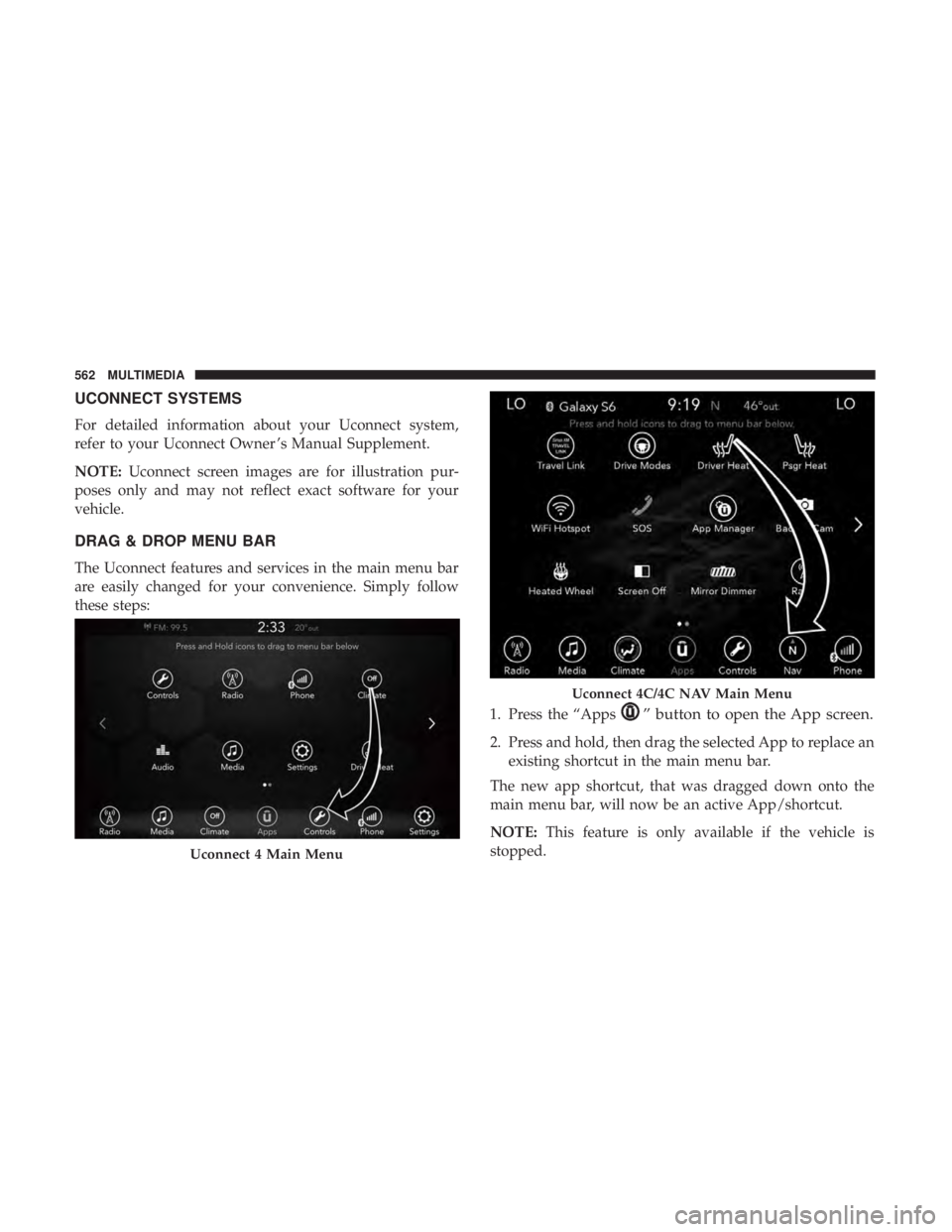
The Uconnect features and services in the main menu bar
are easily changed for your convenience. Simply follow
these steps:
1. Press the “Apps
” button to open the App screen.
2. Press and hold, then drag the selected App to replace anexisting shortcut in the main menu bar.
The new app shortcut, that was dragged down onto the
main menu bar, will now be an active App/shortcut.
NOTE: This feature is only available if the vehicle is
stopped.
Uconnect 4 Main Menu
Uconnect 4C/4C NAV Main Menu
562 MULTIMEDIA
Page 570 of 696
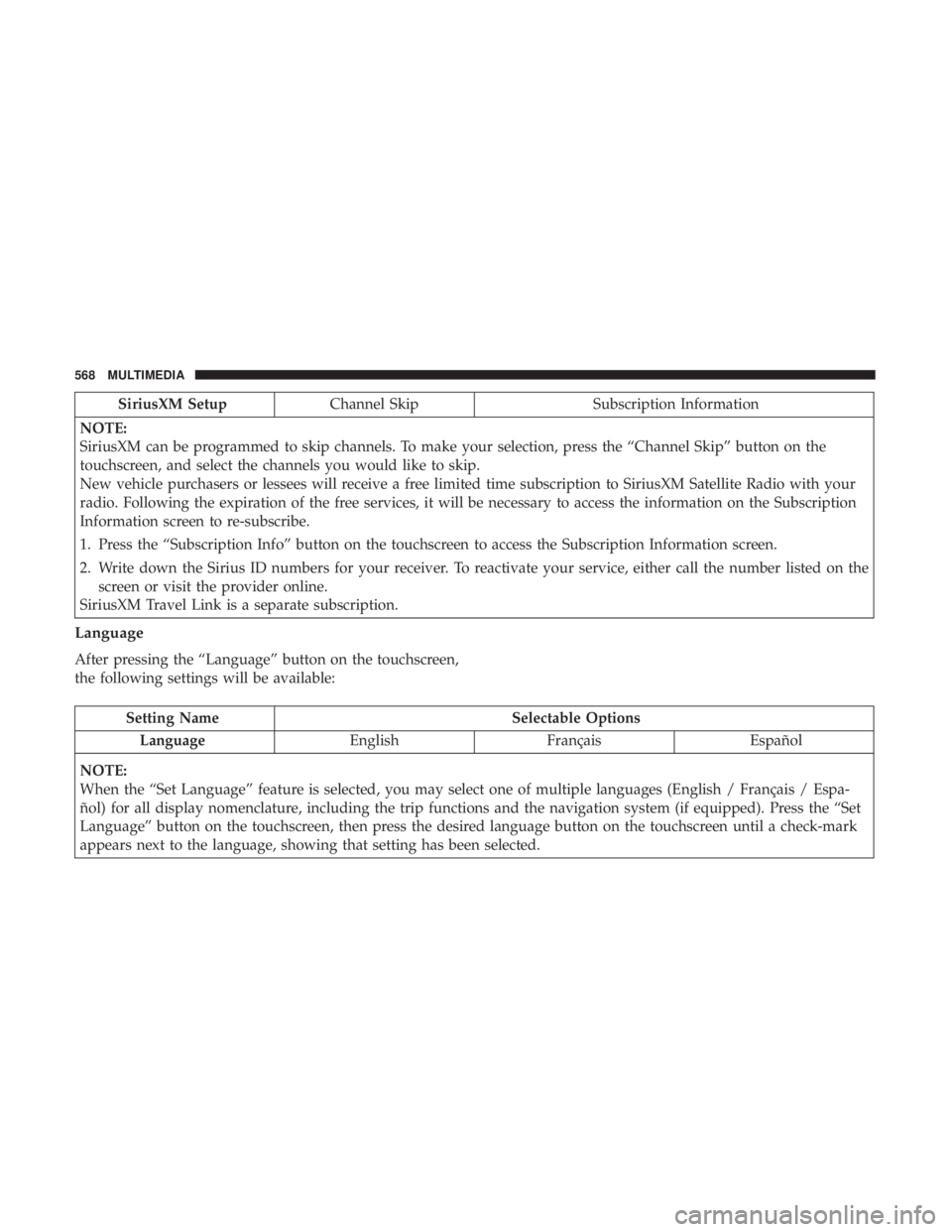
SiriusXM SetupChannel Skip Subscription Information
NOTE:
SiriusXM can be programmed to skip channels. To make your selection, press the “Channel Skip” button on the
touchscreen, and select the channels you would like to skip.
New vehicle purchasers or lessees will receive a free limited time subscription to SiriusXM Satellite Radio with your
radio. Following the expiration of the free services, it will be necessary to access the information on the Subscription
Information screen to re-subscribe.
1. Press the “Subscription Info” button on the touchscreen to access the Subscription Information screen.
2. Write down the Sirius ID numbers for your receiver. To reactivate your service, either call the number listed on the screen or visit the provider online.
SiriusXM Travel Link is a separate subscription.
Language
After pressing the “Language” button on the touchscreen,
the following settings will be available:
Setting Name Selectable Options
Language EnglishFrançais Español
NOTE:
When the “Set Language” feature is selected, you may select one of multiple languages (English / Français / Espa-
ñol) for all display nomenclature, including the trip functions and the navigation system (if equipped). Press the “Set
Language” button on the touchscreen, then press the desired language button on the touchscreen until a check-mark
appears next to the language, showing that setting has been selected.
568 MULTIMEDIA
Page 579 of 696
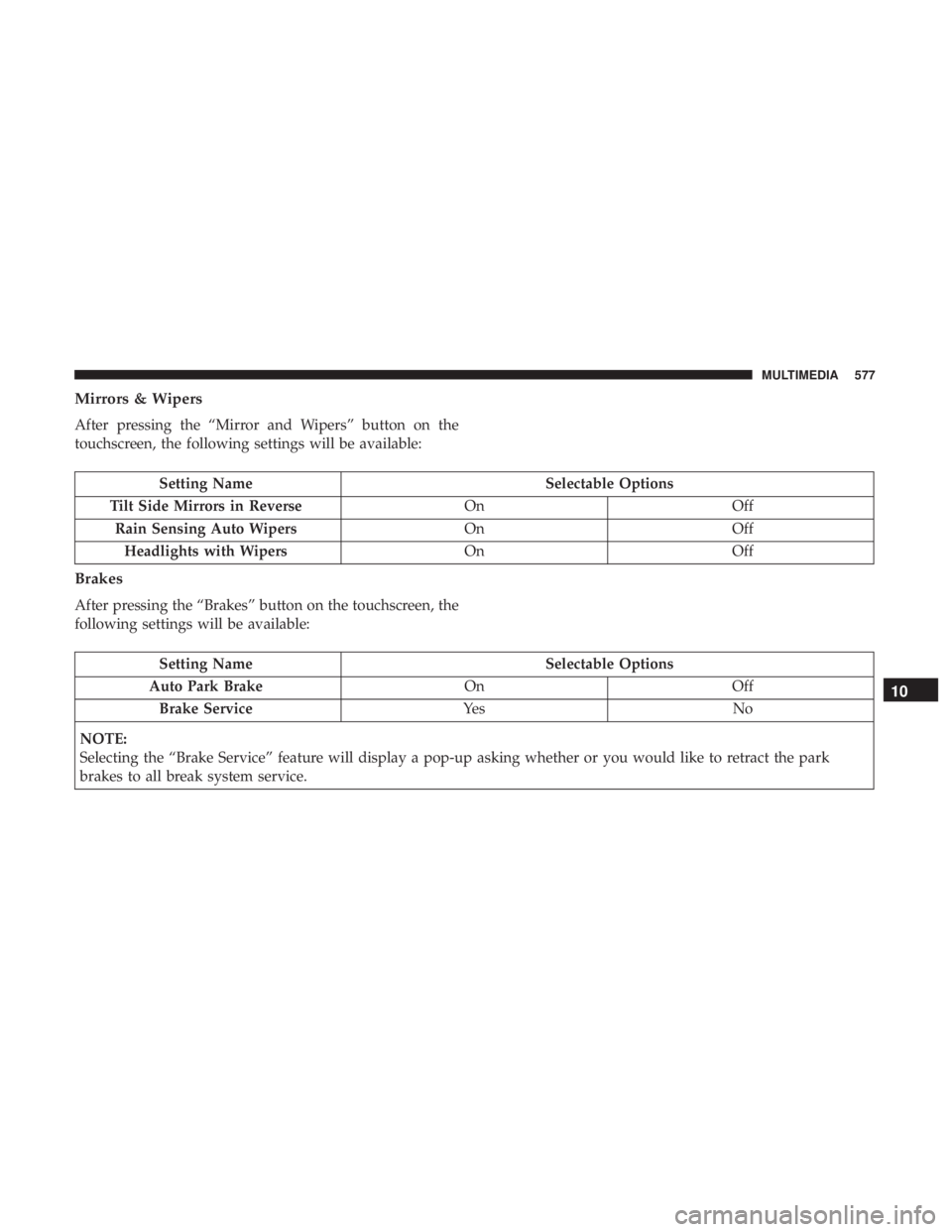
Mirrors & Wipers
After pressing the “Mirror and Wipers” button on the
touchscreen, the following settings will be available:
Setting NameSelectable Options
Tilt Side Mirrors in Reverse OnOff
Rain Sensing Auto Wipers OnOff
Headlights with Wipers OnOff
Brakes
After pressing the “Brakes” button on the touchscreen, the
following settings will be available:
Setting Name Selectable Options
Auto Park Brake OnOff
Brake Service Ye sN o
NOTE:
Selecting the “Brake Service” feature will display a pop-up asking whether or you would like to retract the park
brakes to all break system service.
10
MULTIMEDIA 577
Page 581 of 696
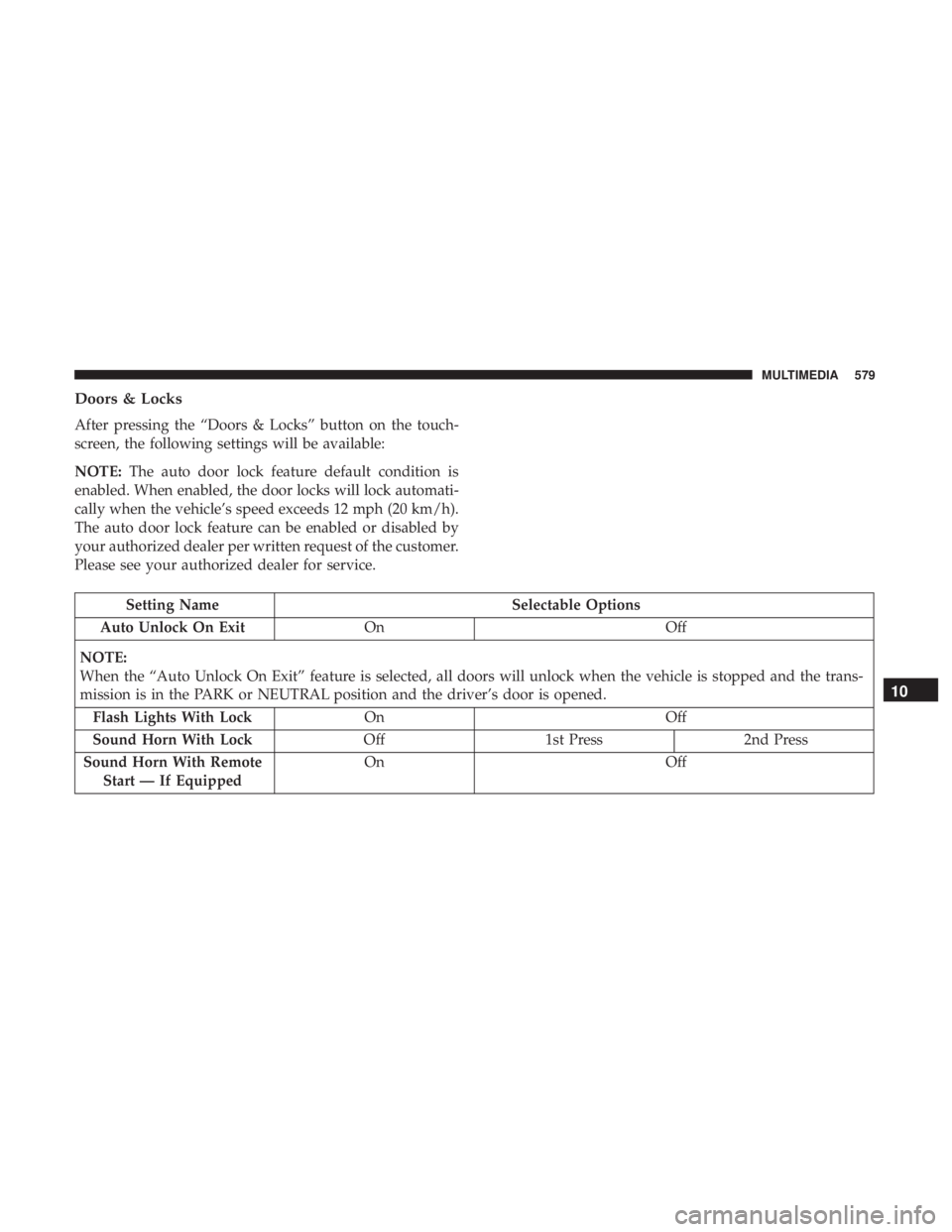
Doors & Locks
After pressing the “Doors & Locks” button on the touch-
screen, the following settings will be available:
NOTE:The auto door lock feature default condition is
enabled. When enabled, the door locks will lock automati-
cally when the vehicle’s speed exceeds 12 mph (20 km/h).
The auto door lock feature can be enabled or disabled by
your authorized dealer per written request of the customer.
Please see your authorized dealer for service.
Setting Name Selectable Options
Auto Unlock On Exit On Off
NOTE:
When the “Auto Unlock On Exit” feature is selected, all doors will unlock when the vehicle is stopped and the trans-
mission is in the PARK or NEUTRAL position and the driver’s door is opened. Flash Lights With Lock On Off
Sound Horn With Lock Off1st Press 2nd Press
Sound Horn With Remote Start — If Equipped On
Off
10
MULTIMEDIA 579
Page 591 of 696
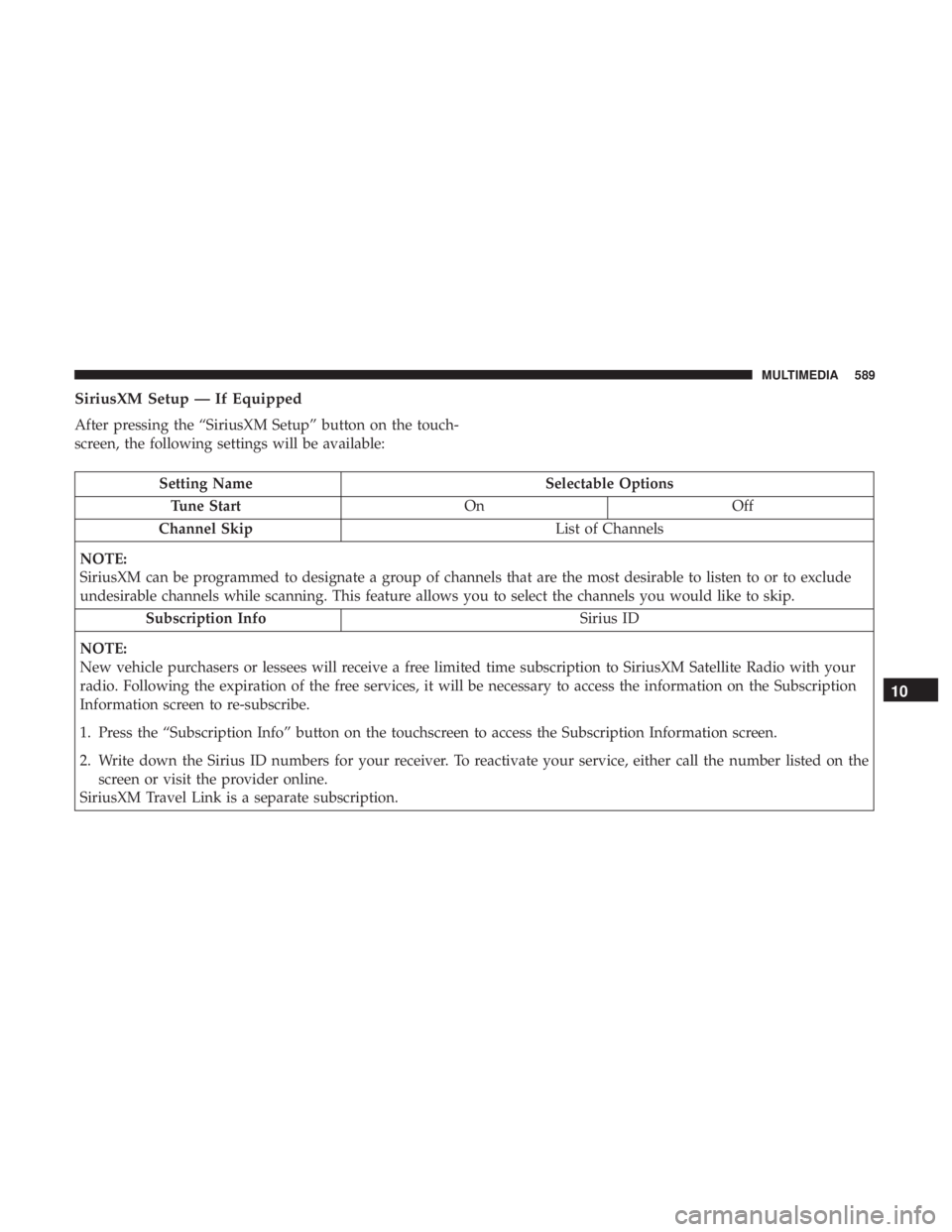
SiriusXM Setup — If Equipped
After pressing the “SiriusXM Setup” button on the touch-
screen, the following settings will be available:
Setting NameSelectable Options
Tune Start OnOff
Channel Skip List of Channels
NOTE:
SiriusXM can be programmed to designate a group of channels that are the most desirable to listen to or to exclude
undesirable channels while scanning. This feature allows you to select the channels you would like to skip. Subscription Info Sirius ID
NOTE:
New vehicle purchasers or lessees will receive a free limited time subscription to SiriusXM Satellite Radio with your
radio. Following the expiration of the free services, it will be necessary to access the information on the Subscription
Information screen to re-subscribe.
1. Press the “Subscription Info” button on the touchscreen to access the Subscription Information screen.
2. Write down the Sirius ID numbers for your receiver. To reactivate your service, either call the number listed on the screen or visit the provider online.
SiriusXM Travel Link is a separate subscription.
10
MULTIMEDIA 589
Page 595 of 696
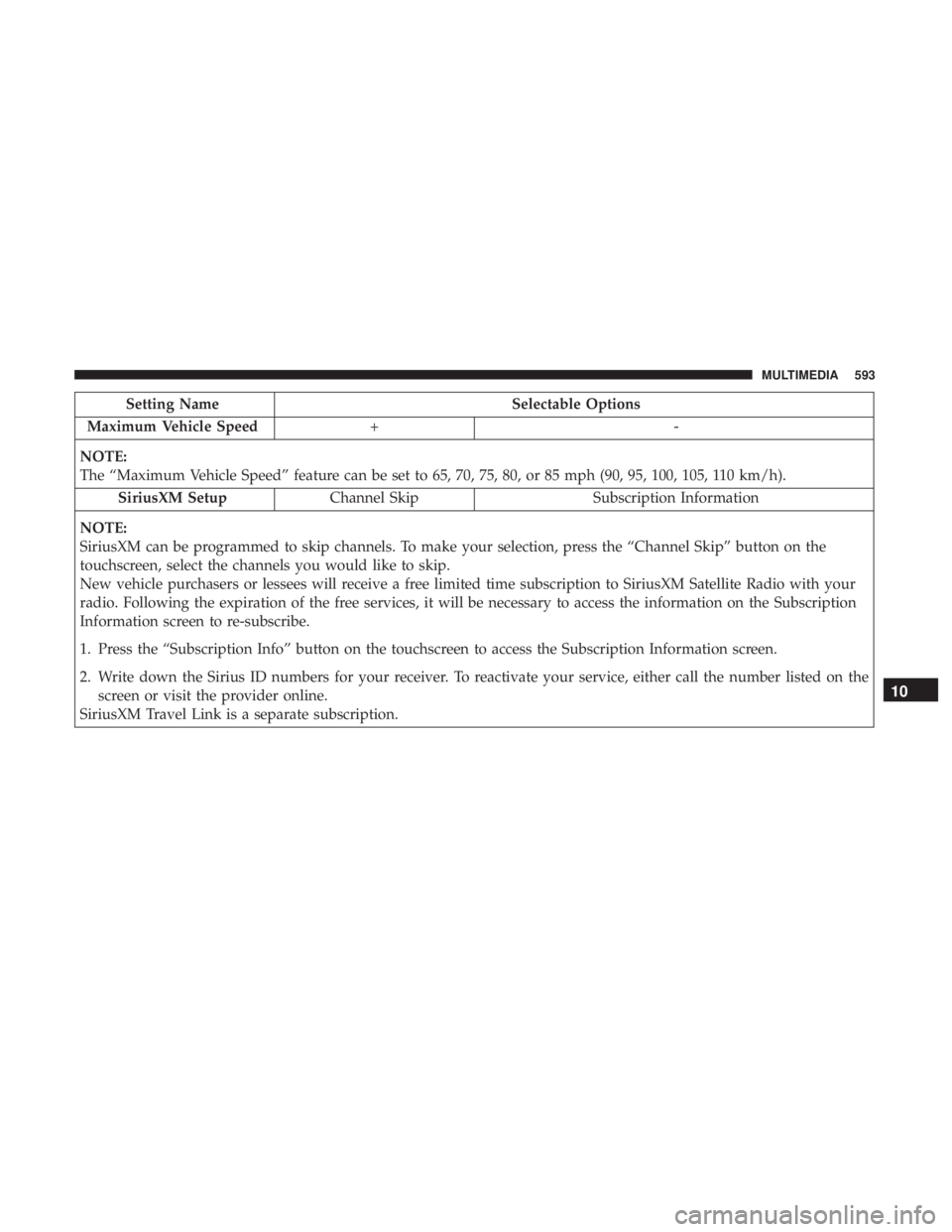
Setting NameSelectable Options
Maximum Vehicle Speed +-
NOTE:
The “Maximum Vehicle Speed” feature can be set to 65, 70, 75, 80, or 85 mph (90, 95, 100, 105, 110 km/h). SiriusXM Setup Channel Skip Subscription Information
NOTE:
SiriusXM can be programmed to skip channels. To make your selection, press the “Channel Skip” button on the
touchscreen, select the channels you would like to skip.
New vehicle purchasers or lessees will receive a free limited time subscription to SiriusXM Satellite Radio with your
radio. Following the expiration of the free services, it will be necessary to access the information on the Subscription
Information screen to re-subscribe.
1. Press the “Subscription Info” button on the touchscreen to access the Subscription Information screen.
2. Write down the Sirius ID numbers for your receiver. To reactivate your service, either call the number listed on the screen or visit the provider online.
SiriusXM Travel Link is a separate subscription.
10
MULTIMEDIA 593