ECU CHRYSLER PACIFICA 2018 User Guide
[x] Cancel search | Manufacturer: CHRYSLER, Model Year: 2018, Model line: PACIFICA, Model: CHRYSLER PACIFICA 2018Pages: 696, PDF Size: 8.48 MB
Page 38 of 696
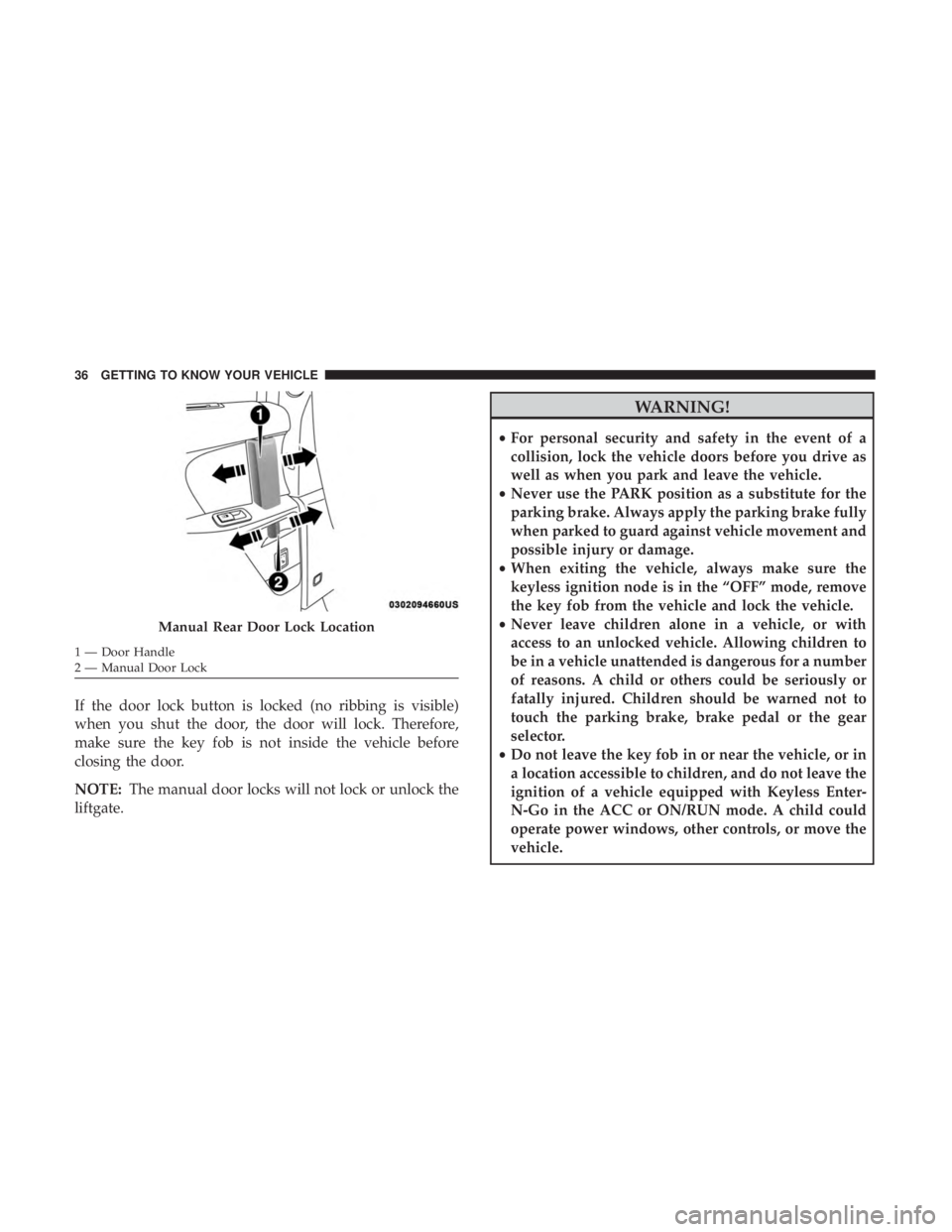
If the door lock button is locked (no ribbing is visible)
when you shut the door, the door will lock. Therefore,
make sure the key fob is not inside the vehicle before
closing the door.
NOTE:The manual door locks will not lock or unlock the
liftgate.
WARNING!
• For personal security and safety in the event of a
collision, lock the vehicle doors before you drive as
well as when you park and leave the vehicle.
• Never use the PARK position as a substitute for the
parking brake. Always apply the parking brake fully
when parked to guard against vehicle movement and
possible injury or damage.
• When exiting the vehicle, always make sure the
keyless ignition node is in the “OFF” mode, remove
the key fob from the vehicle and lock the vehicle.
• Never leave children alone in a vehicle, or with
access to an unlocked vehicle. Allowing children to
be in a vehicle unattended is dangerous for a number
of reasons. A child or others could be seriously or
fatally injured. Children should be warned not to
touch the parking brake, brake pedal or the gear
selector.
• Do not leave the key fob in or near the vehicle, or in
a location accessible to children, and do not leave the
ignition of a vehicle equipped with Keyless Enter-
N-Go in the ACC or ON/RUN mode. A child could
operate power windows, other controls, or move the
vehicle.
Manual Rear Door Lock Location
1 — Door Handle
2 — Manual Door Lock 36 GETTING TO KNOW YOUR VEHICLE
Page 40 of 696
NOTE:
•Passive Entry may be programmed ON/OFF. Refer to
“Uconnect Settings” in “Multimedia” for further infor-
mation.
• If wearing gloves on your hands, or if it has been
raining/snowing on the Passive Entry door handle, the
unlock sensitivity can be affected, resulting in a slower
response time.
• If the vehicle is unlocked by Passive Entry and no door
is opened within 60 seconds, the vehicle will re-lock and
if equipped will arm the security alarm.
• The sliding side doors can be unlocked from the outside
using the hands free or Passive Entry system.
• The key fob may not be able to be detected by the vehicle
passive entry system if it is located next to a mobile
phone, laptop, wireless charging pad, or other electronic
device; these devices may block the key fob’s wireless
signal and prevent the passive entry handle from
locking/unlocking the vehicle.
• If set by the customer in the Uconnect Settings, unlock-
ing with Passive Entry will initiate illuminated approach (low beams, license plate lamp, position lamps) for the
time 0, 30(default), 60 or 90 seconds. Passive Entry also
initiates two flashes of the turn lamps.
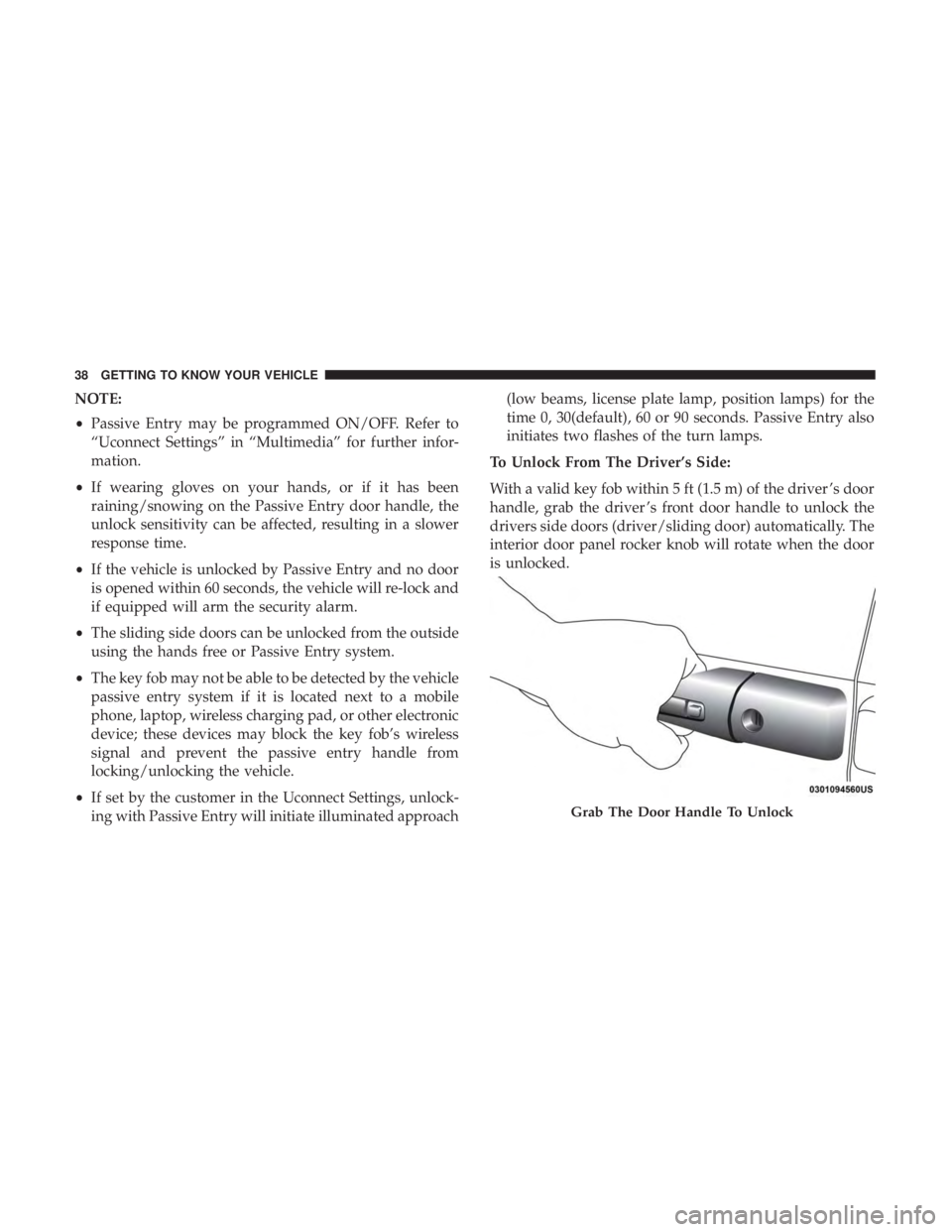
To Unlock From The Driver’s Side:
With a valid key fob within 5 ft (1.5 m) of the driver ’s door
handle, grab the driver ’s front door handle to unlock the
drivers side doors (driver/sliding door) automatically. The
interior door panel rocker knob will rotate when the door
is unlocked.
Grab The Door Handle To Unlock
38 GETTING TO KNOW YOUR VEHICLE
Page 41 of 696
NOTE:If “Unlock All Doors 1st Press” is programmed, all
doors and liftgate will unlock when you grab hold of the
driver ’s front door handle. To select between “Unlock
Driver Door 1st Press” and “Unlock All Doors 1st Press,”
refer to “Uconnect Settings” in “Multimedia” for further
information.
To Unlock From The Passenger Side:
With a valid key fob within 5 ft (1.5 m) of the passenger
door handle, grab the front passenger door handle to
unlock all four doors and the liftgate automatically. The
interior door panel lock knob will rotate when the door is
unlocked.
NOTE: All doors will unlock when the front passenger
door handle is grabbed regardless of the driver ’s door
unlock preference setting (“Unlock Driver Door 1st Press”
or “Unlock All Doors 1st Press”).
Preventing Inadvertent Locking Of Key Fob In Vehicle
(FOBIK-Safe)
To minimize the possibility of unintentionally locking a
key fob inside your vehicle, the Passive Entry system is
equipped with an automatic door unlock feature. FOBIK-Safe only executes in vehicles with Passive Entry.
There are three situations that trigger a FOBIK-Safe search
in any Passive Entry vehicle:
•
A lock request is made by a valid key fob while a door
is open.
• A lock request is made by the Passive Entry door handle
while a door is open.
• A lock request is made by the door panel switch while
the door is open.
When any of these situations occur, after all open doors are
shut, the FOBIK-Safe search will be executed. If it finds a
key fob inside the car, and it does not find any key fob
outside the car, then the car will unlock and alert the
customer.
NOTE: The vehicle will only unlock the doors when a valid
key fob is detected inside the vehicle, and no valid key fob
is detected outside the vehicle. The vehicle will not unlock
the doors when any of the following conditions are met:
• The doors are manually locked using the door lock
knobs.
• There is a valid key fob outside the vehicle and within
5 ft (1.5 m) of either Passive Entry door handle.
3
GETTING TO KNOW YOUR VEHICLE 39
Page 86 of 696
WARNING!
•A loose head restraint thrown forward in a collision
or hard stop could cause serious injury or death to
occupants of the vehicle. Always securely stow re-
moved head restraints in a location outside the
occupant compartment.
• ALL the head restraints MUST be reinstalled in the
vehicle to properly protect the occupants. Follow the
re-installation instructions above prior to operating
the vehicle or occupying a seat.
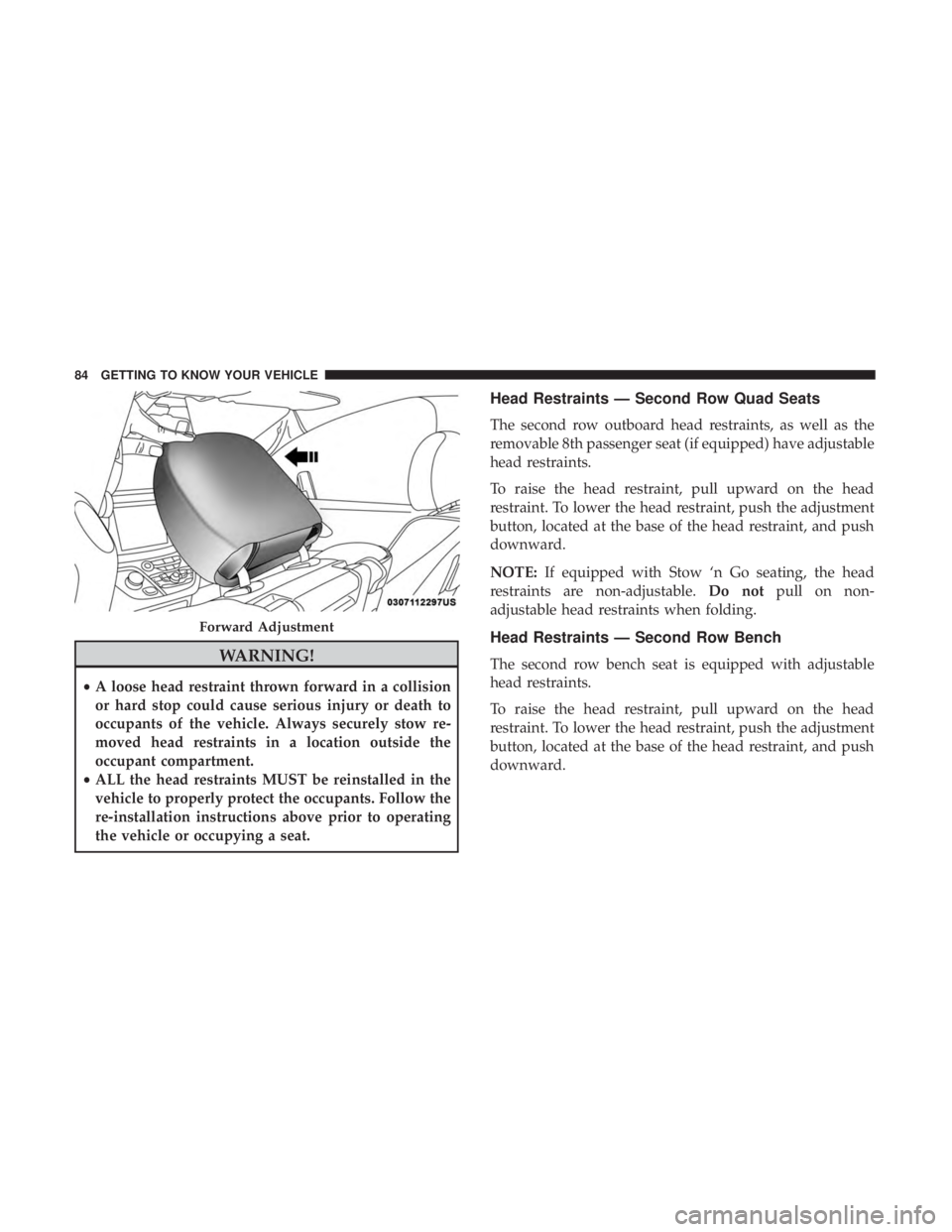
Head Restraints — Second Row Quad Seats
The second row outboard head restraints, as well as the
removable 8th passenger seat (if equipped) have adjustable
head restraints.
To raise the head restraint, pull upward on the head
restraint. To lower the head restraint, push the adjustment
button, located at the base of the head restraint, and push
downward.
NOTE: If equipped with Stow ‘n Go seating, the head
restraints are non-adjustable. Do notpull on non-
adjustable head restraints when folding.
Head Restraints — Second Row Bench
The second row bench seat is equipped with adjustable
head restraints.
To raise the head restraint, pull upward on the head
restraint. To lower the head restraint, push the adjustment
button, located at the base of the head restraint, and push
downward.
Forward Adjustment
84 GETTING TO KNOW YOUR VEHICLE
Page 87 of 696
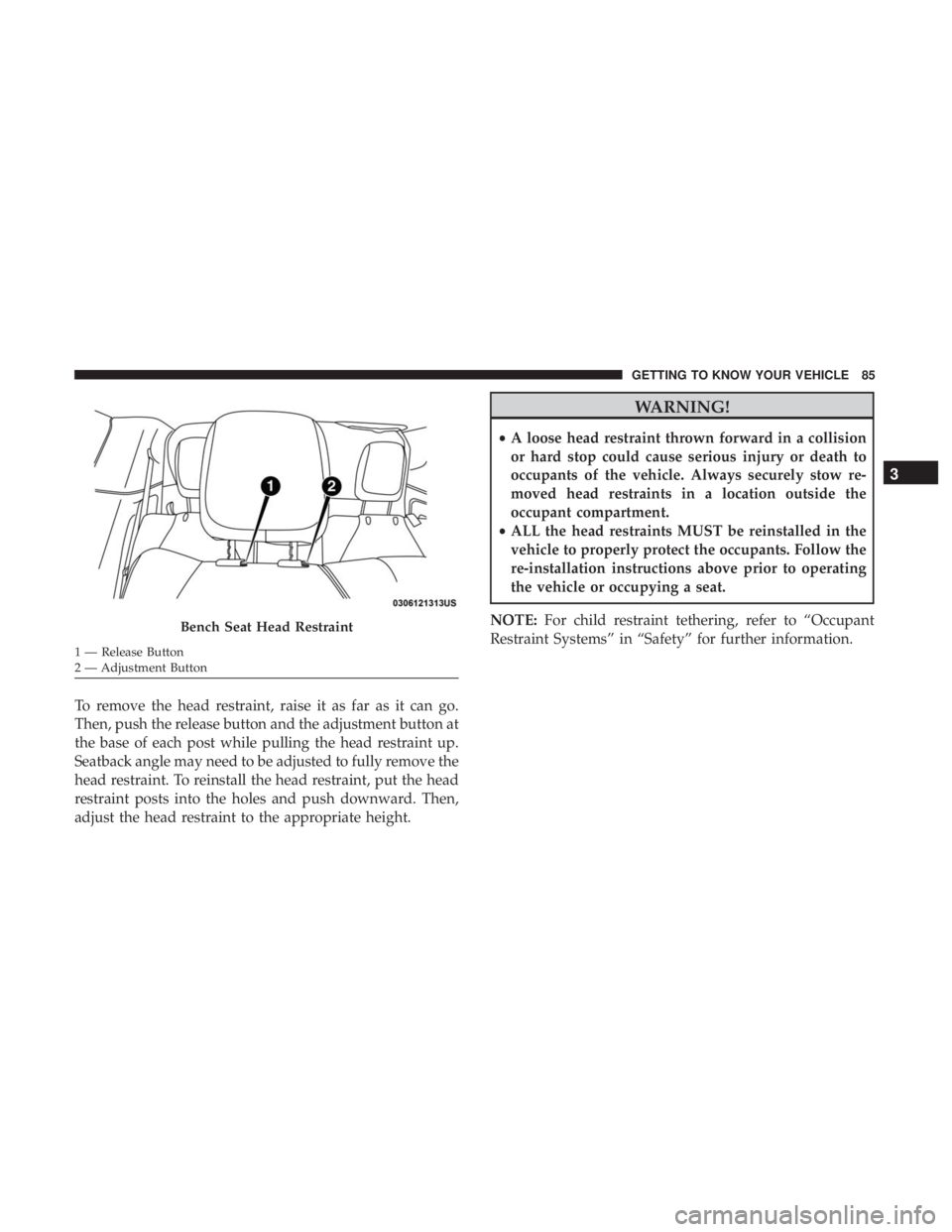
To remove the head restraint, raise it as far as it can go.
Then, push the release button and the adjustment button at
the base of each post while pulling the head restraint up.
Seatback angle may need to be adjusted to fully remove the
head restraint. To reinstall the head restraint, put the head
restraint posts into the holes and push downward. Then,
adjust the head restraint to the appropriate height.
WARNING!
•A loose head restraint thrown forward in a collision
or hard stop could cause serious injury or death to
occupants of the vehicle. Always securely stow re-
moved head restraints in a location outside the
occupant compartment.
• ALL the head restraints MUST be reinstalled in the
vehicle to properly protect the occupants. Follow the
re-installation instructions above prior to operating
the vehicle or occupying a seat.
NOTE: For child restraint tethering, refer to “Occupant
Restraint Systems” in “Safety” for further information.
Bench Seat Head Restraint
1 — Release Button
2 — Adjustment Button
3
GETTING TO KNOW YOUR VEHICLE 85
Page 138 of 696
WARNING!
•Never leave children unattended in a vehicle, or with
access to an unlocked vehicle. Never leave the key
fob in or near the vehicle, or in a location accessible
to children. Do not leave the ignition of a vehicle
equipped with Keyless Enter-N-Go in the ACC or
(Continued)
WARNING! (Continued)
ON/RUN mode. Occupants, particularly unattended
children, can become entrapped by the power sun-
roof while operating the power sunroof switch. Such
entrapment may result in serious injury or death.
• In a collision, there is a greater risk of being thrown
from a vehicle with an open sunroof. You could also
be seriously injured or killed. Always fasten your
seat belt properly and make sure all passengers are
also properly secured.
• Do not allow small children to operate the sunroof.
Never allow your fingers, other body parts, or any
object, to project through the sunroof opening. In-
jury may result.
Opening Sunroof
Express Mode
Push the switch rearward and release it within one second.
The sunroof will open automatically from any position and
stop at the full open position. This is called “Express
Open.” During Express Open operation, any other actua-
tion of the sunroof switch will stop the sunroof.
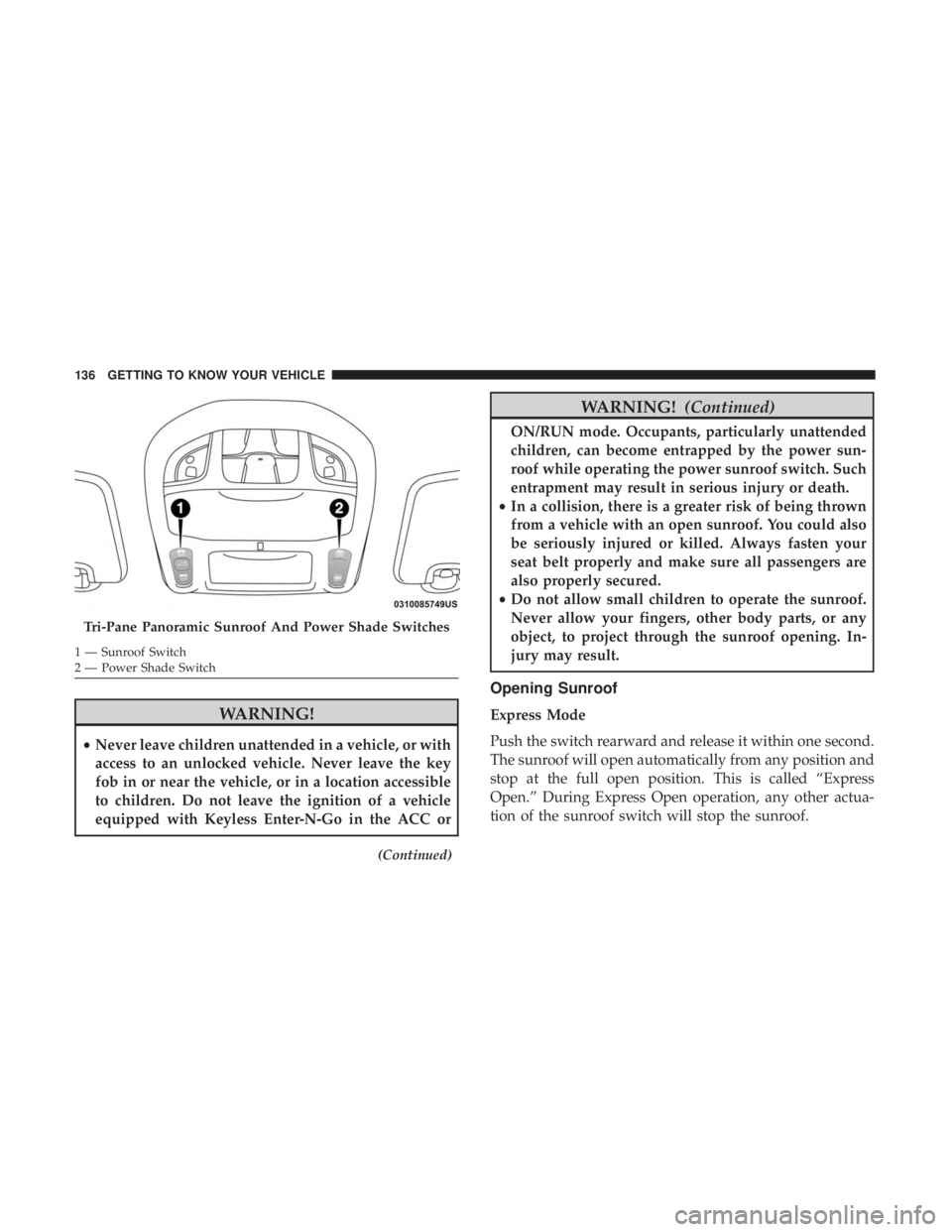
Tri-Pane Panoramic Sunroof And Power Shade Switches
1 — Sunroof Switch
2 — Power Shade Switch 136 GETTING TO KNOW YOUR VEHICLE
Page 140 of 696
Power Sun Shade — If Equipped
Opening Power Shade — Express Mode
Push the shade switch rearward and release it within one
second and the shade will open automatically from any
position. The shade will open and stop automatically at the
half-open position. Push the shade switch rearward again
and release it within one second and the shade will open
automatically to the full-open position. This is called
“Express Open”. During Express Open operation, any
other actuation of the shade switch will stop the shade.
Opening Power Shade — Manual Mode
To open the shade, push and hold the switch rearward. The
shade will open and stop automatically at the half-open
position. Push and hold the shade switch rearward again
and the shade will open automatically to the full-open
position. Any release of the switch will stop the movement
and the shade will remain in a partially opened condition
until the switch is pushed again.
Closing Power Shade — Express Mode
Push the switch forward and release it within one second
and the shade will close automatically from any position. If
the sunroof is completely closed the shade will close fullyand stop automatically. This is called “Express Close”.
During Express Close operation, any other actuation of the
switch will stop the shade.
NOTE:
If the sunroof is open, the shade will close to the
half-open position. Pushing the shade close button again
will automatically close both the sunroof and shade com-
pletely.
Closing Power Shade — Manual Mode
To close the shade, push and hold the switch in the forward
position. Any release of the switch will stop the movement
and the shade will remain in a partially closed condition
until the switch is pushed again.
Pinch Protect Feature
This feature will detect an obstruction in the closing of the
sunroof during the Express Close operation. If an obstruc-
tion in the path of the sunroof is detected, the sunroof will
automatically retract. Remove the obstruction if this oc-
curs.
NOTE: If three consecutive sunroof close attempts result in
Pinch Protect reversals, Pinch Protect will disable and the
sunroof must be closed in Manual Mode.
138 GETTING TO KNOW YOUR VEHICLE
Page 156 of 696
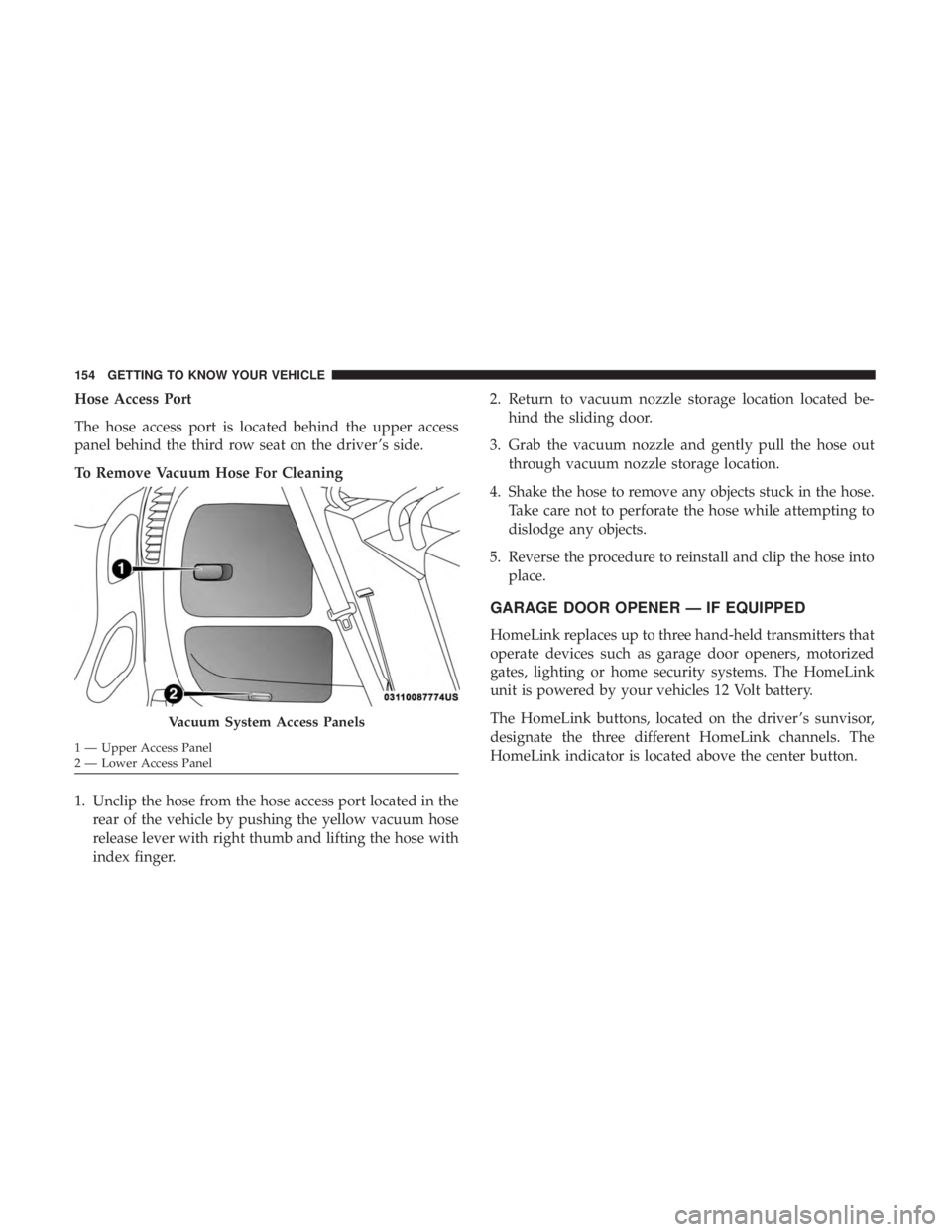
Hose Access Port
The hose access port is located behind the upper access
panel behind the third row seat on the driver ’s side.
To Remove Vacuum Hose For Cleaning
1. Unclip the hose from the hose access port located in therear of the vehicle by pushing the yellow vacuum hose
release lever with right thumb and lifting the hose with
index finger. 2. Return to vacuum nozzle storage location located be-
hind the sliding door.
3. Grab the vacuum nozzle and gently pull the hose out through vacuum nozzle storage location.
4. Shake the hose to remove any objects stuck in the hose. Take care not to perforate the hose while attempting to
dislodge any objects.
5. Reverse the procedure to reinstall and clip the hose into place.
GARAGE DOOR OPENER — IF EQUIPPED
HomeLink replaces up to three hand-held transmitters that
operate devices such as garage door openers, motorized
gates, lighting or home security systems. The HomeLink
unit is powered by your vehicles 12 Volt battery.
The HomeLink buttons, located on the driver ’s sunvisor,
designate the three different HomeLink channels. The
HomeLink indicator is located above the center button.
Vacuum System Access Panels
1 — Upper Access Panel
2 — Lower Access Panel 154 GETTING TO KNOW YOUR VEHICLE
Page 157 of 696
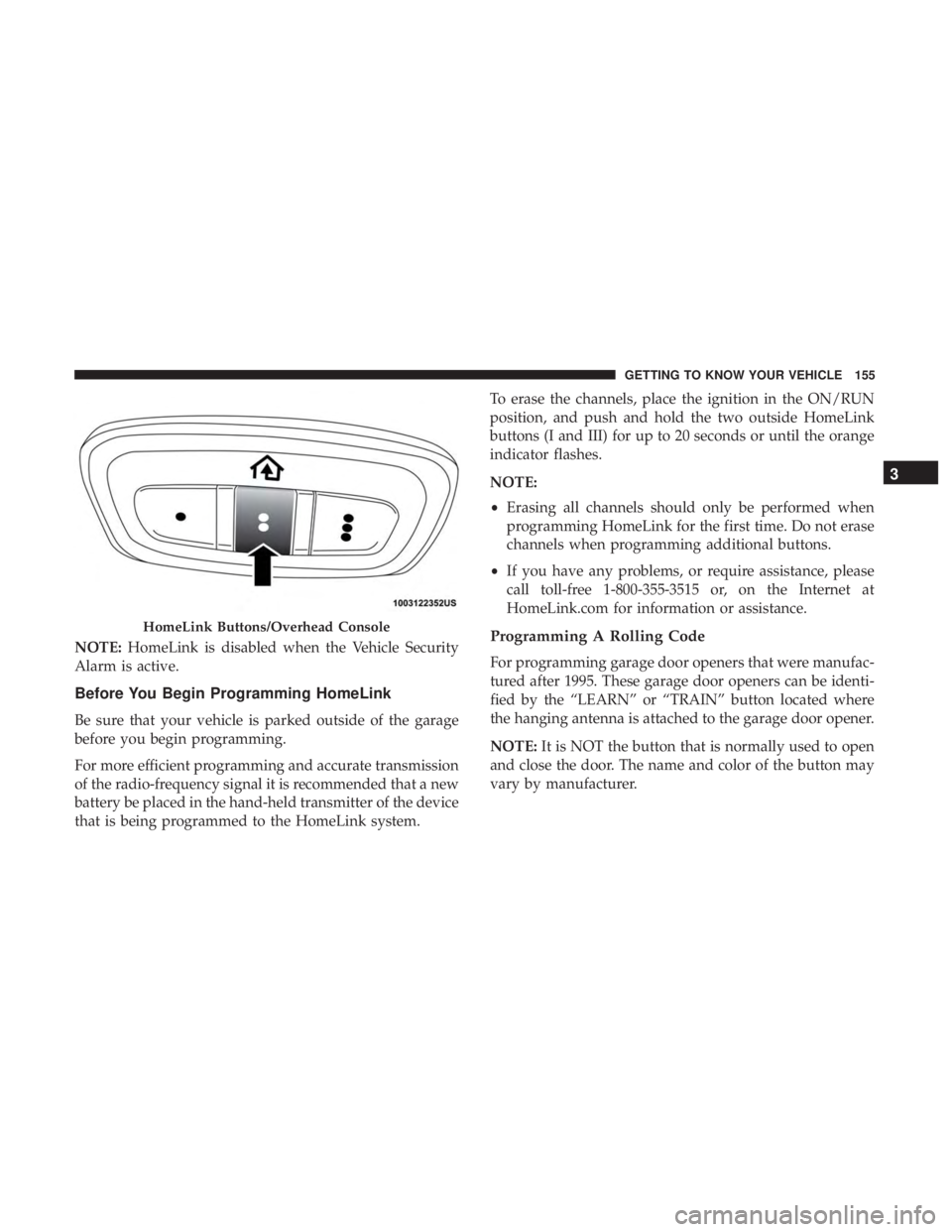
NOTE:HomeLink is disabled when the Vehicle Security
Alarm is active.
Before You Begin Programming HomeLink
Be sure that your vehicle is parked outside of the garage
before you begin programming.
For more efficient programming and accurate transmission
of the radio-frequency signal it is recommended that a new
battery be placed in the hand-held transmitter of the device
that is being programmed to the HomeLink system. To erase the channels, place the ignition in the ON/RUN
position, and push and hold the two outside HomeLink
buttons (I and III) for up to 20 seconds or until the orange
indicator flashes.
NOTE:
•
Erasing all channels should only be performed when
programming HomeLink for the first time. Do not erase
channels when programming additional buttons.
• If you have any problems, or require assistance, please
call toll-free 1-800-355-3515 or, on the Internet at
HomeLink.com for information or assistance.
Programming A Rolling Code
For programming garage door openers that were manufac-
tured after 1995. These garage door openers can be identi-
fied by the “LEARN” or “TRAIN” button located where
the hanging antenna is attached to the garage door opener.
NOTE: It is NOT the button that is normally used to open
and close the door. The name and color of the button may
vary by manufacturer.
HomeLink Buttons/Overhead Console
3
GETTING TO KNOW YOUR VEHICLE 155
Page 161 of 696
If you unplugged the garage door opener/device for
programming, plug it back in at this time.
Reprogramming A Single HomeLink Button (Canadian/
Gate Operator)
To reprogram a channel that has been previously trained,
follow these steps:
1. Cycle the ignition to the ON/RUN position.
2. Press and hold the desired HomeLink button until theindicator light begins to flash after 20 seconds. Do not
release the button.
3. Without releasing the button, proceed with “Canadian/ Gate Operator Programming” step 2 and follow all
remaining steps.
Using HomeLink
To operate, push and release the programmed HomeLink
button. Activation will now occur for the programmed
device (i.e. garage door opener, gate operator, security
system, entry door lock, home/office lighting, etc.). The
hand-held transmitter of the device may also be used at
any time.
Security
It is advised to erase all channels before you sell or turn in
your vehicle.
To do this, push and hold the two outside buttons for 20
seconds until the orange indicator flashes. Note that all
channels will be erased. Individual channels cannot be
erased.
The HomeLink Universal Transceiver is disabled when the
Vehicle Security Alarm is active.
Troubleshooting Tips
If you are having trouble programming HomeLink, here
are some of the most common solutions:
•Replace the battery in the Garage Door Opener hand-
held transmitter.
• Push the LEARN button on the Garage Door Opener to
complete the training for a Rolling Code.
• Did you unplug the device for programming and re-
member to plug it back in?
If you have any problems, or require assistance, please call
toll-free 1-800-355-3515 or, on the Internet at
HomeLink.com for information or assistance.
3
GETTING TO KNOW YOUR VEHICLE 159