camera CHRYSLER PACIFICA 2019 User Guide
[x] Cancel search | Manufacturer: CHRYSLER, Model Year: 2019, Model line: PACIFICA, Model: CHRYSLER PACIFICA 2019Pages: 718, PDF Size: 8.6 MB
Page 423 of 718
NOTE:
•Front tires will be in image when the tires are turned.
• Due to wide angle cameras in mirror, the image will
appear distorted.
• Top view will show which sliding doors are open.
• Open front doors will remove outside image.
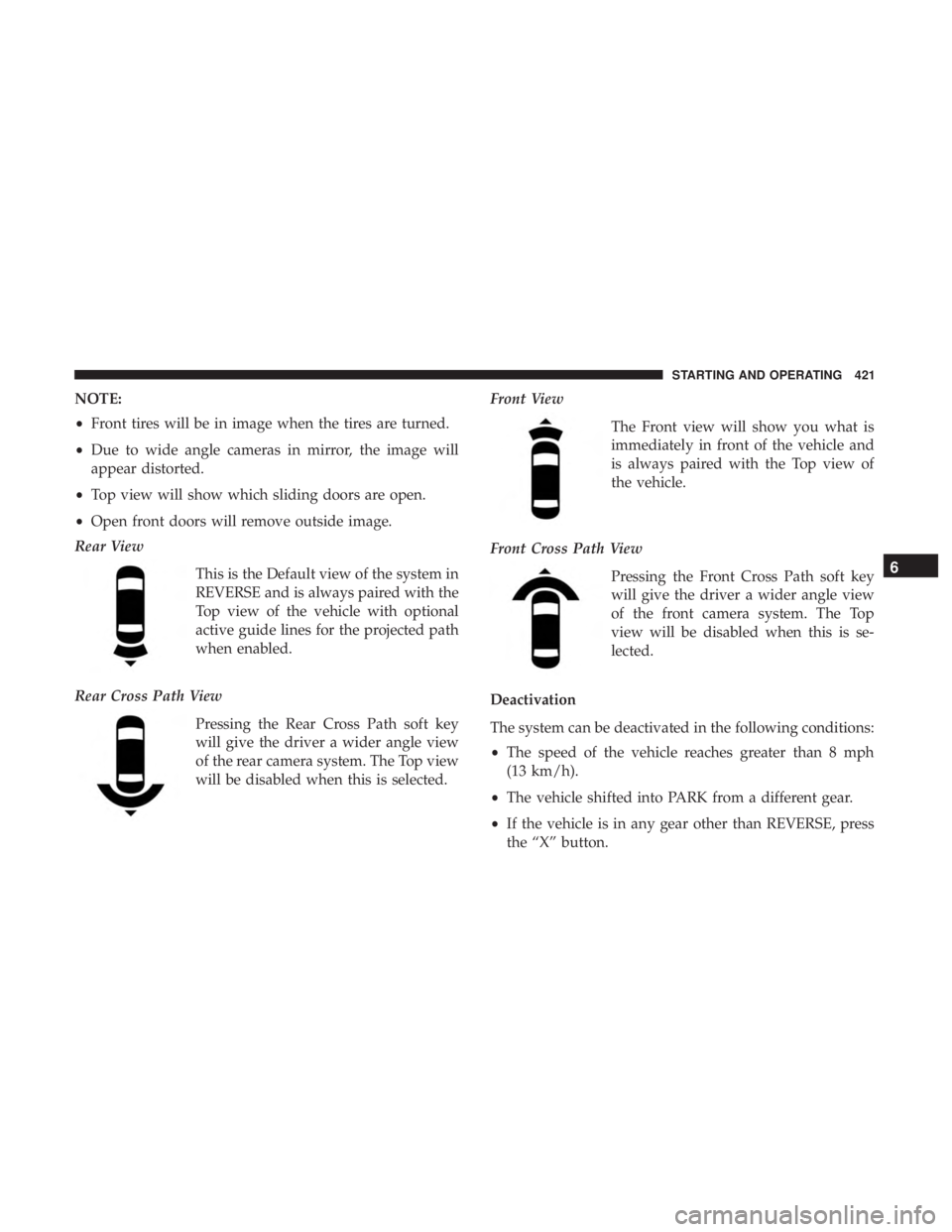
Rear View
This is the Default view of the system in
REVERSE and is always paired with the
Top view of the vehicle with optional
active guide lines for the projected path
when enabled.
Rear Cross Path View Pressing the Rear Cross Path soft key
will give the driver a wider angle view
of the rear camera system. The Top view
will be disabled when this is selected. Front View
The Front view will show you what is
immediately in front of the vehicle and
is always paired with the Top view of
the vehicle.
Front Cross Path View Pressing the Front Cross Path soft key
will give the driver a wider angle view
of the front camera system. The Top
view will be disabled when this is se-
lected.
Deactivation
The system can be deactivated in the following conditions:
• The speed of the vehicle reaches greater than 8 mph
(13 km/h).
• The vehicle shifted into PARK from a different gear.
• If the vehicle is in any gear other than REVERSE, press
the “X” button.
6
STARTING AND OPERATING 421
Page 424 of 718
•The camera delay system is turned off manually through
the Uconnect settings menu. Refer to “Uconnect Set-
tings” in “Multimedia” for further information.
NOTE:
• If snow, ice, mud, or any foreign substance builds up on
the camera lenses, clean the lenses, rinse with water, and
dry with a soft cloth. Do not cover the lenses.
• If a malfunction with the system has occurred, see your
nearest authorized dealer.
WARNING!
Drivers must be careful when backing up even when
using the Surround View Camera. Always check care-
fully behind your vehicle, and be sure to check for
pedestrians, animals, other vehicles, obstructions, or
blind spots before backing up. You are responsible for
the safety of your surroundings and must continue to
pay attention while backing up. Failure to do so can
result in serious injury or death.
CAUTION!
• To avoid vehicle damage, Surround View should
only be used as a parking aid. The Surround View
camera is unable to view every obstacle or object in
your drive path.
• To avoid vehicle damage, the vehicle must be driven
slowly when using Surround View to be able to stop
in time when an obstacle is seen. It is recommended
that the driver look frequently over his/her shoulder
when using Surround View.
REFUELING THE VEHICLE
There is no fuel filler cap. Two flapper doors inside the pipe
seal the system.
WARNING!
• Never have any smoking materials lit in or near the
vehicle when the fuel door is open or the tank is
being filled.
• Never add fuel when the engine is running. This is
in violation of most state and federal fire regulations
(Continued)
422 STARTING AND OPERATING
Page 467 of 718
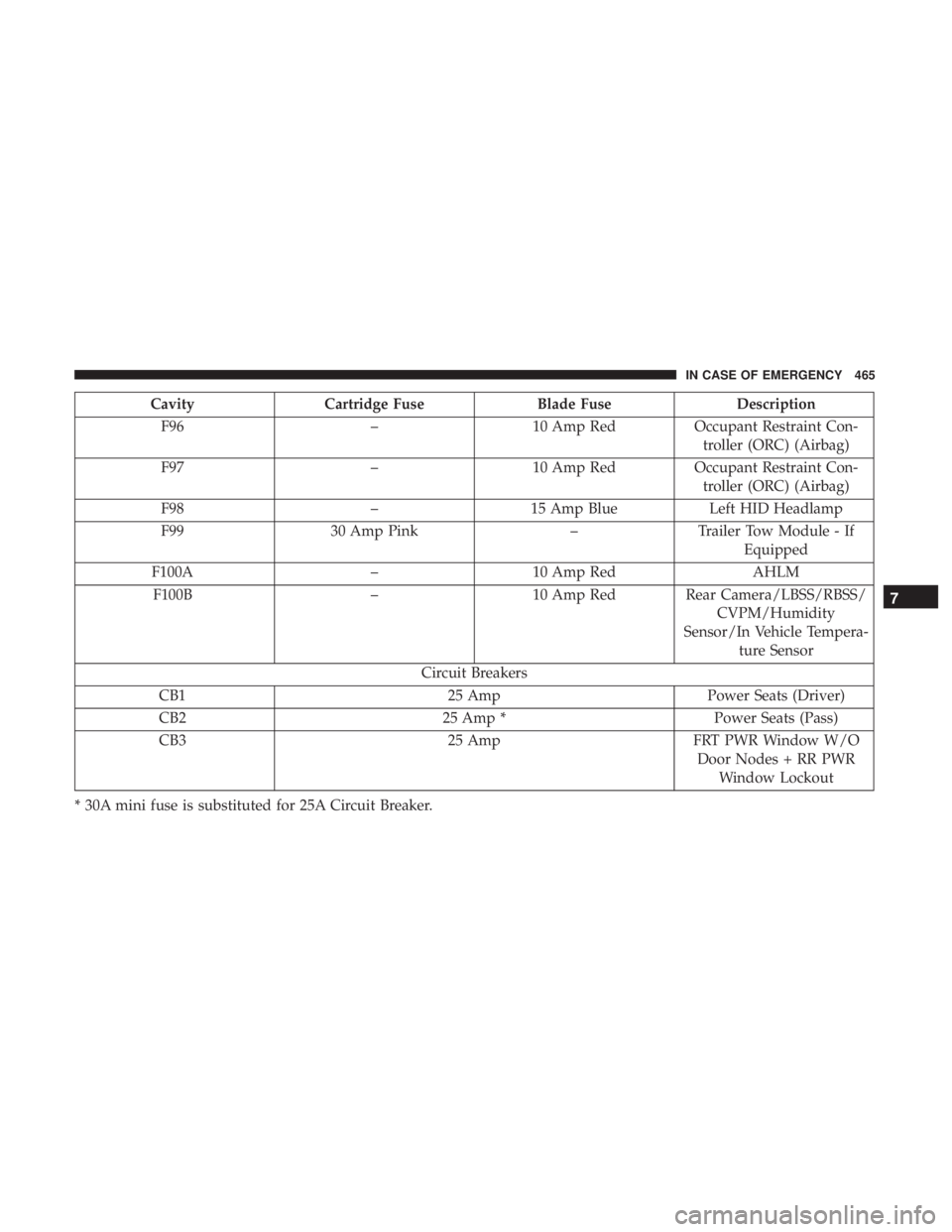
CavityCartridge Fuse Blade FuseDescription
F96 –10 Amp RedOccupant Restraint Con-
troller (ORC) (Airbag)
F97 –10 Amp RedOccupant Restraint Con-
troller (ORC) (Airbag)
F98 –15 Amp Blue Left HID Headlamp
F99 30 Amp Pink –Trailer Tow Module - If
Equipped
F100A –10 Amp Red AHLM
F100B –10 Amp Red Rear Camera/LBSS/RBSS/
CVPM/Humidity
Sensor/In Vehicle Tempera- ture Sensor
Circuit Breakers
CB1 25 AmpPower Seats (Driver)
CB2 25 Amp *Power Seats (Pass)
CB3 25 AmpFRT PWR Window W/O
Door Nodes + RR PWR Window Lockout
* 30A mini fuse is substituted for 25A Circuit Breaker.
7
IN CASE OF EMERGENCY 465
Page 598 of 718
Camera
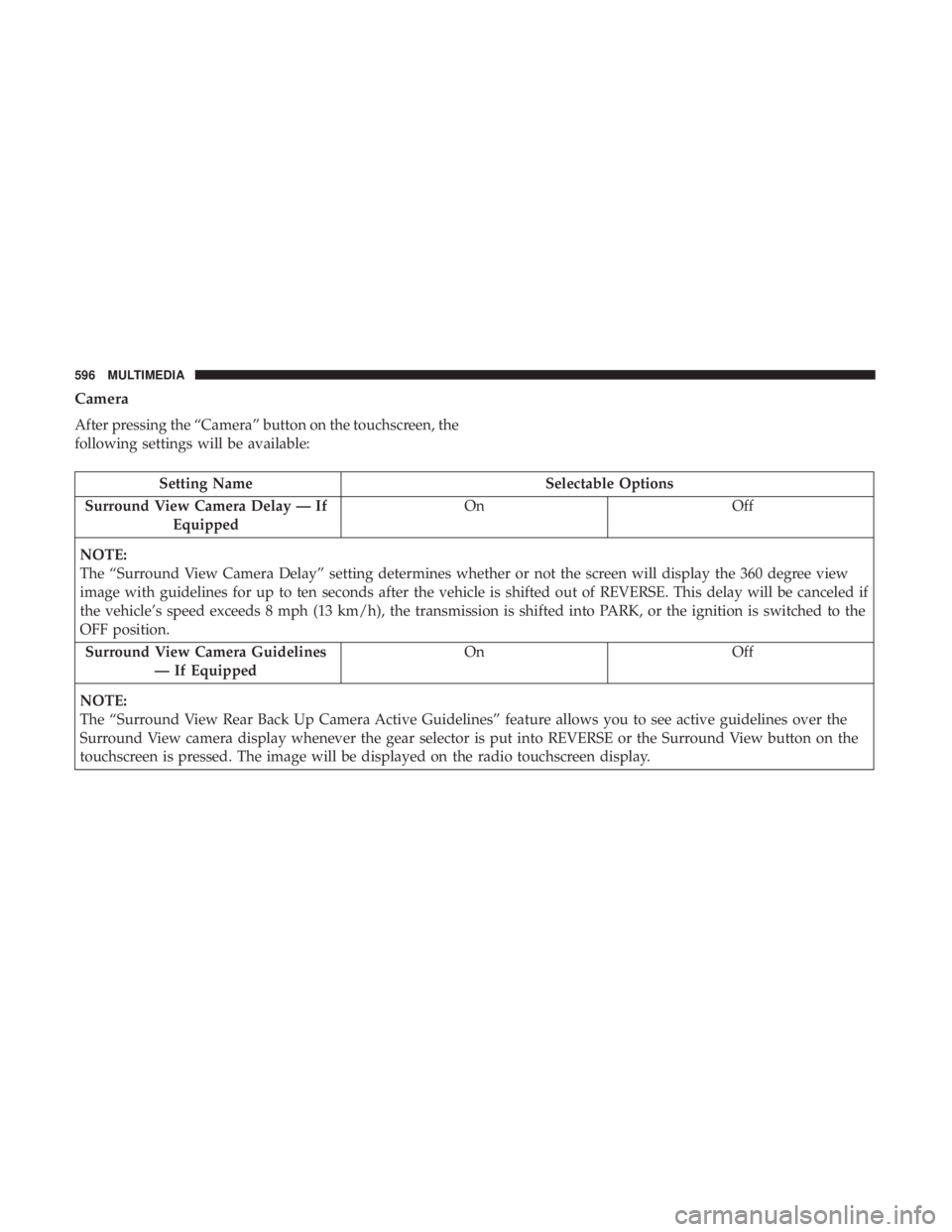
After pressing the “Camera” button on the touchscreen, the
following settings will be available:
Setting NameSelectable Options
Surround View Camera Delay — If Equipped On
Off
NOTE:
The “Surround View Camera Delay” setting determines whether or not the screen will display the 360 degree view
image with guidelines for up to ten seconds after the vehicle is shifted out of REVERSE. This delay will be canceled if
the vehicle’s speed exceeds 8 mph (13 km/h), the transmission is shifted into PARK, or the ignition is switched to the
OFF position. Surround View Camera Guidelines — If Equipped On
Off
NOTE:
The “Surround View Rear Back Up Camera Active Guidelines” feature allows you to see active guidelines over the
Surround View camera display whenever the gear selector is put into REVERSE or the Surround View button on the
touchscreen is pressed. The image will be displayed on the radio touchscreen display.
596 MULTIMEDIA
Page 599 of 718
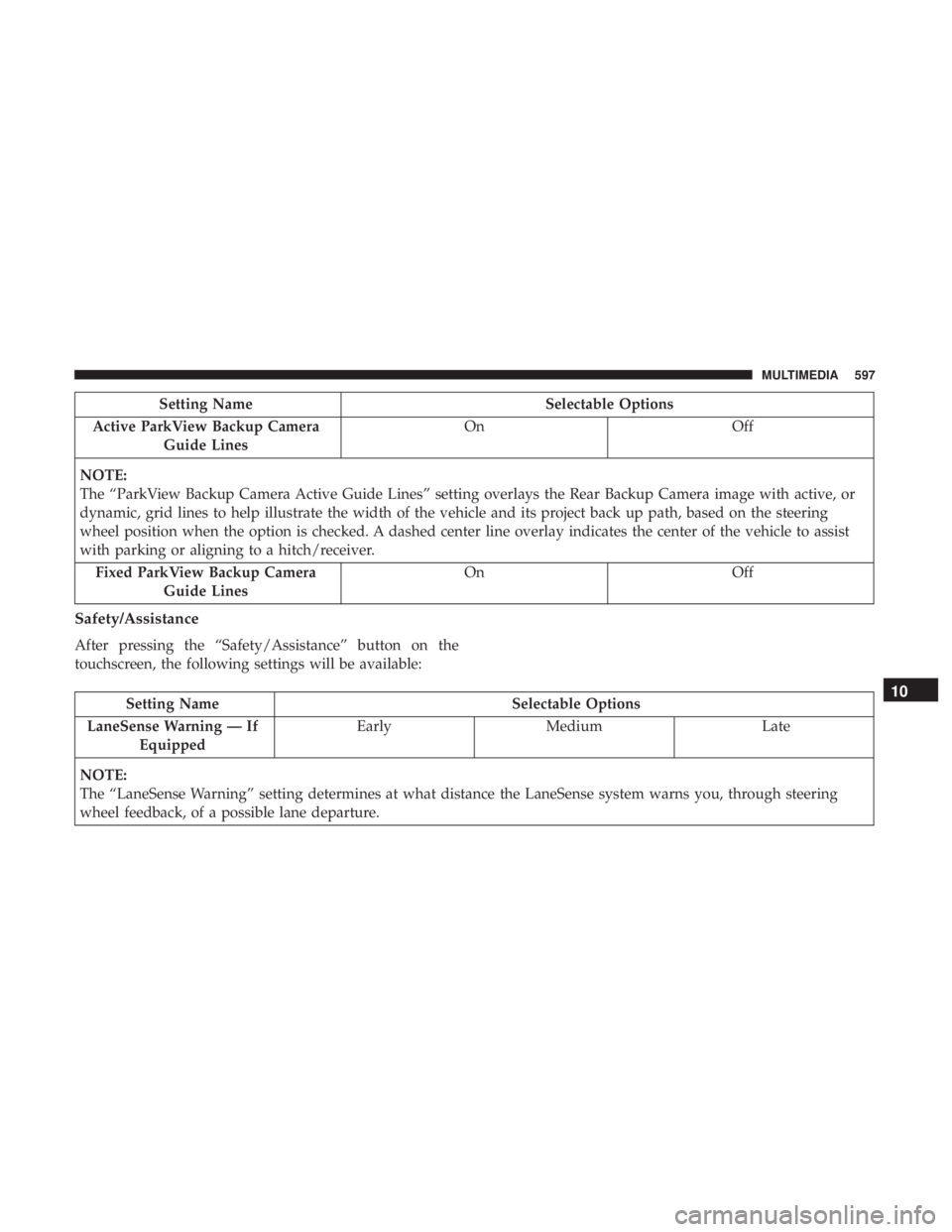
Setting NameSelectable Options
Active ParkView Backup Camera Guide Lines On
Off
NOTE:
The “ParkView Backup Camera Active Guide Lines” setting overlays the Rear Backup Camera image with active, or
dynamic, grid lines to help illustrate the width of the vehicle and its project back up path, based on the steering
wheel position when the option is checked. A dashed center line overlay indicates the center of the vehicle to assist
with parking or aligning to a hitch/receiver. Fixed ParkView Backup Camera Guide Lines On
Off
Safety/Assistance
After pressing the “Safety/Assistance” button on the
touchscreen, the following settings will be available:
Setting Name Selectable Options
LaneSense Warning — If Equipped Early
Medium Late
NOTE:
The “LaneSense Warning” setting determines at what distance the LaneSense system warns you, through steering
wheel feedback, of a possible lane departure.10
MULTIMEDIA 597
Page 623 of 718
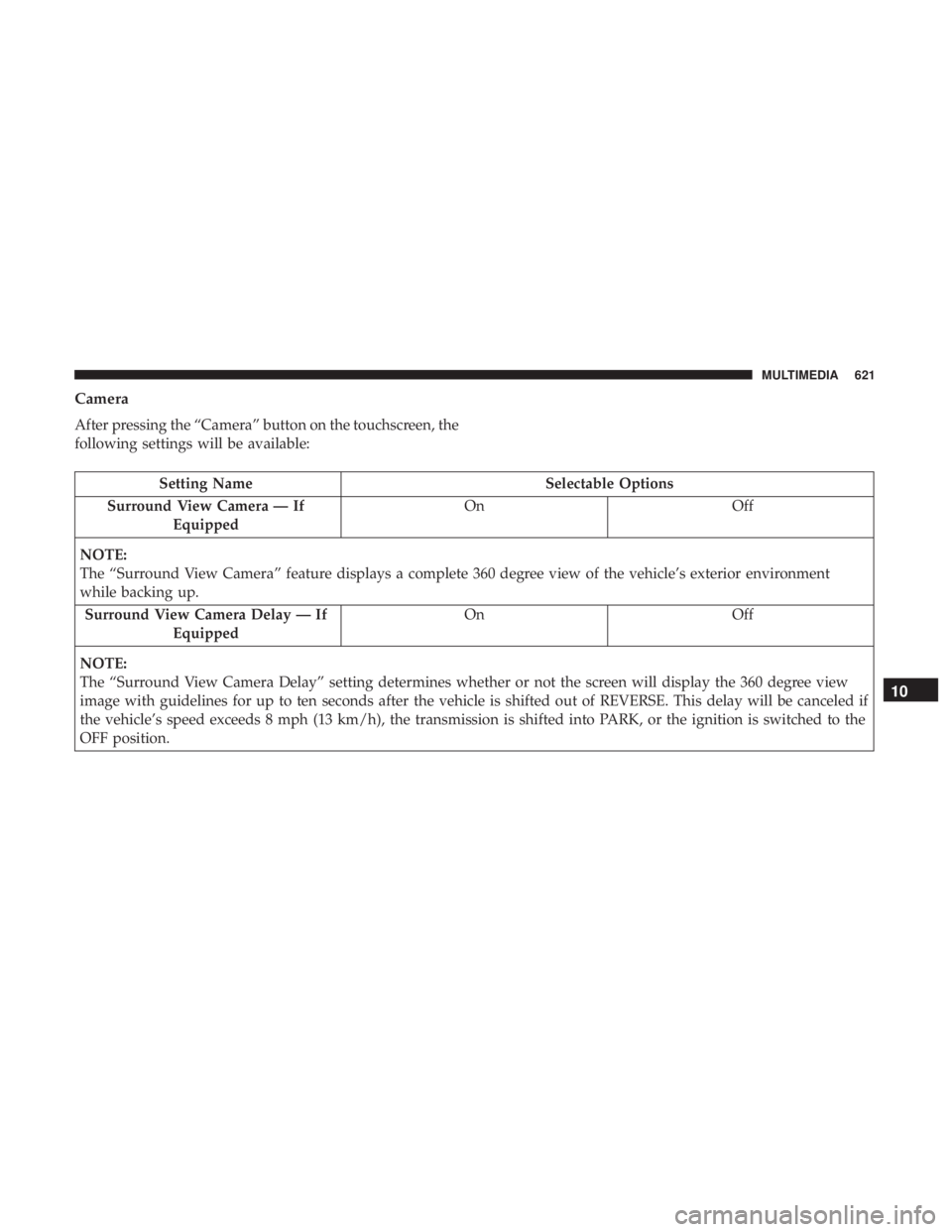
Camera
After pressing the “Camera” button on the touchscreen, the
following settings will be available:
Setting NameSelectable Options
Surround View Camera — If Equipped On
Off
NOTE:
The “Surround View Camera” feature displays a complete 360 degree view of the vehicle’s exterior environment
while backing up. Surround View Camera Delay — If Equipped On
Off
NOTE:
The “Surround View Camera Delay” setting determines whether or not the screen will display the 360 degree view
image with guidelines for up to ten seconds after the vehicle is shifted out of REVERSE. This delay will be canceled if
the vehicle’s speed exceeds 8 mph (13 km/h), the transmission is shifted into PARK, or the ignition is switched to the
OFF position.
10
MULTIMEDIA 621
Page 624 of 718
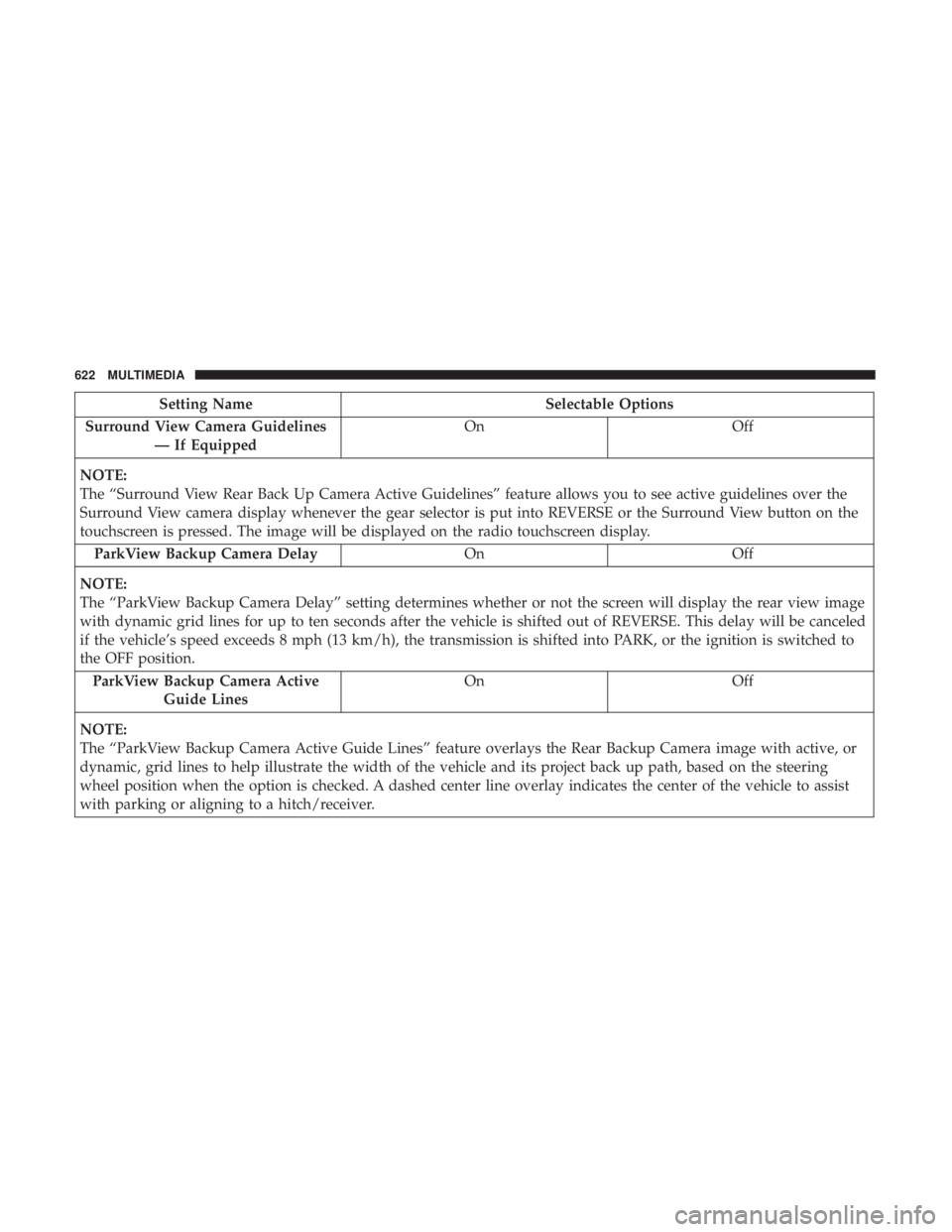
Setting NameSelectable Options
Surround View Camera Guidelines — If Equipped On
Off
NOTE:
The “Surround View Rear Back Up Camera Active Guidelines” feature allows you to see active guidelines over the
Surround View camera display whenever the gear selector is put into REVERSE or the Surround View button on the
touchscreen is pressed. The image will be displayed on the radio touchscreen display. ParkView Backup Camera Delay OnOff
NOTE:
The “ParkView Backup Camera Delay” setting determines whether or not the screen will display the rear view image
with dynamic grid lines for up to ten seconds after the vehicle is shifted out of REVERSE. This delay will be canceled
if the vehicle’s speed exceeds 8 mph (13 km/h), the transmission is shifted into PARK, or the ignition is switched to
the OFF position. ParkView Backup Camera Active Guide Lines On
Off
NOTE:
The “ParkView Backup Camera Active Guide Lines” feature overlays the Rear Backup Camera image with active, or
dynamic, grid lines to help illustrate the width of the vehicle and its project back up path, based on the steering
wheel position when the option is checked. A dashed center line overlay indicates the center of the vehicle to assist
with parking or aligning to a hitch/receiver.
622 MULTIMEDIA
Page 703 of 718
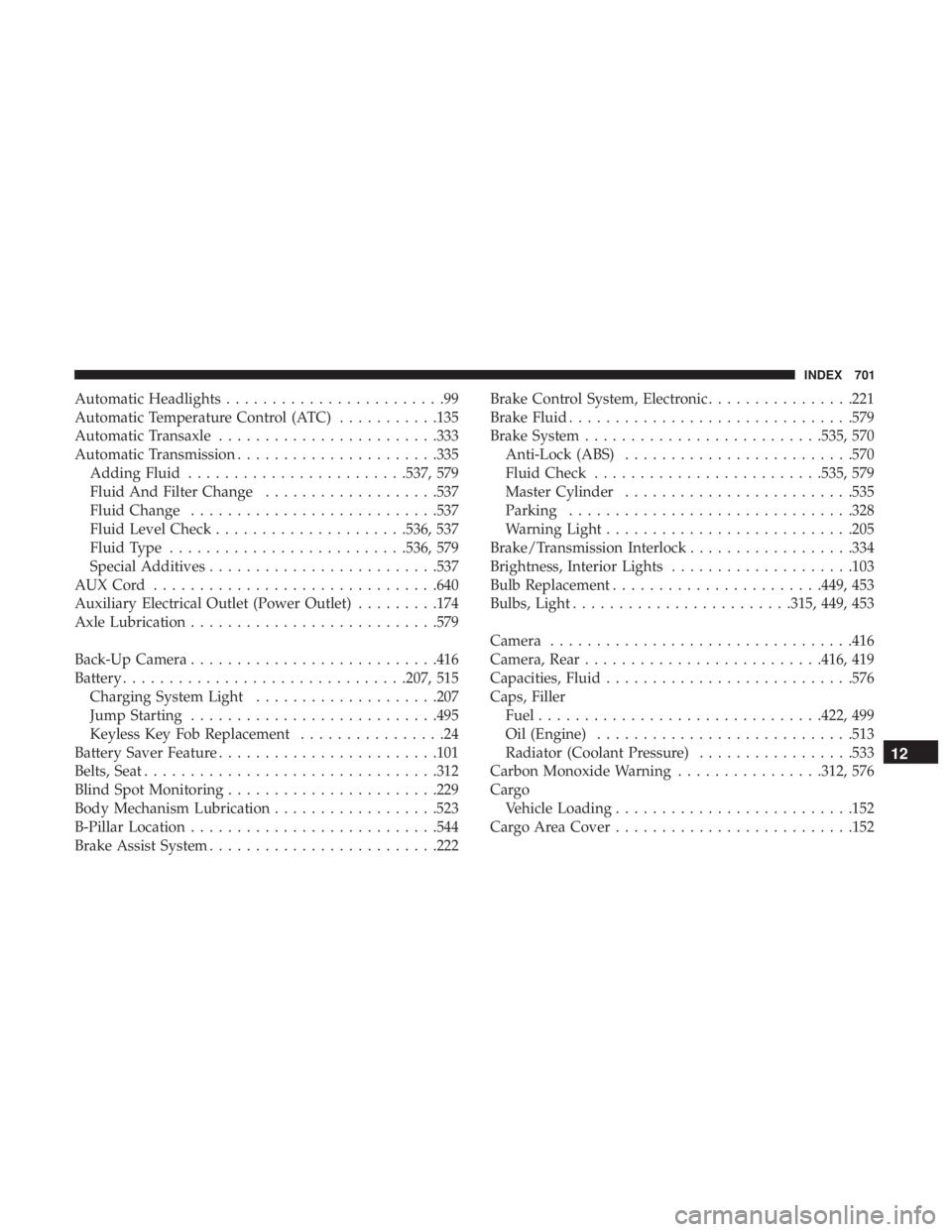
Automatic Headlights........................99
Automatic Temperature Control (ATC) ...........135
Automatic Transaxle ....................... .333
Automatic Transmission ..................... .335
Adding Fluid ....................... .537, 579
Fluid And Filter Change ...................537
Fluid Change .......................... .537
Fluid Level Check .....................536, 537
Fluid Type ......................... .536, 579
Special Additives ........................ .537
AUXCord .............................. .640
Auxiliary Electrical Outlet (Power Outlet) .........174
Axle Lubrication .......................... .579
Back-Up Camera .......................... .416
Battery .............................. .207, 515
Charging System Light ....................207
Jump Starting .......................... .495
Keyless Key Fob Replacement ................24
Battery Saver Feature ....................... .101
Belts, Seat ............................... .312
Blind Spot Monitoring ...................... .229
Body Mechanism Lubrication ..................523
B-Pillar Location .......................... .544
Brake Assist System ........................ .222Brake Control System, Electronic
................221
Brake Fluid .............................. .579
Brake System ......................... .535, 570
Anti-Lock (ABS) ........................ .570
Fluid Check ........................ .535, 579
Master Cylinder ........................ .535
Parking .............................. .328
Warning Light .......................... .205
Brake/Transmission Interlock ..................334
Brightness, Interior Lights ....................103
Bulb Replacement ...................... .449, 453
Bulbs,
Light ....................... .315, 449, 453
Camera ................................ .416
Camera, Rear ......................... .416, 419
Capacities, Fluid .......................... .576
Caps, Filler Fuel .............................. .422, 499
Oil (Engine) ........................... .513
Radiator (Coolant Pressure) .................533
Carbon Monoxide Warning ................312, 576
Cargo Vehicle Loading ......................... .152
Cargo Area Cover ......................... .152
12
INDEX 701
Page 711 of 718
ParkSense System, Rear...................368, 378
Personalized Main Menu .....................584
Pets ....................................311
Placard, Tire And Loading Information ...........544
Power Brakes ............................... .570
Inverter .............................. .177
Mirrors ................................94
Outlet (Auxiliary Electrical Outlet) ............174
Seats ............................... .73, 75
Steering .............................. .341
Power Seats Down .................................74
Forward ................................74
Rearward ...............................74
Up....................................74
Power Sliding Door On / Off Switch ...................... .45, 148
Pregnant Women And Seat Belts ................258
Preparation For Jacking ..................... .467
Pretensioners Seat Belts ............................. .259
Radial Ply Tires ........................... .550
Radiator Cap (Coolant Pressure Cap) .............533Radio Frequency
General Information ................27, 33, 34, 43
Radio Operation .......................... .673
Rear Air Conditioning ....................118,131
Rear Camera ............................. .419
Rear Cross Path ........................... .235
Rear ParkSense System ...................368, 378
Rear Seat Removal ..........................53
Rear View ................................92
Reclining Front Seats .........................51
Recreational Towing ........................ .437
Reformulated Gasoline ...................... .573
Refrigerant .............................. .520
Release, Hood ............................ .145
Reminder, Lights On .........................97
Reminder, Seat Belt ........................ .248
Remote Control Starting System ...........................30
Remote Keyless Entry Arm
The Alarm ..........................35
Disarm The Alarm ........................35
Programming Additional Key Fobs ..........26, 34
Remote Starting Exit Remote Start Mode .....................32
Uconnect Customer Programmable Features ......33
12
INDEX 709