transmission CHRYSLER PACIFICA 2019 Repair Manual
[x] Cancel search | Manufacturer: CHRYSLER, Model Year: 2019, Model line: PACIFICA, Model: CHRYSLER PACIFICA 2019Pages: 718, PDF Size: 8.6 MB
Page 590 of 718
owner creates when accessing the specific settings for the
first time. This 4-digit PIN can only be reset by an autho-
rized dealer.
After pressing the “KeySense” button on the touchscreen,
and entering the KeySense PIN, the following settings will
be available:
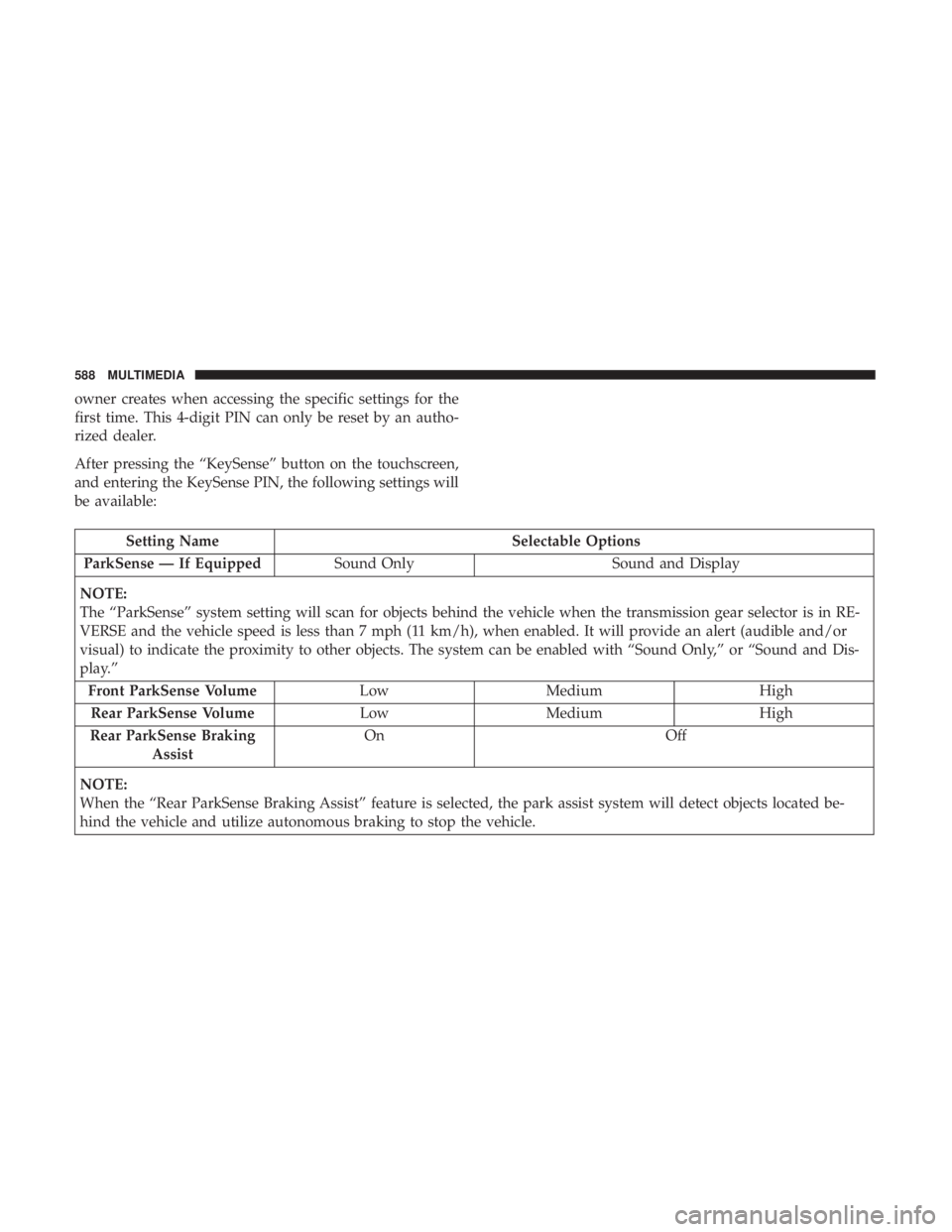
Setting NameSelectable Options
ParkSense — If Equipped Sound Only Sound and Display
NOTE:
The “ParkSense” system setting will scan for objects behind the vehicle when the transmission gear selector is in RE-
VERSE and the vehicle speed is less than 7 mph (11 km/h), when enabled. It will provide an alert (audible and/or
visual) to indicate the proximity to other objects. The system can be enabled with “Sound Only,” or “Sound and Dis-
play.” Front ParkSense Volume LowMedium High
Rear ParkSense Volume LowMedium High
Rear ParkSense Braking Assist On
Off
NOTE:
When the “Rear ParkSense Braking Assist” feature is selected, the park assist system will detect objects located be-
hind the vehicle and utilize autonomous braking to stop the vehicle.
588 MULTIMEDIA
Page 598 of 718
Camera
After pressing the “Camera” button on the touchscreen, the
following settings will be available:
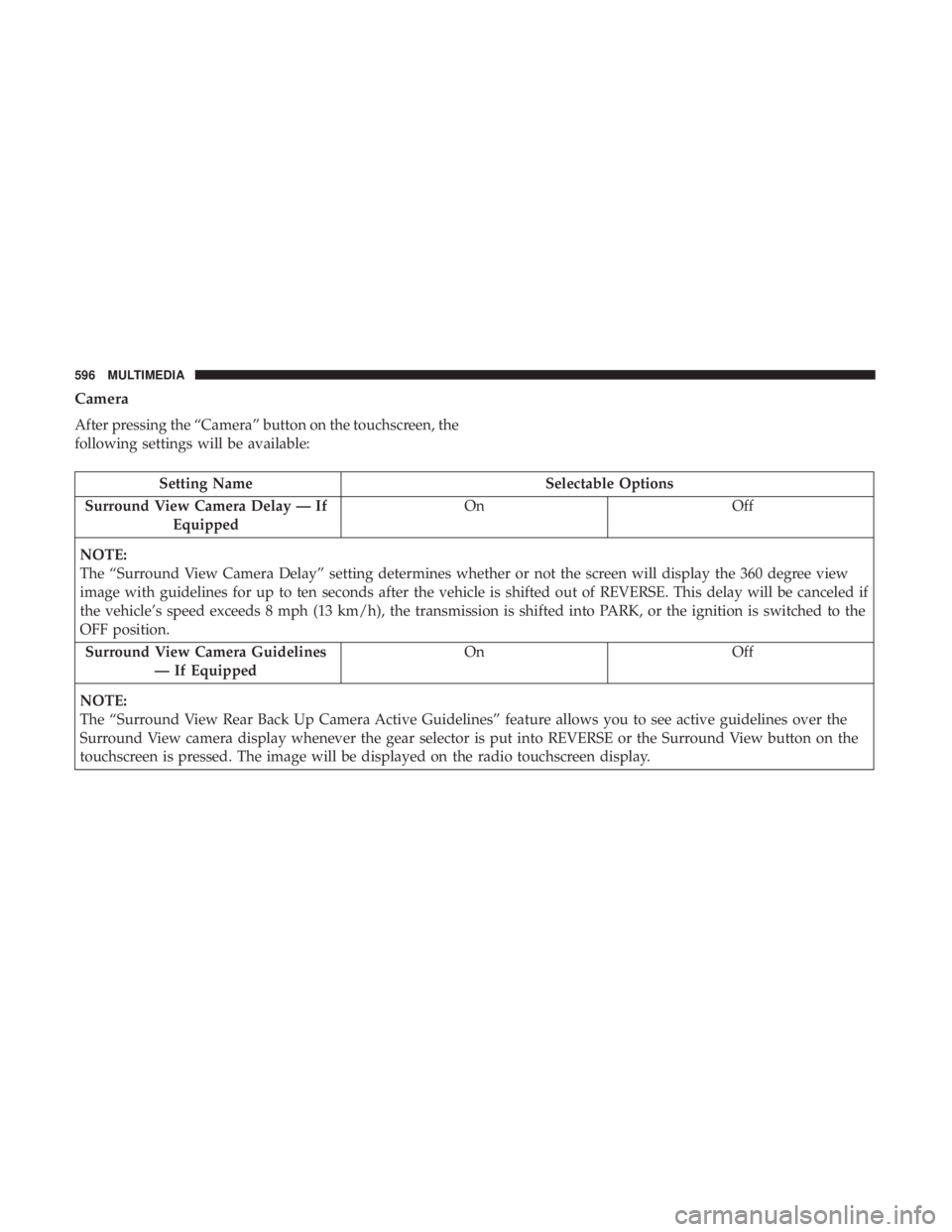
Setting NameSelectable Options
Surround View Camera Delay — If Equipped On
Off
NOTE:
The “Surround View Camera Delay” setting determines whether or not the screen will display the 360 degree view
image with guidelines for up to ten seconds after the vehicle is shifted out of REVERSE. This delay will be canceled if
the vehicle’s speed exceeds 8 mph (13 km/h), the transmission is shifted into PARK, or the ignition is switched to the
OFF position. Surround View Camera Guidelines — If Equipped On
Off
NOTE:
The “Surround View Rear Back Up Camera Active Guidelines” feature allows you to see active guidelines over the
Surround View camera display whenever the gear selector is put into REVERSE or the Surround View button on the
touchscreen is pressed. The image will be displayed on the radio touchscreen display.
596 MULTIMEDIA
Page 623 of 718
Camera
After pressing the “Camera” button on the touchscreen, the
following settings will be available:
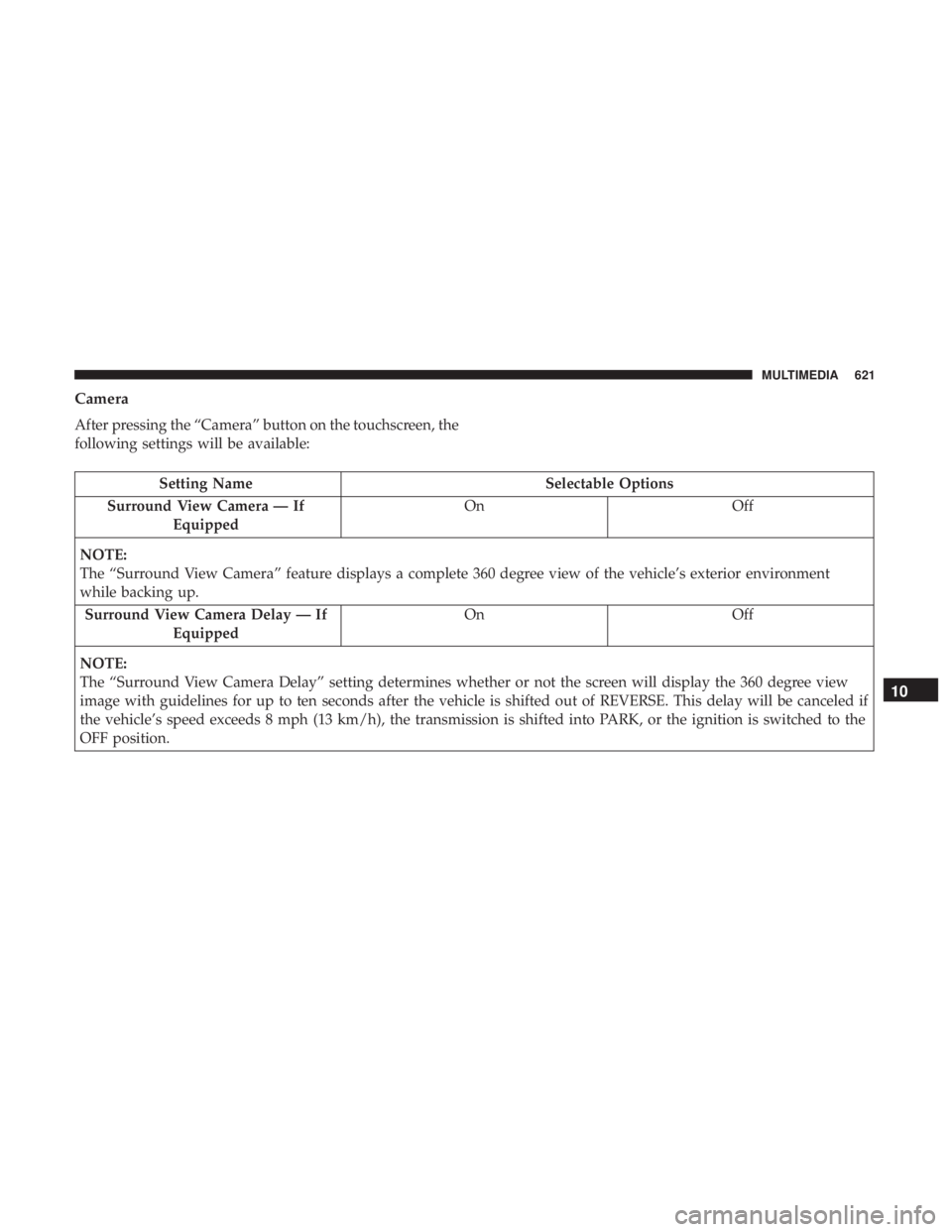
Setting NameSelectable Options
Surround View Camera — If Equipped On
Off
NOTE:
The “Surround View Camera” feature displays a complete 360 degree view of the vehicle’s exterior environment
while backing up. Surround View Camera Delay — If Equipped On
Off
NOTE:
The “Surround View Camera Delay” setting determines whether or not the screen will display the 360 degree view
image with guidelines for up to ten seconds after the vehicle is shifted out of REVERSE. This delay will be canceled if
the vehicle’s speed exceeds 8 mph (13 km/h), the transmission is shifted into PARK, or the ignition is switched to the
OFF position.
10
MULTIMEDIA 621
Page 624 of 718
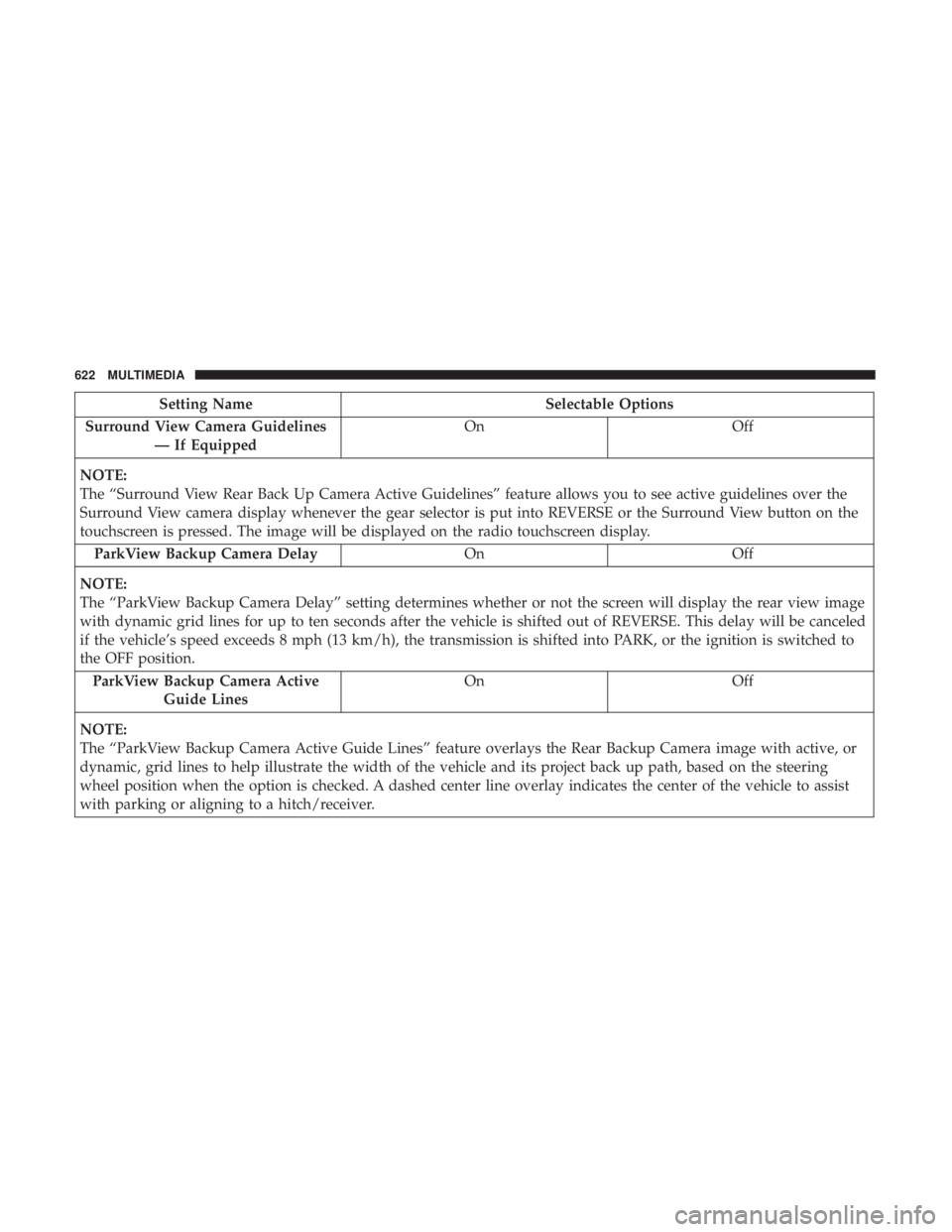
Setting NameSelectable Options
Surround View Camera Guidelines — If Equipped On
Off
NOTE:
The “Surround View Rear Back Up Camera Active Guidelines” feature allows you to see active guidelines over the
Surround View camera display whenever the gear selector is put into REVERSE or the Surround View button on the
touchscreen is pressed. The image will be displayed on the radio touchscreen display. ParkView Backup Camera Delay OnOff
NOTE:
The “ParkView Backup Camera Delay” setting determines whether or not the screen will display the rear view image
with dynamic grid lines for up to ten seconds after the vehicle is shifted out of REVERSE. This delay will be canceled
if the vehicle’s speed exceeds 8 mph (13 km/h), the transmission is shifted into PARK, or the ignition is switched to
the OFF position. ParkView Backup Camera Active Guide Lines On
Off
NOTE:
The “ParkView Backup Camera Active Guide Lines” feature overlays the Rear Backup Camera image with active, or
dynamic, grid lines to help illustrate the width of the vehicle and its project back up path, based on the steering
wheel position when the option is checked. A dashed center line overlay indicates the center of the vehicle to assist
with parking or aligning to a hitch/receiver.
622 MULTIMEDIA
Page 627 of 718
Setting NameSelectable Options
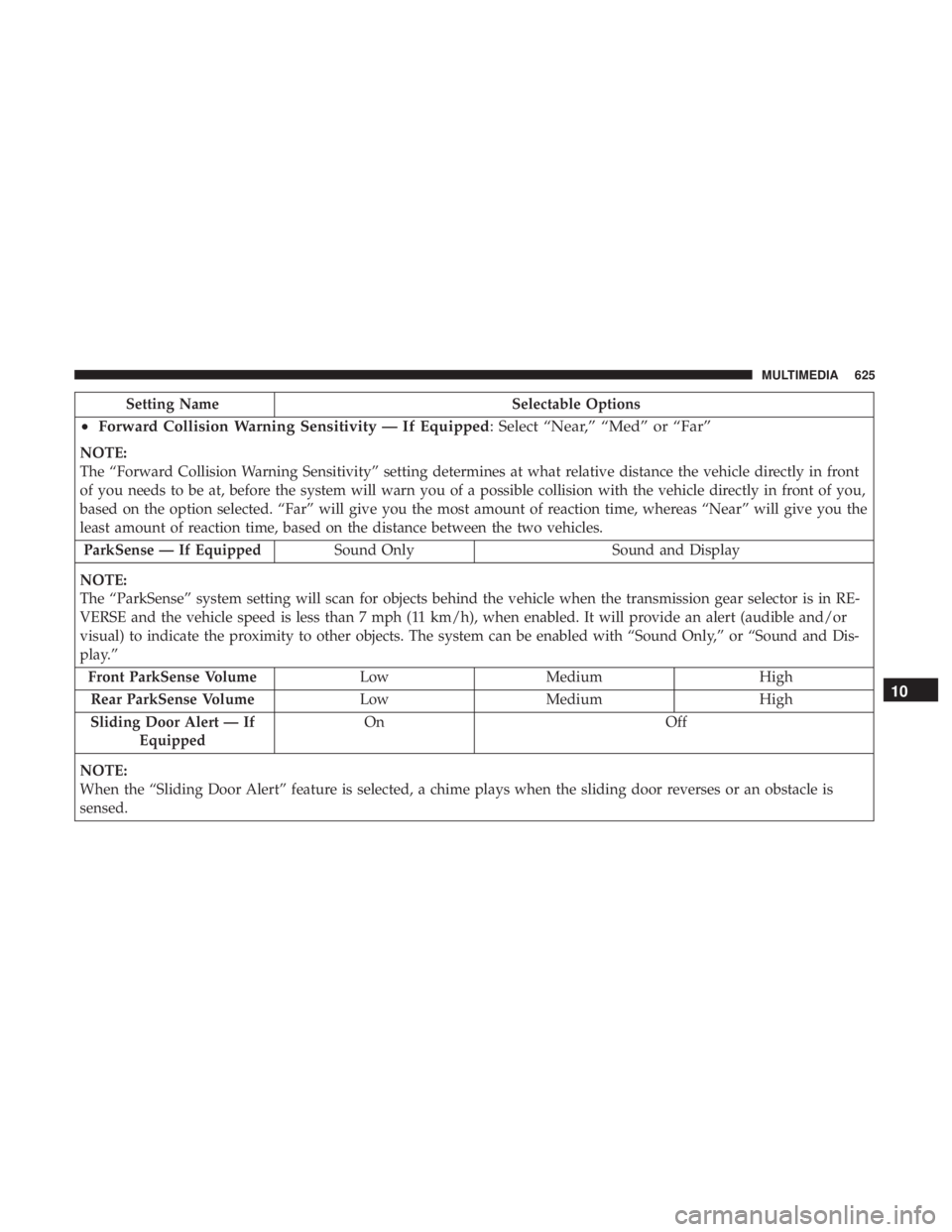
•Forward Collision Warning Sensitivity — If Equipped : Select “Near,” “Med” or “Far”
NOTE:
The “Forward Collision Warning Sensitivity” setting determines at what relative distance the vehicle directly in front
of you needs to be at, before the system will warn you of a possible collision with the vehicle directly in front of you,
based on the option selected. “Far” will give you the most amount of reaction time, whereas “Near” will give you the
least amount of reaction time, based on the distance between the two vehicles.
ParkSense — If Equipped Sound Only Sound and Display
NOTE:
The “ParkSense” system setting will scan for objects behind the vehicle when the transmission gear selector is in RE-
VERSE and the vehicle speed is less than 7 mph (11 km/h), when enabled. It will provide an alert (audible and/or
visual) to indicate the proximity to other objects. The system can be enabled with “Sound Only,” or “Sound and Dis-
play.” Front ParkSense Volume LowMedium High
Rear ParkSense Volume LowMedium High
Sliding Door Alert — If Equipped On
Off
NOTE:
When the “Sliding Door Alert” feature is selected, a chime plays when the sliding door reverses or an obstacle is
sensed.
10
MULTIMEDIA 625
Page 703 of 718
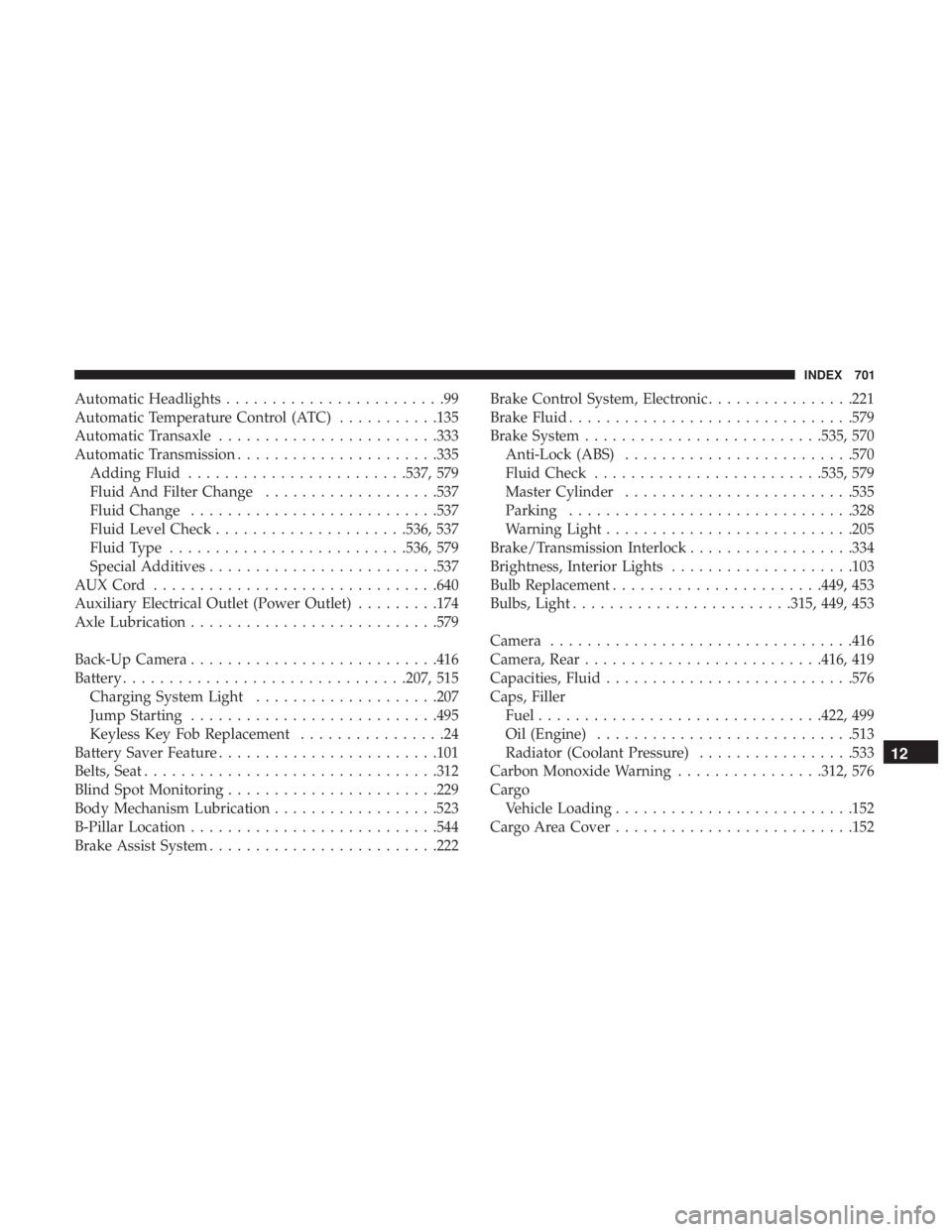
Automatic Headlights........................99
Automatic Temperature Control (ATC) ...........135
Automatic Transaxle ....................... .333
Automatic Transmission ..................... .335
Adding Fluid ....................... .537, 579
Fluid And Filter Change ...................537
Fluid Change .......................... .537
Fluid Level Check .....................536, 537
Fluid Type ......................... .536, 579
Special Additives ........................ .537
AUXCord .............................. .640
Auxiliary Electrical Outlet (Power Outlet) .........174
Axle Lubrication .......................... .579
Back-Up Camera .......................... .416
Battery .............................. .207, 515
Charging System Light ....................207
Jump Starting .......................... .495
Keyless Key Fob Replacement ................24
Battery Saver Feature ....................... .101
Belts, Seat ............................... .312
Blind Spot Monitoring ...................... .229
Body Mechanism Lubrication ..................523
B-Pillar Location .......................... .544
Brake Assist System ........................ .222Brake Control System, Electronic
................221
Brake Fluid .............................. .579
Brake System ......................... .535, 570
Anti-Lock (ABS) ........................ .570
Fluid Check ........................ .535, 579
Master Cylinder ........................ .535
Parking .............................. .328
Warning Light .......................... .205
Brake/Transmission Interlock ..................334
Brightness, Interior Lights ....................103
Bulb Replacement ...................... .449, 453
Bulbs,
Light ....................... .315, 449, 453
Camera ................................ .416
Camera, Rear ......................... .416, 419
Capacities, Fluid .......................... .576
Caps, Filler Fuel .............................. .422, 499
Oil (Engine) ........................... .513
Radiator (Coolant Pressure) .................533
Carbon Monoxide Warning ................312, 576
Cargo Vehicle Loading ......................... .152
Cargo Area Cover ......................... .152
12
INDEX 701
Page 713 of 718
Tilting.............................. .50, 52
Security Alarm ........................... .209
Arm The System ..........................35
Disarm The System ........................35
Selection Of Coolant (Antifreeze) ...............577
Sentry Key Key Programming .........................34
Sentry Key (Immobilizer) ......................33
Sentry Key Replacement ......................34
Service Assistance ......................... .694
Service Contract .......................... .696
Service Manuals .......................... .698
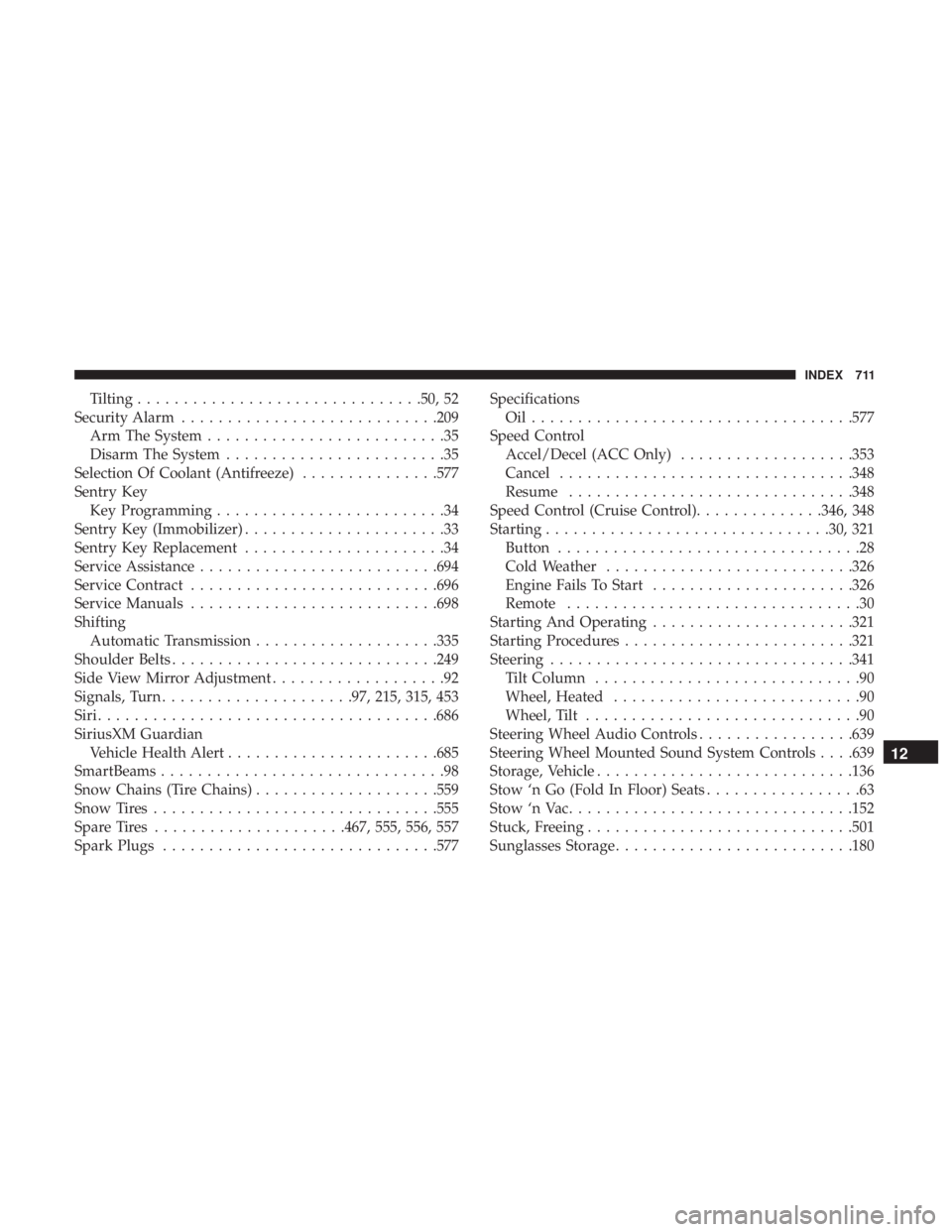
Shifting Automatic Transmission ....................335
Shoulder Belts ............................ .249
Side View Mirror Adjustment ...................92
Signals, Turn .....................97, 215, 315, 453
Siri .................................... .686
SiriusXM Guardian Vehicle Health Alert ...................... .685
SmartBeams ...............................98
Snow Chains (Tire Chains) ....................559
Snow Tires .............................. .555
Spare Tires .....................467, 555, 556, 557
Spark Plugs ............................. .577Specifications
Oil.................................. .577
Speed Control Accel/Decel (ACC Only) ...................353
Cancel ............................... .348
Resume .............................. .348
Speed Control (Cruise Control) ..............346, 348
Starting .............................. .30, 321
Button .................................28
Cold Weather .......................... .326
Engine Fails To Start ..................... .326
Remote ................................30
Starting And Operating ..................... .321
Starting Procedures ........................ .321
Steering ................................ .341
Tilt Column .............................90
Wheel,
Heated ...........................90
Wheel, Tilt ..............................90
Steering Wheel Audio Controls .................639
Steering Wheel Mounted Sound System Controls . . . .639
Storage, Vehicle ........................... .136
Stow ‘n Go (Fold In Floor) Seats .................63
Stow ‘n Vac .............................. .152
Stuck, Freeing ............................ .501
Sunglasses Storage ......................... .180
12
INDEX 711
Page 715 of 718
Traction Control.......................... .221
Trailer Sway Control (TSC) ....................229
Trailer Towing ............................ .426
Cooling System Tips ..................... .437
Hitches ............................... .428
Minimum Requirements ....................432
Tips ................................. .436
Trailer And Tongue Weight ..................432
Wiring ............................... .435
Trailer Towing Guide ....................... .429
Trailer Weight ............................ .429
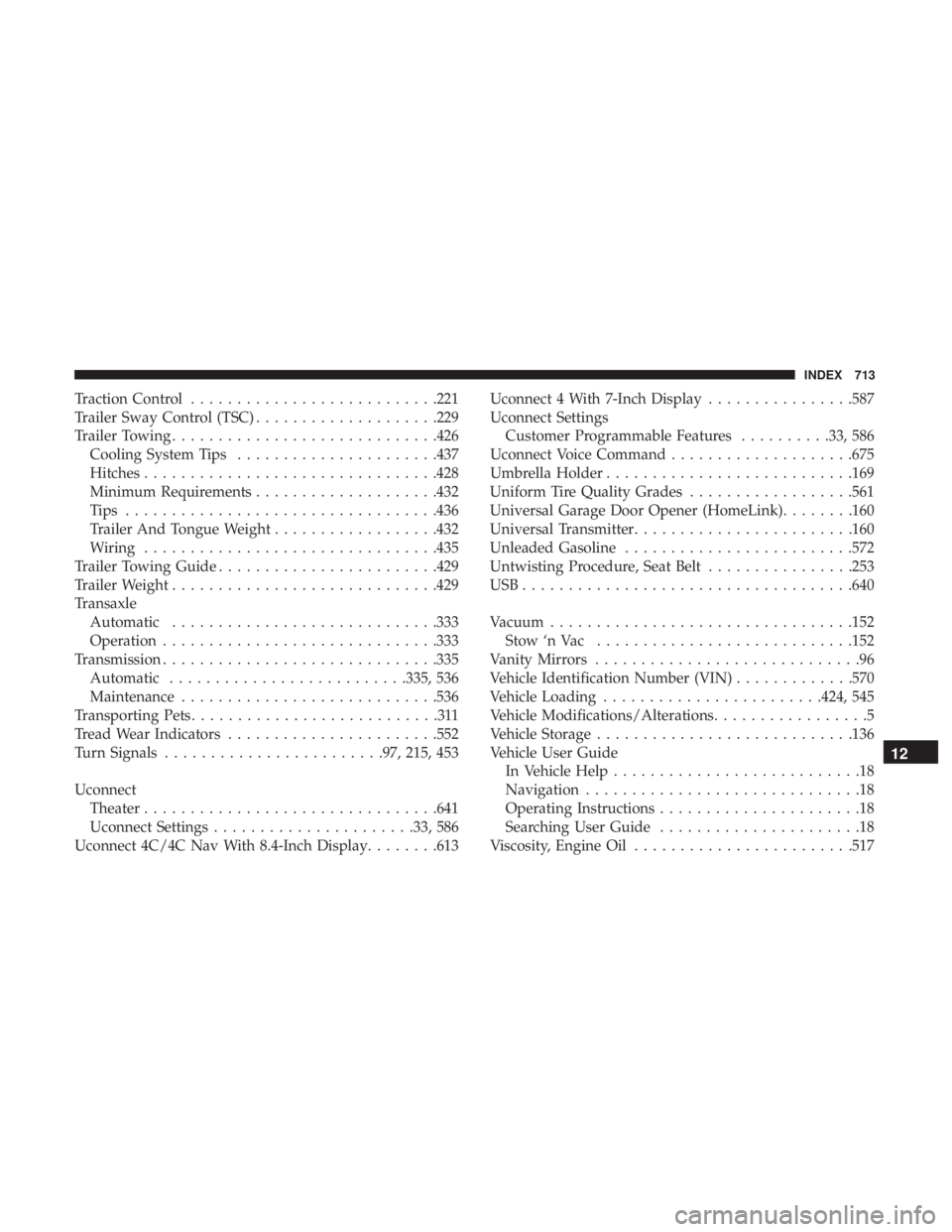
Transaxle Automatic ............................ .333
Operation ............................. .333
Transmission ............................. .335
Automatic ......................... .335, 536
Maintenance ........................... .536
Transporting Pets ...........................311
Tread Wear Indicators ...................... .552
Turn Signals ....................... .97, 215, 453
Uconnect Theater ............................... .641
Uconnect Settings ..................... .33, 586
Uconnect 4C/4C Nav With 8.4-Inch Display ........613Uconnect 4 With 7-Inch Display
................587
Uconnect Settings Customer Programmable Features ..........33, 586
Uconnect Voice Command ....................675
Umbrella Holder .......................... .169
Uniform Tire Quality Grades ..................561
Universal Garage Door Opener (HomeLink) ........160
Universal Transmitter ....................... .160
Unleaded Gasoline ........................ .572
Untwisting Procedure, Seat Belt ................253
USB................................... .640
Vacuum ................................ .152
Stow ‘n Vac ........................... .152
V
anity Mirrors .............................96
Vehicle Identification Number (VIN) .............570
Vehicle Loading ....................... .424, 545
Vehicle Modifications/Alterations .................5
Vehicle Storage ........................... .136
Vehicle User Guide In Vehicle Help ...........................18
Navigation ..............................18
Operating Instructions ......................18
Searching User Guide ......................18
Viscosity, Engine Oil ....................... .517
12
INDEX 713