lock CHRYSLER PACIFICA 2020 Owners Manual
[x] Cancel search | Manufacturer: CHRYSLER, Model Year: 2020, Model line: PACIFICA, Model: CHRYSLER PACIFICA 2020Pages: 516, PDF Size: 28.69 MB
Page 234 of 516
232STARTING AND OPERATING
The following indicators should be used to
ensure that you have properly engaged the
transmission into the PARK position:
Look at the transmission gear position
display and verify that it indicates the PARK
position (P), and is not blinking.
With brake pedal released, verify that the
gear selector will not move out of PARK.
REVERSE (R)
This range is for moving the vehicle backward.
Shift into REVERSE only after the vehicle has
come to a complete stop.
NEUTRAL (N)
Use this range when the vehicle is standing for
prolonged periods with the engine running. The
engine may be started in this range. Apply the
park brake and shift the transmission into PARK
if you must exit the vehicle.
DRIVE (D)
This range should be used for most city and
highway driving. It provides the smoothest
upshifts and downshifts, and the best fuel
economy. The transmission automatically
upshifts through all forward gears. The DRIVE
position provides optimum driving
characteristics under all normal operating
conditions.
If the transmission temperature exceeds
normal operating limits, the transmission
controller may modify the transmission shift
schedule, reduce engine torque, and/or expand
the range of torque converter clutch
engagement. This is done to prevent
transmission damage due to overheating.
Never leave children alone in a vehicle, or
with access to an unlocked vehicle. Allowing
children to be in a vehicle unattended is
dangerous for a number of reasons. A child
or others could be seriously or fatally injured.
Children should be warned not to touch the
parking brake, brake pedal or the transmis -
sion gear selector.
Do not leave the key fob in or near the
vehicle (or in a location accessible to chil -
dren), and do not leave the ignition in the
ACC or ON/RUN mode. A child could
operate power windows, other controls, or
move the vehicle.
CAUTION!
Before moving the transmission gear
selector out of PARK, you must start the
engine, and also press the brake pedal.
Otherwise, damage to the gear selector
could result.
DO NOT race the engine when shifting from
PARK or NEUTRAL into another gear range,
as this can damage the drivetrain.
WARNING! (Continued)
WARNING!
Do not coast in NEUTRAL and never turn off
the ignition to coast down a hill. These are
unsafe practices that limit your response to
changing traffic or road conditions. You might
lose control of the vehicle and have a
collision.
CAUTION!
Towing the vehicle, coasting, or driving for any
other reason with the transmission in
NEUTRAL can cause severe transmission
damage.
Refer to “Recreational Towing” in “Starting
And Operating” and “Towing A Disabled
Vehicle” in “In Case Of Emergency” for further
information.
20_RU_OM_EN_US_t.book Page 232
Page 235 of 516
STARTING AND OPERATING233
If the transmission becomes extremely hot, the
“Transmission Temperature Warning Light” will
illuminate, a warning message will appear in the
instrument cluster, and the transmission may
operate differently until the transmission cools
down.
During cold temperatures, transmission
operation may be modified depending on
engine and transmission temperature as well
as vehicle speed. This feature improves warm
up time of the engine and transmission to
achieve maximum efficiency. Engagement of
the torque converter clutch, and shifts into 8th
or 9th gear, are inhibited until the transmission
fluid is warm refer to the “Note” under “Torque
Converter Clutch” in this section. Normal
operation will resume once the transmission
temperature has risen to a suitable level.
LOW (L)
Use this range for engine braking when
descending very steep grades. In this range, the
transmission will downshift for increased
engine braking. To access the LOW position,
push down on the gear selector and rotate it
fully clockwise.
Transmission Limp Home Mode
Transmission function is monitored
electronically for abnormal conditions. If a
condition is detected that could result in
transmission damage, Transmission Limp
Home Mode is activated. In this mode, the
transmission may operate only in a fixed gear,
or may remain in NEUTRAL. The Malfunction
Indicator Light (MIL) may be illuminated. Limp
Home Mode may allow the vehicle to be driven
to an authorized dealer for service without
damaging the transmission.
In the event of a momentary problem, the
transmission can be reset to regain all forward
gears by performing the following steps:
1. Stop the vehicle.
2. Shift the transmission into PARK, if
possible. If not, shift the transmission to
NEUTRAL.
3. Push and hold the ignition switch until the engine turns off.
4. Wait approximately 30 seconds. 5. Restart the engine.
6. Shift into the desired gear range. If the
problem is no longer detected, the
transmission will return to normal
operation.
NOTE:
Even if the transmission can be reset, we
recommend that you visit an authorized dealer
at your earliest possible convenience. An autho -
rized dealer has diagnostic equipment to
assess the condition of your transmission. If the
transmission cannot be reset, authorized dealer
service is required.
Torque Converter Clutch
A feature designed to improve fuel economy
has been included in the automatic
transmission on your vehicle. A clutch within the
torque converter engages automatically at
calibrated speeds. This may result in a slightly
different feeling or response during normal
operation in the upper gears. When the vehicle
speed drops or during some accelerations, the
clutch automatically disengages.
5
20_RU_OM_EN_US_t.book Page 233
Page 245 of 516
STARTING AND OPERATING243
To Cancel
The following conditions cancel the system:
The brake pedal is applied.
The CANC (cancel) button is pushed.
An Anti-Lock Brake System (ABS) event
occurs.
The gear selector is removed from the DRIVE
position.
The Electronic Stability Control/Traction
Control System (ESC/TCS) activates.
The vehicle parking brake is applied.
Driver seat belt is unbuckled at low speeds.
Driver door is opened at low speeds.
To Turn Off
The system will turn off and clear the set speed
in memory if:
The Adaptive Cruise Control (ACC) on/off
button is pushed.
The Normal (Fixed Speed) Cruise Control on/
off button is pushed.
The ignition is placed in the OFF position.
To Resume
If there is a set speed in memory, push the RES
(resume) button and then remove your foot
from the accelerator pedal. The instrument
cluster display will display the last set speed.
NOTE:
If your vehicle stays at standstill for longer
than two seconds, then the driver will either
have to push the RES (resume) button, or
apply the accelerator pedal to reengage the
ACC to the existing set speed.
ACC cannot be resumed if there is a
stationary vehicle in-front of your vehicle in
close proximity.
To Vary The Speed Setting
To Increase Speed
While ACC is set, you can increase the set speed
by pushing the SET (+) button.
The driver's preferred units can be selected
through the instrument cluster. Refer to
“Instrument Cluster Display” in “Getting To
Know Your Instrument Panel” for more
information. The speed increment shown is
dependent on the chosen speed unit of U.S.
(mph) or Metric (km/h):
U.S. Speed (mph)
Pushing the SET (+) button once will result in
a 1 mph increase in set speed. Each subse -
quent tap of the button results in an increase
of 1 mph.
If the button is continually pushed, the set
speed will continue to increase in 5 mph
increments until the button is released. The
increase in set speed is reflected in the
instrument cluster display.WARNING!
The Resume function should only be used if
traffic and road conditions permit. Resuming
a set speed that is too high or too low for
prevailing traffic and road conditions could
cause the vehicle to accelerate or decelerate
too sharply for safe operation. Failure to
follow these warnings can result in a collision
and death or serious personal injury.
5
20_RU_OM_EN_US_t.book Page 243
Page 271 of 516
STARTING AND OPERATING269
Vehicle speed greater than 5 mph (7 km/h)
during active steering guidance into the
parking space.
Touching the steering wheel during active
steering guidance into the parking space.
Pushing the ParkSense Front and Rear Park
Assist switch.
The driver’s door is opened.
The liftgate is opened.
Electronic Stability Control/Anti-Lock Braking
System intervention.
The ParkSense Active Park Assist system will
allow a maximum of eight shifts between
DRIVE and REVERSE. If the maneuver cannot
be completed within eight shifts, the system
will cancel and the instrument cluster display
will instruct the driver to complete the
maneuver manually. The ParkSense Active Park Assist system will
only operate and search for a parking space
when the following conditions are present:
The gear position is in DRIVE.
The ignition is in the RUN position.
The ParkSense Active Park Assist switch is
activated.
The driver’s door is closed.
The liftgate is closed.
Vehicle speed is less than 15 mph (25 km/h).
NOTE:
If the vehicle is driven above approximately
15 mph (25 km/h), the instrument cluster
display will instruct the driver to slow down. If the
vehicle is driven above approximately 18 mph
(30 km/h), the system will cancel. The driver
must then reactivate the system by pushing the
ParkSense Active Park Assist switch.
The outer surface and the underside of the
front and rear fascias/bumpers are clean
and clear of snow, ice, mud, dirt or other
obstruction.
When pushed, the LED on the ParkSense Active
Park Assist switch will blink momentarily, and
then the LED will turn off if any of the above
conditions are not present.
Parallel Parking Space Assistance
Operation/Display
When the ParkSense Active Park Assist system
is enabled the “Active ParkSense Searching -
Push OK for Perpendicular Park” message will
appear in the instrument cluster display. You
may switch to perpendicular parking if you
desire. Push the OK button on the left side
steering wheel switch to change your parking
space setting.5
20_RU_OM_EN_US_t.book Page 269
Page 284 of 516
282STARTING AND OPERATING
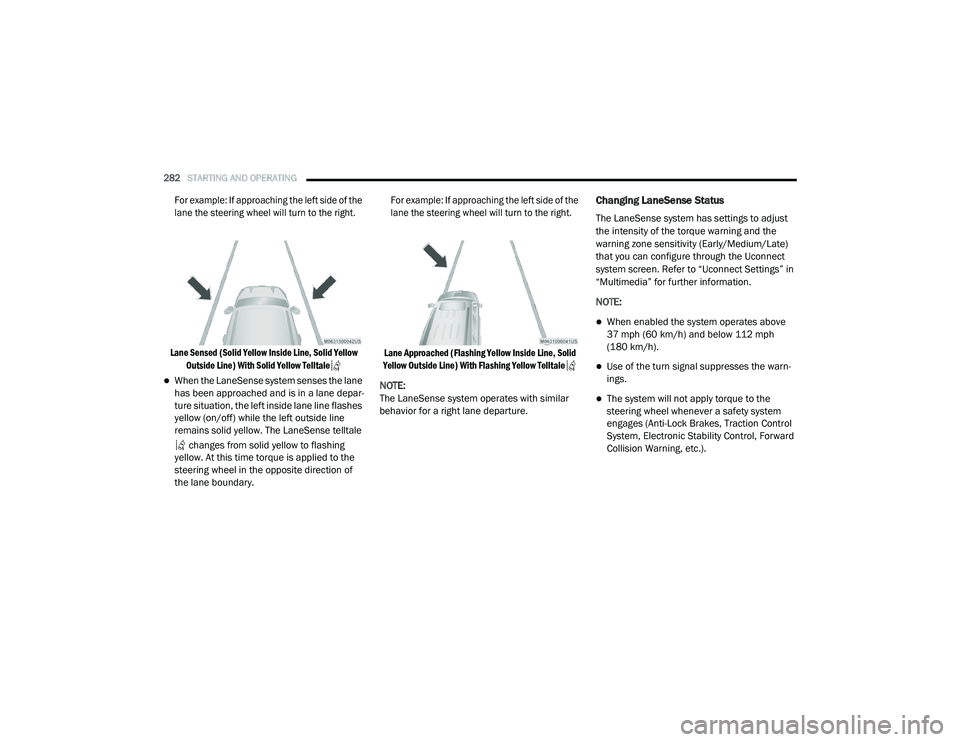
For example: If approaching the left side of the
lane the steering wheel will turn to the right.
Lane Sensed (Solid Yellow Inside Line, Solid Yellow Outside Line) With Solid Yellow Telltale
When the LaneSense system senses the lane
has been approached and is in a lane depar -
ture situation, the left inside lane line flashes
yellow (on/off) while the left outside line
remains solid yellow. The LaneSense telltale
changes from solid yellow to flashing
yellow. At this time torque is applied to the
steering wheel in the opposite direction of
the lane boundary.
For example: If approaching the left side of the
lane the steering wheel will turn to the right.
Lane Approached (Flashing Yellow Inside Line, Solid
Yellow Outside Line) With Flashing Yellow Telltale
NOTE:
The LaneSense system operates with similar
behavior for a right lane departure.
Changing LaneSense Status
The LaneSense system has settings to adjust
the intensity of the torque warning and the
warning zone sensitivity (Early/Medium/Late)
that you can configure through the Uconnect
system screen. Refer to “Uconnect Settings” in
“Multimedia” for further information.
NOTE:
When enabled the system operates above
37 mph (60 km/h) and below 112 mph (180 km/h).
Use of the turn signal suppresses the warn -
ings.
The system will not apply torque to the
steering wheel whenever a safety system
engages (Anti-Lock Brakes, Traction Control
System, Electronic Stability Control, Forward
Collision Warning, etc.).
20_RU_OM_EN_US_t.book Page 282
Page 289 of 516
STARTING AND OPERATING287
1. Put the vehicle in park and switch the
ignition off.
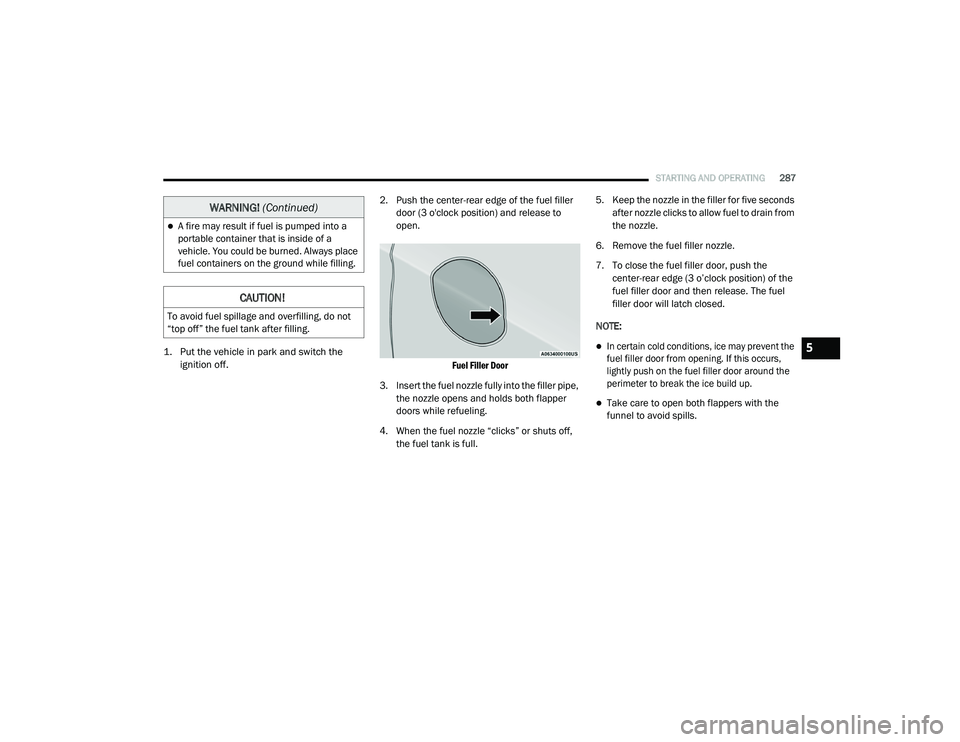
2. Push the center-rear edge of the fuel filler
door (3 o'clock position) and release to
open.
Fuel Filler Door
3. Insert the fuel nozzle fully into the filler pipe, the nozzle opens and holds both flapper
doors while refueling.
4. When the fuel nozzle “clicks” or shuts off, the fuel tank is full. 5. Keep the nozzle in the filler for five seconds
after nozzle clicks to allow fuel to drain from
the nozzle.
6. Remove the fuel filler nozzle.
7. To close the fuel filler door, push the center-rear edge (3 o’clock position) of the
fuel filler door and then release. The fuel
filler door will latch closed.
NOTE:
In certain cold conditions, ice may prevent the
fuel filler door from opening. If this occurs,
lightly push on the fuel filler door around the
perimeter to break the ice build up.
Take care to open both flappers with the
funnel to avoid spills.
A fire may result if fuel is pumped into a
portable container that is inside of a
vehicle. You could be burned. Always place
fuel containers on the ground while filling.
CAUTION!
To avoid fuel spillage and overfilling, do not
“top off” the fuel tank after filling.
WARNING! (Continued)
5
20_RU_OM_EN_US_t.book Page 287
Page 297 of 516
STARTING AND OPERATING295
Towing Requirements — Tires
Do not attempt to tow a trailer while using a
compact spare tire.
Do not drive more than 50 mph (80 km/h)
when towing while using a full size spare tire.
Proper tire inflation pressures are essential
to the safe and satisfactory operation of your
vehicle. Refer to “Tires” in “Servicing And
Maintenance” for proper tire inflation proce -
dures.
Check the trailer tires for proper tire inflation
pressures before trailer usage.
Check for signs of tire wear or visible tire
damage before towing a trailer. Refer to
“Tires” in “Servicing And Maintenance” for
the proper inspection procedure.
When replacing tires, refer to “Tires” in
“Servicing And Maintenance” for the proper
tire replacement procedures. Replacing tires
with a higher load carrying capacity will not
increase the vehicle's GVWR and GAWR
limits.
Towing Requirements — Trailer Brakes
Do not interconnect the hydraulic brake
system or vacuum system of your vehicle
with that of the trailer. This could cause inad -
equate braking and possible personal injury.
An electronically actuated trailer brake
controller is required when towing a trailer
with electronically actuated brakes. When
towing a trailer equipped with a hydraulic
surge actuated brake system, an electronic
brake controller is not required.
Trailer brakes are recommended for trailers
over 1,000 lbs (453 kg) and required for
trailers in excess of 2,000 lbs (907 kg).
Vehicles with trailers should not be parked
on a grade. When parking, apply the
parking brake on the tow vehicle. Put the
tow vehicle transmission in PARK. For
four-wheel drive vehicles, make sure the
transfer case is not in NEUTRAL. Always,
block or "chock" the trailer wheels.
GCWR must not be exceeded.
Total weight must be distributed between
the tow vehicle and the trailer such that the
following four ratings are not exceeded :
GVWR
GTW
GAWR
Tongue weight rating for the trailer
hitch utilized.
WARNING! (Continued)
WARNING!
Do not connect trailer brakes to your
vehicle's hydraulic brake lines. It can over -
load your brake system and cause it to fail.
You might not have brakes when you need
them and could have an accident.
Towing any trailer will increase your stop -
ping distance. When towing, you should
allow for additional space between your
vehicle and the vehicle in front of you.
Failure to do so could result in an accident.
5
20_RU_OM_EN_US_t.book Page 295
Page 302 of 516
300STARTING AND OPERATING
(Continued)
(Continued)
Flowing/Rising Water
Shallow Standing Water
Although your vehicle is capable of driving
through shallow standing water, consider the
following Warnings and Cautions before doing so.
WARNING!
Do not drive on or across a road or path
where water is flowing and/or rising (as in
storm run-off). Flowing water can wear away
the road or path's surface and cause your
vehicle to sink into deeper water.
Furthermore, flowing and/or rising water can
carry your vehicle away swiftly. Failure to
follow this warning may result in injuries that
are serious or fatal to you, your passengers,
and others around you.
WARNING!
Driving through standing water limits your
vehicle’s traction capabilities. Do not
exceed 5 mph (8 km/h) when driving
through standing water.
Driving through standing water limits your
vehicle’s braking capabilities, which
increases stopping distances. Therefore,
after driving through standing water, drive
slowly and lightly press on the brake pedal
several times to dry the brakes.
Failure to follow these warnings may result
in injuries that are serious or fatal to you,
your passengers, and others around you.
CAUTION!
Always check the depth of the standing
water before driving through it. Never drive
through standing water that is deeper than
the bottom of the tire rims mounted on the
vehicle.
Determine the condition of the road or the
path that is under water and if there are any
obstacles in the way before driving through
the standing water.
WARNING! (Continued)
Do not exceed 5 mph (8 km/h) when
driving through standing water. This will
minimize wave effects.
Driving through standing water may cause
damage to your vehicle’s drivetrain compo -
nents. Always inspect your vehicle’s fluids
(i.e., engine oil, transmission, axle, etc.) for
signs of contamination (i.e., fluid that is
milky or foamy in appearance) after driving
through standing water. Do not continue to
operate the vehicle if any fluid appears
contaminated, as this may result in further
damage. Such damage is not covered by
the New Vehicle Limited Warranty.
Getting water inside your vehicle’s engine
can cause it to lock up and stall out, and
cause serious internal damage to the
engine. Such damage is not covered by the
New Vehicle Limited Warranty.
CAUTION! (Continued)
20_RU_OM_EN_US_t.book Page 300
Page 310 of 516
308IN CASE OF EMERGENCY
Replacing Exterior Bulbs
High Intensity Discharge (HID) Headlamps —
If Equipped
The headlamps contain a type of high voltage
discharge light source. High voltage can remain
in the circuit even with the headlamp switch off.
Because of this, you should not attempt to
service a HID headlamp light source yourself. If
an HID headlamp light source fails, take your
vehicle to an authorized dealer for service.
NOTE:
On vehicles equipped with HID headlamps,
when the headlamps are turned on, there is a
blue hue to the lights. This diminishes and
becomes more white after approximately 10
seconds, as the system charges.
Halogen Headlamps
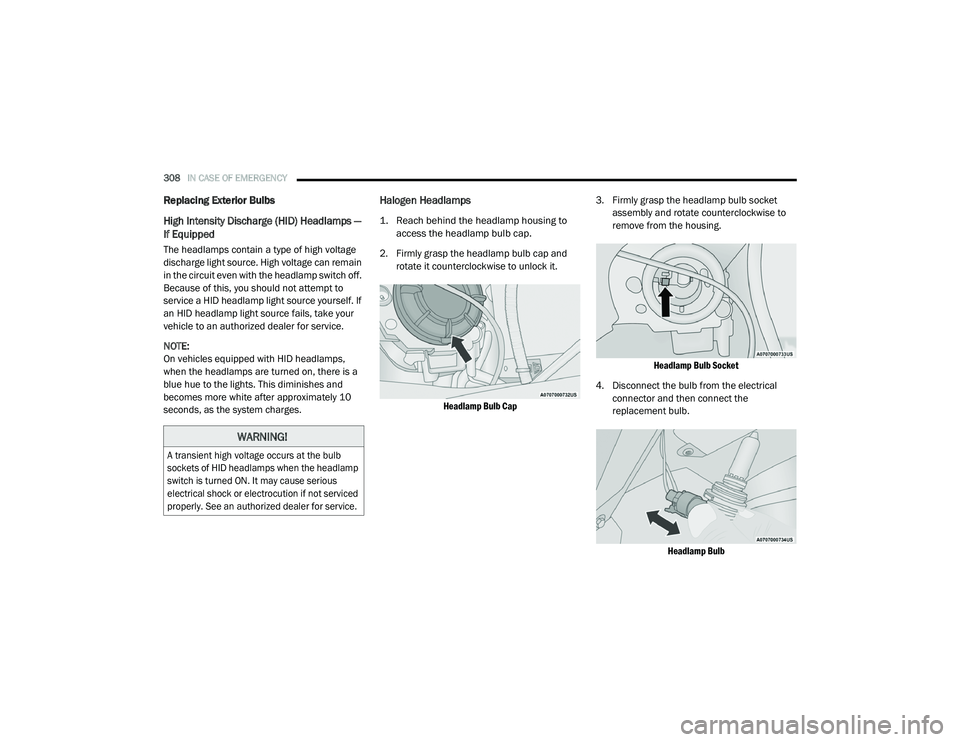
1. Reach behind the headlamp housing to
access the headlamp bulb cap.
2. Firmly grasp the headlamp bulb cap and rotate it counterclockwise to unlock it.
Headlamp Bulb Cap
3. Firmly grasp the headlamp bulb socket
assembly and rotate counterclockwise to
remove from the housing.
Headlamp Bulb Socket
4. Disconnect the bulb from the electrical connector and then connect the
replacement bulb.
Headlamp Bulb
WARNING!
A transient high voltage occurs at the bulb
sockets of HID headlamps when the headlamp
switch is turned ON. It may cause serious
electrical shock or electrocution if not serviced
properly. See an authorized dealer for service.
20_RU_OM_EN_US_t.book Page 308
Page 311 of 516
IN CASE OF EMERGENCY309
5. Install the bulb and connector assembly
into the headlamp housing and rotate
clockwise to lock it in place.
6. Install the headlamp bulb cap in the headlamp housing and rotate clockwise to
lock it in place.
Front Turn Signal Lamp
1. Open the hood.
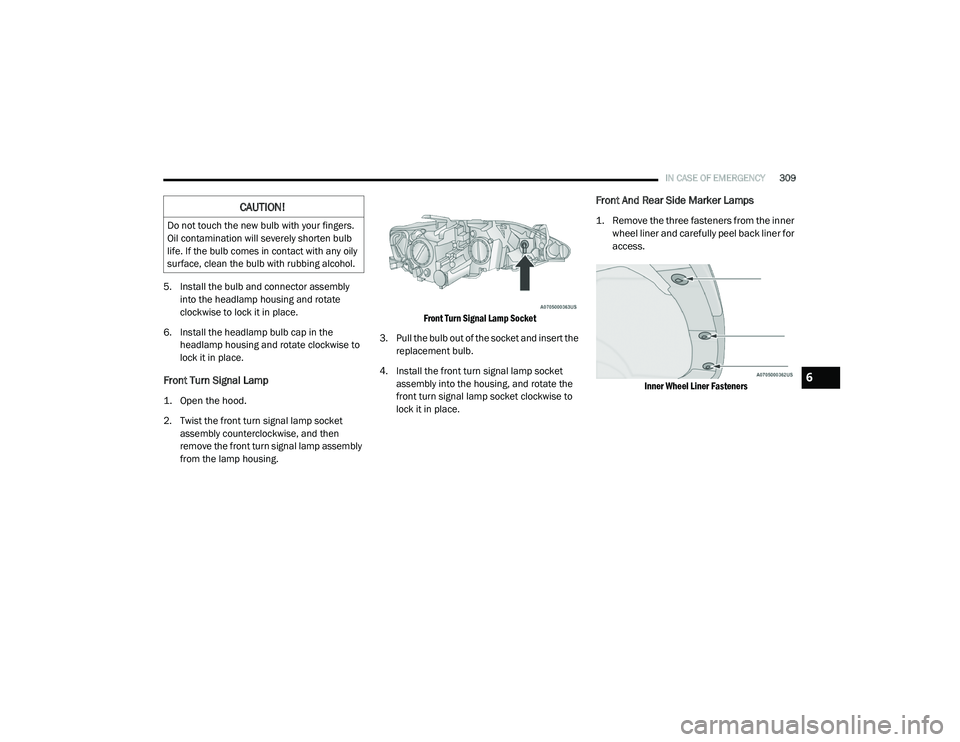
2. Twist the front turn signal lamp socket assembly counterclockwise, and then
remove the front turn signal lamp assembly
from the lamp housing.
Front Turn Signal Lamp Socket
3. Pull the bulb out of the socket and insert the replacement bulb.
4. Install the front turn signal lamp socket assembly into the housing, and rotate the
front turn signal lamp socket clockwise to
lock it in place.
Front And Rear Side Marker Lamps
1. Remove the three fasteners from the inner wheel liner and carefully peel back liner for
access.
Inner Wheel Liner Fasteners
CAUTION!
Do not touch the new bulb with your fingers.
Oil contamination will severely shorten bulb
life. If the bulb comes in contact with any oily
surface, clean the bulb with rubbing alcohol.
6
20_RU_OM_EN_US_t.book Page 309