Eco CHRYSLER PACIFICA 2020 Owners Manual
[x] Cancel search | Manufacturer: CHRYSLER, Model Year: 2020, Model line: PACIFICA, Model: CHRYSLER PACIFICA 2020Pages: 516, PDF Size: 28.69 MB
Page 305 of 516
IN CASE OF EMERGENCY303
(Continued)
in the vehicle. The vehicle’s SOS Call system
will attempt to remain connected with the
SOS operator until the SOS operator termi -
nates the connection.
5. The SOS operator may attempt to contact appropriate emergency responders and
provide them with important vehicle
information and GPS coordinates. SOS Call System Limitations
Vehicles sold in Mexico
DO NOT have SOS Call
system capabilities.
SOS or other emergency line operators in
Mexico may not answer or respond to SOS
system calls.
If the SOS Call system detects a malfunction,
any of the following may occur at the time the
malfunction is detected, and at the beginning of
each ignition cycle:
The Rearview Mirror light located between
the ASSIST and SOS buttons will continuously
be illuminated red.
The Device Screen will display the following
message “Vehicle device requires service.
Please contact your dealer.”
An In-Vehicle Audio message will state
“Vehicle device requires service. Please
contact your dealer.”
WARNING!
If anyone in the vehicle could be in danger
(e.g., fire or smoke is visible, dangerous
road conditions or location), do not wait for
voice contact from an Emergency Services
Agent. All occupants should exit the vehicle
immediately and move to a safe location.
Never place anything on or near the
vehicle’s operable network and GPS
antennas. You could prevent operable
network and GPS signal reception, which
can prevent your vehicle from placing an
emergency call. An operable network and
GPS signal reception is required for the SOS
Call system to function properly.
The SOS Call system is embedded into the
vehicle’s electrical system. Do not add
aftermarket electrical equipment to the
vehicle’s electrical system. This may
prevent your vehicle from sending a signal
to initiate an emergency call. To avoid inter -
ference that can cause the SOS Call system
to fail, never add aftermarket equipment
(e.g., two-way mobile radio, CB radio, data
recorder, etc.) to your vehicle’s electrical
system or modify the antennas on your
vehicle. IF YOUR VEHICLE LOSES BATTERY
POWER FOR ANY REASON (INCLUDING
DURING OR AFTER AN ACCIDENT), THE
UCONNECT FEATURES, APPS AND
SERVICES, AMONG OTHERS, WILL NOT
OPERATE.
Modifications to any part of the SOS Call
system could cause the air bag system to
fail when you need it. You could be injured
if the air bag system is not there to help
protect you.
WARNING! (Continued)
6
20_RU_OM_EN_US_t.book Page 303
Page 306 of 516
304IN CASE OF EMERGENCY
Even if the SOS Call system is fully functional,
factors beyond FCA US LLC’s control may
prevent or stop the SOS Call system operation. These include, but are not limited to, the
following factors:
Delayed accessories mode is active
The ignition is in the OFF position
The vehicle’s electrical systems are not intact
The SOS Call system software and/or hard
-
ware are damaged during a crash
The vehicle battery loses power or becomes
disconnected during a vehicle crash
LTE (voice/data) or 4G (data) network and/or
Global Positioning Satellite signals are
unavailable or obstructed
Equipment malfunction at the SOS operator
facility
Operator error by the SOS operator
LTE (voice/data) or 4G (data) network
congestion
Weather
Buildings, structures, geographic terrain, or
tunnels
WARNING!
Ignoring the Rearview Mirror light could
mean you will not have SOS Call services. If
the Rearview Mirror light is illuminated,
have an authorized dealer service the SOS
Call system immediately.
The Occupant Restraint Control module
turns on the air bag Warning Light on the
instrument panel if a malfunction in any
part of the system is detected. If the Air Bag
Warning Light is illuminated, have an
authorized dealer service the Occupant
Restraint Control system immediately.
WARNING!
ALWAYS obey traffic laws and pay attention to
the road. ALWAYS drive safely with your hands
on the steering wheel. You have full
responsibility and assume all risks related to
the use of the features and applications in
this vehicle. Only use the features and
applications when it is safe to do so. Failure
to do so may result in an accident involving
serious injury or death.
20_RU_OM_EN_US_t.book Page 304
Page 307 of 516
IN CASE OF EMERGENCY305
NOTE:
Your vehicle may be transmitting data as
authorized by the subscriber.
Never place anything on or near the vehicle’s
LTE (voice/data) or 4G (data) and GPS
antennas. You could prevent LTE (voice/
data) or 4G (data) and GPS signal reception,
which can prevent your vehicle from placing
an emergency call. An operable LTE (voice/
data) or 4G (data) network connection and a
GPS signal is required for the SOS Call
system to function properly.
NOTE:
Changes or modifications not expressly
approved by the party responsible for compli -
ance could void the user's authority to operate
the equipment.
General Information
The following regulatory statement applies to all
Radio Frequency (RF) devices equipped in this
vehicle:
This device complies with Part 15 of the FCC
Rules and with Innovation, Science and
Economic Development Canada license-exempt
RSS standard(s). Operation is subject to the
following two conditions:
1. This device may not cause harmful interference, and
2. This device must accept any interference received, including interference that may
cause undesired operation.
Le présent appareil est conforme aux CNR
d`Innovation, Science and Economic
Development applicables aux appareils radio
exempts de licence. L'exploitation est autorisée
aux deux conditions suivantes:
1. l'appareil ne doit pas produire de brouillage, et
2. l'utilisateur de l'appareil doit accepter tout
brouillage radioélectrique subi, même si le
brouillage est susceptible d'en compro -
mettre le fonctionnement.
La operación de este equipo está sujeta a las
siguientes dos condiciones:
1. es posible que este equipo o dispositivo no cause interferencia perjudicial y
2. este equipo o dispositivo debe aceptar cualquier interferencia, incluyendo la que
pueda causar su operación no deseada.
NOTE:
Changes or modifications not expressly
approved by the party responsible for compli -
ance could void the user’s authority to operate
the equipment.
CAUTION!
To avoid damage to the mirror during
cleaning, never spray any cleaning solution
directly onto the mirror. Apply the solution
onto a clean cloth and wipe the mirror clean.
6
20_RU_OM_EN_US_t.book Page 305
Page 310 of 516
308IN CASE OF EMERGENCY
Replacing Exterior Bulbs
High Intensity Discharge (HID) Headlamps —
If Equipped
The headlamps contain a type of high voltage
discharge light source. High voltage can remain
in the circuit even with the headlamp switch off.
Because of this, you should not attempt to
service a HID headlamp light source yourself. If
an HID headlamp light source fails, take your
vehicle to an authorized dealer for service.
NOTE:
On vehicles equipped with HID headlamps,
when the headlamps are turned on, there is a
blue hue to the lights. This diminishes and
becomes more white after approximately 10
seconds, as the system charges.
Halogen Headlamps
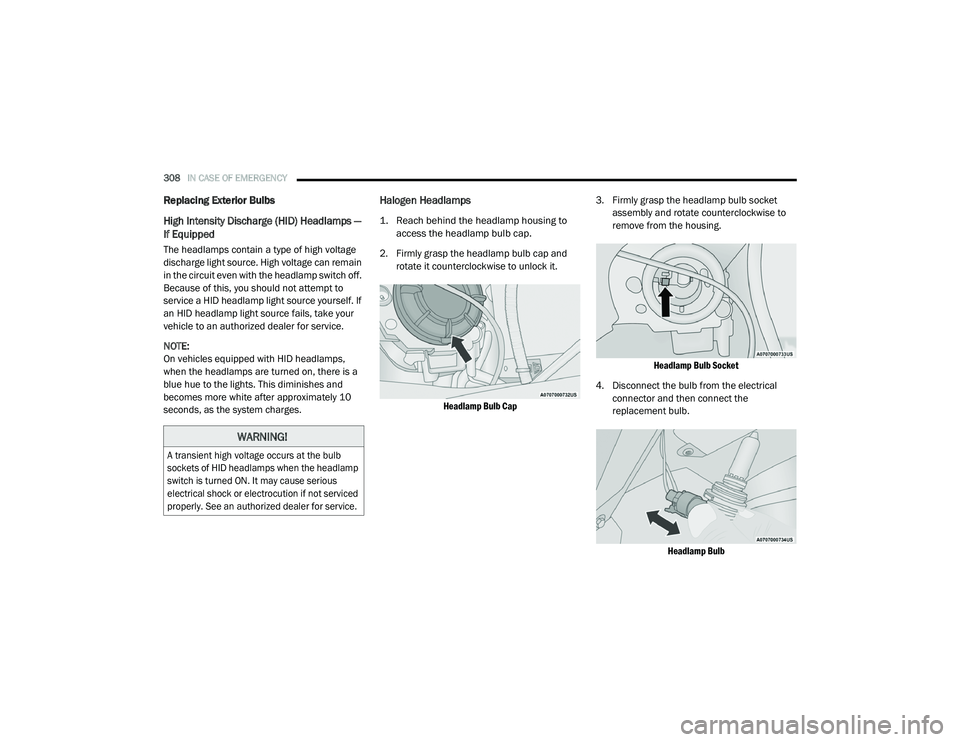
1. Reach behind the headlamp housing to
access the headlamp bulb cap.
2. Firmly grasp the headlamp bulb cap and rotate it counterclockwise to unlock it.
Headlamp Bulb Cap
3. Firmly grasp the headlamp bulb socket
assembly and rotate counterclockwise to
remove from the housing.
Headlamp Bulb Socket
4. Disconnect the bulb from the electrical connector and then connect the
replacement bulb.
Headlamp Bulb
WARNING!
A transient high voltage occurs at the bulb
sockets of HID headlamps when the headlamp
switch is turned ON. It may cause serious
electrical shock or electrocution if not serviced
properly. See an authorized dealer for service.
20_RU_OM_EN_US_t.book Page 308
Page 326 of 516
324IN CASE OF EMERGENCY
3. Place the wrench on the jack screw and turn
clockwise until the jack head is properly
engaged in the described location. Do not
raise the vehicle until you are sure the jack
is securely engaged.
4. Raise the vehicle by turning the jack screw clockwise, using the swivel wrench. Raise
the vehicle only until the tire just clears the
surface and enough clearance is obtained
to install the compact spare tire. Minimum
tire lift provides maximum stability.
5. Remove the wheel lug nuts, for vehicles with wheel covers, remove the cover from
the wheel by hand. Do not pry the wheel
cover off. Then pull the wheel off the hub.
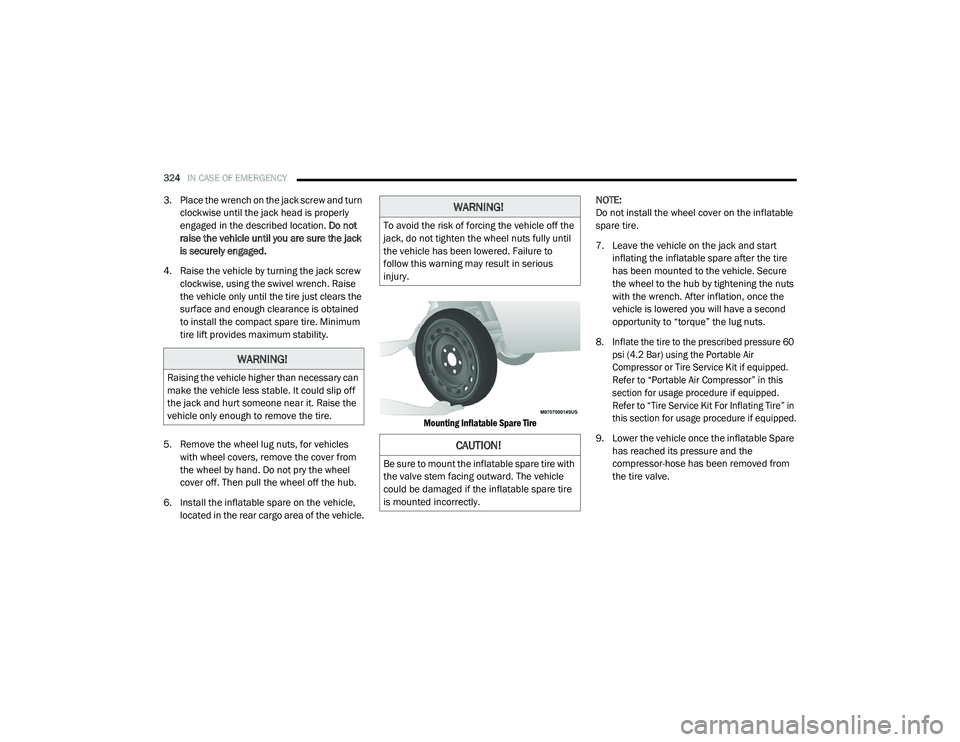
6. Install the inflatable spare on the vehicle, located in the rear cargo area of the vehicle.
Mounting Inflatable Spare Tire
NOTE:
Do not install the wheel cover on the inflatable
spare tire.
7. Leave the vehicle on the jack and start
inflating the inflatable spare after the tire
has been mounted to the vehicle. Secure
the wheel to the hub by tightening the nuts
with the wrench. After inflation, once the
vehicle is lowered you will have a second
opportunity to “torque” the lug nuts.
8. Inflate the tire to the prescribed pressure 60 psi (4.2 Bar) using the Portable Air
Compressor or Tire Service Kit if equipped.
Refer to “Portable Air Compressor” in this
section for usage procedure if equipped.
Refer to “Tire Service Kit For Inflating Tire” in
this section for usage procedure if equipped.
9. Lower the vehicle once the inflatable Spare has reached its pressure and the
compressor-hose has been removed from
the tire valve.
WARNING!
Raising the vehicle higher than necessary can
make the vehicle less stable. It could slip off
the jack and hurt someone near it. Raise the
vehicle only enough to remove the tire.
WARNING!
To avoid the risk of forcing the vehicle off the
jack, do not tighten the wheel nuts fully until
the vehicle has been lowered. Failure to
follow this warning may result in serious
injury.
CAUTION!
Be sure to mount the inflatable spare tire with
the valve stem facing outward. The vehicle
could be damaged if the inflatable spare tire
is mounted incorrectly.
20_RU_OM_EN_US_t.book Page 324
Page 329 of 516
IN CASE OF EMERGENCY327
(Continued)
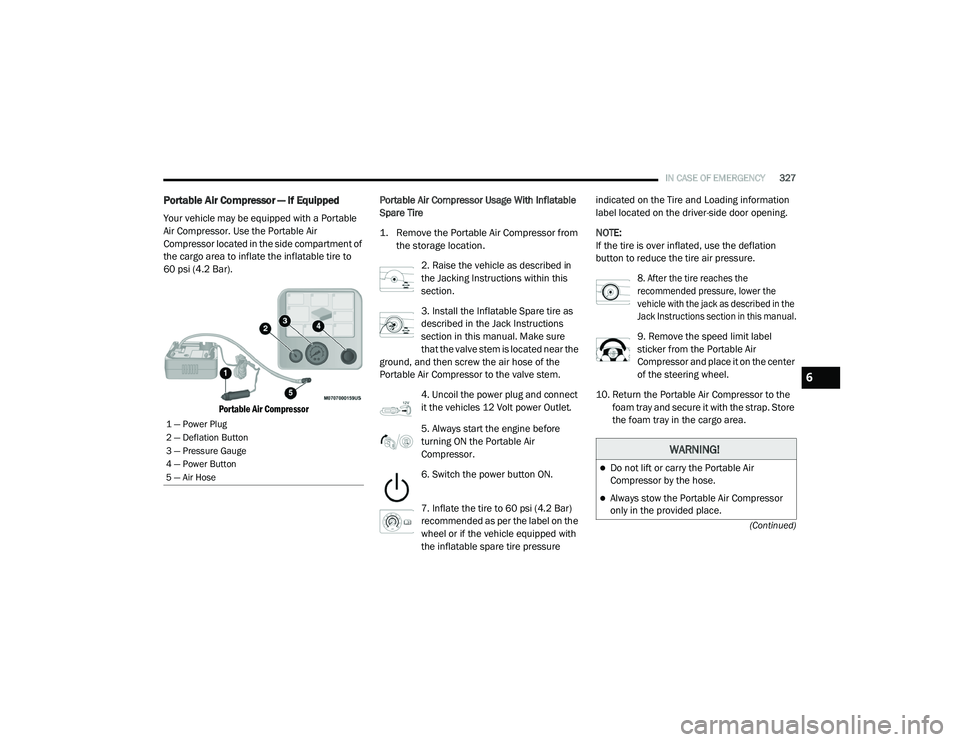
Portable Air Compressor — If Equipped
Your vehicle may be equipped with a Portable
Air Compressor. Use the Portable Air
Compressor located in the side compartment of
the cargo area to inflate the inflatable tire to
60 psi (4.2 Bar).
Portable Air Compressor
Portable Air Compressor Usage With Inflatable
Spare Tire
1. Remove the Portable Air Compressor from
the storage location.
2. Raise the vehicle as described in
the Jacking Instructions within this
section.
3. Install the Inflatable Spare tire as
described in the Jack Instructions
section in this manual. Make sure
that the valve stem is located near the
ground, and then screw the air hose of the
Portable Air Compressor to the valve stem.
4. Uncoil the power plug and connect
it the vehicles 12 Volt power Outlet.
5. Always start the engine before
turning ON the Portable Air
Compressor.
6. Switch the power button ON.
7. Inflate the tire to 60 psi (4.2 Bar)
recommended as per the label on the
wheel or if the vehicle equipped with
the inflatable spare tire pressure indicated on the Tire and Loading information
label located on the driver-side door opening.
NOTE:
If the tire is over inflated, use the deflation
button to reduce the tire air pressure.
8. After the tire reaches the
recommended pressure, lower the
vehicle with the jack as described in the
Jack Instructions section in this manual.
9. Remove the speed limit label
sticker from the Portable Air
Compressor and place it on the center
of the steering wheel.
10. Return the Portable Air Compressor to the foam tray and secure it with the strap. Store
the foam tray in the cargo area.
1 — Power Plug
2 — Deflation Button
3 — Pressure Gauge
4 — Power Button
5 — Air Hose
WARNING!
Do not lift or carry the Portable Air
Compressor by the hose.
Always stow the Portable Air Compressor
only in the provided place.
6
20_RU_OM_EN_US_t.book Page 327
Page 330 of 516
328IN CASE OF EMERGENCY
Tire Service Kit For Inflating Tire — If
Equipped
Your vehicle may be equipped with a Tire
Service Kit. Use the Tire Service Kit located in
the side compartment of the cargo area to
inflate the inflatable tire to 60 psi (4.2 Bar). Tire Service Kit And Components And Operation
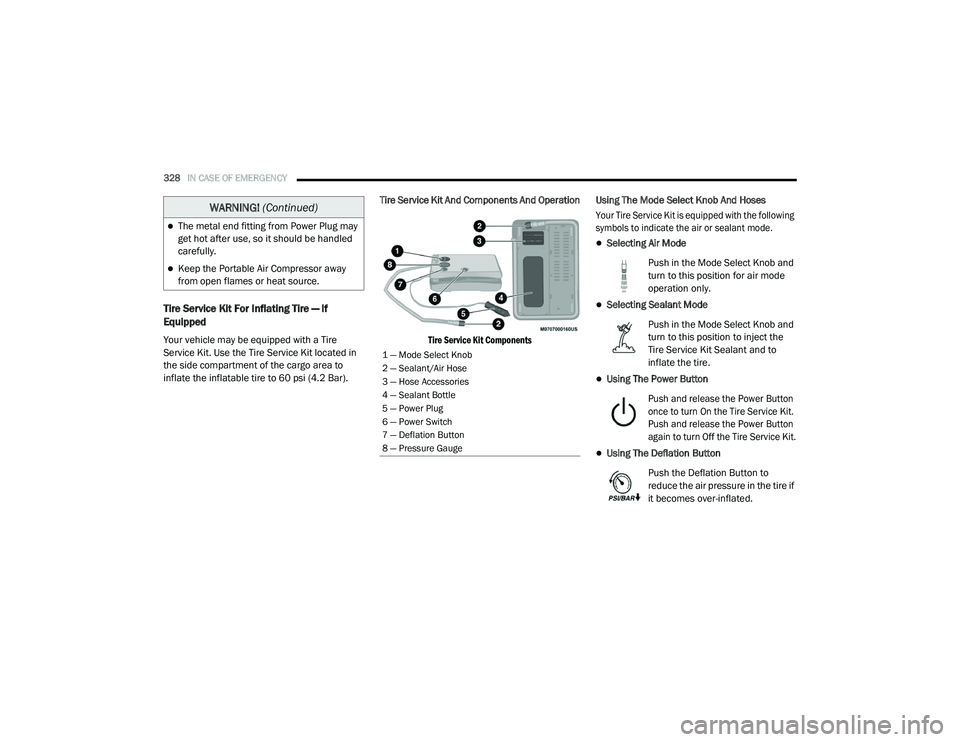
Tire Service Kit Components
Using The Mode Select Knob And Hoses
Your Tire Service Kit is equipped with the following
symbols to indicate the air or sealant mode.
Selecting Air Mode
Push in the Mode Select Knob and
turn to this position for air mode
operation only.
Selecting Sealant Mode
Push in the Mode Select Knob and
turn to this position to inject the
Tire Service Kit Sealant and to
inflate the tire.
Using The Power Button
Push and release the Power Button
once to turn On the Tire Service Kit.
Push and release the Power Button
again to turn Off the Tire Service Kit.
Using The Deflation Button
Push the Deflation Button to
reduce the air pressure in the tire if
it becomes over-inflated.
The metal end fitting from Power Plug may
get hot after use, so it should be handled
carefully.
Keep the Portable Air Compressor away
from open flames or heat source.
WARNING! (Continued)
1 — Mode Select Knob
2 — Sealant/Air Hose
3 — Hose Accessories
4 — Sealant Bottle
5 — Power Plug
6 — Power Switch
7 — Deflation Button
8 — Pressure Gauge
20_RU_OM_EN_US_t.book Page 328
Page 332 of 516
330IN CASE OF EMERGENCY
NOTE:
Do not fill inflatable spare tire with sealant.
Refer to “Tire Service Kit” in this chapter for
repairing tires.
8. Switch the power button ON.
9. Inflate the tire to 60 psi (4.2 Bar)
recommended as per the label on the
wheel or if the vehicle equipped with
the inflatable spare tire pressure
indicated on the Tire and Loading information
label located on the driver-side door opening.
NOTE:
If the tire is over inflated, use the deflation
button to reduce the tire air pressure.
10. After the tire reaches the
recommended pressure, lower the
vehicle with the jack as described in the
Jack Instructions section in this manual.
11. Remove the speed limit label
sticker from the Tire Service Kit and
place it on the center of the steering
wheel.
12. Return the Tire Service Kit to the foam tray and secure it with the strap. Store the foam
tray in the cargo area.
Return Inflatable Spare Tire
To return Inflatable Spare Tire to its storage
location.
1. Return the Jack.
2. Deflate the spare tire. Use the Tire Service Kit or Portable Air Compressor and push the
deflation button to do this step. Refer to
“Portable Air Compressor” in this section for
additional information. The inflatable spare
tire will return to its original shape. 3. Install the inflatable spare tire back into its
original stowage location and position
facing outward.
4. Install the foam tray with wrench and funnel installed.
5. Install and tighten the wing nut by hand.
6. Install the Tire Service Kit or Portable Air Compressor (if equipped) and tighten the
strap.
7. Install access panel door.TIRE SERVICE KIT — IF EQUIPPED
Your vehicle may be equipped with a Tire
Service Kit. Small punctures up to 1/4 inch
(6 mm) in the tire tread can be sealed with Tire
Service Kit. Foreign objects (e.g., screws or
nails) should not be removed from the tire. Tire
Service Kit can be used in outside temperatures
down to approximately -4°F (-20°C). This kit will
provide a temporary tire seal, allowing you to
drive your vehicle up to 100 miles (160 km)
with a maximum speed of 50 mph (80 km/h).
20_RU_OM_EN_US_t.book Page 330
Page 333 of 516
IN CASE OF EMERGENCY331
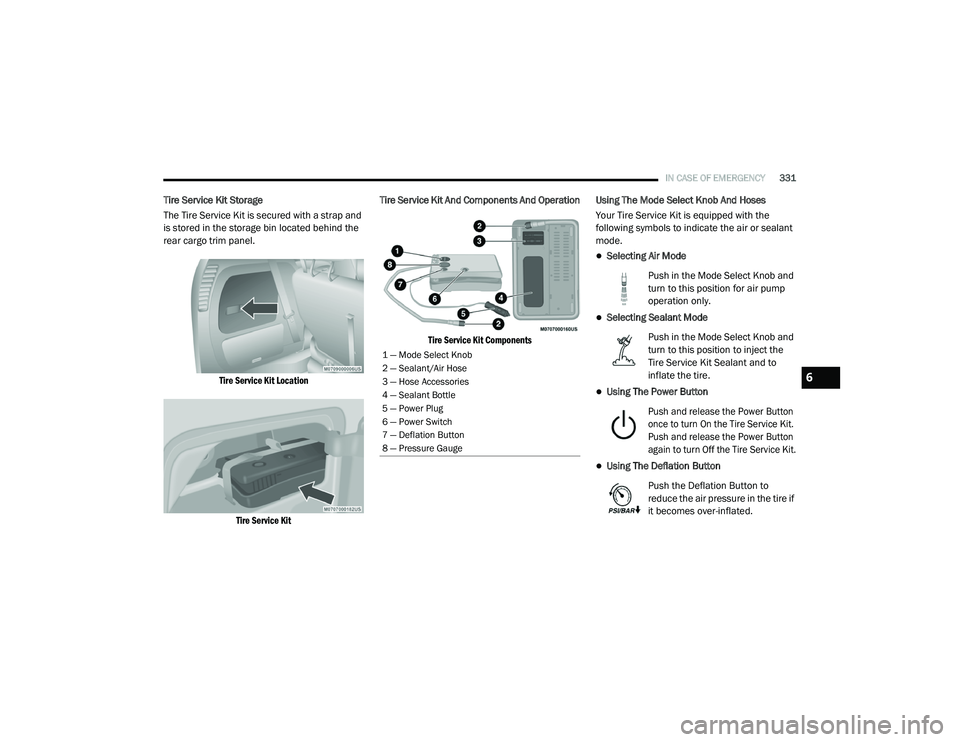
Tire Service Kit Storage
The Tire Service Kit is secured with a strap and
is stored in the storage bin located behind the
rear cargo trim panel.
Tire Service Kit LocationTire Service Kit
Tire Service Kit And Components And Operation
Tire Service Kit Components
Using The Mode Select Knob And Hoses
Your Tire Service Kit is equipped with the
following symbols to indicate the air or sealant
mode.
Selecting Air Mode
Push in the Mode Select Knob and
turn to this position for air pump
operation only.
Selecting Sealant Mode
Push in the Mode Select Knob and
turn to this position to inject the
Tire Service Kit Sealant and to
inflate the tire.
Using The Power Button
Push and release the Power Button
once to turn On the Tire Service Kit.
Push and release the Power Button
again to turn Off the Tire Service Kit.
Using The Deflation Button
Push the Deflation Button to
reduce the air pressure in the tire if
it becomes over-inflated.
1 — Mode Select Knob
2 — Sealant/Air Hose
3 — Hose Accessories
4 — Sealant Bottle
5 — Power Plug
6 — Power Switch
7 — Deflation Button
8 — Pressure Gauge
6
20_RU_OM_EN_US_t.book Page 331
Page 336 of 516
334IN CASE OF EMERGENCY
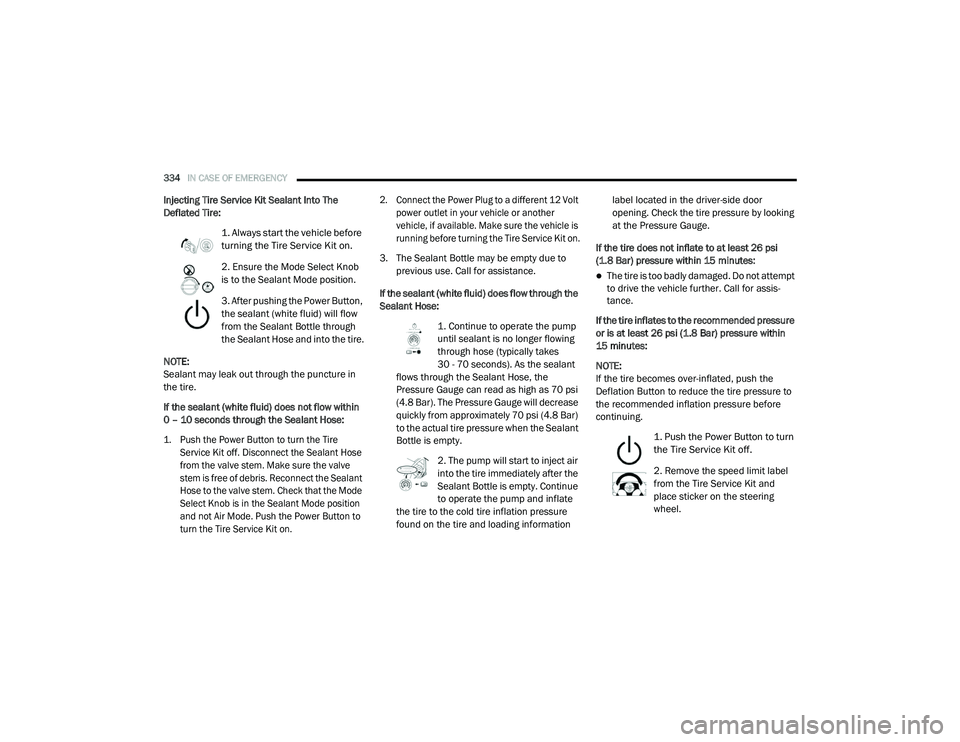
Injecting Tire Service Kit Sealant Into The
Deflated Tire:
1. Always start the vehicle before
turning the Tire Service Kit on.
2. Ensure the Mode Select Knob
is to the Sealant Mode position.
3. After pushing the Power Button,
the sealant (white fluid) will flow
from the Sealant Bottle through
the Sealant Hose and into the tire.
NOTE:
Sealant may leak out through the puncture in
the tire.
If the sealant (white fluid) does not flow within
0 – 10 seconds through the Sealant Hose:
1. Push the Power Button to turn the Tire Service Kit off. Disconnect the Sealant Hose
from the valve stem. Make sure the valve
stem is free of debris. Reconnect the Sealant
Hose to the valve stem. Check that the Mode
Select Knob is in the Sealant Mode position
and not Air Mode. Push the Power Button to
turn the Tire Service Kit on. 2. Connect the Power Plug to a different 12 Volt
power outlet in your vehicle or another
vehicle, if available. Make sure the vehicle is
running before turning the Tire Service Kit on.
3. The Sealant Bottle may be empty due to previous use. Call for assistance.
If the sealant (white fluid) does flow through the
Sealant Hose: 1. Continue to operate the pump
until sealant is no longer flowing
through hose (typically takes
30 - 70 seconds). As the sealant
flows through the Sealant Hose, the
Pressure Gauge can read as high as 70 psi
(4.8 Bar). The Pressure Gauge will decrease
quickly from approximately 70 psi (4.8 Bar)
to the actual tire pressure when the Sealant
Bottle is empty.
2. The pump will start to inject air
into the tire immediately after the
Sealant Bottle is empty. Continue
to operate the pump and inflate
the tire to the cold tire inflation pressure
found on the tire and loading information label located in the driver-side door
opening. Check the tire pressure by looking
at the Pressure Gauge.
If the tire does not inflate to at least 26 psi
(1.8 Bar) pressure within 15 minutes:
The tire is too badly damaged. Do not attempt
to drive the vehicle further. Call for assis -
tance.
If the tire inflates to the recommended pressure
or is at least 26 psi (1.8 Bar) pressure within
15 minutes:
NOTE:
If the tire becomes over-inflated, push the
Deflation Button to reduce the tire pressure to
the recommended inflation pressure before
continuing.
1. Push the Power Button to turn
the Tire Service Kit off.
2. Remove the speed limit label
from the Tire Service Kit and
place sticker on the steering
wheel.
20_RU_OM_EN_US_t.book Page 334