lights CHRYSLER PACIFICA 2020 User Guide
[x] Cancel search | Manufacturer: CHRYSLER, Model Year: 2020, Model line: PACIFICA, Model: CHRYSLER PACIFICA 2020Pages: 516, PDF Size: 28.69 MB
Page 65 of 516
GETTING TO KNOW YOUR VEHICLE63
EXTERIOR LIGHTS
Multifunction Lever
The multifunction lever is located on the left
side of the steering column. The multifunction
lever controls the turn signals, headlight high/
low beams, and flash-to-pass functions.
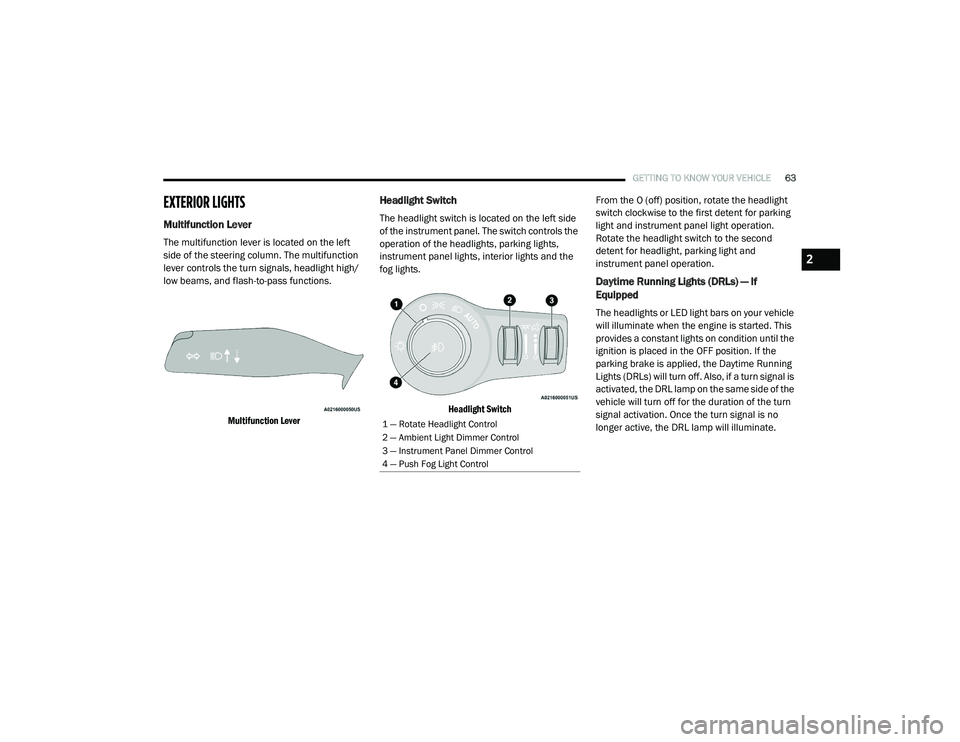
Multifunction Lever
Headlight Switch
The headlight switch is located on the left side
of the instrument panel. The switch controls the
operation of the headlights, parking lights,
instrument panel lights, interior lights and the
fog lights.
Headlight Switch
From the O (off) position, rotate the headlight
switch clockwise to the first detent for parking
light and instrument panel light operation.
Rotate the headlight switch to the second
detent for headlight, parking light and
instrument panel operation.
Daytime Running Lights (DRLs) — If
Equipped
The headlights or LED light bars on your vehicle
will illuminate when the engine is started. This
provides a constant lights on condition until the
ignition is placed in the OFF position. If the
parking brake is applied, the Daytime Running
Lights (DRLs) will turn off. Also, if a turn signal is
activated, the DRL lamp on the same side of the
vehicle will turn off for the duration of the turn
signal activation. Once the turn signal is no
longer active, the DRL lamp will illuminate.
1 — Rotate Headlight Control
2 — Ambient Light Dimmer Control
3 — Instrument Panel Dimmer Control
4 — Push Fog Light Control
2
20_RU_OM_EN_US_t.book Page 63
Page 66 of 516
64GETTING TO KNOW YOUR VEHICLE
High/Low Beam Switch
When the headlights are turned on, pushing the
multifunction lever toward the instrument panel
will switch from low beams to high beams.
Pulling back to the neutral position returns the
headlights to the low beam operation.
Automatic High Beam — If Equipped
The Automatic High Beam system provides
increased forward lighting at night by
automating high beam control through the use
of a digital camera mounted on the windshield.
This camera detects vehicle specific light and
automatically switches from high beams to low
beams until the approaching vehicle is out of
view.
NOTE:
Broken, muddy, or obstructed headlights and
taillights of vehicles in the field of view will
cause headlights to remain on longer (closer to
the vehicle). Also, dirt, film and other obstruc -
tions on the windshield or camera lens will
cause the system to function improperly.
To Activate
1. Select “Automatic High Beams — ON” through the Uconnect system. Refer to
"Uconnect Settings” in “Multimedia” for
further information.
2. Rotate the headlight switch clockwise to the AUTO position.
3. Push the multifunction lever away from you to switch the headlights to the high beam
position. Refer to “Multifunction Lever” in
this section for further information.
NOTE:
This system will not activate until the vehicle is
at, or above 16 mph (25 km/h).
To Deactivate
Perform either of the following steps to
deactivate the Automatic High Beam system.
1. Select “Automatic High Beams — OFF” through the Uconnect System. Refer to
“Uconnect Settings” in “Multimedia” for
further information.
2. Pull the multifunction lever toward you to switch the headlights from the high beam to
the low beam position. 3. Rotate the headlight switch counter
-
clockwise from the AUTO to the on position.
NOTE:
Once active, the Automatic High Beam system
will stop functioning below 12 mph (20 km/h).
Flash-To-Pass
You can signal another vehicle with your
headlights by lightly pulling the multifunction
lever toward you. This will cause the high beam
headlights to turn on, and remain on, until the
lever is released.
Automatic Headlights — If Equipped
This system automatically turns your headlights
on or off based on ambient light levels. To turn
the system on, turn the headlight switch to the
extreme clockwise position aligning the
indicator with the AUTO on the headlight switch.
When the system is on, the Headlight Time
Delay feature is also on. This means your
headlights will stay on for up to 90 seconds
after the ignition is placed in the OFF position.
To turn the Automatic System off, turn the
headlight switch counterclockwise to the O (off)
position.
20_RU_OM_EN_US_t.book Page 64
Page 67 of 516
GETTING TO KNOW YOUR VEHICLE65
NOTE:
The engine must be running before the head -
lights will come on in the Automatic mode.
Headlights On With Wipers — If Equipped
When your headlights are in the AUTO mode
and the engine is running, the headlights will
automatically turn on when the wiper system is
also turned on. Headlights on when windshield
wipers are on may be found on vehicles
equipped with an automatic headlight system.
NOTE:
The Headlights with Wipers feature can be
turned on or off through the Uconnect system.
Refer to “Uconnect Settings” in “Multimedia”
for further information.
Headlight Delay — If Equipped
This feature provides the safety of headlight
illumination for up to 90 seconds after exiting
your vehicle.
To activate the delay feature, place the ignition
in the OFF position while the headlights are still
on. The 90 second delay interval begins when
headlight switch is turned off. If the headlights or parking lights are turned back on or the
ignition is placed in the ON position, the delay
will be cancelled.
When exiting the vehicle the driver can choose
to have the headlights remain on for 30, 60, or
90 seconds or not remain on. To change the
timer setting, select the proper setting through
the Uconnect System.
Refer to “Uconnect Settings” in “Multimedia”
for further information.
If the headlights are turned off before the
ignition, they will turn off in the normal manner.
NOTE:
The headlights must be turned off within
45 seconds of placing the ignition in the OFF
position to activate this feature.Lights-On Reminder
If the headlights or the parking lights are left on
after the ignition switch is placed in the OFF
position, a chime will sound when the driver's
door is opened.
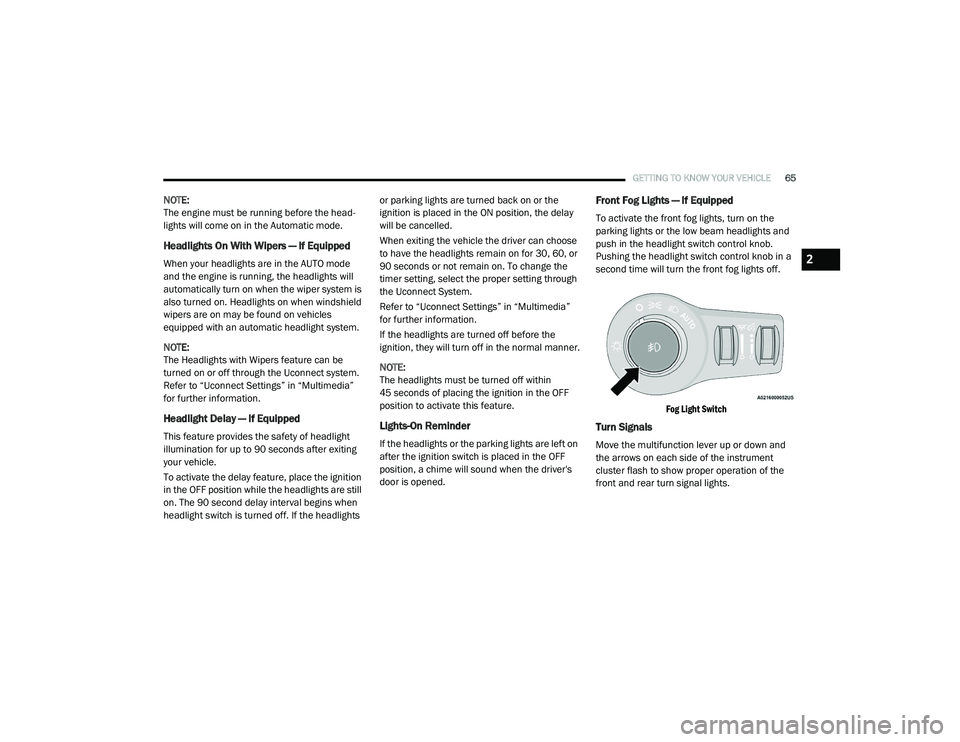
Front Fog Lights — If Equipped
To activate the front fog lights, turn on the
parking lights or the low beam headlights and
push in the headlight switch control knob.
Pushing the headlight switch control knob in a
second time will turn the front fog lights off.
Fog Light Switch
Turn Signals
Move the multifunction lever up or down and
the arrows on each side of the instrument
cluster flash to show proper operation of the
front and rear turn signal lights.
2
20_RU_OM_EN_US_t.book Page 65
Page 68 of 516
66GETTING TO KNOW YOUR VEHICLE
NOTE:
If either light remains on and does not flash, or
there is a very fast flash rate, check for a defec -
tive outside light bulb. If an indicator fails to
light when the lever is moved, it would suggest
that the indicator bulb is defective.
Turn Signal Warning
If the vehicle electronics sense that the vehicle
has traveled for about 1 mile (1.6 km) with the
turn signals on, a chime will sound and a
message will display in the cluster to alert the
driver.
Lane Change Assist — If Equipped
Tap the multifunction lever up or down once,
without moving beyond the detent, and the turn
signal (right or left) will flash three times then
automatically turn off.
Battery Protection
This feature provides battery protection to avoid
wearing down the battery if the headlights or
parking lights are left on for extended periods of
time when the ignition is in the OFF position.
After eight minutes of the ignition being in the OFF position and the headlight switch in any
position other than OFF or AUTO, the lights will
turn off automatically until the next cycle of the
ignition or headlight switch.
The battery protection feature will be disabled if
the ignition is placed in any position other than
OFF during the eight minute delay.
INTERIOR LIGHTS
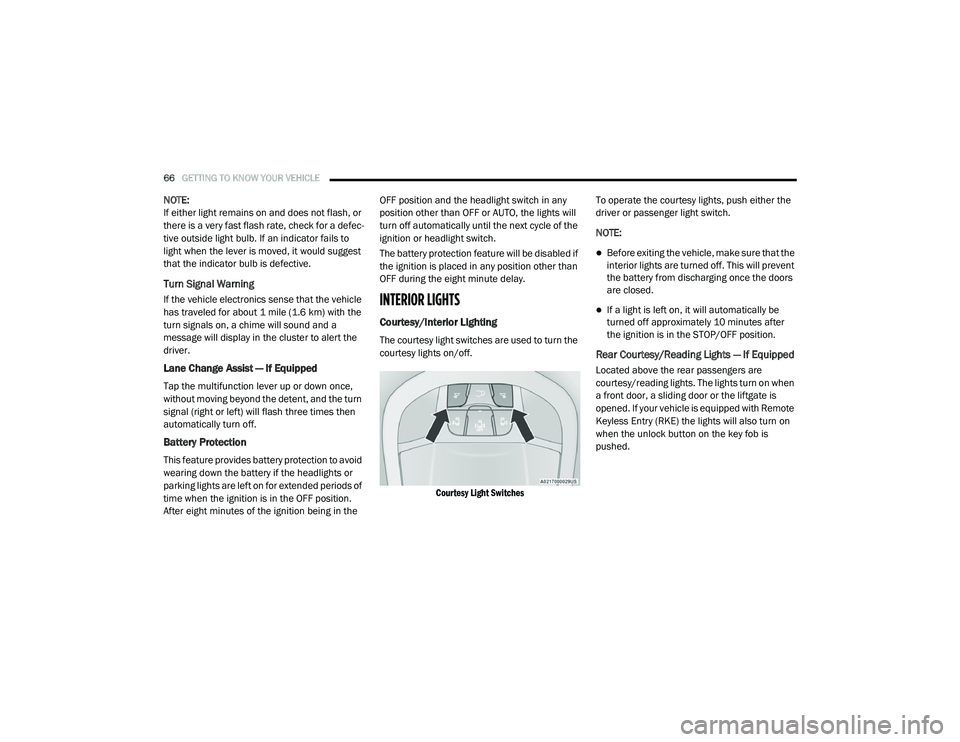
Courtesy/Interior Lighting
The courtesy light switches are used to turn the
courtesy lights on/off.
Courtesy Light Switches
To operate the courtesy lights, push either the
driver or passenger light switch.
NOTE:
Before exiting the vehicle, make sure that the
interior lights are turned off. This will prevent
the battery from discharging once the doors
are closed.
If a light is left on, it will automatically be
turned off approximately 10 minutes after
the ignition is in the STOP/OFF position.
Rear Courtesy/Reading Lights — If Equipped
Located above the rear passengers are
courtesy/reading lights. The lights turn on when
a front door, a sliding door or the liftgate is
opened. If your vehicle is equipped with Remote
Keyless Entry (RKE) the lights will also turn on
when the unlock button on the key fob is
pushed.
20_RU_OM_EN_US_t.book Page 66
Page 69 of 516
GETTING TO KNOW YOUR VEHICLE67
The courtesy lights also function as reading
lights. Push the lens to turn these lights on while
inside the vehicle. Push the lens a second time
to turn each light off.
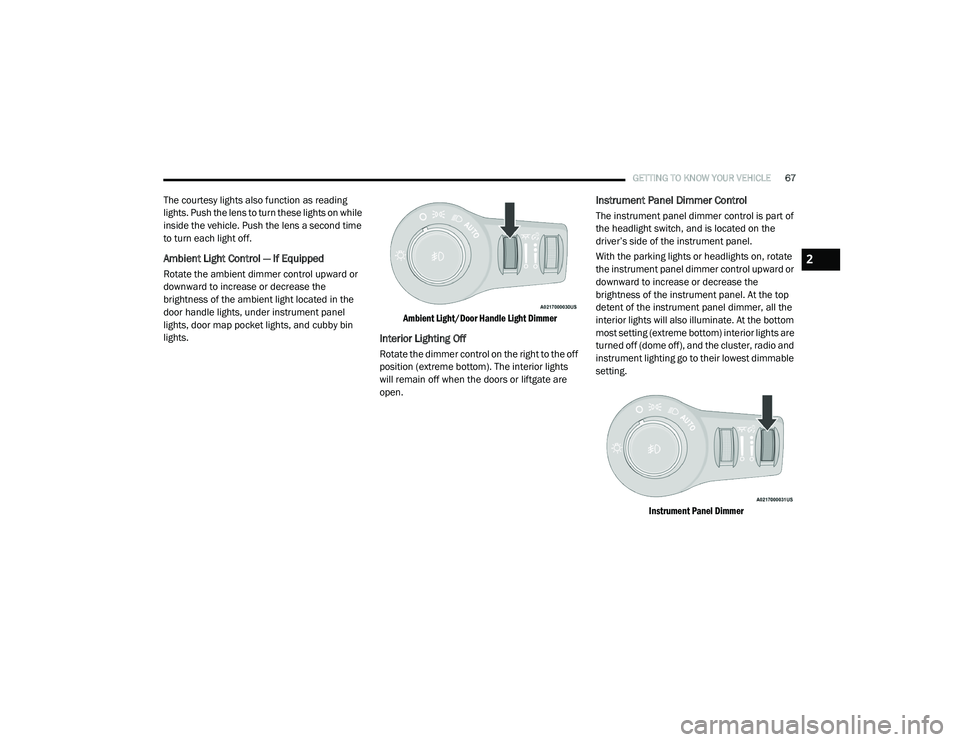
Ambient Light Control — If Equipped
Rotate the ambient dimmer control upward or
downward to increase or decrease the
brightness of the ambient light located in the
door handle lights, under instrument panel
lights, door map pocket lights, and cubby bin
lights.
Ambient Light/Door Handle Light Dimmer
Interior Lighting Off
Rotate the dimmer control on the right to the off
position (extreme bottom). The interior lights
will remain off when the doors or liftgate are
open.
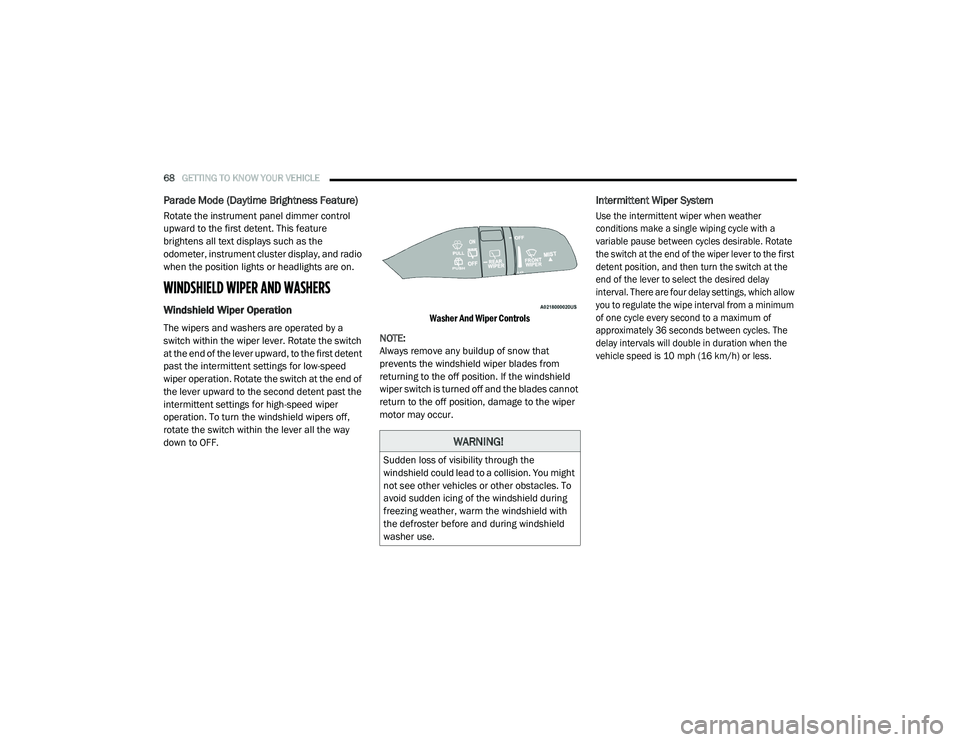
Instrument Panel Dimmer Control
The instrument panel dimmer control is part of
the headlight switch, and is located on the
driver’s side of the instrument panel.
With the parking lights or headlights on, rotate
the instrument panel dimmer control upward or
downward to increase or decrease the
brightness of the instrument panel. At the top
detent of the instrument panel dimmer, all the
interior lights will also illuminate. At the bottom
most setting (extreme bottom) interior lights are
turned off (dome off), and the cluster, radio and
instrument lighting go to their lowest dimmable
setting.
Instrument Panel Dimmer
2
20_RU_OM_EN_US_t.book Page 67
Page 70 of 516
68GETTING TO KNOW YOUR VEHICLE
Parade Mode (Daytime Brightness Feature)
Rotate the instrument panel dimmer control
upward to the first detent. This feature
brightens all text displays such as the
odometer, instrument cluster display, and radio
when the position lights or headlights are on.
WINDSHIELD WIPER AND WASHERS
Windshield Wiper Operation
The wipers and washers are operated by a
switch within the wiper lever. Rotate the switch
at the end of the lever upward, to the first detent
past the intermittent settings for low-speed
wiper operation. Rotate the switch at the end of
the lever upward to the second detent past the
intermittent settings for high-speed wiper
operation. To turn the windshield wipers off,
rotate the switch within the lever all the way
down to OFF.
Washer And Wiper Controls
NOTE:
Always remove any buildup of snow that
prevents the windshield wiper blades from
returning to the off position. If the windshield
wiper switch is turned off and the blades cannot
return to the off position, damage to the wiper
motor may occur.
Intermittent Wiper System
Use the intermittent wiper when weather
conditions make a single wiping cycle with a
variable pause between cycles desirable. Rotate
the switch at the end of the wiper lever to the first
detent position, and then turn the switch at the
end of the lever to select the desired delay
interval. There are four delay settings, which allow
you to regulate the wipe interval from a minimum
of one cycle every second to a maximum of
approximately 36 seconds between cycles. The
delay intervals will double in duration when the
vehicle speed is 10 mph (16 km/h) or less.
WARNING!
Sudden loss of visibility through the
windshield could lead to a collision. You might
not see other vehicles or other obstacles. To
avoid sudden icing of the windshield during
freezing weather, warm the windshield with
the defroster before and during windshield
washer use.
20_RU_OM_EN_US_t.book Page 68
Page 103 of 516
GETTING TO KNOW YOUR VEHICLE101
To Close The Liftgate
The liftgate can also be closed using the Rear
Interior Power Liftgate button (if equipped),
located in the upper left trim in the liftgate
opening.
Rear Interior Power Liftgate Switch
Lock The Vehicle
With a valid Passive Entry key fob within 5 ft
(1.5 m) of the liftgate, pushing the Passive Entry
lock button located to the right of the outside
handle will lock the vehicle.Hands-Free Liftgate — If Equipped
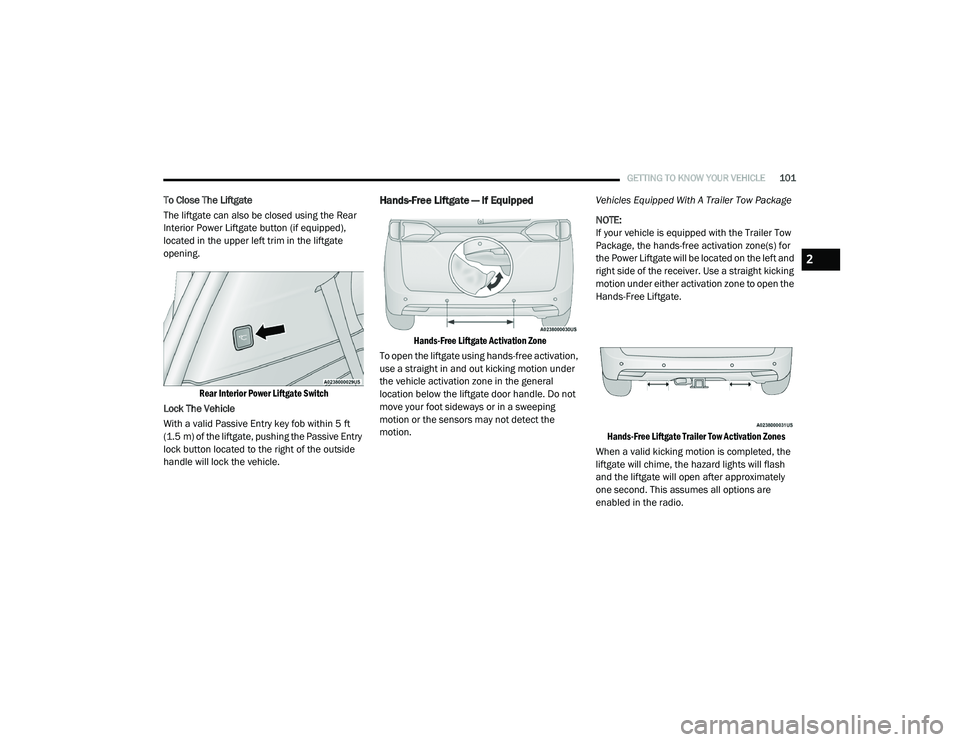
Hands-Free Liftgate Activation Zone
To open the liftgate using hands-free activation,
use a straight in and out kicking motion under
the vehicle activation zone in the general
location below the liftgate door handle. Do not
move your foot sideways or in a sweeping
motion or the sensors may not detect the
motion. Vehicles Equipped With A Trailer Tow Package
NOTE:
If your vehicle is equipped with the Trailer Tow
Package, the hands-free activation zone(s) for
the Power Liftgate will be located on the left and
right side of the receiver. Use a straight kicking
motion under either activation zone to open the
Hands-Free Liftgate.
Hands-Free Liftgate Trailer Tow Activation Zones
When a valid kicking motion is completed, the
liftgate will chime, the hazard lights will flash
and the liftgate will open after approximately
one second. This assumes all options are
enabled in the radio.
2
20_RU_OM_EN_US_t.book Page 101
Page 121 of 516
GETTING TO KNOW YOUR VEHICLE119
(Continued)
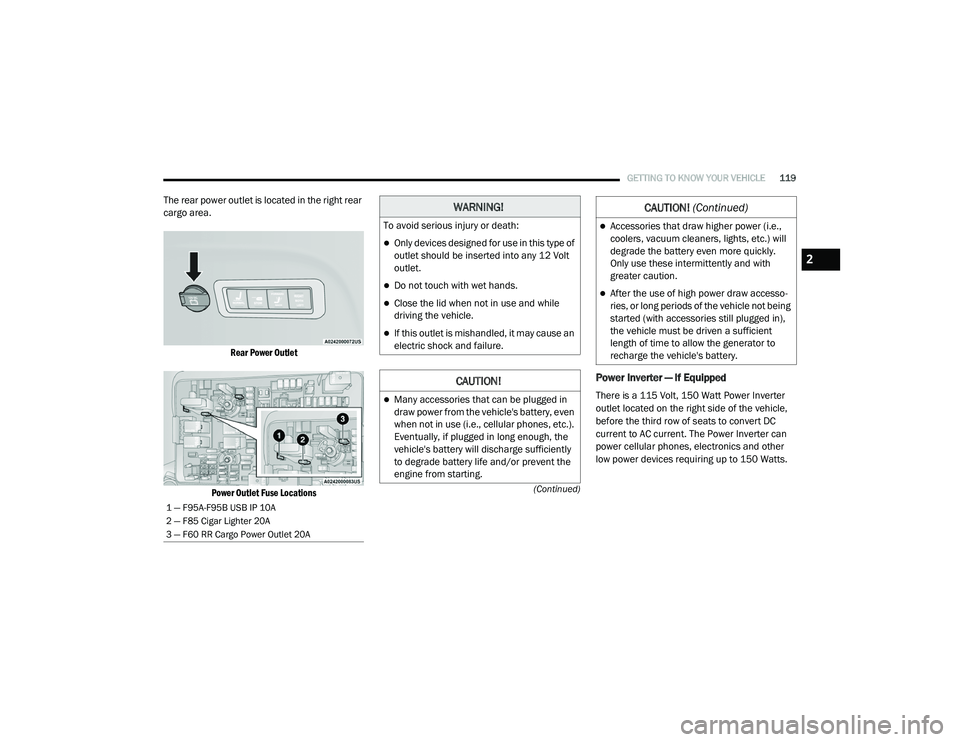
The rear power outlet is located in the right rear
cargo area.
Rear Power Outlet
Power Outlet Fuse Locations
Power Inverter — If Equipped
There is a 115 Volt, 150 Watt Power Inverter
outlet located on the right side of the vehicle,
before the third row of seats to convert DC
current to AC current. The Power Inverter can
power cellular phones, electronics and other
low power devices requiring up to 150 Watts.
1 — F95A-F95B USB IP 10A
2 — F85 Cigar Lighter 20A
3 — F60 RR Cargo Power Outlet 20A
WARNING!
To avoid serious injury or death:
Only devices designed for use in this type of
outlet should be inserted into any 12 Volt
outlet.
Do not touch with wet hands.
Close the lid when not in use and while
driving the vehicle.
If this outlet is mishandled, it may cause an
electric shock and failure.
CAUTION!
Many accessories that can be plugged in
draw power from the vehicle's battery, even
when not in use (i.e., cellular phones, etc.).
Eventually, if plugged in long enough, the
vehicle's battery will discharge sufficiently
to degrade battery life and/or prevent the
engine from starting.
Accessories that draw higher power (i.e.,
coolers, vacuum cleaners, lights, etc.) will
degrade the battery even more quickly.
Only use these intermittently and with
greater caution.
After the use of high power draw accesso -
ries, or long periods of the vehicle not being
started (with accessories still plugged in),
the vehicle must be driven a sufficient
length of time to allow the generator to
recharge the vehicle's battery.
CAUTION! (Continued)
2
20_RU_OM_EN_US_t.book Page 119
Page 141 of 516
GETTING TO KNOW YOUR INSTRUMENT PANEL139
Loss of the battery charge may indicate one or
more of the following conditions:
The charging system cannot deliver enough
electrical power to the vehicle system
because the electrical loads are larger than
the capability of charging system. The
charging system is still functioning properly.
Turning on all possible vehicle electrical
loads (e.g. HVAC to max settings, exterior and
interior lights, overloaded power outlets +12
Volts, 150W, USB ports) during certain
driving conditions (city driving, towing,
frequent stopping).
Installing options like additional lights,
upfitter electrical accessories, audio
systems, alarms and similar devices.
Unusual driving cycles (short trips separated
by long parking periods).
The vehicle was parked for an extended
period of time (weeks, months).
The battery was recently replaced and was
not charged completely.
The battery was discharged by an electrical
load left on when the vehicle was parked.
The battery was used for an extended period
with the engine not running to supply radio,
lights, chargers, +12 Volt portable appli-
ances like vacuum cleaners, game consoles
and similar devices.
What to do when an electrical load reduction
action message is present (“Battery Saver On”
or “Battery Saver Mode”)
During a trip:
Reduce power to unnecessary loads if
possible:
Turn off redundant lights (interior or exte -
rior)
Check what may be plugged in to power
outlets +12 Volts, 150W, USB ports
Check HVAC settings (blower, tempera -
ture)
Check the audio settings (volume) After a trip:
Check if any aftermarket equipment was
installed (additional lights, upfitter electrical
accessories, audio systems, alarms) and
review specifications if any (load and Ignition
Off Draw currents).
Evaluate the latest driving cycles (distance,
driving time and parking time).
The vehicle should have service performed if
the message is still present during consecu
-
tive trips and the evaluation of the vehicle
and driving pattern did not help to identify the
cause.
Instrument Cluster Display Programmable
Features Screen Setup
Push the up or down arrow button to scroll
through the Menu Items until the Screen Setup
displays in the instrument cluster display. Push
the OK button to enter Screen Setup. The
Screen Setup feature allows you to change what
information is displayed in the instrument
cluster display as well as the location that
information is displayed.
3
20_RU_OM_EN_US_t.book Page 139
Page 143 of 516
GETTING TO KNOW YOUR INSTRUMENT PANEL141
WARNING LIGHTS AND MESSAGES
The warning/indicator lights will illuminate in
the instrument panel together with a dedicated
message and/or acoustic signal when
applicable. These indications are indicative and
precautionary and as such must not be
considered as exhaustive and/or alternative to
the information contained in the Owner’s
Manual, which you are advised to read carefully
in all cases. Always refer to the information in
this chapter in the event of a failure indication.
All active telltales will display first if applicable.
The system check menu may appear different
based upon equipment options and current
vehicle status. Some telltales are optional and
may not appear.
Red Warning Lights
Air Bag Warning Light
This warning light will illuminate to
indicate a fault with the air bag, and
will turn on for four to eight seconds
as a bulb check when the ignition is
placed in the ON/RUN or ACC/ON/RUN
position. This light will illuminate with a single
chime when a fault with the air bag has been
detected, it will stay on until the fault is cleared. If the light is either not on during startup, stays
on, or turns on while driving, have the system
inspected at an authorized dealer as soon as
possible.
Brake Warning Light
This warning light monitors various
brake functions, including brake fluid
level and parking brake application. If
the brake light turns on it may
indicate that the parking brake is applied, that
the brake fluid level is low, or that there is a
problem with the anti-lock brake system
reservoir.
If the light remains on when the parking brake
has been disengaged, and the fluid level is at
the full mark on the master cylinder reservoir, it
indicates a possible brake hydraulic system
malfunction or that a problem with the Brake
Booster has been detected by the Anti-Lock
Brake System (ABS) / Electronic Stability
Control (ESC) system. In this case, the light will
remain on until the condition has been
corrected. If the problem is related to the brake
booster, the ABS pump will run when applying
the brake, and a brake pedal pulsation may be
felt during each stop. The dual brake system provides a reserve
braking capacity in the event of a failure to a
portion of the hydraulic system. A leak in either
half of the dual brake system is indicated by the
Brake Warning Light, which will turn on when
the brake fluid level in the master cylinder has
dropped below a specified level.
The light will remain on until the cause is
corrected.
NOTE:
The light may flash momentarily during sharp
cornering maneuvers, which change fluid level
conditions. The vehicle should have service
performed, and the brake fluid level checked.
If brake failure is indicated, immediate repair is
necessary.
WARNING!
Driving a vehicle with the red brake light on is
dangerous. Part of the brake system may
have failed. It will take longer to stop the
vehicle. You could have a collision. Have the
vehicle checked immediately.
3
20_RU_OM_EN_US_t.book Page 141