mph CHRYSLER PACIFICA 2020 Owner's Manual
[x] Cancel search | Manufacturer: CHRYSLER, Model Year: 2020, Model line: PACIFICA, Model: CHRYSLER PACIFICA 2020Pages: 516, PDF Size: 28.69 MB
Page 223 of 516
STARTING AND OPERATING221
(Continued)
activated the instrument cluster will display the
message “AutoPark Engaged”
AutoPark will engage when all of these
conditions are met:
Vehicle is equipped with a rotary selector
Vehicle is not in PARK
Vehicle speed is 1.2 mph (1.9 km/h) or less
Driver has pushed the ENGINE START/STOP
BUTTON
If the vehicle is not in PARK and the driver exits
the vehicle with the engine running, if certain
conditions are met, the vehicle will AutoPark,
automatically shifting the vehicle’s
transmission to the PARK position. The Electric
Park Brake SAFE HOLD feature will also activate
in some conditions. Please reference SAFE
HOLD pages for additional information
regarding this function. AutoPark will engage when all of these
conditions are met:
Vehicle is equipped with a rotary selector
Vehicle is not in PARK
Vehicle speed is 1.2 mph (1.9 km/h) or less
Driver’s door is ajar
Driver’s seat belt is unbuckled
Brake pedal is not depressed
The MESSAGE “ AutoPark Engaged ” will display
in the instrument cluster.
AutoPark In Stop/Start Autostop Mode
AutoPark will engage when all of these condi -
tions are met:
Vehicle is equipped with a rotary shifter
Vehicle is not in PARK
Vehicle speed is 1.2 mph (1.9 km/h) or less
Driver’s door is ajar
Driver’s seat belt is unbuckled or Brake Pedal
is not depressed
The MESSAGE “ AutoPark Engaged ” will display
in the instrument cluster.
CAUTION!
Engine will remain running.
WARNING!
Never use the PARK position as a substi -
tute for the parking brake. Always apply the
parking brake fully when exiting the vehicle
to guard against vehicle movement and
possible injury or damage.
Your vehicle could move and injure you and
others if it is not in PARK. Check by trying to
move the transmission gear selector out of
PARK with the brake pedal released. Make
sure the transmission is in PARK before
exiting the vehicle.
The transmission may not engage PARK if
the vehicle is moving. Always bring the
vehicle to a complete stop before shifting to
PARK, and verify that the transmission gear
position indicator solidly indicates PARK (P)
without blinking. Ensure that the vehicle is
completely stopped, and the PARK position
is properly indicated, before exiting the
vehicle.
5
20_RU_OM_EN_US_t.book Page 221
Page 225 of 516
STARTING AND OPERATING223
(Continued)
If the driver shifts into PARK while moving, the
vehicle may Park.
PARK will engage ONLY when vehicle speed is
1.2 mph (1.9 km/h) or less.
The MESSAGE “ Vehicle Speed is Too High to
Shift to P ” will display in the Instrument Cluster
Display if vehicle speed is above 1.2 mph
(1.9 km/h). The gear position indicator will blink
continuously until the selector is returned to the
proper position, or the requested shift can be
completed.Cold Weather Operation (Below –22°F Or
−30°C)
To ensure reliable starting at these
temperatures, use of an externally powered
electric engine block heater (available from an
authorized dealer) is recommended.
After Starting — Warming Up The Engine
The idle speed is controlled automatically and it
will decrease as the engine warms up.
If Engine Fails To Start To Turn Off The Engine Using ENGINE
START/STOP Button
1. Place the gear selector in PARK, then push
and release the ENGINE START/STOP
button.
2. The ignition switch will return to the OFF position.
3. If the gear selector is not in PARK, the ENGINE START/STOP button must be held
for two seconds or three short pushes in a
row with the vehicle speed above 5 mph
(8 km/h) before the engine will shut off. The
ignition switch position will remain in the
ACC position until the gear selector is in
PARK and the button is pushed twice to the
OFF position. If the gear selector is not in WARNING!
If vehicle speed is not below 1.2 mph
(1.9 km/h) when the driver shifts into PARK,
the transmission will default to NEUTRAL until
the vehicle speed drops below 1.2 mph
(1.9 km/h) and the above condition are met,
enabling AutoPark. A vehicle left in the
NEUTRAL position can roll. As an added
precaution, always apply the parking brake
when exiting the vehicle.WARNING!
Never pour fuel or other flammable liquid
into the throttle body air inlet opening in an
attempt to start the vehicle. This could
result in flash fire causing serious personal
injury.
Do not attempt to push or tow your vehicle
to get it started. Vehicles equipped with an
automatic transmission cannot be started
this way. Unburned fuel could enter the
catalytic converter and once the engine has
started, ignite and damage the converter
and vehicle.
If the vehicle has a discharged battery,
booster cables may be used to obtain a
start from a booster battery or the battery in
another vehicle. This type of start can be
dangerous if done improperly. Refer to
“Jump Starting Procedure” in “In Case Of
Emergency” for further information.
WARNING! (Continued)
5
20_RU_OM_EN_US_t.book Page 223
Page 226 of 516
224STARTING AND OPERATING
PARK and the ENGINE START/STOP button
is pushed once, the instrument cluster will
display a “Vehicle Not In Park” message and
the engine will remain running. Never leave
a vehicle out of the PARK position, or it
could roll.
NOTE:
If the ignition switch is left in the ACC or RUN
(engine not running) position and the transmis -
sion is in PARK, the system will automatically
time out after 30 minutes of inactivity and the
ignition will switch to the OFF position.
ENGINE BLOCK HEATER — IF EQUIPPED
The engine block heater warms the engine and
permits quicker starts in cold weather.
Connect the cord to a 110-115 Volt AC electrical
outlet with a grounded, three-wire extension
cord.
For ambient temperatures below 0°F (-18°C),
the engine block heater is recommended. For
ambient temperatures below -20°F (-29°C),
the engine block heater is required. The engine block heater cord is routed under
the hood, behind to the passenger’s side
headlamp. Follow the steps below to properly
use the engine block heater:
1. Locate the engine block heater cord
(behind the passenger’s side headlamp).
2. Undo the hook-and-loop strap that secures the heater cord in place.
3. Pull the cord to the front of the vehicle and plug it into a grounded, three-wire extension
cord.
4. After the vehicle is running, reattach the cord to the hook-and-loop strap and
properly stow away behind the passenger’s
side headlamp.
NOTE:
The engine block heater cord is a factory
installed option. If your vehicle is not
equipped, heater cords are available from an
authorized Mopar dealer.
The engine block heater will require 110
Volts AC and 6.5 Amps to activate the heater
element.
The engine block heater must be plugged in
at least one hour to have an adequate
warming effect on the engine.
ENGINE BREAK-IN RECOMMENDATIONS
A long break-in period is not required for the
engine and drivetrain (transmission and axle) in
your vehicle.
Drive moderately during the first 300 miles
(500 km). After the initial 60 miles (100 km),
speeds up to 50 or 55 mph (80 or 90 km/h) are
desirable.
WARNING!
Remember to disconnect the engine block
heater cord before driving. Damage to the
110-115 Volt electrical cord could cause
electrocution.
20_RU_OM_EN_US_t.book Page 224
Page 229 of 516
STARTING AND OPERATING227
If exceptional circumstances should make it
necessary to engage the park brake while the
vehicle is in motion, push on the electric park
brake switch for as long as engagement is
desired. The BRAKE warning lamp will
illuminate, and a continuous chime will sound.
The rear stop lamps will also be illuminated
automatically while the vehicle remains in
motion. To disengage the park brake while the vehicle is
in motion, release the switch. If the vehicle is
brought to a complete stop using the park
brake, when the vehicle reaches approximately
3 mph (4.8 km/h), the park brake will remain
engaged.
In the unlikely event of a malfunction of the
Electric Park Brake system, a yellow EPB fault
lamp will illuminate. This may be accompanied
by the BRAKE warning lamp flashing. In this
case, urgent service of the electric park brake
system is required. Do not rely on the park
brake to hold the vehicle stationary.
Auto Park Brake
The Electric Park Brake can be programmed to
be applied automatically whenever the vehicle
is at a standstill and the automatic transmission
is placed in PARK. Auto Park Brake is enabled
and disabled by customer selection through the
“Customer Programmable Features” section of
the “Uconnect Settings”.
SafeHold
SafeHold is a safety feature of the Electric Park
Brake System that will engage the park brake
automatically if the vehicle is left unsecured. If
the automatic transmission is not in PARK, the
seat belt is unbuckled, the driver door is open,
the vehicle is at a standstill, and there is no
attempt to depress the brake pedal or
accelerator pedal, the park brake will
automatically engage to prevent the vehicle
from rolling.
SafeHold can be temporarily bypassed by
pushing the Electric Park Brake Switch while the
driver door is open and brake pedal is pressed.
Once manually bypassed, SafeHold will be
enabled again once the vehicle reaches
12 mph (20 km/h) or the ignition is cycled to
the OFF position and back to ON again.
Brake Service Mode
We recommend having your brakes serviced by
an authorized dealer. You should only make
repairs for which you have the knowledge and
the right equipment. You should only enter
Brake Service Mode during brake service.
When servicing your rear brakes, it may be
necessary for you or your technician to push the
rear piston into the rear caliper bore. With the
Driving the vehicle with the parking brake
engaged, or repeated use of the parking
brake to slow the vehicle may cause
serious damage to the brake system.
CAUTION!
If the Brake System Warning Light remains on
with the parking brake released, a brake
system malfunction is indicated. Have the
brake system serviced by an authorized
dealer immediately.
WARNING!
(Continued)
5
20_RU_OM_EN_US_t.book Page 227
Page 238 of 516

236STARTING AND OPERATING
Other Factors Which Can Inhibit Autostop
Include:
Accelerator pedal input.
Engine temp too high.
5 mph (8 km/h) threshold not achieved from
previous AUTOSTOP.
Steering angle beyond threshold.
ACC is on and speed is set.
It may be possible for the vehicle to be driven
several times without the Stop/Start system
going into a Stop/Start READY state under more
extreme conditions of the items listed above.
To Start The Engine While In Auto Stop/Start
While in a forward gear, the engine will start
when the brake pedal is released or the throttle
pedal is depressed. The transmission will
automatically re-engage upon engine restart.
Conditions That Will Cause The Engine To Start
Automatically While In Auto Stop/Start:
The transmission selector is moved out of
DRIVE.
To maintain cabin temperature comfort.
HVAC is set to full defrost mode.
HVAC system temperature or fan speed is
manually adjusted.
Battery voltage drops too low. During this
time a message will display "Stop/Start Not
Ready Battery Charging".
Low brake vacuum (e.g. after several brake
pedal applications).
Stop/Start OFF switch is pushed.
A Stop/Start system error occurs.
To Manually Turn Off The Stop/Start System
Stop/Start OFF Button
1. Push the Stop/Start OFF switch (located on
the instrument panel). The light on the
switch will illuminate.
2. The “STOP/START OFF” message will appear in the instrument cluster display.
Refer to “Instrument Cluster Display” in
“Getting To Know Your Instrument Panel”
for further information.
3. At the next vehicle stop (after turning off the Stop/Start system) the engine will not be
stopped.
4. The Stop/Start system will reset itself back to an ON condition every time the ignition is
turned off and back on.
Automatic Shutdown
This vehicle is equipped with an automatic
shutdown feature. If the vehicle is left in READY
mode (vehicle running) with the gear selector in
PARK for one hour after the driver exits, this
feature will automatically turn the vehicle off.
Notifications have been added into this feature
to raise awareness of the timed event:In the interior of the vehicle, the instrument
cluster will display “Ready To Drive”, and will
be accompanied by three audible chimes
20_RU_OM_EN_US_t.book Page 236
Page 239 of 516
STARTING AND OPERATING237
while exiting. These interior warnings will
occur regardless of whether the key fob
remains in the vehicle or is removed.
For the exterior of the vehicle, the horn will
sound three times if the fob is removed from
the vehicle and the vehicle is in the “READY”
mode.
Please consider this feature when intentionally
running the vehicle for extended periods of time
over one hour. To restart the vehicle, follow the
normal vehicle starting process.
NOTE:
If the vehicle is left in the ACC or RUN (engine
not running) position and the transmission is in
PARK, the system will automatically time out
(shut down) after an initial 30 minutes of inac -
tivity, followed by the additional amount of time
for power accessory delay selected in the radio
settings menu. Once the vehicle times out, it will
switch to the OFF position.
To Manually Turn On The Stop/Start System
After turning off the Stop/Start system, push
the Stop/Start OFF switch again (located on the
instrument panel). The light on the switch will
turn off.
System Malfunction
If there is a malfunction in the Stop/Start
system, the system will not shut down the
engine. A “SERVICE STOP/START SYSTEM”
message will appear in the instrument cluster
display and the Stop/Start telltale will remain
yellow. Refer to “Instrument Cluster Display” in
“Getting To Know Your Instrument Panel” for
further information.
If the “SERVICE STOP/START SYSTEM”
message appears in the instrument cluster
display, have the system checked by an
authorized dealer.
SPEED CONTROL — IF EQUIPPED
When engaged, the Speed Control takes over
accelerator operations at speeds greater than
25 mph (40 km/h).
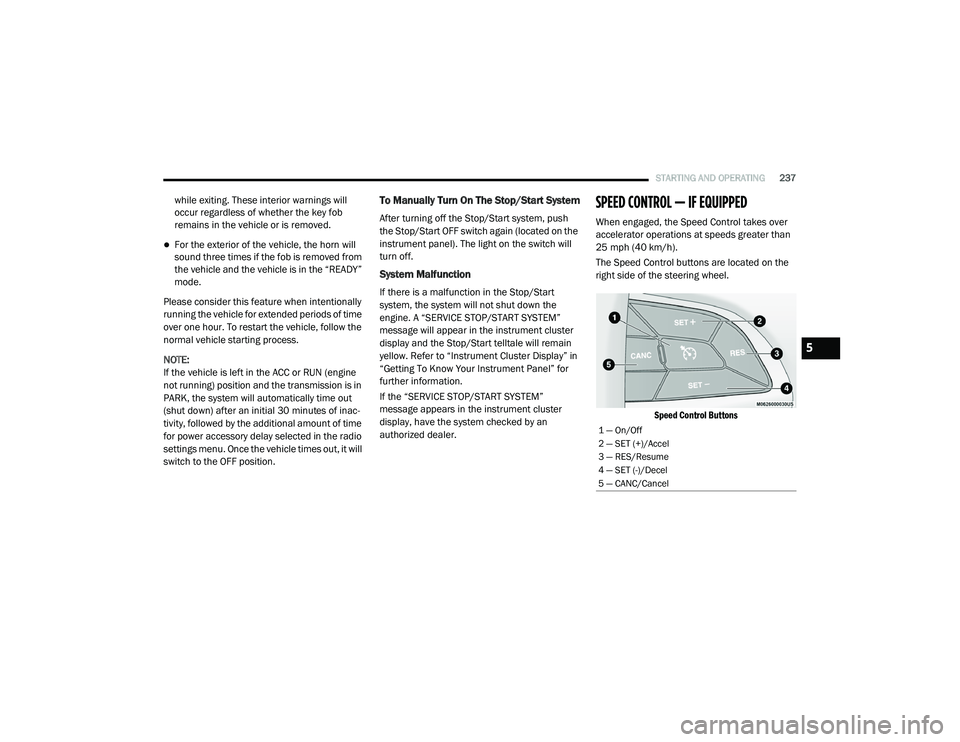
The Speed Control buttons are located on the
right side of the steering wheel.
Speed Control Buttons
1 — On/Off
2 — SET (+)/Accel
3 — RES/Resume
4 — SET (-)/Decel
5 — CANC/Cancel
5
20_RU_OM_EN_US_t.book Page 237
Page 240 of 516
238STARTING AND OPERATING
NOTE:
In order to ensure proper operation, the Speed
Control System has been designed to shut down
if multiple Speed Control functions are operated
at the same time. If this occurs, the Speed
Control System can be reactivated by pushing
the Speed Control on/off button and resetting
the desired vehicle set speed.
To Activate
Push the on/off button to activate the Speed
Control. The cruise indicator light in the
instrument cluster display will illuminate. To turn
the system off, push the on/off button a second
time. The cruise indicator light will turn off. The
system should be turned off when not in use.
To Set A Desired Speed
Turn the Speed Control on.
NOTE:
The vehicle should be traveling at a steady
speed and on level ground before pushing the
SET (+) or SET (-) button.
When the vehicle has reached the desired
speed, push the SET (+) or SET (-) button and
release. Release the accelerator and the
vehicle will operate at the selected speed.
To Vary The Speed Setting
To Increase Speed
When the Speed Control is set, you can increase
speed by pushing the SET (+) button.
The driver’s preferred units can be selected
through the instrument panel settings. Refer to ”Instrument Cluster Display” in “Getting To
Know Your Instrument Panel” for more
information. The speed increment shown is
dependent on the chosen speed unit of U.S.
(mph) or Metric (km/h):
U.S. Speed (mph)
Pushing the SET
(+) button once will result in
a 1 mph increase in set speed. Each subse -
quent tap of the button results in an increase
of 1 mph.
If the button is continually pushed, the set
speed will continue to increase until the
button is released, then the new set speed
will be established.
Metric Speed (km/h)
Pushing the SET (+) button once will result in
a 1 km/h increase in set speed. Each subse -
quent tap of the button results in an increase
of 1 km/h.
If the button is continually pushed, the set
speed will continue to increase until the
button is released, then the new set speed
will be established.
WARNING!
Speed Control can be dangerous where the
system cannot maintain a constant speed.
Your vehicle could go too fast for the
conditions, and you could lose control and
have an accident. Do not use Speed Control
in heavy traffic or on roads that are winding,
icy, snow-covered or slippery.
WARNING!
Leaving the Speed Control system on when
not in use is dangerous. You could
accidentally set the system or cause it to go
faster than you want. You could lose control
and have an accident. Always leave the
system off when you are not using it.
20_RU_OM_EN_US_t.book Page 238
Page 241 of 516
STARTING AND OPERATING239
To Decrease Speed
When the Speed Control is set, you can
decrease speed by pushing the SET (-) button.
The driver’s preferred units can be selected
through the instrument panel settings. Refer to
”Instrument Cluster Display” in “Getting To
Know Your Instrument Panel” for more
information. The speed increment shown is
dependent on the chosen speed unit of U.S.
(mph) or Metric (km/h):
U.S. Speed (mph)
Pushing the SET (-) button once will result in
a 1 mph decrease in set speed. Each subse -
quent tap of the button results in a decrease
of 1 mph.
If the button is continually pushed, the set
speed will continue to decrease until the
button is released, then the new set speed
will be established. Metric Speed (km/h)
Pushing the SET
(-) button once will result in
a 1 km/h decrease in set speed. Each subse -
quent tap of the button results in a decrease
of 1 km/h.
If the button is continually pushed, the set
speed will continue to decrease until the
button is released, then the new set speed
will be established.
To Accelerate For Passing
Press the accelerator as you would normally.
When the pedal is released, the vehicle will
return to the set speed.
To Resume Speed
To resume a previously set speed, push the RES
button and release. Resume can be used at any
speed above 20 mph (32 km/h).
To Deactivate
A soft tap on the brake pedal, pushing the CANC
(cancel) button, or normal brake pressure while
slowing the vehicle will deactivate the Speed
Control without erasing the set speed from
memory. Pushing the on/off button or placing the ignition
in the OFF position erases the set speed from
memory.
ADAPTIVE CRUISE CONTROL (ACC) — IF
EQUIPPED
Adaptive Cruise Control (ACC) increases the
driving convenience provided by cruise control
while traveling on highways and major
roadways. However, it is not a safety system
and not designed to prevent collisions.
Speed
Control function performs differently. Please
refer to the proper section within this chapter.
ACC will allow you to keep cruise control
engaged in light to moderate traffic conditions
without the constant need to reset your cruise
control. ACC utilizes a radar sensor and a
forward facing camera designed to detect a
vehicle directly ahead of you.
5
20_RU_OM_EN_US_t.book Page 239
Page 243 of 516
STARTING AND OPERATING241
Adaptive Cruise Control (ACC) Operation
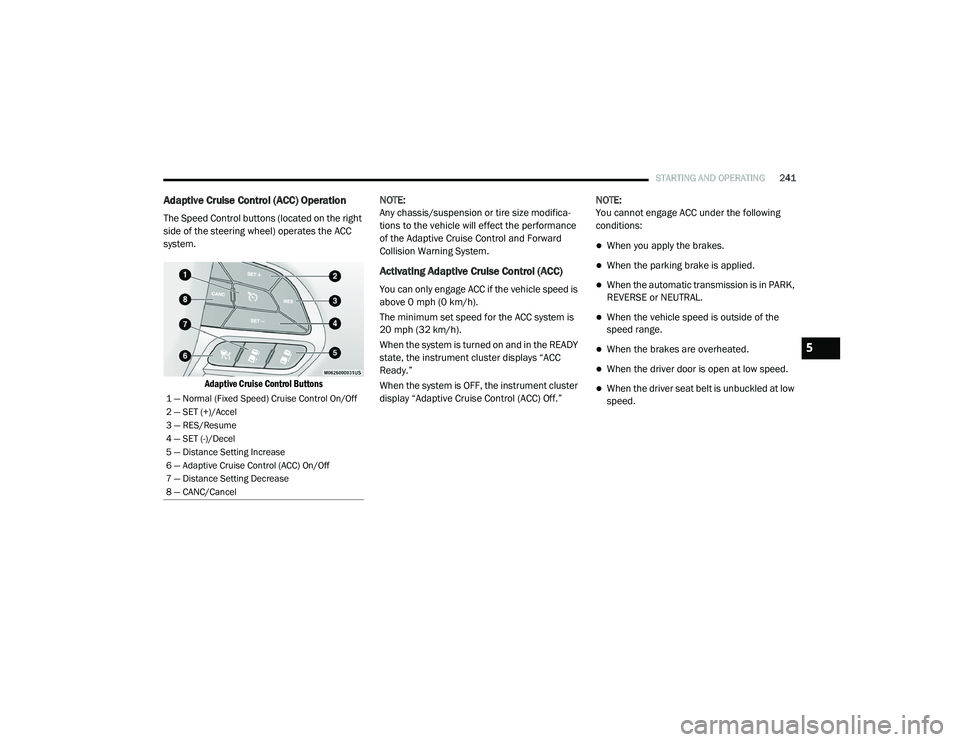
The Speed Control buttons (located on the right
side of the steering wheel) operates the ACC
system.
Adaptive Cruise Control Buttons
NOTE:
Any chassis/suspension or tire size modifica
-
tions to the vehicle will effect the performance
of the Adaptive Cruise Control and Forward
Collision Warning System.
Activating Adaptive Cruise Control (ACC)
You can only engage ACC if the vehicle speed is
above 0 mph (0 km/h).
The minimum set speed for the ACC system is
20 mph (32 km/h).
When the system is turned on and in the READY
state, the instrument cluster displays “ACC
Ready.”
When the system is OFF, the instrument cluster
display “Adaptive Cruise Control (ACC) Off.” NOTE:
You cannot engage ACC under the following
conditions:
When you apply the brakes.
When the parking brake is applied.
When the automatic transmission is in PARK,
REVERSE or NEUTRAL.
When the vehicle speed is outside of the
speed range.
When the brakes are overheated.
When the driver door is open at low speed.
When the driver seat belt is unbuckled at low
speed.1 — Normal (Fixed Speed) Cruise Control On/Off
2 — SET (+)/Accel
3 — RES/Resume
4 — SET (-)/Decel
5 — Distance Setting Increase
6 — Adaptive Cruise Control (ACC) On/Off
7 — Distance Setting Decrease
8 — CANC/Cancel
5
20_RU_OM_EN_US_t.book Page 241
Page 244 of 516
242STARTING AND OPERATING
To Activate/Deactivate
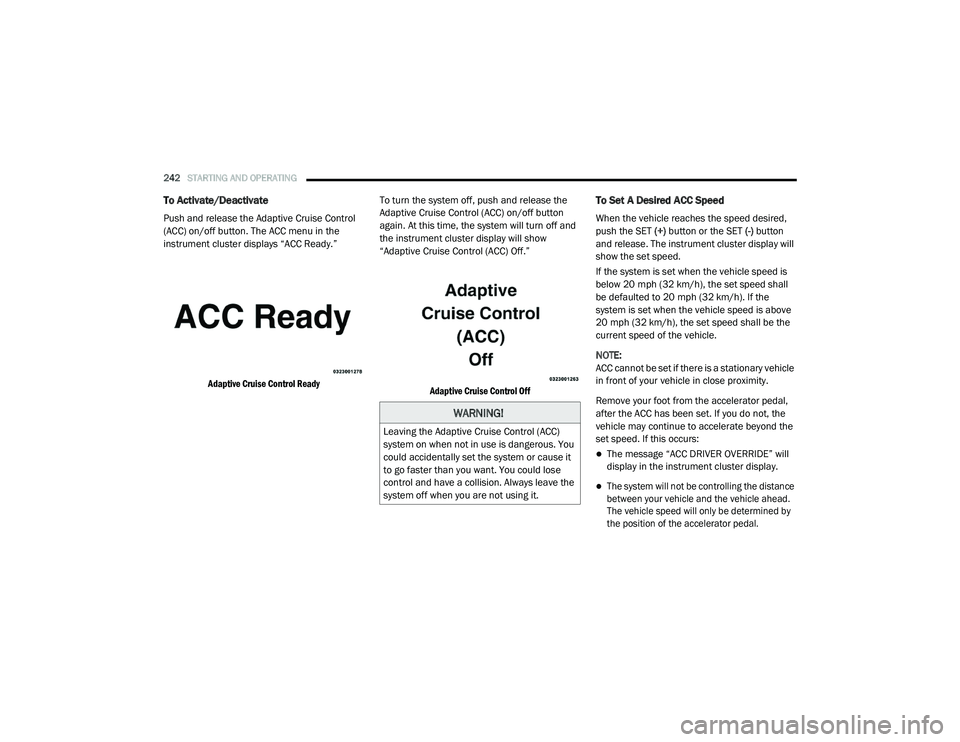
Push and release the Adaptive Cruise Control
(ACC) on/off button. The ACC menu in the
instrument cluster displays “ACC Ready.”
Adaptive Cruise Control Ready
To turn the system off, push and release the
Adaptive Cruise Control (ACC) on/off button
again. At this time, the system will turn off and
the instrument cluster display will show
“Adaptive Cruise Control (ACC) Off.”
Adaptive Cruise Control Off
To Set A Desired ACC Speed
When the vehicle reaches the speed desired,
push the SET (+) button or the SET (-) button
and release. The instrument cluster display will
show the set speed.
If the system is set when the vehicle speed is
below 20 mph (32 km/h), the set speed shall
be defaulted to 20 mph (32 km/h). If the
system is set when the vehicle speed is above
20 mph (32 km/h), the set speed shall be the
current speed of the vehicle.
NOTE:
ACC cannot be set if there is a stationary vehicle
in front of your vehicle in close proximity.
Remove your foot from the accelerator pedal,
after the ACC has been set. If you do not, the
vehicle may continue to accelerate beyond the
set speed. If this occurs:
The message “ACC DRIVER OVERRIDE” will
display in the instrument cluster display.
The system will not be controlling the distance
between your vehicle and the vehicle ahead.
The vehicle speed will only be determined by
the position of the accelerator pedal.
WARNING!
Leaving the Adaptive Cruise Control (ACC)
system on when not in use is dangerous. You
could accidentally set the system or cause it
to go faster than you want. You could lose
control and have a collision. Always leave the
system off when you are not using it.
20_RU_OM_EN_US_t.book Page 242