mph CHRYSLER PACIFICA 2020 Owner's Guide
[x] Cancel search | Manufacturer: CHRYSLER, Model Year: 2020, Model line: PACIFICA, Model: CHRYSLER PACIFICA 2020Pages: 516, PDF Size: 28.69 MB
Page 245 of 516
STARTING AND OPERATING243
To Cancel
The following conditions cancel the system:
The brake pedal is applied.
The CANC (cancel) button is pushed.
An Anti-Lock Brake System (ABS) event
occurs.
The gear selector is removed from the DRIVE
position.
The Electronic Stability Control/Traction
Control System (ESC/TCS) activates.
The vehicle parking brake is applied.
Driver seat belt is unbuckled at low speeds.
Driver door is opened at low speeds.
To Turn Off
The system will turn off and clear the set speed
in memory if:
The Adaptive Cruise Control (ACC) on/off
button is pushed.
The Normal (Fixed Speed) Cruise Control on/
off button is pushed.
The ignition is placed in the OFF position.
To Resume
If there is a set speed in memory, push the RES
(resume) button and then remove your foot
from the accelerator pedal. The instrument
cluster display will display the last set speed.
NOTE:
If your vehicle stays at standstill for longer
than two seconds, then the driver will either
have to push the RES (resume) button, or
apply the accelerator pedal to reengage the
ACC to the existing set speed.
ACC cannot be resumed if there is a
stationary vehicle in-front of your vehicle in
close proximity.
To Vary The Speed Setting
To Increase Speed
While ACC is set, you can increase the set speed
by pushing the SET (+) button.
The driver's preferred units can be selected
through the instrument cluster. Refer to
“Instrument Cluster Display” in “Getting To
Know Your Instrument Panel” for more
information. The speed increment shown is
dependent on the chosen speed unit of U.S.
(mph) or Metric (km/h):
U.S. Speed (mph)
Pushing the SET (+) button once will result in
a 1 mph increase in set speed. Each subse -
quent tap of the button results in an increase
of 1 mph.
If the button is continually pushed, the set
speed will continue to increase in 5 mph
increments until the button is released. The
increase in set speed is reflected in the
instrument cluster display.WARNING!
The Resume function should only be used if
traffic and road conditions permit. Resuming
a set speed that is too high or too low for
prevailing traffic and road conditions could
cause the vehicle to accelerate or decelerate
too sharply for safe operation. Failure to
follow these warnings can result in a collision
and death or serious personal injury.
5
20_RU_OM_EN_US_t.book Page 243
Page 246 of 516
244STARTING AND OPERATING
Metric Speed (km/h)
Pushing the SET (+) button once will result in
a 1 km/h increase in set speed. Each subse -
quent tap of the button results in an increase
of 1 km/h.
If the button is continually pushed, the set
speed will continue to increase in 10 km/h
increments until the button is released. The
increase in set speed is reflected in the
instrument cluster display.
To Decrease Speed
While ACC is set, the set speed can be
decreased by pushing the SET (-) button.
The driver's preferred units can be selected
through the instrument cluster. Refer to
“Instrument Cluster Display” in “Getting To
Know Your Instrument Panel” for more
information. The speed decrement shown is
dependent on the chosen speed unit of U.S.
(mph) or Metric (km/h): U.S. Speed (mph)
Pushing the SET (-) button once will result in
a 1 mph decrease in set speed. Each subse -
quent tap of the button results in a decrease
of 1 mph.
If the button is continually pushed, the set
speed will continue to decrease in 5 mph
decrements until the button is released. The
decrease in set speed is reflected in the
instrument cluster display.
Metric Speed (km/h)
Pushing the SET (-) button once will result in
a 1 km/h decrease in set speed. Each subse -
quent tap of the button results in a decrease
of 1 km/h.
If the button is continually pushed, the set
speed will continue to decrease in 10 km/h
decrements until the button is released. The
decrease in set speed is reflected in the
instrument cluster display. NOTE:
When you override and push the SET (+)
button or SET (-) buttons, the new set speed
will be the current speed of the vehicle.
When you use the SET (-) button to decel
-
erate, if the powertrain braking power does
not slow the vehicle sufficiently to reach the
set speed, the brake system will automati -
cally slow the vehicle.
The ACC system decelerates the vehicle to a
full stop when following a target vehicle. If an
ACC host vehicle follows a target vehicle to a
standstill, after two seconds the driver will
either have to push the RES (resume) button,
or apply the accelerator pedal to reengage
the ACC to the existing set speed.
The ACC system maintains set speed when
driving up hill and down hill. However, a slight
speed change on moderate hills is normal. In
addition, downshifting may occur while climbing
uphill or descending downhill. This is normal
operation and necessary to maintain set speed.
When driving up hill and down hill, the ACC
system will cancel if the braking temperature
exceeds normal range (overheated).
20_RU_OM_EN_US_t.book Page 244
Page 254 of 516
252STARTING AND OPERATING
Normal (Fixed Speed) Cruise Control Mode
In addition to Adaptive Cruise Control mode, a
Normal (Fixed Speed) Cruise Control mode is
available for cruising at fixed speeds. The
Normal (Fixed Speed) Cruise Control mode is
designed to maintain a set cruising speed
without requiring the driver to operate the
accelerator. Cruise Control can only be
operated if the vehicle speed is above 20 mph
(32 km/h).
To change between the different control modes,
push the Adaptive Cruise Control (ACC) on/off
button which turns the ACC and the Normal
(Fixed Speed) Cruise Control off. Pushing the
Normal (Fixed Speed) Cruise Control on/off
button will result in turning on (changing to) the
Normal (Fixed Speed) Cruise Control mode.
To Set A Desired Speed
Turn the Normal (Fixed Speed) Cruise
Control on. When the vehicle has
reached the desired speed, push the
SET (+) or SET (-) button and release.
Release the accelerator and the vehicle will
operate at the selected speed. Once a speed
has been set a message “CRUISE CONTROL SET
TO MPH (km/h)” will appear indicating what
speed was set. This light will turn on when the
system is turned on via the on/off control. It
turns green when the cruise control is set.
To Vary The Speed Setting
To Increase Speed
When the Normal (Fixed Speed) Cruise Control
is set, you can increase speed by pushing the
SET (+) button.
The driver’s preferred units can be selected
through the instrument cluster. Refer to
“Instrument Cluster Display” in “Getting To
Know Your Instrument Panel” for more
information. The speed increment shown is
dependent on the speed of U.S. (mph) or Metric
(km/h) units:
U.S. Speed (mph)
Pushing the SET (+) button once will result in
a 1 mph increase in set speed. Each subse -
quent tap of the button results in an increase
of 1 mph.
If the button is continually pushed, the set
speed will continue to increase in 5 mph
increments until the button is released. The
increase in set speed is reflected in the
instrument cluster display.
WARNING!
In the Normal (Fixed Speed) Cruise Control
mode, the system will not react to vehicles
ahead. In addition, the proximity warning
does not activate and no alarm will sound
even if you are too close to the vehicle ahead
since neither the presence of the vehicle
ahead nor the vehicle-to-vehicle distance is
detected. Be sure to maintain a safe distance
between your vehicle and the vehicle ahead.
Always be aware which mode is selected.
20_RU_OM_EN_US_t.book Page 252
Page 255 of 516
STARTING AND OPERATING253
Metric Speed (km/h)
Pushing the SET (+) button once will result in a
1 km/h increase in set speed. Each subsequent
tap of the button results in an increase of 1 km/h.
If the button is continually pushed, the set
speed will continue to increase in 10 km/h
increments until the button is released. The
increase in set speed is reflected in the
instrument cluster display.
To Decrease Speed
When the Normal (Fixed Speed) Cruise Control
is set, you can decrease speed by pushing the
SET (-) button.
The driver’s preferred units can be selected
through the instrument cluster. Refer to
“Instrument Cluster Display” in “Getting To
Know Your Instrument Panel” for more
information. The speed decrement shown is
dependent on the speed of U.S. (mph) or Metric
(km/h) units:
U.S. Speed (mph)
Pushing the SET (-) button once will result in
a 1 mph decrease in set speed. Each subse -
quent tap of the button results in a decrease
of 1 mph.
If the button is continually pushed, the set
speed will continue to decrease in 5 mph
decrements until the button is released. The
decrease in set speed is reflected in the
instrument cluster display.
Metric Speed (km/h)
Pushing the SET (-) button once will result in
a 1 km/h decrease in set speed. Each subse -
quent tap of the button results in a decrease
of 1 km/h.
If the button is continually pushed, the set
speed will continue to decrease in 10 km/h
decrements until the button is released. The
decrease in set speed is reflected in the
instrument cluster display.
To Cancel
The following conditions will cancel the Normal
(Fixed Speed) Cruise Control without clearing
the memory:
The brake pedal is applied.
The CANC (cancel) button is pushed.
The Electronic Stability Control/Traction
Control System (ESC/TCS) activates.
The vehicle parking brake is applied.
The braking temperature exceeds normal
range (overheated).
The gear selector is removed from the DRIVE
position.
To Resume Speed
To resume a previously set speed, push the RES
button and release. Resume can be used at any
speed above 20 mph (32 km/h).
To Turn Off
The system will turn off and erase the set speed
in memory if:
The Normal (Fixed Speed) Cruise Control on/
off button is pushed.
The ignition is placed in the OFF position.
The Adaptive Cruise Control (ACC) on/off
button is pushed.
5
20_RU_OM_EN_US_t.book Page 253
Page 256 of 516
254STARTING AND OPERATING
PARKSENSE REAR PARK ASSIST — IF
EQUIPPED
The ParkSense Rear Park Assist system
provides visual and audible indications of the
distance between the rear fascia and a
detected obstacle when backing up (e.g. during
a parking maneuver). If your vehicle is equipped
with an Automatic Transmission, the vehicle
brakes may be automatically applied and
released when performing a reverse parking
maneuver if the system detects a possible
collision with an obstacle.
NOTE:
The driver can override the automatic
braking function by pressing the gas pedal,
turning ParkSense off via ParkSense switch,
or changing the gear while the automatic
brakes are being applied.
Automatic brakes will not be available if ESC
is not available.
Automatic brakes will not be available if there
is a faulted condition detected with the Park -
Sense Park Assist system or the Braking
System Module.
The automatic braking function may not provide
enough vehicle deceleration to avoid colliding
with a detected obstacle depending on vehicle
speed, road conditions, and brake capability.
The automatic braking function may not be
applied fast enough for moving obstacles that
approach the rear of the vehicle from the left
and/or right sides.
The automatic braking function can be
enabled/disabled from the Customer-Program -
mable Features section of the Uconnect
System.
ParkSense will retain its last known configura -
tion state for the automatic braking function
through ignition cycles.
The automatic braking function is intended to
assist the driver in avoiding possible collisions
with detected obstacles when backing up in
REVERSE gear.
NOTE:
The driver is always responsible for
controlling the vehicle.
The system is provided to assist the driver
and not to substitute the driver.
The driver must stay in full control of the
vehicle's acceleration and braking and is
responsible for the vehicle's movements.
Refer to “ParkSense System Usage
Precautions” for limitations of this system and
recommendations.
ParkSense will retain the last system state
(enabled or disabled) from the last ignition cycle
when the ignition is changed to the ON/RUN
position.
ParkSense can be active only when the gear
selector is in REVERSE. If ParkSense is enabled
at this gear selector position, the system will
remain active until the vehicle speed is
increased to approximately 7 mph (11 km/h) or
above. When in REVERSE and above the
system's operating speed, a warning will appear
within the instrument cluster display indicating
the vehicle speed is too fast. The system will
become active again if the vehicle speed is
decreased to speeds less than approximately
6 mph (9 km/h).
20_RU_OM_EN_US_t.book Page 254
Page 262 of 516
260STARTING AND OPERATING
NOTE:
The driver can override the automatic
braking function by pressing the gas pedal,
turning ParkSense off via ParkSense switch,
or changing the gear while the automatic
brakes are being applied.
Automatic brakes will not be available if ESC
is not available.
Automatic brakes will not be available if there
is a faulted condition detected with the Park -
Sense Park Assist system or the Braking
System Module.
The automatic braking function may not
provide enough vehicle deceleration to avoid
colliding with a detected obstacle depending
on vehicle speed, road conditions, and brake
capability.
The automatic braking function may not be
applied fast enough for moving obstacles
that approach the rear of the vehicle from the
left and/or right sides.
The automatic braking function can be
enabled/disabled from the
Customer-Programmable Features section of
the Uconnect System.
ParkSense will retain its last known configu -
ration state for the automatic braking func -
tion through ignition cycles.
The automatic braking function is intended to
assist the driver in avoiding possible collisions
with detected obstacles when backing up in
REVERSE gear.
NOTE:
The driver is always responsible for
controlling the vehicle.
The system is provided to assist the driver
and not to substitute the driver.
The driver must stay in full control of the
vehicle's acceleration and braking and is
responsible for the vehicle's movements. Refer to “ParkSense System Usage
Precautions” for limitations of this system and
recommendations.
ParkSense will retain the last system state
(enabled or disabled) from the last ignition cycle
when the ignition is changed to the ON/RUN
position.
ParkSense can be active only when the gear
selector is in REVERSE or DRIVE. If ParkSense is
enabled at one of these gear selector positions,
the system will remain active until the vehicle
speed is increased to approximately 7 mph
(11 km/h) or above. When in REVERSE and
above the system's operating speed, a warning
will appear in the instrument cluster display
indicating the vehicle speed is too fast. The
system will become active again if the vehicle
speed is decreased to speeds less than
approximately 6 mph (9 km/h).
20_RU_OM_EN_US_t.book Page 260
Page 270 of 516
268STARTING AND OPERATING
PARKSENSE ACTIVE PARK ASSIST SYSTEM
— IF EQUIPPED
The ParkSense Active Park Assist system is
intended to assist the driver during parallel and
perpendicular parking maneuvers by identifying
a proper parking space, providing audible/
visual instructions, and controlling the steering
wheel. The ParkSense Active Park Assist system
is defined as “semi-automatic” since the driver
maintains control of the accelerator, gear
selector and brakes. Depending on the driver's
parking maneuver selection, the ParkSense Active Park Assist system is capable of
maneuvering a vehicle into a parallel or a
perpendicular parking space on either side (i.e.,
driver side or passenger side).
NOTE:
The driver is always responsible for
controlling the vehicle, responsible for any
surrounding objects, and must intervene as
required.
The system is provided to assist the driver
and not to substitute the driver.
During a semi-automatic maneuver, if the
driver touches the steering wheel after being
instructed to remove their hands from the
steering wheel, the system will cancel, and
the driver will be required to manually
complete the parking maneuver.
The system may not work in all conditions
(e.g. environmental conditions such as heavy
rain, snow, etc., or if searching for a parking
space that has surfaces that will absorb the
ultrasonic sensor waves).
New vehicles from the dealership must have
at least 30 miles (48 km) accumulated
before the ParkSense Active Park Assist system is fully calibrated and performs accu
-
rately. This is due to the system’s dynamic
vehicle calibration to improve the perfor -
mance of the feature. The system will also
continuously perform the dynamic vehicle
calibration to account for differences such as
over or under inflated tires and new tires.
Enabling And Disabling The ParkSense
Active Park Assist System
The ParkSense Active Park Assist
system can be enabled and disabled
with the ParkSense Active Park Assist
switch, located on the switch panel
below the Uconnect display.
To enable the ParkSense Active Park Assist
system, push the ParkSense Active Park Assist
switch once (LED turns on).
To disable the ParkSense Active Park Assist
system, push the ParkSense Active Park Assist
switch again (LED turns off).
The ParkSense Active Park Assist system will
turn off automatically for any of the following
conditions:
The parking maneuver is completed.
Vehicle speed greater than 18 mph (30 km/h)
when searching for a parking space.
CAUTION!
ParkSense is only a parking aid and it is
unable to recognize every obstacle,
including small obstacles. Parking curbs
might be temporarily detected or not
detected at all. Obstacles located above or
below the sensors will not be detected
when they are in close proximity.
The vehicle must be driven slowly when
using ParkSense in order to be able to stop
in time when an obstacle is detected. It is
recommended that the driver looks over
his/her shoulder when using ParkSense.
20_RU_OM_EN_US_t.book Page 268
Page 271 of 516
STARTING AND OPERATING269
Vehicle speed greater than 5 mph (7 km/h)
during active steering guidance into the
parking space.
Touching the steering wheel during active
steering guidance into the parking space.
Pushing the ParkSense Front and Rear Park
Assist switch.
The driver’s door is opened.
The liftgate is opened.
Electronic Stability Control/Anti-Lock Braking
System intervention.
The ParkSense Active Park Assist system will
allow a maximum of eight shifts between
DRIVE and REVERSE. If the maneuver cannot
be completed within eight shifts, the system
will cancel and the instrument cluster display
will instruct the driver to complete the
maneuver manually. The ParkSense Active Park Assist system will
only operate and search for a parking space
when the following conditions are present:
The gear position is in DRIVE.
The ignition is in the RUN position.
The ParkSense Active Park Assist switch is
activated.
The driver’s door is closed.
The liftgate is closed.
Vehicle speed is less than 15 mph (25 km/h).
NOTE:
If the vehicle is driven above approximately
15 mph (25 km/h), the instrument cluster
display will instruct the driver to slow down. If the
vehicle is driven above approximately 18 mph
(30 km/h), the system will cancel. The driver
must then reactivate the system by pushing the
ParkSense Active Park Assist switch.
The outer surface and the underside of the
front and rear fascias/bumpers are clean
and clear of snow, ice, mud, dirt or other
obstruction.
When pushed, the LED on the ParkSense Active
Park Assist switch will blink momentarily, and
then the LED will turn off if any of the above
conditions are not present.
Parallel Parking Space Assistance
Operation/Display
When the ParkSense Active Park Assist system
is enabled the “Active ParkSense Searching -
Push OK for Perpendicular Park” message will
appear in the instrument cluster display. You
may switch to perpendicular parking if you
desire. Push the OK button on the left side
steering wheel switch to change your parking
space setting.5
20_RU_OM_EN_US_t.book Page 269
Page 274 of 516
272STARTING AND OPERATING
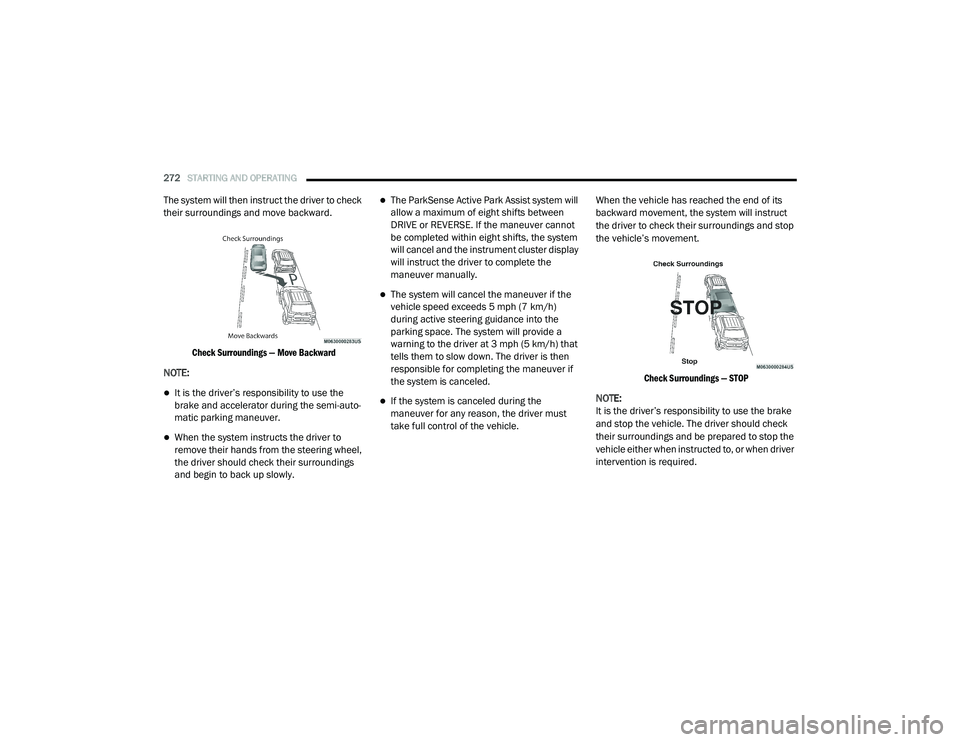
The system will then instruct the driver to check
their surroundings and move backward.
Check Surroundings — Move Backward
NOTE:
It is the driver’s responsibility to use the
brake and accelerator during the semi-auto -
matic parking maneuver.
When the system instructs the driver to
remove their hands from the steering wheel,
the driver should check their surroundings
and begin to back up slowly.
The ParkSense Active Park Assist system will
allow a maximum of eight shifts between
DRIVE or REVERSE. If the maneuver cannot
be completed within eight shifts, the system
will cancel and the instrument cluster display
will instruct the driver to complete the
maneuver manually.
The system will cancel the maneuver if the
vehicle speed exceeds 5 mph (7 km/h)
during active steering guidance into the
parking space. The system will provide a
warning to the driver at 3 mph (5 km/h) that
tells them to slow down. The driver is then
responsible for completing the maneuver if
the system is canceled.
If the system is canceled during the
maneuver for any reason, the driver must
take full control of the vehicle. When the vehicle has reached the end of its
backward movement, the system will instruct
the driver to check their surroundings and stop
the vehicle’s movement.
Check Surroundings — STOP
NOTE:
It is the driver’s responsibility to use the brake
and stop the vehicle. The driver should check
their surroundings and be prepared to stop the
vehicle either when instructed to, or when driver
intervention is required.
20_RU_OM_EN_US_t.book Page 272
Page 279 of 516
STARTING AND OPERATING277
The ParkSense Active Park Assist system will
allow a maximum of eight shifts between
DRIVE or REVERSE. If the maneuver cannot
be completed within eight shifts, the system
will cancel and the instrument cluster display
will instruct the driver to complete the
maneuver manually.
The system will cancel the maneuver if the
vehicle speed exceeds 5 mph (7 km/h)
during active steering guidance into the
parking space. The system will provide a
warning to the driver at 3 mph (5 km/h) that
tells them to slow down. The driver is then
responsible for completing the maneuver if
the system is canceled.
If the system is canceled during the
maneuver for any reason, the driver must
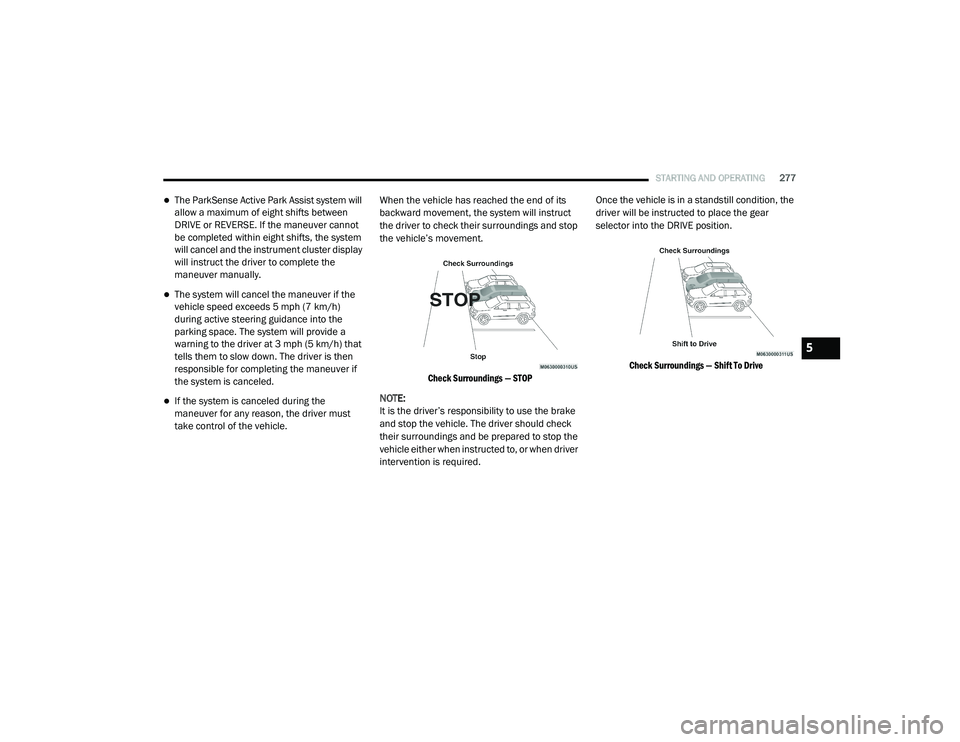
take control of the vehicle. When the vehicle has reached the end of its
backward movement, the system will instruct
the driver to check their surroundings and stop
the vehicle’s movement.
Check Surroundings — STOP
NOTE:
It is the driver’s responsibility to use the brake
and stop the vehicle. The driver should check
their surroundings and be prepared to stop the
vehicle either when instructed to, or when driver
intervention is required. Once the vehicle is in a standstill condition, the
driver will be instructed to place the gear
selector into the DRIVE position.
Check Surroundings — Shift To Drive
5
20_RU_OM_EN_US_t.book Page 277