power steering CHRYSLER PACIFICA 2020 Owner's Manual
[x] Cancel search | Manufacturer: CHRYSLER, Model Year: 2020, Model line: PACIFICA, Model: CHRYSLER PACIFICA 2020Pages: 516, PDF Size: 28.69 MB
Page 412 of 516
410MULTIMEDIA
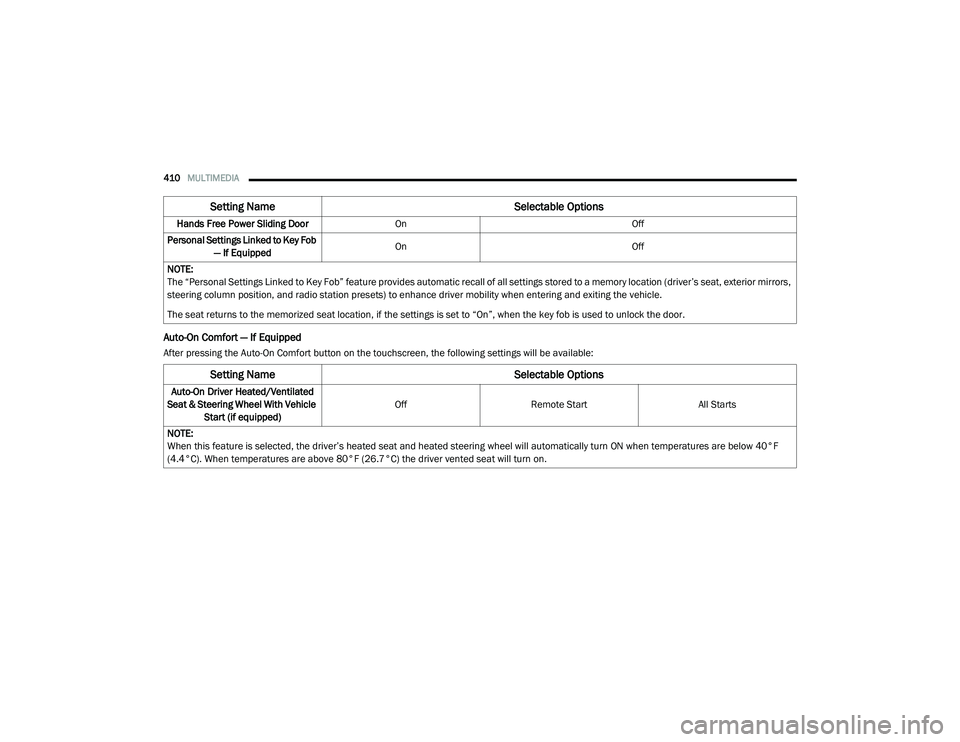
Auto-On Comfort — If Equipped
After pressing the Auto-On Comfort button on the touchscreen, the following settings will be available:Hands Free Power Sliding Door
On Off
Personal Settings Linked to Key Fob — If Equipped On
Off
NOTE:
The “Personal Settings Linked to Key Fob” feature provides automatic recall of all settings stored to a memory location (driver’s seat, exterior mirrors,
steering column position, and radio station presets) to enhance driver mobility when entering and exiting the vehicle.
The seat returns to the memorized seat location, if the settings is set to “On”, when the key fob is used to unlock the door.
Setting Name Selectable Options
Setting NameSelectable Options
Auto-On Driver Heated/Ventilated
Seat & Steering Wheel With Vehicle Start (if equipped) Off
Remote Start All Starts
NOTE:
When this feature is selected, the driver’s heated seat and heated steering wheel will automatically turn ON when temperatures are below 40°F
(4.4°C). When temperatures are above 80°F (26.7°C) the driver vented seat will turn on.
20_RU_OM_EN_US_t.book Page 410
Page 431 of 516
MULTIMEDIA429
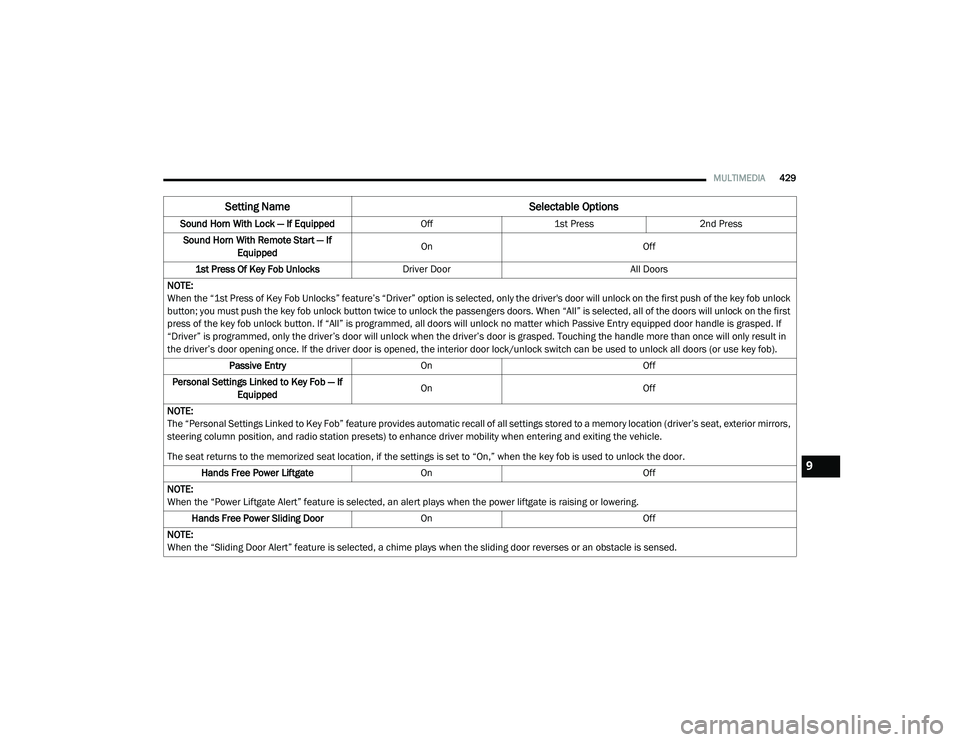
Sound Horn With Lock — If Equipped Off1st Press 2nd Press
Sound Horn With Remote Start — If Equipped On
Off
1st Press Of Key Fob Unlocks Driver Door All Doors
NOTE:
When the “1st Press of Key Fob Unlocks” feature’s “Driver” option is selected, only the driver's door will unlock on the first push of the key fob unlock
button; you must push the key fob unlock button twice to unlock the passengers doors. When “All” is selected, all of the doors will unlock on the first
press of the key fob unlock button. If “All” is programmed, all doors will unlock no matter which Passive Entry equipped door handle is grasped. If
“Driver” is programmed, only the driver’s door will unlock when the driver’s door is grasped. Touching the handle more than once will only result in
the driver’s door opening once. If the driver door is opened, the interior door lock/unlock switch can be used to unlock all doors (or use key fob). Passive Entry On Off
Personal Settings Linked to Key Fob — If Equipped On
Off
NOTE:
The “Personal Settings Linked to Key Fob” feature provides automatic recall of all settings stored to a memory location (driver’s seat, exterior mirrors,
steering column position, and radio station presets) to enhance driver mobility when entering and exiting the vehicle.
The seat returns to the memorized seat location, if the settings is set to “On,” when the key fob is used to unlock the door. Hands Free Power Liftgate On Off
NOTE:
When the “Power Liftgate Alert” feature is selected, an alert plays when the power liftgate is raising or lowering. Hands Free Power Sliding Door OnOff
NOTE:
When the “Sliding Door Alert” feature is selected, a chime plays when the sliding door reverses or an obstacle is sensed.
Setting Name Selectable Options
9
20_RU_OM_EN_US_t.book Page 429
Page 432 of 516
430MULTIMEDIA
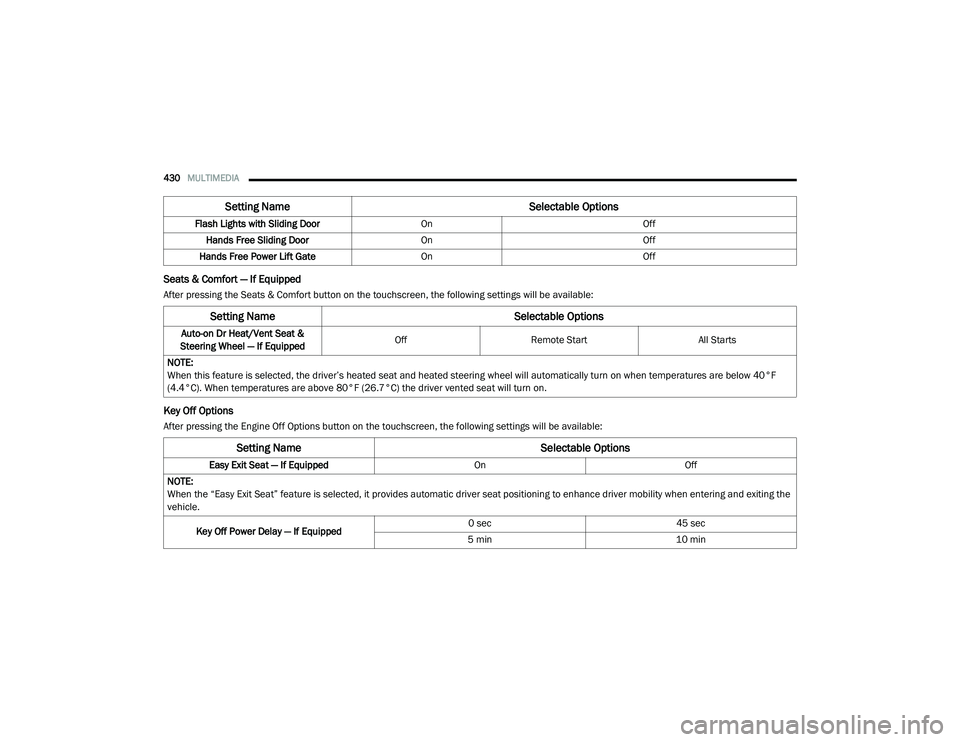
Seats & Comfort — If Equipped
After pressing the Seats & Comfort button on the touchscreen, the following settings will be available:
Key Off Options
After pressing the Engine Off Options button on the touchscreen, the following settings will be available:Flash Lights with Sliding Door
OnOff
Hands Free Sliding Door On Off
Hands Free Power Lift Gate On Off
Setting Name Selectable Options
Setting NameSelectable Options
Auto-on Dr Heat/Vent Seat &
Steering Wheel — If Equipped Off
Remote Start All Starts
NOTE:
When this feature is selected, the driver’s heated seat and heated steering wheel will automatically turn on when temperatures are below 40°F
(4.4°C). When temperatures are above 80°F (26.7°C) the driver vented seat will turn on.
Setting Name Selectable Options
Easy Exit Seat — If EquippedOnOff
NOTE:
When the “Easy Exit Seat” feature is selected, it provides automatic driver seat positioning to enhance driver mobility when entering and exiting the
vehicle.
Key Off Power Delay — If Equipped 0 sec
45 sec
5 min 10 min
20_RU_OM_EN_US_t.book Page 430
Page 441 of 516
MULTIMEDIA439
Volume/Power Control
Push the Volume/Power control knob to turn off
the screen and mute the radio. Push the
Volume/Power control knob a second time to
turn the screen back on and unmute the radio.
The electronic volume control turns
continuously (360 degrees) in either direction,
without stopping. Turning the Volume/Power
control knob clockwise increases the volume,
and counterclockwise decreases it.
Tune/Scroll Control
When the audio system is turned on, the sound
will be set at the same volume level as last
played.
Turn the rotary Tune/Scroll control knob
clockwise to increase or counterclockwise to
decrease the radio station frequency. Push the
Enter/Browse button to choose a selection.
Screen Close
The X button on the touchscreen at the top right,
provides a means to close the Direct Tune
Screen. The Direct Tune Screen also auto
closes if no activity occurs within a few seconds. Seek And Direct Tune Functions
The Seek Up and Down functions are activated
by pressing the double arrow buttons on the
touchscreen to the right and left of the radio
station display or by pressing the left Steering
Wheel Audio Control up or down.
Seek Up
Press and release the Seek Up button on the
touchscreen to tune the radio to the next
listenable station or channel. During a Seek Up
function, if the radio reaches the starting station
after passing through the entire band two times,
the radio will stop at the station where it began.
Fast Seek Up
Press and hold the Seek Up button on the
touchscreen to advance the radio through the
available stations or channels at a faster rate. The
radio stops at the next available station or channel
when the button on the touchscreen is released.
Seek Down
Press and release the Seek Down button on the
touchscreen to tune the radio to the next
listenable station or channel. During a Seek
Down function, if the radio reaches the starting
station after passing through the entire band
two times, the radio will stop at the station
where it began.Fast Seek Down
Press and hold the Seek Down button on the
touchscreen to advance the radio through the
available stations or channel at a faster rate.
The radio stops at the next available station or
channel when the button on the touchscreen is
released.
Direct Tune
Press the Tune button on the touchscreen
located at the bottom of the radio screen. The
Direct Tune button on the touchscreen is
available in AM, FM, and SXM radio modes and
can be used to direct tune the radio to a desired
station or channel.
Press the available number button on the
touchscreen to begin selecting a desired
station. Once a number has been entered, any
numbers that are no longer possible (stations
that cannot be reached) will become
deactivated/grayed out.
Undo
You can backspace an entry by pressing the
bottom left on the touchscreen.
OK
Once the last digit of a station has been
entered, press the OK button, and the Direct
9
20_RU_OM_EN_US_t.book Page 439
Page 451 of 516
MULTIMEDIA449
Media Mode
Press the Media button on the touchscreen to
select the desired audio source: Bluetooth®.
Tracks
If the Bluetooth® device supports this feature,
press the Tracks button on the touchscreen to
display a pop-up with the Song List. The
currently playing song is indicated by a red
arrow and lines above and below the song title.
Pressing the Tracks button on the touchscreen
while the pop-up is displayed will close the
pop-up.
Audio
Refer to Radio Mode for adjusting the audio
settings.
Android Auto™ & Apple CarPlay® — If
Equipped
Android Auto™
NOTE:
Feature availability depends on your carrier and
mobile phone manufacturer. Some Android
Auto™ features may or may not be available in
every region and/or language. Android Auto™ is a feature of your Uconnect
system, and your Android™ 5.0 Lollipop or
higher powered smartphone with a data plan,
that allows you to project your smartphone and
a number of its apps onto the touchscreen radio
display. Android Auto™ automatically brings you
useful information, and organizes it into simple
cards that appear just when they are needed.
Android Auto™ can be used with Google's
best-in-class speech technology, the steering
wheel controls, the knobs and buttons on your
radio faceplate, and the radio display’s
touchscreen to control many of your apps. To
use Android Auto™, follow the following
procedure:
1. Download the Android Auto™ app from the
Google Play store on your
Android™-powered smartphone.
2. Connect your Android™-powered smartphone to one of the media USB ports
in your vehicle. If the Android Auto™ app
was not downloaded, the first time you plug
your device in, the app will begin to
download. NOTE:
Be sure to use the factory-provided USB cable
that came with your phone, as aftermarket
cables may not work.
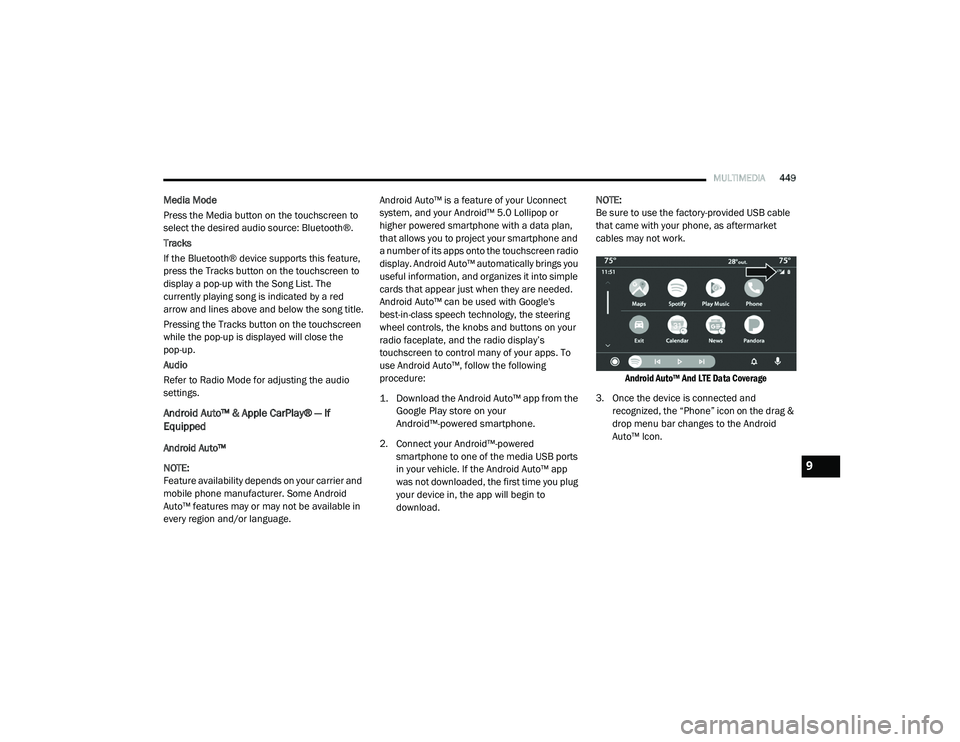
Android Auto™ And LTE Data Coverage
3. Once the device is connected and recognized, the “Phone” icon on the drag &
drop menu bar changes to the Android
Auto™ Icon.
9
20_RU_OM_EN_US_t.book Page 449
Page 499 of 516
MULTIMEDIA497
NOTE:
Only the beginning of your custom message
will be seen on the touchscreen.
Reply with text message is not compatible
with iPhones®.
Auto reply with text message is only available
on phones that supporting Bluetooth® MAP.
Android Auto™ — If Equipped
NOTE:
Feature availability depends on your carrier and
mobile phone manufacturer. Some Android
Auto™ features may or may not be available in
every region and/or language.
Android Auto™ allows you to use your voice to
interact with Android’s™ best-in-class speech
technology through your vehicle’s voice
recognition system, and use your smartphone’s
data plan to project your Android™ powered
smartphone and a number of its apps onto your
Uconnect touchscreen. Connect your Android™
5.0 (Lollipop), or higher, to one of the media
USB ports, using the factory-provided USB
cable, and press the new Android Auto™ icon
that replaces your “Phone” icon on the main menu bar to begin Android Auto™. Push and
hold the VR button on the steering wheel, or
press and hold the “Microphone” icon within
Android Auto™, to activate Android’s™ VR,
which recognizes natural voice commands, to
use a list of your smartphone’s features:
Maps
Music
Phone
Text Messages
Additional Apps
Refer to your Uconnect Owner’s Manual
Supplement for further information.
NOTE:
Requires compatible smartphone running
Android™ 5.0 (Lollipop) or higher and download
app on Google Play. Android™, Android Auto™,
and Google Play are trademarks of Google Inc.
Apple CarPlay® — If Equipped
NOTE:
Feature availability depends on your carrier and
mobile phone manufacturer. Some Apple CarPlay® features may or may not be available
in every region and/or language.
Apple CarPlay® allows you to use your voice to
interact with Siri through your vehicle’s voice
recognition system, and use your smartphone’s
data plan to project your iPhone® and a number
of its apps onto your Uconnect touchscreen.
Connect your iPhone® 5, or higher, to one of the
media USB ports, using the factory-provided
Lightning cable, and press the new Apple
CarPlay® icon that replaces your “Phone” icon on
the main menu bar to begin Apple CarPlay®.
Press and hold the VR button on the steering
wheel, or press and hold the “Home” button
within Apple CarPlay®, to activate Siri, which
recognizes natural voice commands to use a list
of your iPhone’s® features:
Phone
Music
Messages
Maps
Additional Apps
Refer to your Uconnect Owner’s Manual
Supplement for further information.
9
20_RU_OM_EN_US_t.book Page 497
Page 511 of 516
509
Power Brakes
....................................................... 388Inverter...................................................... 119Mirrors......................................................... 61Outlet (Auxiliary Electrical Outlet).............. 118Seats.................................................... 48, 50Steering..................................................... 234Power SeatsDown........................................................... 49Forward....................................................... 49Rearward..................................................... 49Up................................................................ 49Power Sliding DoorOn / Off Switch................................... 30, 100Pregnant Women And Seat Belts...................180Preparation For Jacking................................. 321PretensionersSeat Belts.................................................. 181
R
Radial Ply Tires.............................................. 376Radiator Cap (Coolant Pressure Cap)............ 363RadioPresets...................................................... 440Radio Operation.................................. 438, 491Rear Air Conditioning................................ 78, 87Rear Camera................................................. 284Rear Cross Path............................................. 162Rear ParkSense System...................... 254, 259Rear Seat Removal.......................................... 37
Rear View......................................................... 59Reclining Front Seats....................................... 36Recreational Towing..................................... 298Reformulated Gasoline................................. 390Refrigerant.................................................... 354Release, Hood................................................. 97Reminder, Lights On........................................ 63Reminder, Seat Belt...................................... 173Remote ControlStarting System........................................... 19Remote Keyless EntryArm The Alarm............................................. 24Disarm The Alarm........................................ 24Programming Additional Key Fobs........ 16, 23Remote StartingExit Remote Start Mode.............................. 21Uconnect Customer Programmable Features.................................................. 21Uconnect Settings....................................... 21Remote Starting System.................................. 19Replacement Bulbs...................................... 306Replacement Keys........................................... 23Replacement Tires........................................ 377Reporting Safety Defects.............................. 501Restraints, Child........................................... 198Restraints, Head.............................................. 55Roof Luggage Rack....................................... 121Rotation, Tires.............................................. 382
S
Safety Checks Inside Vehicle........................ 217Safety Checks Outside Vehicle...................... 218Safety Defects, Reporting............................. 501Safety Information, Tire................................. 366Safety Tips.................................................... 216Safety, Exhaust Gas...................................... 216Schedule, Maintenance................................ 345Seat Belt Reminder....................................... 143Seat Belts............................................ 172, 217Adjustable Shoulder Belt.......................... 177Adjustable Upper Shoulder Anchorage..... 177Adjustable Upper Shoulder Belt Anchorage............................................ 177Automatic Locking Retractor (ALR)........... 181Child Restraints........................................ 198Energy Management Feature................... 181Extender................................................... 180Front Seat............................... 172, 174, 175Inspection................................................. 217Lap/Shoulder Belt Operation.................... 175Lap/Shoulder Belt Untwisting................... 176Lap/Shoulder Belts................................... 174Operating Instructions.............................. 175Pregnant Women...................................... 180Pretensioners........................................... 181Rear Seat.................................................. 174Reminder.................................................. 17311
20_RU_OM_EN_US_t.book Page 509
Page 512 of 516
510
Seat Belt Extender
.................................... 180Seat Belt Pretensioner.............................. 181Untwisting Procedure................................ 176Seat Belts Maintenance................................ 386Seats................................................. 35, 49, 53Adjustment............................. 35, 36, 37, 49Bench.......................................................... 37Heated........................................................ 53Memory....................................................... 34Power................................................... 48, 50Rear Folding................................................ 35Reclining..................................................... 36Seatback Release................................ 35, 37Stow ‘n Go (Fold in Floor)............................ 43Tilting................................................... 35, 37Security Alarm............................................... 144Arm The System.......................................... 24Disarm The System..................................... 24Selection Of Coolant (Antifreeze)...................394Sentry Key Key Programming........................................ 23Sentry Key (Immobilizer).................................. 22Sentry Key Replacement................................. 23Service Assistance......................................... 499Service Contract............................................ 500Service Manuals............................................ 502ShiftingAutomatic Transmission............................ 230Shoulder Belts............................................... 174Side View Mirror Adjustment........................... 59
Signals, Turn........................ 63, 149, 218, 309Siri................................................................ 496Sirius Satellite Radio..................................... 440Favorites................................................... 442Replay...................................................... 442SiriusXM Satellite RadioBrowse in SXM......................................... 443Favorites................................................... 442Replay...................................................... 442SmartBeams.................................................... 64Snow Chains (Tire Chains)............................ 382Snow Tires.................................................... 379Spare Tire Changing..................................... 320Spare Tire Stowage....................................... 330Spare Tires................................. 320, 379, 380Spark Plugs................................................... 394SpecificationsOil............................................................. 394Speed ControlAccel/Decel (ACC Only)............................. 243Cancel...................................................... 239Resume.................................................... 239Speed Control (Cruise Control)............ 237, 239Starting...................................................19, 219Button......................................................... 18Cold Weather............................................ 223Engine Fails To Start................................. 223Remote........................................................ 19Starting And Operating.................................. 219Starting Procedures...................................... 219
Steering........................................................ 234Tilt Column...................................................58Wheel, Heated.............................................58Wheel, Tilt....................................................58Steering Wheel Audio Controls...................... 467Steering Wheel Mounted Sound System
Controls........................................................ 467Storage, Vehicle...............................................91Store Radio Presets...................................... 440Stow ‘n Go (Fold In Floor) Seats.......................43Stow ‘n Vac................................................... 103Stuck, Freeing............................................... 341Sun Roof..........................................................95Sunglasses Storage...................................... 120Supplemental Restraint System – Air Bag.... 185Sway Control, Trailer..................................... 158Synthetic Engine Oil...................................... 352System, Remote Starting.................................19
T
Telescoping Steering Column...........................58Temperature Control, Automatic (ATC).............90Tie Down Hooks, Cargo................................. 103Tilt Steering Column.........................................58Time DelayHeadlight.....................................................63Tire And Loading Information Placard........... 371Tire Markings................................................ 366Tire Safety Information.................................. 366Tire Service Kit.............................................. 330
20_RU_OM_EN_US_t.book Page 510