Rear view CHRYSLER PACIFICA 2020 Owner's Guide
[x] Cancel search | Manufacturer: CHRYSLER, Model Year: 2020, Model line: PACIFICA, Model: CHRYSLER PACIFICA 2020Pages: 516, PDF Size: 28.69 MB
Page 472 of 516
470MULTIMEDIA
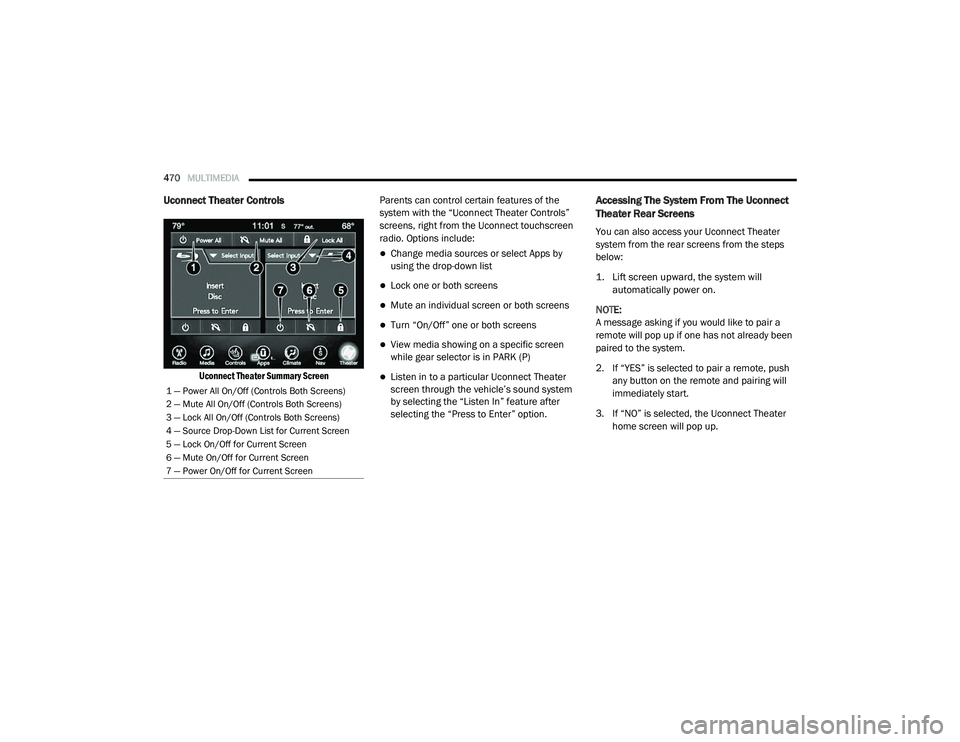
Uconnect Theater Controls
Uconnect Theater Summary Screen
Parents can control certain features of the
system with the “Uconnect Theater Controls”
screens, right from the Uconnect touchscreen
radio. Options include:
Change media sources or select Apps by
using the drop-down list
Lock one or both screens
Mute an individual screen or both screens
Turn “On/Off” one or both screens
View media showing on a specific screen
while gear selector is in PARK (P)
Listen in to a particular Uconnect Theater
screen through the vehicle’s sound system
by selecting the “Listen In” feature after
selecting the “Press to Enter” option.
Accessing The System From The Uconnect
Theater Rear Screens
You can also access your Uconnect Theater
system from the rear screens from the steps
below:
1. Lift screen upward, the system will
automatically power on.
NOTE:
A message asking if you would like to pair a
remote will pop up if one has not already been
paired to the system.
2. If “YES” is selected to pair a remote, push any button on the remote and pairing will
immediately start.
3. If “NO” is selected, the Uconnect Theater home screen will pop up.
1 — Power All On/Off (Controls Both Screens)
2 — Mute All On/Off (Controls Both Screens)
3 — Lock All On/Off (Controls Both Screens)
4 — Source Drop-Down List for Current Screen
5 — Lock On/Off for Current Screen
6 — Mute On/Off for Current Screen
7 — Power On/Off for Current Screen
20_RU_OM_EN_US_t.book Page 470
Page 474 of 516
472MULTIMEDIA
Unpairing The Remote
In events such as updating the Uconnect
Theater software, or taking a remote to another
vehicle, the remote will need to be unpaired
from your Uconnect Theater system. To unpair
the remote:
1. Press the Settings icon found in the lower
right portion of the Uconnect Theater
touchscreen.
2. Press the Remote button towards the bottom of the Uconnect Theater
touchscreen, within the settings menu.
3. Select Manage Remote Controls from the Remote section of "Settings” and follow the
on-screen instructions to complete the
unpairing process.
4. Once complete, the remote will be ready to pair again. NOTE:
There will be a touchscreen notification
message when unpairing is successful. Repeat
the above steps to unpair a second remote.
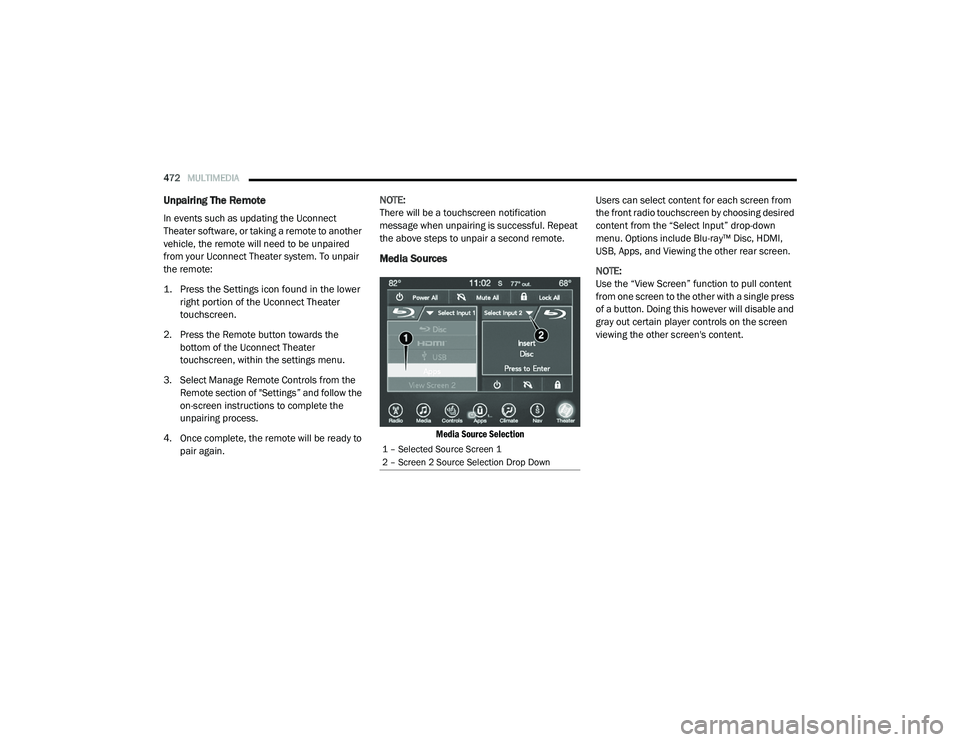
Media Sources
Media Source Selection
Users can select content for each screen from
the front radio touchscreen by choosing desired
content from the “Select Input” drop-down
menu. Options include Blu-ray™ Disc, HDMI,
USB, Apps, and Viewing the other rear screen.
NOTE:
Use the “View Screen” function to pull content
from one screen to the other with a single press
of a button. Doing this however will disable and
gray out certain player controls on the screen
viewing the other screen's content.
1 – Selected Source Screen 1
2 – Screen 2 Source Selection Drop Down
20_RU_OM_EN_US_t.book Page 472
Page 476 of 516
474MULTIMEDIA
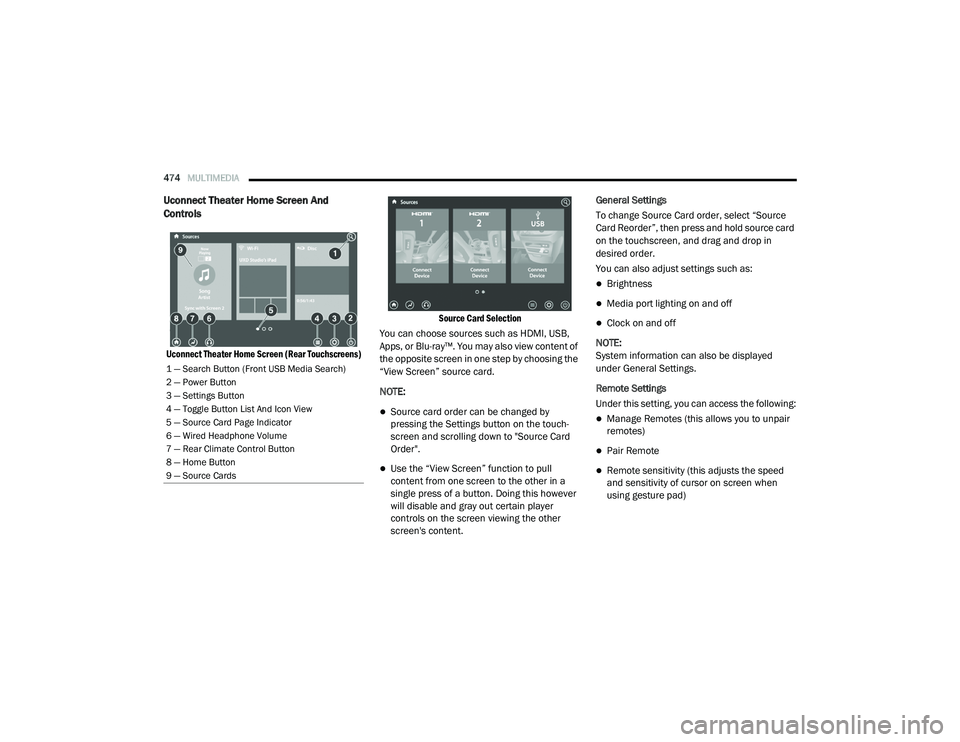
Uconnect Theater Home Screen And
Controls
Uconnect Theater Home Screen (Rear Touchscreens) Source Card Selection
You can choose sources such as HDMI, USB,
Apps, or Blu-ray™. You may also view content of
the opposite screen in one step by choosing the
“View Screen” source card.
NOTE:
Source card order can be changed by
pressing the Settings button on the touch -
screen and scrolling down to "Source Card
Order".
Use the “View Screen” function to pull
content from one screen to the other in a
single press of a button. Doing this however
will disable and gray out certain player
controls on the screen viewing the other
screen's content. General Settings
To change Source Card order, select “Source
Card Reorder”, then press and hold source card
on the touchscreen, and drag and drop in
desired order.
You can also adjust settings such as:
Brightness
Media port lighting on and off
Clock on and off
NOTE:
System information can also be displayed
under General Settings.
Remote Settings
Under this setting, you can access the following:
Manage Remotes (this allows you to unpair
remotes)
Pair Remote
Remote sensitivity (this adjusts the speed
and sensitivity of cursor on screen when
using gesture pad)
1 — Search Button (Front USB Media Search)
2 — Power Button
3 — Settings Button
4 — Toggle Button List And Icon View
5 — Source Card Page Indicator
6 — Wired Headphone Volume
7 — Rear Climate Control Button
8 — Home Button
9 — Source Cards
20_RU_OM_EN_US_t.book Page 474
Page 478 of 516
476MULTIMEDIA
4. For DVD/Blu-ray™ disc — press the Press to
Enter feature in the Movie Snapshot on the
radio touchscreen, then press “OK” on the
following screen. The steps to start a DVD
are dependent on the steps required by that
specific DVD. For USB Media Files — Press
“Music”, “Movie”, or “Folders”, then select
media title from list(s).
5. To play a DVD/Blu-ray™ disc on both screens simultaneously, select “Disc” from
both screen drop downs, or choose “Disc
Source” on one screen and push the View
Screen button on the other.
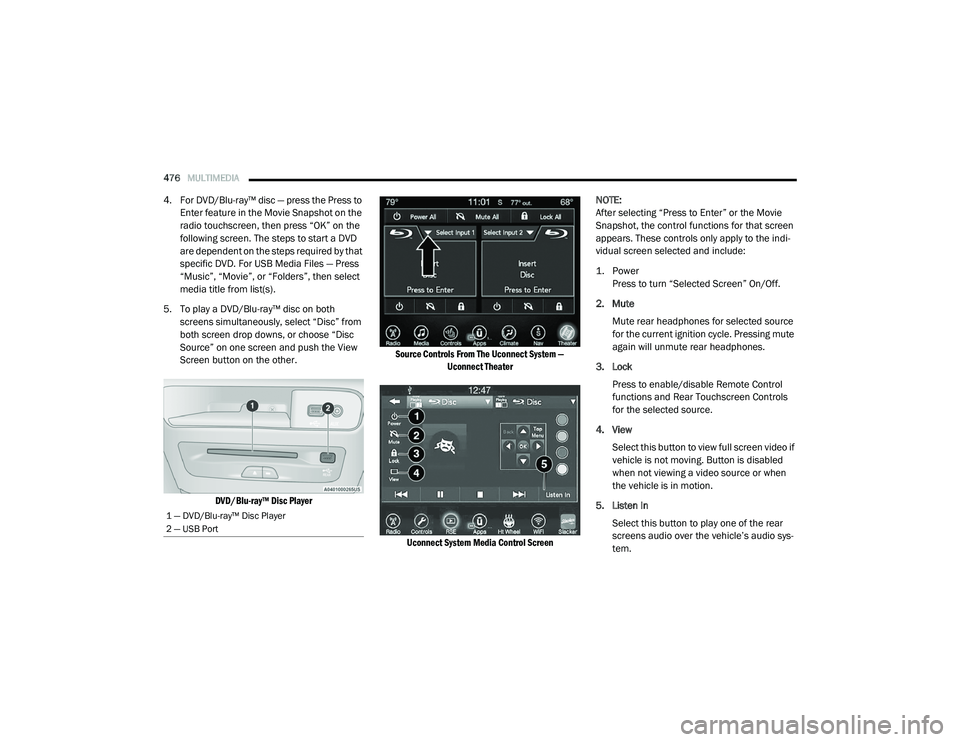
DVD/Blu-ray™ Disc Player Source Controls From The Uconnect System —
Uconnect Theater
Uconnect System Media Control Screen
NOTE:
After selecting “Press to Enter” or the Movie
Snapshot, the control functions for that screen
appears. These controls only apply to the indi
-
vidual screen selected and include:
1. Power
Press to turn “Selected Screen” On/Off.
2. Mute Mute rear headphones for selected source
for the current ignition cycle. Pressing mute
again will unmute rear headphones.
3. Lock Press to enable/disable Remote Control
functions and Rear Touchscreen Controls
for the selected source.
4. View Select this button to view full screen video if
vehicle is not moving. Button is disabled
when not viewing a video source or when
the vehicle is in motion.
5. Listen In Select this button to play one of the rear
screens audio over the vehicle’s audio sys -
tem.
1 — DVD/Blu-ray™ Disc Player
2 — USB Port
20_RU_OM_EN_US_t.book Page 476
Page 479 of 516
MULTIMEDIA477
NOTE:
To view video content on the radio screen, bring
the vehicle to a stop.
Disc Menu
When listening to a CD Audio disc, CD Data disc,
DVD, or Blu-ray™, pushing the remote control’s
Arrow buttons will navigate the cursor on the
rear touchscreen in the desired direction, on
whichever touchscreen is selected. The UP,
DOWN, LEFT, and RIGHT Arrow buttons, and the
OK and MENU buttons on the remote, along
with the corresponding buttons overlaid on the
radio touchscreen, can be used to navigate the
disc menu when it appears. This can be used to
select specific chapters in a movie, to navigate
special features, or to play the movie from the
menu.
NOTE:
Inserting a disc into the player will “auto play” the
disc if already in the “Disc" source menu on the
rear screens, and the disc supports “auto play.”
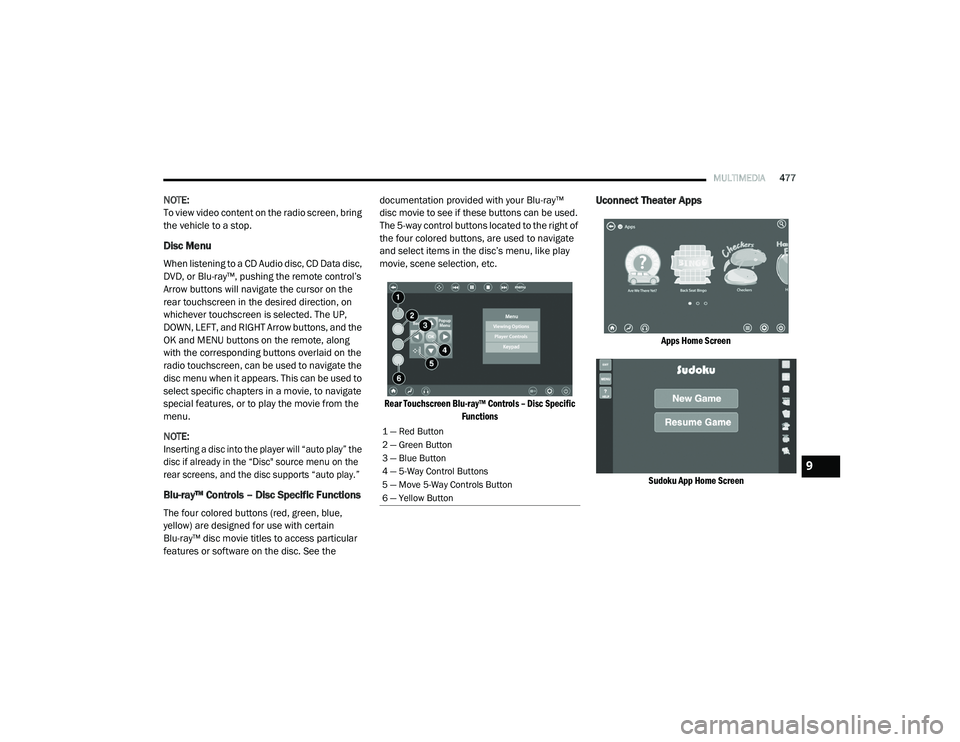
Blu-ray™ Controls – Disc Specific Functions
The four colored buttons (red, green, blue,
yellow) are designed for use with certain
Blu-ray™ disc movie titles to access particular
features or software on the disc. See the documentation provided with your Blu-ray™
disc movie to see if these buttons can be used.
The 5-way control buttons located to the right of
the four colored buttons, are used to navigate
and select items in the disc’s menu, like play
movie, scene selection, etc.
Rear Touchscreen Blu-ray™ Controls – Disc Specific Functions
Uconnect Theater Apps
Apps Home Screen
Sudoku App Home Screen
1 — Red Button
2 — Green Button
3 — Blue Button
4 — 5-Way Control Buttons
5 — Move 5-Way Controls Button
6 — Yellow Button
9
20_RU_OM_EN_US_t.book Page 477
Page 481 of 516
MULTIMEDIA479
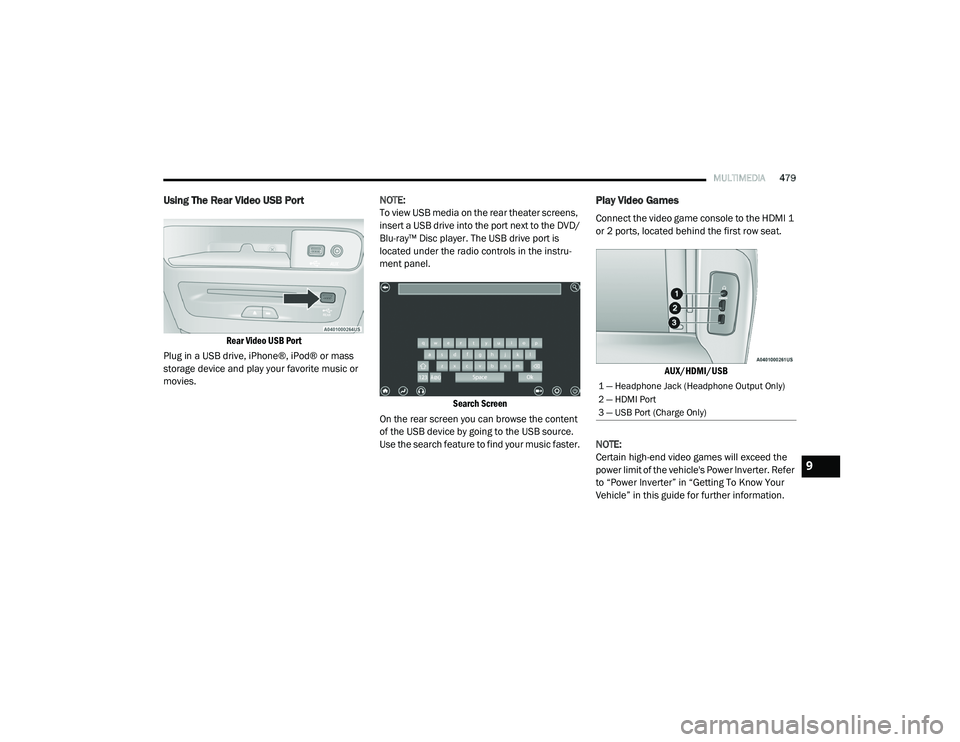
Using The Rear Video USB Port
Rear Video USB Port
Plug in a USB drive, iPhone®, iPod® or mass
storage device and play your favorite music or
movies. NOTE:
To view USB media on the rear theater screens,
insert a USB drive into the port next to the DVD/
Blu-ray™ Disc player. The USB drive port is
located under the radio controls in the instru
-
ment panel.
Search Screen
On the rear screen you can browse the content
of the USB device by going to the USB source.
Use the search feature to find your music faster.
Play Video Games
Connect the video game console to the HDMI 1
or 2 ports, located behind the first row seat.
AUX/HDMI/USB
NOTE:
Certain high-end video games will exceed the
power limit of the vehicle's Power Inverter. Refer
to “Power Inverter” in “Getting To Know Your
Vehicle” in this guide for further information.
1 — Headphone Jack (Headphone Output Only)
2 — HDMI Port
3 — USB Port (Charge Only)
9
20_RU_OM_EN_US_t.book Page 479
Page 486 of 516
484MULTIMEDIA
Accessibility — If Equipped
Accessibility is a feature of the DVD/Blu-ray™/USB
Video system that announces a function prior to
performing the action. Refer to “Uconnect
Settings” in this chapter for further information.
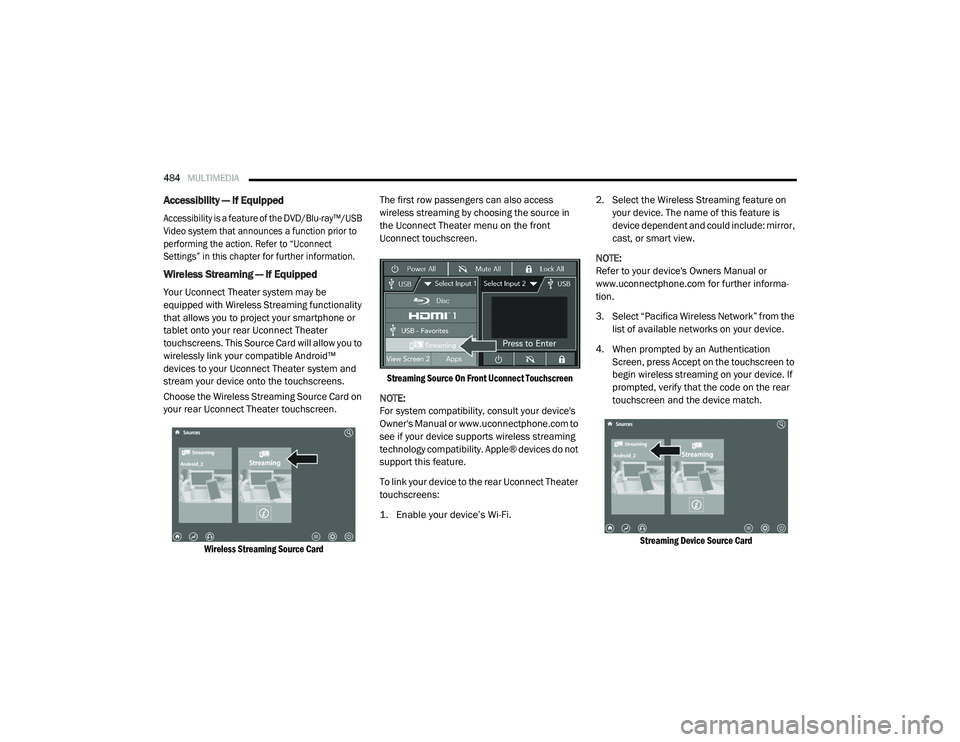
Wireless Streaming — If Equipped
Your Uconnect Theater system may be
equipped with Wireless Streaming functionality
that allows you to project your smartphone or
tablet onto your rear Uconnect Theater
touchscreens. This Source Card will allow you to
wirelessly link your compatible Android™
devices to your Uconnect Theater system and
stream your device onto the touchscreens.
Choose the Wireless Streaming Source Card on
your rear Uconnect Theater touchscreen.
Wireless Streaming Source Card
The first row passengers can also access
wireless streaming by choosing the source in
the Uconnect Theater menu on the front
Uconnect touchscreen.
Streaming Source On Front Uconnect Touchscreen
NOTE:
For system compatibility, consult your device's
Owner's Manual or www.uconnectphone.com to
see if your device supports wireless streaming
technology compatibility. Apple® devices do not
support this feature.
To link your device to the rear Uconnect Theater
touchscreens:
1. Enable your device’s Wi-Fi.
2. Select the Wireless Streaming feature on
your device. The name of this feature is
device dependent and could include: mirror,
cast, or smart view.
NOTE:
Refer to your device's Owners Manual or
www.uconnectphone.com for further informa -
tion.
3. Select “Pacifica Wireless Network” from the list of available networks on your device.
4. When prompted by an Authentication Screen, press Accept on the touchscreen to
begin wireless streaming on your device. If
prompted, verify that the code on the rear
touchscreen and the device match.
Streaming Device Source Card
20_RU_OM_EN_US_t.book Page 484
Page 495 of 516
MULTIMEDIA493
UCONNECT VOICE RECOGNITION QUICK TIPS
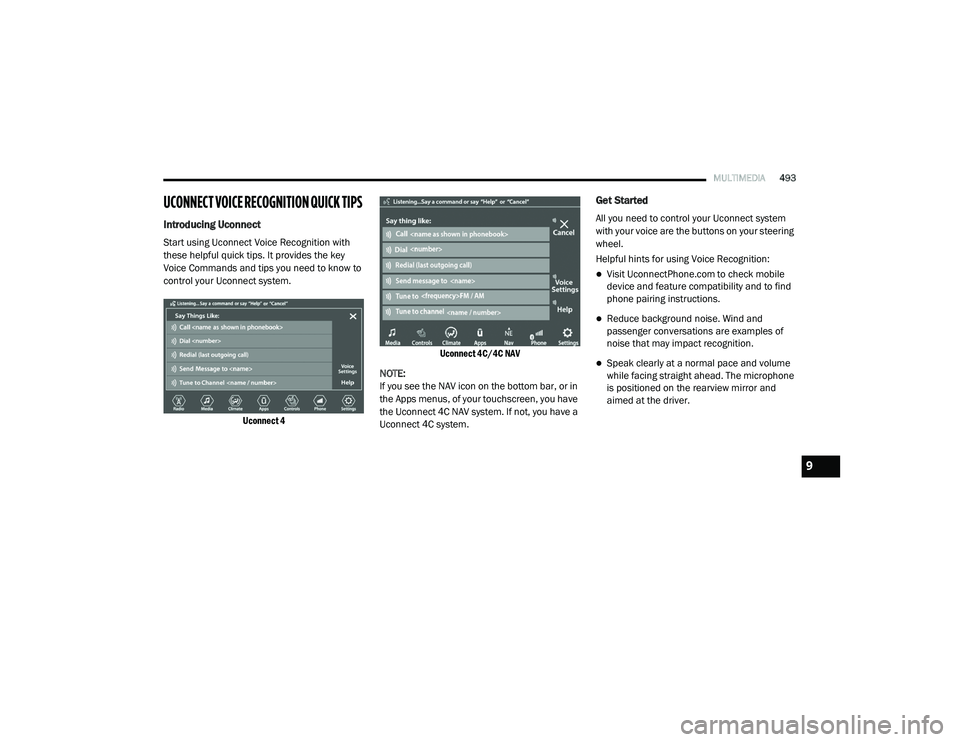
Introducing Uconnect
Start using Uconnect Voice Recognition with
these helpful quick tips. It provides the key
Voice Commands and tips you need to know to
control your Uconnect system.
Uconnect 4 Uconnect 4C/4C NAV
NOTE:
If you see the NAV icon on the bottom bar, or in
the Apps menus, of your touchscreen, you have
the Uconnect 4C NAV system. If not, you have a
Uconnect 4C system.
Get Started
All you need to control your Uconnect system
with your voice are the buttons on your steering
wheel.
Helpful hints for using Voice Recognition:
Visit UconnectPhone.com to check mobile
device and feature compatibility and to find
phone pairing instructions.
Reduce background noise. Wind and
passenger conversations are examples of
noise that may impact recognition.
Speak clearly at a normal pace and volume
while facing straight ahead. The microphone
is positioned on the rearview mirror and
aimed at the driver.
9
20_RU_OM_EN_US_t.book Page 493
Page 509 of 516
507
I
Ignition
............................................................ 18Switch......................................................... 18In Vehicle Help Vehicle User Guide...................................... 12Inside Rearview Mirror............................ 59, 301Instrument Cluster......................................... 126Descriptions.............................................. 149Display...................................................... 127Menu Items............................................... 131Instrument Panel Lens Cleaning.................... 387Interior And Instrument Lights......................... 66Interior Appearance Care............................... 386Interior Lights.................................................. 66Intermittent Wipers (Delay Wipers).................. 68InverterPower........................................................ 119iPod/USB/MP3 Control................................. 447
J
Jack Location................................................. 320Jack Operation..................................... 320, 366Jump Starting................................................ 337
K
Key Fob........................................................... 13Arm The System.......................................... 24Disarm The Alarm........................................ 24Programming Additional Key Fobs....... 16, 23
Key Fob Battery Service (Remote Keyless
Entry)............................................................... 15Key Fob Programming (Remote Keyless
Entry)............................................................... 16Keys................................................................. 13Replacement............................................... 23
L
Lane Change And Turn Signals........................ 63Lane Change Assist.................................. 63, 66LaneSense.................................................... 280Lap/Shoulder Belts....................................... 174Latches......................................................... 218Hood............................................................ 97Lead Free Gasoline....................................... 389Leaks, Fluid.................................................. 218Life Of Tires................................................... 377Liftgate............................................................ 99Power....................................................... 100Light Bulbs........................................... 218, 309LighterCigar......................................................... 120Lights............................................................ 218Air Bag.................................... 141, 184, 217Battery Saver............................................... 66Brake Assist Warning............................... 156Brake Warning.......................................... 141Bulb Replacement........................... 306, 309Center Mounted Stop............................... 311Cruise.............................................. 148, 149
Daytime Running.........................................63Dimmer Switch, Headlight...........................63Engine Temperature Warning................... 143Exterior............................................ 218, 309Fog..................................................... 65, 310Headlights.................................. 63, 64, 308High Beam/Low Beam Select......................63Instrument Cluster.......................................63Intensity Control..........................................67Interior.........................................................66Lights On Reminder..............................63, 65Malfunction Indicator (Check Engine)....... 145Parade Mode (Daytime Brightness).............68Park.......................................................... 148Passing.................................................63, 64Reading.......................................................66Seat Belt Reminder.................................. 143Security Alarm.......................................... 144Service...................................................... 306Side Marker.............................................. 309SmartBeams................................................64Traction Control........................................ 156Turn Signals..................... 63, 149, 218, 309Warning Instrument Cluster Descriptions................................ 143, 149Load Floor, Cargo.......................................... 103Load Shed Battery Saver Mode..................... 138Load Shed Battery Saver On......................... 138Load Shed Electrical Load Reduction........... 138Load Shed Intelligent Battery Sensor............ 138
11
20_RU_OM_EN_US_t.book Page 507
Page 510 of 516
508
Loading Vehicle
................................... 103, 288Tires.......................................................... 371Low Tire Pressure System............................. 167Lubrication, Body........................................... 356Lug Nuts........................................................ 388Luggage Carrier............................................. 121
M
Maintenance Free Battery............................. 350Maintenance Schedule.................................. 345Malfunction Indicator Light (Check
Engine)................................................ 145, 151Manual Park Release............................................. 340Service...................................................... 502Map/Reading Lights........................................ 66Marker Lights, Side....................................... 309Media Hub..................................................... 468Memory Feature (Memory Seats).................... 35Memory Seat..................................... 34, 35, 61Memory Seats And Radio................................ 35Methanol....................................................... 390Mini-Trip Computer........................................ 140Mirrors............................................................. 59Automatic Dimming.............................. 59, 60Electric Remote........................................... 61Exterior Folding........................................... 61
Heated.................................................. 59, 61Memory....................................................... 34Outside................................................. 59, 60Rearview.............................................59, 301Vanity.......................................................... 62Modifications/AlterationsVehicle......................................................... 11Monitor, Tire Pressure System...................... 167Mopar Parts.................................................. 501MP3 Control.................................................. 468Multi-Function Control Lever............................ 63
N
New Vehicle Break-In Period......................... 224
O
Occupant Restraints..................................... 171Octane Rating, Gasoline (Fuel)............ 389, 394Oil Change Indicator..................................... 129Reset........................................................ 129Oil Filter, Change.......................................... 352Oil Filter, Selection........................................ 352Oil Pressure Light.......................................... 144
Oil, Engine............................................ 351, 394Capacity.................................................... 393Change Interval........................................ 351Checking................................................... 350Disposal.................................................... 352Filter................................................ 352, 394Filter Disposal........................................... 352Identification Logo.................................... 352Materials Added To................................... 352Pressure Warning Light............................. 144Recommendation............................ 351, 393Synthetic................................................... 352Viscosity........................................... 352, 393Onboard Diagnostic System.......................... 150Operating Precautions.................................. 150Operator ManualOwner's Manual................................. 10, 502Outside Rearview Mirrors.......................... 59, 60Overheating, Engine...................................... 339Owner’s Manual (Operator Manual).................10
P
Paint Care..................................................... 385Parking Brake............................................... 225ParkSense System, Rear...................... 254, 259Pets............................................................... 215Placard, Tire And Loading Information.......... 371
20_RU_OM_EN_US_t.book Page 508