controls CHRYSLER PACIFICA 2020 Owner's Guide
[x] Cancel search | Manufacturer: CHRYSLER, Model Year: 2020, Model line: PACIFICA, Model: CHRYSLER PACIFICA 2020Pages: 516, PDF Size: 28.69 MB
Page 92 of 516
90GETTING TO KNOW YOUR VEHICLE
Climate Control Functions
Air Conditioning (A/C)
The Air Conditioning (A/C) button allows the
operator to manually activate or deactivate the
air conditioning system. When in A/C mode with
the ATC set to a cool temperature, dehumidified
air flows through the air outlets. If Economy
mode is desired, push the A/C button to turn off
the A/C mode in the Automatic Temperature
Control (ATC) display and deactivate the A/C
system.
NOTE:
If the system is in Mix or Defrost Mode, the A/C
can be turned off, but the A/C system shall
remain active to prevent fogging of the
windows.
If not operating in AUTO mode, the system
will not automatically sense the presence of
fog, mist or ice on the windshield. Defrost
Mode must be manually selected to clear the
windshield and side glass.
If fog or mist appears on the windshield or
side glass, select Defrost Mode and adjust
blower speed if needed.
Recirculation For Automatic Temperature
Control
When outside air contains smoke, odors, or
high humidity, or if rapid cooling is desired, you
may wish to recirculate interior air by pressing
the Recirculation control button. The
recirculation indicator will illuminate when this
button is selected. Press the button a second
time to turn off the Recirculation mode and
allow outside air into the vehicle.
NOTE:
In cold weather, use of recirculation mode may
lead to excessive window fogging. The recircula-
tion feature may be unavailable (button on the
touchscreen greyed out) if conditions exist that
could create fogging on the inside of the wind-
shield. On systems with Manual Climate
Controls, the Recirculation mode is not allowed
in Defrost Mode to improve window clearing
operation. Recirculation will be disabled auto -
matically if this mode is selected. Attempting to
use Recirculation while in this mode will cause
the LED in the control button to blink and then
turn off.
Automatic Temperature Control (ATC) — If
Equipped
Automatic Operation
1. Push the AUTO button on the faceplate, or the AUTO button on the touchscreen on the
Automatic Temperature Control (ATC)
Panel.
2. Next, adjust the temperature you would like the system to maintain by adjusting the
driver and passenger temperature control
buttons. Once the desired temperature is
displayed, the system will achieve and
automatically maintain that comfort level.
3. When the system is set up for your comfort level, it is not necessary to change the
settings. You will experience the greatest
efficiency by simply allowing the system to
function automatically.
20_RU_OM_EN_US_t.book Page 90
Page 94 of 516
92GETTING TO KNOW YOUR VEHICLE
Outside Air Intake
Make sure the air intake, located directly in
front of the windshield, is free of obstructions
such as leaves. Leaves collected in the air
intake may reduce airflow, and if they enter the
plenum, they could plug the water drains. In
Winter months, make sure the air intake is clear
of ice, slush, and snow.
A/C Air Filter
The Climate Control system filters out dust and
pollen from the air. Refer to an authorized
dealer for filter replacement instructions.
Operating Tips Chart
CAUTION!
Failure to follow these cautions can cause
damage to the heating elements:
Use care when washing the inside of the
rear window. Do not use abrasive window
cleaners on the interior surface of the
window. Use a soft cloth and a mild
washing solution, wiping parallel to the
heating elements. Labels can be peeled off
after soaking with warm water.
Do not use scrapers, sharp instruments, or
abrasive window cleaners on the interior
surface of the window.
Keep all objects a safe distance from the
window.
WEATHERCONTROL
SETTINGS
Hot Weather And
Vehicle Interior Is Very Hot Set the mode control
to , on, and
blower on high. Roll
down the windows for a minute to flush out
the hot air. Adjust the
controls as needed to achieve comfort.
Warm Weather Turn on and set
the mode control to
the position.
Cool Sunny Operate in
position.
Cool & Humid Conditions Set the mode control
to and turn on to keep windows clear.
Cold Weather Set the mode control
to the position. If windshield fogging
starts to occur, move
the control to the position.
WEATHER CONTROL
SETTINGS
20_RU_OM_EN_US_t.book Page 92
Page 95 of 516
GETTING TO KNOW YOUR VEHICLE93
WINDOWS
Power Windows
You can control either the front or rear windows
using controls located on the driver's door trim
panel.
The driver may lock out the rear power windows
by pushing the bar control just below the power
window controls.
The controls will operate only when the ignition
switch is in the ON/RUN or ACC position and
during power accessory delay.
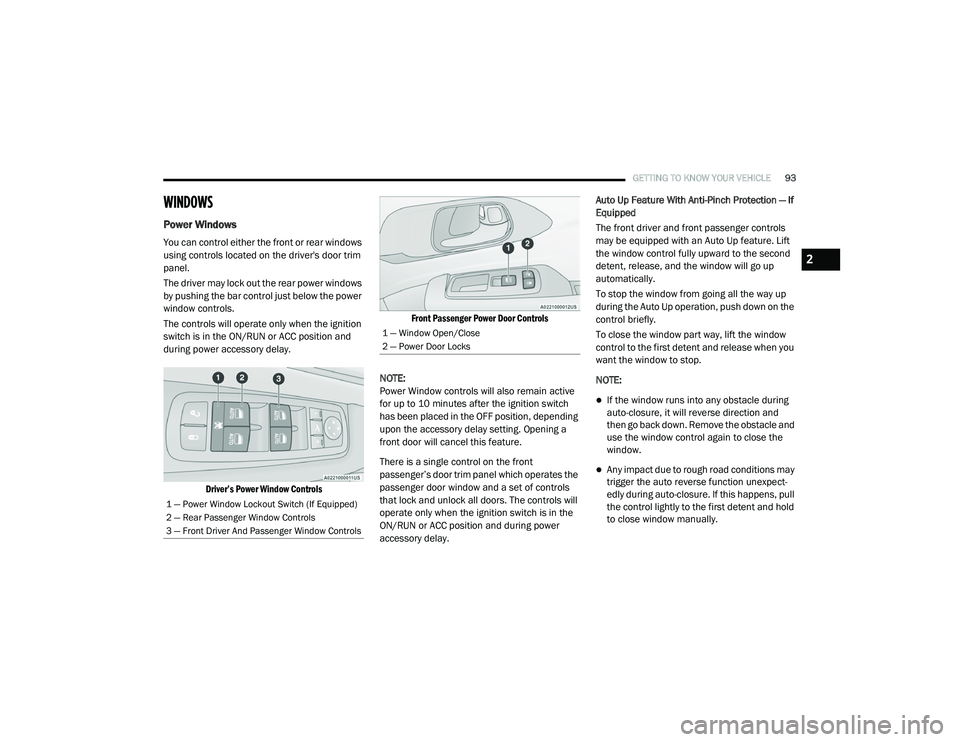
Driver’s Power Window Controls Front Passenger Power Door Controls
NOTE:
Power Window controls will also remain active
for up to 10 minutes after the ignition switch
has been placed in the OFF position, depending
upon the accessory delay setting. Opening a
front door will cancel this feature.
There is a single control on the front
passenger’s door trim panel which operates the
passenger door window and a set of controls
that lock and unlock all doors. The controls will
operate only when the ignition switch is in the
ON/RUN or ACC position and during power
accessory delay. Auto Up Feature With Anti-Pinch Protection — If
Equipped
The front driver and front passenger controls
may be equipped with an Auto Up feature. Lift
the window control fully upward to the second
detent, release, and the window will go up
automatically.
To stop the window from going all the way up
during the Auto Up operation, push down on the
control briefly.
To close the window part way, lift the window
control to the first detent and release when you
want the window to stop.
NOTE:
If the window runs into any obstacle during
auto-closure, it will reverse direction and
then go back down. Remove the obstacle and
use the window control again to close the
window.
Any impact due to rough road conditions may
trigger the auto reverse function unexpect
-
edly during auto-closure. If this happens, pull
the control lightly to the first detent and hold
to close window manually.
1 — Power Window Lockout Switch (If Equipped)
2 — Rear Passenger Window Controls
3 — Front Driver And Passenger Window Controls
1 — Window Open/Close
2 — Power Door Locks
2
20_RU_OM_EN_US_t.book Page 93
Page 96 of 516
94GETTING TO KNOW YOUR VEHICLE
Auto Up Reset — If Equipped
To reactivate the Auto Up feature, perform the
following steps after vehicle power is restored:
1. Pull the window control up to close the
window completely and continue to hold
the control up for an additional two
seconds after the window is closed.
2. Push the window control down firmly to the second detent to open the window
completely and continue to hold the control
down for an additional two seconds after
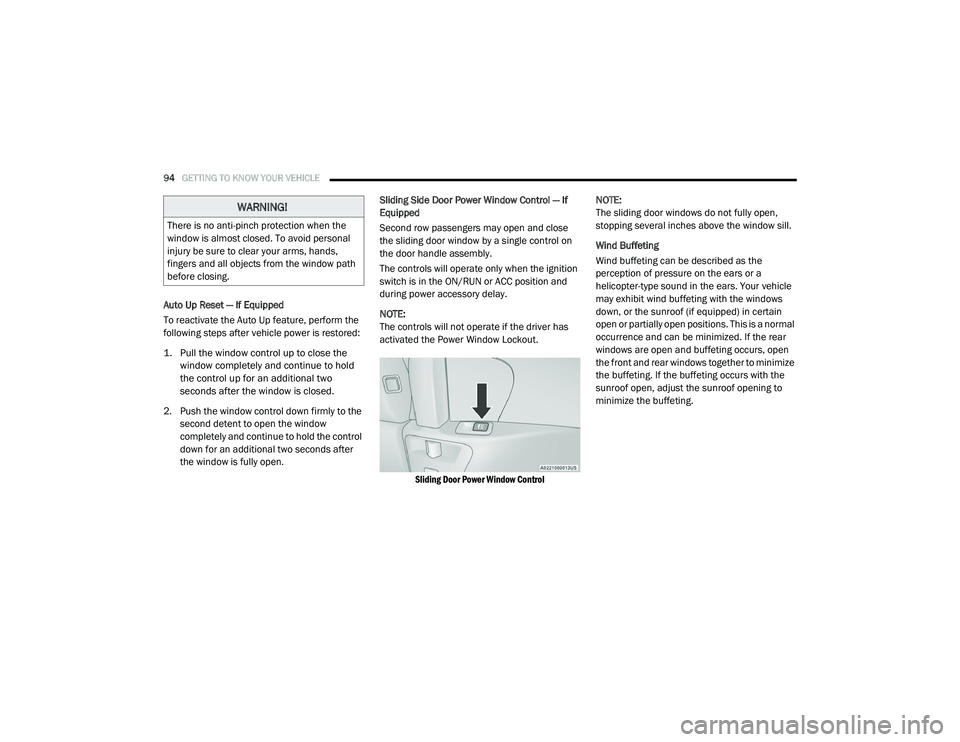
the window is fully open. Sliding Side Door Power Window Control — If
Equipped
Second row passengers may open and close
the sliding door window by a single control on
the door handle assembly.
The controls will operate only when the ignition
switch is in the ON/RUN or ACC position and
during power accessory delay.
NOTE:
The controls will not operate if the driver has
activated the Power Window Lockout.
Sliding Door Power Window Control
NOTE:
The sliding door windows do not fully open,
stopping several inches above the window sill.
Wind Buffeting
Wind buffeting can be described as the
perception of pressure on the ears or a
helicopter-type sound in the ears. Your vehicle
may exhibit wind buffeting with the windows
down, or the sunroof (if equipped) in certain
open or partially open positions. This is a normal
occurrence and can be minimized. If the rear
windows are open and buffeting occurs, open
the front and rear windows together to minimize
the buffeting. If the buffeting occurs with the
sunroof open, adjust the sunroof opening to
minimize the buffeting.
WARNING!
There is no anti-pinch protection when the
window is almost closed. To avoid personal
injury be sure to clear your arms, hands,
fingers and all objects from the window path
before closing.
20_RU_OM_EN_US_t.book Page 94
Page 105 of 516
GETTING TO KNOW YOUR VEHICLE103
(Continued)
(Continued)
Cargo Area Features
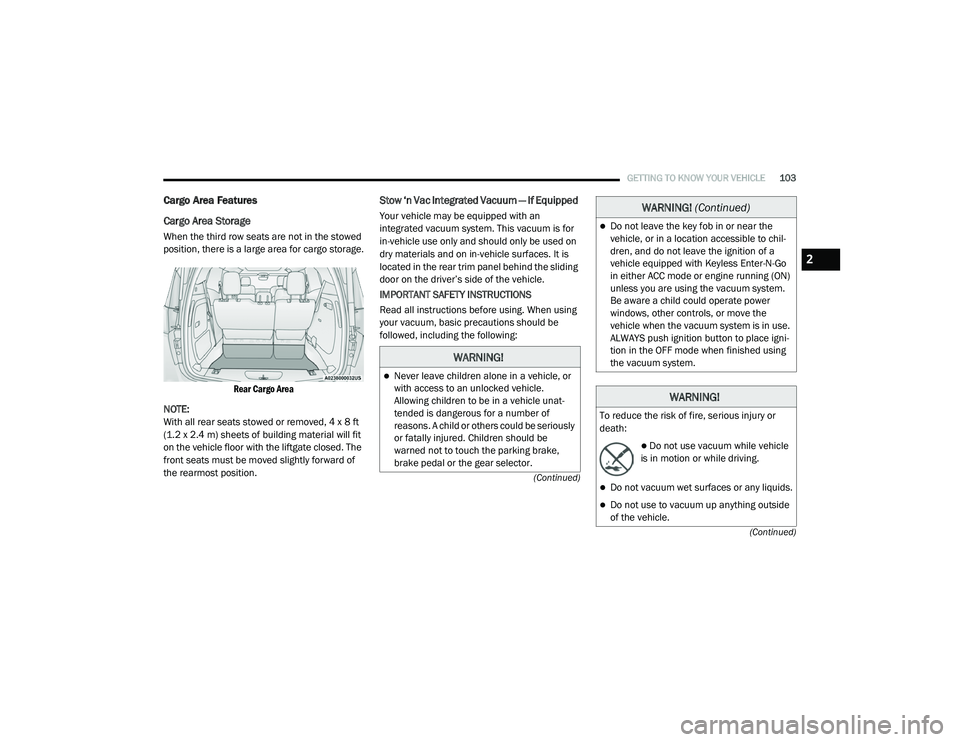
Cargo Area Storage
When the third row seats are not in the stowed
position, there is a large area for cargo storage.
Rear Cargo Area
NOTE:
With all rear seats stowed or removed, 4 x 8 ft
(1.2 x 2.4 m) sheets of building material will fit
on the vehicle floor with the liftgate closed. The
front seats must be moved slightly forward of
the rearmost position.
Stow ‘n Vac Integrated Vacuum — If Equipped
Your vehicle may be equipped with an
integrated vacuum system. This vacuum is for
in-vehicle use only and should only be used on
dry materials and on in-vehicle surfaces. It is
located in the rear trim panel behind the sliding
door on the driver’s side of the vehicle.
IMPORTANT SAFETY INSTRUCTIONS
Read all instructions before using. When using
your vacuum, basic precautions should be
followed, including the following:
WARNING!
Never leave children alone in a vehicle, or
with access to an unlocked vehicle.
Allowing children to be in a vehicle unat -
tended is dangerous for a number of
reasons. A child or others could be seriously
or fatally injured. Children should be
warned not to touch the parking brake,
brake pedal or the gear selector.
Do not leave the key fob in or near the
vehicle, or in a location accessible to chil -
dren, and do not leave the ignition of a
vehicle equipped with Keyless Enter-N-Go
in either ACC mode or engine running (ON)
unless you are using the vacuum system.
Be aware a child could operate power
windows, other controls, or move the
vehicle when the vacuum system is in use.
ALWAYS push ignition button to place igni -
tion in the OFF mode when finished using
the vacuum system.
WARNING!
To reduce the risk of fire, serious injury or
death:
Do not use vacuum while vehicle
is in motion or while driving.
Do not vacuum wet surfaces or any liquids.
Do not use to vacuum up anything outside
of the vehicle.
WARNING! (Continued)
2
20_RU_OM_EN_US_t.book Page 103
Page 129 of 516
GETTING TO KNOW YOUR INSTRUMENT PANEL127
4. Fuel Gauge
The gauge shows the level of fuel in the
fuel tank when the ignition switch is in
the ON/RUN position.
The fuel pump symbol points
to the side of the vehicle where
the fuel door is located.
5. Temperature Gauge
The temperature gauge shows engine
coolant temperature. Any reading within
the normal range indicates that the
engine cooling system is operating satis -
factorily.
The gauge can indicate a higher tempera -
ture when driving in hot weather or up
mountain grades. It should not be
allowed to exceed the upper limits of the
normal operating range. NOTE:
The hard telltales will illuminate for a bulb check
when the ignition is first cycled.
INSTRUMENT CLUSTER DISPLAY
Your vehicle is equipped with an instrument
cluster display, which offers useful information
to the driver. With the ignition in the OFF
position (and the key removed, for vehicles with
mechanical key), opening/closing of a door will
activate the display for viewing, and display the
total miles or kilometers in the odometer. Your
instrument cluster display is designed to display
important information about your vehicle’s
systems and features. Using a driver interactive
display located on the instrument panel, your
instrument cluster display can show you how
systems are working and give you warnings
when they are not. The steering wheel mounted
controls allow you to scroll through and enter
the main menus and submenus. You can
access the specific information you want and
make selections and adjustments.
WARNING!
Driving with a hot engine cooling system
could damage your vehicle. If the
temperature gauge reaches “H” pull over and
stop the vehicle. Idle the vehicle with the air
conditioner turned off until the gauge drops
back into the normal range and is no longer
red. If the gauge remains on the “H”, turn the
engine off immediately and call an authorized
dealer for service.
WARNING!
A hot engine cooling system is dangerous.
You or others could be badly burned by steam
or boiling coolant. You may want to call an
authorized dealer for service if your vehicle
overheats. If you decide to look under the
hood yourself, refer to “Cooling System
Pressure Cap” in “Servicing And
Maintenance” for further information.
3
20_RU_OM_EN_US_t.book Page 127
Page 130 of 516
128GETTING TO KNOW YOUR INSTRUMENT PANEL
Instrument Cluster Display Location And
Controls
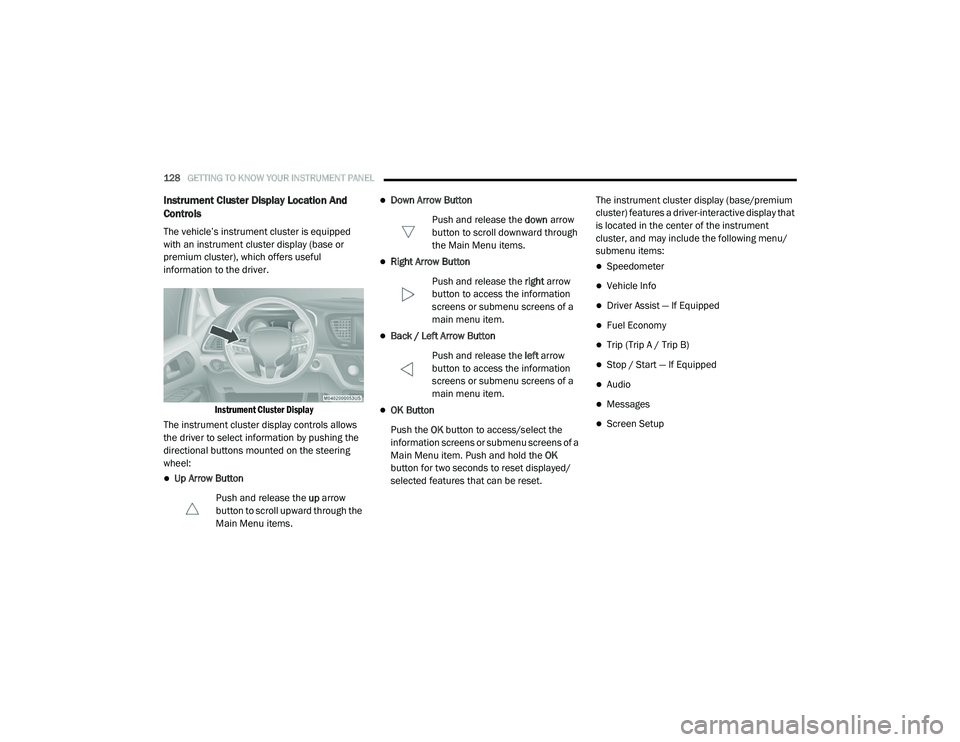
The vehicle’s instrument cluster is equipped
with an instrument cluster display (base or
premium cluster), which offers useful
information to the driver.
Instrument Cluster Display
The instrument cluster display controls allows
the driver to select information by pushing the
directional buttons mounted on the steering
wheel:
Up Arrow Button
Push and release the up arrow
button to scroll upward through the
Main Menu items.
Down Arrow Button
Push and release the down arrow
button to scroll downward through
the Main Menu items.
Right Arrow Button
Push and release the right arrow
button to access the information
screens or submenu screens of a
main menu item.
Back / Left Arrow Button
Push and release the left arrow
button to access the information
screens or submenu screens of a
main menu item.
OK Button
Push the OK button to access/select the
information screens or submenu screens of a
Main Menu item. Push and hold the OK
button for two seconds to reset displayed/
selected features that can be reset. The instrument cluster display (base/premium
cluster) features a driver-interactive display that
is located in the center of the instrument
cluster, and may include the following menu/
submenu items:
Speedometer
Vehicle Info
Driver Assist — If Equipped
Fuel Economy
Trip (Trip A / Trip B)
Stop / Start — If Equipped
Audio
Messages
Screen Setup
20_RU_OM_EN_US_t.book Page 128
Page 152 of 516
150GETTING TO KNOW YOUR INSTRUMENT PANEL
ONBOARD DIAGNOSTIC SYSTEM — OBD II
Your vehicle is equipped with a sophisticated
Onboard Diagnostic system called OBD II. This
system monitors the performance of the
emissions, engine, and automatic transmission
control systems. When these systems are
operating properly, your vehicle will provide
excellent performance and fuel economy, as
well as emissions well within current
government regulations.
If any of these systems require service, the OBD
II system will turn on the Malfunction Indicator
Light (MIL). It will also store diagnostic codes
and other information to assist your service
technician in making repairs. Although your
vehicle will usually be drivable and not need
towing, see an authorized dealer for service as
soon as possible.
Onboard Diagnostic System (OBD II)
Cybersecurity
Your vehicle is required to have an Onboard
Diagnostic system (OBD II) and a connection
port to allow access to information related to
the performance of your emissions controls.
Authorized service technicians may need to
access this information to assist with the
diagnosis and service of your vehicle and
emissions system. For further information, refer to “Cybersecurity”
in “Multimedia”.
CAUTION!
Prolonged driving with the MIL on could
cause further damage to the emission
control system. It could also affect fuel
economy and driveability. The vehicle must
be serviced before any emissions tests can
be performed.
If the MIL is flashing while the vehicle is
running, severe catalytic converter damage
and power loss will soon occur. Immediate
service is required.
WARNING!
ONLY an authorized service technician
should connect equipment to the OBD II
connection port in order to read the VIN,
diagnose, or service your vehicle.
If unauthorized equipment is connected to
the OBD II connection port, such as a
driver-behavior tracking device, it may:
Be possible that vehicle systems,
including safety related systems, could
be impaired or a loss of vehicle control
could occur that may result in an acci
-
dent involving serious injury or death.
Access, or allow others to access, infor -
mation stored in your vehicle systems,
including personal information.
20_RU_OM_EN_US_t.book Page 150
Page 160 of 516
158SAFETY
Towing With HSA
HSA will also provide assistance to mitigate roll
back while towing a trailer.
Disabling And Enabling HSA
This feature can be turned on or turned off. To
change the current setting, proceed as follows:
If disabling HSA using Uconnect Settings,
refer to “Uconnect Settings” in “Multimedia”
for further information.
Rain Brake Support (RBS)
Rain Brake Support (RBS) may improve braking
performance in wet conditions. It will
periodically apply a small amount of brake
pressure to remove any water buildup on the
front brake rotors. It functions when the
windshield wipers are in LO or HI speed. When
RBS is active, there is no notification to the
driver and no driver interaction is required.
Ready Alert Braking (RAB)
Ready Alert Braking (RAB) may reduce the time
required to reach full braking during emergency
braking situations. It anticipates when an
emergency braking situation may occur by
monitoring how fast the throttle is released by
the driver. The Electronic Brake Control (EBC)
system will prepare the brake system for a
panic stop.
Traction Control System (TCS)
The Traction Control System (TCS) monitors the
amount of wheel spin of each of the driven
wheels. If wheel spin is detected, the TCS may
apply brake pressure to the spinning wheel(s)
and/or reduce vehicle power to provide
enhanced acceleration and stability. A feature
of the TCS, Brake Limited Differential (BLD),
functions similar to a limited slip differential
and controls the wheel spin across a driven
axle. If one wheel on a driven axle is spinning
faster than the other, the system will apply the
brake of the spinning wheel. This will allow more
vehicle torque to be applied to the wheel that is
not spinning. BLD may remain enabled even if
TCS and the Electronic Stability Control (ESC)
are in a reduced mode.
Trailer Sway Control (TSC)
Trailer Sway Control (TSC) uses sensors in the
vehicle to recognize an excessively swaying
trailer and will take the appropriate actions to
attempt to stop the sway. TSC will become
active automatically once an excessively
swaying trailer is recognized. Note that TSC
cannot stop all trailers from swaying. Always
use caution when towing a trailer and follow the
trailer tongue weight recommendations. Refer
WARNING!
If you use a trailer brake controller with your
trailer, the trailer brakes may be activated
and deactivated with the brake switch. If so,
there may not be enough brake pressure to
hold both the vehicle and the trailer on a hill
when the brake pedal is released. In order to
avoid rolling down an incline while resuming
acceleration, manually activate the trailer
brake or apply more vehicle brake pressure
prior to releasing the brake pedal.
HSA is not a parking brake. Always apply
the parking brake fully when exiting your
vehicle. Also, be certain to place the trans -
mission in PARK.
Failure to follow these warnings can result
in a collision or serious personal injury.
20_RU_OM_EN_US_t.book Page 158
Page 218 of 516
216SAFETY
SAFETY TIPS
Transporting Passengers
NEVER TRANSPORT PASSENGERS IN THE
CARGO AREA.
Exhaust Gas The best protection against carbon monoxide
entry into the vehicle body is a properly
maintained engine exhaust system.
Whenever a change is noticed in the sound of
the exhaust system, when exhaust fumes can
be detected inside the vehicle, or when the
underside or rear of the vehicle is damaged,
have a competent mechanic inspect the
complete exhaust system and adjacent body
areas for broken, damaged, deteriorated, or
mispositioned parts. Open seams or loose
connections could permit exhaust fumes to
seep into the passenger compartment. In
addition, inspect the exhaust system each time
the vehicle is raised for lubrication or oil
change. Replace as required.
WARNING!
Do not leave children or animals inside
parked vehicles in hot weather. Interior
heat build-up may cause serious injury or
death.
It is extremely dangerous to ride in a cargo
area, inside or outside of a vehicle. In a
collision, people riding in these areas are
more likely to be seriously injured or killed.
Do not allow people to ride in any area of
your vehicle that is not equipped with seats
and seat belts.
Be sure everyone in your vehicle is in a seat
and using a seat belt properly.
WARNING!
Exhaust gases can injure or kill. They contain
carbon monoxide (CO), which is colorless and
odorless. Breathing it can make you
unconscious and can eventually poison you.
To avoid breathing (CO), follow these safety
tips:
Do not run the engine in a closed garage or
in confined areas any longer than needed
to move your vehicle in or out of the area.
If you are required to drive with the trunk/
liftgate/rear doors open, make sure that all
windows are closed and the climate control
BLOWER switch is set at high speed. DO
NOT use the recirculation mode.
If it is necessary to sit in a parked vehicle
with the engine running, adjust your
heating or cooling controls to force outside
air into the vehicle. Set the blower at high
speed.
20_RU_OM_EN_US_t.book Page 216