Rear settings CHRYSLER PACIFICA 2020 Service Manual
[x] Cancel search | Manufacturer: CHRYSLER, Model Year: 2020, Model line: PACIFICA, Model: CHRYSLER PACIFICA 2020Pages: 516, PDF Size: 28.69 MB
Page 473 of 516
MULTIMEDIA471
NOTE:
There will be a touchscreen notification
message when pairing is successful.
Test to make sure the remote is successfully
paired by dragging your finger across the
gesture pad. If you do not see the On-screen
Arrow, try using the Screen button on the
remote to switch between rear screen one
and rear screen two to make sure the remote
is controlling the intended screen. It may take
several seconds for the remote to react when
initially paired.
If remote does not pair, refer to “Pairing The
Remote” in this section for an alternative
pairing process.
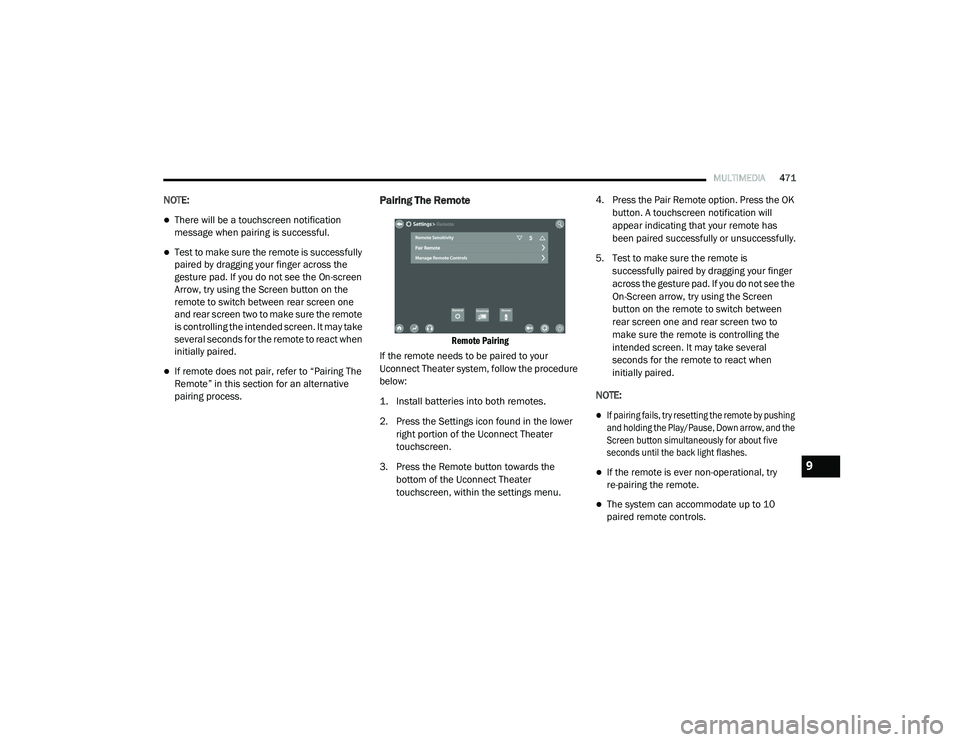
Pairing The Remote
Remote Pairing
If the remote needs to be paired to your
Uconnect Theater system, follow the procedure
below:
1. Install batteries into both remotes.
2. Press the Settings icon found in the lower right portion of the Uconnect Theater
touchscreen.
3. Press the Remote button towards the bottom of the Uconnect Theater
touchscreen, within the settings menu. 4. Press the Pair Remote option. Press the OK
button. A touchscreen notification will
appear indicating that your remote has
been paired successfully or unsuccessfully.
5. Test to make sure the remote is successfully paired by dragging your finger
across the gesture pad. If you do not see the
On-Screen arrow, try using the Screen
button on the remote to switch between
rear screen one and rear screen two to
make sure the remote is controlling the
intended screen. It may take several
seconds for the remote to react when
initially paired.
NOTE:
If pairing fails, try resetting the remote by pushing
and holding the Play/Pause, Down arrow, and the
Screen button simultaneously for about five
seconds until the back light flashes.
If the remote is ever non-operational, try
re-pairing the remote.
The system can accommodate up to 10
paired remote controls.
9
20_RU_OM_EN_US_t.book Page 471
Page 474 of 516
472MULTIMEDIA
Unpairing The Remote
In events such as updating the Uconnect
Theater software, or taking a remote to another
vehicle, the remote will need to be unpaired
from your Uconnect Theater system. To unpair
the remote:
1. Press the Settings icon found in the lower
right portion of the Uconnect Theater
touchscreen.
2. Press the Remote button towards the bottom of the Uconnect Theater
touchscreen, within the settings menu.
3. Select Manage Remote Controls from the Remote section of "Settings” and follow the
on-screen instructions to complete the
unpairing process.
4. Once complete, the remote will be ready to pair again. NOTE:
There will be a touchscreen notification
message when unpairing is successful. Repeat
the above steps to unpair a second remote.
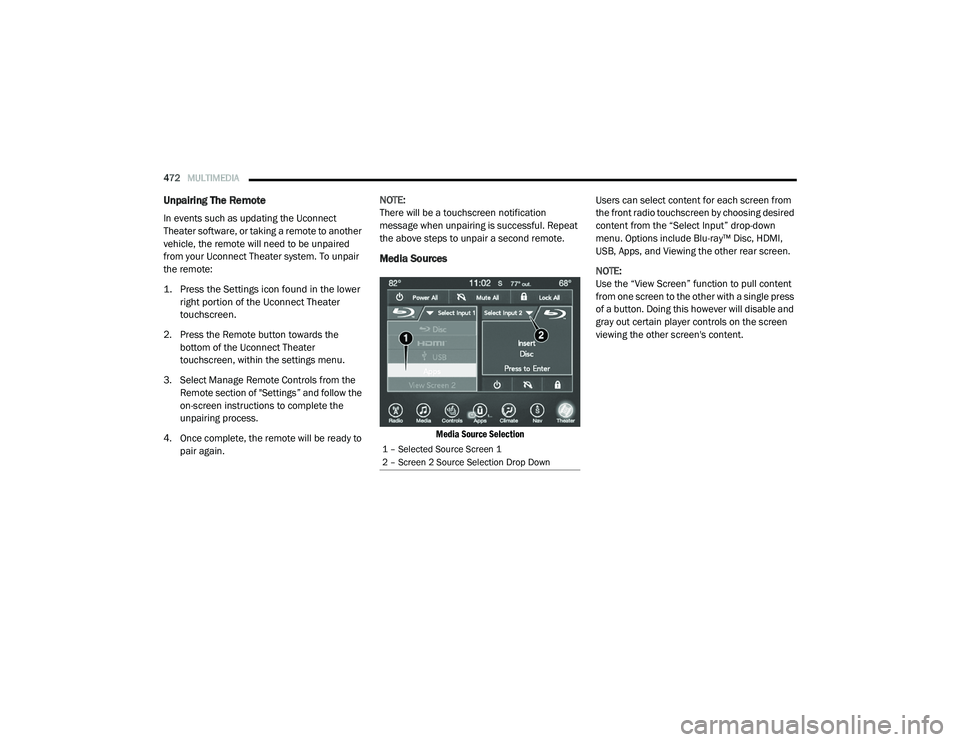
Media Sources
Media Source Selection
Users can select content for each screen from
the front radio touchscreen by choosing desired
content from the “Select Input” drop-down
menu. Options include Blu-ray™ Disc, HDMI,
USB, Apps, and Viewing the other rear screen.
NOTE:
Use the “View Screen” function to pull content
from one screen to the other with a single press
of a button. Doing this however will disable and
gray out certain player controls on the screen
viewing the other screen's content.
1 – Selected Source Screen 1
2 – Screen 2 Source Selection Drop Down
20_RU_OM_EN_US_t.book Page 472
Page 476 of 516
474MULTIMEDIA
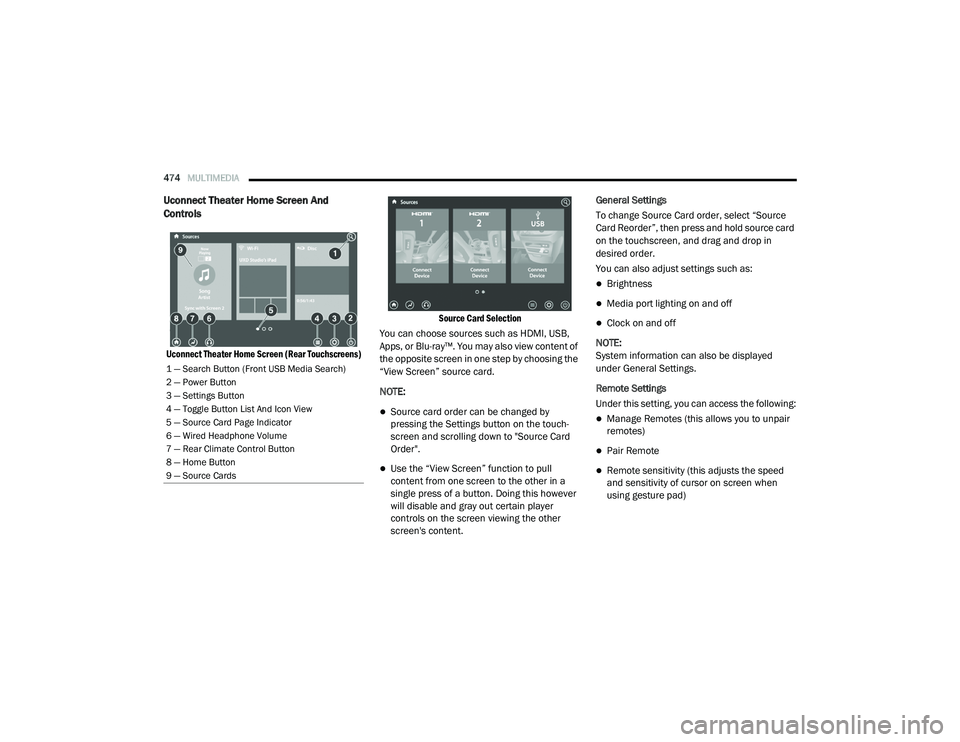
Uconnect Theater Home Screen And
Controls
Uconnect Theater Home Screen (Rear Touchscreens) Source Card Selection
You can choose sources such as HDMI, USB,
Apps, or Blu-ray™. You may also view content of
the opposite screen in one step by choosing the
“View Screen” source card.
NOTE:
Source card order can be changed by
pressing the Settings button on the touch -
screen and scrolling down to "Source Card
Order".
Use the “View Screen” function to pull
content from one screen to the other in a
single press of a button. Doing this however
will disable and gray out certain player
controls on the screen viewing the other
screen's content. General Settings
To change Source Card order, select “Source
Card Reorder”, then press and hold source card
on the touchscreen, and drag and drop in
desired order.
You can also adjust settings such as:
Brightness
Media port lighting on and off
Clock on and off
NOTE:
System information can also be displayed
under General Settings.
Remote Settings
Under this setting, you can access the following:
Manage Remotes (this allows you to unpair
remotes)
Pair Remote
Remote sensitivity (this adjusts the speed
and sensitivity of cursor on screen when
using gesture pad)
1 — Search Button (Front USB Media Search)
2 — Power Button
3 — Settings Button
4 — Toggle Button List And Icon View
5 — Source Card Page Indicator
6 — Wired Headphone Volume
7 — Rear Climate Control Button
8 — Home Button
9 — Source Cards
20_RU_OM_EN_US_t.book Page 474
Page 486 of 516
484MULTIMEDIA
Accessibility — If Equipped
Accessibility is a feature of the DVD/Blu-ray™/USB
Video system that announces a function prior to
performing the action. Refer to “Uconnect
Settings” in this chapter for further information.
Wireless Streaming — If Equipped
Your Uconnect Theater system may be
equipped with Wireless Streaming functionality
that allows you to project your smartphone or
tablet onto your rear Uconnect Theater
touchscreens. This Source Card will allow you to
wirelessly link your compatible Android™
devices to your Uconnect Theater system and
stream your device onto the touchscreens.
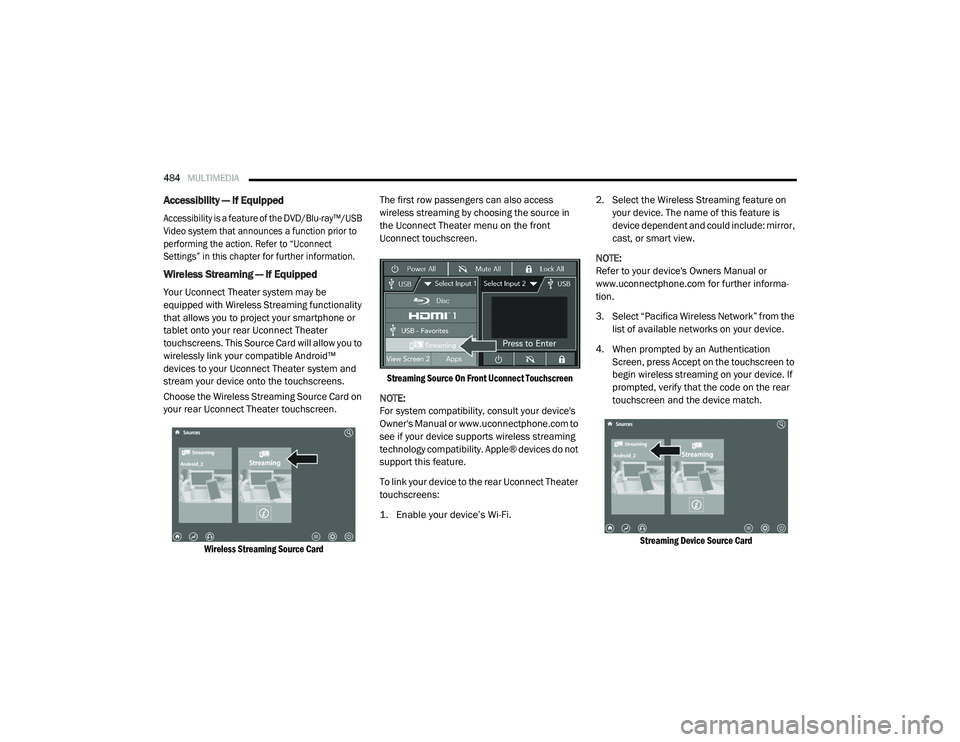
Choose the Wireless Streaming Source Card on
your rear Uconnect Theater touchscreen.
Wireless Streaming Source Card
The first row passengers can also access
wireless streaming by choosing the source in
the Uconnect Theater menu on the front
Uconnect touchscreen.
Streaming Source On Front Uconnect Touchscreen
NOTE:
For system compatibility, consult your device's
Owner's Manual or www.uconnectphone.com to
see if your device supports wireless streaming
technology compatibility. Apple® devices do not
support this feature.
To link your device to the rear Uconnect Theater
touchscreens:
1. Enable your device’s Wi-Fi.
2. Select the Wireless Streaming feature on
your device. The name of this feature is
device dependent and could include: mirror,
cast, or smart view.
NOTE:
Refer to your device's Owners Manual or
www.uconnectphone.com for further informa -
tion.
3. Select “Pacifica Wireless Network” from the list of available networks on your device.
4. When prompted by an Authentication Screen, press Accept on the touchscreen to
begin wireless streaming on your device. If
prompted, verify that the code on the rear
touchscreen and the device match.
Streaming Device Source Card
20_RU_OM_EN_US_t.book Page 484
Page 487 of 516
MULTIMEDIA485
Your phone will be added as an additional
Source Card on the Uconnect Theater
touchscreens.
NOTE:
The Authentication Screen will appear on both
rear touchscreens. The touchscreen screen on
which Accept is selected will be the primary
controller for the wireless streaming session.
NOTE:
Some devices will allow you to control your
device through the Uconnect Theater rear
touchscreens. They will react to your selec -
tions from the touchscreen and be repre -
sented on your device as well. When
supported, the Uconnect Theater task bar will
appear at the top and bottom of the
Uconnect Theater touchscreen, framing your
streaming device.
Devices that do not support this feature will
not respond to Uconnect Theater touch -
screen but can still be controlled using the
streaming device.
Settings
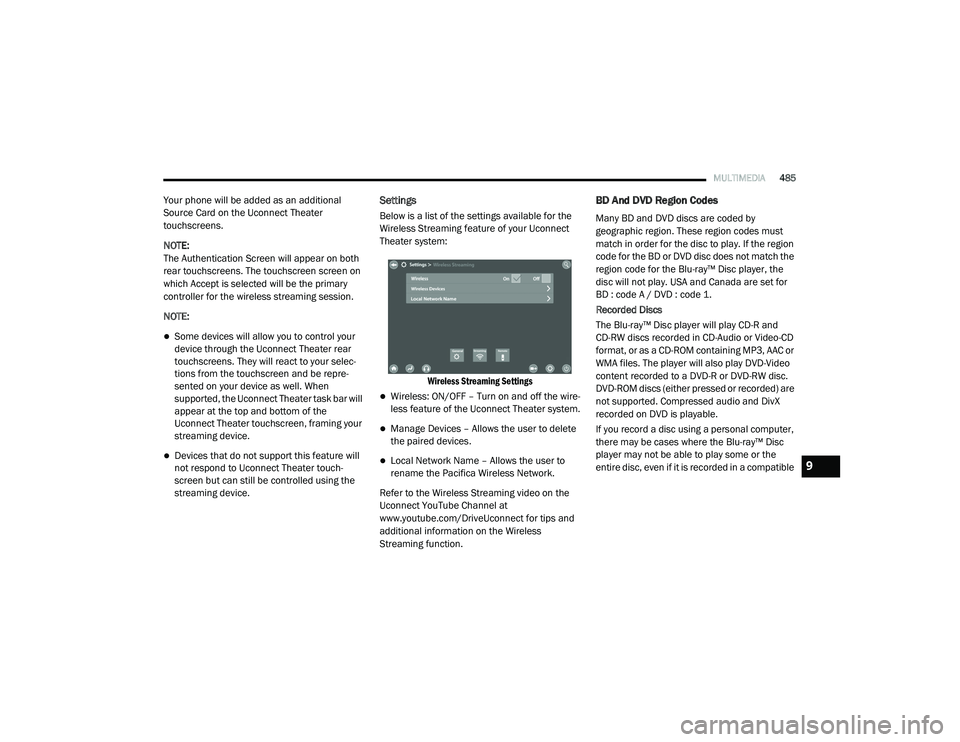
Below is a list of the settings available for the
Wireless Streaming feature of your Uconnect
Theater system:
Wireless Streaming Settings
Wireless: ON/OFF – Turn on and off the wire -
less feature of the Uconnect Theater system.
Manage Devices – Allows the user to delete
the paired devices.
Local Network Name – Allows the user to
rename the Pacifica Wireless Network.
Refer to the Wireless Streaming video on the
Uconnect YouTube Channel at
www.youtube.com/DriveUconnect for tips and
additional information on the Wireless
Streaming function.
BD And DVD Region Codes
Many BD and DVD discs are coded by
geographic region. These region codes must
match in order for the disc to play. If the region
code for the BD or DVD disc does not match the
region code for the Blu-ray™ Disc player, the
disc will not play. USA and Canada are set for
BD : code A / DVD : code 1.
Recorded Discs
The Blu-ray™ Disc player will play CD-R and
CD-RW discs recorded in CD-Audio or Video-CD
format, or as a CD-ROM containing MP3, AAC or
WMA files. The player will also play DVD-Video
content recorded to a DVD-R or DVD-RW disc.
DVD-ROM discs (either pressed or recorded) are
not supported. Compressed audio and DivX
recorded on DVD is playable.
If you record a disc using a personal computer,
there may be cases where the Blu-ray™ Disc
player may not be able to play some or the
entire disc, even if it is recorded in a compatible
9
20_RU_OM_EN_US_t.book Page 485
Page 505 of 516
503
INDEX
A
About Your Brakes......................................... 388Adaptive Cruise Control (ACC) (Cruise
Control).......................................................... 239Adding Engine Coolant (Antifreeze)............... 362Additives, Fuel............................................... 390AdjustDown........................................................... 49Forward....................................................... 49Rearward..................................................... 49Up................................................................ 49Air Bag........................................................... 185Air Bag Operation...................................... 187Air Bag Warning Light...................... 184, 187Driver Knee Air Bag................................... 192Enhanced Accident Response......... 196, 344Event Data Recorder (EDR)....................... 344Front Air Bag............................................. 187If Deployment Occurs................................ 195Knee Impact Bolsters................................ 192Maintaining Your Air Bag System.............. 197Maintenance............................................. 197Redundant Air Bag Warning Light.............185Side Air Bags............................................. 192Transporting Pets...................................... 215Air Bag Light............................... 141, 184, 217
Air Cleaner, Engine (Engine Air Cleaner
Filter)............................................................ 353Air Conditioner Maintenance........................ 354Air Conditioner Refrigerant........................... 354Air Conditioner System................................. 354Air Conditioning Filter..............................92, 354Air Conditioning, Operating Tips....................... 91Air Filter........................................................ 353Air PressureTires......................................................... 375AlarmArm The System.......................................... 24Disarm The System..................................... 24Security Alarm.......................................... 144Alterations/ModificationsVehicle......................................................... 11Android Auto................................................. 497Antifreeze (Engine Coolant)................. 361, 393Disposal................................................... 363Anti-Lock Brake System (ABS)...................... 152Anti-Lock Warning Light................................ 144Apple CarPlay................................................ 497Ashtray.......................................................... 120Assist, Hill Start............................................. 157Audio Jack..................................................... 468Audio Settings............................................... 444
Audio Systems (Radio).................................. 397Automatic Dimming Mirror........................59, 60Automatic Headlights.......................................64Automatic Temperature Control (ATC)..............90Automatic Transaxle..................................... 228Automatic Transmission................................ 230Adding Fluid..................................... 366, 396Fluid And Filter Change............................. 366Fluid Change............................................. 366Fluid Level Check...................................... 365Fluid Type........................................ 365, 396Special Additives...................................... 365AUX Cord....................................................... 468Aux Mode...................................................... 448Auxiliary Electrical Outlet (Power Outlet)....... 118Axle Lubrication............................................ 396
B
Back-Up Camera........................................... 283Battery................................................. 143, 350Charging System Light.............................. 143Jump Starting........................................... 337Keyless Key Fob Replacement....................15Battery Saver Feature......................................66Belts, Seat.................................................... 217Blind Spot Monitoring................................... 159
11
20_RU_OM_EN_US_t.book Page 503
Page 511 of 516
509
Power Brakes
....................................................... 388Inverter...................................................... 119Mirrors......................................................... 61Outlet (Auxiliary Electrical Outlet).............. 118Seats.................................................... 48, 50Steering..................................................... 234Power SeatsDown........................................................... 49Forward....................................................... 49Rearward..................................................... 49Up................................................................ 49Power Sliding DoorOn / Off Switch................................... 30, 100Pregnant Women And Seat Belts...................180Preparation For Jacking................................. 321PretensionersSeat Belts.................................................. 181
R
Radial Ply Tires.............................................. 376Radiator Cap (Coolant Pressure Cap)............ 363RadioPresets...................................................... 440Radio Operation.................................. 438, 491Rear Air Conditioning................................ 78, 87Rear Camera................................................. 284Rear Cross Path............................................. 162Rear ParkSense System...................... 254, 259Rear Seat Removal.......................................... 37
Rear View......................................................... 59Reclining Front Seats....................................... 36Recreational Towing..................................... 298Reformulated Gasoline................................. 390Refrigerant.................................................... 354Release, Hood................................................. 97Reminder, Lights On........................................ 63Reminder, Seat Belt...................................... 173Remote ControlStarting System........................................... 19Remote Keyless EntryArm The Alarm............................................. 24Disarm The Alarm........................................ 24Programming Additional Key Fobs........ 16, 23Remote StartingExit Remote Start Mode.............................. 21Uconnect Customer Programmable Features.................................................. 21Uconnect Settings....................................... 21Remote Starting System.................................. 19Replacement Bulbs...................................... 306Replacement Keys........................................... 23Replacement Tires........................................ 377Reporting Safety Defects.............................. 501Restraints, Child........................................... 198Restraints, Head.............................................. 55Roof Luggage Rack....................................... 121Rotation, Tires.............................................. 382
S
Safety Checks Inside Vehicle........................ 217Safety Checks Outside Vehicle...................... 218Safety Defects, Reporting............................. 501Safety Information, Tire................................. 366Safety Tips.................................................... 216Safety, Exhaust Gas...................................... 216Schedule, Maintenance................................ 345Seat Belt Reminder....................................... 143Seat Belts............................................ 172, 217Adjustable Shoulder Belt.......................... 177Adjustable Upper Shoulder Anchorage..... 177Adjustable Upper Shoulder Belt Anchorage............................................ 177Automatic Locking Retractor (ALR)........... 181Child Restraints........................................ 198Energy Management Feature................... 181Extender................................................... 180Front Seat............................... 172, 174, 175Inspection................................................. 217Lap/Shoulder Belt Operation.................... 175Lap/Shoulder Belt Untwisting................... 176Lap/Shoulder Belts................................... 174Operating Instructions.............................. 175Pregnant Women...................................... 180Pretensioners........................................... 181Rear Seat.................................................. 174Reminder.................................................. 17311
20_RU_OM_EN_US_t.book Page 509