transmission CHRYSLER PACIFICA 2020 Repair Manual
[x] Cancel search | Manufacturer: CHRYSLER, Model Year: 2020, Model line: PACIFICA, Model: CHRYSLER PACIFICA 2020Pages: 516, PDF Size: 28.69 MB
Page 410 of 516
408MULTIMEDIA
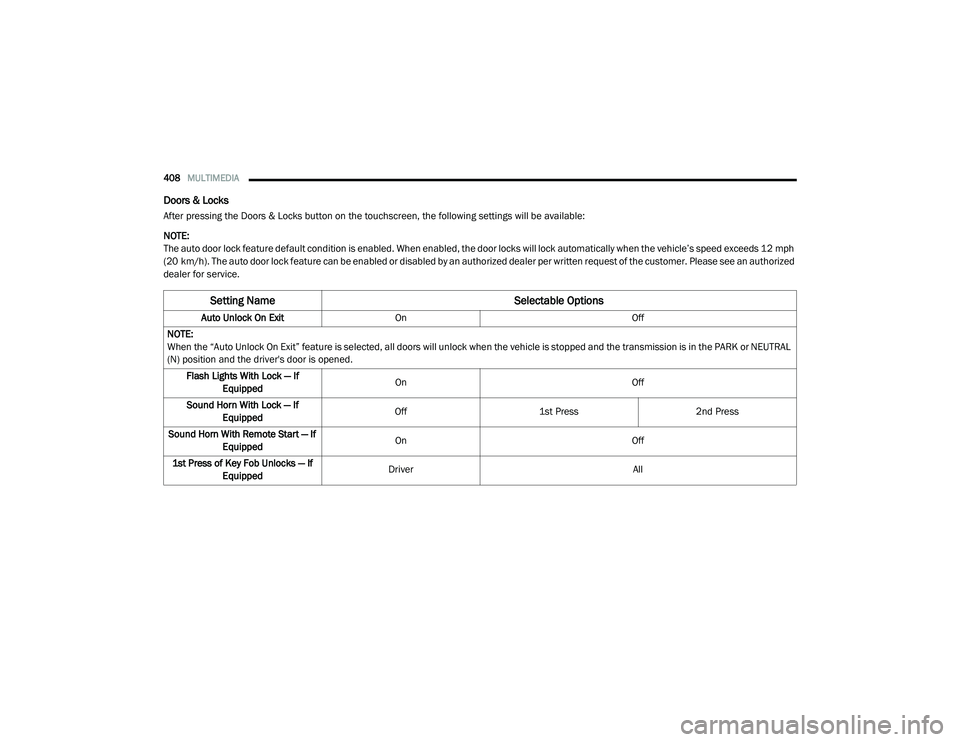
Doors & Locks
After pressing the Doors & Locks button on the touchscreen, the following settings will be available:
NOTE:
The auto door lock feature default condition is enabled. When enabled, the door locks will lock automatically when the vehicle’s speed exceeds 12 mph
(20 km/h). The auto door lock feature can be enabled or disabled by an authorized dealer per written request of the customer. Please see an authorized
dealer for service.
Setting Name Selectable Options
Auto Unlock On ExitOn Off
NOTE:
When the “Auto Unlock On Exit” feature is selected, all doors will unlock when the vehicle is stopped and the transmission is in the PARK or NEUTRAL
(N) position and the driver's door is opened. Flash Lights With Lock — If Equipped On
Off
Sound Horn With Lock — If Equipped Off
1st Press 2nd Press
Sound Horn With Remote Start — If Equipped On
Off
1st Press of Key Fob Unlocks — If Equipped Driver
All
20_RU_OM_EN_US_t.book Page 408
Page 424 of 516
422MULTIMEDIA
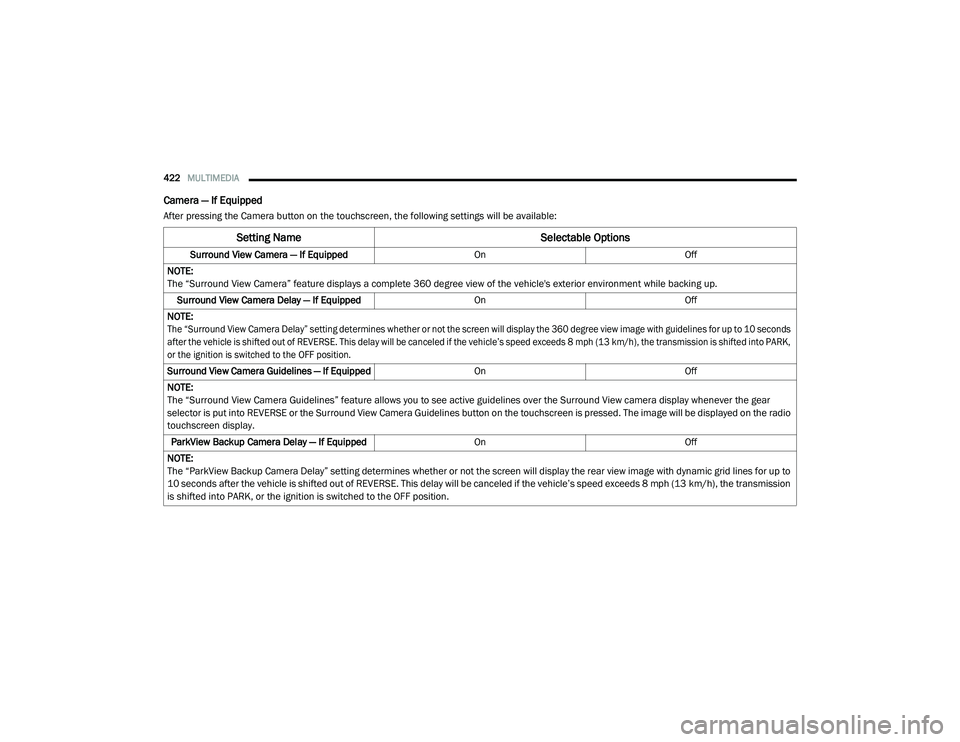
Camera — If Equipped
After pressing the Camera button on the touchscreen, the following settings will be available:
Setting Name Selectable Options
Surround View Camera — If Equipped OnOff
NOTE:
The “Surround View Camera” feature displays a complete 360 degree view of the vehicle's exterior environment while backing up. Surround View Camera Delay — If Equipped OnOff
NOTE:
The “Surround View Camera Delay” setting determines whether or not the screen will display the 360 degree view image with guidelines for up to 10 seconds
after the vehicle is shifted out of REVERSE. This delay will be canceled if the vehicle’s speed exceeds 8 mph (13 km/h), the transmission is shifted into PARK,
or the ignition is switched to the OFF position.
Surround View Camera Guidelines — If Equipped OnOff
NOTE:
The “Surround View Camera Guidelines” feature allows you to see active guidelines over the Surround View camera display whenever the gear
selector is put into REVERSE or the Surround View Camera Guidelines button on the touchscreen is pressed. The image will be displayed on the radio
touchscreen display. ParkView Backup Camera Delay — If Equipped OnOff
NOTE:
The “ParkView Backup Camera Delay” setting determines whether or not the screen will display the rear view image with dynamic grid lines for up to
10 seconds after the vehicle is shifted out of REVERSE. This delay will be canceled if the vehicle’s speed exceeds 8 mph (13 km/h), the transmission
is shifted into PARK, or the ignition is switched to the OFF position.
20_RU_OM_EN_US_t.book Page 422
Page 426 of 516
424MULTIMEDIA
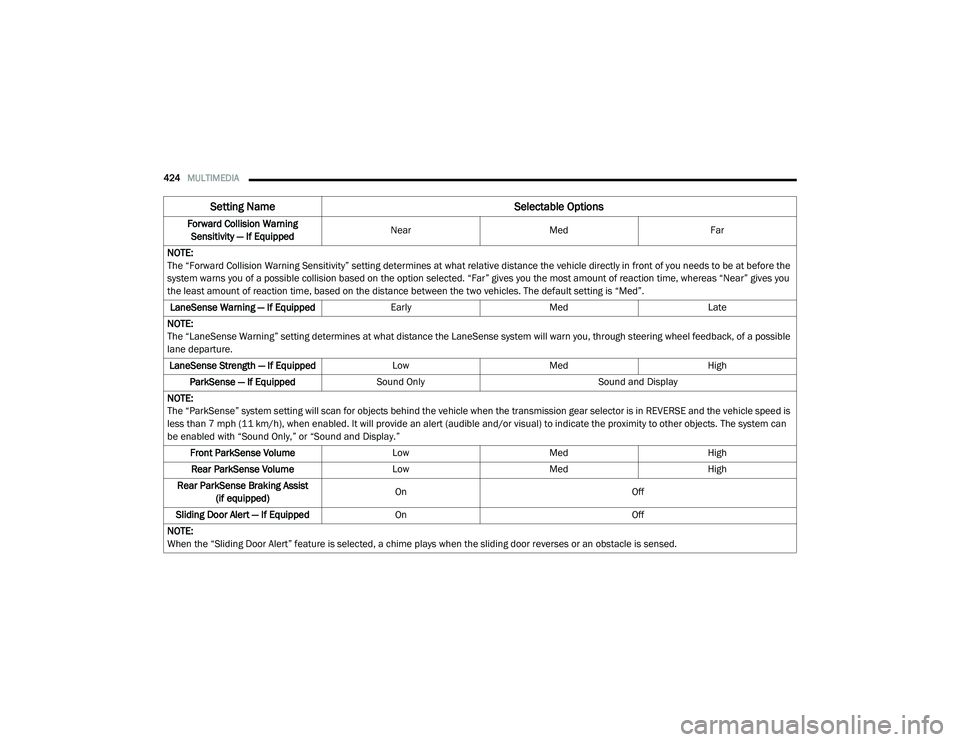
Forward Collision Warning
Sensitivity — If Equipped Near
Med Far
NOTE:
The “Forward Collision Warning Sensitivity” setting determines at what relative distance the vehicle directly in front of you needs to be at before the
system warns you of a possible collision based on the option selected. “Far” gives you the most amount of reaction time, whereas “Near” gives you
the least amount of reaction time, based on the distance between the two vehicles. The default setting is “Med”. LaneSense Warning — If Equipped EarlyMedLate
NOTE:
The “LaneSense Warning” setting determines at what distance the LaneSense system will warn you, through steering wheel feedback, of a possible
lane departure. LaneSense Strength — If Equipped LowMed High
ParkSense — If Equipped Sound Only Sound and Display
NOTE:
The “ParkSense” system setting will scan for objects behind the vehicle when the transmission gear selector is in REVERSE and the vehicle speed is
less than 7 mph (11 km/h), when enabled. It will provide an alert (audible and/or visual) to indicate the proximity to other objects. The system can
be enabled with “Sound Only,” or “Sound and Display.” Front ParkSense Volume LowMed High
Rear ParkSense Volume LowMed High
Rear ParkSense Braking Assist (if equipped) On
Off
Sliding Door Alert — If Equipped On Off
NOTE:
When the “Sliding Door Alert” feature is selected, a chime plays when the sliding door reverses or an obstacle is sensed.
Setting Name Selectable Options
20_RU_OM_EN_US_t.book Page 424
Page 427 of 516
MULTIMEDIA425
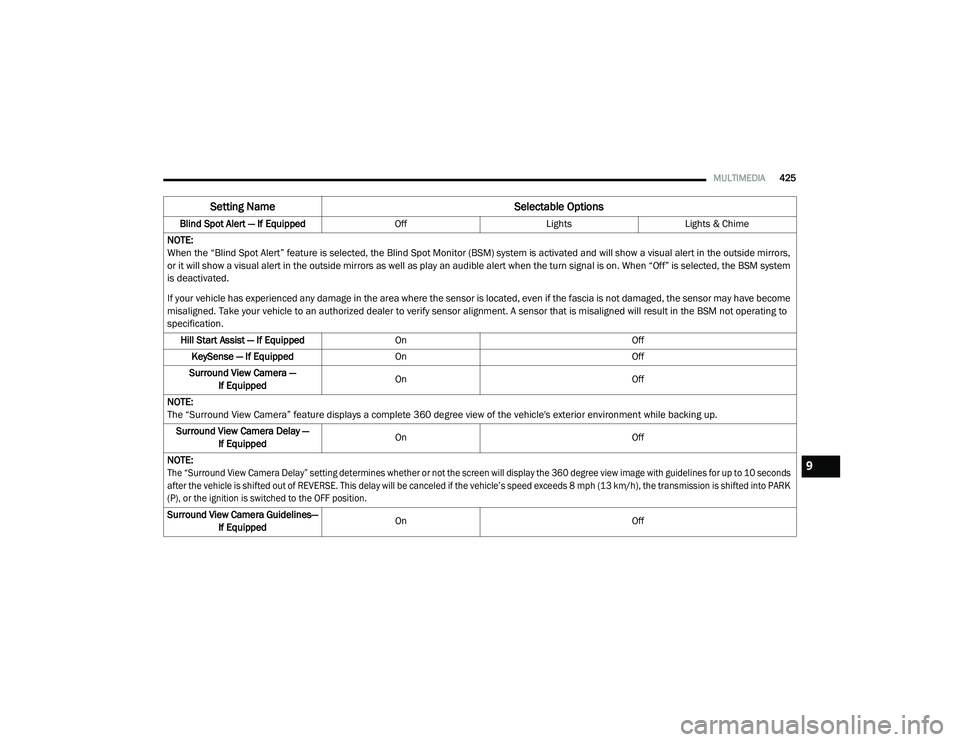
Blind Spot Alert — If Equipped OffLightsLights & Chime
NOTE:
When the “Blind Spot Alert” feature is selected, the Blind Spot Monitor (BSM) system is activated and will show a visual alert in the outside mirrors,
or it will show a visual alert in the outside mirrors as well as play an audible alert when the turn signal is on. When “Off” is selected, the BSM system
is deactivated.
If your vehicle has experienced any damage in the area where the sensor is located, even if the fascia is not damaged, the sensor may have become
misaligned. Take your vehicle to an authorized dealer to verify sensor alignment. A sensor that is misaligned will result in the BSM not operating to
specification. Hill Start Assist — If Equipped On Off
KeySense — If Equipped On Off
Surround View Camera — If Equipped On
Off
NOTE:
The “Surround View Camera” feature displays a complete 360 degree view of the vehicle's exterior environment while backing up. Surround View Camera Delay — If Equipped On
Off
NOTE:
The “Surround View Camera Delay” setting determines whether or not the screen will display the 360 degree view image with guidelines for up to 10 seconds
after the vehicle is shifted out of REVERSE. This delay will be canceled if the vehicle’s speed exceeds 8 mph (13 km/h), the transmission is shifted into PARK
(P), or the ignition is switched to the OFF position.
Surround View Camera Guidelines— If Equipped On
Off
Setting Name Selectable Options
9
20_RU_OM_EN_US_t.book Page 425
Page 428 of 516
426MULTIMEDIA
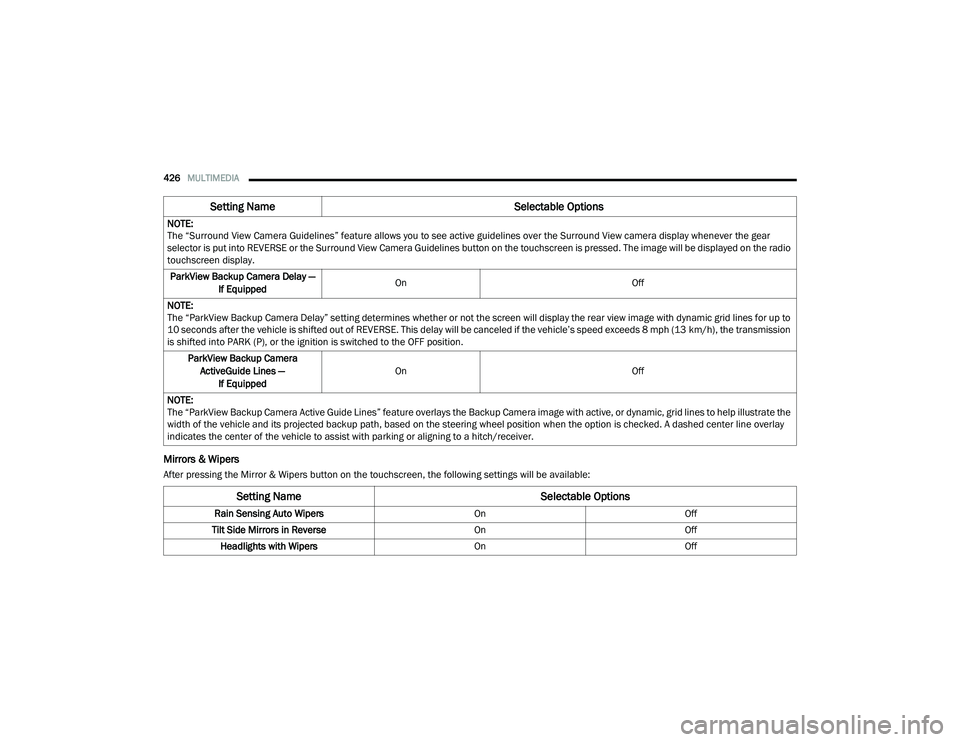
Mirrors & Wipers
After pressing the Mirror & Wipers button on the touchscreen, the following settings will be available:NOTE:
The “Surround View Camera Guidelines” feature allows you to see active guidelines over the Surround View camera display whenever the gear
selector is put into REVERSE or the Surround View Camera Guidelines button on the touchscreen is pressed. The image will be displayed on the radio
touchscreen display.
ParkView Backup Camera Delay — If Equipped On
Off
NOTE:
The “ParkView Backup Camera Delay” setting determines whether or not the screen will display the rear view image with dynamic grid lines for up to
10 seconds after the vehicle is shifted out of REVERSE. This delay will be canceled if the vehicle’s speed exceeds 8 mph (13 km/h), the transmission
is shifted into PARK (P), or the ignition is switched to the OFF position.
ParkView Backup Camera ActiveGuide Lines — If Equipped On
Off
NOTE:
The “ParkView Backup Camera Active Guide Lines” feature overlays the Backup Camera image with active, or dynamic, grid lines to help illustrate the
width of the vehicle and its projected backup path, based on the steering wheel position when the option is checked. A dashed center line overlay
indicates the center of the vehicle to assist with parking or aligning to a hitch/receiver.
Setting Name Selectable Options
Setting NameSelectable Options
Rain Sensing Auto WipersOnOff
Tilt Side Mirrors in Reverse OnOff
Headlights with Wipers OnOff
20_RU_OM_EN_US_t.book Page 426
Page 430 of 516
428MULTIMEDIA
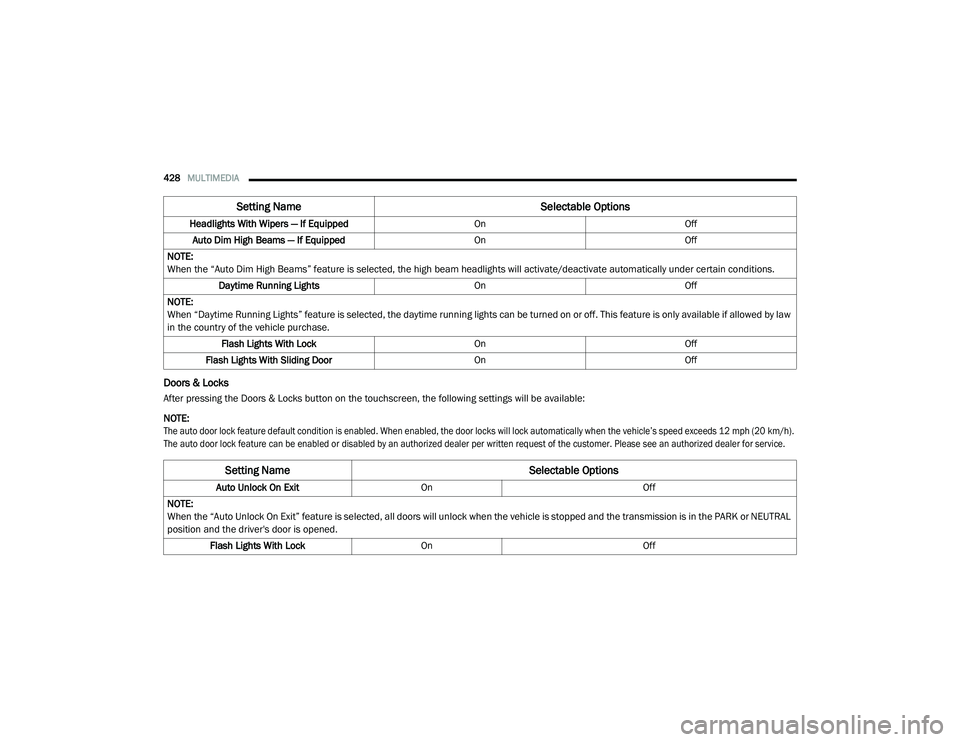
Doors & Locks
After pressing the Doors & Locks button on the touchscreen, the following settings will be available:
NOTE:
The auto door lock feature default condition is enabled. When enabled, the door locks will lock automatically when the vehicle’s speed exceeds 12 mph (20 km/h).
The auto door lock feature can be enabled or disabled by an authorized dealer per written request of the customer. Please see an authorized dealer for service.
Headlights With Wipers — If Equipped
OnOff
Auto Dim High Beams — If Equipped OnOff
NOTE:
When the “Auto Dim High Beams” feature is selected, the high beam headlights will activate/deactivate automatically under certain conditions. Daytime Running Lights OnOff
NOTE:
When “Daytime Running Lights” feature is selected, the daytime running lights can be turned on or off. This feature is only available if allowed by law
in the country of the vehicle purchase. Flash Lights With Lock OnOff
Flash Lights With Sliding Door OnOff
Setting Name Selectable Options
Setting NameSelectable Options
Auto Unlock On ExitOn Off
NOTE:
When the “Auto Unlock On Exit” feature is selected, all doors will unlock when the vehicle is stopped and the transmission is in the PARK or NEUTRAL
position and the driver's door is opened. Flash Lights With Lock On Off
20_RU_OM_EN_US_t.book Page 428
Page 505 of 516
503
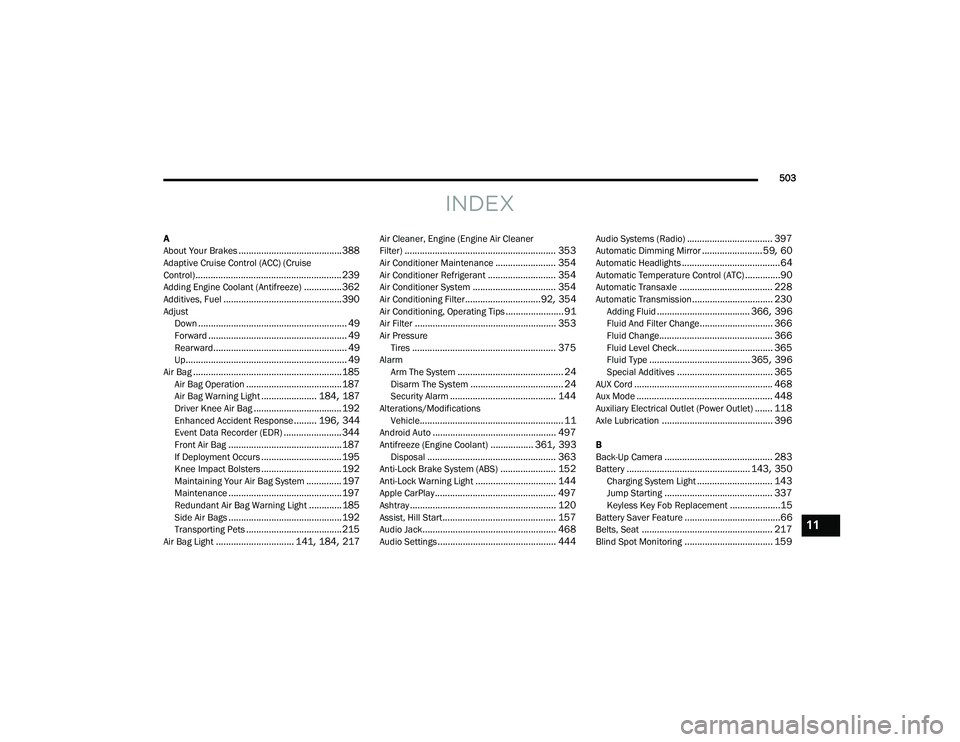
INDEX
A
About Your Brakes......................................... 388Adaptive Cruise Control (ACC) (Cruise
Control).......................................................... 239Adding Engine Coolant (Antifreeze)............... 362Additives, Fuel............................................... 390AdjustDown........................................................... 49Forward....................................................... 49Rearward..................................................... 49Up................................................................ 49Air Bag........................................................... 185Air Bag Operation...................................... 187Air Bag Warning Light...................... 184, 187Driver Knee Air Bag................................... 192Enhanced Accident Response......... 196, 344Event Data Recorder (EDR)....................... 344Front Air Bag............................................. 187If Deployment Occurs................................ 195Knee Impact Bolsters................................ 192Maintaining Your Air Bag System.............. 197Maintenance............................................. 197Redundant Air Bag Warning Light.............185Side Air Bags............................................. 192Transporting Pets...................................... 215Air Bag Light............................... 141, 184, 217
Air Cleaner, Engine (Engine Air Cleaner
Filter)............................................................ 353Air Conditioner Maintenance........................ 354Air Conditioner Refrigerant........................... 354Air Conditioner System................................. 354Air Conditioning Filter..............................92, 354Air Conditioning, Operating Tips....................... 91Air Filter........................................................ 353Air PressureTires......................................................... 375AlarmArm The System.......................................... 24Disarm The System..................................... 24Security Alarm.......................................... 144Alterations/ModificationsVehicle......................................................... 11Android Auto................................................. 497Antifreeze (Engine Coolant)................. 361, 393Disposal................................................... 363Anti-Lock Brake System (ABS)...................... 152Anti-Lock Warning Light................................ 144Apple CarPlay................................................ 497Ashtray.......................................................... 120Assist, Hill Start............................................. 157Audio Jack..................................................... 468Audio Settings............................................... 444
Audio Systems (Radio).................................. 397Automatic Dimming Mirror........................59, 60Automatic Headlights.......................................64Automatic Temperature Control (ATC)..............90Automatic Transaxle..................................... 228Automatic Transmission................................ 230Adding Fluid..................................... 366, 396Fluid And Filter Change............................. 366Fluid Change............................................. 366Fluid Level Check...................................... 365Fluid Type........................................ 365, 396Special Additives...................................... 365AUX Cord....................................................... 468Aux Mode...................................................... 448Auxiliary Electrical Outlet (Power Outlet)....... 118Axle Lubrication............................................ 396
B
Back-Up Camera........................................... 283Battery................................................. 143, 350Charging System Light.............................. 143Jump Starting........................................... 337Keyless Key Fob Replacement....................15Battery Saver Feature......................................66Belts, Seat.................................................... 217Blind Spot Monitoring................................... 159
11
20_RU_OM_EN_US_t.book Page 503
Page 506 of 516
504
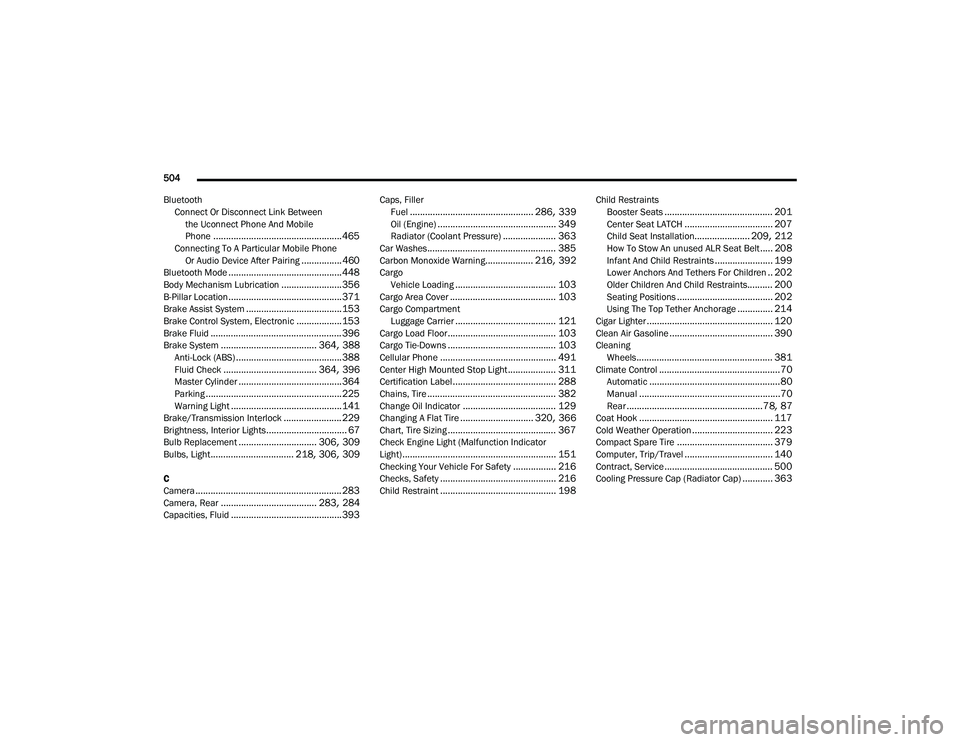
Bluetooth Connect Or Disconnect Link Betweenthe Uconnect Phone And Mobile
Phone
................................................... 465Connecting To A Particular Mobile PhoneOr Audio Device After Pairing................460Bluetooth Mode............................................. 448Body Mechanism Lubrication........................ 356B-Pillar Location............................................. 371Brake Assist System...................................... 153Brake Control System, Electronic.................. 153Brake Fluid.................................................... 396Brake System...................................... 364, 388Anti-Lock (ABS).......................................... 388Fluid Check..................................... 364, 396Master Cylinder......................................... 364Parking...................................................... 225Warning Light............................................ 141Brake/Transmission Interlock....................... 229Brightness, Interior Lights................................ 67Bulb Replacement............................... 306, 309Bulbs, Light................................. 218, 306, 309
C
Camera.......................................................... 283Camera, Rear...................................... 283, 284Capacities, Fluid............................................ 393
Caps, FillerFuel................................................. 286, 339Oil (Engine)............................................... 349Radiator (Coolant Pressure)..................... 363Car Washes................................................... 385Carbon Monoxide Warning................... 216, 392CargoVehicle Loading........................................ 103Cargo Area Cover.......................................... 103Cargo CompartmentLuggage Carrier........................................ 121Cargo Load Floor........................................... 103Cargo Tie-Downs........................................... 103Cellular Phone.............................................. 491Center High Mounted Stop Light................... 311Certification Label......................................... 288Chains, Tire................................................... 382Change Oil Indicator..................................... 129Changing A Flat Tire............................. 320, 366Chart, Tire Sizing........................................... 367Check Engine Light (Malfunction Indicator
Light)............................................................. 151Checking Your Vehicle For Safety................. 216Checks, Safety.............................................. 216Child Restraint.............................................. 198
Child RestraintsBooster Seats........................................... 201Center Seat LATCH................................... 207Child Seat Installation...................... 209, 212How To Stow An unused ALR Seat Belt..... 208Infant And Child Restraints....................... 199Lower Anchors And Tethers For Children.. 202Older Children And Child Restraints.......... 200Seating Positions...................................... 202Using The Top Tether Anchorage.............. 214Cigar Lighter.................................................. 120Clean Air Gasoline......................................... 390CleaningWheels...................................................... 381Climate Control................................................70Automatic....................................................80Manual........................................................70Rear......................................................78, 87Coat Hook..................................................... 117Cold Weather Operation................................ 223Compact Spare Tire...................................... 379Computer, Trip/Travel................................... 140Contract, Service........................................... 500Cooling Pressure Cap (Radiator Cap)............ 363
20_RU_OM_EN_US_t.book Page 504
Page 512 of 516
510
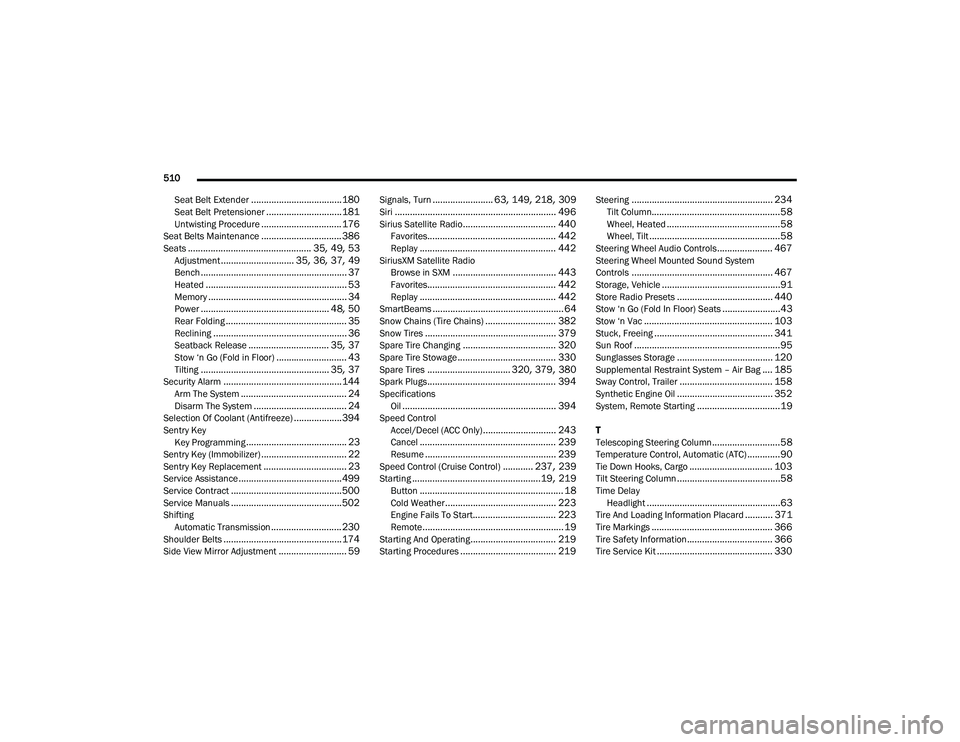
Seat Belt Extender
.................................... 180Seat Belt Pretensioner.............................. 181Untwisting Procedure................................ 176Seat Belts Maintenance................................ 386Seats................................................. 35, 49, 53Adjustment............................. 35, 36, 37, 49Bench.......................................................... 37Heated........................................................ 53Memory....................................................... 34Power................................................... 48, 50Rear Folding................................................ 35Reclining..................................................... 36Seatback Release................................ 35, 37Stow ‘n Go (Fold in Floor)............................ 43Tilting................................................... 35, 37Security Alarm............................................... 144Arm The System.......................................... 24Disarm The System..................................... 24Selection Of Coolant (Antifreeze)...................394Sentry Key Key Programming........................................ 23Sentry Key (Immobilizer).................................. 22Sentry Key Replacement................................. 23Service Assistance......................................... 499Service Contract............................................ 500Service Manuals............................................ 502ShiftingAutomatic Transmission............................ 230Shoulder Belts............................................... 174Side View Mirror Adjustment........................... 59
Signals, Turn........................ 63, 149, 218, 309Siri................................................................ 496Sirius Satellite Radio..................................... 440Favorites................................................... 442Replay...................................................... 442SiriusXM Satellite RadioBrowse in SXM......................................... 443Favorites................................................... 442Replay...................................................... 442SmartBeams.................................................... 64Snow Chains (Tire Chains)............................ 382Snow Tires.................................................... 379Spare Tire Changing..................................... 320Spare Tire Stowage....................................... 330Spare Tires................................. 320, 379, 380Spark Plugs................................................... 394SpecificationsOil............................................................. 394Speed ControlAccel/Decel (ACC Only)............................. 243Cancel...................................................... 239Resume.................................................... 239Speed Control (Cruise Control)............ 237, 239Starting...................................................19, 219Button......................................................... 18Cold Weather............................................ 223Engine Fails To Start................................. 223Remote........................................................ 19Starting And Operating.................................. 219Starting Procedures...................................... 219
Steering........................................................ 234Tilt Column...................................................58Wheel, Heated.............................................58Wheel, Tilt....................................................58Steering Wheel Audio Controls...................... 467Steering Wheel Mounted Sound System
Controls........................................................ 467Storage, Vehicle...............................................91Store Radio Presets...................................... 440Stow ‘n Go (Fold In Floor) Seats.......................43Stow ‘n Vac................................................... 103Stuck, Freeing............................................... 341Sun Roof..........................................................95Sunglasses Storage...................................... 120Supplemental Restraint System – Air Bag.... 185Sway Control, Trailer..................................... 158Synthetic Engine Oil...................................... 352System, Remote Starting.................................19
T
Telescoping Steering Column...........................58Temperature Control, Automatic (ATC).............90Tie Down Hooks, Cargo................................. 103Tilt Steering Column.........................................58Time DelayHeadlight.....................................................63Tire And Loading Information Placard........... 371Tire Markings................................................ 366Tire Safety Information.................................. 366Tire Service Kit.............................................. 330
20_RU_OM_EN_US_t.book Page 510
Page 513 of 516
511
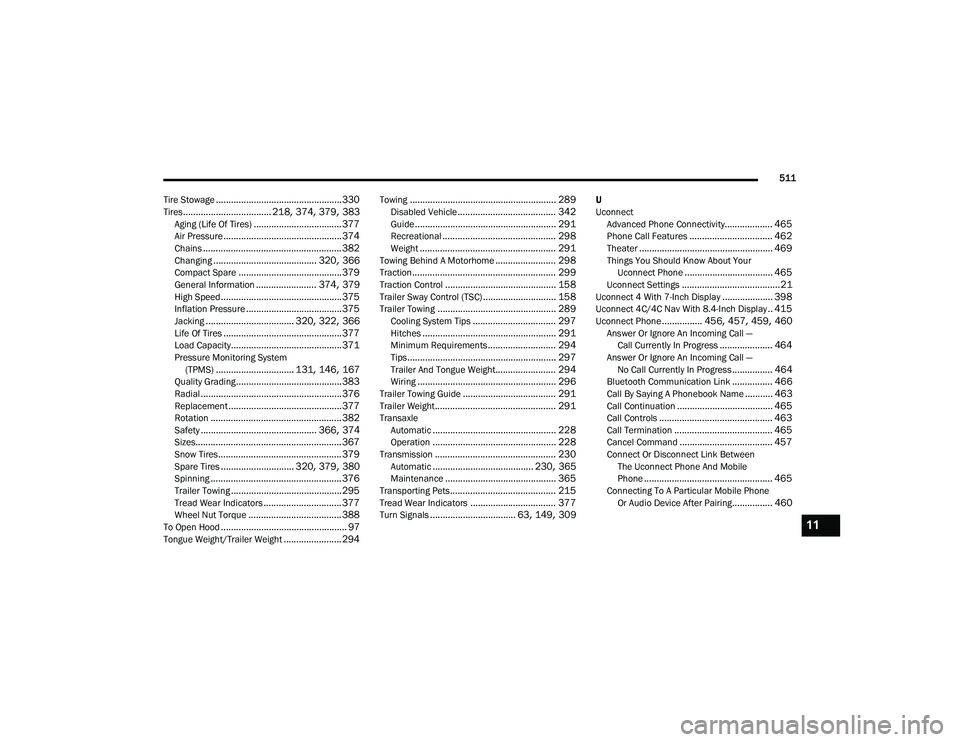
Tire Stowage
.................................................. 330Tires................................... 218, 374, 379, 383Aging (Life Of Tires)................................... 377Air Pressure............................................... 374Chains....................................................... 382Changing......................................... 320, 366Compact Spare......................................... 379General Information........................ 374, 379High Speed................................................ 375Inflation Pressure...................................... 375Jacking................................... 320, 322, 366Life Of Tires............................................... 377Load Capacity............................................ 371Pressure Monitoring System (TPMS)............................... 131, 146, 167Quality Grading.......................................... 383Radial........................................................ 376Replacement............................................. 377Rotation.................................................... 382Safety.............................................. 366, 374Sizes.......................................................... 367Snow Tires................................................. 379Spare Tires............................. 320, 379, 380Spinning.................................................... 376Trailer Towing............................................ 295Tread Wear Indicators............................... 377Wheel Nut Torque..................................... 388To Open Hood.................................................. 97Tongue Weight/Trailer Weight....................... 294
Towing.......................................................... 289Disabled Vehicle....................................... 342Guide........................................................ 291Recreational............................................. 298Weight...................................................... 291Towing Behind A Motorhome........................ 298Traction......................................................... 299Traction Control............................................ 158Trailer Sway Control (TSC)............................. 158Trailer Towing............................................... 289Cooling System Tips................................. 297Hitches..................................................... 291Minimum Requirements........................... 294Tips........................................................... 297Trailer And Tongue Weight........................ 294Wiring....................................................... 296Trailer Towing Guide..................................... 291Trailer Weight................................................ 291TransaxleAutomatic................................................. 228Operation................................................. 228Transmission................................................ 230Automatic........................................ 230, 365Maintenance............................................ 365Transporting Pets.......................................... 215Tread Wear Indicators.................................. 377Turn Signals.................................. 63, 149, 309
U
UconnectAdvanced Phone Connectivity
................... 465Phone Call Features................................. 462Theater..................................................... 469Things You Should Know About Your Uconnect Phone................................... 465Uconnect Settings.......................................21Uconnect 4 With 7-Inch Display.................... 398Uconnect 4C/4C Nav With 8.4-Inch Display.. 415Uconnect Phone................ 456, 457, 459, 460Answer Or Ignore An Incoming Call — Call Currently In Progress..................... 464Answer Or Ignore An Incoming Call — No Call Currently In Progress................ 464Bluetooth Communication Link................ 466Call By Saying A Phonebook Name........... 463Call Continuation...................................... 465Call Controls............................................. 463Call Termination....................................... 465Cancel Command..................................... 457Connect Or Disconnect Link Between The Uconnect Phone And Mobile
Phone
................................................... 465Connecting To A Particular Mobile Phone Or Audio Device After Pairing................ 460
11
20_RU_OM_EN_US_t.book Page 511